F72B - Oven PKM - Free user manual and instructions
Find the device manual for free F72B PKM in PDF.



| Product Type | Built-in electric oven |
| Brand | PKM |
| Model | F72B |
| Energy Class | A |
| Energy Efficiency Index (EEI) | 95.2 |
| Usable Volume | 54 L |
| Conventional Energy Consumption | 0.74 kWh |
| Fan-assisted Energy Consumption | 0.78 kWh |
| Maximum Power | 2.3 kW |
| Voltage/Frequency | 220-240 V / 50 Hz |
| Dimensions (H x W x D) | 59.5 x 59.5 x 55.5 cm |
| Net Weight | 29 kg |
| Gross Weight | 31 kg |
| Control Panel Color | Black glass |
| Number of Functions | 7 |
| Functions | Top/bottom heat, fan-assisted, defrost, grill, fan grill, bottom heat, lamp |
| Grill | Yes |
| Fan | Yes |
| Interior Light | Yes (25 W bulb, 230 V, G9) |
| Glass Door | 3 panes |
| Cooling System | Yes |
| Supplied Accessories | 1 drip tray, 1 grid |
| Power Cable Length | 150 cm |
| Noise Level | < 52 dB(A) |
| Maintenance | Clean with warm water and mild detergent; do not use steam cleaner |
| Replacement Bulb | G9, 25 W, 230 V, resistant to 300°C |
Frequently Asked Questions - F72B PKM
User questions about F72B PKM
0 question about this device. Answer the ones you know or ask your own.
Ask a new question about this device
Download the instructions for your Oven in PDF format for free! Find your manual F72B - PKM and take your electronic device back in hand. On this page are published all the documents necessary for the use of your device. F72B by PKM.
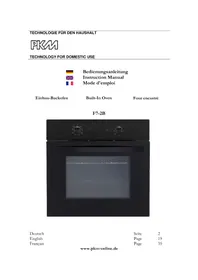
USER MANUAL F72B PKM
natural_image
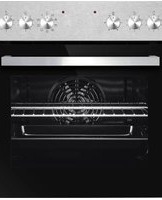
Interior view of a black oven with control knobs and a blank display window (no visible text or symbols)Deutsch
English
Français
Scite 2
Page 19
Page 35
www.pkm-online.de

natural_image
Technical line drawing of a mechanical bracket or support structure (no text or symbols)
natural_image
Technical line drawing of a mechanical bracket or support structure (no text or symbols)B

natural_image
Diagram of a layered electronic component or package structure with labeled points A, B, C (no text or symbols beyond labels)Dear customer! We would like to thank you for purchasing a product from our wide range of domestic appliances. Read the complete instruction manual before you operate the appliance for the first time. Retain this instruction manual in a safe place for future reference. If you transfer the appliance to a third party, also hand over this instruction manual.
Index
- Safety instructions....20
- Installation 23
2.1 Unpacking and positioning.... 23
2.2 Installation of the oven.... 24
2.3 Electrical connection.... 25
- Operation....26
3.1 Control panel....26
3.2 Functions of the oven.... 26
3.3 Helpful hints....27
3.4 Energy saving....28
- Cleaning and maintenance....28
4.1 Replacing of the illuminant.... 28
4.2 Removing of the guides.... 29
4.3 Removing of the oven door....29
4.4 Trouble shooting.... 31
- Technical data.... 31
- Waste management.... 32
- Guarantee conditions....33
EU - Declaration of Conformity
★ The products, which are described in this instruction manual, comply with the harmonized regulations.
★ The relevant documents can be requested from the final retailer by the competent authorities.
The figures in this instruction manual may differ in some details from the current design of your appliance. Nevertheless follow the instructions in such a case. Delivery without content.
i Any modifications, which do not influence the functions of the appliance. shall remain reserved by the manufacturer. Please dispose of the packing with respect to your current local and municipal regulations.
The appliance you have purchased may be an enhanced version of the unit this manual was printed for. Nevertheless, the functions and operating conditions are identical. This manual is therefore still valid. Technical modifications as well as misprints shall remain reserved.
1. Safety instructions
i Read the safety instructions carefully before you operate the appliance for the first time. All information included in those pages serve for the protection of the operator. If you ignore the safety instructions, you will endanger your health and life.
DANGER indicates a hazardous situation which, if ignored, will result in death or serious injury.
WARNING! indicates a hazardous situation which, if ignored, could result in death or serious injury.
CAUTION! indicates a hazardous situation which, if not avoided, may result in minor or moderate injury.
NOTICE! indicates possible damage to the appliance.
Store this manual in a safe place so you can use it whenever it is needed. Strictly observe the instructions to avoid damage to persons and property.
Check the technical periphery of the appliance! Do all wires and connections to the appliance work properly? Or are they time-worn and do not match the technical requirements of the appliance? A check-up of existing and newly-made connections must be done by an authorized professional. All connections and energy-leading components (incl. wires inside a wall) must be checked by a qualified professional. All modifications to the electrical mains to enable the installation of the appliance must be performed by a qualified professional.
i The appliance is intended for private use only.
i The appliance is intended for cooking in a private household only.
i The appliance is intended for indoor-use only.
The appliance is not intended to be operated for commercial purposes, during camping and in public transport.
i Operate the appliance in accordance with its intended use only.
Do not allow anybody who is not familiar with this instruction manual to operate the appliance.
This appliance may be operated by children aged from 8 years and above as well as by persons with reduced physical, sensory and mental capabilities or lack of experience and knowledge if they are supervised or have been instructed concerning the safe use of the appliance and do comprehend the hazard involved. Children must not play with the appliance. Cleaning and user-maintenance must not be carried out by children unless they are supervised.
DANGER!
- The appliance must be connected to the mains by a qualified professional, who is familiar with and adheres to the local requirements and supplementary regulations of your energy supplier.
- All electrical work must be carried out by a qualified professional. Do not modify the energy supply. The connection must be carried out in accordance with the current local and legal regulations
- Do not connect the appliance to the mains if the appliance itself or the power cord or the plug are visibly damaged.
- Never try to repair the appliance yourself. Repairs carried out by unauthorized persons can cause serious damage. If the appliance does not operate properly, please contact the shop you purchased the appliance at. Original spare parts should be used only.
- When the power cord is damaged, it must be replaced by the manufacturer or an authorized aftersales service or a qualified professional only.
WARNING!
- Disconnect the appliance from the mains before you clean or maintain it.
- The appliance must always be grounded and protected corresponding to the requirements of your local energy supplier. The main current circuit must be equipped with a safety shut-down device.
- All modifications to the electrical mains to enable the installation of the appliance must be performed by a qualified professional.
-
In case of an event caused by a technical malfunction, disconnect the appliance from the mains. Report the malfunction to your service centre so it can be repaired.
-
Do not use adapters, multiple sockets and extension cords for connecting the appliance to the mains.
-
Do not carry out any modifications to your appliance.
-
The room the appliance is installed in must be dry and well-ventilated. When the appliance is installed, an easy access to all control elements is required.
-
The veneering of cabinets has to be fixed with a heat-resistant glue, that is able to withstand a temperature of 120^ C.
-
Adjacent furniture or housing and all materials used for installation must be able to resist a temperature of min. 85 C above the ambient temperature of the room the appliance is installed in during operation.
-
Remove the back of the kitchen unit to ensure adequate ventilation around the appliance. The appliance must have at least 45 mm of free space at its back.
-
Do not install the appliance in rooms or at areas which contain flammable substances as petrol, gas or paint. This warning also refers to the vapour these substances release.
-
Cooker-hoods should be installed according to their manufacturers' instructions.
-
Do not heat your rooms or dry your washing by use of the appliance.
-
Do not install the appliance near to curtains or upholstered furniture. RISK OF FIRE!
-
Do not store any objects in the oven. RISK OF FIRE!
-
Household equipment and connection leads must not touch the hot oven or the hob as the insulation material is usually not heat-resistant.
-
Never use a steam cleaner to clean the appliance. The steam will cause serious damage to the electric components of the appliance. Risk of electrical shock!
-
The accessible parts of the oven become hot during operation, so keep children away from the operating appliance. Touching the appliance while it is operating can cause serious burns.
-
Children must not play with the appliance.
-
Always supervise children if they are near the appliance.
CAUTION!
-
The appliance becomes hot while operating. Do not touch the hot components inside the oven.
-
Do not use any aggressive, abrasive and acrid detergents or sharp-edged items to clean the door of the oven. Otherwise you may scratch the surface and damage the glass.
-
Do not put any cookware or baking trays directly on the base inside the oven. Do not cover the base inside the oven with aluminium foil.
-
Keep the door of the oven always closed if you use one of the oven-functions.
-
Do not put any cookware directly on the base inside the oven. Use the trays.
-
Be careful if you open the door. Do not get in contact with the hot parts of the oven or the steam, which will escape the oven.
-
Always use oven-gloves.
-
This appliance complies with the current European safety legislation. We do wish to emphasize that this compliance does not negate the fact that the surfaces of the appliance will become hot while operating and will retain and emit heat even if it has stopped operating.
NOTICE
- When you move the appliance, hold it at its base and lift it carefully. Keep the appliance in an upright position.
- Never use the door for moving the appliance as you will damage the hinges.
- The appliance must be transported and installed by at least two persons.
- When you unpack the appliance, you should take note of the position of every part of the interior accessories in case you have to repack and transport it at a later point of time.
- Do not operate the appliance unless all components are installed properly.
- Do not stand or lean on the base, the drawers, the doors etc of the appliance.
- The air vents of the appliance or its built-in structure (if the appliance is suitable for being built-in) must be completely open, unblocked and free of any kind of dirt.
- Do not put any heavy items onto the open door of the oven. Do not lean against the open door of the oven as you will damage the hinges.
2. Installation
2.1 Unpacking and positioning
- Unpack the appliance carefully. Dispose of the packaging as described in chapter waste management.
- Completely remove the transport-protection. Be very careful and do not use any aggressive or abrasive detergents to remove residuals of the transport-protection.
- Check that the appliance and the power cord are not visible damaged.
- Do not install the appliance in a place where it may come in contact with water or rain; otherwise, the insulation of the electrical system will be damaged.
- Install the appliance on a level, dry and solid floor. Check the correct installation with a bubble level.
- Remove the complete packaging material (inside and outside the appliance) before initial operation.
- The nameplate is situated inside the appliance or at the back.
2.2 Installation of the oven
DANGER!
The appliance must be connected to the mains by a qualified professional, who is familiar with and adheres to the local requirements and supplementary regulations of your electricity supplier.
All electrical work must be carried out by a qualified professional. Do not modify the energy supply. The connection must be carried out in accordance with the current local and legal regulations
- Provide an opening meeting the dimensions on figure 1. Fit the appliance into the opening.
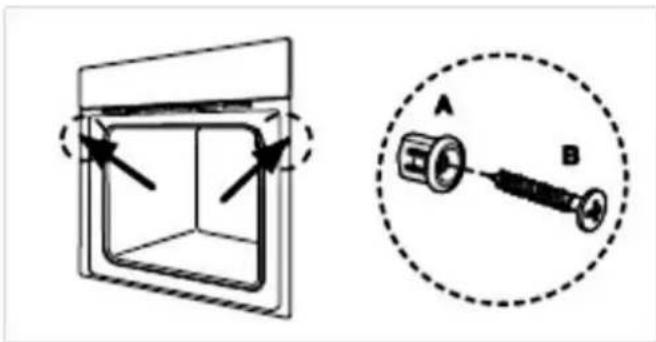
- Open the door and remove the rubber caps of the two screws on the sides of the oven-frame.
- Fix the oven on the kitchen cabinet with the two screws which fit the holes provided in the oven-frame.
- Fix the rubber caps after fitting the oven into the cabinet.
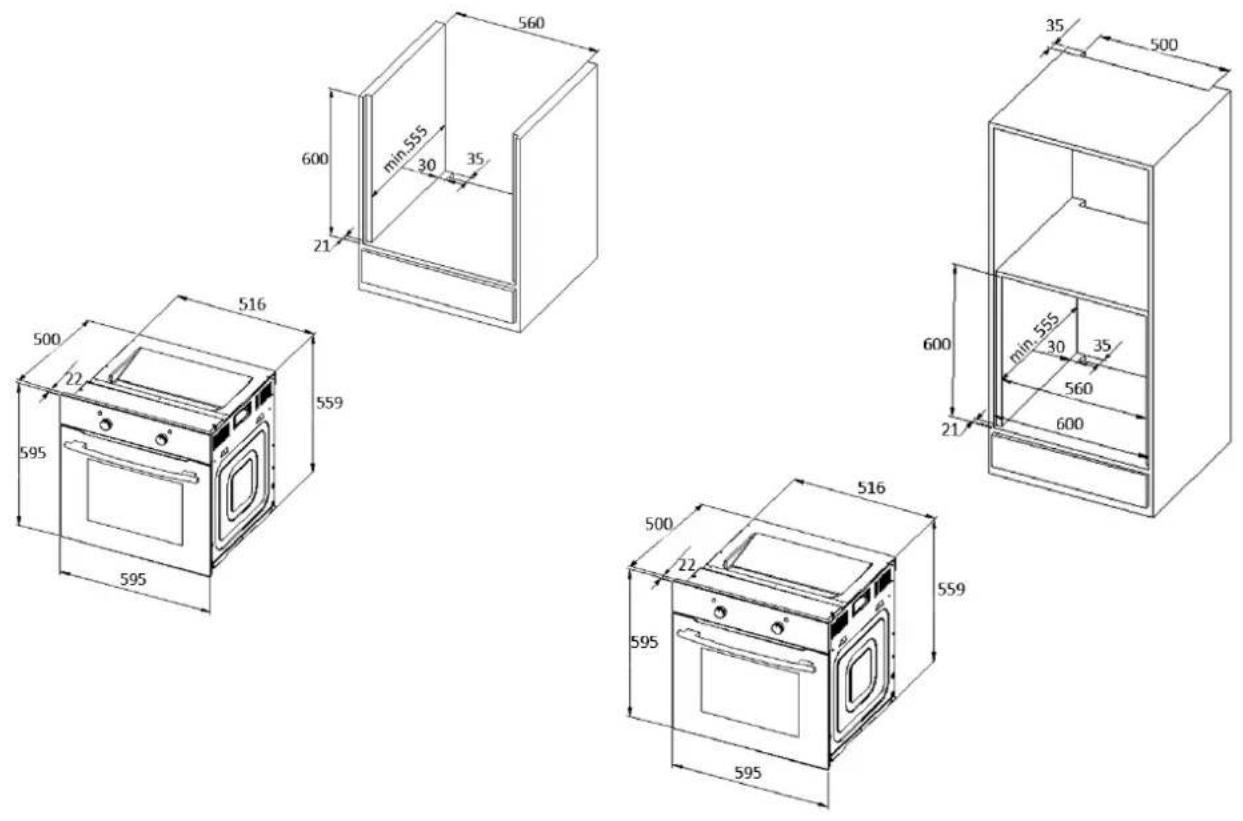
Fig. 1
natural_image
Diagram showing a 3D box with arrows indicating direction and a schematic of a mechanical component labeled A and B (no text or symbols present)
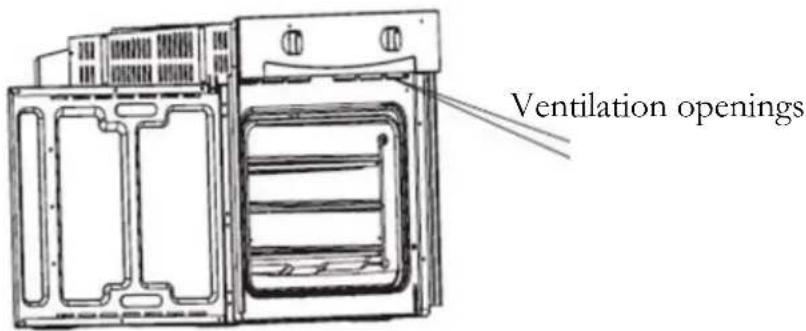
Ventilation openings
The temperature of the oven is higher than 70 ^ after cooking. The ventilation opening will keep working for 15 minutes when you have stopped cooking.
2.3 Electrical connection
Instructions for the installer (qualified professional)
The appliance is designed to be connected to a 230V-50Hz electricity supply. Total power absorbed is 2300W. The cable used for connection must have a cross section of 1.5 mm ^2 . The direct connection to the mains supply must have a double pole switch with a minimum rating of 250V, 20A. The switch must not brake the yellow-green earth cable at any point.
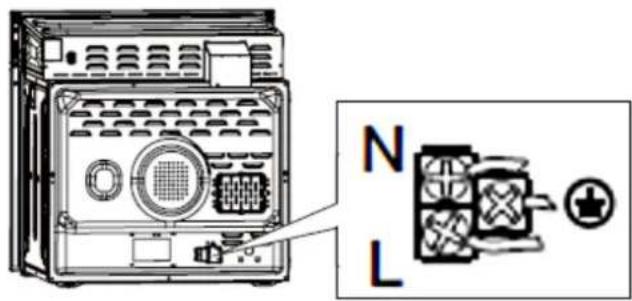
The cable must be placed in such a way that it cannot touch a high temperature area at any point after installation and connection.
3. Operation
3.1 Control panel
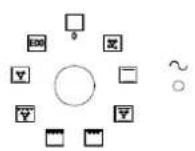
SETTING OF FUNCTIONS
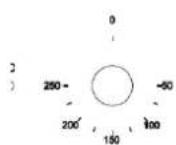
SETTING OF TEMPERATURE
- Turn the knob to the desired symbol to select the function.
- Turn the knob to the desired value to select the temperature.
- The appliance starts operating as soon as you have set the function and the temperature.
- Always turn the temperature-knob to 0 when you do not operate the appliance.
Proper positioning of the trays is mandatory for safe operation of the appliance. Otherwise hot food or cookware can slide off the trays when removing them.
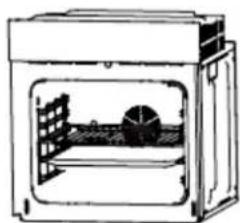
natural_image
Diagram of a simple oven or incubator with internal structure and ventilation slots (no text or labels)3.2 Functions of the oven
Symbol
Function

Defrost. The circulation of air at room temperature allows frozen food to defrost without adding any heat.

Bottom heat heats the base of your dish without browning it. Suitable for long-cooking dishes as casscrole-dishes, stews, pastries and pizza with a crispy base. You can set the temperature from 60^0 to 120^0 C.

Bottom and top heat operating simultaneously provide conventional cooking/baking. You can set the temperature from 50^0 to 250^0 C.

Bottom and top heat and fan operating simultaneously provide equal sharing of the heat and can save 30 - 40 % of energy. Your dishes are browned slightly from the outside and stay juicy inside. This function is suitable to cook large pieces of meat at a high temperature. You can set the temperature from 50^0 to 250^0 C.

Half grill. The half grill-element is switched on and off to maintain the cooking temperature. You can set the temperature from 180^ to 240^ C.

Full Grill. The entire grill is operating. You can set the temperature from 180^0 to 240^0 C.

Grill and fan. The entire grill and the fan are operating simultaneously. You can set the temperature from 180^0 to 240^0 C.

ECO Mode. Top/Bottom Heat with Energy saving.
CAUTION! Strictly observe the following safety instructions.
- Keep the door of the oven always closed if you use one of the oven-functions.
- Do not put any cookware directly on the base inside the oven. Use the trays.
- The interior parts of the oven become extremely hot. Do not touch any parts inside the oven if you handle your cookware.
- Be careful if you open the door. Do not get in contact with the hot parts of the oven or the steam, which will escape the oven.
- Always use oven-gloves.
3.3 Helpful hints
We recommend to use the supplied baking tray provided with your appliance.
It is also possible to bake in cake tins and trays bought somewhere else. For baking it is better to use black trays which conduct heat better and shorten the baking time.
◆ Shapes and trays with bright or shiny surfaces are not recommended when using the conventional heating method (top and bottom heaters). The use of such tins can result in under-cooking the base of cakes.
Before you take a cake out of the oven, check that it is ready using a wooden stick (when the cake is ready the stick should come out dry and clean after having been inserted in the cake).
When switching off the oven leave the cake inside for about 5 minutes.
- Cook meat with a weight of more than 1 kg in the oven. Cook smaller pieces of food on the hob.
Use oven-proof cookware only. Check that their handles also are oven-proof.
When you cook meat on a grillage, insert a drip tray with a small amount of water in the oven (minimum rack height).
◆ Turn over meat at least once.
❖ Never pour cold water on the meat.
3.4 Energy saving
Do not open the oven door unnecessarily often.
❖ Switch off the oven in good time and make use of the residual heat.
❖ Only use the oven when cooking larger dishes.
✿ Meat of up to 1kg can be cooked more economically in a pan on the hob.
If the cooking time takes longer than 40 minutes switch off the oven 10 minutes before.
◆ Make sure the oven door is closed properly.
- Heat can escape through spillages on the door seals. Clean up any spillages immediately.
Do not install the cooker near of refrigerators/freezers. Otherwise the energy consumption increases unnecessarily.
4. Cleaning and maintenance
WARNING!
Switch off the appliance and let it cool down before cleaning. Disconnect the appliance from the mains before maintenance.
Oven
➢ Clean the oven after use.
▶ Switch on the internal light while cleaning.
Clean the interior with warm water and a little bit of washing-liquid. Use a sponge or a soft cloth. Never use abrasive or aggressive detergents.
▶ Dry after cleaning.
Clean the outside of the oven with warm soapy water. Use a sponge or a soft cloth. Never use abrasive or aggressive detergents.
If you use a special oven-detergent, check that the detergent is suitable for your appliance (instructions on the packaging of the detergent).
Any damage that is caused to the appliance by a cleaning product will not be fixed free of charge, even if the guarantee period of the appliance is still valid.

Never use a steam cleaner.
Oven-door
Clean the door very carefully. Do not use any abrasive detergents; otherwise you may damage or brake the glass. Use wash-up liquid and warm water.
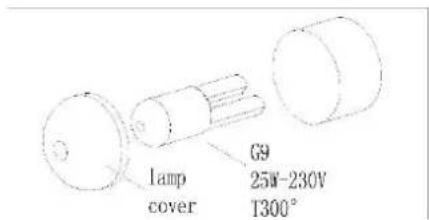
4.1 Replacing of the illuminant
- Switch off the appliance and disconnect it from the mains.
- Unscrew and wash the lamp cover and wipe it dry.
- Remove the illuminant and replace it by a new one of the same kind and power:
Heat-proof illuminant for ovens (300°C), 200-240V/25W/G9 thread /50 Hz.
- Do not use any other type of bulb
- Screw the bulb in, making sure it is properly inserted into the ceramic socket.
- Screw in the lamp cover.
4.2 Removing of the guides
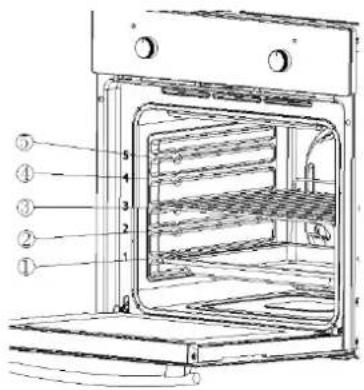
- Unscrew the screws of the guides.
- Rotate the guide vertically to make it leave the side panel.
- Take the guide out of the side panel hole, using an approx. 45° angle between the guide and side panel.
4.3 Removing of the oven door
- Fully open the door.
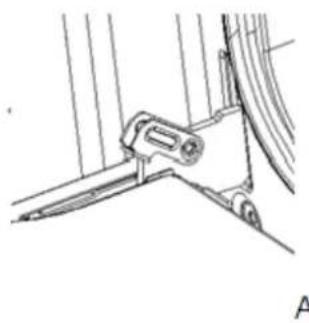
- Fold up the right and left side of locking rod (Picture A).
- Close the door until reach to stop step, hold on both left and right sides of the door, then reclose the door, upward and downward and pull out the door.
natural_image
Technical line drawing of a mechanical component or bracket assembly (no text or symbols)
Reinstalling of the oven door
Follow to the opposite order of door disassembly
-
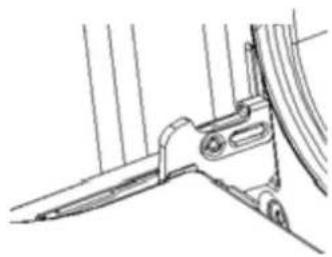
When install oven door, make sure both hinge plug into opening mouth directly.
-
Both sides of hinge rabbet must be fixed onto the hinge mounting hole on the door.
-
When open the door, spread down locking rod (Picture B).
natural_image
Technical line drawing of a mechanical component or bracket assembly (no text or symbols)B

If the door drops accidentally or hinges shut up suddenly, do not push your hand in hinges. Please call the after-sales.

Reinstalling of the oven door
-
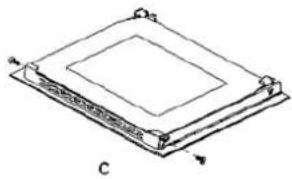
Unscrew and unfasten the bracket latch that is in the corner at the top of the door.
-
Next take out the glass from the second blocking mechanism and remove.
-
After cleaning, insert and block the glass panel, and screw in the blocking mechanism (picture C).
natural_image
Diagram of a layered electronic component or circuit board structure with no visible text or symbols4.4 Trouble shooting
Emergency measures:
- Switch off the entire appliance.
- Disconnect the appliance from the mains (fuse box of your household power supply).
- Contact your aftersales service.
Check the schedule below before you contact your aftersales service.
MALFUNCTION POSSIBLE CAUSES MEASURES
Appliance does not work at all.
The appliance is not supplied with energy.
➢ Check the relevant fuse in the fuse box of your household power supply.
Internal light does not work.
The illuminant is loose or damaged.
▶ Tighten or replace the illuminant.
5. Technical data
| Supplier's name | PKM | ||
| Model | F7-2S | ||
| Energy efficiency index(IEE cavity) | 95.2 | ||
| Number of cavities | 1 | ||
| Heat source per cavity | Electricity | ||
| Type | Built-In Oven | ||
| Control panel | Black Glass cover | ||
| Energy efficiency class | A | ||
| Energy consumption (conventional) | 0.74 KW/h | ||
| Energy consumption (with fan) | 0.78 KW/h | ||
| Usable volume | 54.00 l | ||
| Size of the appliance | medium: 35 l ≤ volume < 65 l | ||
| Functions | Top and bottom heat, top and bottom heat with fan, defrost, half grill, full grill, grill with fan, bottom heat with fan, ECO | ||
| Grill/fan/hot air fan | ✓ | ✓ | - |
| All-glass inner door | ✓ | ||
| Door/glass layers | Black glass | 3 | |
| Enclosure cooling | ✓ | ||
| Handle and knobs | Aluminium | ||
| Noise emission | < 52 db/A | ||
| Maximum power | 2.30 KW | ||
| Voltage/frequency | 220-240V | 50 Hz | |
| Drip tray/grillage | 1 | 1 | |
| Cable length | 150 cm | ||
| Installation dimensions in cm | 59.50 | 59.50 | 50,00 |
| Dimensions packaging in cm | 65,00 | 66,00 | 57,70 |
| Weight net/gross | 29,00 | 31,00 | |
6. Waste management
- While unpacking, the packaging materials (polythene bags, polystyrene pieces, etc.) should be kept away from children. CHOKING HAZARD!
- Old and unused appliances must be send for disposal to the responsible recycling centre. Never expose to open flames.
- Before you dispose of an old appliance, render it inoperative. Unplug the appliance and cut off the entire power cord. Dispose of the power cord and the
plug immediately. Remove the door completely so children are not able to get into the appliance as this endangers their lives!
- Dispose of any paper and cardboard into the corresponding containers.
- Dispose of any plastics into the corresponding containers.
- If suitable containers are not available at your residential area, dispose of these materials at a suitable municipal collection point for waste-recycling.
- Receive more detailed information from your retailer or your municipal facilities.

Materials marked with this symbol are recyclable.

Please contact your local authorities to receive further information.
7. Guarantee conditions
for large electric appliances, PKM GmbH & Co. KG, Neuer Wall 2, 47441 Moers.
This appliance includes a 24-month guarantee for the consumer given by the manufacturer, dated from the day of purchase, referring to its flawless material-components and its faultless fabrication. The consumer is accredited with both the dues of the guarantee given by the manufacturer and the vendor's guarantees. These
are not restricted to the manufacturer's guarantee. Any guarantee claim has to be made immediately after the detection and within 24 months after the delivery to the first ultimate vendee. The guarantee claim has to be verified by the vendee by submitting a proof of purchase including the date of purchase and/or the date of delivery. The guarantee does not establish any entitlement to withdraw from the purchase contract or for a price reduction. Replaced components or exchanged appliances demise to us as our property.
The guarantee claim does not cover:
- fragile components as plastic, glass or bulbs;
- minor modifications of the PKM-products concerning their authorized condition if they do not influence the utility value of the product;
- damage caused by handling errors or false operation;
- damage caused by aggressive environmental conditions, chemicals, detergents;
- damage caused by non-professional installation and haulage;
- damage caused by non common household use;
- damages which have been caused outside the appliance by a PKM-product unless a liability is forced by legal regulations.
The validity of the guarantee will be terminated if:
- the prescriptions of the installation and operation of the appliance are not observed.
- the appliance is repaired by a non-professional.
- the appliance is damaged by the vendor, the installer or a third party.
- the installation or the start-up is performed inappropriately.
- the maintenance is inadequately or incorrectly performed.
- the appliance is not used for its intended purpose.
- the appliance is damaged by force majeur or natural disasters, including, but with not being limited to fires or explosions.
The guarantee claims neither extend the guarantee period nor initiate a new guarantee period. The geographical scope of the guarantee is limited with respect to appliances, which are purchased and used in Germany, Austria, Belgium, Luxembourg and the Netherlands.
PKM
August 2014
natural_image
Diagram showing a 3D box with arrows indicating direction and a circular diagram of a syringe with labeled points A and B (no text or symbols beyond labels)
natural_image
Technical line drawing of an oven with internal compartments and ventilation slots (no text or symbols)natural_image
Line drawing of a simple enclosure with a dome-shaped structure inside, no text or symbols present.natural_image
Technical line drawing of a mechanical component or bracket assembly (no text or symbols visible)A

natural_image
Technical line drawing of a mechanical bracket or clamp assembly (no text or symbols)B

natural_image
Pure technical diagram of a layered structure with labeled points A and C, no text or symbols presentAftersales service information on the leaflet inside this instruction manual.
Subject to alterations
- Index
- EU - Declaration of Conformity
- Safety instructions
- DANGER!
- WARNING!
- CAUTION!
- NOTICE
- Installation
- Unpacking and positioning
- Installation of the oven
- Ventilation openings
- Electrical connection
- Instructions for the installer (qualified professional)
- Operation
- Control panel
- SETTING OF FUNCTIONS
- SETTING OF TEMPERATURE
- Functions of the oven
- Symbol
- Function
- CAUTION! Strictly observe the following safety instructions.
- Helpful hints
- Energy saving
- Cleaning and maintenance
- Oven
- Never use a steam cleaner.
- Oven-door
- Replacing of the illuminant
- Removing of the guides
- Removing of the oven door
- Reinstalling of the oven door
- Trouble shooting
- Emergency measures:
- MALFUNCTION POSSIBLE CAUSES MEASURES
- Appliance does not work at all.
- Internal light does not work.
- Technical data
- Waste management
- Guarantee conditions
- The guarantee claim does not cover:
- The validity of the guarantee will be terminated if:
- PKM
- August 2014
- Aftersales service information on the leaflet inside this instruction manual.
Brand : PKM
Model : F72B
Category : Oven