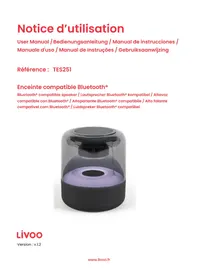
TES251 - Loudspeaker LIVOO - Free user manual and instructions
Find the device manual for free TES251 LIVOO in PDF.


| Product type | Bluetooth® speaker |
| Brand | Livoo |
| Model | TES251 |
| Bluetooth version | 5.3 |
| Bluetooth profile | AC6965E |
| Transmission distance | ≥ 10 m |
| Rated output power | 5 W |
| Frequency response | 20 Hz - 20 kHz |
| Signal-to-noise ratio | 95 dB |
| Speaker impedance | 4 Ω |
| Speaker diameter | 66 mm |
| Sensitivity | 88.6 dB |
| Power supply | 5 V, 1 A (via USB) |
| Built-in battery | 3.7 V, 1200 mAh |
| Battery life (volume at 50%) | 4 to 5 hours |
| Charging time | 3 to 4 hours |
| Dimensions | Ø 12 x 13.8 cm |
| Weight | 380 g |
| Audio inputs | USB, AUX, micro-USB (charging), TF card |
| Main functions | Play/Pause, track change, volume adjustment, hands-free calling, LED light |
| LED display modes | Diffuse light, color change, flashing, random color |
| Cleaning | With a soft cloth, keep away from dust and moisture |
| Safety | Do not use outdoors/in damp areas, do not insert objects, adult supervision for children |
| Package contents | Speaker, USB cable (micro-USB), AUX cable, instruction manual |
Frequently Asked Questions - TES251 LIVOO
User questions about TES251 LIVOO
0 question about this device. Answer the ones you know or ask your own.
Ask a new question about this device
Download the instructions for your Loudspeaker in PDF format for free! Find your manual TES251 - LIVOO and take your electronic device back in hand. On this page are published all the documents necessary for the use of your device. TES251 by LIVOO.
USER MANUAL TES251 LIVOO
Thank you for choosing a Livoo product!
EN
Your blender, your barbecue, and your headphones are not just objects, they are extensions of yourself, allowing you to get closer to your friends and family, to bring them together, to laugh and to share experiences. Livoo's aim is to help you live your life to the fullest, whatever wishes you have throughout the year. Winter raclette, summer barbecue. Or the other way around. It's up to you. Take advantage of this freedom for feel good moments every day.
That's why we're constantly innovating and creating clever products full of zest, but most of all, accessible. Find our entire collection on our website www.livoo.en.
Livoo, your daily companion till social networks

@Livoo

@livoo_officiel

@Livoo
Safety Instructions
Please read the following instructions carefully before using the unit and save them for future use.
Improper use of the unit may result in damage to the unit or injury to the user. Make sure you use the unit for its intended purpose. We do not accept any responsibility for damages due to improper use or mishandling.
Using the speaker outdoors or in damp areas may result in a risk of electric shock and damage to the product.
Avoid dropping the unit to prevent breakage.
Do not insert foreign objects into the product.
Adult supervision is recommended if children are using this product.
A 5V/0.5A-1A AC adapter can be used to power the unit. Be sure to choose an adapter that is compatible with your device.
Technical Specifications
The complete product consists of a Bluetooth® enabled speaker, an instruction manual, a 5V, 1A - microUSB charging cable and an auxiliary cable.
| BLUETOOTH | |
| Bluetooth version | 5.3 |
| Bluetooth profile | AC6965E |
| Frequency band / output power | 8dB |
| Transmission distance | ≥10m |
| AUDIO | |
| Rated output power | 4Ω, 5W |
| Frequency response | 20Hz-20Khz |
| Signal to noise ratio | 95dB |
| Weight | 378g |
| SPEAKER | |
| Impedance | 4ohms |
| Speaker diameter | 66mm |
| Sensitivity | 88.6db |
| GENERAL INFORMATION | |
| Input | 5V, 1A |
| Built-in battery | 3.7V 1200mAh |
| Size | Ø11 x 13cm |
| Listening time on battery (50% volume) | 4-5h |
| Charging time | 3-4h |
Drawing of the device
Figure 1 - bottom of the unit. Figure 2 - back of the device.
| Figure 1 |
| 1. ON/OFF" button |
| 2. « M » mode button |
| 3. Back button |
| 4. Play/Pause button |
| 5. Skip to next button |
| Figure 2 |
| 6. USB input |
| 7. AUX input |
| 8. Micro-USB charging input |
| 9. TF card input |
Use of the device
Charging the battery
Fully charge the battery with the supplied USB cable before first use. Insert the micro USB tip of the charging cable into the micro-USB socket on the speaker and plug it into a USB port (computer, AC charger, car charger, etc.).
While charging, a red light will illuminate.
When the battery is full, the red light will turn off.
Turning the device on or off and changing functions
Press and hold the ON/OFF button to turn your device on and off.
Press and hold the M button to change the function: TF card, USB, Aux, Bluetooth.
Pairing the speaker via Bluetooth
Your speaker goes directly to Bluetooth® mode when there is no TF card, AUX or USB cable connected. When any of these are connected, press the M button to switch to Bluetooth® mode and activate this function.
Then open the Bluetooth® setting on your phone, tablet or other Bluetooth® audio device and select the "TES251" device that appears in the list. Pairing is now complete.
The device will automatically connect to the last connected Bluetooth® device if it is active and within the required transmission range.
Display different LED colors
The device automatically switches to "diffuse light" mode when turned on.
Briefly press the ON/OFF button to turn off the LED light.
Briefly press the ON/OFF button again to switch to the next LED display mode. In this mode, the colors will change one after another.
Briefly press the ON/OFF button again to move to the next mode. In this mode, the color flashes. Press the ON/OFF button again to change the color.
Briefly press the ON/OFF button again, the unit will display a color randomly. This is the last mode.
Briefly press the ON/OFF button again and the "diffused light" mode will resume.
LED color sequence: Red - Green - Blue - Yellow - Purple - Light Blue - White
Playing music
Select a compatible media on your phone, tablet or other Bluetooth® audio device.
Briefly press the play button to start or pause music.
Briefly press the or Button to go to the previous or next song.
Long press the or Button to adjust the volume.
Answering the phone
To answer or hang up a call, briefly press the Play Button.
Press the Play Button twice briefly to dial the last incoming call.
Using other audio inputs: AUX/TF card/USB
Insert the TF card or USB stick into the appropriate port. The music will start automatically. Briefly press the "M" button to toggle between Bluetooth® / AUX / TF Card / USB.
Note: The Bluetooth brand name is owned by the Bluetooth SIG.
Cleaning and maintenance
Clean the product with a soft cloth.
Keep it free of dust, dirt and moisture.
UE DECLARATION OF CONFORMITY
We
DELTA
BP61071
67452 Mundolsheim - France
Declare under our own responsibility that the article :
Description:Bluetooth®compatible speaker
Reference:TES251

to which this declaration applies, is in conformity with the applicable EU harmonization legislation :
| DIRECTIVES | NORMES or SPECIFICATIONS |
| (ROHS) 2011/65/EU | The object of the declaration described above is in conformity with Directive 2011/65/EU of the European Parliament and of the Council of 8 June 2011 on the restriction of the use of certain hazardous substances in electrical and electronic equipment. EU 2011/65/EU et EU 2015/863 |
| (RED) 2014/53/EU | EN 62368-1 :2014+A11 :2017EN 62479 :2010EN 50663 :2017ETSI EN 301 489-1 V2.2.3 (2019-11)ETSI EN 301 489-17 V3.2.4 (2020-09)EN 55032 :2015+A11 :2020EN 55035 :2017+A11 :2020ETSI EN 300 328 V2.2.2 (2019-07) |
Mundolsheim, the 13/06/2022
David Bousquet, CEO
Signature:
DELTA sas
T
67433 MUNY, 10000, USA
1
TIL 23.35.02 17:46
m - 1 ≠ 0 ;
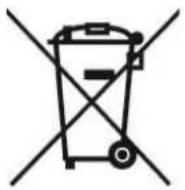

Correct disposal of the unit (Electrical and Electronic Equipment).
(Applicable in the European Union and the rest of Europe that have adopted separate collection systems countries). The European Directive 2012/19/EU on Waste Electrical and Electronic Equipment (WEEE), requires that old household electrical appliances must not be disposed of in the normal household waste stream. Old appliances must be collected separately in order to optimize the recovery and recycling of the materials they contain and reduce the impact on human health and the environment. The symbol of the crossed out dustbin is marked on all products to remind the obligations of separate collection. Consumers should contact their local authority or retailer for information concerning the correct disposal of their product.
Non contractual illustration
- Product information is subject to change without prior notice.
Mostrar differs cores LED
- Thank you for choosing a Livoo product!
- Livoo, your daily companion till social networks
- Safety Instructions
- Technical Specifications
- Drawing of the device
- Use of the device
- Charging the battery
- Turning the device on or off and changing functions
- Pairing the speaker via Bluetooth
- Display different LED colors
- Playing music
- Answering the phone
- Using other audio inputs: AUX/TF card/USB
- Cleaning and maintenance
- UE DECLARATION OF CONFORMITY
- Correct disposal of the unit (Electrical and Electronic Equipment).
- Mostrar differs cores LED
Brand : LIVOO
Model : TES251
Category : Loudspeaker