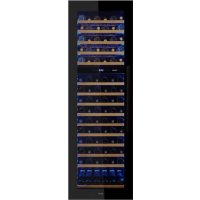
PVMAVP 178112CRR - Wine cellar Pando - Free user manual and instructions
Find the device manual for free PVMAVP 178112CRR Pando in PDF.



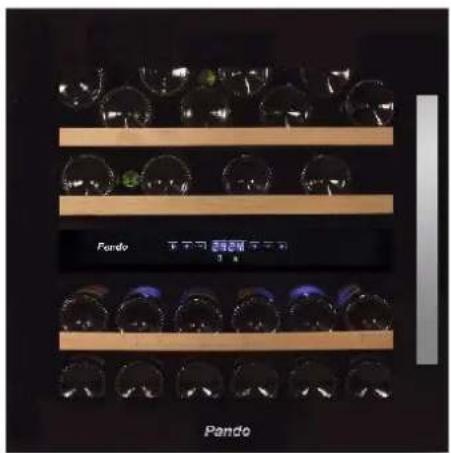
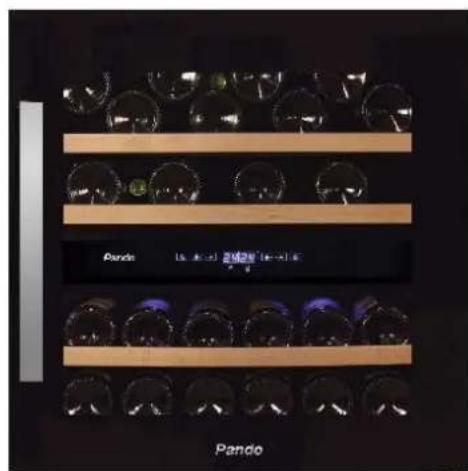
| Product type | Wine cellar |
| Brand | Pando |
| Model | PVMAVP 178112CRR |
| Capacity | 112 bottles (0.75 L) |
| Temperature zones | 2 independent zones |
| Temperature range | 5 °C to 20 °C |
| Dimensions (H × W × D) without handle | 1784 × 592 × 559 mm |
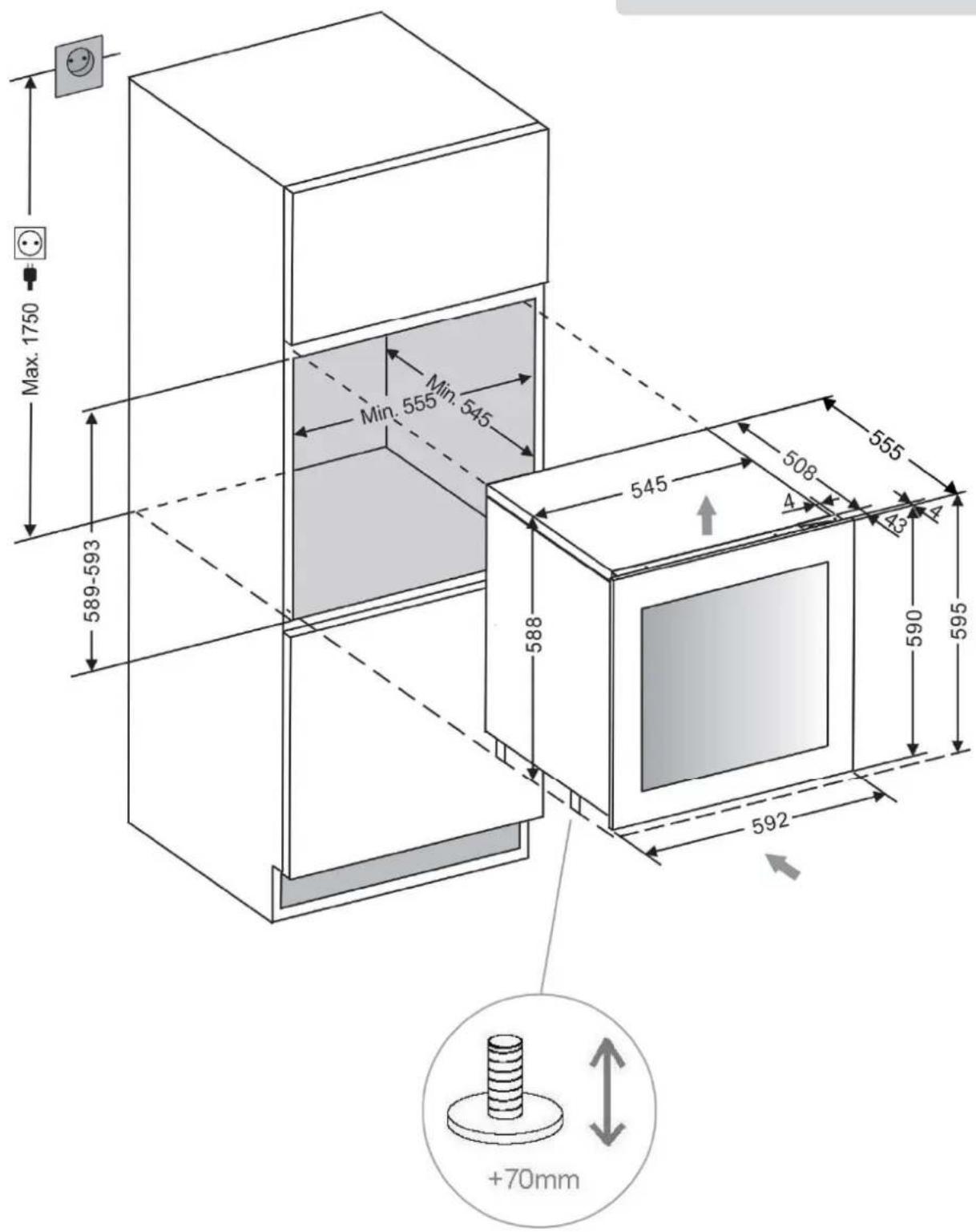
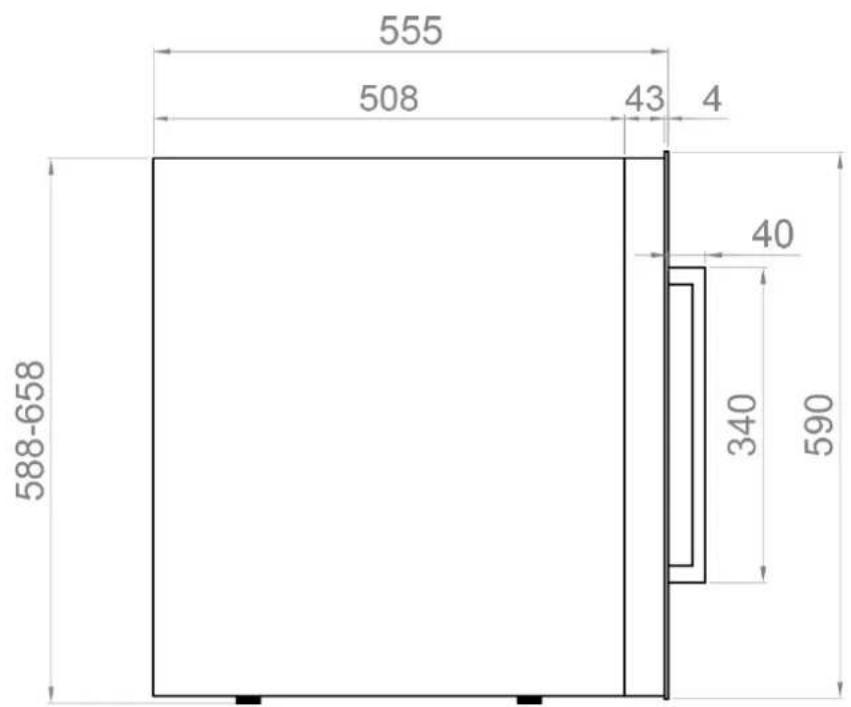
| Recess dimensions (H × W × D) | 1773 × 555 × 545 mm |
| Weight | Approximately 70 kg (estimated) |
| Power supply | 220-240 V ~ 50 Hz |
| Power | 160 W |
| Rated current | 1.4 A |
| Energy class (2021) | G |
| Refrigerant | R600a (isobutane) |
| Noise level (LwA) | 40 dB(A) |
| Number of beech wood shelves | 15 |
| Door type | Triple-layer tempered UV-protective glass |
| Door opening direction | Fixed (non-reversible) |
| Interior lighting | Blue LED with switch |
| Activated carbon filter | Yes (annual replacement) |
| Special features | Dynamic climate, silent mode, display off, door alarm, automatic defrost |
Frequently Asked Questions - PVMAVP 178112CRR Pando
User questions about PVMAVP 178112CRR Pando
0 question about this device. Answer the ones you know or ask your own.
Ask a new question about this device
Download the instructions for your Wine cellar in PDF format for free! Find your manual PVMAVP 178112CRR - Pando and take your electronic device back in hand. On this page are published all the documents necessary for the use of your device. PVMAVP 178112CRR by Pando.
USER MANUAL PVMAVP 178112CRR Pando
Quality Management System
UNE-EN ISO 9001:2015
ES19/86566

PVMB 40-28 / PVMBP-HD 40-28


11.DISTRUCION BOTELLAS

PVMB 60-53
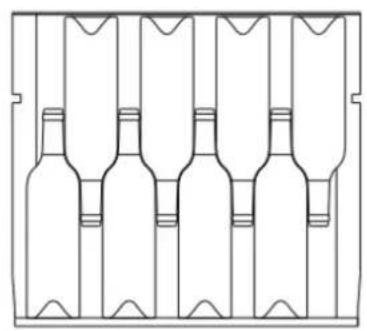

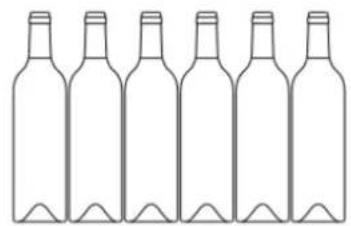
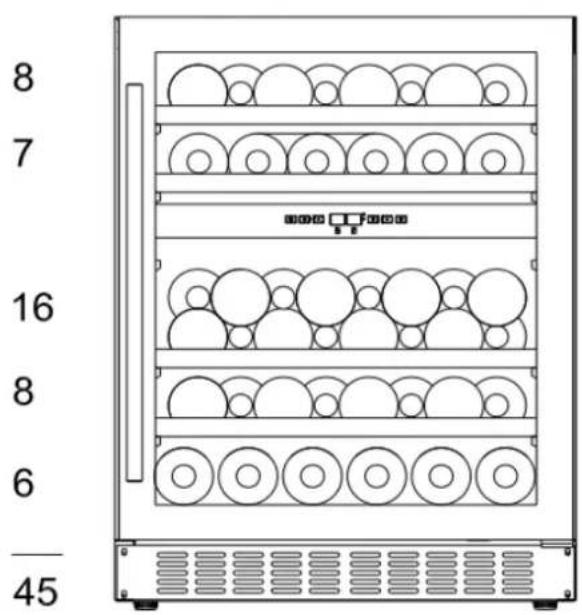
PVMBP 60-45 / PVMBP-HD 60-45


12.SERVICIO TECNICO POST-VENTA (SAT) Y RANTÍA:
Environmental Management System Certification LINE EN ISO 14001:2015
ONE-ENSO1400 ES20/208675

Quality Management System
UNE-EN ISO 9001:2015
ES19/86566
PAINEL INDICADOR LUMINAOSO (DISPLAY)
Apresenta a temperatura e altri servicios.
LUZ INDICADA
PVMB 40-28 / PVMBP-HD 40-28

Quality Management System
UNE-EN ISO 9001:2015 ES19/86566
2. CHARACTERISTIQUES DU PRODUIT
PVMB 40-28 / PVMBP-HD 40-28


Quality Management System
ONE-EN ISO 9001 ES19/86566
User and installation manual Guarantee certificate
First of all we wish to thank you for the trust shown on our Company by purchasing one of our products. We are sure you have made the right choice.
In Pando, not only we offer first quality products, but also we make available a large professional team to serve and assist you on any query you may have regarding installation and/or performance.
We also suggest you to pay a visit to our web site (www.pando.es/en) to get to know us better and where you will find all product range containing all necessary commercial and technical information.
A wide selection of extractor hoods can be found there; Wall Hoods, Ceiling, Island or Canopy Hoods. Four types of installation making possible to adapt ourselves to any type of kitchen based on different needs.
At the same time, we take the opportunity to introduce you our collection of in house essential appliances, such our new high performance Ovens and Microwaves, Induction and Gas Hobs to make real your best recipes. Wine Coolers and Aging Wine Coolers to maintain and keep your wines in best of conditions and built-in Dishwashers with latest technology.
All that under a brand with over 40 year history in the market, making products like a real craftsman, and gathering in them the best of our experience to please all your needs.
We sincerely look forward you to have fun, experience and enjoy with the comfort and capacity of what already became your new kitchen ally.
Many Thanks
The PANDO Team
1.SAFETY 6
2.PRODUCT CHARACTERISTICS 10
- INSTALLATION 11
3.1.Before using the appliance 11
3.2.Installation 11
3.3. Instructions for fitting under a worktop 12
3.4. Assembly instructions in column / integrated 13
3.5. Electrical connection 14
3.6.Fitting the handle 14
3.7. Set and secure the unit to the furniture 15
3.8.Reversible optional door 16
3.9.Glass plinth (optional) 18
3.10. Bordeaux bottle holder (optional) 18
3.11. Side trim angles (optional) 19
- OPERATING INSTRUCTIONS 20
- USE AND OPERATION 21
5.1.Use and operation 21
5.1.1. Control panel 21
5.1.2.Shelves and storage 26
5.1.3. Dynamic climate mode / silent mode ( energy saving) 27
3.1.4. Display off mode 27
5.1.5.Eco demo mode 28
5.2. Push automatic opening function 29
5.3.Shelves 30
5.4. Noise in operation 30
5.5.Defrosting/humidity/ventilation 31
5.6. Table with wine serving temperatures 32
6.CARE AND MAINTENANCE 33
6.1.Humidity control 33
6.2. Cleaning the unit 33
6.3.Activated charcoal odor filter 35
6.4. Power cuts 34
6.5.During holidays/long absence 35
6.6.Moving the unit / changing location 35
6.7.Advices for saving energy 35
7.TROUBLESHOOTING 36
8. FAQ's (Frequently Asked Questions) 38
9. TECHNICAL SPECIFICATIONS 40
- INSTALLATION DIAGRAMS AND DIMENSIONS 44
- BOTTLES DISTRIBUTION 69
- AFTER SALES TECHNICAL SERVICE AND GUARANTEE 74
1. SAFETY
When using an electrical appliance, certain precautions must be taken to reduce the risk of fire, electric shock and injury, including the following:
FOR YOUR SAFETY
Please read the instructions carefully, even if you are very familiarized with the device.
- This appliance is designed to be used for wine storage. Please use it only as described in this manual. Other non-recommended uses could cause fires, electrical shock or injuries.
- This appliance can be used by children aged 8 or over and people with physical, sensorial or mental disablement or with a lack of experience and knowledge, if they have been instructed on the safe use of the appliance and understand the risks, or they are supervised. Children must not play with the appliance. Cleaning and maintenance must not be done by unsupervised children.
- In compliance with IEC standards: This appliance is not designed to be used by people (including children) with reduced physical, sensorial or mental capacity or with a lack of experience and knowledge, unless they are supervised or instructed on the use of the appliance by a person responsible for their safety. Ensure that children do not play with the appliance.
- Electrical appliances are not toys. Always keep the appliance out of the reach of children. Keep the electric power cable out of the reach of children. Do not let the mains cable hang over the edge of a table or worktop where the appliance has been located.
Children aged from 3 to 8 years are allowed to load and unload refrigerating appliances. - To avoid electrical shocks, DO NOT SUBMERGE the unit, the cable or the plug in water or spray any liquid onto it.
- Unplug the appliance from the mains socket when not in use, when it is moved from one place to another and before cleaning it.
- To disconnect the appliance, hold the plug and pull it out of the mains socket. Never pull the cable.

WARNING: Please keep the appliance distant from inflammable substances. Do not connect the appliance in the presence of explosive and/or inflammable gases.

- Do not place this appliance or any of its parts close to an open flame, cooker or a heating device.
- Do not use the appliance if the electric cable or plug is damaged, if it does not work or if it has fallen or suffered any other type of damage. If the power cable is damaged, it must be replaced by the manufacturer, an after-sales service, or qualified personnel, to avoid hazards.
- The use of accessories not recommended by the manufacturer could be dangerous.
- Place the unit on a dry and level surface.
- Do not start the appliance if the casing is removed or damaged.
- A bad connection between the mains AC socket (in the wall) and the plug could cause overheating and deform it. Contact a qualified electrician to replace the wall socket if it is loose or damaged.
-
Place the unit out of direct sunlight and sources of heat (stove, heater, radiator, etc.)
-
WARNING: This appliance is free from CFC and HFC gases and contains small amounts of isobutane (R600a), which is respectful with the environment, but it is inflammable. It does not damage the ozone layer, nor does it add to the greenhouse effect. During transport and start up, make sure no parts of the refrigeration system are damaged. Leaks of coolant are inflammable and could harm eyes.
In case of damage:
- Avoid open flames and anything that could cause sparks
- Disconnect from the mains
- Ventilate the room where the appliance is located for some minutes and contact the Technical Assistance Service for advice.
In case of a coolant leak, if the appliance is in a small room, there is a risk that the gases could spread around the room. For each 8g of coolant, at least 1 cubic meter of space is required. The amount of coolant contained in the appliance is indicated on a specifications plate placed inside the appliance. It is dangerous for anyone who is not an authorized technician to carry out maintenance or repairs on this appliance.
WARNING: Keep the ventilation openings in the appliance or the integrated structure unobstructed. The manufacturer will not accept liability for damage caused by misuse or as a result of repairs made by unauthorized personnel. This will also void the guarantee and any other claim for liability.
WARNING: Do not use mechanical means or utensils to accelerate the process of defrosting except those recommended by the manufacturer.
WARNING: Do not damage the cooling circuit. Never use the appliance if the cooling circuit has been damaged.
WARNING: Do not use any electrical appliance inside the food compartment of the unit unless it is recommended by the manufacturer.
WARNING: To avoid danger caused by instability, the unit must be secured as indicated in the instructions.
WARNING: Please keep the unit away from fire or corrosive substances when installing.
WARNING: DO NOT store explosive substances such as aerosol cans with inflammable propellant in this unit.
WARNING: When position the appliance, ensure the supply cord is not trapped or damaged.
WARNING: Do not locate multiple portable socket-outlets or portable power supplies at the rear of the appliance.
To avoid contamination of food, please respect the following instructions:
- Opening the door for long periods can cause a significant increase of the temperature in the compartments of the appliance.
- Clean regularly surfaces that can come in contact with accidental spills of liquids.
- If the refrigerating appliance is left empty for long periods, switch off, defrost, clean, dry, and leave the door open to prevent mould developing with the appliance.
-
The wine cellar is not intended for food preservation. The recommended use is for the conservation of bottled liquids.
-
This appliance is designed for DOMESTIC use, IT IS NOT recommended for INDUSTRIAL use.
- Do not try to repair or replace any component of the unit unless specifically recommended in this manual. Any other servicing must be carried out by authorized technicians.
- Replace all the panels after servicing and before starting up the unit.
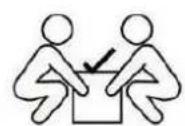
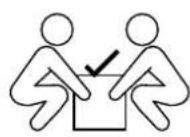
- The unit should be moved by two or more people. Trying to move it with one person could cause back and/or other lesions.
- Never clean the parts of this appliance with inflammable liquids. Vapours could cause a fire or an explosion. Do not store petrol or any other inflammable liquid in the proximity of the unit. Vapours could cause a fire or explosion.
- Do not plug in or unplug the appliance with wet hands.
- A separate circuit supplying this appliance is recommended. Use an unswitched mains socket.
- If you use a lock, do not keep the keys close to the appliance or within the reach of children.
WARNING: To reduce the risk of fires, electrical shocks or injuries, unplug or disconnect the mains supply before carrying out any maintenance work.
PLEASE KEEP THESE INSTRUCTIONS AT HAND
In case of any problem, refer to the Troubleshooting guide at the end of this manual. It contains minor operation problems that can be corrected.
PACKAGING AND END OF LIFE
Packaging must be disposed of correctly. Make sure that the plastic wrapping, bags, etc. are disposed of safely and keep them out of the reach of children. Danger of suffocation!
Refrigeration equipment must be disposed of properly and professionally at the end of its useful life, according to local regulations and environmental legislation.
This applies to discarded appliances as well as to this unit when it has reached the end of its life.
WARNING: Make sure that old appliances cannot be used after disposal, by removing the doors, the cap, cutting the electric cable and destroying or removing any catch with springs or screws.
This will avoid children playing and getting trapped inside the appliance (danger of suffocation) or endangering their lives in any other way. DO NOT dispose of this appliance in waste dumps with the insulation (cyclopentane) and the coolant gas (R600a) still in the device, as they are inflammable.
Instructions for disposal:
- This appliance must not be disposed of as domestic waste.
- The cooling circuit, especially the heat exchanger at the rear/ bottom of the unit should not be damaged.
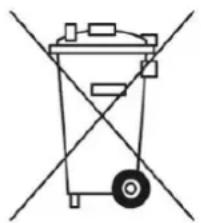
This symbol on the product or its packaging indicates that this product is not of as normal domestic waste, and must be taken to a collection point for ical and electronic waste. Disposing of this product correctly contributes to the e environment and the health of other human beings. Incorrect disposal lth and the environment. For more information about product recycling, please y council.
2.PRODUCT CHARACTERISTICS
- Equipped with independent shelves with one, two or three temperature areas, depending on the model.
-
Variable electronic temperature control with a digital screen and tactile operation.
-
Temperature can be adjusted from 5^ to 20^ ( 41^ to 68^ ) in any of the compartments and can be displayed in degrees Fahrenheit or Centigrade.
- It can be configured for long-term storage temperature or specific serving temperature for red /white/ sparkling wines.
- Cooling and heating (depending on model) for perfect storage and/or serving conditions.
- A dynamic cooling compressor to guarantee air circulation inside with a uniform distribution of temperature and humidity.
- Blue LED light inside with an ON/OFF switch. Operation mode and display mode.
- Alarm system warning of malfunctioning due to open door.
- The standby mode "DISPLAY OFF" will disconnect the display lights, interior light and audible alarms. Pre-existing cooling operations will continue functioning normally.
- Temperature memory function-If the power supply is cut off (voltage surge, circuit breaker, etc.) and then reconnected, the unit will continue operating at the last selected temperature.
Automatic defrosting with evaporation of water from defrosting. - Reversible tempered glass door, with a double/triple panel, smoked glass to protect the wine from UV light and offer an attractive presentation with little condensation and a low noise level.
- Steel external and internal body in a mat black finish with interior coating also finished in black, offering good performance, long life and stability. This mat finish avoids excessive light damaging the maturing process.
- Glass door or glass door with stainless steel frame, and with or without stainless steel handle.
- Shelves made of solid beech wood sliding out and adjustable to offer maximum convenience and flexibility to adapt to different sized bottles.
- Coolant respectful with the environment with insulating foam.
- Humidity control system (Water tank)
NOTE: Characteristics and specifications may be subject to modifications without prior notice.
3. INSTALLATION
3.1. BEFORE USING THE APPLIANCE
- Remove all the external and internal packaging. Clean the internal surfaces with a soft cloth and warm water. The unit may contain residual smells at first, these will disappear as the unit begins to cool.
- Before connecting the appliance to the mains, leave it to rest in vertical position for at least 24 hours. This will reduce the possibility of malfunctioning in the cooling system caused by transportation. During this time, it is recommended to leave the door open to dispel any residual smells.
- The door can be opened either from the left or from the right. The unit is delivered with the door opening on the left-hand side. If you wish to open the door on the right, follow the instructions in "changing the door hinges".
- Change the door handle round if necessary.
3.2. INSTALLATION
PLANS AND DIMENSIONS FOR INSTALLATION: SEE PAGES AT THE END OF THIS MANUAL.
- This appliance is designed to be installed either fitted or free-standing.
- WARNING: Do not store or install the unit in the open. This unit is designed for indoor use only.
- WARNING: Do not install the unit in a washroom area. Avoid placing the unit in damp locations.
- Place the unit on a floor with sufficient strength to bear the weight of the unit when full. To level the unit, adjust the front levelling foot at the bottom of the unit.
- When installing free-standing, it is necessary to leave 100mm of space between the rear and sides of the unit to allow for air circulation to cool the compressor and condenser, which will save energy. When installed built-in, it is also necessary to leave 5mm on each side and at the top, to guarantee adequate ventilation. Make sure that the air outlet at the front of the unit is not covered or obstructed.
- Place the unit out of direct sunlight and sources of heat (stove, heater, radiator, etc.) Direct sunlight can affect the acrylic coating and the heat of the sun can increase energy consumption. Extremely cold ambient temperatures could also cause the unit to malfunction.
- Connect the unit to an exclusive and easily accessible mains socket. Any query about power and/or ground connection should be directed to a qualified electrician or an authorised service centre.
- This device must be installed with all its electrical, plumbing and drainage connections in compliance with national and local regulations.
IMPORTANT: HIGH HUMIDITY ENVIRONMENTS
At times of high humidity, there may be some condensation on the external surfaces of the glass door. This condensation will disappear when the levels of humidity decrease. To prevent this from happening, it is recommended to install the unit in a location with sufficient ventilation, in a place with dry air or air conditioning.
NOTE: The mains plug of the unit should be accessible.
3.3. INSTRUCTIONS FOR FITTING UNDER A WORKTOP
Only for models:
PVMB15-7
PVMB 30-16
PVMB 40-28
PVMBP-HD 40-28
PVMB 60-53
- PVMBP 60-45
- PVMBP-HD 60-45
PBE 182-190
PBE 89-66
Make sure that the installation does not obstruct the front ventilation grille. This unit is designed to fit under worktops of 820-890 mm height, using the adjustable ventilation grille to guarantee that the feet are hidden from view at the front. Remove the screws from the adjustable ventilation grille and slide it to the required height. Tighten the screws to secure the grille in its position.
If the unit is completely built-in, when fitting the kitchen skirting board, make sure that the ventilation grilles in this skirting board can dissipate at least 300 square centimetres, so the hot air can be dispersed without any obstruction. Otherwise, the unit will have to work more, increasing electricity consumption.
Also make sure that the door can open and close freely in the chosen location.
NOTE: When pushing the unit into its space, make sure that the power cable is not trapped.
3.4. ASSEMBLY INSTRUCTIONS IN COLUMN / INTEGRATED
Only for models:
-
PVMAV 45-18
-
PVMAVP 88-49
PVMAVP 45-18
PVMAV 124-70
PVMAV 60-25
-
PVMAVP 124-70
-
PVMAVP 60-25
PVMAV 178-112
PVMAV88-49
- PVMAVP 178-112
These models have incorporated an exclusive Pando integrated ventilation system, see image.
They incorporate a ventilation system in the upper and lower front, invisible with the door of the unit closed.
Do not cover or hinder the grids, keep them clean for free air circulation.
They can be mounted in the niche of the furniture / column directly, without the need for ventilation in the furniture.


FRONT VIEW
SIDE VIEW

NOTICE
Respect the minimum front ventilation perimeter and interior (5 mm), to avoid malfunctions or product breakdowns that would NOT be covered by the warranty.
ATENTION
FOR INSTALLATION YOU CAN FIND A DETAILED DIAGRAM IN THE PAGES AT THE END OF THIS MAANUAL
3.5. ELECTRICAL CONNECTION
WARNING: Incorrect grounding of the unit may pose an electrical shock hazard. If the mains cable is damaged, it must be replaced by a qualified electrician or an authorized service center.
All electrical work must be carried out by qualified professionals, in compliance with national and local safety regulations.
Check that the voltage indicated on the unit corresponds to the voltage supplied by the mains.
Connect the unit separately to a mains socket with 13A capacity
Connection must be made to an adequate power socket that is easily accessible. For greater safety, it is recommendable to install a residual current device (RCD) with a triggering current of 30mA .
Have a qualified electrician check the device and the circuit to ensure that the power socket is correctly connected to earth.
Note: In locations where lightning is frequent, it is recommended to use voltage surge protectors.
Do not connect the unit to the mains through an extension lead. Extension leads do not offer the necessary safety for the appliance (e.g. danger of overheating).
The unit should not be connected to an inverter and should not be used with a multiple connection socket adaptor, as this could damage the electronic unit.
The cable should be securely behind the appliance avoiding it getting entangled or hanging in an unprotected manner.
WARNING: THIS APPLIANCE MUST BE GROUNDED.
3.6. FITTING THE HANDLE
IMPORTANT: Do not tighten the screws excessively and do not use electric tools to install the handle.
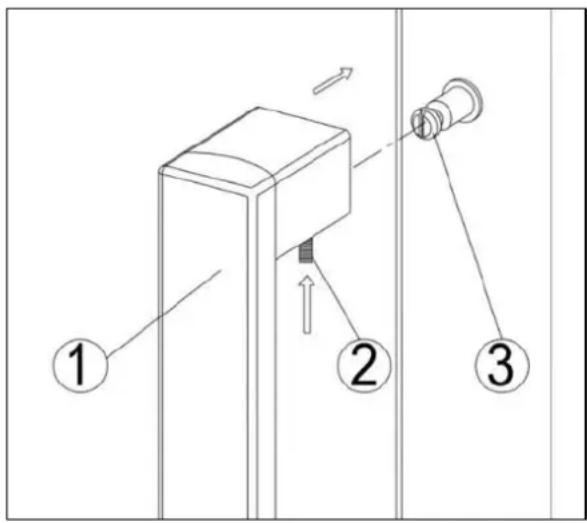
- Place the handle (1) onto the securing studs (3) of the door and tighten the grab screws (2) with an Allen key to secure the handle.
Note:
All the parts removed should be stored, in case it is required to change the door back to its original configuration.
3.7. SET AND SECURE THE UNIT TO THE FURNITURE
3.7.1 Only for models UNDER A WORKTOP:

PVMB15-7
PVMB 30-16
PVMB 60-53
PVMB15-7
PVMB 30-16
PVMB 40-28
PVMBP-HD 40-28
PVMB 60-53
PVMBP 60-45
PVMBP-HD 60-45
PBE 182-190
PBE 89-66
Open the two caps of the body of the appliance on the opposite side of the hinge and secure the appliance in the niche by tightening the screws through the mounting bracket.
3.7.2 Only for models UNDER A WORKTOP:

PVMAV 45-18
PVMAVP 45-18
PVMAV 60-25
PVMAVP 60-25
PVMAV 88-49
PVMAVP 88-49
PVMAV 124-70
PVMAVP 124-70
PVMAV 178-112
PVMAVP 178-112
Open the two caps of the body of the appliance on the opposite side of the hinge and secure the appliance in the niche by tightening the screws through the mounting bracket.
3.7.3 Additional fixing OPTIONAL
Only for models professional articulated hinge with closure "SOFT"
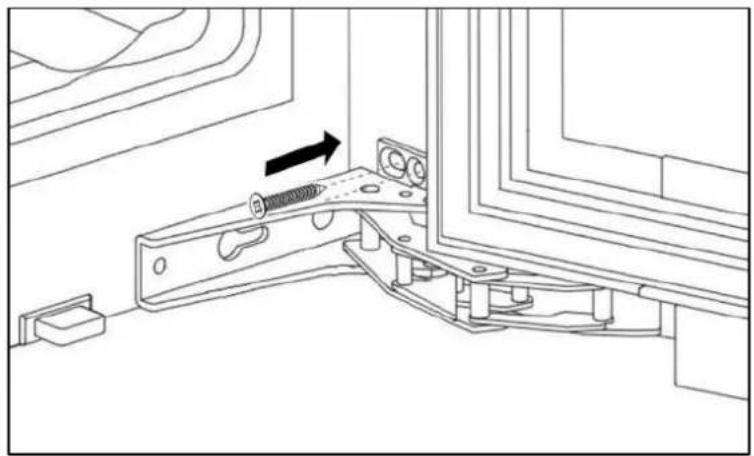
On models with "SOFT" closure, If required, the fixing of the unit can be strengthened by screwing the hinges to the side cabinet, as indicated.
NOTE: this screw is NOT included in the accessories.
3.8. REVERSIBLE OPTIONAL DOOR
WARNING: The side on which the door opens should be indicated at the moment of purchasing the unit, as this must be done by specialized personnel. It can be modified in the future, please consult with our After-sales Service.
DIAGRAM - MODELS FITTED UNDER A WORKTOP

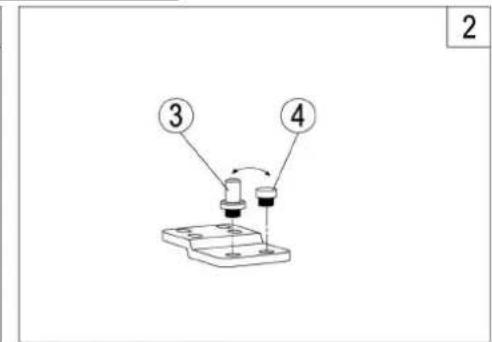


- Remove the lower hinge (1) by unscrewing the four locking screws (2). Be careful to hold the glass door firmly after removing the screws. (Figure 1)
- Gently pull down to remove the glass door from the upper right hinge and place it on a padded surface to avoid the risk of damage. Then remove the upper right hinge (5). (Fig. 3) Unscrew and transfer the hinge (7) and / or door plug (8) from the lower hinge to the opposite side.(Fig. 3)
- Unscrew and transfer the hinge pin (3) and / or the door stop (4) from the lower hinge to the opposite side. (Figure 2).
- Open the cover caps on the left side of the cabinet and use them to cover the screw holes on the right side.
- Screw the alternative upper left hinge (7) to the left side of the cabinet. (Fig. 3)
- Turn the door 180^ and reposition the door in the designated position. Then, screw the lower hinge assembly in the designated position to the left and tighten it once the door is levelled.
- Transfer the handle and plugs to the opposite positions and then reassemble the ventilation grills if necessary.


DIAGRAM - PROFESSIONAL ARTICULATED HINGE WITH CLOSURE "SOFT"

ATTENTION
Be very careful with articulated hinges. The hinge closes automatically and there are many pin points before / during installation
- Unscrew and remove the two screws (1) and loosen the two screws (2). Move the door through the hole and remove it. Be careful to hold the door securely and place it on a padded surface to prevent damage.
- Remove the screws (2). Remove the covers on the opposite side of the cabinet and use them to cover the holes in these screws.
- On the opposite side, screw the screws (2) half way.
- Place the new door on the opposite side, moving the hinge hole by the screws (2). Level and tighten both screws firmly.
- Finally, screw the screws firmly (1)
3.9. GLASS PLINTH (OPTIONAL)
PBE 182-190CRR
PBE 89-66CRR
Only for models:

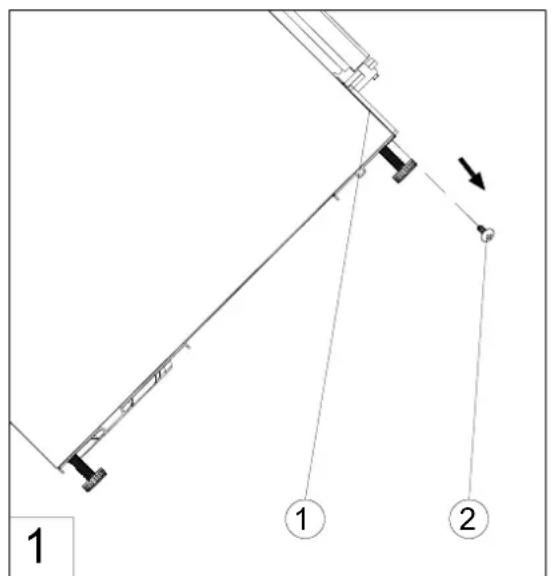
- Unscrew and remove the four screws (2) that are used to fix the metal ventilation plinth (1) and the bottom bracket. (Fig. 1)
- Insert the tabs on the glass fronted plinth section into the top slots of the metal plinth. Manoeuvre the plinth so that the holes in the inner lip of the glass fronted plinth section are level with the holes in the metal plinth. Re-fit the screws (2). (Fig. 2)
NOTE: Do not tilt the appliance further than 90^ during this process. Allow the appliance to settle for at least 8 hours before switching on after tilting.
3.10. BORDEAUX BOTTLE HOLDER
Only for models:
PBE 182-190CRR
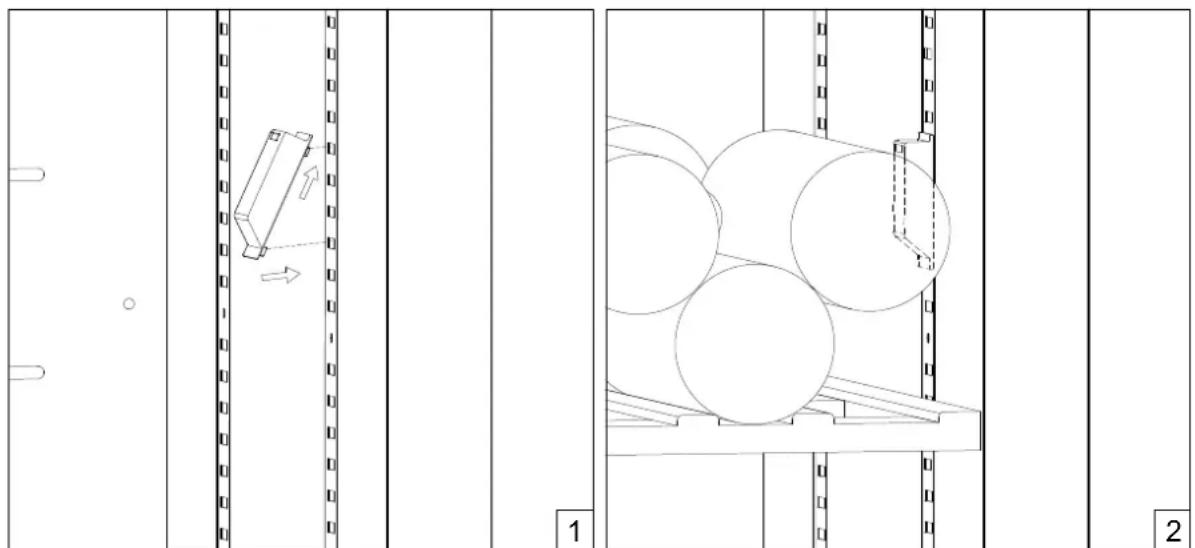
The wine cabinet is designed to load either Bordeaux bottles or Burgundy bottles. In order to keep the bottle stability when loading the Bordeaux bottles, pls follow up below instruction to install the plastic Bordeaux bottle holders (if they are provided) on the side pilasters. When loading the Burgundy bottles, pls remove them.
3.11. SIDE TRIM ANGLES (OPTIONAL)

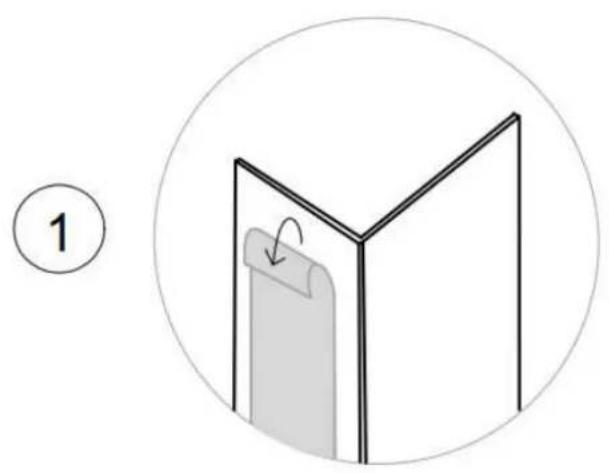
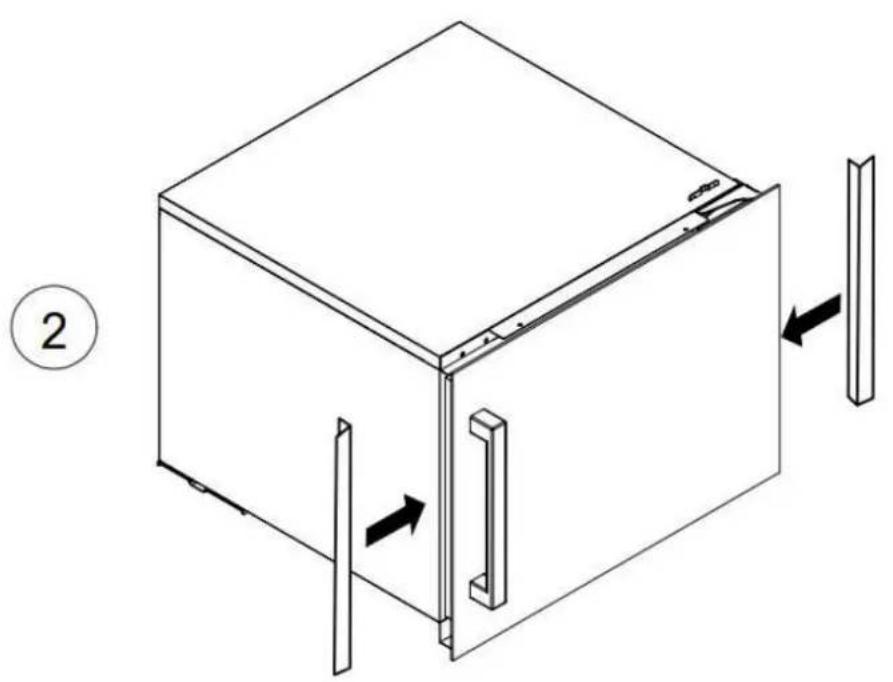
4. OPERATING INSTRUCTIONS
This device is designed to work within certain ambient temperatures. The climate class is specified on the specifications plate.
The appliance may malfunction if it is left working for a long period of time outside the specified temperature range. For example, placing the unit in extreme heat or cold conditions could cause fluctuations in the internal temperature. The range of 5^ and 20^ ( 41^ and 68^ ) will not be achieved.
| Climate class Am | bient temperature |
| SN | +10°C to +32°C |
| N +16°C | to +32°C |
| ST +16°C | to +38°C |
| T | +16°C to +43°C |
NOTE: Units without a heater will not raise the internal temperature if ambient the temperature is lower than the pre-set level.
ATTENTION:
- When using the appliance for the first time, or after restarting after a long period of inactivity, the selected temperature may vary a few degrees from the temperature indicated on the LED panel. This is normal and is due to the activation time. Once the unit has been in operation for a few hours, everything will return to normal.
- If the unit is disconnected, there is a power cut or it is switched off, you will have to wait for 3 to 5 minutes before restarting the unit. If you try to start the unit before, it will not turn on.
5. USE AND OPERATION
5.1. USE AND OPERATION
5.1.1. CONTROL PANEL
FOR A SINGLE ZONE

POWER To turn the appliance off, lightly touch and hold the key for 5 seconds until temperature display goes out. To turn the appliance on, lightly touch and hold the key for 1 second until temperature display lights up.
NOTE: Pressing the button once will disconnect the audible alarm if it is on.

LIGHT Used to turn the internal light on/off.
UP Used to increase the temperature in 1^ steps.
DOWN Used to lower the temperature in 1^ steps.
ILLUMINATED DISPLAY
Shows the temperature and other services.
INDICATOR LIGHT
The indicator light is the dot on the lower right-hand side of the screen. The indicator light turns on when you select the multi-key function. To carry out this function, keep the first key pressed and then press the pause key for at least 5 seconds and then release all keys.
DEGREES ^ C / ^ F SELECTOR
Select the temperature display in degrees Fahrenheit or Centigrade. To change the option, keep the LIGHT key pressed for 5 seconds.
TEMPERATURE CONTROL ADJUSTMENT
- The unit has a single temperature zone. Temperature can be adjusted from 5^ to 20^ (41°F and 68°F), ideal for storing red, white or sparkling wine.
- When the unit is plugged in for the first time, it will start with the factory pre-set values. Predefined temperature is 12^ (54°F).
- You can adjust the temperature as needed by pressing the UP or DOWN keys. If both keys are pressed at once, the screen will display the last predetermined temperature. The temperature will increase by 1^ / 1^ when the UP key is pressed once, or will decrease by 1^ / 1^ when the DOWN key is pressed once. The screen will blink while the adjustment is being made.
- When the temperature has been set, the screen will display the current interior temperature.
- To see the system temperature at any time, press the UP or DOWN key, the established temperature will be displayed temporarily for 5 seconds. Then the screen will display the current interior temperature again.
FOR DOUBLE ZONE
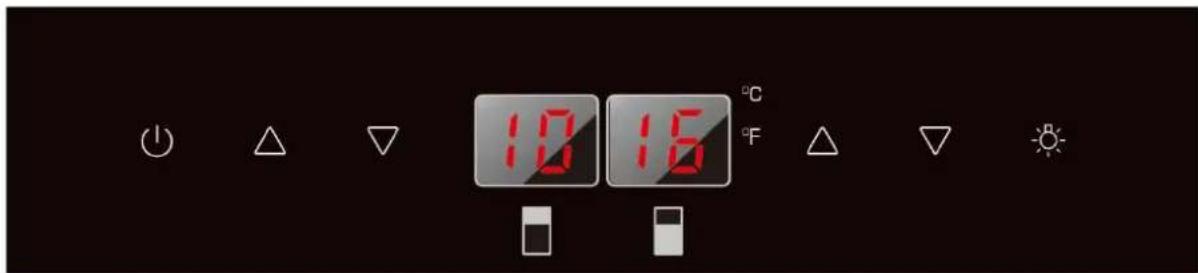
POWER To turn the appliance off, lightly touch and hold the key for 5 seconds until temperature display goes out. To turn the appliance on, lightly touch and hold the key for 1 second until temperature display lights up.
NOTE: Pressing the button once will disconnect the audible alarm if it is on.

LIGHT Used to turn the internal light on/off.

UP Used to increase the temperature in 1^ steps.

DOWN Used to lower the temperature in 1^ steps.
ILLUMINATED DISPLAY Shows the temperature and other services.

The upper refrigeration zone.

The lower refrigeration zone.
INDICATOR LIGHT
The indicator light is the dot on the lower right-hand side of the screen. The indicator light turns on when you select the multi-key function. To carry out this function, keep the first key pressed, press the pause key for at least 5 seconds and then release all keys.
DEGREES ^ C / ^ SELECTOR
Select the temperature display in degrees Fahrenheit or Centigrade. To change the option, keep the LIGHT key pressed for 5 seconds.
TEMPERATURE CONTROL ADJUSTMENT
The unit has two independent temperature zones. The temperature of both zones can be adjusted from 5^ to 20^ (41°F to 68°F). The LOWER temperature zone is ideal for storing white and red wine from 13^ to 20^ (55°F to 68°F). The UPPER temperature zone is ok for white wine from 5^ to 13^ (41°F to 55°F).
-
When the unit is plugged in for the first time it will start with the factory pre-set values. The temperature programmed in the factory for the upper temperature area is 8^ ( 46^ ) and for the lower temperature zone is 12^ ( 54^ ).
-
Press the keys on the left UP and DOWN to control the internal temperature of the upper temperature zone and press the keys on the right up and down to control the internal temperature of the lower zone. If both keys are pressed at once the screen will display the last predetermined temperature.
-
IMPORTANT: The temperatures of the two zones can be equalized, obtaining the same temperature throughout the wine cellar.
In the case that unequal areas are desired, the temperature of the upper zone must always be the colder one and the lower zone the less cold.
TO EQUAL THE TEMPERATURES, press the up or down keys until the desired temperature value is achieved.
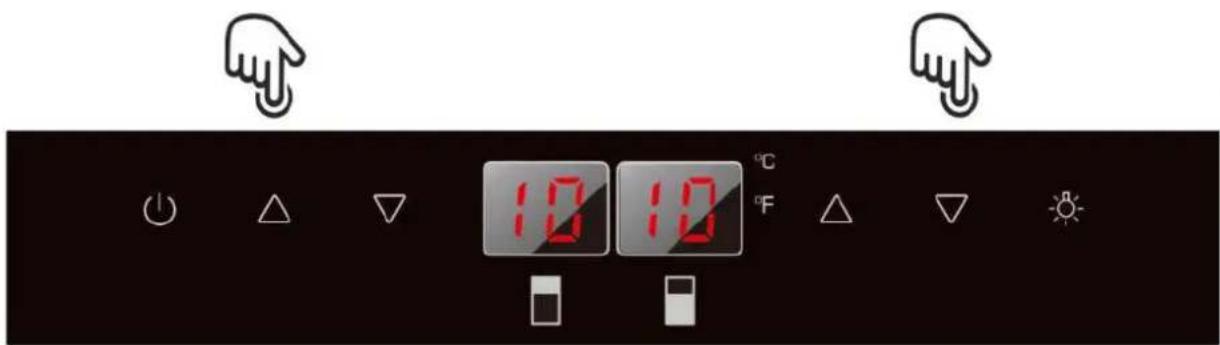
TO UNEQUAL THE TEMPERATURES, press the central keys up or down until the desired temperature value is achieved.
NOTE: The temperature of the upper zone always has to be lowest, than the temperature of lower zone.

-
The temperature to be set will increase in 1^ or 1^ F steps when pressing the UP sign once, and will decrease by 1^ C or 1^ F when pressing the DOWN sign once. The screen will blink while the adjustment is being made.
-
When the temperature has been set, the screen with display the actual interior temperature on the particular zone.
-
To see the system temperature at any time, press the UP or DOWN keys. The temperature setting will blink temporarily in the screen for 5 seconds. Then the screen will display the current interior temperature again.
FOR SINGLE ZONE WITH LCD DISPLAY (PBE MODELS)
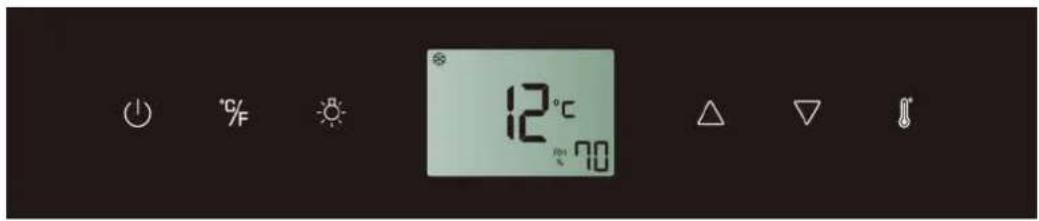
POWER To turn the appliance ON, lightly touch and hold the key for 1 second until temperature display goes on. To turn the appliance OFF, lightly touch and hold the key for 5 seconds until temperature display goes off.
NOTE: Touching the key once can switch off the audible alarm when the alarm is on.
^ F °F/°C Selector Set the temperature to be displayed in °Fahrenheit or °Celsius.
LIGHT Used to turn the inner light on/off.
UP Used to increase (warm) the set temperature by 1^ / 1^ .
DOWN Used to decrease (cool) the set temperature by 1^ / 1^ .
Setting Selector Select the temperature and humidity you want to set.
ICONS ON THE DISPLAY:
- The following symbols will be automatically displayed on the screen as appropriate, being managed by the unit itself.

Temperature or Error code display for the upper zone
Temperature or Error code display for the middle zone
Temperature or Error code display for the lower zone
Compressor is ON
Heater is ON
Defrosting mode
Warning
Alarm
- The following symbols will be shown on the screen according to user selection.

Dynamic Climate mode
DEMO
Eco Demo mode

The interior light is in Showcase mode

Relative humidity display
SETTING THE TEMPERATURE CONTROL
- The unit has a single adjustable temperature zone. The temperature can be set between 5^ and 20^ ( 41^ and 68^ ). It can be used as a wine maturing cabinet or a wine serving cabinet. The recommended temperature setting range for maturing wine is between 11^ and 14^ ( 52^ and 57^ ). The recommended temperature setting range for serving white wine is between 5^ and 10^ ( 41^ and 50^ ) and the recommended temperature setting range for serving red wine is between 15^ and 20^ ( 58^ and 68^ ).
- When the unit is plugged in for the first time, the unit will power up automatically to the preset defaults. The temperature preset at the factory is 12^ ( 54^ ) (ideal maturing temperature).
- Touch the Setting Selector until the temperature you want to set is flashing. Then you can use the UP and DOWN keys to set the internal temperature as required. When you touch either key at the first time, the display will show the last temperature set previously.
- The temperature will increase 1^ / 1^ if you touch the UP key once, or the temperature will decrease 1^ / 1^ if you touch the DOWN key once. The display flashes while you make the setting.
- The set temperature will temporarily flash in the display for 5 seconds after the temperature has been set. Then the display shows the current inner temperature again.
- To view the set temperature at any time, touch the Setting Selector key, the set temperature will temporarily flash in the display for 5 seconds. Then the display shows the current inner temperature again.
SETTING THE HUMIDITY CONTROL
- Humidity level can be kept automatically for models with humidity pump.
- Touch the Setting Selector until the humidity display is flashing. Now you can use the UP and DOWN key to choose the relative humidity setting from 50% to 80% and 00% . The set humidity will temporarily flash in the display for 5 seconds. Then the display shows the current inner humidity again. The humidity preset at the factory is 70% (ideal wine storage humidity).
- When 00% is selected, the humidity pump will be switched off. The humidity pump increases the energy consumption of the unit. If the function is not necessary, please switch it off. The rated energy consumption is based on the function is switched off.
5.1.2. SHELVES AND STORAGE
WARNING: Do not pull out more than one full shelf at once, as this could cause the unit tip forwards. Some shelves are designed to store more than one layer of bottles. These shelves should not be slid out if there is more than 1 layer of bottles on them.
WARNING: Do not attempt to slide the shelves out further than the stop position, to avoid bottles falling.
WARNING: To avoid damage to the door seal, make sure that the door is completely open when you pull a shelf out of the compartment.
All the wine shelves slide, for easy access, except the bottom shelf. To access the bottles easily, pull the shelf out gently until it stops. The shelves are designed with an emergency stop to prevent them coming out too much while the bottles are being loaded.
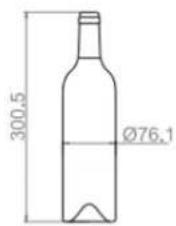
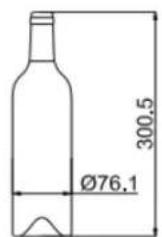
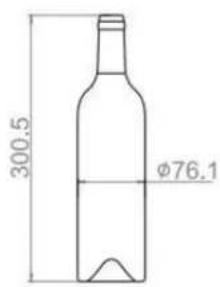
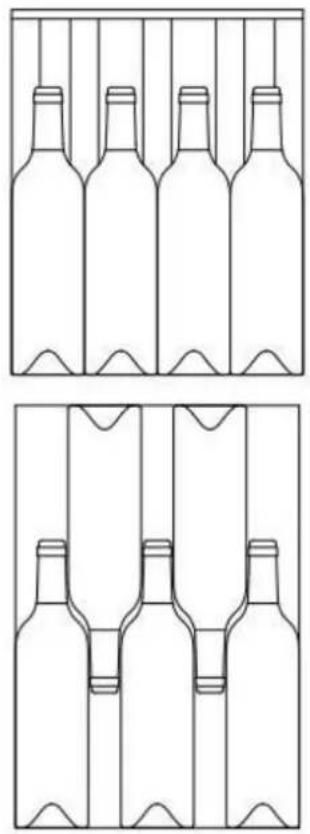
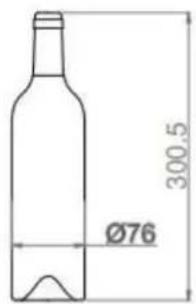
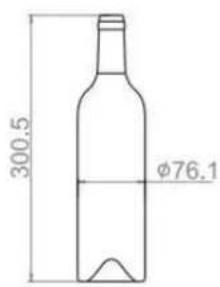
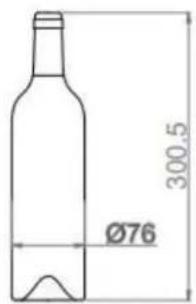
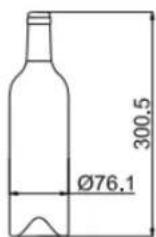
WARNING: The bottles may vary in size and dimensions. Different formats in size and diameter can be found in the market. For that reason, the actual number of bottles to store could vary. The maximum capacity of the wine rack is produced with traditional Bordeaux bottles of 750 ml. with a bottle height of up to 30cm.
- You can store your bottles of wine in a single row or stacked, taking the following into account: If you do not have enough bottles to fill the cabinet, it is better to distribute them, so as to avoid them being all at the top or all at the bottom.
- Do not remove or change the wooden shelves to make room for larger bottles or to increase the capacity by piling them all up. (See removing shelves)
- Maintain a small space between the walls of the cabinet and the bottles to allow for air circulation. Like in an underground cellar, air circulation is important to avoid mould and maintain a more homogenous temperature.
- Do not overload the cabinet, to facilitate air circulation.
- Place the bottles flat.
- Avoid obstructing the internal fans (located inside the rear panel of the unit)
- Do not place any contaminants inside. Only store wine in your unit, to guarantee an environment free from smells.
- Only store unopened wine bottles. Storing opened bottles could give rise to spills.
5.1.3. DYNAMIC CLIMATE MODE / SILENT MODE (ENERGY SAVING)
The wine cellar is supplied originally with the Silent Energy Saving mode activated. Dynamic Climate mode is recommended for storing wines for long term in excellent conditions. In this mode the indoor fan distributes the air evenly and keeps the relative humidity and temperature stable throughout the cavity, even when the set temperature has been reached. Due to the continuous use of the fan, small noises may occur and the energy consumption is higher.
- To turn on Dynamic Climate mode, press and hold down the "▼" key for about 5 seconds until it beeps 5 times.
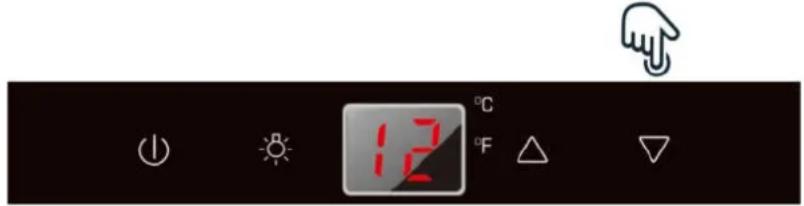
- To turn off Dynamic Climate mode or turn on Silent Energy Saving mode, press and hold the "▲" key for about 5 seconds until 3 beeps are emitted.

5.1.4. DISPLAY OFF MODE
This mode will turn off the illumination of the displays, the interior light and the audible alarms, which will not be heard. Pre-existing cooling operations will continue functioning normally.
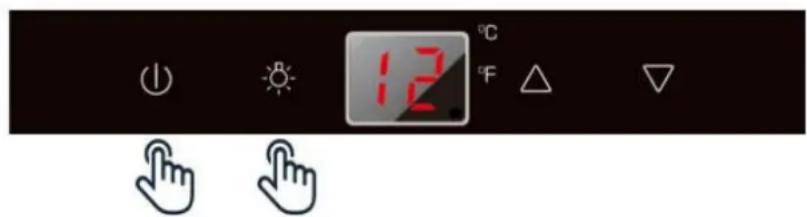
To enter "DISPLAY OFF" mode, press the ON and LIGHT keys at the same time for at least 5 seconds. The display will blink four times to confirm the mode is ACTIVE.

The "DISPLAY OFF" mode can be cancelled by repeating the same procedure. This mode will turn off automatically after 48 or 96 hours.
5.1.5. ECO DEMO MODE
Eco Demo mode can be activated on presenting the unit in exhibitions or sales outlets. In Eco Demo mode, the compressor and all the fans are off.
For models PVMB
ACTIVATE:
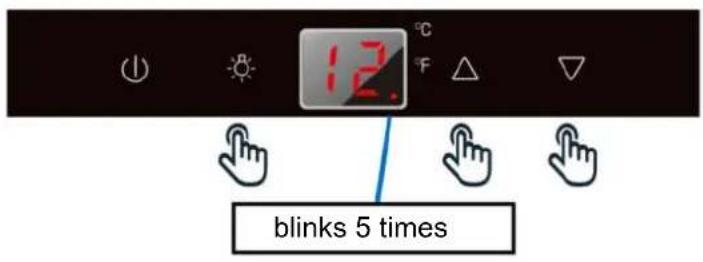
Press the UP and DOWN keys (Upper zone controls in models with two zones) and the LIGHT key together for at least 5 seconds, the indicator light will blink five times to confirm the order and the unit will operate in Eco Mode (demo).

DEACTIVATE:
Deactivate by using the same procedure above.
For models PVMAV
ACTIVATE:
Press the UP and DOWN keys (Upper zone controls in models with two zones) and the LIGHT key together for at least 5 seconds, the indicator light will blink five times to confirm the order and the unit will operate in Eco Mode (demo).
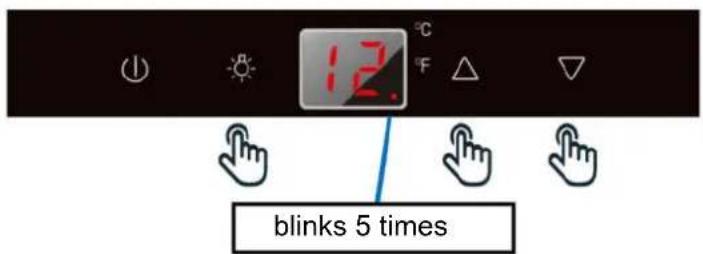

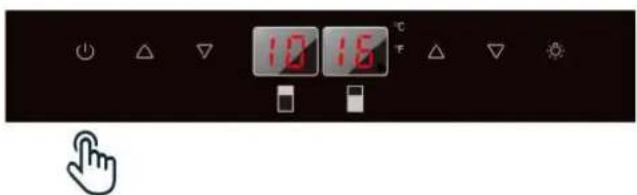
DEACTIVATE:
- Press the START / STOP button for at least 5 seconds, until the unit display turns off completely.
- Then, reconnect the unit by pressing the START / STOP button for 1 second until the display lights again and the unit starts up again. The unit will NO longer work in Eco mode (demo)

5.2.PUSH AUTOMATIC OPENING FUNCTION
Only for models:
- PVMAVP 45-18
PVMAVP 60-25 - PVMBP 60-45
- PVMAVP 88-49
- PVMAVP 124-70
- PVMAVP 178-112
The PUSH function of opening and closing the door is activated when the unit is switched on. To open the door, press firmly on the upper front centre and release again. The door will open approx. 2 7 cm. by the push piston housed in the frame. Then the door can be opened completely manually.

NOTE: Do not block the door or hold it while it is opening. If the door is locked or held during opening, the door opening mechanism - push piston - and the door will be damaged, potentially causing serious damage not covered by the warranty.
Do not push the opening piston or hold it during closing. If the piston is blocked during closing or is inserted inside its base, it can no longer reach its initial position.
In the initial position, the opening piston is aligned with the front of the control panel. To return the opening piston to its initial position, disconnect the appliance from the mains, wait approx. 10 seconds and plug it back. The piston will return to its initial position.
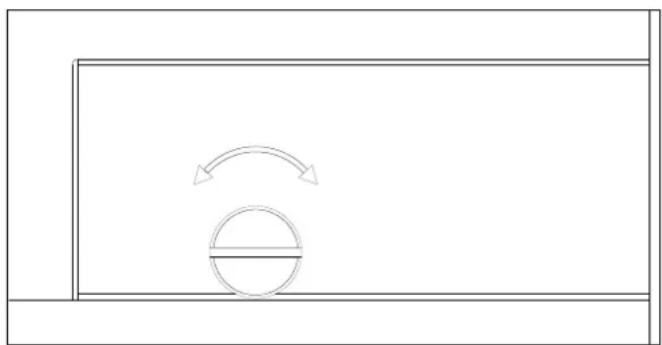
The door on the unit is sensitive to pressure. The pressure to open the door is possible to adjust as following steps:
- Open the door.
- Rotate the screw on the top middle of door counterclockwise to increase the sensitivity and clockwise to decrease the sensitivity.
- Close the door and check if it is correctly adjusted. Rotating the screw counterclockwise too much can cause the door to open automatically even without pushing. In reverse rotating the screw clockwise too much can cause the door not to open even with heavy pushing.
5.3 SHELVES
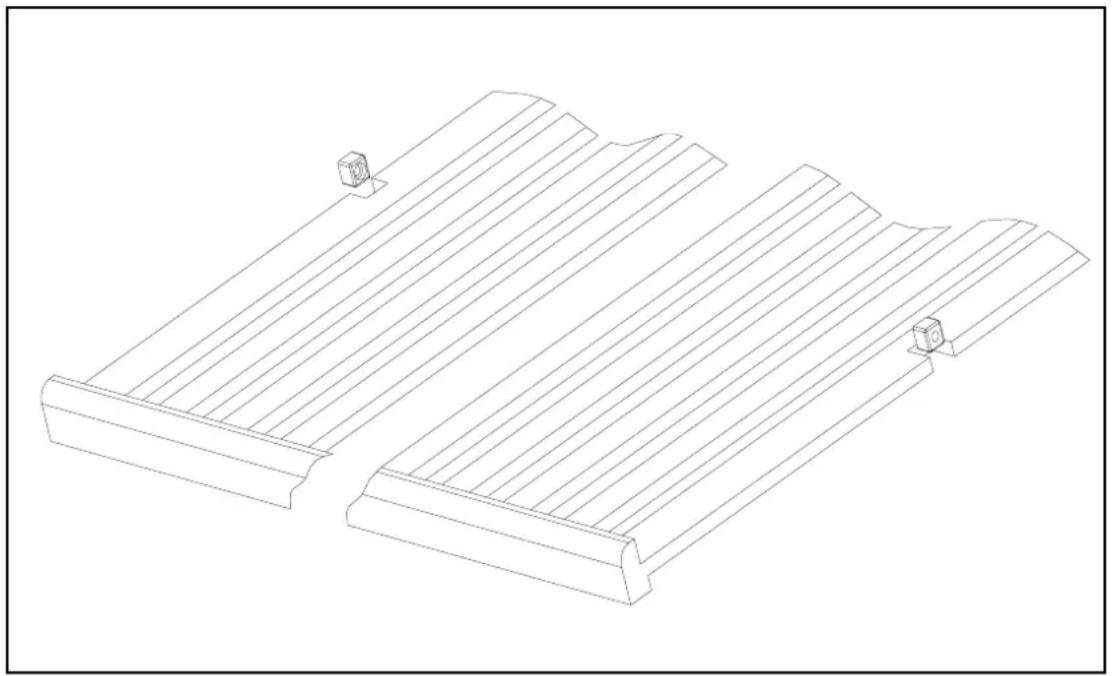
To remove any of the shelves from the rail compartment, move the shelf to the position where the notch of wooden shelf is exactly under the plastic post and then lift it up and out.
In order to replace the shelf, repeat steps described above in reverse. And make sure to engage the shelves with the small pegs of the extended rails when the model is equipped with roller system.
5.4 NOISE DURING OPERATION
This unit uses a compressor for cooling. The compressor pumps coolant through the cooling system, which produces some operating noise. Even when the compressor stops, noises caused by temperature and pressure changes are unavoidable. The operating noises will be more audible just after switching off. The unit will be quieter when it has been working continuously for a time.
The following noises are normal and occur now and then:
- "Bubbling" noise caused by the coolant flowing through the coils of the appliance.
- Buzzing produced by the motor / compressor. This noise may be louder for brief periods when the motor starts up.
- Clicks/ soft noises, resulting from contraction and expansion of the materials cause by temperature differences.
- Fan noise, while circulating air inside the wine cabinet.
- Unusual noises are normally the result of incorrect installation. Under no circumstances should the radiator tubes touch a wall, furniture or other tubes.
- If the unit is installed in an open-plan kitchen or in partition walls, operating noises could be more audible. This, however will be due to the surrounding architecture and not the unit itself.
- Noise perception is directly linked to the surroundings of the unit, as well as the specific model. Our appliances are in line with international standards and the latest technologies. But please remember that noises produced by the compressor and the coolant are inevitable.
5.5 DEFROSTING / HIGROMETRY / VENTILATION
The unit has an automatic defrosting system. During the "switching off cycle" the evaporator at the rear of the unit will automatically defrost.
Condensation is accumulated in the drainage tray at the rear of the unit and some of it flows through the drainage hole in the drip tray above the compressor.
Heat is transferred from the discharge tube or the compressor, evaporating any condensation accumulated in the tray. Part of the remaining water is collected inside the unit for humidity purposes.
This system keeps correct humidity inside the unit, something that natural cork, needs to maintain its sealing properties and long life.
The unit is not completely sealed from the outside: Fresh air can enter through the drainage tube. Air circulates through the unit, moved by a fan/fans through the gaps between the shelves.
NOTE: Frost may accumulate on the evaporator if the unit is opened frequently and it is very hot or the unit is located in a very humid place. If the frost does not disappear within 24 hours, the unit will require manual defrosting.
IMPORTANT:
Do not locate the wine cabinet, especially integrated models, with sources of heat under it, such as freezers, ovens, stoves, etc.
This may result in the compressor working all the time and the unit will produce an excessive amount of ice, affecting correct operation of the internal fans and the compressor itself.
5.6. TABLE WITH WINE SERVING TEMPERATURES
All wines mature at the same temperature, which is a constant temperature set between 11^ and 14^ . The table below indicates the best temperature for drinking wines:
| RECOMMENDED TEMPERATURES FOR SERVING WINE | ||
| SPARKLING WINES Cava, | Cremat, Champagne, Saumur, Sekt. 4-7 °C | |
| SPECIAL SPARKLING WINES | Milesimé champagne. 9-8 °C | |
| LIGHT WHITE AND DRY WINES | Penedes, Alvariño, Sauvignon from Alsace. 6-8 °C | |
| WHITE SEMI-DRY AND COMPLEX WINES | Burgundy, Chardonnay Navarre and Catalan, Gravés, Rioja, Aulese. | 9-12 °C |
| WHITE FORTIFIED Sauterne, late harvesting. 11-13 °C | ||
| ROSE Can be served very cold 5-8 °C | ||
| YOUNG RED WINES Loire, Rioja alavesa, Côtes-du-Rhone 10-12 °C | ||
| PINOT NOIR RED WINES Burgundy 16-17 °C | ||
| ORDINARY RED WINES Bordeaux, Burgundy, Rioja | 14-15 °C | |
| GRANS CRUS Ribera del Duero, Cruz classé Bourdeaux, Côte-Rotie. 17-18 °C | ||
| SPECIAL WINES Jerezmino (Sherry). | 9-11 °C | |
| SPECIAL WINES Amontillado Sherry, Oloroso Sherry, Madeira, Port wines. | 15-16 °C | |
| SPECIAL WINES Vintage Port. | 16-18 °C | |
| SPECIAL WINES Natural sweet wines | 8-10 °C | |
IMPORTANT INFORMATION ABOUT TEMPERATURE
Your unit has been designed to guarantee optimum storage conditions and/or serving temperature for your wines.
Quality wines require longer and milder maturing and need specific conditions to reach their full potential.
Only the "tasting" temperature varies according to the type of wine (See "Table with temperatures for serving wine" above). The same as in natural cellars used by wineries for long-term storage, more than the exact temperature, what is important is temperature "consistency". In other words, as long as the temperature in your cellar is constant (11^ - 14^) your wines will be stored in perfect condition. Not all wines improve with aging. Some must be consumed young (2 - 3 years), while others have an enormous capacity for aging (50 years or more). All wines have an optimum state of maturation. Consult with your wine provider to obtain this information.
6. CARE AND MAINTENANCE
WARNING: If you do not disconnect the unit before maintenance or cleaning, there is the risk of an electric shock or harm.
6.1. HUMIDITY CONTROL
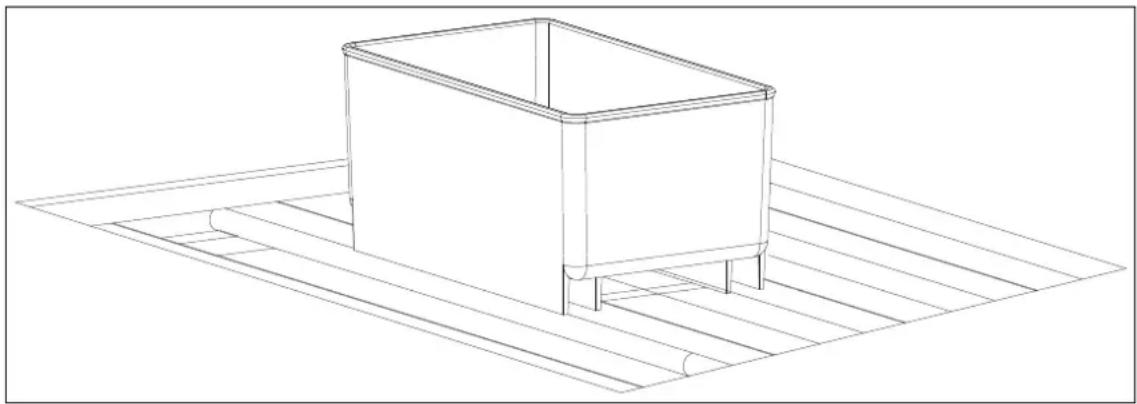
The unit has a system to maintain the correct level of humidity. In extremely dry conditions, it may be necessary to add a little water to the humidity box supplied with your wine cabinet.
Fill the small plastic tank (humidity box) to 34 capacity with water, and insert it in the guides in the top shelf of the appliance. Check the level of water regularly and refill as necessary.
Make sure that the tank is correctly located on the guides of the top shelf to avoid water spillage.
6.2. CLEANING THE UNIT
Disconnect the power, unplug the appliance and remove everything inside, including the shelves.
Wash the interior surfaces with warm water and sodium bicarbonate (Baking soda) The solution should be approximately 2 spoons of sodium bicarbonate to a liter of water.
Wash the shelves with a mild detergent solution.
Dry any excess water with a sponge and a cloth to clean the control area Displays / front buttons.
Wash the exterior with hot water and mild liquid detergent. Rinse well and dry with a soft clean cloth.
Do not clean stainless steel parts with metal scouring pads or abrasive sponges. It is recommended to use an all-in-one stainless steel cleaner and always wiping in the direction of the grain.
6.3. ACTIVED CHARCOAL ODOR FILTER
Only for models:
PVMAVP 45-18
- PVMAVP 60-25
PVMAVP 178-112
PBE 180-190
PBE 89-66
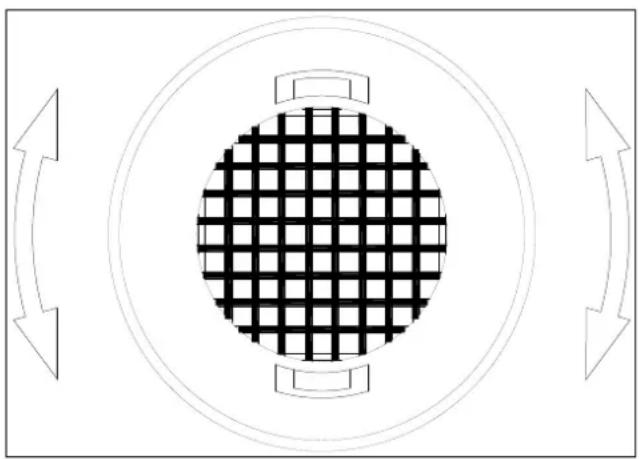
The active charcoal air filter is located in the back of compartment. Replace it with a new one once a year.
1 Remove the shelf in front of the filter.
2 Grip the filter and turn it 90^ clockwise or anti-clockwise to remove.
3 Insert the new filter in the vertical position and turn it 90^ clockwise or anti-clockwise until it clicks into position.
6.4. POWER CUTS
In case of a power cut, all the temperature settings will be memorized automatically. If there is a power cut (Voltage surge, circuit breaker, etc.) and it is later switched on, the unit will restart at the last temperature setting.
Most power cuts last a few hours and should not affect the temperature of the unit if you minimize the number of times the door is opened. If power is going to be cut for a longer period, it will be necessary to take measures to protect the contents.
NOTE: Regardless of the cause, if you notice an abnormal temperature or variations in the level of humidity inside the unit, only long and frequent exposure to these abnormal conditions can have adverse effect on your wine.
6.5. DURING HOLIDAYS/ LONG ABSENCE
Short holidays: Leave the unit working during holidays lasting less than three weeks.
Long absence: If you are not going to use the unit for several months, empty it, switch it off and unplug it. Clean the inside and dry well. To avoid mould growing and bad smells, leave the door ajar, blocking it is necessary.
6.6. MOVING THE UNIT / CHANGING LOCATION
Unplug the unit.
Remove the contents of the trays and all removable parte from the inside. Raise the adjustable feet to the base to avoid damage.
Seal the door closed and make sure it is locked.
Only transport the unit in vertical position. In addition, protect the exterior of the unit with a blanket or similar element.
6.7. ADVICES FOR SAVING ENERGY
- If the unit is left empty for long periods of time, it is recommended that it is disconnected and after careful cleaning, leave the door ajar for the air to circulate in the cabinet and avoid condensation, mould or smells.
- The unit should be installed in the coldest area of the room, away from appliances that generate heat, and out of direct sunlight.
- Make sure that the unit is properly ventilated. Never obstruct the air outlets. Clean dust and dirt off the condenser regularly.
- Open the door only when necessary, keeping it open as short a time as possible. Store the wine tidily.
- Do not overfill the unit so that air can circulate properly.
7. TROUBLESHOOTING
Many common problems are easy to solve, avoiding a call to the technical service.
Try the following suggestions to solve the problem before calling the customer/after sales service.
| PROBLEM | POSSIBLE CAUSE | SOLUTION |
| The unit does not work. | ·Connect the unit. ·Switch on the unit. ·Reset the circuit breaker / ICP or change the burnt-out fuse. | |
| The unit does not cool enough. | ·The temperature has not been correctly set. ·Ambient temperature requires a higher temperature setting. ·The door is opened very frequently. ·The door is not completely closed. ·The door does not close hermetically. ·The condenser is too dirty. ·The ventilation opening is obstructed or contains too much dust. | ·Check the temperature setting ·Select a higher temperature. ·Do not open the door unless strictly necessary. ·Close the door with care. ·Check the door seal and clean or replace it. ·Clean the condenser when necessary. ·Remove obstructions and clean out the dust. |
| The unit turns on and off frequently. | ·Ambient temperature is higher than average. ·Many bottles have just been added to the unit. ·The door is opened very frequently. ·The door is not completely closed. ·The door does not close hermetically. | ·Place the appliance in a cooler location. Let the appliance work for a time until it has reached the selected temperature. ·Do not open the door unless strictly necessary. ·Close the door with care. ·Check the door seal and clean or replace it. |
| The light does not come on. | ·The unit is not connected to the mains. ·Circuit breaker triggered / ICP or fuse burnt out. ·The light was switched off from the front panel. | ·Connect the unit. ·Reset the circuit breaker / ICP or change the burnt-out fuse. ·Switch on the light using the front panel. |
| Vibrations. | ·The unit is not exactly level. | ·Level the unit using the adjustable feet. |
| The appliance makes noises. | The rattling noise may come from the flow of the coolant, this is normal. At the end of each cycle, you may hear gurgling noises made by the flow of coolant in the appliance. If there are temperature fluctuations, contraction and expansion of internal walls may make cracking noises. | |
| ·The unit is not exactly level | ·Level the unit using the adjustable feet. | |
| The door does not close correctly. | ·The door opening side was changed and it has not been correctly fitted. ·The seal is dirty. ·The shelves are incorrectly positioned. ·The appliance is not properly levelled. | ·Check the door seal and refit correctly. ·Clean the door seal. ·Check the shelves and refit correctly. ·Level the appliance with the adjustable feet. |
PROBLEM POSSIBLE CAUSE SOLUTION
Front panel displays - "E0", "E1". "E2", "E3", "E4", "E5", "E6".
-
Error codes
-
Try to restore the controls with a "Reset". (Disconnect from the mains for 5 minutes)
Front panel displays "E7".
-
Indicates the door switch failure
-
If the problem persists, call Technical Service.
The alarm sounds and the display is flashing
-
Has the door been open for more than 60 seconds?
-
Check that the door closes properly and that the sensor is not dirty or obstructed.
If not, the temperature has risen or has fallen below the temperature established. This may have been due to:
-
If this is the case, close the door.
-
The door is opened very often.
-
Do not open the door more than necessary.
The ventilation opening is obstructed or contains too much dust.
- Remove the obstructions and clean out the dust.
A long power cut.
-
Let the device work for some time until it has reached the selected temperature.
-
Many of bottles have just been added to the unit.
The alarm sounds and the display panel DOES NOT blink. (door alarm)
-
Has the door been open for more than 60 seconds?
-
Close the door or press the POWER button to turn off the alarm. The alarm will stop when the door is closed
The icon "-" is lit up and blinking on the display
-
The temperature on the Display is out of range.
-
The appliance only shows temperatures within a range of 0 99^ F/-9 37°C. If the temperature is not within this range, the icon "-" with be displayed instead.
Condensation on the outside of the door glass
High Humidity in the environment
- During periods of high humidity, it may appear drops of water on the outside of the door glass. These will disappear when the humidity level drops. It is advisable to install the unit in a place with sufficient ventilation, in a dry place and / or with air conditioning.
The display temperature does not correspond to the real one
-
Differential temperature relationship between both zones is out of range. Greater than 10^
-
Lower temperature difference between zones.
8. FAQ's (Frequently Asked Questions)
- What are the storage conditions that concern collectors and consumers of good wine?
Light, humidity, temperature and vibration.
- What is the ideal temperature for wine?
The ideal temperature to store wine is 11^ - 14^ ( 52^ 57^ ). Nevertheless, any temperature between 5^ 20^ ( 41^ 68^ ) will be ok, as long as it is a constant.
- What is the ideal humidity for wine?
Humidity between 60% -70% is an excellent range to store wine. High levels of humidity maintain humidity inside the bottle, thus avoiding evaporation through the cork. Excessively high levels of humidity are often the cause of development of microorganisms that can prematurely age the wine and even spoil it.
- Storage temperature often seems to vary 3 or 4 degrees.
This is normal: Small differences in temperature are necessary for the appliance to work correctly. When the unit begins the defrosting cycle, the temperature may increase slightly. When the refrigeration system comes back into action, temperature falls again.
These changes occur in a short period of time and their effect is minimum on the preservation of the wine. Liquid tends to maintain an average temperature with a margin of +/- 2^ . For example, if the temperature of a swimming pool is 25^ and during the night the external temperature drops to 18^ , the temperature of the water will not vary so much. In early morning, it will only be 22^
- Water has accumulated on the floor or at the rear of the unit.
Make sure that the drainage hose inside the appliance is correctly fitted to the water collection tray at the rear. If it is Ok, when there is a lot of humidity you will have to mop up the excess water with a sponge.
- There is water on the interior wall of the unit.
At time of maximum humidity this can happen if the door is opened too frequently.
- The unit seems never to switch off: it is always working.
Make sure the door is closed correctly. Place a thermometer inside the cabinet to see if the unit is displaying the same temperature.
- Vapor / condensation on the glass door.
This may happen in very humid times, especially in the summer.
Make sure the unit is installed according to the instructions in the manual, more specifically regarding ventilation, which is highly important for optimum operation and to avoid breakdowns. Regarding condensation on the outside of the glass door, this is normal and natural in certain circumstances when there is a high exterior temperature, high relative humidity, a room or kitchen without proper ventilation, a room the has been closed for a long time and the cold door of the cabinet will produce condensation.
8. FAQ's (Frequently Asked Questions)
9. The interior fan motors turn on and off even when the set temperature is reached.
To circulate air and maintain the set temperature inside the cabinet, the interior fans will turn ON and OFF when the compressor is on in Dynamic Climate mode. The fan will turn on and off every 20 seconds, approximately. Thus, is normal and serves to circulate air as well as to ensure the operating status of the fans. If the fan is completely off and does not complete the cycle, it is not working. The Dynamic climate mode is factory pre-set. If the user finds it noisy, the SILENT mode can be selected by pressing the UP key for at least 5 seconds until hearing "B B B" three sounds the confirm that silent mode is active.
10. It is not possible to set the high and low temperatures separately – both are adjusted at the same time (Raising one, raises the other as well, etc.).
This is normal: The temperature setting for the LOWER ZONE should always be the same or higher than the UPPER ZONE. So, when the user adjusts the temperature of one of the zones, if the above condition is not met, the temperature setting of the second zone will change automatically to conform to the conditions.
11. It seems that the control panel is not working.
The control panel of this appliance has auto-locking, to avoid undesired manipulation of the settings. This is automatically activated 2 minutes after the control panel is left untouched. To unlock the control panel, press UP and DOWN keys together for 5 seconds.
12. The fans are constantly working. Is this is normal?
To circulate air and maintain the set temperature inside the cabinet, the interior fans will turn ON and OFF when the compressor is on in Dynamic Climate mode. The fan will turn on and off every 20 seconds, approximately. This is normal and serves to circulate air as well as to ensure the operating status of the fans. Fans working continuously. If the fan stops compete, and does not complete the cycle, the fan is not working.
13. The digital screen works. But the unit is not cooling.
Check to see if the unit is in "Demo Eco mode". Simultaneously press "UP", "DOWN" and "LIGHT" at the same time for at least 5 seconds to exit Demo Eco mode.
14. The digital screen, the light and the sound do not work, but the unit is cooling well.
Perhaps the unit is in "display OFF" mode
15. Ice is building up at the bottom rear (compressor area) obstructing the fan and causing the unit to malfunction.
Check that the lower part or in the vicinity, especially in built-in models, there is another appliance producing heat, such as a freezer, oven, etc., THE WINE CABINET SHOULD NOT BE PLACED IN THESE LOCATIONS.
- TECHNICAL SPECIFICATIONS
| SPECIFICATION | PVMAV 45-18 / PVMAVP 45-18 | PVMAV 60-25 / PVMAVP 60-25 | PVMAV 88-49 / PVMAVP 88-49 | PVMAV 124-70 / PVMAVP 124-70 | PVMAV 178/112 / PVMAVP 178/112 | PBE 89-66 | PBE 182-190 |
| Number of Sections | 1 | 2 | 2 | 2 | 2 | 1 | 1 |
| Cold sections insulation | Yes | Yes | Yes | Yes | Yes | Yes | - |
| Wine Storage Bottles with Full Sliding Shelves - Total | 18 | 25 | 49 | 70 | 112 | 66 | 190 |
| Bottle height (mm) 300 | 300 | 300 | 300 | 300 | 300 | 300 | |
| No. Trays removable wood Haya | 2 | 3 | 5 | 9 | 15 | 2 | 4 |
| No. Trays fixed department | 1 | 1 | - | - | - | - | - |
| Light Yes | Yes | Yes | Yes | Yes | Yes | Yes | |
| Temp. Control (Electronic-Digital/Mechanical) | Electronic-Digital | Electronic-Digital | Electronic-Digital | Electronic-Digital | Electronic-Digital | Electronic-Digital | Electronic-Digital |
| Temp. Range (°C/°F) 5~20°C | 5~20°C | 5~20°C | 5~20°C | 5~20°C | 5~20°C | 5~20°C | |
| Temp. Range - Zone One (Upper or Left) (°C/°F) | 5~20°C | 5~20°C | 5~20°C | 5~20°C | 5~20°C | 5~20°C | 5~20°C |
| Temp. Range - Zone Two (Lower or Right) (°C/°F) | N.A | 5~20°C | 5~20°C | 5~20°C | 5~20°C | 5~20°C | N.A |
| Defrosting (Automatic/Semi Automatic/Manual/Frost Free) | Automatic | Automatic | Automatic | Automatic | Automatic | Automatic | Automatic |
| Humidity Control (Humidity Box) | Humidity Box | Humidity Box | Humidity Box | Humidity Box | Humidity Box | Humidity Box | Humidity Box |
| Heating Yes | Yes | Yes | Yes | Yes | Yes | Yes | |
| Temperature Alarm System | Yes | Yes | Yes | Yes | Yes | Yes | Yes |
| Door Alarm System Yes | Yes | Yes | Yes | Yes | Yes | Yes | |
| Deodorizer - Active Charcoal Filter | No | No | No | No | Yes | Yes | Yes |
| Wine Storage Compartment Humidity | Yes | Yes | Yes | Yes | Yes | Yes | Yes |
| Control System Humidity Pump for humidity control | NO | NO | NO | NO | NO | Yes | Yes |
| °C/°F Temperature Display | Yes | Yes | Yes | Yes | Yes | Yes | Yes |
| Display Color (Blue/Red) | Blue | Blue | Blue | Blue | Blue | Blue | Blue |
| Interior Light Type (LED/Bulb) | LED | LED | LED | LED | LED | LED | LED |
| Interior Light Color (White/Blue) | Blue | Blue | Blue | Blue | Blue | Blue | Blue |
| Flush Back Design Smooth | Smooth | Smooth | Smooth | Smooth | Smooth | Smooth | |
| Light Switch Yes | Yes | Yes | Yes | Yes | Yes | Yes | |
| Profesional Fully-integrated HINDGE | Yes | Yes | Yes | Yes | Yes | No | No |
| Door reversibility No | No | No | No | No | Yes | Yes | |
| Door Opening Angle 95-115° | 95-115° | 95-115° | 95-115° | 95-115° | 115° | 115° | |
| Anti UV Glass Yes | Yes | Yes | Yes | Yes | Yes | Yes |
- TECHNICAL SPECIFICATIONS
| SPECIFICATION | PVMAV 45-18 / PVMAVP 45-18 | PVMAV 60-25 / PVMAVP 60-25 | PVMAV 88-49 / PVMAVP 88-49 | PVMAV 124-70 / PVMAVP 124-70 | PVMAV 178/112 / PVMAVP 178/112 | PBE 89-66 | PBE 182-190 |
| Number of Layers for Glass Door | 3 | 3 | 3 | 3 | 3 | 3 | 3 |
| Tempered Glass Yes | Yes | Yes | Yes | Yes | Yes | Yes | |
| Free Standing | No | No | No | No | No | Yes | Yes |
| Built-in Yes | Yes | Yes | Yes | Yes | No | No | |
| Built-under No | No | No | No | No | Yes | Yes | |
| Power Cord Length (m) - Cabinet to Wall | 1,8 | 1,8 | 1,8 | 1,8 | 1,8 | 1,8 | 1,8 |
| Integrated ventilation system | Yes | Yes | Yes | Yes | Yes | No | No |
| Air Ventilation (Kitchen Unit Ventilation/Flintth Ventilation) | Integrated free ventilation | Integrated free ventilation | Integrated free ventilation | Integrated free ventilation | Integrated free ventilation | Front ventilation skirting board | Front ventilation skirting board |
| Height (mm/Inches) | 455 | 595 | 885 | 1234 | 1784 | 820 | 1820 |
| Width (mm/Inches) | 592 | 592 | 592 | 592 | 592 | 595 | 595 |
| Depth without handle (mm/Inches) | 559 | 559 | 559 | 559 | 559 | 575 | 575 |
| Depth with handle (mm/Inches) | 599 NO | 599 NO | 599 NO | 599 NO | 599 NO | 615 | 615 |
| Body depth without door (mm) | 512 | 512 | 512 | 512 | 512 | 530 | 530 |
| Depth and height base_DxH (mm) | - | - | - | - | - | 72x95 | 72x95 |
| Handle Dimensions_HxWxD (mm) | 285x25x40 NO | 285x25x40 NO | 285x25x40 NO | 285x25x40 NO | 285x25x40 NO | 510x25x40 | 510x25x40 |
| product size (HxWxD) | 455x592x55 9 | 595x592x55 9 | 885x592x55 9 | 1234x592x55 9 | 1784x592x55 9 | 820x595x575 | 1820x595x575 |
| Adjustment measures_HxWxD (mm) | 450x555x54 5 | 589x555x54 5 | 874x555x54 5 | 1223x555x54 5 | 1773x555x54 5 | 822x600x58 5 | 1825x600x58 5 |
| Total Storage Volume (l) | 45 | 62 | 116 | 182 | 285 | 128 | 335 |
| Energy Efficiency Class | A | A | A | A | A | A+ | A+ |
| Energy Efficiency Class / 2021 | G | G | G | G | G | E | G |
| Climate Class (Temp. Range) | ST | ST | ST | ST | ST | ST | ST |
| Rated Power Supply | 220-240V~ /50Hz | 220-240V~ /50Hz | 220-240V~ /50Hz | 220-240V~ /50Hz | 220-240V~ /50Hz | 220-240V~ /50Hz | 220-240V~ /50Hz |
| Interior Light Number Qty | 12 | 12 | 24 | 38 | 60 | 6 | 62 |
| Consumption for indoor led unit (W) | 0,05 | 0,05 | 0,05 | 0,05 | 0,05 | 0,15 | 0,05 |
| Consumption Total indoor led light (W) | 0,6 | 0,6 | 1,2 | 1,9 | 3 | 0,9 | 3,1 |
| Power Input (W) 85 | 100 | 100 | 160 | 160 | 100 | 160 | |
| Current (A) 0,6 | 1,2 | 1,2 | 1,2 | 1,4 | 1,2 | 1,4 | |
| Energy Consumption (kWh/y.r) / 2021 | 127 | 131 | 156 | 170 | 185 | 76 | 144 |
| INVERTER (Yes / No) | NO | NO | NO | Yes | Yes | NO | NO |
| Refrigerant Type | R600a | R600a | R600a | R600a | R600a | R600a | R600a |
| Sound LwA (dB(A) re 1 pW) / 2021 | 36 | 39 | 40 | 40 | 40 | 40 | 41 |
- TECHNICAL SPECIFICATIONS
| SPECIFICATION | PVMB15-7 | PVMB30-16 | PVMB40-28 | PVMBP-HD40-28 | PVMB60-53 | PVMBP60-45 | PVMBP-HD60-45 |
| Number of Sections 1 | 2 | 2 | 2 | 2 | 2 | 2 | |
| Cold sections insulation - | Yes | Yes | Yes | Yes | Yes | Yes | |
| Wine Storage Bottles withFull Sliding Shelves - Total | 7 | 16 | 28 | 28 | 53 | 45 | 45 |
| Bottle height (mm) 300 | 300 | 300 | 300 | 300 | 300 | 300 | |
| No. Trays removable woodHaya | - | 5 | 5 | 5 | 4 | 4 | 4 |
| No. Trays fixed department 7 | 1 | 1 | 1 | 1 | 1 | 1 | |
| Light Yes | Yes | Yes | Yes | Yes | Yes | Yes | |
| Temp. Control (Electronic-Digital/Mechanical) | Electronic-Digital | Electronic-Digital | Electronic-Digital | Electronic-Digital | Electronic-Digital | Electronic-Digital | Electronic-Digital |
| Temp. Range (°C/°F) 5~20°C | 5~20°C | 5~20°C | 5~20°C | 5~20°C | 5~20°C | 5~20°C | |
| Temp. Range - Zone One(Upper or Left) (°C/°F) | 5~20°C | 5~20°C | 5~20°C | 5~20°C | 5~20°C | 5~20°C | 5~20°C |
| Temp. Range - Zone Two(Lower or Right) (°C/°F) | N.A | 5~20°C | 5~20°C | 5~20°C | 5~20°C | 5~20°C | 5~20°C |
| Defrosting (Automatic/SemiAutomatic/Manual/FrostFree) | Automatic | Automatic | Automatic | Automatic | Automatic | Automatic | Automatic |
| Humidity Control (HumidityBox) | HumidityBox | HumidityBox | HumidityBox | HumidityBox | HumidityBox | HumidityBox | HumidityBox |
| Heating No | Yes | Yes | Yes | Yes | Yes | Yes | |
| Temperature Alarm System | Yes | Yes | Yes | Yes | Yes | Yes | Yes |
| Door Alarm System Yes | Yes | Yes | Yes | Yes | Yes | Yes | |
| Deodorizer - ActiveCharcoal Filter | No | No | Yes | Yes | No | No | No |
| Wine Storage Compartment Humidity | Yes | Yes | Yes | Yes | Yes | Yes | Yes |
| Control System HumidityPump for humidity control | NO | NO | NO | NO | NO | NO | NO |
| °C/°F Temperature Display Yes | Yes | Yes | Yes | Yes | Yes | Yes | |
| Display Color (Blue/Red) Blue | Blue | Blue | Blue | Blue | Blue | Blue | |
| Interior Light Type(LED/Bulb) | LED | LED | LED | LED | LED | LED | LED |
| Interior Light Color(White/Blue) | Blue | Blue | Blue | Blue | Blue | Blue | Blue |
| Flush Back Design Smooth | Smooth | Smooth | Smooth | Smooth | Smooth | Smooth | |
| Light Switch Yes | Yes | Yes | Yes | Yes | Yes | Yes | |
| Professional Fully-integratedHINDGE | No | No | No | No | No | Yes | Yes |
| Door reversibility No | No | No | No | No | No | Not without LogoYES with Logo | |
| Door Opening Angle 115° | 115° | 115° | 115° | 115° | 115° | 115° | |
| Anti UV Glass Yes | Yes | Yes | Yes | Yes | Yes | Yes |
- TECHNICAL SPECIFICATIONS
| SPECIFICATION | PVMB15-7 | PVMB30-16 | PVMB40-28 | PVMBP-HD40-28 | PVMB60-53 | PVMBP60-45 | PVMBP-HD60-45 |
| Number of Layers for Glass Door | 3 | 3 | 3 | 3 | 3 | 3 | 3 |
| Tempered Glass Yes | Yes | Yes | Yes | Yes | Yes | Yes | |
| Free Standing Yes | Yes | Yes | Yes | Yes | Yes | Yes | |
| Built-in | No | No | No | No | No | No | No |
| Built-under | Yes | Yes | Yes | Yes | Yes | Yes | Yes |
| Power CordLength (m) -Cabinet to Wall | 1,8 | 1,8 | 1,8 | 1,8 | 1,8 | 1,8 | 1,8 |
| Integratedventilation system | No | No | No | No | No | No | No |
| Air Ventilation(Kitchen UnitVentilation/FlontPlinth Ventilation) | Frontventilationskirting board | Frontventilationskirting board | Frontventilationskirting board | Frontventilationskirting board | Frontventilationskirting board | Frontventilationskirting board | Frontventilationskirting board |
| Height(mm/Inches) | 820 | 820 | 820 | 880 | 820 | 820 | 880 |
| Width (mm/Inches) | 148 | 295 | 395 | 395 | 595 | 595 | 595 |
| Depth withouthandle(mm/Inches) | 530 | 575 | 575 | 575 | 575 | 556 | 556 |
| Depth with handle(mm/Inches) | 570 | 615 | 615 | 615 | 615 | - | - |
| Body depthwithout door (mm) | 485 | 530 | 530 | 530 | 530 | 510 | 510 |
| Depth and heightbase_DxH (mm) | 72x95 | 72x95 | 72x95 | 72x95 | 72x95 | 72x95 | 72x95 |
| HandleDimensions_HxWxD (mm) | 510x25x40 | 510x25x40 | 510x25x41 | 510x25x42 | 510x25x40 | - | - |
| product size(HxWxD) | 820x148x530 | 820x295x575 | 820x395x575 | 880x395x575 | 820x595x575 | 820x595x556 | 880x595x556 |
| Adjustmentmeasures_HxWxD(mm) | 822x153x≥540 | 822x300x≥585 | 822x400x≥575 | 882x400x≥575 | 822x600x≥585 | 822x600x≥575 | 882x600x≥575 |
| Total StorageVolume (l) | 19 | 52 | 75 | 75 | 125 | 116 | 116 |
| Energy EfficiencyClass | A | A | - | - | A | A | A |
| Energy EfficiencyClass / 2021 | G | G | G | G | G | G | G |
| Climate Class(Temp. Range) | ST | ST | ST | ST | ST | ST | ST |
| Rated PowerSupply | 220-240V~/50Hz | 220-240V~/50Hz | 220-240V~/50Hz | 220-240V~/50Hz | 220-240V~/50Hz | 220-240V~/50Hz | 220-240V~/50Hz |
| Interior LightNumber Qty | 3 | 24 | 24 | 24 | 24 | 24 | 24 |
| Consumption forindoor led unit (W) | 0,05 | 0,05 | 0,05 | 0,05 | 0,05 | 0,05 | 0,05 |
| ConsumptionTotal indoor ledlight (W) | 0,15 | 1,2 | 1,2 | 1,2 | 1,2 | 1,2 | 1,2 |
| Power Input (W) 60 | 85 | 85 | 85 | 100 | 100 | 100 | |
| Current (A) | 0,6 | 0,6 | 0,6 | 0,6 | 1,2 | 1,2 | 1,2 |
| EnergyConsumption(kWh/y.r) / 2021 | 142 | 123 | 147 | 147 | 133 | 133 | 133 |
| INVERTER (Yes /No) | NO | NO | NO | NO | NO | NO | NO |
| Refrigerant Type R600a | R600a | R600a | R600a | R600a | R600a | R600a | |
| Sound LwA (dB(A)re 1 pW) / 2021 | 40 | 40 | 39 | 39 | 40 | 40 | 40 |
10. INSTALLATION DIAGRAMS AND DIMENSIONS
PVMAV 45-18 / PVMAVP 45-18

10. INSTALLATION DIAGRAMS AND DIMENSIONS
PVMAV 45-18 / PVMAVP 45-18
VISTA LATERAL






10. INSTALLATION DIAGRAMS AND DIMENSIONS
PVMAV 60-25 / PVMAVP 60-25

5mm PERIMETER Ventilation
See details on page 13
10. INSTALLATION DIAGRAMS AND DIMENSIONS
PVMAV 60-25 / PVMAVP 60-25
VISTA LATERAL




10. INSTALLATION DIAGRAMS AND DIMENSIONS
PVMAV 88-49 / PVMAVP 88-49

10. INSTALLATION DIAGRAMS AND DIMENSIONS
PVMAV 88-49 / PVMAVP 88-49
VISTA LATERAL








10. INSTALLATION DIAGRAMS AND DIMENSIONS
PVMAV 124-70 / PVMAVP 124

10. INSTALLATION DIAGRAMS AND DIMENSIONS
PVMAV 124-70 / PVMAVP 124-70
VISTA LATERAL
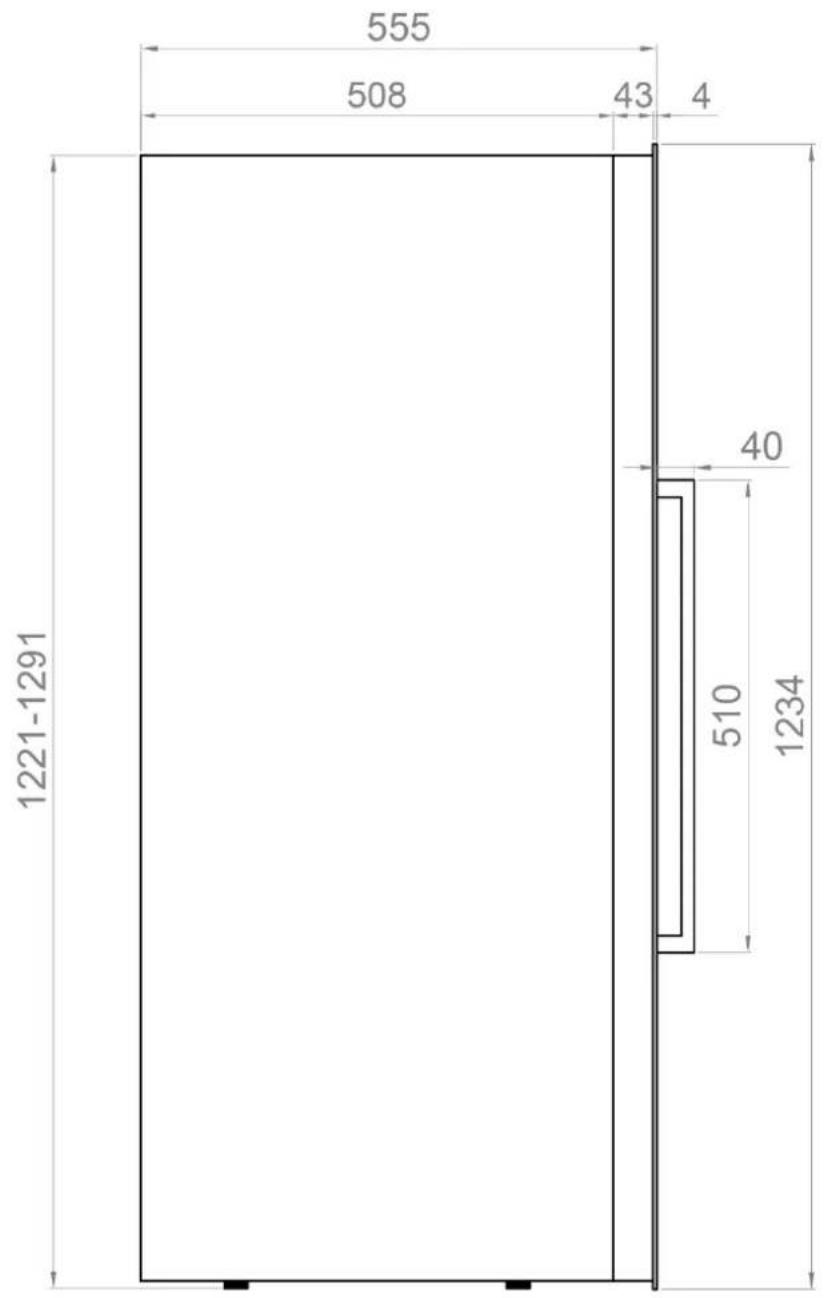




10. INSTALLATION DIAGRAMS AND DIMENSIONS
PVMAV 178-112 / PVMAVP 178 112

10. INSTALLATION DIAGRAMS AND DIMENSIONS
PVMAV 178-112 / PVMAVP 178-112
VISTA LATERAL




10. INSTALLATION DIAGRAMS AND DIMENSIONS
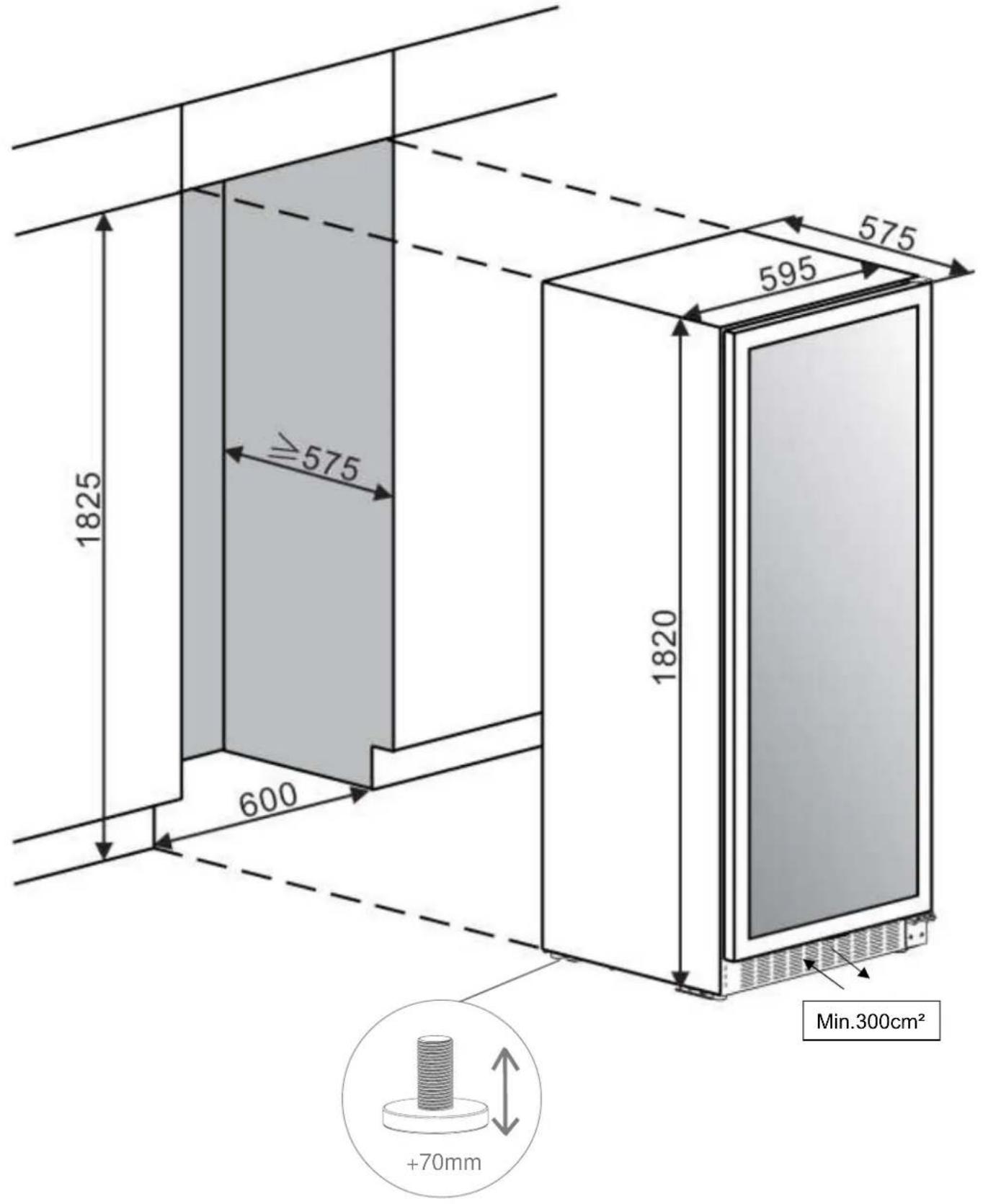
PBE 182-190
10. INSTALLATION DIAGRAMS AND DIMENSIONS
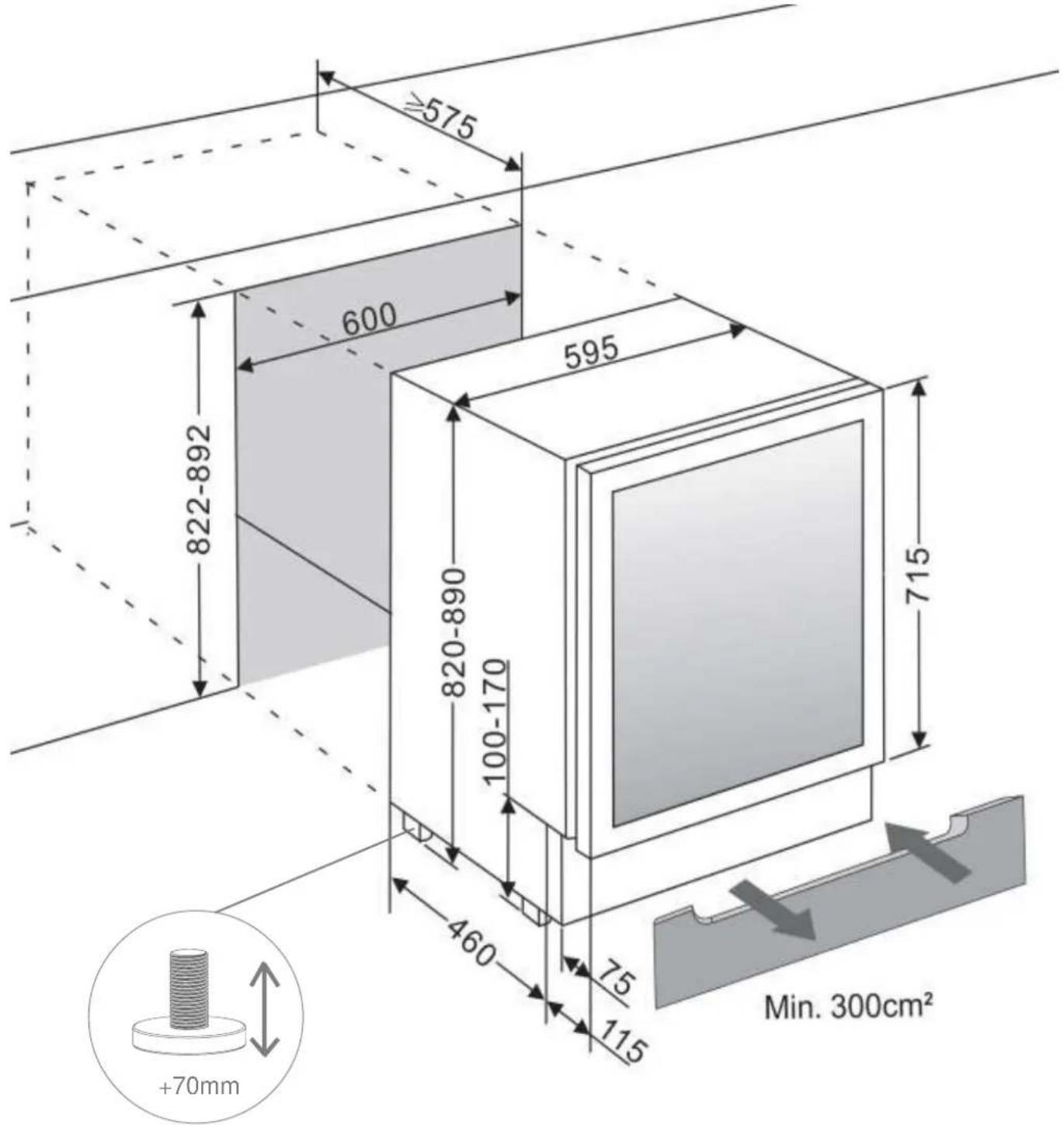
PBE 89-66
10. INSTALLATION DIAGRAMS AND DIMENSIONS
PVMB 15-7
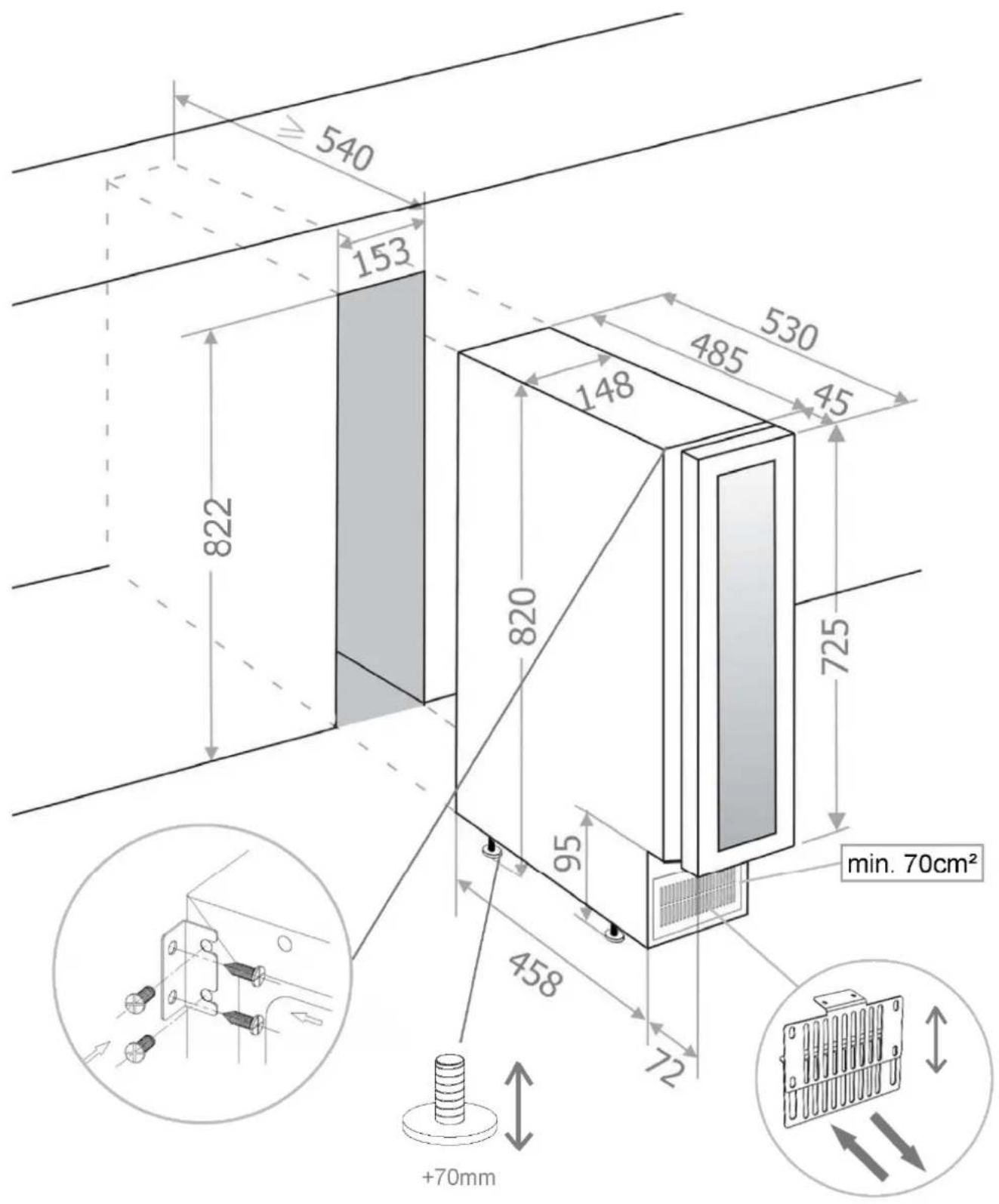
10. INSTALLATION DIAGRAMS AND DIMENSIONS
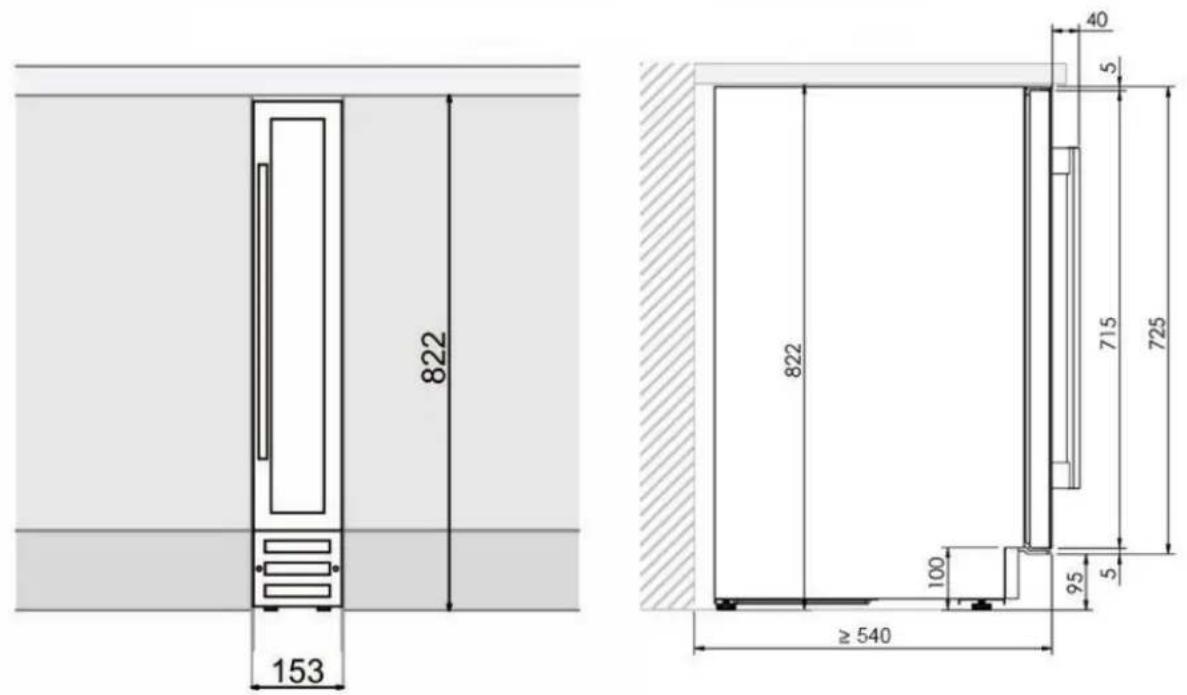
PVMB 15-7

10. INSTALLATION DIAGRAMS AND DIMENSIONS

PVMB 30-16
10. INSTALLATION DIAGRAMS AND DIMENSIONS

PVMB 30-16
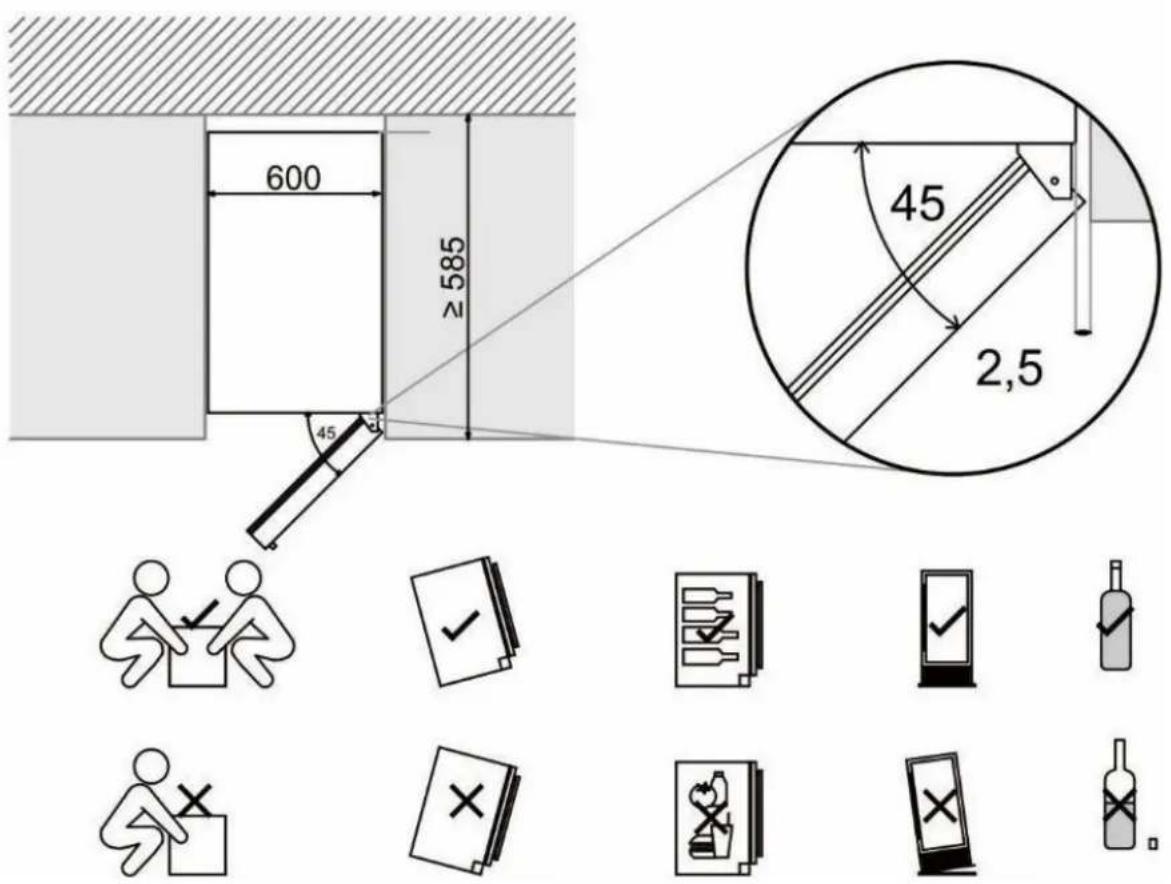
10. INSTALLATION DIAGRAMS AND DIMENSIONS
PVMB 40-28
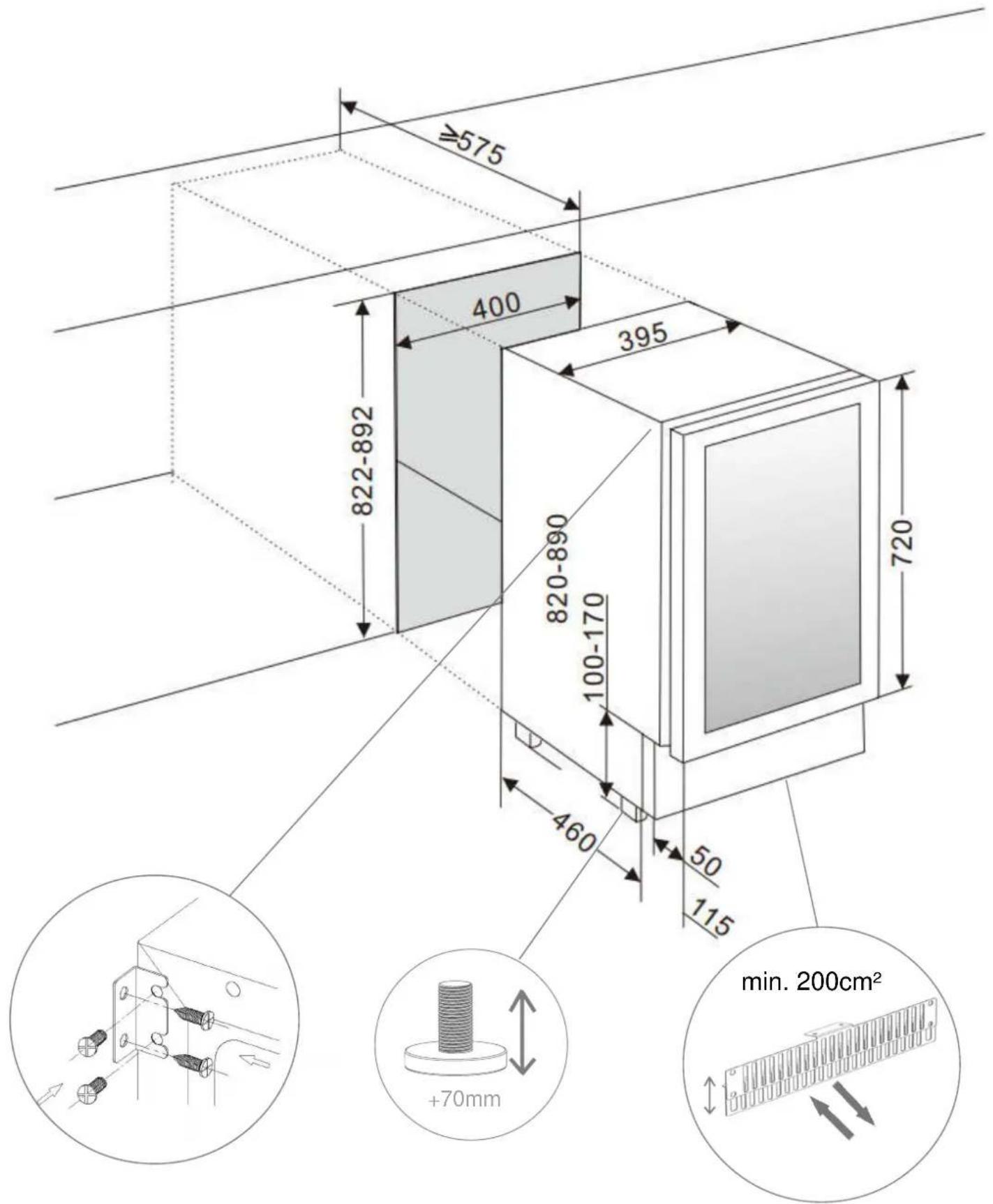
10. INSTALLATION DIAGRAMS AND DIMENSIONS

PVMB 40-28
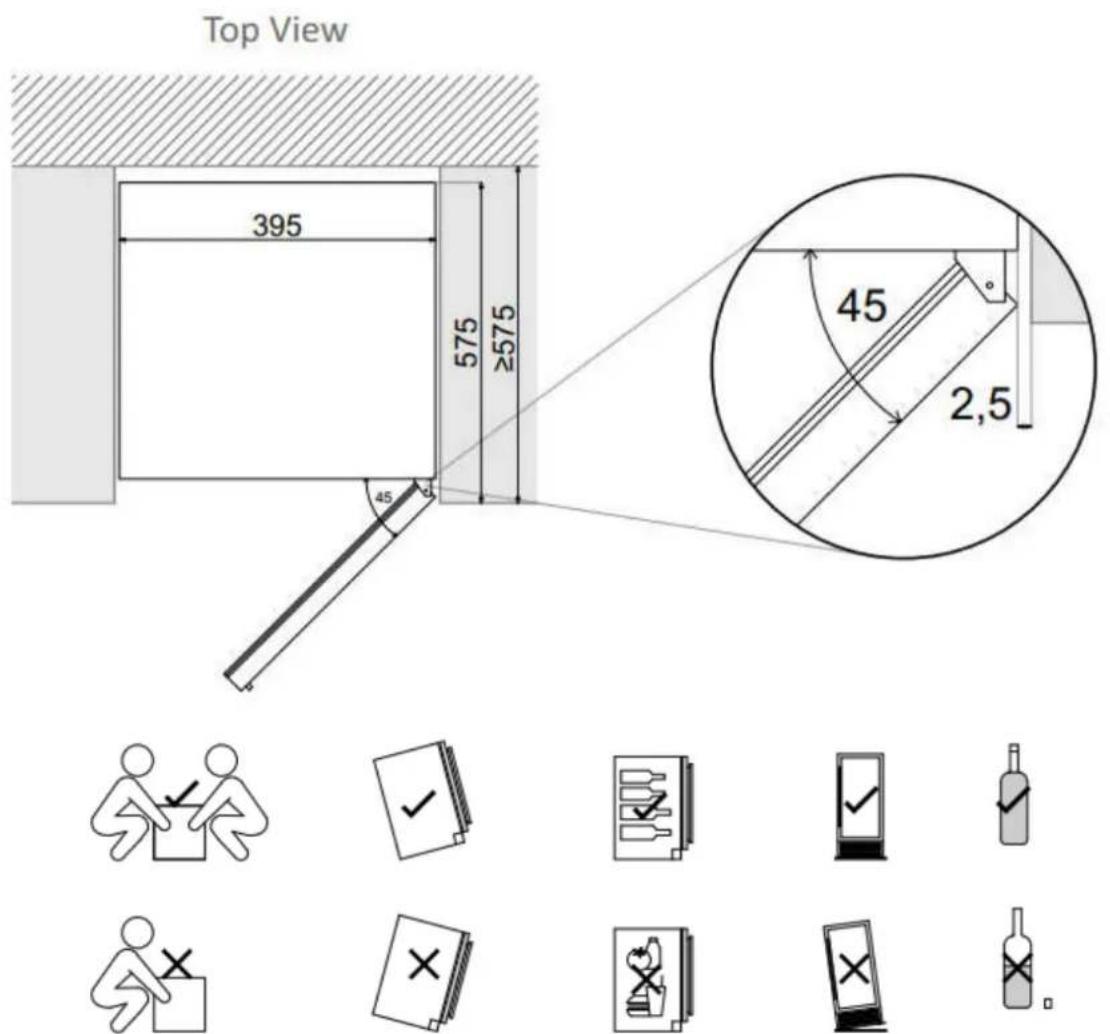
10. INSTALLATION DIAGRAMS AND DIMENSIONS

PVMBP-HD 40-28
10. INSTALLATION DIAGRAMS AND DIMENSIONS
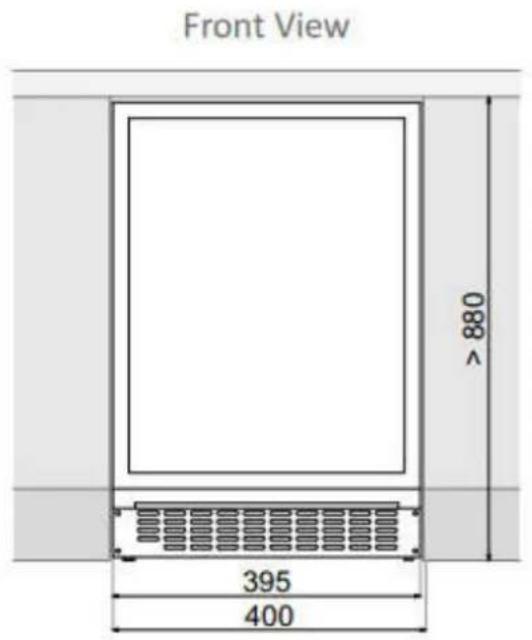
PVMBP-HD 40-28






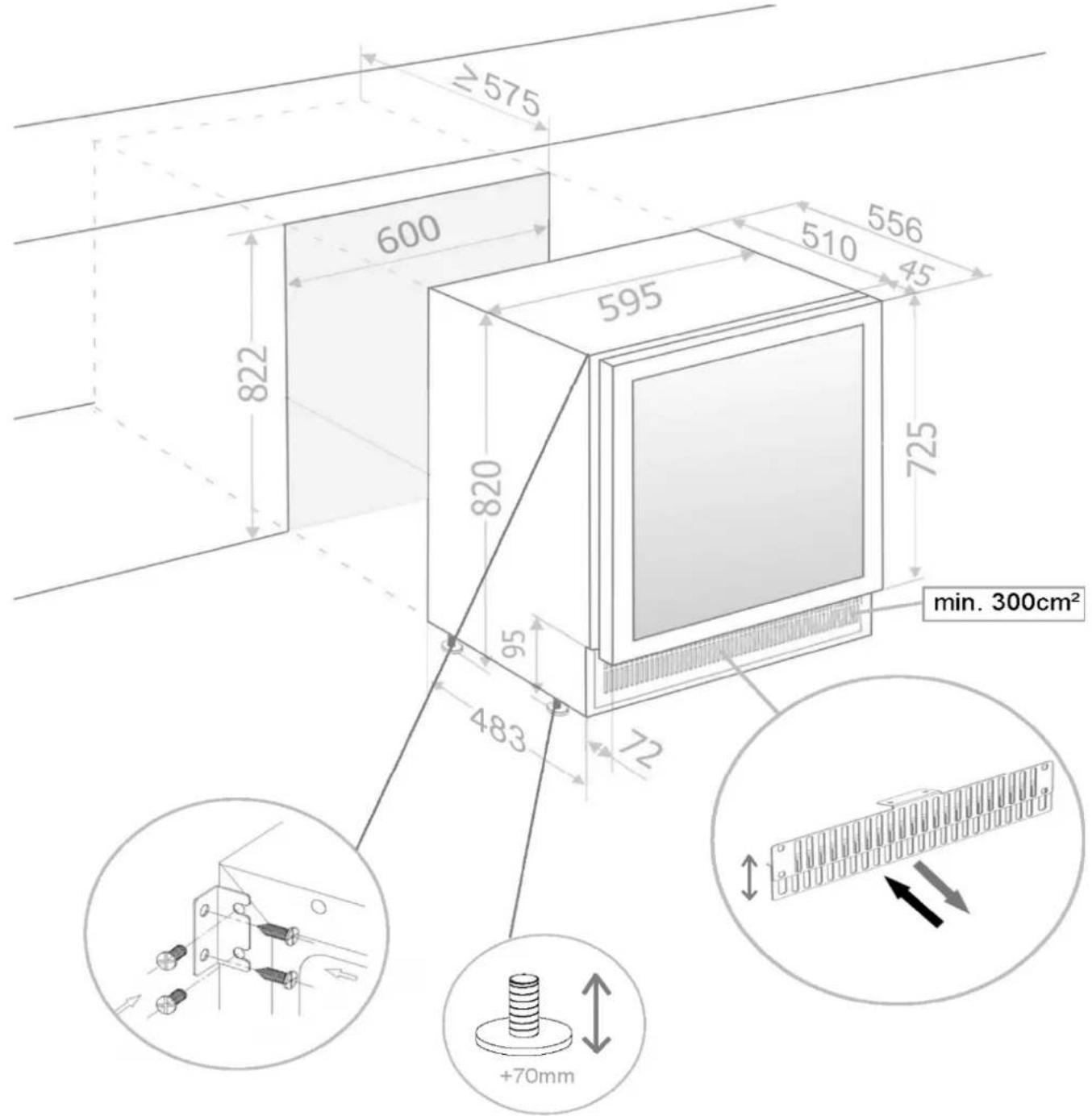
10. INSTALLATION DIAGRAMS AND DIMENSIONS

PVMB 60-53
10. INSTALLATION DIAGRAMS AND DIMENSIONS

PVMB 60-53
10. INSTALLATION DIAGRAMS AND DIMENSIONS
PVMBP 60-45
10. INSTALLATION DIAGRAMS AND DIMENSIONS
PVMBP 60-45

VISTA FRONTAL

VISTA LATERAL
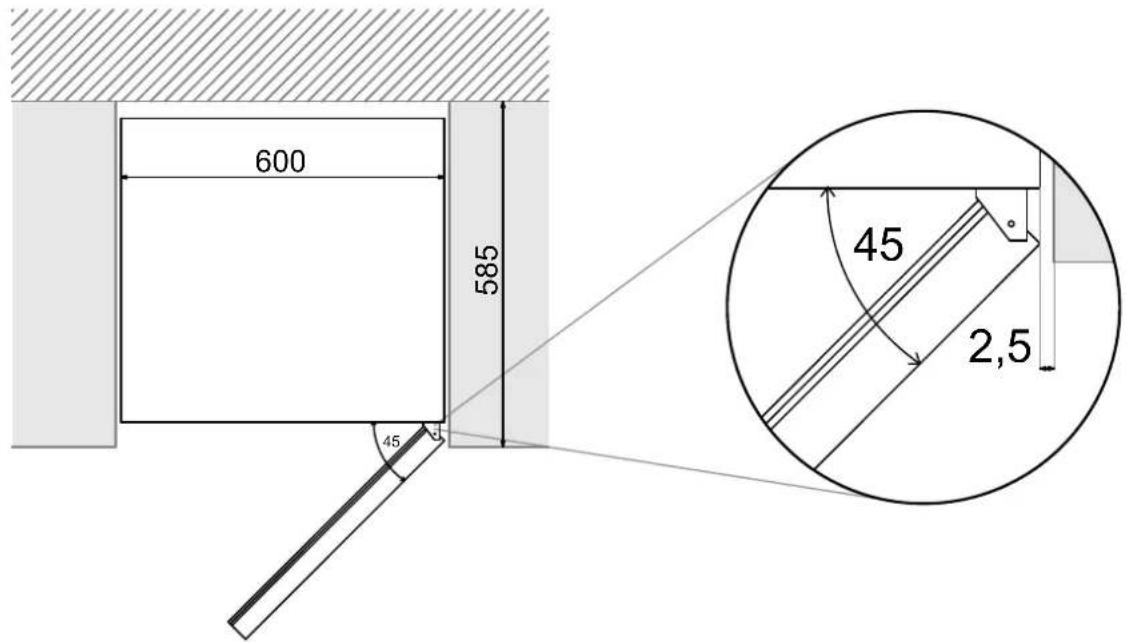
VISTA SUPERIOR


10. INSTALLATION DIAGRAMS AND DIMENSIONS
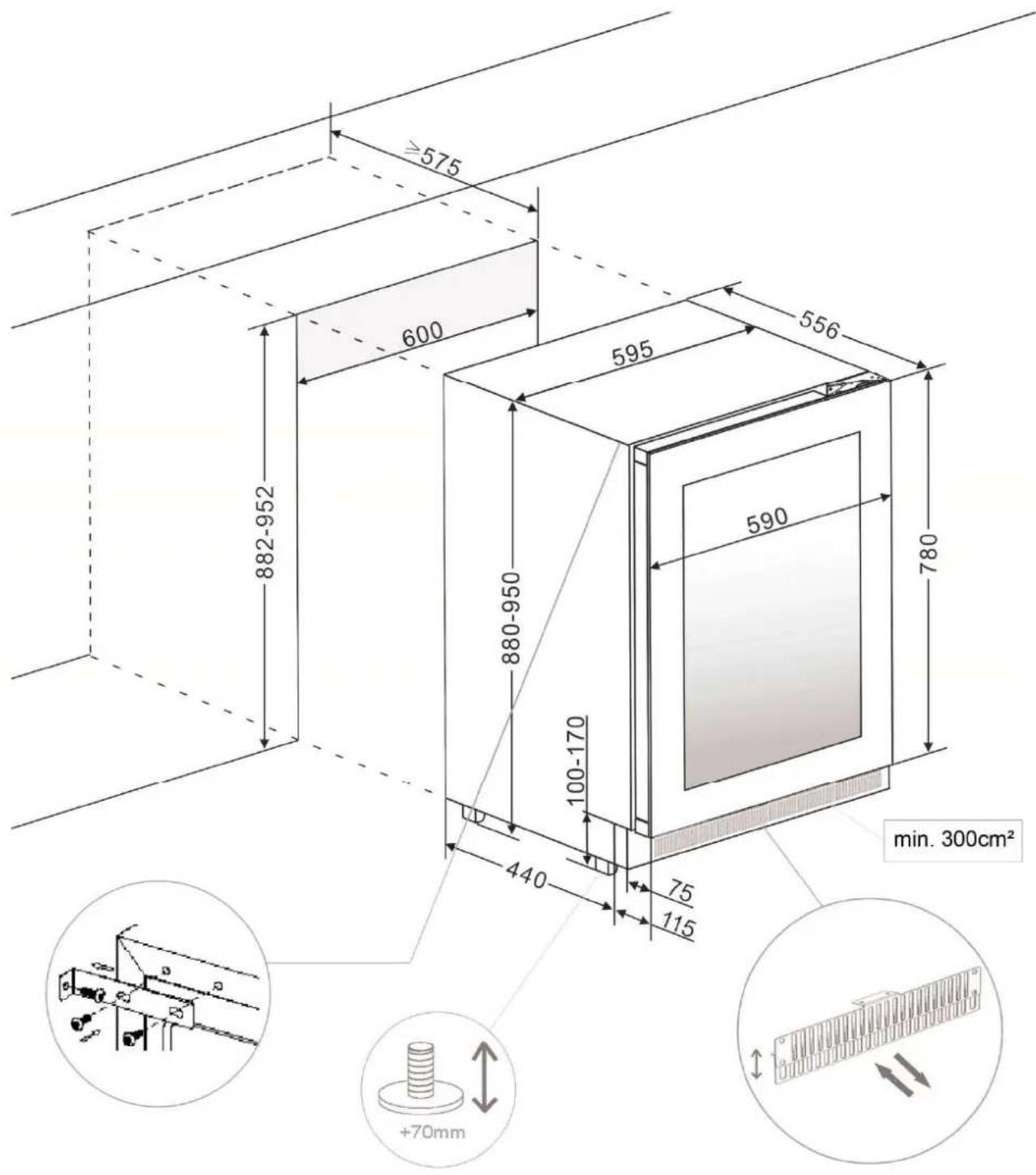
PVMBP-HD 60-45
11. BOTTLES DISTRIBUTION
PVMAV 45-18 / PVMAVP 45-18
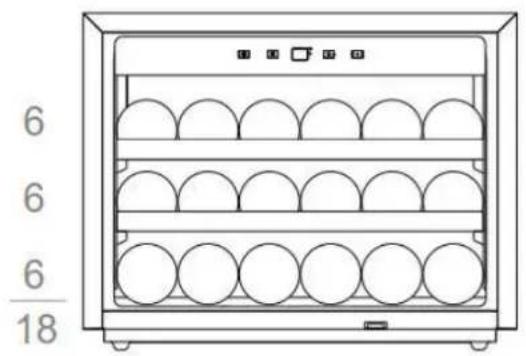
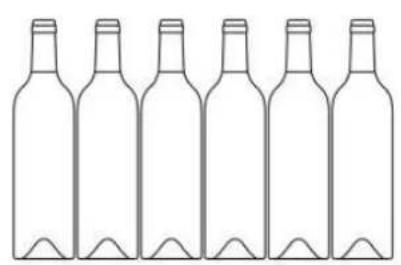

PVMAV 60-25 / PVMAVP 60-25
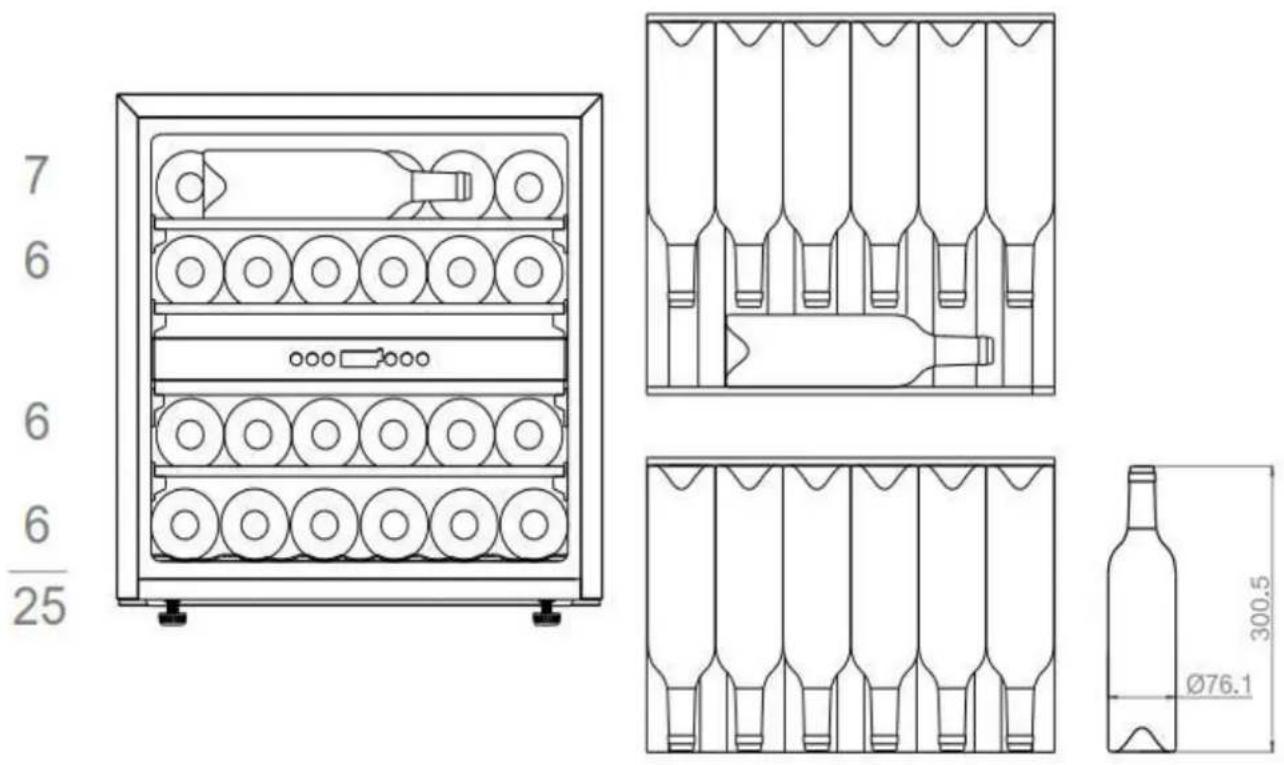
11. BOTTLES DISTRIBUTION
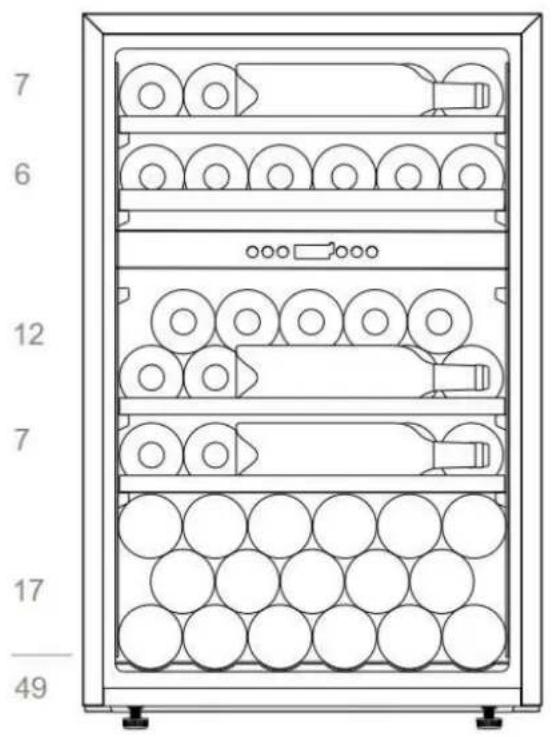
PVMAV 88-49 / PVMAVP 88-49
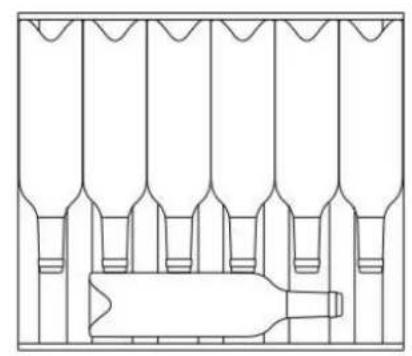
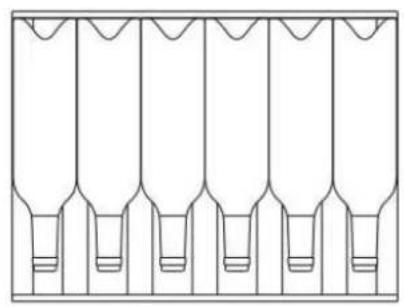


PVMAV 124-70 / PVMAVP 124-70
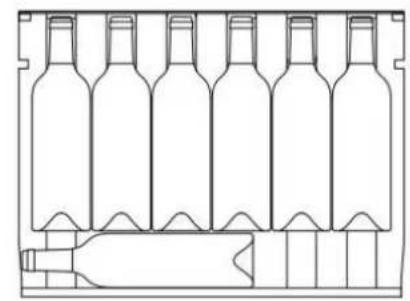
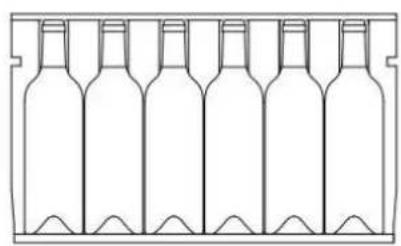

11. BOTTLES DISTRIBUTION
PVMAV 178-112 / PVMAVP 178-112

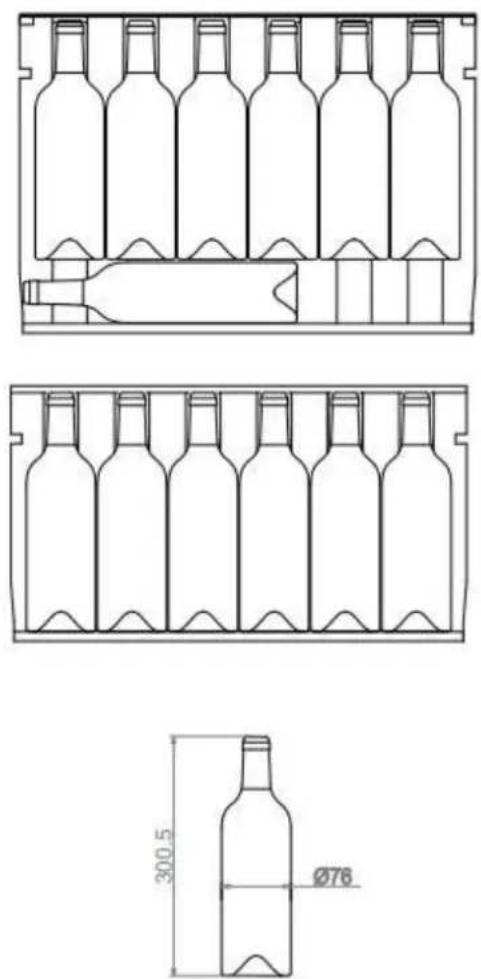
11. BOTTLES DISTRIBUTION
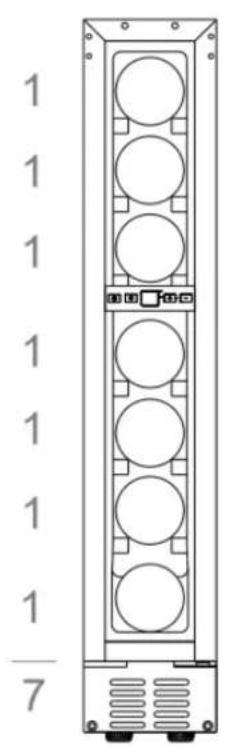
PVMB15-7
PVMB 30-16

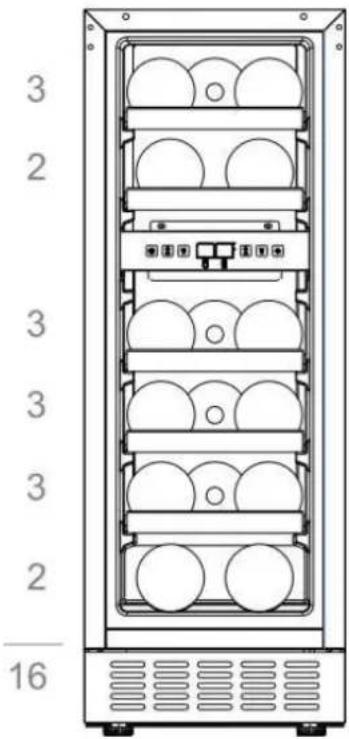

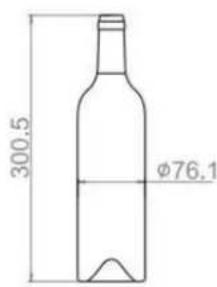
PVMB 40-28 / PVMBP-HD 40-28


11. BOTTLES DISTRIBUTION

PVMB 60-53

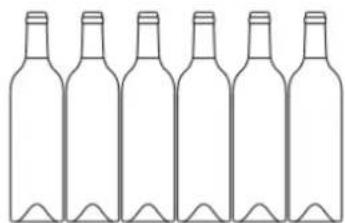
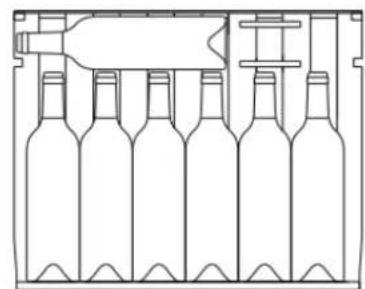


PVMBP 60-45 / PVMBP-HD 60-45

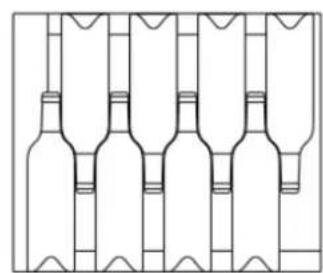
12. AFTER SALES TECHNICAL SERVICE (SAT) AND GUARANTEE:
INOXPAN S.L., thank you for choosing our brand and for trusting a Pando product, standard of Quality, Design & Innovation, a brand honoring his origins and commitments.
TERMS OF THIS WARRANTY:
This product comes with a warranty of 3 year as from the date of purchase covering all product defect affecting its performance. To validate the same is mandatory to apply the purchasing invoice or buying ticket before the official Customer Service engineer.
During the above mentioned period, the Company pledge to repair or replace at no cost any defective part whose cause is due to vice or manufacturing product flaw to make it work fine again, as well as the necessary labour cost and expenses involved in said repairing or replacement.
PANDO WARRANTY EXEMPTIONS:
It shall not be covered by the warranty or may be cause of cancelation of such, any of the following case scenarios, thus being the user the one taking charge of any material cost, labour and customer service travel expenses:
- Installation or performing reviews, extractor hood or ducting cleaning or maintenance.
- Failures or defects caused by not respecting or following the safety instructions, product use and maintenance manual recommendations.
- Whenever the product is orientated to commercial or non-residential use, to which it is not made for.
- Product malfunction caused by not following the instructions, recommendations and/or norms shown in the appliance manuals.
- Issues arising from any unappropriated product or smoke ducting installation
- Issues and faults produced by carriage or moves, and/or product handling by non-authorised personnel to this company or the brand Pando.
- Bumps, dents, scratches, or broken glasses
- Other alien bodies present in the interior or exterior of the product
- The product or any peripheral associated device, like in-line motors- might not be accessible, either due to elements impeding easy and safe access. All necessary means to access by the Pando authorised engineer shall be on account and responsibility of the user.
- Wiring inadequate handling and internal motor connections, remote or roof, and extractor hood.
- Wear and tear aesthetical parts, like lighting screens, filters and lamps.
Rust, stains, tone changes produced by the use of inadequate non recommended corrosive cleaning products without the right protection, as those containing chemical corrosive agents, and/or exposure to the sea breeze (saltpetre). - Issues or malfunction produced by variations of main supply, or natural and random causes from weather or geological origin, as storms, lightning, earthquakes, floods, etc
- Products whose origin is resale, used appliance, or displays with more than two years since their date of manufacturing.
INOXPAN, S.L., remains expressly excluded from any liability over any eventual damage any direct or indirect to persons or materials produced by inadequate product handling and use.
Official Pando Customer Service Contact Details
| SPAIN, PORTUGAL Y ANDORRA: | OTHER COUNTRIES / AUTRES PAYS | |
| https://www.pando.es/asistencia-technica/ | EN https://www.pando.es/en/after-sales-services/ FR https://www.pando.es/fr/service-apres-vente/ | |
NOTES:
INOXPAN S.L.
Pol. Ind. El Cros
Av. El Moli de les Mateves, 11
Apdo. Correos n° 21
08310ARGENTONA
Barcelona - Spain)
Tel. +34 93 757 94 11
Fax +34 937579653
www.pando.es
com.pando@pando.es
Export:
export@pando.es
Tel. 902 41 55 11

Pando
www.pando.es

SERVICIO POST VENTA
Espana, Portugal y Andorra
www.pando.es/asistencia-technica/
SERVICE APRES VENTE AFTER SALES SERVICE
Otros paises
Autres pays / Other countries www.pando.es/en/after-sales-services/

Certificacion del Sistema de Gestion de la Calidad Environmental Management System Certification UNE-EN ISO 14001:2015 ES20/208675
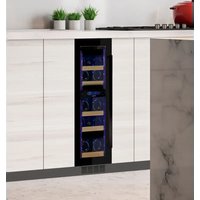

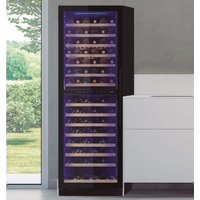
- 11.DISTRUCION BOTELLAS
- 12.SERVICIO TECNICO POST-VENTA (SAT) Y RANTÍA:
- PAINEL INDICADOR LUMINAOSO (DISPLAY)
- LUZ INDICADA
- CHARACTERISTIQUES DU PRODUIT
- SAFETY
- FOR YOUR SAFETY
- In case of damage:
- To avoid contamination of food, please respect the following instructions:
- PLEASE KEEP THESE INSTRUCTIONS AT HAND
- PACKAGING AND END OF LIFE
- Instructions for disposal:
- 2.PRODUCT CHARACTERISTICS
- INSTALLATION
- BEFORE USING THE APPLIANCE
- INSTALLATION
- IMPORTANT: HIGH HUMIDITY ENVIRONMENTS
- INSTRUCTIONS FOR FITTING UNDER A WORKTOP
- Only for models:
- ASSEMBLY INSTRUCTIONS IN COLUMN / INTEGRATED
- NOTICE
- ATENTION
- ELECTRICAL CONNECTION
- FITTING THE HANDLE
- Note:
- SET AND SECURE THE UNIT TO THE FURNITURE
- Only for models UNDER A WORKTOP:
- Only for models UNDER A WORKTOP:
- Additional fixing OPTIONAL
- REVERSIBLE OPTIONAL DOOR
- DIAGRAM - MODELS FITTED UNDER A WORKTOP
- DIAGRAM - PROFESSIONAL ARTICULATED HINGE WITH CLOSURE "SOFT"
- ATTENTION
- GLASS PLINTH (OPTIONAL)
- BORDEAUX BOTTLE HOLDER
- SIDE TRIM ANGLES (OPTIONAL)
- OPERATING INSTRUCTIONS
- ATTENTION:
- USE AND OPERATION
- USE AND OPERATION
- CONTROL PANEL
- FOR A SINGLE ZONE
- ILLUMINATED DISPLAY
- INDICATOR LIGHT
- DEGREES ° C / ° F SELECTOR
- TEMPERATURE CONTROL ADJUSTMENT
- FOR DOUBLE ZONE
- DEGREES ° C / °F SELECTOR
- FOR SINGLE ZONE WITH LCD DISPLAY (PBE MODELS)
- ICONS ON THE DISPLAY:
- SETTING THE TEMPERATURE CONTROL
- SETTING THE HUMIDITY CONTROL
- SHELVES AND STORAGE
- DYNAMIC CLIMATE MODE / SILENT MODE (ENERGY SAVING)
- DISPLAY OFF MODE
- ECO DEMO MODE
- For models PVMB
- ACTIVATE:
- DEACTIVATE:
- For models PVMAV
- 5.2.PUSH AUTOMATIC OPENING FUNCTION
- SHELVES
- NOISE DURING OPERATION
- DEFROSTING / HIGROMETRY / VENTILATION
- IMPORTANT:
- TABLE WITH WINE SERVING TEMPERATURES
- IMPORTANT INFORMATION ABOUT TEMPERATURE
- CARE AND MAINTENANCE
- HUMIDITY CONTROL
- CLEANING THE UNIT
- ACTIVED CHARCOAL ODOR FILTER
- POWER CUTS
- DURING HOLIDAYS/ LONG ABSENCE
- MOVING THE UNIT / CHANGING LOCATION
- ADVICES FOR SAVING ENERGY
- TROUBLESHOOTING
- PROBLEM POSSIBLE CAUSE SOLUTION
- FAQ's (Frequently Asked Questions)
- The interior fan motors turn on and off even when the set temperature is reached.
- It is not possible to set the high and low temperatures separately – both are adjusted at the same time (Raising one, raises the other as well, etc.).
- It seems that the control panel is not working.
- The fans are constantly working. Is this is normal?
- The digital screen works. But the unit is not cooling.
- The digital screen, the light and the sound do not work, but the unit is cooling well.
- Ice is building up at the bottom rear (compressor area) obstructing the fan and causing the unit to malfunction.
- INSTALLATION DIAGRAMS AND DIMENSIONS
- PVMAV 45-18 / PVMAVP 45-18
- PVMAV 60-25 / PVMAVP 60-25
- PVMAV 88-49 / PVMAVP 88-49
- PVMAV 124-70 / PVMAVP 124
- PVMAV 124-70 / PVMAVP 124-70
- PVMAV 178-112 / PVMAVP 178 112
- PVMAV 178-112 / PVMAVP 178-112
- PVMB 15-7
- PVMB 40-28
- PVMBP 60-45
- BOTTLES DISTRIBUTION
- AFTER SALES TECHNICAL SERVICE (SAT) AND GUARANTEE:
- TERMS OF THIS WARRANTY:
- PANDO WARRANTY EXEMPTIONS:
- INOXPAN S.L.
- Pando
Brand : Pando
Model : PVMAVP 178112CRR
Category : Wine cellar