AMSR20HB - Television LG - Free user manual and instructions
Find the device manual for free AMSR20HB LG in PDF.



| Product type | LG TV with infrared remote control |
| Brand | LG |
| Model | AMSR20HB |
| TV power supply | Mains (standard electrical outlet) |
| Remote control power supply | 2 AAA 1.5 V batteries (included) |
| Main functions | Smart TV, Netflix, Pro:Centric, teletext, audio description, electronic program guide |
| Remote control type | Infrared |
| Special keys | Quick access, subtitles, mute, multidirectional navigation |
| Maintenance and cleaning | Clean with a soft dry cloth. Avoid chemical products. |
| Battery replacement | Open the cover, respect polarity, use identical new batteries |
| Safety | Do not mix new and used batteries. Do not throw into fire. Recycle according to local regulations. |
| Spare parts | Replacement remote control, AAA batteries |
| Repairability | Check LG support for parts and repairs |
| General information | Manual available in several languages. Free PDF download. |
Frequently Asked Questions - AMSR20HB LG
User questions about AMSR20HB LG
0 question about this device. Answer the ones you know or ask your own.
Ask a new question about this device
Download the instructions for your Television in PDF format for free! Find your manual AMSR20HB - LG and take your electronic device back in hand. On this page are published all the documents necessary for the use of your device. AMSR20HB by LG.
USER MANUAL AMSR20HB LG
Copyright © 2021 LG Electronics Inc. All Rights Reserved.
Using Remote Control
The descriptions in this manual are based on the buttons on the remote control. Please read this manual carefully and use the TV correctly.
To install batteries, open the battery cover, replace batteries (1.5 V AAA) matching the and ends to the label inside the compartment, and close the battery cover.
To remove the batteries, perform the installation actions in reverse. This remote uses infrared light. When in use, it should be pointed in the direction of the TV's remote sensor.
(Some buttons and services may not be provided depending upon models or regions.)
- To use the button, press and hold for more than 1 second.
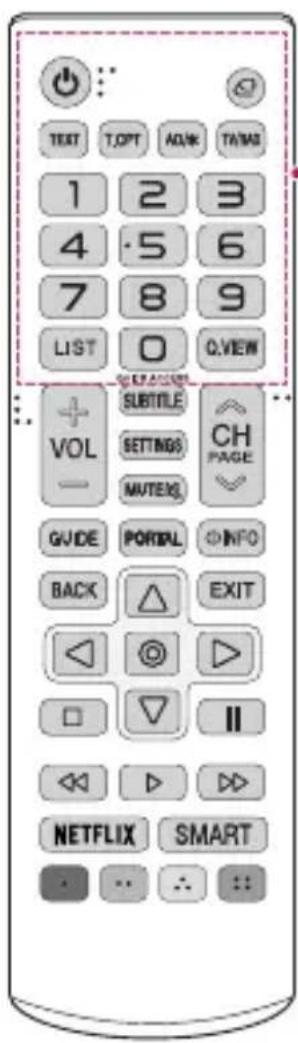

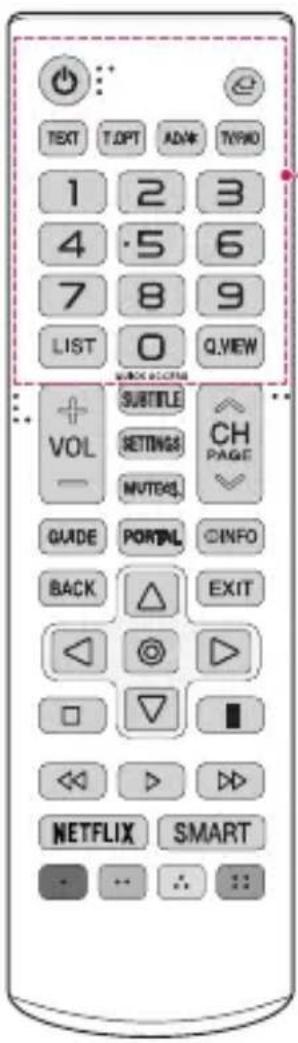
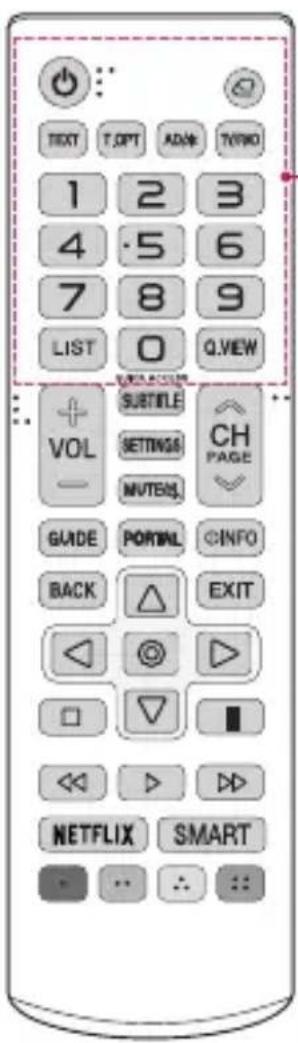
(Power)
Turns the TV on or off.

(Input)
Changes the input source.

(tfetext buttons)
These buttons are used for teletext.

Audio descriptions function will be enabled.

Selects Radio, TV and DTV programme.
Number button
Enters numbers.

Enters numbers.

Returns to the previously viewed programme.
QUICK ACCESS*
Edits QUICK ACCESS.
- QUICK ACCESS is a feature that allows you to enter a specified app or Live TV directly by pressing and holding the number buttons.
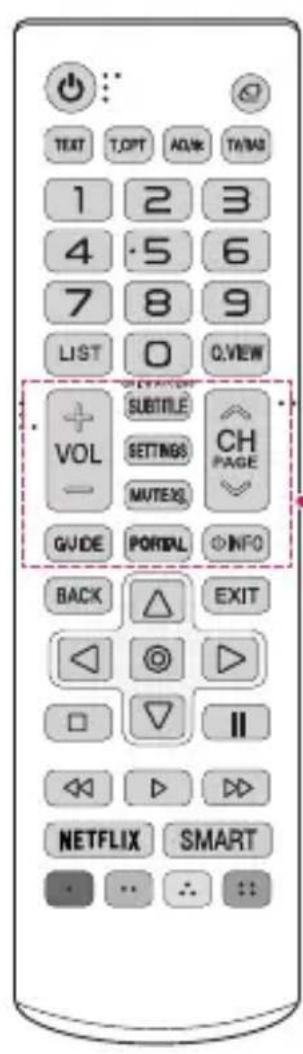

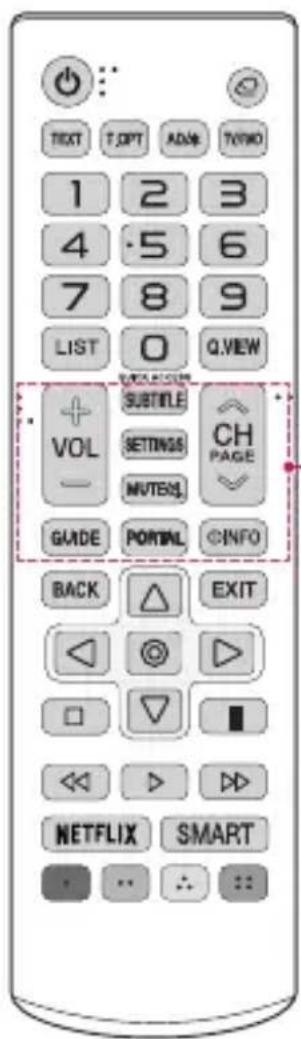
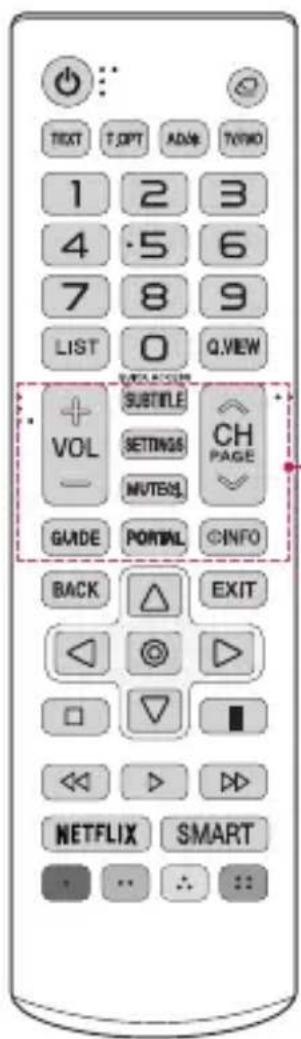
Adjusts the volume level.
SUBTITLE
Recalls your preferred subtitle in digital mode.
SETTINGS
Accesses the quick settings.
MUTE
Mutes all sounds.

Scrolls through the saved channels.
GUIDE
Displays and removes the electronic program guide of Pro:Centric Application.
PORTAL
Displays and removes Pro:Centric Application.
INFO
Shows the information of the current program.
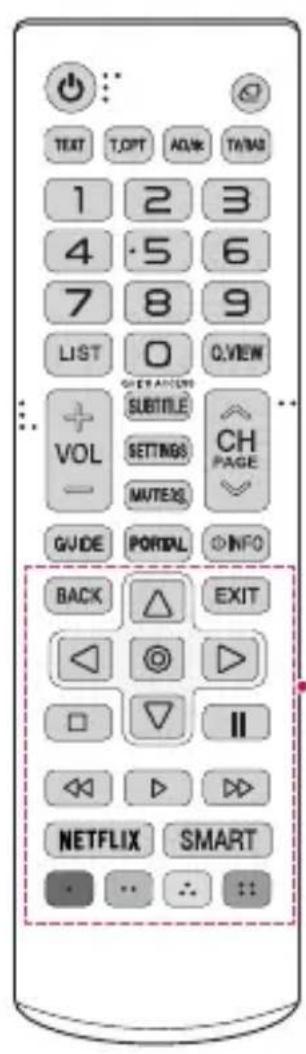
BACK
Returns to the previous screen.
Navigation button (up / down / left / right)
Scrolls through menus or options.

Selects menus or options and confirms your input.
EXIT
Cleared on-screen displays and returns to TV viewing.

Control buttons for media contents
NETFLIX
Connects to the Netflix Service. (Available only in certified SI)
SMART
Accesses the Smart menu.

These access special functions in some menus.

-
Do not mix new batteries with old batteries. This may cause the batteries to overheat and leak.
-
Failure to match the correct polarities of the battery may cause the battery to burst or leak, resulting in fire, personal injury, or ambient pollution.
-
This apparatus uses batteries. In your community there might be regulations that require you to dispose of these batteries properly due to environmental considerations. Please contact your local authorities for disposal or recycling information.
-
The product's internal and external batteries should not be exposed to excessive heat such as direct sunlight, fire, or the like.
GUIDE DE DÉMARRAGE RAPIDE
TEXT, (Tasti Teletext)
KPATKOE BBOHHOE PYKOBOCTBO
O6bIyHbI pyJIbT dy
AM-SR20HB
www.lg.com
Abtopckoe npabo © LG Electronics Inc., 2021. Bce npaba 3aunneHbI.
IcnoJb3ObaHne npNbTa Dy
OncaHnB DaHHOM «PyKOBOCTBE» OTHOCATC K KHONKAM Ha nyIbTe Y. BHIMaTeJIbHO npouHTaTe HactoJee «PyKOBOCTBO» dI npabNlbHO rNcNoIb3ObaHn IyIbTa Y.
YTo6bI 3aMeHnTb 6aTapeN,OTKpOInTe KpbIshKy 6aTapeHoro OTceKa,3aMeHnTe 6aTapeN (1,5BAAA) c yEtOM ,yKa3aHHbIX Ha MapKnIpOBKe B OTceKe, n 3aKpOInTe KpbIshKy OTceKa.
YTo6bI n3BLeue 6aTapei, BblONHIne yka3aHnno Ix yctaHOBe B o6paTHOM nopraKe.
DaNHBn pynbT Dy nepeaet cnHan C NOMOsbIO NHpapacno H3nyeHn. NToMy ero Heo6xOIMO HApabNtB B CTOpOHy dNCTaHcNOHOro DaTnKa TeNeBu3opa.
(HeKOTOpbIe KHONIK N cepBncbl MOrY T 6bITb HeIOCTyINbI B 3aBcIMOCtN OT MoJEN I perNoHa).
- Yo6bl BocnoIb3ObaTbcra KHONKo, HaxMnte n ydepxnBaIte ee B TeueHne 1 nn 6bonee cekyhd.
(Питанne)
BkIIOueHn I BbIKIOueHn TeJIeBu3Opa.
(BxoD)
I3MeHeHne IcToUHNKa BxOJHOro CURHaJa.
TEXT, TURNTKIN TeNETekCTa)
3TNKHNKINCNONb3yOTcIaP60TbICTeNETeKTOM.
AD/
BkJIOueHne fYHKnny aynnooNncaHH.
TV/RAD
IpeeknueHne pexmOB: padno/ump. TB/aHaJor. TB.
UΦpoBbie KhoNKn
BbOa uncen.
LIST
BbOJ uHcEJI.
Q.VIEW
Bo3BpaT K paHee npocMaTpnuBaemn nporpaMMe.
QUICK ACCESS*
PeJaKtnoBaHne MeHIO BblCTPbI JIOCTyI.
-5bICTPbIIOCTU—3TOyHKuN,KOTOPaNO3BOJAreTnepeoxntb K ONpeJeHHomy PnIIOKeHNIOIINTeJIeTpacnlaCn NOMOsbHO HaxKaTnY UdepXKNBaHnCOOTBeTCTByoux KNHOOK C uΦpaMn.
VOL
Hactpoika ypOBHa rPOMKoCTn.
SUBTITLE
OTo6paXeHne cy6TnTpOB B uNΦpObBix KaHaIax (PnB WeaHnn).
SETTINGS
IocTyK6bICTpbIMHaCTpOJaM.
MUTE
Bkn./OTkn.3Byka.
CH
IocneIOBaTeIbHOe nepeKJIIOueHHe coXpaHeHHbIX KaHaJIIOB.
GUIDE
OTo6paXeHne n cKpbItne 3NeKtpoHHo nporpaMMbl nepedau dI pyuLoXeHn Pro:Centric.
PORTAL
OTo6paXeHne n cKpbItne npuNoxKeHn Pro:Centric.
INFO
OTo6paXeHne cBeHeHn o Tekyue nporpaMme.
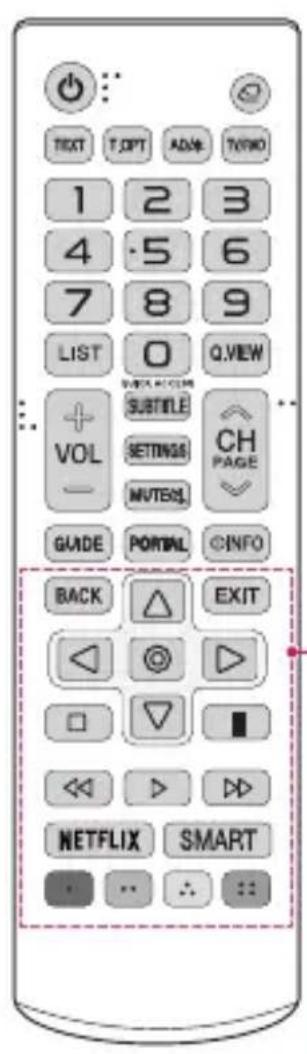
BACK
Bo3BpaT K npeIbIyUcEmy 3KpaHy.
KhoNkHaBraaun(BBepx/BHn3/BJeBO/BnpaBO)
IocneIOBaTeIbHaj HaburaunB MeHIO B Bbl6paHHOM HapabHeHn.

Bb6op MeHIO nnnapaMeTpOB INoTBePKeDHeNc BBOda.
EXIT
3aKpbITNe OKOH npocMoTpa Ha 3KpaHe N Bo3BpaT K npocMToPy TeIeBu3Opa.

KhONKNynpaBHeHnMybTmEeHbIM coepXmbIM
NETFLIX
CtahdapTHnIyIbT DnCTaHcHOrO KepyBaHHa
AM-SR20HB
BnKopncTahnnyIbTa DK
ycbomy noci6nky onncaHO KHONK nyIbTa nIcTahuHOrO KepyBaHH. yBaXHo npouHTaTe cei noci6nK i BVKOPNCOTByte TeIeB3Op HaleKHM YHOM.
ДяВсановпнгбатapeиok BiДКрИТe Кршky BiДСICy ДЯ 6atapeиok,ЗamHITb 6atapeиkn (1,5ВАА),Вставлючix3урахуBaHHm ПОЯрноcti (no3nauchn ta BCEpeDINHi BiDciky) iЗakриTe Kprшky BiDciky.
Ioo6 BnHrTn 6aTapeKn, BnKoHaIe Ti cami dii y 3BOpOTHomy npraKy. Lcen nylt BnKOpNCTOBYe CnCTemy iHpaaepBOHO BnPOMIHOBaHH. Iid Yac BnKOpNCTAHNo I norO notpi6Ho HABODHTn Ha BiINOBIDH daTtHK Ha TeJIeBI3opi.
(HaBnictb Okpemnx KhoNOK i nocnyr 3aIeKntb BiD moEJI ta perioHy.)
* 06 cKOpNCTaTcK HONKO, HatncHtB i yTpmyTe II BnpOdoBx noHa1 1 cekyHn.
U(KMBneHHN)
YbIMKHeHH Ta BUMKHeHH JNIBNeHH TeNeBi3opa.
(BXID)
3MiHa Dxkepena BxIDHOro CnHany.
TEXT, T(KronKpexkmy TeneTeKcty)
Liz KhoNk BnKOpNCTOByIObCra IJIPO6OTBpeXMI TeTeKeCTy.
AD/
Bye yBIMKHeHO fYHKUIO aydioonncy.
TV/RAD
Bn6ip kaHany paio-, TelemOBJIeHHa a6o ufoPoBOrO MOJIeHHa.
Khonkn 3 uΦpamn
BveednnaP.
LIST
BvEeHnHa nΦp.
Q.VIEW
IobepHeHHaD nonpeHbOrO KaHaNy.
QUICK ACCESS
PeDaryBaHHaMeHIO WBNKIN DOCTYI.
- WBNIKN DOCTYI - ue yHKci, 0o dae 3Mory nepexoNTn Do neBHOI nporpaMn YI TeJIeTpaHcIaIi 3a DOnOMOROU HaNTCKaHH Ta yTpIMyBaHH BIDNOBIDHX KHOJOK i3 uΦpAMn.
VOL
PerynboHH npBn rnuHocti.
SUBTITLE
Buknk Bn6paHx Bamc cy6TuTpib y uΦpObMy peKmI.
SETTINGS
IocTyn Do WbNdknx HanaaTyBaHb.
MUTE
Telif Hakki © 2021 LG Electronics Inc.
- Using Remote Control
- QUICK ACCESS*
- SUBTITLE
- SETTINGS
- MUTE
- GUIDE
- PORTAL
- INFO
- BACK
- EXIT
- NETFLIX
- SMART
- TEXT, (Tasti Teletext)
- O6bIyHbI pyJIbT dy
- IcnoJb3ObaHne npNbTa Dy
- (Питанne)
- (BxoD)
- TEXT, TURNTKIN TeNETekCTa)
- AD/
- TV/RAD
- UΦpoBbie KhoNKn
- LIST
- Q.VIEW
- VOL
- CH
- CtahdapTHnIyIbT DnCTaHcHOrO KepyBaHHa
- BnKopncTahnnyIbTa DK
- U(KMBneHHN)
- (BXID)
- TEXT, T(KronKpexkmy TeneTeKcty)
- Khonkn 3 uΦpamn
- QUICK ACCESS
Brand : LG
Model : AMSR20HB
Category : Television