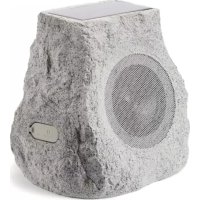
Glow Stone Solar - Speaker ION - Free user manual and instructions
Find the device manual for free Glow Stone Solar ION in PDF.



| Product Type | Portable outdoor speaker with solar panel |
| Brand | ION |
| Model | Glow Stone Solar |
| Connection Technology | Bluetooth |
| Water Resistance | Yes, splash resistant |
| Battery Type | Rechargeable lead-acid |
| Charging Methods | Included AC adapter and built-in solar panel |
| LED Lighting | Yes, with brightness adjustment (low, high, off) |
| Link Function | Allows connecting two speakers for stereo sound |
| Voice Prompts | Yes, can be disabled by pressing Bluetooth and Link simultaneously |
| Auto Power Off | After 30 minutes without audio signal and LEDs off |
| Bluetooth Connection Range | Up to 9 m between speakers for Link pairing |
| Minimum Safety Distance (FCC) | 20 cm |
| Recommended Storage Temperature | Between 0°C and 32°C |
| Reset | Reset button on the bottom of the device |
| Box Contents (Individual packaging) | 1 speaker, 1 charging adapter, quick start guide, safety instructions |
| Support | ionaudio.com/support |
Frequently Asked Questions - Glow Stone Solar ION
User questions about Glow Stone Solar ION
0 question about this device. Answer the ones you know or ask your own.
Ask a new question about this device
Download the instructions for your Speaker in PDF format for free! Find your manual Glow Stone Solar - ION and take your electronic device back in hand. On this page are published all the documents necessary for the use of your device. Glow Stone Solar by ION.
USER MANUAL Glow Stone Solar ION
Quickstart Guide English (3–5)
Appendix English (22)
Quickstart Guide (English)
Introduction
Thank you for purchasing the ION Audio Solar Stone Glow! Solar Stone Glow simulates a natural rock finish that blends into your landscaping, with a solar-rechargeable battery-powered, water-resistant speaker. Equipped with Bluetooth ^® technology, you can listen to your favorite music wirelessly while working in the garden, hosting a dinner party, or relaxing by the pool.
- Make sure all items listed in the Box Contents are included in the box.
- Read the Safety & Warranty Manual before using the product
- Make sure that you have completely charged the battery prior to first use for maximum battery life.
Box Contents
If an individual speaker is purchased:
If purchased as a boxed pair:
1 Solar Stone Glow 2 Solar Stone Glows
1 Charging Adapter 2 Charging Adapters
Quickstart Guide Quickstart Guide
Safety & Warranty Manual Safety & Warranty Manual
Support
For the latest information about this product (documentation, technical specifications, system requirements, compatibility information, etc.) and product registration, visit ionaudio.com.
For additional product support, visit ionaudio.com/support.
Rechargeable Batteries
Rechargeable lead-acid batteries are the same type used in automobiles. As with your car battery, how you use this battery has a significant impact on its lifespan. With proper use and treatment, a lead-acid battery can last for years. Here are some recommendations for getting the longest life from the internal battery.
General Usage Fully charge the battery before using it.
Charge the battery completely after each use.
Storage For best product longevity, do not store at exceedingly hot (greater than 90^ F/ 32^ C) or exceedingly cold (less than 32^ F/ 0^ C) temperatures.
It is acceptable to leave your sound system plugged in. This will not overcharge the battery.
If you leave the battery level low and do not charge it for 6 months, it may permanently lose capacity.
Repair If the battery fails to charge, contact ION Audio at ionaudio.com.
Disposal Bring the unit to a recycling center or dispose of in accordance with local ordinances.
Outdoor Use and Care
Though Solar Stone Glow is water-resistant and able to tolerate splashing water, please review the tips below to get the best performance from Solar Stone Glow:
- Bring Solar Stone Glow indoors during extreme cold, heavy rain, or melting snow.
- Please do not place Solar Stone Glow in standing water.
- Please do not connect the charging adapter to Solar Stone Glow in a wet environment. Make sure the charging adapter input, charging adapter, and power outlet are all completely dry before making any connections.
- WARNING: Keep any non-water-resistant devices (phones, music players, etc.) in a dry place where they will not be affected by water and cause a risk of electric shock.
Features
- Power: Hold this button to power Solar Stone Glow on and off.
- Bluetooth Connect: Press this button briefly to begin Bluetooth connecting.
Note: Solar Stone Glow will automatically power off after 30 minutes if no audio is playing and the rear LEDs are not on.
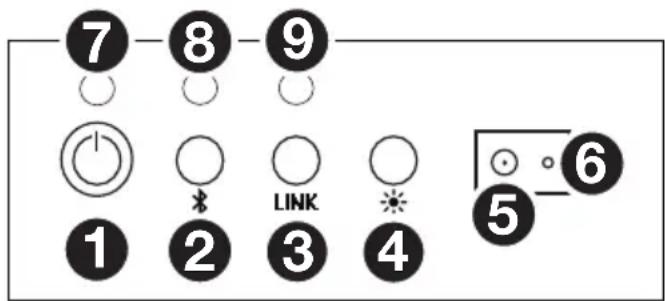
- Link: Press this button to link two Solar Stone Glow units together.
- Light Control: Press this button to adjust the brightness settings for the lights: LED low, LED high, and off.
- Charging Adapter Input: Insert the included charging adapter here to charge the Solar Stone Glow battery.
Solar Stone Glow should be fully charged prior to first use for maximum battery life. Once fully charged, Solar Stone Glow's solar panel can provide suitable power for typical daily use without the need to connect the charging adapter. Results will vary depending on daily number of hours Solar Stone Glow is exposed to direct sunlight.
- Reset: If Solar Stone Glow is working abnormally, shutdown the unit by placing a paperclip into the Reset hole located on the back of Solar Stone Glow, and gently push until the unit turns off. Try this only after you have first attempted to reboot Solar Stone Glow using the power button.
- Charging LED: This LED is solid red when the battery is charging and turns off when the battery is fully charged/no adapter is connected.
- Bluetooth LED: This LED slowly blinks blue when the speaker is powered on, blinks fast while Bluetooth searching, and is solid when Bluetooth connected.
- Link LED: This LED blinks fast when searching for another Solar Stone Glow and is solid when linked to another Solar Stone Glow.
Bluetooth Connecting with Solar Stone Glow
Connecting to One Solar Stone Glow
- Power on Solar Stone Glow by holding down the power button. You will hear "Power On" for confirmation. *
- Press the Bluetooth Connect button briefly to enter Connecting Mode—the Bluetooth LED will blink fast, and you will hear "Pairing" to indicate this. *
- Navigate to your device's Bluetooth setup screen, find Solar Stone Glow, and connect. Bluetooth LED will light up solid when it is connected and you will hear "Pairing successful, connected" for confirmation. *
Note: If you experience trouble in connecting, select "Forget this Device" on your Bluetooth device and try to connect again. - To disconnect, hold the Bluetooth Connect button on Solar Stone Glow. You will hear "Disconnected" for confirmation. *
- If your Bluetooth device is not able to connect to Solar Stone Glow, hold the Bluetooth Connect button on the speaker to break previous Bluetooth connections and reset the Bluetooth module.
Linking Two Solar Stone Glows to Each Other for Stereo Sound
Note: Ensure that the speakers are not already Bluetooth connected in single mode. If either of them is connected, hold the Bluetooth Connect button to disconnect and then follow the steps below.
- Power on each Solar Stone Glow by holding down their power buttons. You will hear "Power On" for confirmation. *
- Press the Link button on each Solar Stone Glow. The speakers will search for each other while playing an intermittent tone. Once the stereo pair is successfully linked, you will hear "Pairing successful, connected" followed by "Left channel" and "Right channel" on the respective speakers. *
This process may take up to 2 minutes the first time two speakers are linked. Speakers that were previously linked will relink automatically in a few seconds if powered on in range of one another.
Note: Solar Stone Glows should be within 30 ft. (9 m) of each other to Link properly.
- On the Left speaker, the Bluetooth LED will blink. Press the Bluetooth Connect button briefly to enter Bluetooth Pairing mode.
Note: The Left speaker will be the "primary" speaker, and the unit from which the Bluetooth range will be determined.
- Navigate to your device's Bluetooth setup screen, find Solar Stone Glow, and connect. You will hear "Connected" for confirmation. *
Note: If you experience trouble in connecting, select "Forget this Device" for Solar Stone Glow on your Bluetooth device and try to connect again.
-
To disconnect linking, hold the Link button on the "primary" Solar Stone Glow for 2 seconds. You will hear "Disconnected" for confirmation. *
-
If your Bluetooth device is not able to connect to Solar Stone Glow, hold the Bluetooth Connect button on the speaker to break previous Bluetooth connections and reset the Bluetooth module.
Note: When two speakers are linked, hold the power button on the "primary" speaker to turn both speakers off. If you want to only turn off the "secondary" speaker, press and hold the power button on that speaker. The speakers will relink automatically the next time they are both powered on.
* Tip: If you would like to disable (or enable) the voice prompts, simultaneously press the Bluetooth Connect and Link buttons briefly.
Technical Specifications
| Speaker Output | 20 W (peak) |
| Power | Via power adapter or solar panelPower adapter: 15V DC, 2000mA, center-positiveSolar panel: 1 W output |
| Battery | Type: Built-in rechargeable 12V lead-acid batteryBattery Life: Up to 50 hours *Recharge Time: 5.5 hours by AC adapter; 55 hours by solar panel |
| Driver | 6.5" / 165 mm |
| Light Type | LED |
| Water-Resistant Class | IPX Level 4 |
| Supported Bluetooth Profile | A2DP |
| Bluetooth Range | Up to 100 ft. / 30.5 m ** |
| Linked Stereo Range | Up to 30 ft. / 9 m ** between 2 linked Solar Stone Glows |
| Dimensions(width x depth x height) | 10.75" x 9"x 9"273 mm x 229 mm x 229 mm |
| Weight | 9.2 lbs.4.17 kg |
Specifications are subject to change without notice.
* Battery life may vary based on temperature, age, and volume usage of product.
**Bluetooth and wireless reception and range are affected by walls, obstructions, and movement. For optimal performance, place the product in the center of the room so it is unobstructed by walls, furniture, etc.
Trademarks & Licenses
ION Audio is a trademark of ION Audio, LLC, registered in the U.S. and other countries.
The Bluetooth word mark and logos are owned by the Bluetooth SIG, Inc. and any use of such marks by ION Audio is under license.
All other product names, company names, trademarks, or trade names are those of their respective owners.
ionaudio.com
- Quickstart Guide (English)
- Introduction
- Box Contents
- If an individual speaker is purchased:
- If purchased as a boxed pair:
- Support
- Rechargeable Batteries
- General Usage Fully charge the battery before using it.
- Storage For best product longevity, do not store at exceedingly hot (greater than 90° F/ 32° C) or exceedingly cold (less than 32° F/ 0° C) temperatures.
- Repair If the battery fails to charge, contact ION Audio at ionaudio.com.
- Disposal Bring the unit to a recycling center or dispose of in accordance with local ordinances.
- Outdoor Use and Care
- Features
- Bluetooth Connecting with Solar Stone Glow
- Connecting to One Solar Stone Glow
- Linking Two Solar Stone Glows to Each Other for Stereo Sound
- Trademarks & Licenses
Brand : ION
Model : Glow Stone Solar
Category : Speaker