
S3948 - Air conditioner QLIMA - Free user manual and instructions
Find the device manual for free S3948 QLIMA in PDF.
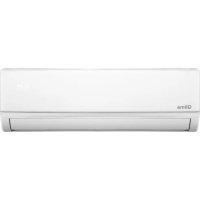



| Product type | Split wall air conditioner |
| Brand | Qlima |
| Model | S3948 |
| Cooling capacity | 5100 W (1250 - 5920 W) |
| Energy class cooling | A++ |
| Heating capacity | 4500 W (1350 - 6280 W) |
| Energy class heating | A+ |
| Dehumidification capacity | 36 L/24h |
| Air flow | 800 m³/h |
| Power supply | 220-240 V~ / 50 Hz / 1 phase |
| Max. current | 12.0 A |
| Refrigerant | R32 (charge 920 g, GWP=675) |
| Indoor unit dimensions (WxHxD) | 910 x 292 x 205 mm |
| Outdoor unit dimensions (WxHxD) | 780 x 602 x 347 mm |
| Net weight indoor unit | 10.0 kg |
| Net weight outdoor unit | 36.0 kg |
| Indoor noise level | 53 dB(A) |
| Outdoor noise level | 65 dB(A) |
| Main functions | Feel, Cooling, Heating, Dehumidification, Ventilation, Turbo, Sleep, Timer, Oscillation, Quiet, Eco, I Feel |
| Control type | Electronic remote control (range 7 m) |
| Filters | Washable air filter, active carbon filter (optional) |
| Maintenance and cleaning | Clean the filter every 2 weeks in dusty environments, front panel with soft cloth and warm water |
| Warranty | 48 months compressor, 24 months parts (excluding normal wear) |
| Safety | Must be plugged into a grounded outlet, do not use an extension cord, do not block air inlets/outlets |
Frequently Asked Questions - S3948 QLIMA
User questions about S3948 QLIMA
0 question about this device. Answer the ones you know or ask your own.
Ask a new question about this device
Download the instructions for your Air conditioner in PDF format for free! Find your manual S3948 - QLIMA and take your electronic device back in hand. On this page are published all the documents necessary for the use of your device. S3948 by QLIMA.
USER MANUAL S3948 QLIMA
guarantee
4
YEARS
| E | INSTRUCCIONES DE USO | 2 |
| F | MANUEL D’UTILISATION | 20 |
| GB | OPERATING MANUAL | 38 |
| I | ISTRUZIONI D’USO | 56 |
| NL | GEBRUIKSAANWIJZING | 74 |
| P | MANUAL DE INSTRUÇÕES | 92 |
| SLO | NAVODILA ZA UPORABO | 110 |
Dear Sir/Madam,

ATTENTION!
I Technical specifications
A Safety instructions

ATTENTION!
H Warranty conditions
Congratulations on the purchase of your air conditioner. You have acquired a high quality product that will provide you with many years of pleasure,
provided you use it responsibly. Therefore, read this manual first for a maximum lifetime of your air conditioner.
On behalf of the manufacturer we offer you a 24 month warranty against all material and manufacturing defects.
We wish you coolness and comfort with your air conditioner.
Yours sincerely,
PVG Holding B.V.
Customer service department
CONTENTS
A Safety regulations B Components C Before use D Operation E Maintenance F Operating temperatures G Troubleshooting H Warranty conditions I Specifications
A SAFETY REGULATIONS
Install this device only when it complies with local/national legislation, regulation and standards. This product is intended to be used as an air conditioner in residential houses and is only suitable for use indoors in dry locations, in normal household conditions, like living rooms, kitchens, and garages. This device is suitable exclusively for earthed sockets, connection voltage 220-240 V~/ 50 Hz.

IMPORTANT
- The device MUST be grounded. If the power supply is not grounded, you may not connect the device. The plug must always be readily accessible if the device is connected. Read this instruction manual carefully and follow the instructions.
- The air conditioner contains a refrigerant and can be classified as equipment under pressure. Therefore always call a qualified technician for the installation and maintenance of the air conditioner. The air conditioner has to be checked and serviced yearly by an authorised technician, otherwise the warranty looses its validity.
Check before connecting the device if:
- The supply voltage matches the mains voltage specified on the name plate;
- Socket and power supply are suited for the electrical voltage specified on the name plate;
- The plug of the power cord can be plugged into the socket;
- The device is positioned on a firm foundation.
Have the electrical installation checked by a qualified professional if you are not sure everything is done properly.
• This device is constructed according CE safety standards.
You have to be careful, like with any electrical device.
- Never cover the air inlet and exhaust.
- Never let the device come into contact with chemicals.
- Never let the device come into contact with water, never spray water on it or immerse it in water. Switch off the device and disconnect the power supply if there is water running into the unit.
- Don't put your hands, fingers or objects in the holes of the device.
- Never use the device with an extension cord. If there is no suited grounded socket available, have one installed by a qualified electrician.
- Repairs and/or maintenance should only be performed by an authorized technician or your regulated supplier. Follow the instructions for use and maintenance in this manual.
- Always disconnect from the mains if the device isn't being used.
- Never turn the air conditioner on or off by inserting the plug in the socket or pulling it out. Only use the designated buttons on the air conditioner or the remote control.
- Never move the air conditioner when in service. Disconnect from the mains before opening the device.
- Always pull the plug out of the socket or disconnect the mains for cleaning or servicing the air conditioner.
- Never position gas burners, ovens or cooking devices in the airflow.
- Never touch buttons or the air conditioner with wet hands.
- The outdoor unit produces noise when the device is in service. This can be a violation of local statutory regulations. The user is responsible to check if the equipment fully complies with the local statutory legislations.
- This device is not intended to be used by persons (including children) with reduced physical, sensory or mental capacities, or lack of experience and knowledge, unless they are supervised and have been given instructions con-
concerning the use of the device by a person responsible for their safety.
- Children must be supervised to ensure they do not play with the device.
- Never stand directly in the airflow.
- Never drink the condensed water from the air conditioner.
- Do not modify the product.
- If the power cord is damaged, it must be repaired by the manufacturer, its service agent, or similarly qualified persons in order to avoid a hazard.
- This device can be used by children aged 8 and above and by people with physical, sensory, or intellectual disabilities, and by people who lack experience or knowledge of the device, if they are supervised or have received instructions concerning the safe use of the device and are aware of the risks.
- Ensure children do not play with the device.
- Cleaning and maintenance must not be performed by children without supervision.
- Do not use means to accelerate the defrosting process or to clean, other than those recommended by the manufacturer.
- Do not pierce or burn the appliance.
- The appliance shall be stored in a room without continuously operating sources (for example: open flames, an operating ignition gas appliance, or an operating electric heater).


ATTENTION!
- Never use the device if the power cord, plug, body, or control panel is damaged.
- Failure to comply with the instructions could invalidate the warranty for this device.
B
PARTS
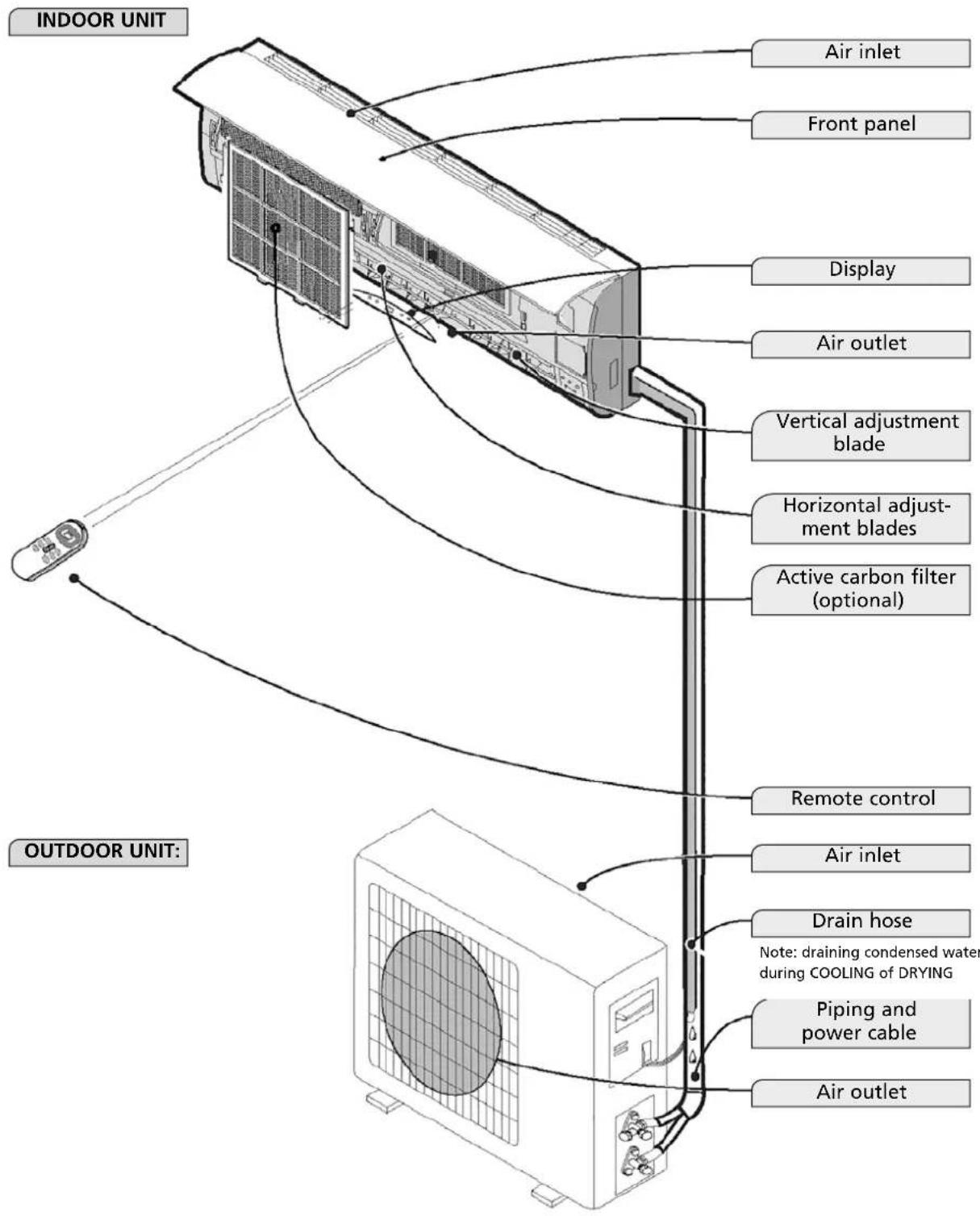
The illustrations in this manual are based on a standard model. The air conditioner you purchased may be a different model.

BEFORE USE
Before using the air conditioner, you must check and set the following.
Setting the remote control
The remote control is not set by the manufacturer for cooling-only or heating functions; you must set these functions yourself.
Every time the batteries in the remote control are replaced, the arrow "Heat" or "Cool" on the display will flash.
Depending on your type of air conditioner, set the remote control as follows:
Press any button if the arrow in front of "Heat" flashes; the heat pump is set.
Press any button if the arrow in front of "Cool" flashes; cooling-only is set.
If you do not press a button within 10 seconds, the remote control will automatically be set to cooling.

OPERATION
Operation and display
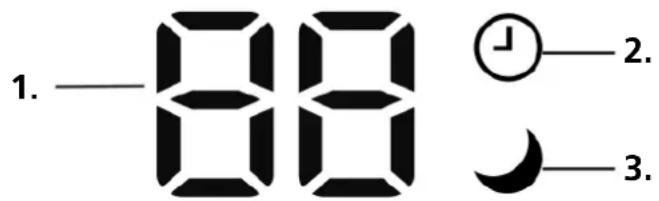
- Temperature indication LED
Shows the set temperature.
- Indication LED for timer function.
Shows that the timer function is activated.
- Indication LED for sleep function.
Shows that the sleep function is activated.
Remote control.
The remote control sends signals to the system.
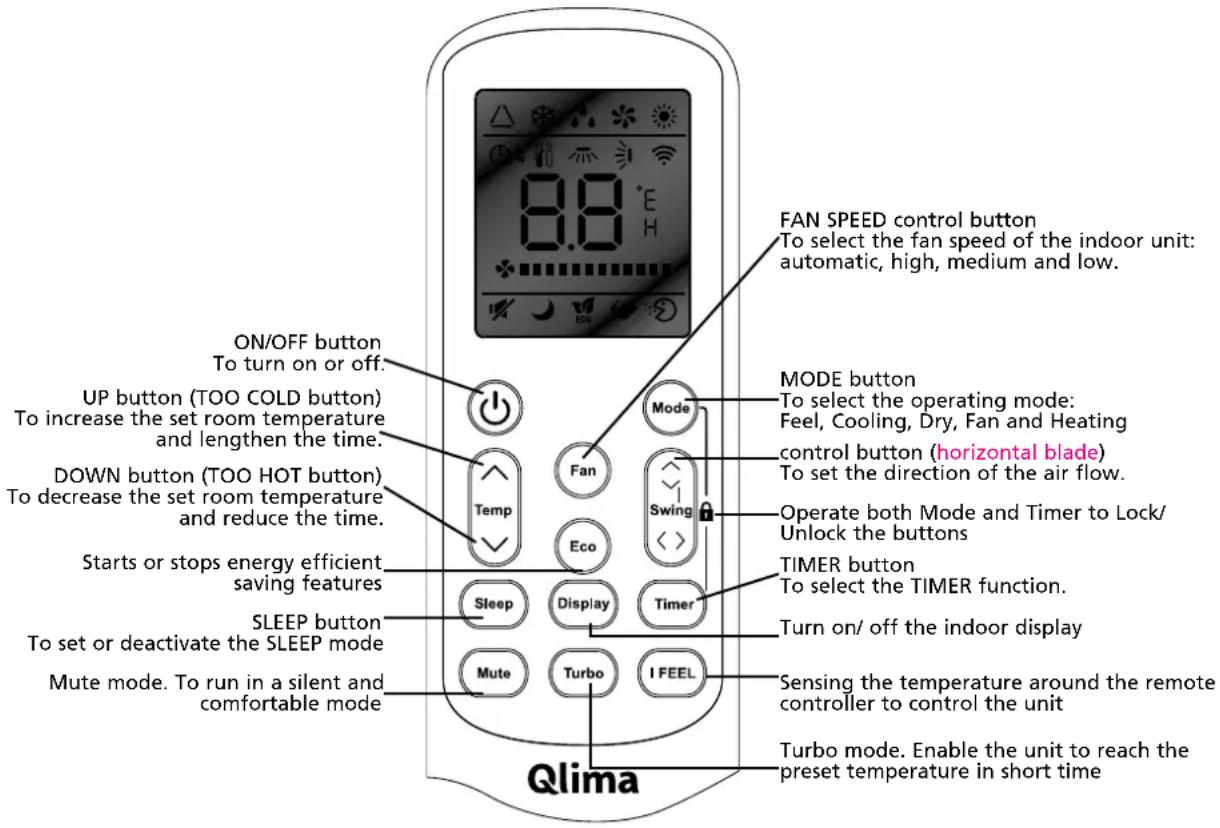
Note: Every mode and the relevant functions will be specified hereafter.
Placement of batteries.
Remove the battery cover in the direction of the arrow.
Insert new batteries as shown (align the positive (+) and negative (-) symbols).
Slide the battery cover back into position.
Note: Use 2 LR03 AAA (1.5 volt) batteries. Do not use rechargeable batteries. Replace batteries with batteries of the same type (see above) if the display becomes more blurred.
Storage of the remote control and tips for using.
The remote control can be stored in a holder, mounted against the wall.
Using the remote control
Point the remote control towards the receiver on the indoor unit of the air conditioner. This way, the air conditioner can be operated from a distance up to 7 meters.
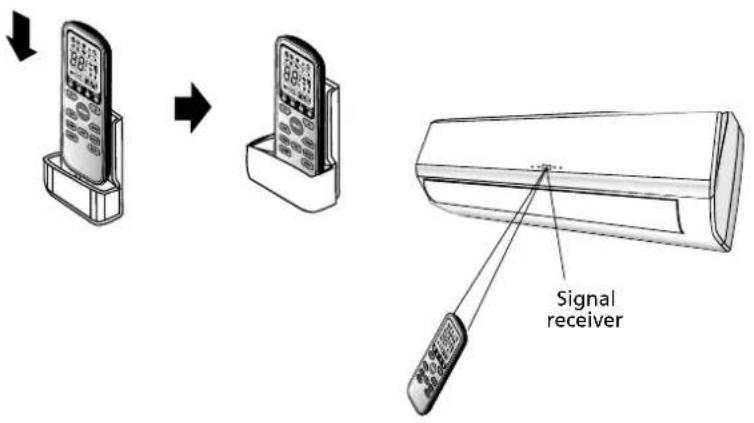
OPERATING INSTRUCTIONS
FEEL mode operating mode △
The operating mode is selected automatically (HEATING, DRY, FAN, COOLING) depending on the room temperature at the time of selection.
With the remote control pointed towards the air conditioner.
1. Turn on
Press the ON/OFF/RUN button. When the device receives a signal, the indication light RUNNING of the indoor unit lights up.
If the unit is not in the FEEL mode.
2. Select FEEL mode
Press the MODE button
Switching from MODE to FEEL
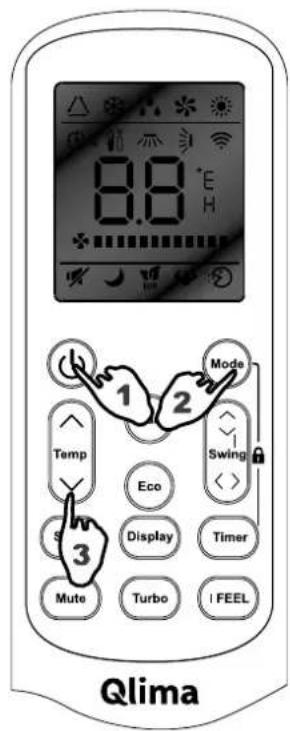
Operating mode and temperature will be set according to the indoor temperature.
| Indoor temperature Operating mode Desired temperature | ||
| Less than 20 °C | Heating for‘heat pump’ typeFan for ‘cooling only’ type | 23°C |
| 20 - 26°C DRY 18°C | ||
| More than 26 °C COOLING | 23°C | |
3. Set temperature
Press the △ button or the ▽ button.
By pressing the △ button, the set value of the set temperature will be increased by 1°C.
After the temperature is increased by 2°C, the indication light will remain unchanged.
By pressing the ∇ button, the set value of the set temperature will be decreased by 1°C.
After the temperature is decreased by 2°C, the indication light will remain unchanged.
Note:
It might occur that there is no air flow with the unit in service.
When changing the mode, the unit isn't always in service right away.
Cooling mode (COOL), heating (HEAT), and ventilate (FAN).
With the remote control pointed towards the air conditioner.
- Press the power button. When the device receives a signal, the indication light "running" of the indoor unit lights up.
- Press the MODE button to select the desired mode: cooling, ventilating, or heating.
- In the heating and cooling modes, it is possible to set the desired temperature with the △ and ∇ buttons and the desired fan speed, AUTO (FLASH), LOW, MID, or HIGH, with the FAN button on the remote control.
- In the ventilate mode, it is not possible to set the room temperature. The speed of the fan can be set with the FAN button to LOW, MID, or HIGH.
If the fan is set to AUTO, the fan will automatically activate the most favourable fan speed. When the room temperature comes closer to the set temperature, the speed of the fan will decrease.
Features of the HEATING mode
To heat
After the HEATING function is activated, the indoor unit will start blowing air after 2–5 minutes.
After heating
After the Heating function is stopped, the fan of the indoor unit will continue running for 2–5 minutes.
Defrost
During HEATING, the device will defrost automatically for the best performance. This procedure normally takes 2–10 minutes. The fan will stop during defrosting. After defrosting, the HEATING function will restart automatically.
Dehumidify mode
With the remote control pointed towards the air conditioner.
- Press the power button. When the device receives a signal, the indication light "running" of the indoor unit lights up.
- Press the mode button and select the DRY mode. The air conditioner will now dehumidify the room.
- When the room temperature reaches 18°C, the air conditioner will automatically stop dehumidifying. The air conditioner will restart automatically when the room temperature reaches 20°C.
When activating dehumidifying, the fan speed will be automatically set to AUTO.
The desired room temperature cannot be changed in the dry mode. This is automatically set to 18°C.
TIMER mode
When you set the timer with the TIMER button when you leave, it will be comfortable when you return home. At night you can turn off the timer.
SET TIMER
The following procedure must be followed to turn on the air conditioner at the desired time (the remote control and the air conditioner are turned off):
- Press the Timer button.
- Choose the desired mode by pressing the Mode button.
- Choose the desired temperature by pressing the button (only possible if the 'cool' or 'heat' mode is selected).
- Choose the fan speed (low, medium or high) or the automatic mode (only possible if the Feel, Cool or Heat mode is selected) by pressing the Fan button.
In the Dry mode the fan always runs on the Auto mode.
- Choose Swing or No swing by pressing the Swing button.
- Press the Timer button ('h' flashes).
- Use the button to select the period the air conditioner has to be turned on (between 0 and 10 you can set the time per half hour; between 10 and 24, you can set the time per hour).
- Press the Timer button ("h" will stop flashing) and the set time will appear on the display.
- Press the Timer button again to delete the selected data from the memory.
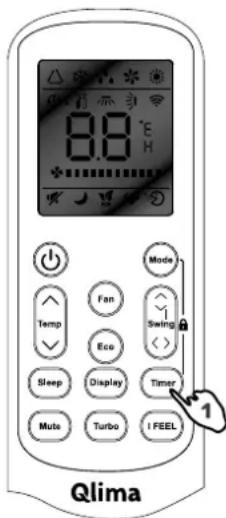
Note: When no buttons have been pushed during setting the timer function, the remote control will automatically turn off after 10 seconds.
The following procedure must be followed to turn off the air conditioner at the desired time (the remote control and the air conditioner are turned off):
- Press the Timer button.
- Use the △▽ button to select the period the air conditioner has to be turned off (between 0 and 10 you can set the time per half hour; between 10 and 24, you can set the time per hour).
- Press the Timer button ("h" will stop flashing) and the set time will appear on the display.
- Press the Timer button again to delete the selected data from the memory.
Note: When no buttons have been pushed during setting the timer function, the remote control will automatically turn off after 10 seconds.
Note: if 'h' is flashing and you press the ON/OFF/RUN button once, the set temperature will appear on the display. You can now change the temperature with the △▽ button. If you press the Timer button, the time will appear again and can be changed at this moment*. If you press the Timer button again, all data will be saved and the remaining time (the air conditioner will be turned on) will appear on the display.
* When you press the ON/OFF/RUN button instead of the Timer button, the remote control will be turned off.
Press the Timer function to check the settings on the display.
SWING function
Carry out the operations below when the air conditioner is in service.
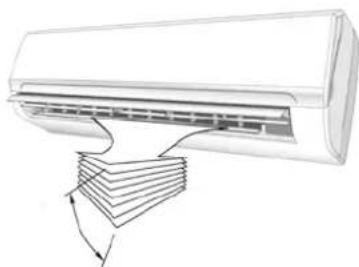
- Press the SWING button to activate the swing function. The vertical blades will now move up and down to distribute the air to the room better in the vertical direction.
- Press the SWING button again, the vertical blade will stop at the position during the moment the SWING button is pressed.
Horizontal air distribution
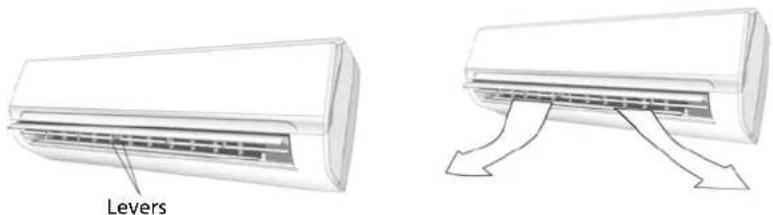
The horizontal air flow can be changed manually by adapting the horizontal blades with the levers, see picture.
SLEEP mode
Carry out the operations below when the air conditioner is in service.
- Press the SLEEP button to activate the sleep function.
- Press the SLEEP button or the MODE button to select another mode and turn off the SLEEP mode.
In SLEEP mode the air conditioner will control the room temperature as follows:
- In the cooling mode the set temperature will be increased automatically by 1°C after 1 hour. After two hours, the set temperature will be increased again by 1°C.
- In the heating mode the set temperature will be decreased automatically by 1°C after 1 hour. After two hours, the set temperature will be decreased again by 1°C.
- In the FEEL mode the air conditioner will set the temperature according point 1 or 2, depending on whether the air conditioner must cool or heat the room.
In the SLEEP mode, the air conditioner will be turned off automatically after 10 hours.
The SLEEP mode can only be used when the FEEL, cooling, or heating mode is selected.
TURBO function
Press the TURBO button to make the unit work extra hard. In COOL/HEAT/FAN mode, when you select the TURBO feature, it will use the highest fan setting and use the preset temperature of 16°C in COOL mode and 31°C in HEAT mode. Press it again to deactivate the pre-setting status.
Mute mode
Press the Mute button to activate mute mode. The unit will blow at the lowest fan setting and the compressor works at lowest capacity. This may result in insufficient cooling and heating capacity. Press it again to cancel mute mode.
I FEEL mode
Press the I Feel button to enable the remote control to measure the temperature at its current location and send this signal to the air conditioner to enable the air conditioner to optimize the temperature around you and ensure maximum comfort. Press it again to cancel the I FEEL mode.
ECO mode
Press the ECO button to enable the unit to work in an economic situation like adjusting the compressor frequency and fan speed. Press it again to cancel the ECO mode.
Lock mode
Press Mode and Timer together to lock or unlock the keyboard. When locked, all buttons can't be operated until they are unlocked. The remote controller screen shows "LO".
E MAINTENANCE
Cleaning the front panel
- Turn off the device and pull the plug out of the socket.
- Grab the front panel at position "a" and pull it towards you.
- Clean with a soft, dry cloth. Use lukewarm water (max. 30°C) to remove persistent dirt.
- Never use volatile substances like gasoline, or an abrasive to remove dirt.
- Never spray water on the indoor unit. Danger! Electrical shock!
- Replace the front panel and close it by pressing down position "b".

Cleaning the air filter
The air filter must be cleaned regularly.
Do this as follows:
- Turn off the device completely.
- Open the front panel.
- Grab the lever and pull the filter out.
- Clean the air filter and insert it again.
Clean a very dirty filter in lukewarm water with detergent. Let the filter completely dry at a spot without direct sunlight after cleaning.
- Close the front panel.
When the air conditioner is being used in a very dusty environment, it has to be cleaned every two weeks.
F OPERATING TEMPERATURES
Cooling, heating and / or dehumidifying is possible at the following inside or outside temperature.
| Mode | |||
| Refrigeration Heating | Dehumidify | ||
| Room temperature 16 | -48°C 16 – 31°C 16 – 48°C | ||
| Outdoor temperature 0 | -48°C -15 – +24°C 0 – 48°C | ||
G TROUBLESHOOTING
| Problem Cause / Solution | |
| Unit doesn’t work. | The plug is not inserted correct in the socket. |
| The batteries of the remote control are empty. | |
| The safety switch is activated or the fuse is blown. | |
| Are the air inlets, outlets obstructed? | |
| No cooled or heated air. | Is the temperature set correctly? |
| Is the air filter clogged? | |
| No effective control. | Due to a malfunction (discharge of static electricity, power system failure) the device will not work properly. If this is the case, pull the plug out of the socket and insert it again after 2-3 seconds. |
| Do not start the unit immediately. | Changing mode when the unit is in service: 3 minute delay. |
| Unusual odour. | Odour might come from another source, furniture, cigarettes, etc. The unit blows the sucked in air out again. |
| Sound of running water. | Cause by the refrigerant in the air conditioner, this is not a malfunction. |
| Sound of defrosting in the heating mode. | |
| Cracking sound. | The sound can be caused by the expansion/contraction of the front panel due to changes in temperature. |
| A lot of vapour/mist is coming out the air outlet. | Vapour/mist is formed when the air temperature in the room drops strongly because cold air is being exhausted in the COOLING or DRY mode. |
| The red indicator light for the compressor flashes continuous and the fan of the indoor unit is not working anymore. | The unit switches from the heating mode to the defrost mode. The indication light turns off within 10 minutes, the unit returns to the heating mode. |

WARRANTY CONDITIONS
The air conditioner comes with a 48 month warranty for the compressor and a 24 month warranty for other parts, valid from the date of purchase. The following rules apply:
- We explicitly reject all further claims for damages, including consequential damage.
- Repairing or replacing parts during the warranty period does not extend the warranty period.
- The warranty is void when modifications have been made, non-original parts are used or when repairs have been made by third parties.
- Parts subject to normal wear, like the filter, are not covered by the warranty.
- The warranty is valid only when you present the original, dated purchase invoice and if no modifications have been made to it.
- The guarantee is invalid for damage caused by neglect or actions that deviate from those in the user manual.
- Shipping costs and the risks associated with shipping the air conditioner or parts of it will always be on account of the purchaser.
- Damage caused by not using the appropriate filters is not covered by the warranty.
- Loss of refrigerant and/or leakage as a result of unprofessional connecting / detaching of the units by unqualified personal is not covered by the warranty conditions applicable to this product. Damage to devices which were not installed, connected and / or detached according local rules and legislation and / or according this installation manual are not covered by the warranty conditions applicable to this product.
In case of repairs, refer to your dealer if these instructions don't offer a solution. Make sure that in the exceptional case of a forced detachment, this procedure always is carried out by a qualified and authorised professional, according local legislation and regulations.
SPECIFICATIONS
| Model S 3925 S 3932 S 3948 | ||||
| Air conditioner type | Wall model air conditioner | Wall model air conditioner | Wall model air conditioner | |
| Cooling capacity* W 2600 (960 - 3120) 3300 (1080 - 3770) 5100 (1250 - 5920) | ||||
| EE rating cooling* A++ A++ A++ | ||||
| SEER* 6.6 6.1 6.3 | ||||
| Heating capacity* W 2400 (950 - 3380) 2800 (1010 - 3940) 4500 (1350 - 6280) | ||||
| EE rating heating* | A+ | A+ | A+ | |
| SCOP* | 4.0 4.0 4.0 | |||
| Dehumidifying capacity ** / *** | I / 24 h | 21.6 | 26.4 | 36.0 |
| Power consumption cooling | kW | 0.69 | 1.00 | 1.53 |
| Power consumption heating | kW | 0.67 | 1.01 | 1.55 |
| Yearly power consumption cooling / heating | kWh | 138/840 | 189/980 | 283/1575 |
| Power input | V / Hz / Ph | 220-240~ / 50 / 1 | 220-240~ / 50 / 1 | 220-240~ / 50 / 1 |
| Max. current | A | 6.4 | 7.1 | 12.0 |
| Air flow ** | m3/h | 550 | 550 | 800 |
| For rooms from - to ** | m3 | 60-85 | 80-100 | 140-185 |
| Suited for regions | W/A | W/A | W/A | |
| Compressor type | Rotary | Rotary | Rotary | |
| Fan speeds | 3 | 3 | 3 | |
| Thermostatic range | °C | 16 - 31 | 16 - 31 | 16 - 31 |
| Manual / mechanical / electronic control | Electronic remote control | Electronic remote control | Electronic remote control | |
| Remote control Yes / No | Yes | Yes | Yes | |
| Air filter type(s) | Mesh | Mesh | Mesh | |
| Refrigerant type / filling | C / g | R32 / 520 | R32 / 600 | R32 / 920 |
| Refrigerant GWP | 675 | 675 | 675 | |
| CO2 equivalent | tonnes. | 0.351 | 0.405 | 0.621 |
| Diameter refrigerant piping Fluid - Gas | mm | 1/4" / 3/8" | 1/4" / 3/8" | 1/4" / 3/8" |
| Dimensions indoor unit (WxHxD) | mm | 777×250×205 | 777×250×205 | 910×292×205 |
| Dimensions outdoor unit (WxHxD) | mm | 700×552×256 | 700×552×256 | 780×602×347 |
| Net weight indoor unit | kg | 8.5 | 8.5 | 10.0 |
| Net weight outdoor unit | kg | 24.0 | 26.0 | 36.0 |
| Gross weight indoor unit | kg | 10.5 | 10.5 | 13.0 |
| Gross weight outdoor unit | kg | 27.0 | 29.0 | 40.0 |
| Sound level indoor unit**** | dB(A) | 50 | 50 | 53 |
| Sound level outdoor unit**** | dB(A) | 60 | 60 | 65 |
| Sound pressure level indoor unit (low)**** | dB | 19 | 19 | 27 |
| Protection indoor unit | IP | IPX0 | IPX0 | IPX0 |
| Protection outdoor unit | IP | IPX4 | IPX4 | IPX4 |
| Refrigerant R32 | Room area | Above 4m2 | Above 4m2 | Above 15m2 |
* EN 14511/EN 14825
** Use indicative
*** Remove moisture at 27°C, 60% RL
**** EN 12108
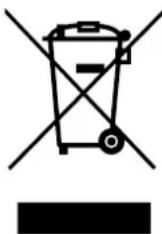
Don't dispose electrical devices with household waste; deliver it to a designated collection point. Contact the local authorities for information about places for disposal of electrical devices. When electrical devices are dumped at landfills or dumps, hazardous substances can leak into the groundwater and get into the food chain, with all consequences for the health of the local population. When replacing old devices it is the legal responsibility of the supplier to collect the old device for disposal. Don't throw batteries into fire. They can explode or leak hazardous fluids. When you replace or dispose the remote control, remove the batteries and
Dispose of them according to the applicable legislation. They are harmful to the environment.
Environmental information: This device contains fluorinated greenhouse gases, as stated in the Kyoto Protocol. The equipment may be repaired or dismantled only by professional, trained personnel.
This device contains refrigerant R32, the amount is indicated in the table above. Do not let R32 escape into the atmosphere: R32 is a fluorinated greenhouse gas with a greenhouse gas effect (GWP) = 675.
Internet:
In order to provide a better service, you can download the latest version of the user, installation, or service manual at www.qlima.com.



Distributed in Europe by PVG Holding B.V.
If you need more information or if you have any problems, please visit our website www.qlima.com or contact our customer service (phone number on www.qlima.com). For all further information or in case of any problems with the appliance, please refer to www.qlima.com or the local Customer Center (phone numbers can be found at www.qlima.com). If you need information or if you have a problem, please visit our website www.qlima.com, or contact customer service (you will find the phone number on www.qlima.com). (F) If you wish to obtain additional information or if you encounter a problem, please visit our website (www.qlima.com) or contact our customer service (you will find the address and phone number on www.qlima.com). FHN If you need service, more information, or if you have problems with the device, please visit our website at www.qlima.com or ask for advice from the PVG consumer service center (www.qlima.com). ⑥ If you need information or if you have a problem, please visit our website (www.qlima.com) or contact our sales support (you will find its phone number on www.qlima.com). ① For information and in case of problems, visit the website www.qlima.com or contact the Customer Assistance Center (to find out the phone number, see www.qlima.com). If you need information, or if you have a problem with the product, you can go to the website www.qlima.com. Alternatively, you can contact the PVG consumer service (phone number at www.qlima.com). If you need information or if you have a problem, please visit our website (www.qlima.com) or contact the sales support department (address and phone on www.qlima.com). If you need information or if you have problems, visit the website www.qlima.com or contact the Assistance Center (phone number at www.qlima.com). In case of problems and for detailed information, visit the Qlima website at www.qlima.com or contact the Qlima Contact Center (www.qlima.com). (6) If you need service or information or have problems with the appliance, you can visit www.qlima.com or contact Qlima customer service (you will find the phone number at www.qlima.com). ⑤0 For additional information, visit the company's website at www.qlima.com or call the telephone (www.qlima.com). TR If you need more information or if you encounter a problem, visit the Qlima website at www.qlima.com or contact the Qlima customer center in your country (phone number: www.qlima.com).
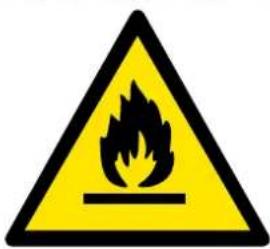
Warning: Combustible & Dangerous

Read the user manual

Read the installation manual

Read the service manual
- ATTENTION
- A SAFETY INSTRUCTIONS
- H WARRANTY CONDITIONS
- CONTENTS
- A SAFETY REGULATIONS
- IMPORTANT
- PARTS
- BEFORE USE
- SETTING THE REMOTE CONTROL
- OPERATION
- REMOTE CONTROL
- PLACEMENT OF BATTERIES
- STORAGE OF THE REMOTE CONTROL AND TIPS FOR USING
- USING THE REMOTE CONTROL
- OPERATING INSTRUCTIONS
- FEEL MODE OPERATING MODE △
- TURN ON
- SELECT FEEL MODE
- SET TEMPERATURE
- COOLING MODE (COOL), HEATING (HEAT), AND VENTILATE (FAN)
- FEATURES OF THE HEATING MODE
- TO HEAT
- AFTER HEATING
- DEFROST
- DEHUMIDIFY MODE
- TIMER MODE
- SET TIMER
- SWING FUNCTION
- HORIZONTAL AIR DISTRIBUTION
- SLEEP MODE
- TURBO FUNCTION
- MUTE MODE
- I FEEL MODE
- ECO MODE
- LOCK MODE
- E MAINTENANCE
- CLEANING THE FRONT PANEL
- CLEANING THE AIR FILTER
- F OPERATING TEMPERATURES
- G TROUBLESHOOTING
- WARRANTY CONDITIONS
- INTERNET
- DISTRIBUTED IN EUROPE BY PVG HOLDING B.V
Brand : QLIMA
Model : S3948
Category : Air conditioner