ManualGo.com
KD65X82K - TV SONY - Free user manual and instructions
Find the device manual for free KD65X82K SONY in PDF.



Download the instructions for your TV in PDF format for free! Find your manual KD65X82K - SONY and take your electronic device back in hand. On this page are published all the documents necessary for the use of your device. KD65X82K by SONY.
USER MANUAL KD65X82K SONY
About Manuals This TV comes with the following manuals. Please retain the manuals for future reference. Note
- Before operating the TV, please read the “Safety Information”.• Read the supplied safety documentation for additional safety information. • Images and illustrations used in the Setup Guide and this manual are for reference only and may differ from the actual product.• The “x”/“xx” that appears in the model name corresponds to a numeric digit, related to design, colour or TV system. Notice for Radio Equipment Hereby, Sony Corporation declares that the radio equipment types KD-75X82K, KD-75X81K, KD-65X82K, KD-65X81K, KD-65X80K, KD-55X82K, KD-55X81K, KD-55X80K, KD-50X82K, KD-50X81K, KD-50X80K, KD-43X82K, KD-43X81K, KD-43X80K are in compliance with Directive 2014/53/EU. The full text of the EU declaration of conformity is available at the following internet address: https://compliance.sony.euHereby, Sony Corporation declares that the radio equipment types KD-75X81K, KD-65X81K, KD-65X80K, KD-55X81K, KD-55X80K, KD-50X81K, KD-50X80K, KD-43X81K, KD-43X80K are in compliance with the UK relevant statutory requirements.The full text of the declaration of conformity is available at the following internet address: https://compliance.sony.co.ukFor this radio equipment, the following restrictions on putting into service or of requirements for authorization of use apply in AT, BE, HR, CY, CZ, DK, EE, FI, FR, DE, EL, HU, IE, IT, LV, LT, LU, MT, NL, PL, PT, SK, SI, ES, SE, UK, UK (NI), IS, LI, NO, CH, BG, RO, TR, AL, BA, MK, MD, RS, ME, Kosovo :5150 - 5350 MHz band is restricted to indoor operations only. Transporting
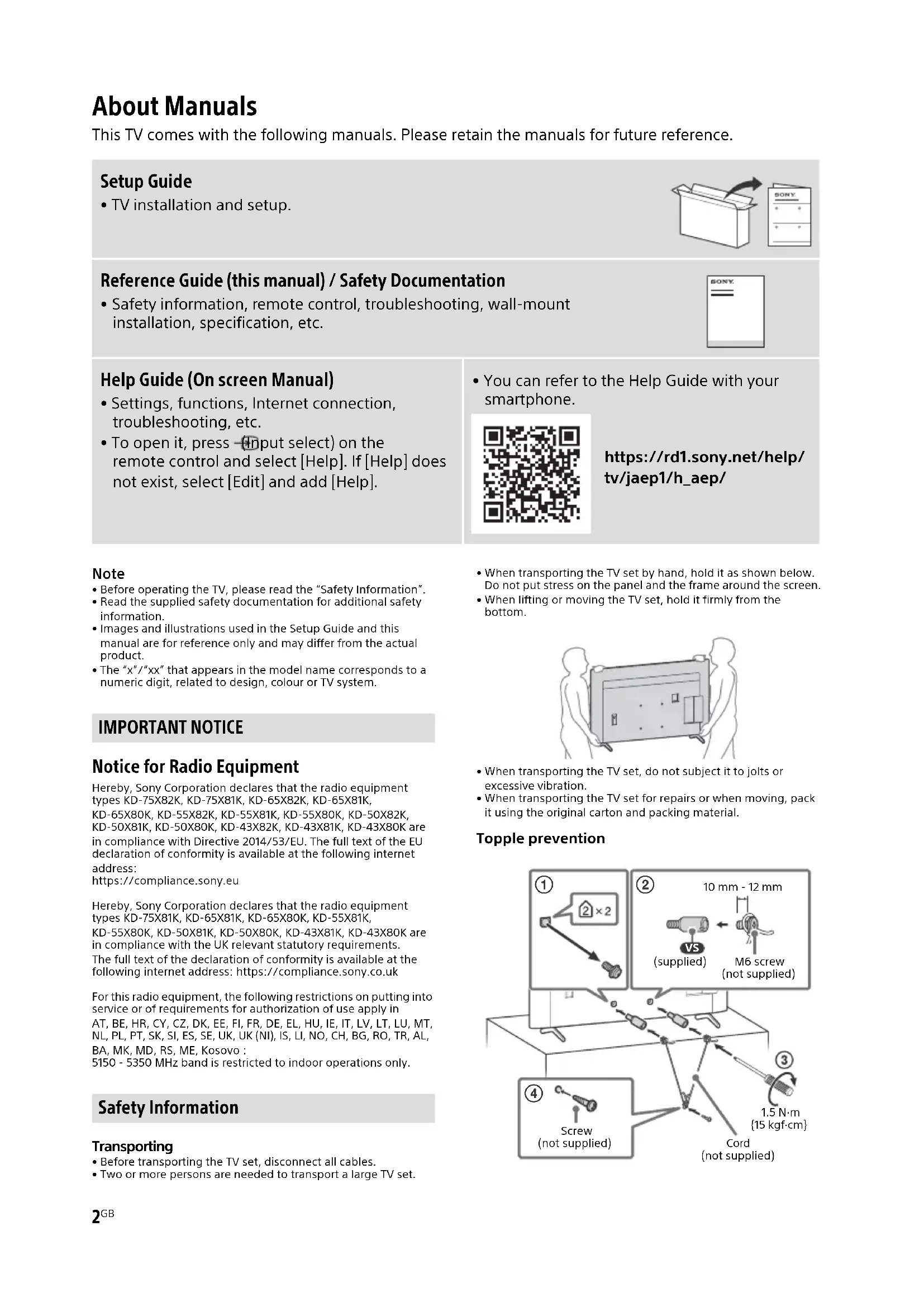
- Before transporting the TV set, disconnect all cables.• Two or more persons are needed to transport a large TV set.• When transporting the TV set by hand, hold it as shown below. Do not put stress on the panel and the frame around the screen.• When lifting or moving the TV set, hold it firmly from the bottom.• When transporting the TV set, do not subject it to jolts or excessive vibration.• When transporting the TV set for repairs or when moving, pack it using the original carton and packing material. Topple prevention Setup Guide
- TV installation and setup. Reference Guide (this manual) / Safety Documentation
- Safety information, remote control, troubleshooting, wall-mount installation, specification, etc. Help Guide (On screen Manual)
- Settings, functions, Internet connection, troubleshooting, etc.
- To open it, press (Input select) on the remote control and select [Help]. If [Help] does not exist, select [Edit] and add [Help].
- You can refer to the Help Guide with your smartphone. https://rd1.sony.net/help/ tv/jaep1/h_aep/ IMPORTANT NOTICE Safety Information
10 mm - 12 mmM6 screw (not supplied)Screw (not supplied)Cord (not supplied)1.5 N·m {15 kgf·cm}(supplied)3
Remote Control and TV The remote control shape, layout, availability and function of remote control buttons may vary depending on your region/country/TV model/TV settings*
(Guide): Display the digital programme guide of TV or TV box*
App buttons BUILT-IN MIC SWITCH*
: Turn on/off the built-in MIC. (Power) Remote Control sensor / Light sensor / LED Built-in MIC*
: To enable the built-in MIC, press the Google Assistant/microphone button on the remote control and follow the on-screen instructions.*1 For other remote control models, refer to the online Help Guide for details.*2 Only for limited region/country/model/language.*3 Google Assistant or voice search requires an Internet connection.*4 Accessibility shortcut is available by pressing and holding (Mute).*5 [TV box setup] setting is required.*6 Power consumption will increase when the built-in MIC is enabled as it is always listening. Optional Camera and Microphone Unit Cable Management
MICMIC For more information, refer to the Help Guide. Press (Input select) on the remote control and select [Help]. If [Help] does not exist, select [Edit] and add [Help].
Using Soundbar (not supplied) (KD-75X82K / 65X82K / 55X82K / 50X82K / 43X82K) Recommended (in front of the TV) Place the soundbar (not supplied) in front of the TV's Table-Top Stand. Alternate (on the Table-Top Stand) If there is not enough space to place the soundbar in front of the TV, attach the rubber feet (supplied with the TV) to the bottom of the soundbar (not supplied) and place the soundbar on top of the Table-Top Stand. Note
- Make sure that the soundbar height is not blocking the path between the remote control and the IR sensor on your TV.• By using rubber feet, the sound condition may vary depending on soundbar model.• Do not cover the ventilation hole and the identification label with the rubber feet.• Be sure to store the removed rubber feet in a safe place, keeping them away from children. (e.g., When sending the soundbar for repair) Troubleshooting General troubleshooting for issues like: black screen, no sound, frozen picture, TV does not respond, or network is lost, do the following steps. 1 Restart your TV by pressing the power button on the remote control for about five seconds. The TV will restart. If the TV does not recover, try unplugging the mains lead then press the power button on the TV and release it. Wait for two minutes, and plug in the mains lead. Or, press the power button on the TV for about 40 seconds until the TV turns off. 2 Refer to the Help menu shown below. 3 Connect your TV to the Internet and perform a software update. Sony recommends you to keep your TV software updated. Software updates provide new features and performance improvements. 4 Visit Sony support website (information provided at the end of this manual). When you plug in the TV, the TV may not be able to turn on for a while even if you press the power button on the remote control or the TV. It takes time to initialize the system. Wait for about one minute, then operate it again. The remote control does not function.
- Replace the batteries. The parental lock password has been forgotten.
- Enter 9999 for the PIN and enter the new PIN.For more information on troubleshooting, refer to the Help Guide.Press (Input select) on the remote control and select [Help]. If [Help] does not exist, select [Edit] and add [Help].5
Audio: In eARC (Enhanced Audio Return Channel) mode Refer to the online Help Guide for details. Except eARC mode
5.1 channel linear PCM: 32/44.1/48/88.2/
In eARC mode Refer to the online Help Guide for details. In ARC mode Two channel linear PCM: 48 kHz 16 bits, Dolby Audio, Dolby Atmos, DTS DIGITAL AUDIO OUT (OPTICAL) Digital optical jack (Two channel linear PCM: 48 kHz 16 bits, Dolby Audio, DTS) 1, 2 (HDD REC)*
USB device port ( 2 USB HDD device for REC feature) USB port 1 supports High Speed USB (USB 2.0) USB port 2 supports Super Speed USB (USB 3.2 Gen 1) CAM (Conditional Access Module) slot LAN 10BASE-T/100BASE-TX connector (Depending on the operating environment of the network, connection speed may differ. The communication rate and quality are not guaranteed.) Power, Product Fiche and others Power requirements 220 V - 240 V AC, 50 Hz Screen size (measured diagonally) (Approx.) KD-75X8xK: 189.3 cm / 75 inches KD-65X8xK: 163.9 cm / 65 inches KD-55X8xK: 138.8 cm / 55 inches KD-50X8xK: 125.7 cm / 50 inches KD-43X8xK: 108.0 cm / 43 inches Frequency range Output power Wireless LAN (TV) 2400-2483.5 MHz 5150-5250 MHz 5250-5350 MHz 5470-5725 MHz 5725-5850 MHz < 20.0 dBm < 23.0 dBm < 20.0 dBm < 20.0 dBm < 13.9 dBm Bluetooth® (TV) 2400-2483.5 MHz < 10.0 dBm Bluetooth® (RMF-TX800U) 2400-2483.5 MHz < 10.0 dBm6
Power consumption In [Standard] mode KD-75X8xK: 194 W KD-65X8xK: 147 W KD-55X8xK: 127 W KD-50X8xK: 89 W KD-43X8xK: 65 W Standby power consumption*
0.50 W (25 W in software/EPG update mode)
Display resolution (horizontal × vertical) (pixels) 3840 × 2160 Output rating 500 mA (for USB 1), 900 mA (for USB 2) Dimensions (Approx.) (w × h × d) (cm) with Table‐Top Stand KD-75X82K: 167.5 × 104.0 × 44.4 KD-75X81K: 167.5 × 104.1 × 41.2 KD-65X82K: 145.2 × 90.8 × 32.5 KD-65X81K / 65X80K: 145.2 × 90.6 × 33.9 KD-55X82K: 123.3 × 78.5 × 32.5 KD-55X81K / 55X80K: 123.3 × 78.3 × 33.9 KD-50X82K: 111.9 × 71.6 × 30.3 KD-50X81K / 50X80K: 111.9 × 71.6 × 28.8 KD-43X82K: 96.4 × 63.0 × 30.3 KD-43X81K / 43X80K: 96.4 × 62.9 × 28.8 without Table-Top Stand KD-75X8xK: 167.5 × 96.2 × 7.3 KD-65X8xK: 145.2 × 83.6 × 7.2 KD-55X8xK: 123.3 × 71.3 × 7.2 KD-50X8xK: 111.9 × 64.9 × 7.0 KD-43X8xK: 96.4 × 56.3 × 6.9 Stand width (Approx.) (cm) Standard position: KD-75X82K: 62.3 KD-75X81K: 132.9 KD-65X82K: 50.9 KD-65X81K / 65X80K: 120.9 KD-55X82K: 51.0 KD-55X81K / 55X80K: 106.1 KD-50X82K: 63.1 KD-50X81K / 50X80K: 66.5 KD-43X82K: 63.1 KD-43X81K / 43X80K: 66.5 Narrow position: KD-75X81K: 55.9 KD-65X81K / 65X80K: 47.9 KD-55X81K / 55X80K: 45.8 Mass (Approx.) (kg) with Table-Top Stand KD-75X82K: 36.7 KD-75X81K: 33.5 KD-65X82K: 25.2 KD-65X81K / 65X80K: 22.7 KD-55X82K: 19.4 KD-55X81K / 55X80K: 16.9 KD-50X82K: 15.4 KD-50X81K / 50X80K: 13 KD-43X82K: 13.1 KD-43X81K / 43X80K: 10.7 without Table-Top Stand KD-75X8xK: 32.2 KD-65X8xK: 21.7 KD-55X8xK: 15.9 KD-50X8xK: 12.4 KD-43X8xK: 10.1 Others Optional accessories Wall-Mount Bracket: SU-WL850 (KD-75X8xK / 65X8xK / 55X8xK only) Wall-Mount Bracket: SU-WL450 Screw diameter and length: Camera and Microphone Unit: CMU-BC1 Operating temperature: 0 ºC – 40 ºC Operating humidity: 10 % – 80 % RH (non- condensing) *1 When 4096 × 2160p is input and [Wide mode] is set to [Normal], the resolution is displayed as 3840 × 2160p. To display 4096 × 2160p, set [Wide mode] setting to [Full 1] or [Full 2]. *2 Refer to the on screen menu to set [HDMI signal format]. *3 Refer to the online Help Guide for details. *4 Connect your audio system to the HDMI IN 3 to route TV audio to your audio system. *5 Function not available in Italy. *6 Specified standby power is reached after the TV finishes necessary internal processes. *7 Standby power consumption will increase when your TV is connected to the network.
- Optional accessories availability depends on countries/region/TV model/stock.
- Design and specifications are subject to change without notice.
- Subscriptions for services and applications may be required and additional terms, conditions and/or charges may apply when using Google Assistant.
+ / – (Volume) (Sem som)*