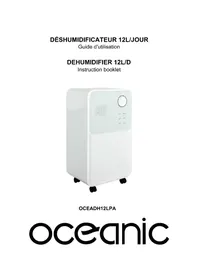
OCEADH12LPA - Dehumidifier OCEANIC - Free user manual and instructions
Find the device manual for free OCEADH12LPA OCEANIC in PDF.

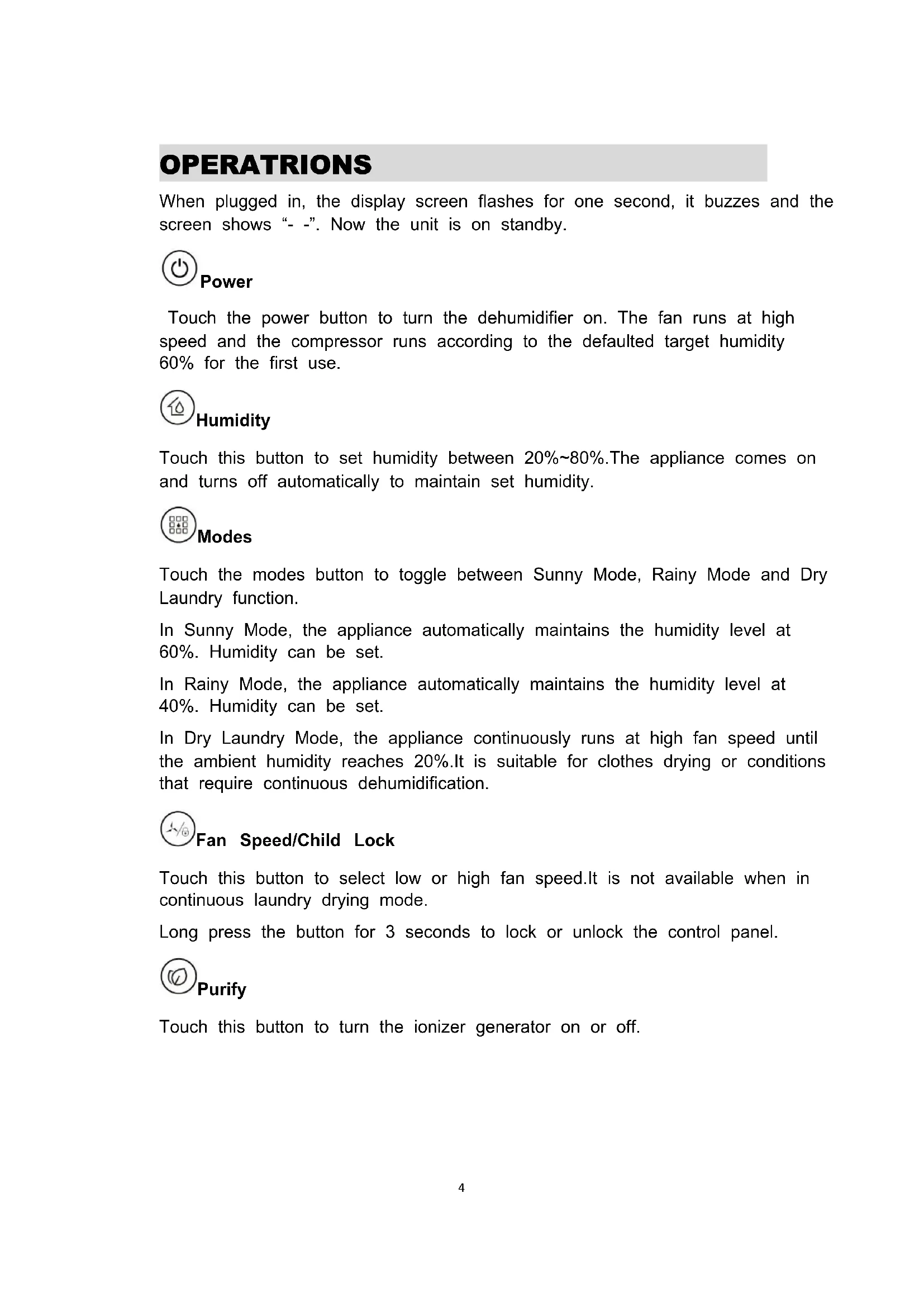

| Product Type | Dehumidifier |
| Brand | Oceanic |
| Model | OCEADH12LPA |
| Dimensions (W x D x H) | 280 x 200 x 500 mm |
| Net Weight | 12 kg |
| Power Supply | 220-240 V / 50 Hz |
| Power Consumption | 225 W (30 °C, 80 % RH) |
| Rated Current | 1.14 A (30 °C, 80 % RH) |
| Dehumidification Capacity | 12 L/day (30 °C, 80 % RH) |
| Water Tank Capacity | 2 L |
| Air Flow Rate | 120 m³/h |
| Refrigerant | R134a (0.09 kg) |
| Operating Temperature | 5 °C to 35 °C |
| Recommended Area | 20-25 m² (height 2.6 m) |
| Operating Modes | Sunny, Rainy, Dry Clothes, Standby |
| Touch Screen | Yes, with 3-color digital display |
| Ionizer | Yes |
| Child Lock | Yes (long press 3 seconds on speed button) |
| Timer | 1-24 hours (delayed start or stop) |
| Continuous Drainage | Possible (hose diameter 9.5 mm) |
| Filter Cleaning | Washable with warm water and mild detergent |
| Fuse | Type F, 3.15 A, 250 V |
| GWP / CO2 equivalent | 1430 / 0.13 tonnes |
| Warranty | Consult the retailer |
Frequently Asked Questions - OCEADH12LPA OCEANIC
User questions about OCEADH12LPA OCEANIC
0 question about this device. Answer the ones you know or ask your own.
Ask a new question about this device
Download the instructions for your Dehumidifier in PDF format for free! Find your manual OCEADH12LPA - OCEANIC and take your electronic device back in hand. On this page are published all the documents necessary for the use of your device. OCEADH12LPA by OCEANIC.
USER MANUAL OCEADH12LPA OCEANIC
OCEADH12LPA
oceanic
CONTENU
CONSIGNES DE SÉCURITÉ 1
PARAMÈTRES 2
CARACTÉRISTIQUES 2
DESCRIPTION DU PRODUIT 3
UTILISATION 4
ENTRETIEN.... 6
DÉPANNAGE....8
CONSIGNES DE SÉCURITÉ
- Videz l'eau.

ENTRETIEN
PRÉCAUTIONS
1
4
NETTOYAGE
- Replacez le filtre.
STOCKAGE
PRODUCT DISCRIPTION....3
OPERATRIONS......4
MAINTENANCE....6
TROUBLE SHOOTING....8
CAUTIONS
- Use this appliance only as described in this instruction manual.
- This appliance is designed to dehumidify domestic rooms and dry laundry and must not be used for other purposes.
- It is dangerous to modify or alter the characteristics of the appliance in any way.
- This appliance can be used by children aged from 8 years and above and persons with reduced physical, sensory or mental capabilities or lack of experience and knowledge if they have been given supervision or instruction concerning use of the appliance in a safe way and understand the hazards involved. Children shall not play with the appliance. Cleaning and user maintenance shall not be made by children without supervision.
- If the supply cord is damaged, it must be replaced by the manufacturer, its service agent or similarly qualified persons in order to avoid a hazard.
- The appliance must be connected to an efficient earth installation. Have your electrical circuit checked by a qualified electrician.
- The use of an extension lead is not recommended, however if it is necessary then follow carefully the extension lead's instructions, and most importantly ensure that the extension lead is correctly rated in accordance with the appliance being used and NEVER overloaded.
- Before cleaning or maintenance operations, always unplug the appliance from the power socket.
- Do not move the appliance by pulling the power cable.
- Never use the appliance in very damp rooms (laundries for example).
- Do not use the appliance on sloping surfaces.
- Keep the appliance at least 50 cm away from flammable substances (alcohol etc) or pressurised containers (e.g. aerosol cans).
- Do not rest heavy or hot objects on top of the appliance.
- Clean the air filter regularly.
- The materials used for packaging can be recycled. You are therefore recommended to dispose of them in appropriate waste collection containers.
- Do not use the appliance outdoors.
- Do not obstruct the air intake or outlet.
- Do not insert fingers or other objects into the air intake or outlet openings. Do not insert metal objects into the apertures.
- Danger! Rotating parts contact with the internal fan could cause electric shock or injury.
- Do not drink the water collected from the appliance or use it as animal drinking water.
- Before moving the appliance, turn off the switch and empty the water in the tank. Water could leak out and wet other objects, causing electric shocks or fire.
- Fluorinated greenhouse gases are contained in hermetically sealed equipment.
- The appliance shall be installed in accordance with national wiring regulations.
- Environment friendly disposal. You can help protect the environment!
Please remember to respect the local regulations: hand in the non-working electrical equipments to an appropriate waste disposal centre. The packaging material is recyclable. Dispose of the packaging in an environmentally friendly manner and make it available for the recyclable material collection-service.
PARAMETERS
| Model No. | OCEADH12LPA |
| Power Supply | AC220V-240V/50Hz |
| Power Consumption | 225W(30°C,80%) |
| 180W(27°C,60%) | |
| Rated Current | 1.14A(30°C,80%) |
| 0.94A(27°C,60%) | |
| Dehumidify Capacity | 12L/ Day(30C,80%) |
| 6.5L/day(27 °C,60%) | |
| Noise | ≤36dB(A) |
| Air Circulation | 120m3/hr |
| Water Tank Capacity | 2L |
| Refrigerant /Charge | R134a/0.09kg |
| Working Temp. | 5°C-35°C |
| Recommended Room Size | 20~25m2(height=2.6m) |
| Body Size | 280x200x500mm |
| Net Weight | 12kg |
| Fuse Type F,3.15A,250V | |
| GWP / CO2 Equivalent | 1430 / 0.13Ton |
FEATURES
- 12L/day efficient dehumidification
- Big touch panel
- Three color digital display
- Compact and modern design
●Air purifying with ionizer - Extremely quiet operation(36dB(A))
●Auto defrosting
- Four optional modes (Sunny,Rainy,Dry Clothes,Sleep)
PRODUCT DISCRIPTION
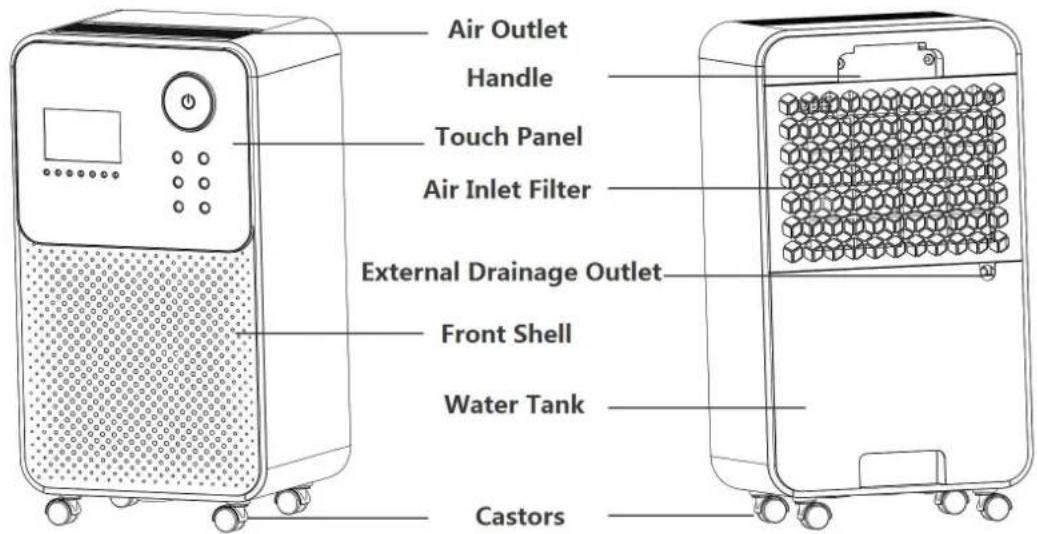
 |  BLUE HUM < 60 % Defrosting BLUE HUM < 60 % Defrosting | ||
 GREEN 60 %≤ HUM < 80 % Purify Function Only GREEN 60 %≤ HUM < 80 % Purify Function Only | |||
 RED HUM≥80 % E2/CL/CH/LO/HI, Water Full Alarm RED HUM≥80 % E2/CL/CH/LO/HI, Water Full Alarm | |||
 | SUNNY | ||
 | RAINY | ||
 | DRY LAUNDRY | ||
 | WATER TANK | ||
 | LOW FAN SPEED | ||
 | HIGH FAN SPEED | ||
 | CHILD-LOCK | ||
OPERATRIONS
When plugged in, the display screen flashes for one second, it buzzes and the screen shows “- -”. Now the unit is on standby.

Power
Touch the power button to turn the dehumidifier on. The fan runs at high speed and the compressor runs according to the defaulted target humidity 60% for the first use.

Humidity
Touch this button to set humidity between 20%\~80%. The appliance comes on and turns off automatically to maintain set humidity.

Modes
Touch the modes button to toggle between Sunny Mode, Rainy Mode and Dry Laundry function.
In Sunny Mode, the appliance automatically maintains the humidity level at 60%. Humidity can be set.
In Rainy Mode, the appliance automatically maintains the humidity level at 40%. Humidity can be set.
In Dry Laundry Mode, the appliance continuously runs at high fan speed until the ambient humidity reaches 20%. It is suitable for clothes drying or conditions that require continuous dehumidification.

Fan Speed/Child Lock
Touch this button to select low or high fan speed. It is not available when in continuous laundry drying mode.
Long press the button for 3 seconds to lock or unlock the control panel.

Purify
Touch this button to turn the ionizer generator on or off.

Timer
When on standby, set 1\~24 hours to turn the dehumidifier on.
When the dehumidifier is on, set 1\~24 hours to turn the dehumidifier off.
Adjust it to "00" to cancel setting.

Sleep Mode
Press this button to enter/cancel sleep mode.
In sleep mode, the indicating lights go off and the fan runs at low speed.
Touch any button to awake the indicating lights.

Water Tank Full Alarm
Water tank indicator
- When the tank is full for 5 seconds, it sets the alarm. The water tank indicator turns red and the unit buzzes for 15 times.
Clear the alarm
- When the buzz is on, press any button to stop it. The compressor,fan and ionizer generator shut down and all the functions freeze until the tank is emptied and back in right position.
Empty the tank
- Grab the notch at the bottom of the tank and pull it out with both hands. Take it slowly and steadily in case of spilled water.
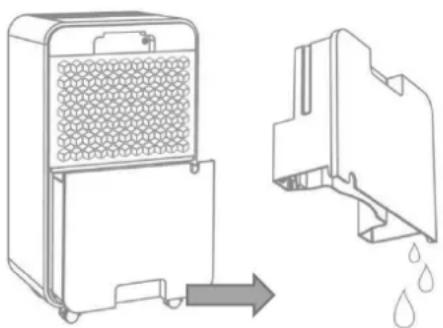
●Empty the water.
- Put the water tank back in position. The dehumidifier automatically starts working again.
CONTINUOUS DRAINAGE
- Take out the water tank
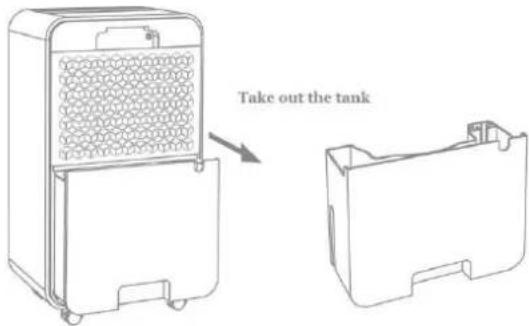
-
Use a water hose(diameter=9.5mm) to connect the water outlet.
-
Passes the water hose through the cutting hole in the tank and p the tank back in position.
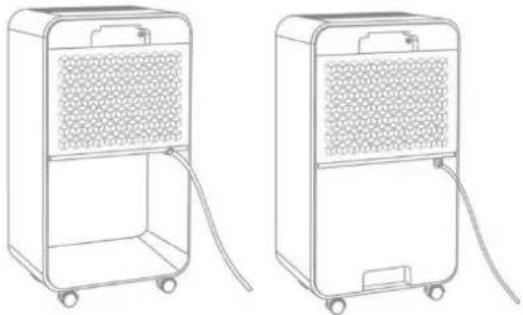

For continuous drainage,
the end of the hose should not submerged in water to prevent i from being blocked or damaged.
MAINTENANCE
PRECAUTIONS
1
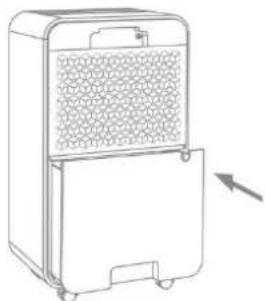
Do not remove the float out of the tank otherwise the dehumidifier can not start up
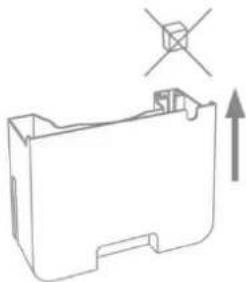
2
Ensure the water tank is in right position when putting it back, otherwise the dehumidifier can not start up
3
If the tank is dirty, wash it with cool/warm water. Do no use cleanser, steel balls, chemically treated dust-proof cloth, gasoline, benzene, thinners or other chemical solvents in case of damage and leakage.
4
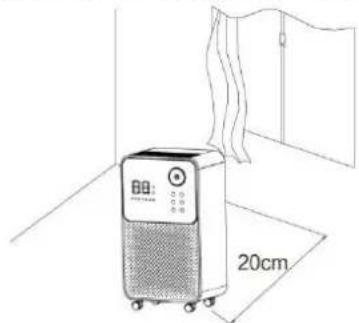
When the dehumidifier is in operation, make sure that the rear of the dehumidi maintains a minimum spacing of 20 cm.
CLEANING
- Body Cleaning
Use a soft and slightly moist cloth to clean the dehumidifier body.
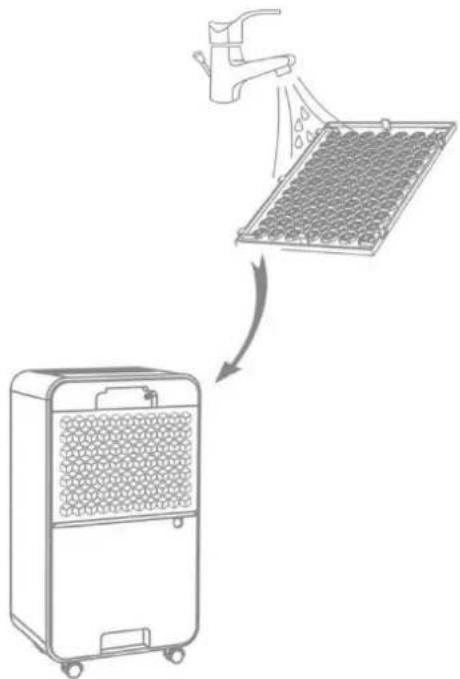
-Filter Cleaning
-
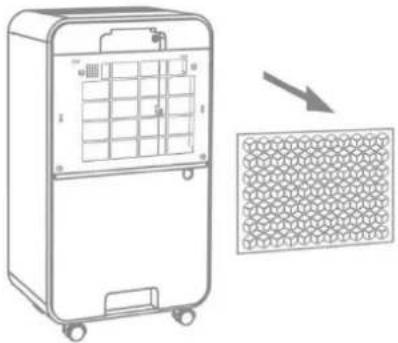
Remove the filter frame and take off the filter.
-
Use a vacuum cleaner to gently absorb the dust on the surface.
If the filter is very dirty, wash it with water soft detergent and dry it thoroughly afterward
- Put the filter back.
![graph TD A["Hand spraying water"] --> B["Rack-mounted device with grid pattern"] B --> C["Final container with spray"]](/content/2026/03/563936/images/c06565c8a1bcfc33fad7c9777c8945297fc8c77a4f32c9cc1a704e87e120f411.jpg)
STORAGE
When not using the product for a long time and intend to store it, please pay attention to the following steps:
-
Empty the water in the water tank and wipe the water droplets on bottom of inside machine.
-
Collect the power cord and store it in the dry water tank.
-
Clean the filter.
-
Place the machine in a cool and dry environment.
TROUBLE SHOOTING
1. FUNCTIONING TEMP.
5° C ≤ Ambient Temp. ≤ 35° C
When the ambient temp is lower or higher than the functioning temp, the dehumidifier stops.
When 5°C ≤ Ambient temp. ≤ 16°C , the compressor automatically defrosts at intervals; during defrosting, the compressor stops and the fan keeps running.
2. BEFORE CALLING FOR SERVICE
Before contacting professional service, please review the trouble shooting list that includes common occurrences which are not the result of a defect in workmanship or materials.
| Problem | Possible Cause | Solution |
| Not working | No power supply | Connect to a functioning outlet and swit on |
| Water Full Indication Flashes | Drain water tank and reset it, or re-posit the water tank to right place | |
| Room temperature < 5°C,or >35 °C | Self-Protection designed to protect the unit. Can not work under such temperatu | |
| Bad functioning | Is the air filter clogged? | Clean the air filter as instructed |
| Is the intake duct or discharge duct obstructed? | Remove the obstruction from the discharge duct or intake duct. | |
| No air intake | Is the filter clogged? | Wash the filter |
| Loud noise when running | Is the machine put in the plat place? | Put the machine on the plat ground |
| Is the filter clogged? | Wash the filter | |
| E2 | Humidity sensor problem | Change a sensor |
| LO | Environmental humidity is below 35% | The dehumidifier shuts down for self-protection |
| HI | Environmental humidity is above 95% | |
| CL | Low temperature protection, the environmental temperature<5°C | |
| CH | High temperature protection, the environmental temperature>35°C |
PROTECTION DE L'ENVIRONNEMENT

- OCEANIC
- CONTENU
- CONSIGNES DE SÉCURITÉ
- ENTRETIEN
- PRÉCAUTIONS
- NETTOYAGE
- STOCKAGE
- CAUTIONS
- PARAMETERS
- FEATURES
- PRODUCT DISCRIPTION
- OPERATRIONS
- POWER
- HUMIDITY
- MODES
- FAN SPEED/CHILD LOCK
- PURIFY
- TIMER
- SLEEP MODE
- WATER TANK FULL ALARM
- WATER TANK INDICATOR
- CLEAR THE ALARM
- EMPTY THE TANK
- CONTINUOUS DRAINAGE
- MAINTENANCE
- PRECAUTIONS
- CLEANING
- STORAGE
- TROUBLE SHOOTING
- FUNCTIONING TEMP
- BEFORE CALLING FOR SERVICE
- PROTECTION DE L'ENVIRONNEMENT
Brand : OCEANIC
Model : OCEADH12LPA
Category : Dehumidifier