iWa225 - Receiver MTX Audio - Free user manual and instructions
Find the device manual for free iWa225 MTX Audio in PDF.

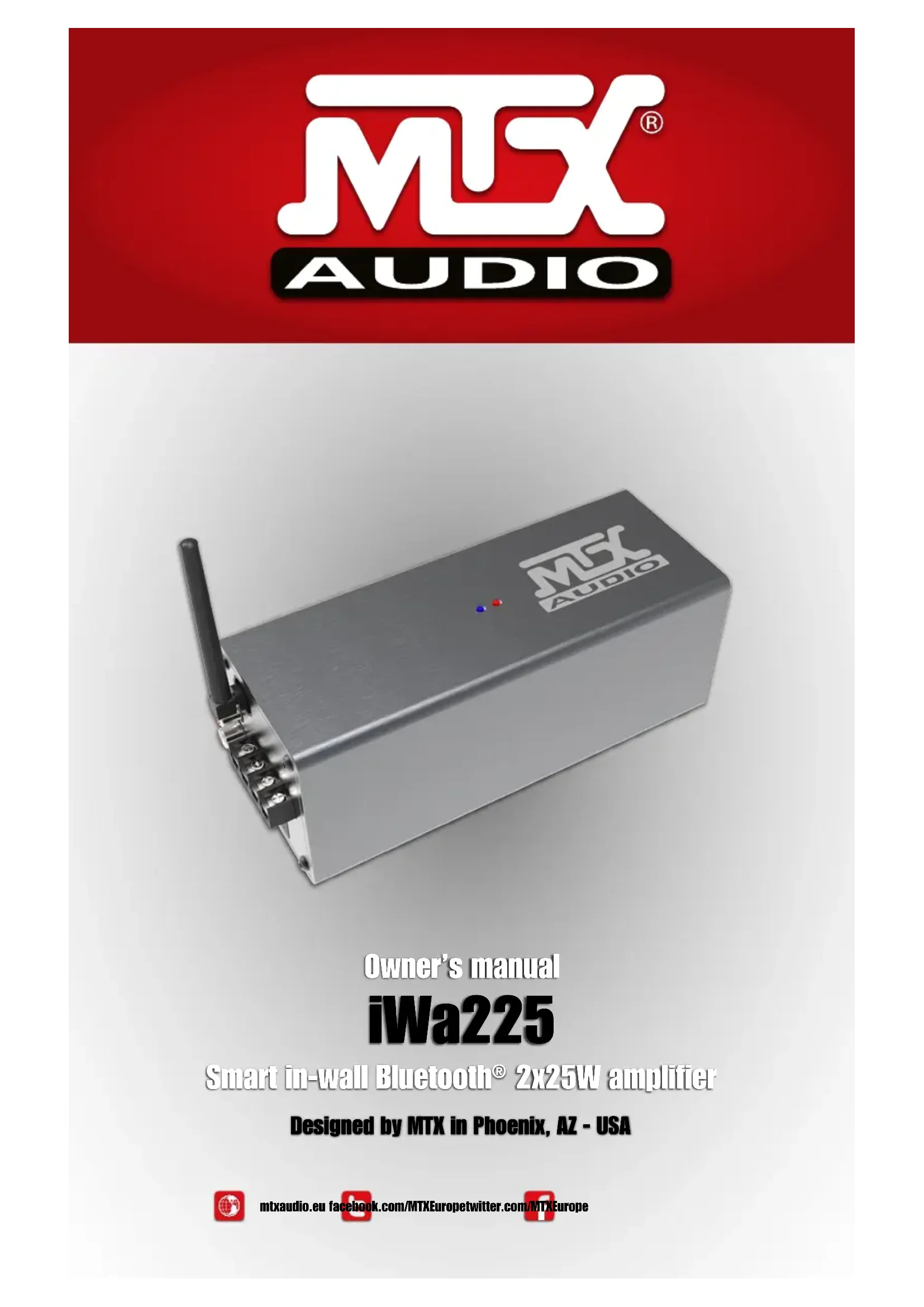


| Product Type | Stereo amplifier with Bluetooth receiver |
| Brand | MTX Audio |
| Model | iWa225 |
| Output Power | 2 x 25 W RMS at 4 Ω (0.1% THD+N) or 2 x 13 W RMS at 8 Ω (0.1% THD+N) |
| Compatible Impedance | 4 to 8 Ω |
| Audio Inputs | Bluetooth (with dedicated antenna) and RCA auxiliary input |
| Speaker Outputs | 2 channels (screw terminals) |
| Bluetooth | Yes, with pairing and reset |
| Remote Control | Infrared with wired IR receiver (1 m cable) |
| Power Supply | 100‑120 V / 200‑240 V, 50‑60 Hz (automatic switching) |
| Power Consumption | Not specified (built-in power adapter) |
| Dimensions (W x D x H) | 8 x 20 x 8 cm |
| Weight (amplifier only) | 920 g |
| Housing Material | Not specified (plastic or metal) |
| Color | Black (assumed) |
| Maintenance and Cleaning | Unplug the device before cleaning; use a soft, dry cloth. |
| Safety | Observe speaker polarities; do not expose to moisture. |
| Spare Parts and Repairability | Contact MTX Audio customer service; no spare parts listed in the manual. |
| General Information | Recycle at an appropriate collection point; do not dispose of with household waste. |
Frequently Asked Questions - iWa225 MTX Audio
User questions about iWa225 MTX Audio
0 question about this device. Answer the ones you know or ask your own.
Ask a new question about this device
Download the instructions for your Receiver in PDF format for free! Find your manual iWa225 - MTX Audio and take your electronic device back in hand. On this page are published all the documents necessary for the use of your device. iWa225 by MTX Audio.
USER MANUAL iWa225 MTX Audio
Designed by MTX in Phoenix, AZ - USA
Thank You!
Thank you for purchasing the MTX iWa225 high-end, high-definition audio amplifier. The iWa225 is designed to deliver a deeper dimension that brings your music to life. No other system provides the exacting measure of clarity in such a small unit. Whether you are listening from your iPad, iPhone, iPod or computer, the iWa225 delivers outstanding sound quality. Congratulations for making a smart choice and enjoy the ultimate audio experience with MTX.
In the Box
1x iWa225 amp with its built in power supply
1x Bluetooth antenna
1x Power cable
1x IR (Infra red) receiver
1x Remote control
1x This owner's manual
Specifications
Power:2x25W RMS @4Ω 0,1%THD+N or 2x13W RMS @8Ω 0,1%THD+N
- Compatible load: 4 to 8
- Inputs : Bluetooth and Aux (RCA)
- Remote: IR receiver with 100cm cable
- Power supply: 100 120V - 200 240V, 50 - 60Hz
- Dimensions: 8x20x8cm
Weight:920g (amp only)
Connections
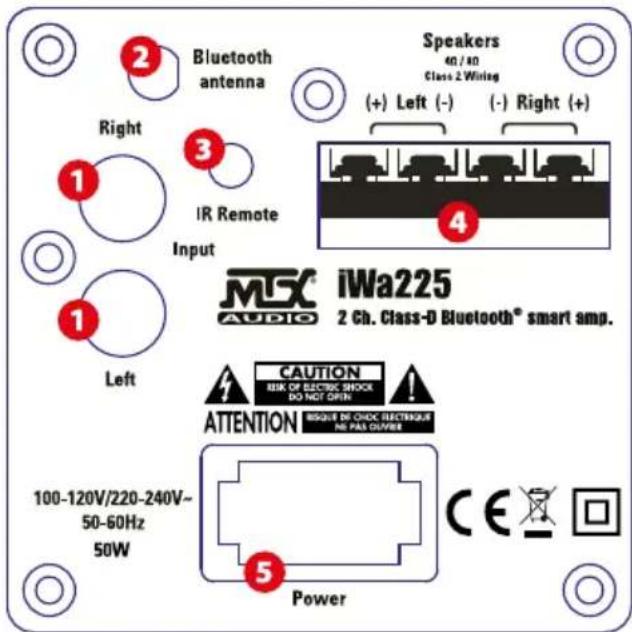
- RCA Inputs - These RCA inputs are used with your external music source. MTX recommends only high quality RCA cables to decrease the possibility of radiated noise entering the system.
- Bluetooth antenna connector - Connect the provided antenna. Note the BT input will not work properly without the antenna. It also requires that the IR receiver and IR remote control are in sight.
- IR (Infra red receiver connector - Connect the provided IR sensor. Note that without IR sensor, the remote control will not be functional.
- Speakers connectors - Connect your 4 or 8 speakers to it. Be careful with the polarities. Reverse polarity strongly degrades the level of serious and sound quality.
- Power supply connector - use the provided power cord and connect it to a 110V or 220V wall plug. You don't need to change any setting.
Remote control keys
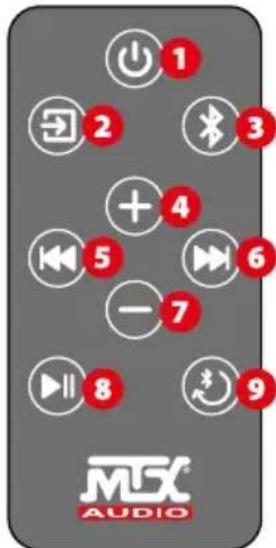
- Power OFF: use to switch off the unit. Note that it doesn't switch on the unit...
- Aux input : push once to switch on the iWa225 and use the AUX input.
-
The right red LED will switch on
- Bluetooth input : Push once to switch on the iWa225 and to use the BT input.
-
The left blue LED will switch on
- Volume UP : use it to raise the volume level
- Skip backward : push once to go back in track (only available in BT)
- Skip forward : push once to go next (only available in BT)
- Volume Down : use it to reduce the volume level
- Play/Pause : push once to play or pause the track(only available in BT mode)
- BT paring : Push once to pair a new device to with your iWa225.
Push once to release the BT connexion.
Quick start
- Screw the antenna
- Connect the speakers. It is important to respect the speaker polarities to get a good sound and a good bass response. Note that the minimum speaker load is 4
- Connect the RCA inputs if available
- Connect the IR sensor and make it visible for the IR remote control
- Connect the power cable to a wall socket. Your iWa225 is ready
- On the remote control, remove the battery protection to activate it
- Press the Aux input or the BT input on the remote control. The amp is on.
- If you use the Aux input, adjust the volume level.
- If you use the Bluetooth input, go to the next paragraph.
Bluetooth paring
- First connexion : push the Bluetooth key ( n^ 3 ) on the remote control. The unit is switching on and the blue LED is now on.
- Push once on the "BT paring/release" key (n°9) on the remote control. The blue LED is now flashing blue. The unit is ready to pair.
- On your BT device (Cell phone, iPad, computer...), go to the BT preferences and tap on "MTX iWa225" to pair the devices together.
- When it is done, go to your music app and play a track.
Note 1: After 1 minute without BT signal, the unit will switch to Aux automatically if it detects signal on Aux.
Note 2: You have to be in BT input to release BT.
Note 3: You can always release the MTX iWa225 and make it available for an other BT device by simply pushing the "BT paring" (n°9) key on the remote control. You don't need to disconnect the devices, just push once "BT paring" (n°9).
Recycling
Do not trash this product. You must deliver it to the applicable collection point for recycling. The iWa225 is made of highly recyclable components and materials.
How to Stay Tuned :

https://www.facebook.com/MTXEurope

https://twitter.com/MTXEurope

http://www.mbxaudio.eu
Merci!
https://www.facebook.com/MTXFrance

https://twitter.com/MTXFrance

http://www.mtxaudio.fr
Vielen Dank!
https://www.facebook.com/MTXEurope

https://twitter.com/MTXEurope

http://www.mtxaudio.eu
MITEK Corporation
Designed and Engineered by MTX in Phoenix - AZ, USA. Assembled in PRC.
© 2016 Mitek. All rights reserved.
MTX is a registered trademark of Mitek.
Due to continual product development, all
specifications are subject to change without notice.
Mitek - MTX
4545 East Baseline Rd. Phoenix, AZ 85042, USA
MTX is proud to be an American
Audio Company since 1971.

Brand : MTX Audio
Model : iWa225
Category : Receiver