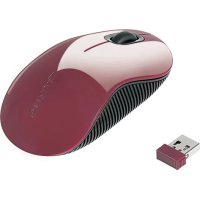
AMW5003EU - Mouse TARGUS - Free user manual and instructions
Find the device manual for free AMW5003EU TARGUS in PDF.



| Product Type | Wireless Mouse |
| Brand | Targus |
| Model | AMW5003EU |
| Detection Technology | Bluetrace (optical) |
| Connection Type | Wireless RF |
| Interface | USB (mini receiver) |
| Power Source | 2 AA batteries (included) |
| Estimated Battery Life | Up to 6 months depending on usage |
| Range | Approximately 10 meters |
| System Compatibility | Windows 2000, XP, Vista; Mac OS X 10.4+ |
| Plug & Play | Yes, no driver needed |
| Main Functions | Left/right buttons, clickable scroll wheel |
| Low Battery Indicator | Visible beam between buttons |
| Dimensions (L x W x H) | Approximately 10 x 6 x 3.5 cm |
| Weight (with batteries) | Approximately 120 g |
| Color | Black (typical) |
| Box Contents | Mouse, 2 AA batteries, mini USB receiver, user manual |
| Receiver Storage | Under the mouse (clip) |
| Maintenance and Cleaning | Clean with a soft, dry cloth; avoid liquids |
| Safety | Remove batteries if not used for an extended period |
| Repairability | Spare parts not provided; contact customer service for repair |
Frequently Asked Questions - AMW5003EU TARGUS
User questions about AMW5003EU TARGUS
0 question about this device. Answer the ones you know or ask your own.
Ask a new question about this device
Download the instructions for your Mouse in PDF format for free! Find your manual AMW5003EU - TARGUS and take your electronic device back in hand. On this page are published all the documents necessary for the use of your device. AMW5003EU by TARGUS.
USER MANUAL AMW5003EU TARGUS
1 YEAR LIMITED WARRANTY: We pride ourselves on inequality of our products. For complete warranty details and a list of our worldwide offices, please visit www. taurus.com. Features and specifications are subject to change without notice. Microsoft, Windows and Windows Vista are registered trademarks or trademarks of Microsoft Corporation in the United States and/or other countries. Ms is a trademark of Apple Inc., registered商标 holder. The use of this brand may not be registered trademark of Logitech International in the United States and other countries. All trademarks and registered trademarks are the property of their respective owners. ©2011 Taurus Group International, Inc.

User Guide
Targus Wireless Bluetrace Mouse
Table of Contents
GB-English
Targus Wireless Bluetrace Mouse 6
BG-BbIrapckn(e3nk)
Bluetrace 6e3xuHa Mmua Targus 12
CZ-Cestina
Bezdralova Bluetrace mys Targus 18
DE-Deutsch
Targus Drahtlose Bluetrace Maus 24
DK-Dansk
Targus Tradlos Bluetrace Mus 30
EE-Eesti
Targus traadita Bluetrace hir 36
ES-Espanol
Raton Bluetrace Inalambrico Targus 42
Targus Wireless Bluetrace Mouse
FI-Suomi
Targus langaton Bluetrace hiiri 48
FR-Frççais
Souris Bluetrace sans fil de Targus 54
GR-EAAnvikAnnpoopio
Aogpuato Bluetrace movri Targus 60
HR-Hrvatski
Targus bezicni Bluetrace mis 66
HU-Magyar
Targus gezetek nelkuli Bluetrace eger 72
IT-Italiano
Mouse Bluetrace Wireless Targus 78
LT-Lietuviškai
Targus" bevièle Bluetrace peIe 84
LV-Latviešu
Targus bezvadu Bluetrace pele 90
Targus Wireless Bluetrace Mouse
Targus Wireless Bluetrace Mouse
NL-Nederlandlands
Targus Wireless Bluetrace Mouse (Targus Draadloze Bluetrace Muis) ..
96
NO-Norsk
Targus tradios Bluetrace mus 102
PL-Polski
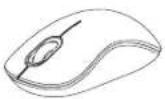
Thank you for your purchase of the Targus Wireless Bluetrace Mouse. The USB receiver conveniently attaches to the mouse for ease of use while traveling or on the go. This is a plug and play device so no additional software is required.
Contents
Targus Wireless Bluetrace Mouse
-2xAA Batteries
·Mini USB Receiver
-User Guide
System Requirements
Hardware
-USB port
Operating System
Microsoft Windows® 2000
Microsoft WindowsXP
Microsoft Windows Vista®
MacOSX10.4or later
Installing the Batteries
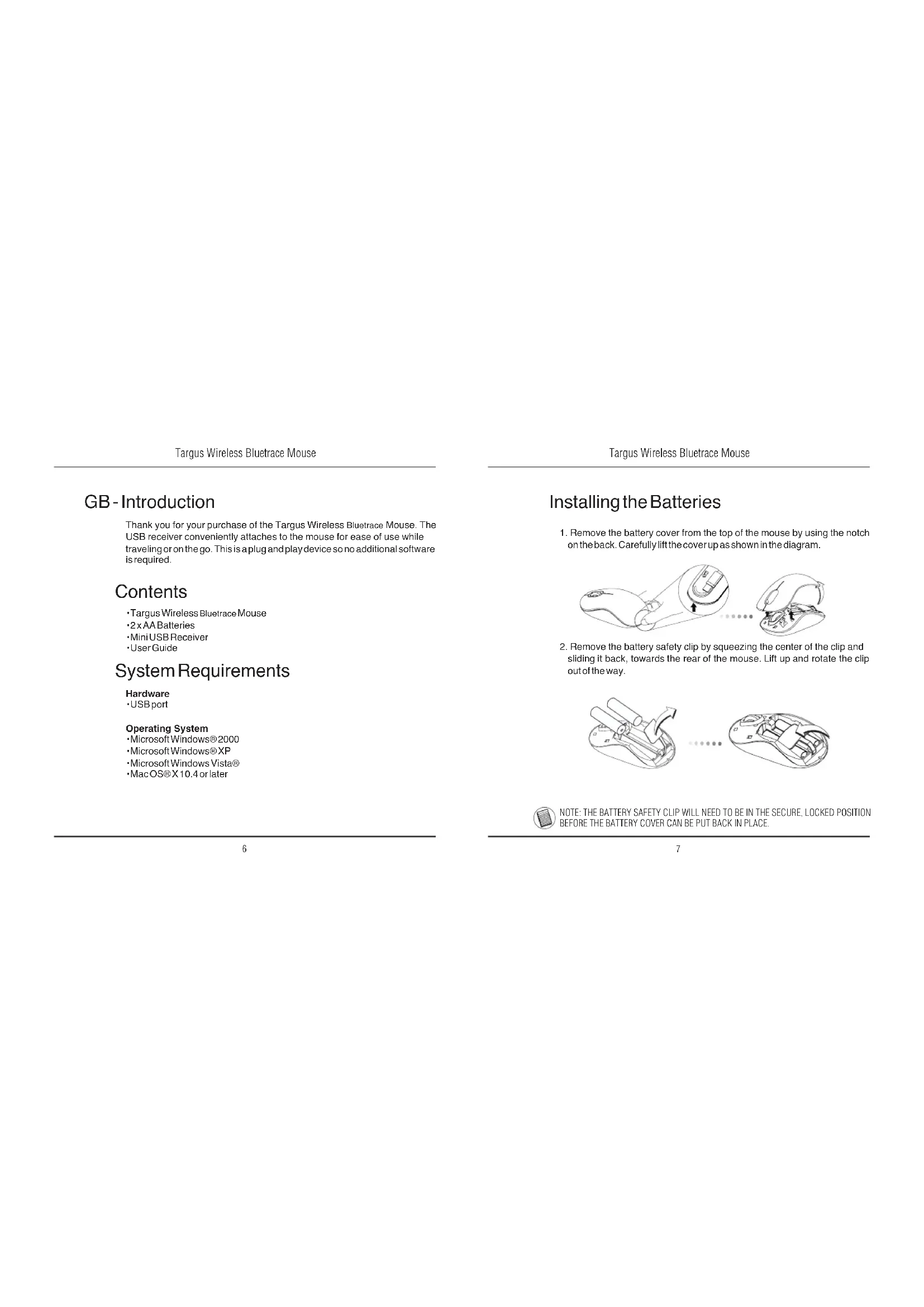
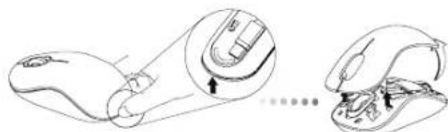
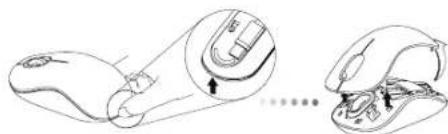
- Remove the battery cover from the top of the mouse by using the notch on the back. Carefully lift the cover up as shown in the diagram.
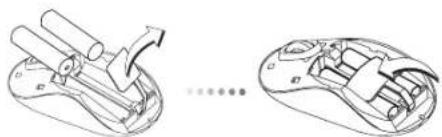
- Remove the battery safety clip by squeezing the center of the clip and sliding it back, towards the rear of the mouse. Lift up and rotate the clip out of the way.
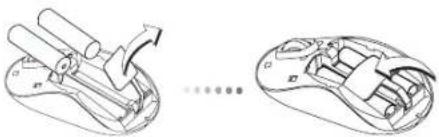

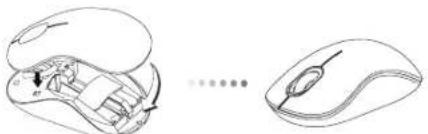
NOTE: THE BATTERY SAFETY CLIP WILL NEED TO BE IN THE SECURE, LOCKED POSITION BEFORE THE BATTERY COVER CAN BE PUT BACK IN PLACE.
Targus Wireless Bluetrace Mouse
- Insert two AA-size batteries, making sure that the positive (+) and negative (-) ends of each battery match the polarity indicators inside the battery compartment.
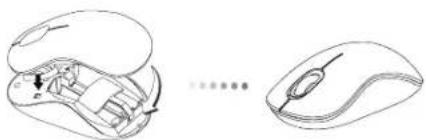
- Replace the battery cover, carefully fit the cover until it clicks into place.
Establishing the Connection
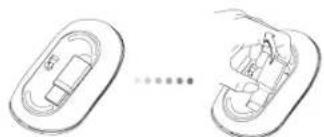
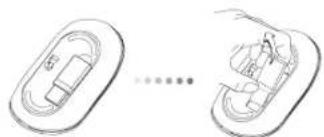
(A) Remove the USB receiver from the bottom of the mouse.
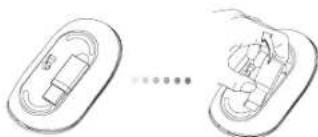
Targus Wireless Bluetrace Mouse
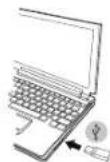
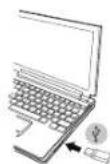
(B) Plug the USB receiver into an available USB port on your computer.
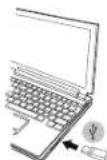
(C) This mouse is a plug and play device. It will automatically operate when the USB receiver is connected to the computer.
Low Battery Power Indicator
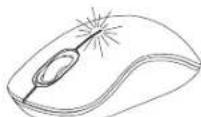
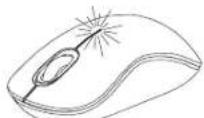
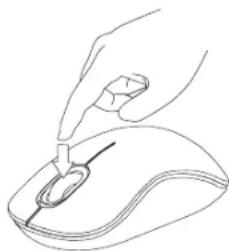
The light illuminates from the seam between the left and right buttons. It will turn on when the power is low and batteries need to be replaced.
Targus Wireless Bluetrace Mouse
Targus Wireless Bluetrace Mouse
Programming Your Mouse
(Windows)
To access the advanced scroll wheel features you will need to download and install the software driver. This can be downloaded from the following location:
Visit www.targus.com to download and install the driver.
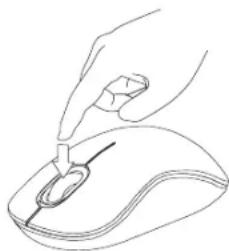
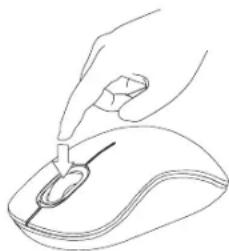
Once installation is complete, open the driver software and select the desired setting for the scroll-wheel button. Close the driver software application and you're ready to go. Activate your selected feature by pressing down on the scroll wheel.
BG-BbBedeHne
Bnaoradapm, Ye 3aaynxte Bluterace 6e3nHHa MMka Targus. MMkaata ce cBp3ba ydo6ho c USB npneMHNk 3a neKota npn bTyBaHe nnn KOrato cte B dBKehe. PnpedanBra plug and play ycTpoiCTBO n He n3NCKBA DOnbIHTenEcoFyep.
CbDpbXaHne
- Bluetrace 6e3KmHa Mmka Targus
-2xAA6aTeepn - MHHN USB npHemHK
PbkoBcTBOHaNTpe6nte
CNCTeMHN 3nCKBaHn
Xapnyep
- USB nopT
OnepaHnHa cnCTema
Microsoft Windows® 2000
Microsoft WindowsXP
Microsoft Windows Vista®
Mac OS® X 10.4 mnn no-HOBA
HCTaIIpaHe Ha 6aTepeInTe
- OCTpaHETe KANAKA ha 6atepHnTA OT rOpHATA CTpaH a MMUKaTa, KATO hON3BATE 6yToHa 03ad.BHNMaTeHNO NOBnHHTe KANAKA, KAKTo E NOK3AHO HA CXEMATA.
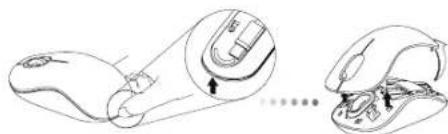
- NtctpaHete cKb6ata Ha 6atepe3 npntnckaHe Ha eHTbpaN, Hn3hETe KbM 3aHaT aHCT Ha MNkata. NOBnHrTe Hn3abPteTe cKb6ata, 3 da n 3BaNDaTe.
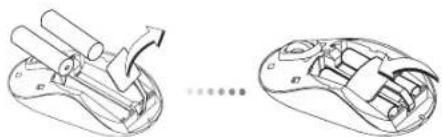

3AEJEKKA: OBE3OACNTENHATA CKOBA HA MATEPIRTA TPR5BA DA BbDE B 3AXBAHATO, BLOKIPAPOH NIOIOKEHE, PEPDN DA BbPHETE KANAKA HA MCTO KANIKA HA OTJEEHEMETO 3A BATEPN.
Targus Wireless Bluetrace Mouse
- NocTabete DBe 6aepm Cpa3mep AA, KaTo cna3BaTe nonpaTeTa (+) n(-) Ha otDeneHMeTO 3a 6aepm.
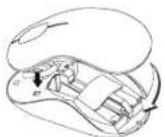

4.BbPHTe BnHmATEIHO HA MRCTO KANAKA HA OTIDENEHMeTO 3a BaTePN I ce yBepTe, Ye UpaKaBa HA MRCTo.
YctaHOBBAHe Ha Bpb3Ka
(A)OTctpaHete USB npmEmnka OT dONHaTcpaHa Ha MMkata.
Targus Wireless Bluetrace Mouse
(5) CbpgkTe USB npmEmnka KbM USB nopt Ha KOMNIOBpa.
(C) MnKkata npedctabnaB plug and play yctpoNCTBO. 3anOyba pa6ota ABTOMATUHO npn BKNIOUbaHe Ha USB npneMHNK kMb KOMNIOTp..
HДиKaTOp 3a HnCKO HnBO Ha 6aTePnYTa
CBeTINHATA Ce H3JIbYBa MEKdy JIeBn N DEcEh 6yToHN. BKnIOUba ce npn HnCKO 3axpaHbAne HnyXda OT CMHa Ha 6aTePmTE.
Повторно поррампане на мшкata (Windows)
3aДа IMATEdoCTbIyOcBbPueHCTBaHNTeФHyKUNHnA nPpMDBHXBAHE Na KONJIOTO ue Tp86Ba da 3apeDInTe N HtCAnIPate coDTpyeh dapanBey ToT MoKe Da ce 3apeDn O t CneHOTo MRCTO:
Docetete www.targus.com, 3a da 3apeiTe n HcTanpaTe dpaiBepa
CnEaKATO HNCTAANHITRAe EPNKNIOUHc, CTAPImpaTte COPTyeepa m3bpeTe KeJAHNTHe hACTPOnIK Ha pINDBNKBaHe. 3aTbOpTe NPINOJOEHMeI N CTE TOBNI 3a p6Ota.
AKnBvIpaIte n36paHATA qHyKlIa Ype3 HATnckAHe HA KOJIeNTo 3a npBeBpTahe.
CZ- Uvod
Dekujeme vam, ze jste si zakoupili bezdratovou Bluetrace mys od spolecnosti Targus. Prijima USB je practicky pifpevné k mysi pro snadne pouziti na cestach. Toto je zaflzeni typu plug und play, proto neni tbreba dalisi software.
Obsah
AnnapaTHbIe CpeDCTBa
USB-nopt
OnepaounHnA cnTeMa
Microsoft Windows® 2000
Microsoft WindowsXP
Microsoft Windows Vista®
Mac OSX 10.4 mnn 6one no3dne Bepcnn
YcTaHOBKa 6aTapeek
1.CHMMTE KpIbIKOy OTeKApA DnB 6BaTaeP C BepXHeN Chtn KOpIpyCa Mblu n cnooBHO na3a CzADn. AkkypaTHO NODHMITE KpbIbIKY, KaK NOKa3Ha HO pncHyKe.
2.HaxMnTe Ha cpeHIOO qACTb npEOxpaHNTeBHO 3aKIMMa DnB 6atapeH nCDBHBe erO B CTOPOHy 3aHNHe qACTN MbIu. PNOHMnTE N NOEPAHTE 3aKIMB CTOPOH.

PIMMEAHNE:PEPEDYCTAHOBKOHA MECTO KPBILIKNOTCEKA DIA BATAPENEHOOXBODMOYCTAHOBNTBIN3AΦIKCIPOBATB N PABAVIBHOMNIOXQEHNIPDEOXPAHINTBHBN3AXKIM.
Targus Wireless Bluetrace Mouse
3.BCTabTe Dae batapeKTHTNAA, Yb6dNTecb, YTO KOHTakbl NIOc (+) INMHyc(-) KAKdoB daapen COOTBECTBYIOT 3HaKaAM NOIAPHOCTN BOTCEK dna batapen.
4.YctahOBHTeHaMeTOKpbIuKyOTcKaDn8BaTapeIN3aФHKpnyTe COUENKOM.
YctahOBka coeHHeHHa
(A) BbHbTe USB-pecBep nHnKHeu qactmMbU.
Targus Wireless Bluetrace Mouse
(6)Поклоче USB-pecnBep KdocTyHOMy USB-nopTy KOMnIbOtepa.
(C)Даннь Мьшьpb6aToTЯNot pinnmny plug-n-play(BkNIOHnИnpa).ОддONKHA abOMATMHeckn HAcTPOITbCHa Na p6oTyNoceNoDKnOChENU USB-peCBeBa K KomnBtopey.
HndkaTOp Hn3KOrO 3apJa6atapei
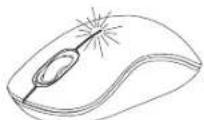
Bue Meky npabOB Hneob KhoNkAMM 3aoropTcR CBeOTHMdkaTOp. OH BKNIOUaTeC, KOra 3apd 6aTaapeek nadaet, INx Heo6XODIMO 3aMeHnltb.
PporpaMMnpoBaHneMbIiIN
(Windows)
YTo6bI BOCONL30aBtCB paCINHPENHbMM FyHKUAMM KONEcKa npokpyTKn, Eo6xOJIMN 3aRpyNTb N yctAHOBNT b CNEImAIBbHbI dpaBep. Ero MoNO 3aRpyNTb NO cneJyoUeM y ADECy:
3aInte Ha caiT: www.targus.com, yTo6b3 aRpy3nTb n yCTaHOBNTb dpaiBep.
IIO KOHuaHH yCTaHOBkM OTKPOITe NpOrpaMMbI dpAEBep H bIb6epnTe Heo6xOJHMbIE HACTOeHN DOKeJIKA pOKpyTK. 3AkpoTHe npINQKeHneD PAJDBepa. YCTPOITcTB OTOBKO KaPote.AKTINBpuTyHeo6xOJHMbIE PHyHKmH HAKaTNeH Ma KONEChKO pOKpyTK.
SE-Introduktion
Tack for ditt kop av Targus tradiosa Bluetrace mus. USB mottagaren fester enkelt pa musen for latthanterlig anvandning, da du befinner dig pa resande fot. Delta ar en plug and play enchet som gor att ingen extra programvara kravs.
Innehåll
Targus tradiola Bluetrace mus
-2xAAbatterier
·Mini USB mottagare
- Anvandarhandbok
Systemkrav
Hardvara
USBingang
Operativsystem
Microsoft Windows® 2000
Microsoft WindowsXP
Microsoft Windows Vista®
MacOSX10.4eller senare version
gaiyai all aie jayalalal 1y jai yaiy gaiy caiy

- Table of Contents
- Targus Wireless Bluetrace Mouse
- NL-Nederlandlands
- NO-Norsk
- PL-Polski
- Contents
- System Requirements
- Installing the Batteries
- Establishing the Connection
- Low Battery Power Indicator
- Programming Your Mouse
- (Windows)
- BG-BbBedeHne
- CbDpbXaHne
- CNCTeMHN 3nCKBaHn
- HCTaIIpaHe Ha 6aTepeInTe
- YctaHOBBAHe Ha Bpb3Ka
- HДиKaTOp 3a HnCKO HnBO Ha 6aTePnYTa
- Повторно поррампане на мшкata (Windows)
- CZ- Uvod
- Obsah
- YcTaHOBKa 6aTapeek
- YctahOBka coeHHeHHa
- HndkaTOp Hn3KOrO 3apJa6atapei
- PporpaMMnpoBaHneMbIiIN
- SE-Introduktion
- Innehåll
- Systemkrav
Brand : TARGUS
Model : AMW5003EU
Category : Mouse