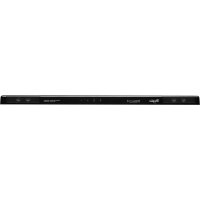
CoolVox WRC36DB - Loudspeaker WHIRLPOOL - Free user manual and instructions
Find the device manual for free CoolVox WRC36DB WHIRLPOOL in PDF.


| Product Type | Bluetooth Speaker for Kitchen (Kitchen Sound System) |
| Brand | Whirlpool |
| Model | CoolVox WRC36DB |
| Dimensions (L x W x H) | 737 x 216 x 38 mm |
| Weight | 1.95 kg |
| Power Supply | 100-240 V AC, 50-60 Hz |
| Total Power | 44 W (4 x 6 W mid-high + 2 x 10 W woofers, THD 1%) |
| Frequency Response | 70 Hz - 20 kHz |
| Speakers | 4 mid-high speakers + 2 woofers |
| Amplification | Class D digital dual amplification |
| Connectivity | Bluetooth A2DP, NFC (Android) |
| Bluetooth Range | Approximately 9 m (30 ft) |
| LED Indicators | Orange: standby; Blue flashing: pairing; Blue steady: connected |
| Device Memory | Up to last 6 paired devices |
| Installation | Placed on top of refrigerator or under a cabinet |
| Auxiliary Input | Not available (Bluetooth only) |
| USB Charging Port | Not available |
| Compatibility | Smartphones, tablets, and any Bluetooth A2DP device |
| Warranty | 1 year (limited) |
Frequently Asked Questions - CoolVox WRC36DB WHIRLPOOL
User questions about CoolVox WRC36DB WHIRLPOOL
0 question about this device. Answer the ones you know or ask your own.
Ask a new question about this device
Download the instructions for your Loudspeaker in PDF format for free! Find your manual CoolVox WRC36DB - WHIRLPOOL and take your electronic device back in hand. On this page are published all the documents necessary for the use of your device. CoolVox WRC36DB by WHIRLPOOL.
USER MANUAL CoolVox WRC36DB WHIRLPOOL
audio by harman/kardon
natural_image
Illustration of a Coolvox brand air conditioner unit with ventilation slots and a coiled cable (no text or symbols on the device itself)COOLVOX™ KITCHEN SOUND SYSTEM SAFETY
Your safety and the safety of others are very important.
We have provided many important safety messages in this manual and on your appliance. Always read and obey all safety messages.

This is the safety alert symbol.
This symbol alerts you to potential hazards that can kill or hurt you and others.
All safety messages will follow the safety alert symbol and either the word "DANGER" or "WARNING."
These words mean:
DANGER
You can be killed or seriously injured if you don't immediately follow instructions.
WARNING
You can be killed or seriously injured if you don't follow instructions.
All safety messages will tell you what the potential hazard is, tell you how to reduce the chance of injury, and tell you what can happen if the instructions are not followed.
State of California Proposition 65 Warnings:
WARNING: This product contains one or more chemicals known to the State of California to cause cancer.
WARNING: This product contains one or more chemicals known to the State of California to cause birth defects or other reproductive harm.
UL Certificate Number - 14-111498
A. Status LED
B. Power/Pair C. Volume
Amber - Standby Mode
Blinking Blue - Pairing Mode
Solid Blue - Connected
■ Designed for the top of the refrigerator; low profile to fit underneath cabinets, reducing countertop clutter.
■ Angled speakers fill the kitchen with sound.
■ Intelligent equalization (EQ) technology: Digital signal processing (DSP) to optimize system dynamics and bass impact.
■ Bi-amplification: the woofers and mid-range to high-range speakers are independently driven by digital Class D amplifiers for exceptional richness and clarity of sound.
■ Advanced transducers: Specially designed woofers produce extended bass performance with minimal distortion. Mid-range to high-range speakers project musical details over a wide listening area.
- Seamless Bluetooth ^W7 connectivity and NFC pairing option for Androids.
■ Drivers: Four mid-range to high-range speakers and two woofers
■ Power: mid-range to high-range: 4 x 6 watts @ 1% THD
■ Woofers: 2 x 10 watts @ 1% THD
■ Frequency response: 70Hz – 20kHz
■ Interface: Bluetooth ^ A2DP music streaming
■ Power supply input voltage: 100 – 240V AC, 50-60 Hz
■ Dimensions: 29" x 8½" x 1½" (737 mm x 216 mm x 38 mm)
■ Weight: 4.3 lb (1.95 kg)
†®BLUETOOTH is a registered trademark of Bluetooth SIG, Inc.
SET UP AND OPERATION
- Remove the CoolVox™ kitchen sound system from its packaging and remove all film.
- Place the sound system on top of the refrigerator with the front edge aligned with the front of the refrigerator cabinet.
- Plug the power cord into the wall outlet. The status LED (A) will glow amber.
- Pair and Play.
The sound system pairs easily with your smart phone, tablet, or other Bluetooth device. It has a range of approximately 30 ft (9 m), so you can enjoy the sound you want without wires.
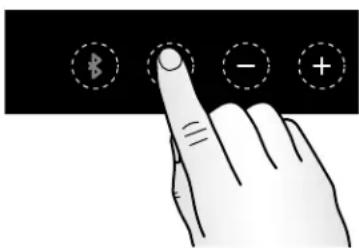
■ Press and release the Power/Pair button (B) on the control panel. The Status LED (A) will flash blue.
■ Select the CoolVox™ kitchen sound system from your device.
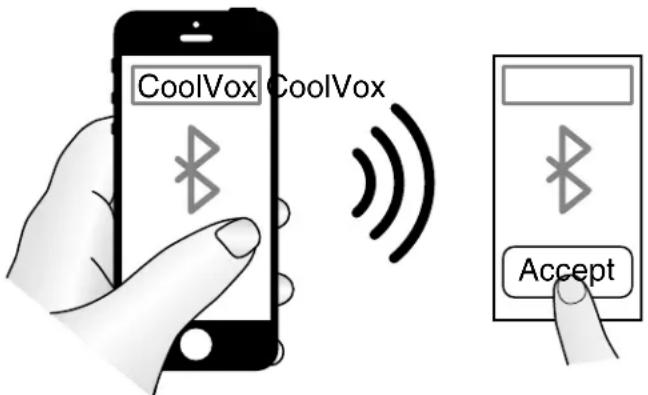
■ The Status LED (A) will glow solid blue when the sound system is properly paired with your Bluetooth device.
■ You are now ready to play your music through CoolVox. Use the controls of your Bluetooth-enabled device to start, stop, or pause the audio.
NOTES:
If another device is already paired with the CoolVox™ sound system, press and hold the Power/Pair button (B) on the control panel for 3 seconds to cancel the existing pairing. Then, re-pair with different device by performing Step 4.
■ The CoolVox ^™ sound system will remember the six devices most recently used, so it is even simpler to reconnect.
TROUBLESHOOTING
Operation
| PROBLEM POSSIBLE CAUSES SOLUTIONS | ||
| The CoolVoxTM sound system will not operateThere is no sound coming from the CoolVox sound system, and status LED is not lit. | Power cord not plugged into wall outlet | Check electrical supply. Plug the power cord's 2-pronged plug into a wall outlet. The Status LED (A) will glow amber if power is present. |
| Switch controlling wall outlet is turned off | Move wall outlet switch to ON position | |
| Fuse blown or circuit breaker tripped | Reset a tripped circuit breaker. Replace any blown fuses.NOTE: If problems continue, contact an electrician. | |
| Mobile Device is not Bluetooth paired | Pair the BlueTooth source. See “Set Up and Operation.” The CoolVoxTM sound system is available for pairing when the Status LED (A) flashes blue. Pairing is accomplished when the Status LED glows constant blue. | |
| Mobile Device is not sending audio Consult User’s Manual for phone or tablet | ||
| Interference with radio and/or television reception | Determine whether or not CoolVoxTM sound system is causing the interference by turning it off and then back on. If the interference stops and then resumes, try to correct the interference by one or more of these measures. | ■ Reorient or relocate receiving antenna.■ Increase the separation between the CoolVoxTM sound system and the receiver■ Connect the CoolVoxTM sound system into an outlet on a circuit different from that to which the receiver is connected.■ Consult the dealer or an experienced radio/TV technician for assistance. |
Bluetooth
| PROBLEM POSSIBLE CAUSES SOLUTIONS | ||
| Bluetooth Not Paired Mobile device does not list CoolVoxTM sound system as a Bluetooth music source. | There is no power to CoolVoxTM sound system. | Check electrical supply. Plug the power cord's 2-pronged plug into a wall outlet. The Status LED (A) will glow (amber or blue) if power is present. |
| Mobile device is not Bluetooth compatible | Obtain audio source material from a Bluetooth compatible device | |
| Mobile device's Bluetooth feature is not enabled | Enable Bluetooth feature using menus on mobile device.NOTE: Many mobile devices ship with the Bluetooth feature disabled to improve battery life. | |
| CoolVoxTM sound system is currently paired with another (muted) Bluetooth music source. This is indicated by the Status LED (A) glowing constant blue. | Cancel any existing pairing by initiating a re-pairing session. Press and hold the CoolVox sound system Power/Pair button (B) for 3 seconds. The Status LED (A) will change from constant blue (paired) to flashing blue (unpaired and available to be paired). While Status LED flashes blue, CoolVoxTM sound system is available for pairing with new mobile device. When new pairing is accomplished, the Status LED returns to constant blue.NOTE: The Status LED (A) glows amber when the CoolVoxTM sound system is in standby mode. | |
| Bluetooth pairing is intermittent; audio “cuts out” sporadically | Mobile device too far away, or signal is blocked | Move mobile device closer to CoolVoxTM sound system.Line-of-sight pairing range is at least 30 ft (9 m) without walls or windows. |
| Mobile device instructs me to enter a Bluetooth passcode | Enter passcode 0000 on mobile device if requested. The CoolVoxTM sound system Status LED (A) will flash blue when re-pairing can be attempted. | |
Miscellaneous
| PROBLEM POSSIBLE CAUSES SOLUTIONS | ||
| Cannot find 3.5 mm audio input jack | Not available | The CoolVoxTM sound system does not offer auxiliary audio input; Bluetooth audio sources only |
| Cannot charge mobile device from CoolVoxTM sound system | No USB jack or docking port The CoolVoxTM sound system does not offer a USB port or any provision for charging or powering mobile devices. | |
| Volume too high or low | Adjust volume levels on CoolVoxTM sound system or mobile device. | Use Volume (+) and (-) buttons (C) on the CoolVoxTM sound system control panel or the volume settings on mobile device.NOTE:Volume changes via CoolVoxTM sound system control panel are echoed back to Bluetooth mobile device. |
| Cannot adjust bass and treble | There are no tone setting provisions within CoolVoxTM sound system. | Equalization must be adjusted via settings on mobile device. |
WHIRLPOOL CORPORATION REFRIGERATION ACCESSORY LIMITED WARRANTY
ONE YEAR LIMITED WARRANTY
For one year from the date of this purchase, when the Refrigerator Accessory is installed, operated, and maintained according to instructions attached to or furnished with this product, Whirlpool Corporation or Whirlpool Canada LP (hereafter "Whirlpool") will, at its sole option, deliver factory specified replacement parts to correct defects in materials or workmanship or replace the product. If replaced, your product will be covered by the remaining one year limited warranty of the original unit.
YOUR SOLE AND EXCLUSIVE REMEDY UNDER THE LIMITED WARRANTY SHALL BE PRODUCT REPAIR OR REPLACEMENT AT OUR DISCRETION AS PROVIDED HEREIN. This limited warranty is valid in the United States and Canada and applies only when the the Refrigerator Accessory is used in the country in which it was purchased. This limited warranty is effective from the date of the original consumer purchase. Proof of original purchase date is required to obtain factory specified replacement parts or product replacement under this limited warranty.
ITEMS EXCLUDED FROM WARRANTY
This warranty does not cover:
- In-home service calls to correct the installation of your Refrigerator Accessory, to instruct you how to use your product, to replace or repair house fuses, reset circuit breakers or to correct house wiring or plumbing.
- Service calls to repair or replace light bulbs. Consumable parts are excluded from warranty coverage.
- Factory specified replacement parts or product replacement when your Refrigerator Accessory is used for other than normal, single-family household use or when it is used in a manner contrary to published user or operator instructions and/or installation instructions.
- Damage resulting from accident, alteration, misuse, abuse, fire, flood, acts of God, improper installation, installation not in accordance with electrical or plumbing codes, or use of consumables or cleaning products not approved by Whirlpool Corporation.
- Cosmetic damage, including scratches, dents, chips or other damage to the finish of your Refrigerator Accessory, unless such damage results from defects in materials or workmanship and is reported to Whirlpool within 30 days from the date of purchase.
- Factory specified parts or product replacement resulting from unauthorized modifications made to the product.
- Refrigerator Accessories with original model/serial numbers that have been removed, altered or cannot be easily determined. This warranty is void if the factory applied serial number has been altered or removed from your appliance.
The cost of repair or replacement under these excluded circumstances shall be borne by the customer.
If you reside in the United States or Canada and need to submit a request for warranty service:
- Customers in the U.S.A. should call our service office at 1-800-253-1301, from 8:00 a.m. to 8:00 p.m., Monday through Friday, Eastern Standard Time. Customers in Canada should call our service office at 1-800-807-6777, from 8:00 a.m. to 6:30 p.m., Monday through Friday, Eastern Standard Time
- Give the consultant your model, serial number, and shipping address (no P.O. Box numbers, please).
- The consultant will advise whether the Refrigerator Accessory qualifies for factory specified replacement parts or product replacement.
- You may be directed to forward the product to a Whirlpool designated service center. You are responsible for insurance and freight to the designated service center. Please include your name and address on a piece of paper, along with proof of purchase (register receipt, charge slip, etc.). The product should be properly packaged to avoid damage in transit, as we will not be responsible for any such damage.
- Whirlpool will return the specified unit or, at our option, an identical or comparable Refrigerator Accessory, or factory specified replacement parts, to your door free of charge.
DISCLAIMER OF IMPLIED WARRANTIES
IMPLIED WARRANTIES, INCLUDING ANY LIMITED WARRANTY OF MERCHANTABILITY OR LIMITED WARRANTY OF FITNESS FOR A PARTICULAR PURPOSE, ARE LIMITED TO 1 YEAR OR THE SHORTEST PERIOD ALLOWED BY LAW. Some states and provinces do not allow limitations on the duration of implied warranties of merchantability or fitness, so this limitation may not apply to you. This warranty gives you specific legal rights, and you also may have other rights that vary from state to state or province to province.
LIMITATION OF REMEDIES; EXCLUSION OF INCIDENTAL AND CONSEQUENTIAL DAMAGES
YOUR SOLE AND EXCLUSIVE REMEDY UNDER THIS LIMITED WARRANTY SHALL BE PRODUCT REPAIR OR REPLACEMENT AT OUR DISCRETION AS PROVIDED HEREIN. WHIRLPOOL SHALL NOT BE RESPONSIBLE FOR INCIDENTAL OR CONSEQUENTIAL DAMAGES. Some states and provinces do not allow the exclusion or limitation of incidental or consequential damages, so these limitations may not apply to you. This warranty gives you specific legal rights, and you also may have other rights that vary from state to state or province to province.
Outside the 50 United States and Canada, this warranty does not apply. Contact your authorized Whirlpool dealer to determine if another warranty applies.
If you need service, first see the "Troubleshooting" section of the Use & Care Guide. Additional help can be found by checking the "Assistance or Service" section or by calling Whirlpool. In the U.S.A. call 1-800-253-1301. In Canada call 1-800-807-6777.
3/14
SÉCURITÉ DU SYSTÈME AUDIO DE CUISINE COOLVOX™
- COOLVOX™ KITCHEN SOUND SYSTEM SAFETY
- Your safety and the safety of others are very important.
- DANGER
- WARNING
- SET UP AND OPERATION
- NOTES:
- TROUBLESHOOTING
- WHIRLPOOL CORPORATION REFRIGERATION ACCESSORY LIMITED WARRANTY
- ONE YEAR LIMITED WARRANTY
- ITEMS EXCLUDED FROM WARRANTY
- This warranty does not cover:
- If you reside in the United States or Canada and need to submit a request for warranty service:
- DISCLAIMER OF IMPLIED WARRANTIES
- LIMITATION OF REMEDIES; EXCLUSION OF INCIDENTAL AND CONSEQUENTIAL DAMAGES
- SÉCURITÉ DU SYSTÈME AUDIO DE CUISINE COOLVOX™
Brand : WHIRLPOOL
Model : CoolVox WRC36DB
Category : Loudspeaker