BE55A - TV SAMSUNG - Free user manual and instructions
Find the device manual for free BE55A SAMSUNG in PDF.



User questions about BE55A SAMSUNG
0 question about this device. Answer the ones you know or ask your own.
Ask a new question about this device
Download the instructions for your TV in PDF format for free! Find your manual BE55A - SAMSUNG and take your electronic device back in hand. On this page are published all the documents necessary for the use of your device. BE55A by SAMSUNG.
USER MANUAL BE55A SAMSUNG
Thank you for purchasing this Samsung product.
To receive more complete service, please register your product at www.samsung.com
Model Serial No.
Before Reading This User Manual
This TV comes with this User Manual and an embedded e-Manual.
Warning! Important Safety Instructions
Please read the Safety Instructions before using your TV. Refer to the table below for an explanation of symbols which may be on your Samsung product.
| CAUTION | |
| RISK OF ELECTRIC SHOCK. DO NOT OPEN. | |
| CAUTION: TO REDUCE THE RISK OF ELECTRIC SHOCK, DO NOT REMOVE COVER (OR BACK). THERE ARE NO USER SERVICEABLE PARTS INSIDE. REFER ALL SERVICING TO QUALIFIED PERSONNEL. | |
| This symbol indicates that high voltage is present inside. It is dangerous to make any kind of contact with any internal part of this product. | |
| This symbol indicates that this product has included important literature concerning operation and maintenance. | |
| Class II product: This symbol indicates that a safety connection to electrical earth (ground) is not required. If this symbol is not present on a product with a mains lead, the product MUST have a reliable connection to protective earth (ground). | |
| ~ | AC voltage: Rated voltage marked with this symbol is AC voltage. |
| = | DC voltage: Rated voltage marked with this symbol is DC voltage. |
| i | Caution. Consult instructions for use: This symbol instructs the user to consult the user manual for further safety related information. |
Power
- Do not overload wall outlets, extension cords, or adaptors beyond their voltage and capacity. It may cause fire or electric shock.
Refer to the power specifications section of the manual and/or the power supply label on the product for voltage and amperage information. - Power-supply cords should be placed so that they are not likely to be walked on or pinched by items placed upon or against them. Pay particular attention to cords at the plug end, at wall outlets, and at the point where they exit from the appliance.
- Never insert anything metallic into the open parts of this apparatus. This may cause electric shock.
- To avoid electric shock, never touch the inside of this apparatus. Only a qualified technician should open this apparatus.
- Be sure to plug in the power cord until it is firmly seated. When unplugging the power cord from a wall outlet, always pull on the power cord's plug. Never unplug it by pulling on the power cord. Do not touch the power cord with wet hands.
- If this apparatus does not operate normally - in particular, if there are any unusual sounds or smells coming from it - unplug it immediately and contact an authorised dealer or Samsung service centre.
-
To protect this apparatus from a lightning storm, or to leave it unattended and unused for a long time (especially when a kid, the elderly, or the disabled is left alone), be sure to unplug it from the wall outlet and disconnect the antenna or cable system.
-
Accumulated dust can cause an electric shock, an electric leakage, or a fire by causing the power cord to generate sparks and heat or by causing the insulation to deteriorate.
-
Use only a properly grounded plug and wall outlet.
- An improper ground may cause electric shock or equipment damage. (Class I Equipment only.)
- To turn off this apparatus completely, disconnect it from the wall outlet. To ensure you can unplug this apparatus quickly if necessary, make sure that the wall outlet and power plug are readily accessible.
Installation
- Do not place this apparatus near or over a radiator or heat register, or where it is exposed to direct sunlight.
- Do not place vessels (vases etc.) containing water on this apparatus, as this can result in a fire or electric shock.
- Do not expose this apparatus to rain or moisture.
- Be sure to contact an authorised Samsung service centre for information if you intend to install your TV in a location with heavy dust, high or low temperatures, high humidity, chemical substances, or where it will operate 24 hours a day such as in an airport, a train station, etc. Failure to do so may lead to serious damage to your TV.
- Do not expose this apparatus to dripping or splashing.
Mounting the TV on a wall

If you mount this TV on a wall, follow the instructions exactly as set out by the manufacturer. If it is not correctly mounted, the TV may slide or fall and cause serious injury to a child or adult and serious damage to the TV.
- To order the Samsung wall mount kit, contact Samsung service centre.
Samsung is not responsible for any damage to the product or injury to yourself or others if you choose to install the wall mount on your own.
Samsung is not liable for product damage or personal injury when a non-VESA or non-specified wall mount is used or when the consumer fails to follow the product installation instructions. - You can install your wall mount on a solid wall perpendicular to the floor. Before attaching the wall mount to surfaces other than plaster board, contact your nearest dealer for additional information. If you install the TV on a ceiling or slanted wall, it may fall and result in severe personal injury.
- When installing a wall mount kit, we recommend you fasten all four VESA screws.
- If you want to install a wall mount kit that attaches to the wall using two top screws only, be sure to use a Samsung wall mount kit that supports this type of installation. (You may not be able to purchase this type of wall mount kit, depending on the geographical area.)
- Do not mount the TV at more than a 15 degree tilt.
- Standard dimensions for wall mount kits are shown in the table on the Quick Setup Guide.

Do not install your wall mount kit while your TV is turned on. This may result in personal injury from electric shock.
- Do not use screws that are longer than the standard dimension or do not comply with the VESA standard screw specifications. Screws that are too long may cause damage to the inside of the TV set.
- For wall mounts that do not comply with the VESA standard screw specifications, the length of the screws may differ depending on the wall mount specifications.
- Do not fasten the screws too firmly. This may damage the product or cause the product to fall, leading to personal injury. Samsung is not liable for these kinds of accidents.
Always have two people mount the TV onto a wall. For 82 inch or larger models, have four people mount the TV onto a wall.
Providing proper ventilation for your TV
When you install your TV, maintain a distance of at least 10 cm between the TV and other objects (walls, cabinet sides, etc.) to ensure proper ventilation. Failing to maintain proper ventilation may result in a fire or a problem with the product caused by an increase in its internal temperature.
- When you install your TV with a stand or a wall mount, we strongly recommend you use parts provided by Samsung only. Using parts provided by another manufacturer may cause difficulties with the product or result in injury caused by the product falling.
Safety Precaution
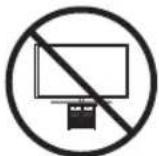
Caution: Pulling, pushing, or climbing on the TV may cause the TV to fall. In particular, ensure your children do not hang on or destabilise the TV. This action may cause the TV to tip over, causing serious injuries or death. Follow all safety precautions provided in the Safety Flyer included with your TV. For added stability and safety, you can purchase and install the anti-fall device, referring to "Preventing the TV from falling".

WARNING: Never place a television set in an unstable location. The television set may fall, causing serious personal injury or death. Many injuries, particularly to children, can be avoided by taking simple precautions such as:
Always use cabinets or stands or mounting methods recommended by Samsung.
Always use furniture that can safely support the television set.
Always ensure the television set is not overhanging the edge of the supporting furniture.
Always educate children about the dangers of climbing on furniture to reach the television set or its controls.
Always route cords and cables connected to your television so they cannot be tripped over, pulled or grabbed.
-
Never place a television set in an unstable location.
-
Never place the television set on tall furniture (for example, cupboards or bookcases) without anchoring both the furniture and the television set to a suitable support.
-
Never place the television set on cloth or other materials that may be located between the television set and supporting furniture.
-
Never place items that might tempt children to climb, such as toys and remote controls, on the top of the television or furniture on which the television is placed.
If the existing television set is going to be retained and relocated, the same considerations as above should be applied.
- When you have to relocate or lift the TV for replacement or cleaning, be sure not to pull out the stand.
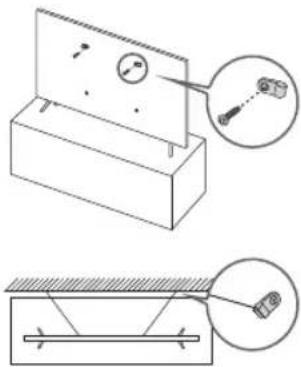
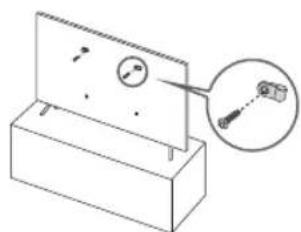
Preventing the TV from falling
-
Using the appropriate screws, firmly fasten a set of brackets to the wall. Confirm that the screws are firmly attached to the wall.
-
You may need additional material such as wall anchors depending on the type of wall.
-
Using the appropriately sized screws, firmly fasten a set of brackets to the TV.
-
For the screw specifications, refer to the standard screw part in the table on the Quick Setup Guide.
-
Connect the brackets fixed to the TV and the brackets fixed to the wall with a durable, heavy-duty string, and then tie the string tightly.
Install the TV near the wall so that it does not fall backwards.
- Connect the string so that the brackets fixed to the wall are at the same height as or lower than the brackets fixed to the TV.
Operation
-
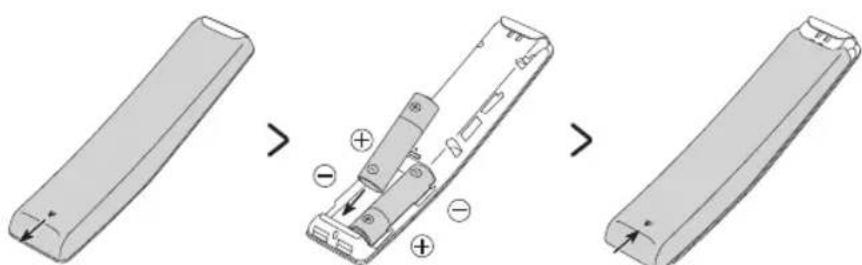
This apparatus uses batteries. In your community, there might be environmental regulations that require you to dispose of these batteries properly. Please contact your local authorities for disposal or recycling information.
-
Store the accessories (remote control, batteries, or etc.) in a location safely out of the reach of children.
-
Do not drop or strike the product. If the product is damaged, disconnect the power cord and contact a Samsung service centre.
-
Do not dispose of remote control or batteries in a fire.
-
Do not short-circuit, disassemble, or overheat the batteries.
-
CAUTION: There is danger of an explosion if you replace the batteries used in the remote with the wrong type of battery. Replace only with the same or equivalent type.
WARNING-TO PREVENT THE SPREAD OF FIRE, KEEP CANDLES AND OTHER ITEMS WITH OPEN FLAMES AWAY FROM THIS PRODUCT AT ALL TIMES.

Caring for the TV
-
To clean this apparatus, unplug the power cord from the wall outlet and wipe the product with a soft, dry cloth. Do not use any chemicals such as wax, benzene, alcohol, thinkers, insecticide, aerial fresheners, lubricants, or detergents. These chemicals can damage the appearance of the TV or erase the printing on the product.
-
The exterior and screen of the TV can get scratched during cleaning. Be sure to wipe the exterior and screen carefully using a soft cloth to prevent scratches.
-
Do not spray water or any liquid directly onto the TV. Any liquid that goes into the product may cause a failure, fire, or electric shock.
01 What's in the Box?
Make sure the following items are included with your TV. If any items are missing, contact your dealer.
Remote Control & Batteries (Depending on the model)
- User Manual
- CI Card Adapter
- Warranty Card / Regulatory Guide (Not available in some locations)
TV Power Cable
The type of battery may vary depending on the model.
- The items' colours and shapes may vary depending on the models.
- Cables not included can be purchased separately.
- Check for any accessories hidden behind or in the packing materials when opening the box.

Warning: Screens can be damaged from direct pressure when handled incorrectly. We recommend lifting the TV at the edges, as shown. For more information about handling, refer to the Quick Setup Guide came with this product.
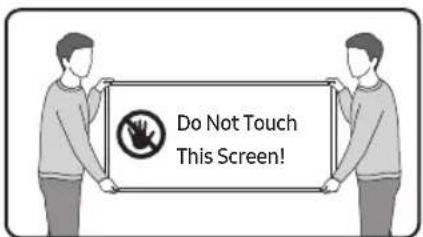
02 Initial Setup
When you turn on your TV for the first time, it immediately starts the Initial Setup. Follow the instructions displayed on the screen and configure the TV's basic settings to suit your viewing environment.
Using the TV Controller
You can turn on the TV with the TV Controller button at the bottom of the TV, and then use the Control menu. The Control menu appears when the TV Controller button is pressed while the TV is On.
- The screen may dim if the protective film on the SAMSUNG logo or the bottom of the TV is not detached. Please remove the protective film.
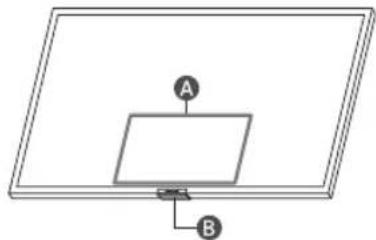
A Control menu
TV Controller button / Remote control sensor
03 About the Buttons on the Remote Control
The images, buttons, and functions of the Remote Control may differ with the model or geographical area.
- If you use the remote control that comes with your TV to control another TV, some functions may not operate normally.
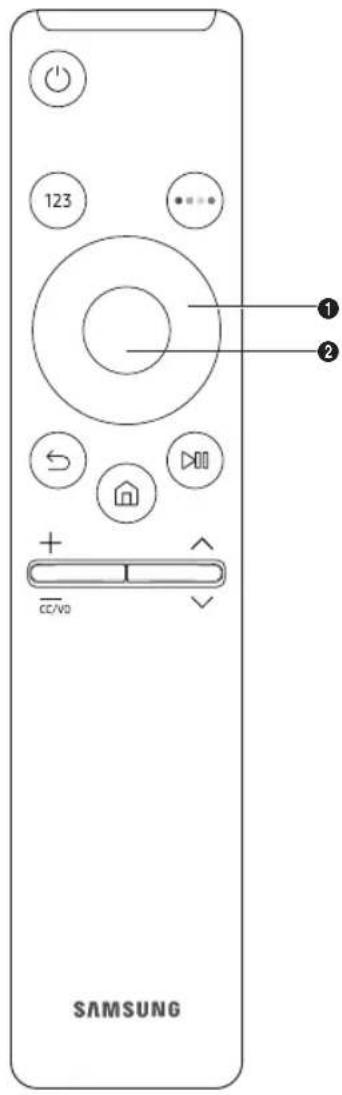
- (Power)
Press to turn the TV on or off.
- Number button)
Press to bring up the virtual numeric pad on the screen. Use the numeric keypad to enter numeric values. Select numbers and then select Done to enter a numeric value. Use to change the channel, enter a PIN, enter a ZIP code, etc.
-
When pressed for 1 second or more, the TTX menu appears.
-
(Colour button)
When pressed, coloured buttons appear on the screen. Use this button to access additional options that are specific to the feature in use.
- 1 Directional button (up, down, left, right)
Moves the focus and changes the values seen on the TV's menu.
- 2 Select
Selects or runs a focused item. When pressed while you are watching a broadcast programme, detailed programme information appears.
- (Return)
Press to return to the previous menu. When pressed for 1 second or more, the running function is terminated. When pressed while you are watching a programme, the previous channel appears.
- (SmartHub)
Returns to the Home Screen.
- (play/pause)
When pressed, the playback controls appear. Using these controls, you can control the media content that is playing.
- (Volume)
Move the button up or down to adjust the volume. To mute the sound, press the button. When pressed for 1 second or more, the Accessibility Shortcuts menu appears.
- (Channel)
Move the button up or down to change the channel. To see the Guide screen, press the button.
- When pressed for 1 second or more, the Channel List screen appears.
English-6
04 Troubleshooting and Maintenance
Troubleshooting
For more information, see "Troubleshooting" or "FAQ" in the e-Manual.
Settings > e-Manual > Troubleshooting or FAQ If none of the troubleshooting tips apply, please visit "www. samsung.com" and click Support or contact the Samsung service centre.
- This TFT LED panel is made up of sub pixels which require sophisticated technology to produce. There may be, however, a few bright or dark pixels on the screen. These pixels will have no impact on the performance of the product.
- To keep your TV in optimum condition, upgrade to the latest software. Use the Update Now or Auto update functions on the TV's menu (Settings > Support > Software Update > Update Now or Auto update).
The TV won't turn on.
Make sure that the AC power cable is securely plugged in to the TV and the wall outlet.
- Make sure that the wall outlet is working and the remote control sensor at the bottom of the TV is lit and glowing a solid red.
- Try pressing the TV Controller button at the bottom of the TV to make sure that the problem is not with the remote control. If the TV turns on, refer to "The remote control does not work".
The remote control does not work.
-
Check if the power indicator at the bottom of the TV blinks when you press the remote's Power button.
-
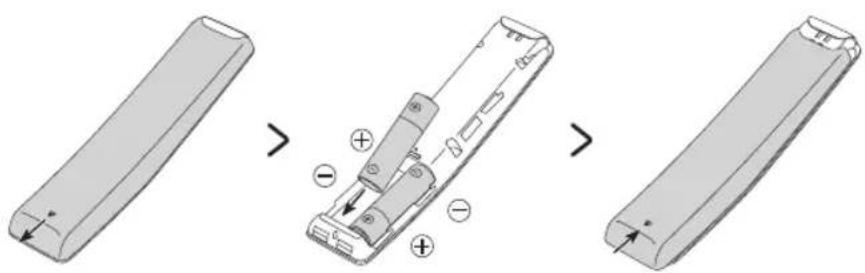
If it does not blink, replace the remote control's batteries. Make sure that the batteries are installed with their poles (+/-) in the correct direction. Alkaline batteries are recommended for longer battery life.
Try pointing the remote directly at the TV from 1.5-1.8 m away.
Eco Sensor and screen brightness
Eco Sensor adjusts the brightness of the TV automatically. This feature measures the light in your room and optimises the brightness of the TV automatically to reduce power consumption. If you want to turn this off, go to Settings > General > Power and Energy Saving > Brightness Optimisation.
- The eco sensor is located at the bottom of the TV. Do not block the sensor with any object. This can decrease picture brightness.
05 Specifications and Other Information
Specifications
Display Resolution 3840 x 2160
Sound (Output) 20 W
Operating Temperature 10 ^ C to 40^ (50°F to 104°F)
Operating Humidity 10% to 80%, non-condensing
Storage Temperature -20oC to 45oC (-4oF to 113oF)
Storage Humidity 5% to 95%, non-condensing
Notes
This device is a Class B digital apparatus.
- For information about the powersupply, and more information about power consumption, refer to the information on the label attached to the product.
- On most models, the label is attached to the back of the TV. (On some models, the label is inside the cover terminal.)
Typical power consumption is measured according to IEC 62087.
To connect a LAN cable, use a CAT 7 (*STP type) cable for the connection. (100/10 Mbps)
-
Shielded Twisted Pair
-
The images and specifications of the Quick Setup Guide may differ from the actual product.
- An administration fee may be charged in the following situations:
(a) An engineer is called out at your request, but it is found that the product has no defect (i.e., where the user manual has not been read).
(b) You bring the unit to the Samsung service centre, but it is found that the product has no defect (i.e., where the user manual has not been read).
- You will be informed of the administration fee amount before a technician visits.
* Figures and illustrations in this User Manual are provided for reference only and may differ from the actual product appearance. Product design and specifications may change without notice.
Following the repair by a non-authorised service provider, self-repair or non-professional repair of the product, Samsung is not liable for any damage to the product, any injury or any other product safety issue caused by any attempt to repair the product which does not carefully follow these repair and maintenance instructions. Any damage to the product caused by an attempt to repair the product by any person other than a Samsung certified service provider will not be covered by the warranty.
Please visit samsung.com/support to find further information about external power adapter and remote control associated with EU Ecodesign directive - ErP regulation
Decreasing power consumption
When you shut the TV off, it enters Standby mode. In Standby mode, it continues to draw a small amount of power. To decrease power consumption, unplug the power cord when you don't intend to use the TV for a long time.
Licences
Dolby Audio
POWERED BY
QUICKSET
rovi guide
HEVCAvance™ Covered by Patents at patentlist.hevcAdvance.com
HOMI
The terms HDMI and HDMI High-Definition Multimedia Interface, and the HDMI Logo are trademarks or registered trademarks of HDMI Licensing LLC in the United States and other countries.
Hereby, Samsung declares that this radio equipment is in compliance with Directive 2014/53/EU and the relevant UK statutory requirements.
The full text of the declaration of conformity is available at the following internet address:
http://www.samsung.com go to Support and enter the model name.
This equipment may be operated in all EU countries and in the UK.
The 5 GHz WLAN(Wi-Fi) function of this equipment may only be operated indoors.
BT max transmitter power: 100mW at 2.4GHz - 2.4835GHz
Wi-Fi max transmitter power: 100mW at 2.4GHz-2.4835GHz,
200mW at 5.15GHz-5.25GHz, 100mW 5.25GHz-5.35GHz & 5.47GHz -5.725GHz
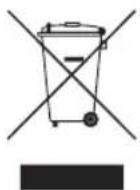
Correct Disposal of This Product (Waste
Electrical & Electronic Equipment)
(Applicable in countries with separate
collection systems)
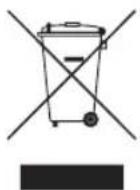
This marking on the product, accessories or literature indicates that the product and its electronic accessories (e.g. charger, headset, USB cable) should not be disposed of with other household waste at the end of their working life. To prevent possible harm to the environment or human health from uncontrolled waste disposal, please separate these items from other types of waste and recycle them responsibly to promote the sustainable reuse of material resources.
Household users should contact either the retailer where they purchased this product, or their local government office, for details of where and how they can take these items for environmentally safe recycling.
Business users should contact their supplier and check the terms and conditions of the purchase contract. This product and its electronic accessories should not be mixed with other commercial wastes for disposal.
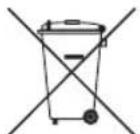
Correct disposal of the batteries in this
product
(Applicable in countries with separate
collection systems)
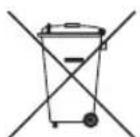
This marking on battery, manual or packaging indicates that the batteries in this product should not be disposed of with other household waste at the end of their working life. Where marked, the chemical symbols Hg, Cd or Pb indicate that the battery contains mercury, cadmium or lead above the reference levels in EC Directive 2006/66. If batteries are not properly disposed of, these substances can cause harm to human health or the environment.
To protect natural resources and to promote material reuse, please separate batteries from other types of waste and recycle them through your local, free battery return system.
IpeiHa IpooyTeToBa pBkoBOdCTBO 3a NOTpe6nteJra
3aedno c tenebn3opa noIyabate HactoIOTOp bkoBODCTBO 3a notpe6nTeI IN BrpaedeHO eEeKtpOHNO pboKOBDCTBO >Hacptpouk> e-Manual).
IpeDynpexKdene! BaXnHnHnCTpyKcnn 3a 6e30paCHOcT
Ipooyete INCHTpykunite 3a 6e3onacnoct, npedn da n3no13BaTe TeneBn3opa. HanpaBeTe cnpabKa B Ta6nucata no-dony 3a o6rchenHe Na CnMBONITE, KOINTo MOKe da ce HAMnPaT Ha BaWnna npOdyKT Samsung.
MOnTnHa He TeneBn3opa Ha cTeHa

AkoMOHTnpaTeTO3nTeLEBn3OpHaCTeHa, CLeDBAIteTOHnTeMHCTpyKcnnOT npOn3BOJnteJI.AKOHeepnabINHO MOHTnpaH, TeLEBn3OpbT MoKeJa Ce nIb3Ne Ia NaHne I Da npuHHnTeKko HapAHBaHe Ha DetE IIN B3paTeHn cepno3Ha NobpeHa TELEBn3Opa.
3a da npbayate KOMTneKta 3a MOHTnpaHe Ha CTeHa Ha Samsung ce Cbpxte Cbc cepBn3eH ueHTbp Ha Samsung.
Samsung He Hocn OTROBOPHOCT 3a BCRAKBN NOBpeN no npOdykTA mI IN TEeCNH HapaHbAHN, aKO n36epTe da MOHTnPATE KOH30JATA 3a CTeHa CAMN.
Samsung He Hocn OTROBOPHCT 3a NOBpeHn Ha npOyKta nn HapaHbAHn Ha xopa, B Cnyuay e n3noI3BaHa CTEN HA KOH30la, HeOTROBAPUa Ha cTaNdapTa VESA nn OT HEn3BeCTeN DOCTABYNK, INB Cnyuay e NOTpe6nteYrT He e CnAIN INHCTpyKcUNTE 3a MOHTaXn HpOyKTA.
- Mojete Da MoHTnPaTe CTeHHaTa KOH3OJa BbPxy 3dpaBaCTeHa, nepHeNdkyIapHa Ha noJa. Ppei Da MoHTnPaTe CTeHHaTa KOH3OJa Ha DpyrN CTpOnTEHN MaTePnAIn, CBpbKeTe Ce c Hai-6bn3Kn TaPboEu Ha Dpe6Ho 3a DonbHNTeHa INΦopMaun. Ako TeleBn3OpbT 6bDe MOHTPaN Ha TabaHa Nn HaKNoHEHa CTeHa, MoJte Da NaDHe NDa PrnHH TeneChn Nobpei.
Korato MOHTnpate KOMJIeKT 3a CTHeH MOHTax, npenopbUBaMe da 3aterHeTe N uetnpTe BInHa VESA.
- Ako nckate da moHTnpate KOMnIeKT 3a CTHeH MoNTaK, KOTo ce 3aKpEnBa KbM CTeHaTa CaMo C DBa TOpHN BnHTa, HENpeMeHH OINON3BaIte KOMnIeKT 3a CTHeH MoNTaK Ha Samsung, KOnTo NOdBpxKa TO3n TnT MoHTaK. (B 3aBcIMoCT ot reOrpaФСКИ ретион e Bb3MOxH0 DA HЯMaTe Bb3MOxHooCT Da NopbAte TO3n TnN KOMnIeKT 3a MOHTaK Ha CTeHa.)
He montnpaTe TeleBn3opa nOHaKNoH, no-rotam ot 15 rpaDyca.
- CtaHapTnHTe pa3Mepn Ha KOMNJIeKNTte 3a MoHTaK Ha cTeHa ca npedctabehn B tabNiuaTa B Quick Setup Guide.

He moHTnpaIte KOMIIeKTA 3a CTHeH MOHTaX, DOKaT0 TeJIeBn3OpbTe BkJIouChE. TOba MoKeJa DoBede Do TeLeCHa NoBpeDa nopadIn eJeKTPnuecKn ynap.
He n3no3BaIte BnHTObe, NO-dbIgN OT cTahdapTHna pa3Mep nn HeCboTBcTBAuN Ha CneuNfKaunTe 3a BnHToBe Ha cTaNdapTa VESA. IpekaneHo DblrBnHTObe Morat da npinyHnT nobpeDn BBB bTpewHocTtHa TeNeBu3opa.
- 3a KOH30JI3a CTeHa, KOHTo HE OTROBaprTa Ha cNeuNΦKauNTte 3a BINTOBe Ha CTaHdApTa VESA,ДьЛЖИHaTa Ha BINTOBeTe MOKe Da e pa3JIuHa, B 3aBcNcMocT O T cNeuΦKauNTte Ha KOMnJIeKTa 3a MOHTnpaHe Ha CTeHa.
- He 3aTaraTe BnHbOBeTe TBbpIe Mhoro. Toba MoKe da Nobpei npOdykTa IIN Da CTHe npUyHa 3a HerOBOTO naDaHe I Da IOBede Do TeNecha nobpeJa. Samsung He Hocu OTROBOPHOCT 3a TaKbB TnI 3NoNOnyKn.
- MoHTnpaHTo Ha CTeHa Ha TeIeBn3opa BInHarN TpI6Ba Da ce 13BbPbWA OT DbMa dyuN. -3a MOHTnpaHTo Ha 82-nHcOBtne IIN NO-tOJIeMn MoJdEHN Ha CTeHa Ca HyKHe YcTupn dyuN.
OcnpyBaHe Ha aDekBaTHo PPOBETpaBe 3a BaIu IeBu3Op
Korato moHTnape TeleBnOpa, octabete nohe 10 cm pa3ctoHne MeKdy Hero n dpyrnte npedMeTn (CTehn, ukafoBe n T.H.), 3a da oCnrgypnte doctaTbUHO do6pa BeHTnlaucn. HeocnrgyraBaHTo Ha DoCTaTbUHO npobetpbaHe Moke Da npuHHN NOkap NIN pno6lem C npOkykTA, CBp3AH C nobuWabaHe Na BtpeHnata TempepaTypa.
Korato MOnHTnape TeIeBn3opa Ha cTOnKa IIN Ha cTeHaTa, ropeo npenopbYBaMe Da n3NoJ3BaTe CaMo YaactN, npedocTabeHn ot Samsung. Ako n3noJ3BaTe YaCTN ot dpyr npoN3BOJNTe, MoKe Da Bb3HKnHAT npo6JeMn C npOdyKta IIN HapaHnBaHe nopAaPiJaHa npOdyKta.
IpeDnA3Hm MepKn 3a 6e30napocT
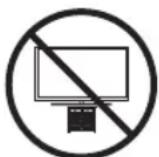
BnMaHHe:lbpnaHe,6yTaHe nn
katepehe Bbpy TeLeBn3Opa MoKe Da ro
cb6opn.OCo6eNo BnMabaiTe DeaTda
He Ce yBncBaT Ha TeLEBn3Opa N da He ro
deCTa6nI3npat. Toba MoKe Da DoBeE do
naDAnHe Ha TeLEBn3Opa, KOeTo Da npuynHn
cepno3Hn HapaHbAHHN Nm Cmbpt.
CleDaBte BCnuKn PpeJa3HN MepKn,
nocouehn B ppeIOCTabeHa TNCTOBka 3a
6e30NaChocT. 3a DonbInHTeHa CTa6nIHocT
n 6e30NaChocT MoKeTe Da 3akynite n
MOHTnPATE yCTpoiCTBO, OcNpyraBaIo 3aUnita
cpeu naDane, Kato 3a ceIta pa3rIePaTe
"PeJeOpTBpaTBAHe Ha naDane Ha TeLEBn3Opa".

PNEUINPEKJENHE: HnKora He noctabYte TeneBn3Op Ha HecTa6nHNO MCTo.. TeneBn3OpbT MoKe Da NaHne, KoETO Da DoBePeDo cepno3Ha TeLeCn HOBpeDa Nm CMBpT. MHOro HapaHbAHN, Oc6eHo Ha Deu, Morat Da ce I36ErHat, KaTo Ce B3eMaT CLEdHnTe PnpMePHn npocTu PpeNa3Hn MepKn:
BbIrapcn-3
BnHnIu3nO3BaNteUkafoBe,CToKNuINMeToNiHa MoNTax,NpeOpbuaHnOT Samsung.
-ИзлгьаутcaMoMe6eHn,KoITOMaT6e3OanHO da noIbpxkaTeneBnOpa.
BnHnCe yBepBaIe,Ye TeIeBn3OpbT He IeKu n3BbH KpaIaTaHa NpIdbPkaIaTa Me6en.
BunarHn INCTpykTpaNte DeaTa OTHOCHO ONaCHOCTnTe ot KaTepeHe no Me6eJIte 3a DoCTnraHe do TeLeBnOpa n HerOBIne opraHn 3a ynpabIeHne.
BnHn npi6npaTe Ka6eNtTe, CbP3aHn KbM TeleBn3opa, Taka Ye n He npeeat, Da He 6bDaT n3DbpnaHn n da He cnBnat HAKORO.
- Hnkora He noctabray Te TeneBn3Op Ha Hecta6nHNo MRCTo..
- Hnkora He noctabraye Te neBn3opa Ha BvcoKn Me6en (Hanpimep cekun nn 6hoetn), 6e3 da fncnpaTe KaKTo TneBn3opa, taka n me6ena KbM IOnxOJa7a onopa.
- Hnkora He noctabraye TeleBn3opa Ha Kbprnn nn npyrMaTepeaann, KOTo MoRaT da ca pa3noJooKeHN MeKdyTeleBn3opa n noDttbpkaaata Me6en.
- HnKora He NoCTabRyTe PpeMEn, KOnto Morat da N3kyuata DeaTata Ce nokatepT, HanprimepurpaKN I DCtAnHOnHH ynpabHeNIA, Bbpy TeBeBnOpa an Me6eIte, Bbpy KOnTO TeLeBnOpt e NoCTaBeH.
Ako 3ana3BaTe N pemeCTBaTe CbIeCTBByBaU TeneBn3Op, Tp86Ba Da nMaTe PneBnD CbO6paKeHnTa No- rope H 3a Hero.
Korato npemecBaTe NnIOBnIraTe TeneBn3Opa 3a CMHaNnNoHCTBaHe,BHMMaBaTe Da He N3DbPNaTe CToiKaTa.
IpeoTbpaTbaHe Na naDaHe Na TeleBn3opa
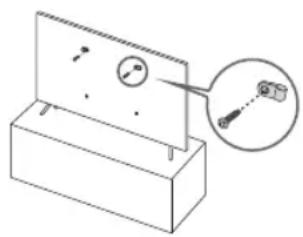
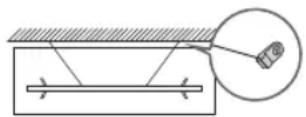
1.ИЗнолзвашиюхаяи винтое,за да зakрпente здраво скобinte кьм сөнота.Провете далы винтоberе с здраво 3axBaHaTNВСөнота.
-MoKeJaCaBnHeo6xOuMnDOnbHInTeHnMaTePnaHn, HApnPmEpIIO6eNn,B3aBcncMoCtOT BnDaCTeHa..
2.ИЗнолзвайтпохдяилpo рамер ВИNTOBe,3a дэзakpenITE 3dparBO CkO6Ite KbM TelenBn3opa.
- 3a INHOPMaIgA OTHOCHO CNEUΦNkAUINTE 3a BHTOBePe pahrdaIte YacTtA 3a BHTOBeB Ta6nucTa nO, Quick Setup Guide.
3.CbpyKeTe cKoBnTe,ФИКСИРаHи KbM TeIeBn3Opa,ИТeЗИ,ФИКСИРaHи KbM CTeHATA,CbC 3dPaB 3uHyp 3a TOrlaMoHaTOBapBaHe N CneI TOBA 3aBpyKeTe 3dpaBO.
-Пoctabete TeIeBn3opa 6IIN3O Do cTeHata, Taka Ye da He naDa Ha3aJ.
- Cbpykete shypa taKa, YeCKo6nTe, fNKCuPAH NkM CTehaTa, Da Ca Ha CbIaTa BnCOUHa HIN No-HNCKOOT CKo6KnTe, fNKCuPAH Km TEJIeBn30pa.
ДeИCTBnE
To3n anapat n3no13Ba 6aTeepu. BvB BaWJa paon HoMoKe da
HMa peryIauzni, KOITo N3NCKBaT N3XBpJrHeTO Ha 6aTepeNTe
No noXoJaH NaH, CbOpaE h cOKoHaTa cpeJa. CbPjHeTe
Ce C MeCTHnTe Bnactn 3a HOpMaunra 3a N3XBpJIHe n peuNKIpaHe.
- CbxpahraBaiTe aKcecoapTe (nCTaHcnoHHOTo ynpaBHeHne, 6aTeepnn n np.) Ha 6e3onacn Mecta, daNeu OT Docbna Ha neca.
- He n3nyckaIte n He ydpraIte npOdykTa. Ppi nobpeHa TeIeBn3opa n3KIIouTe 3axpaHbauia K6eI OT KOHTaKa n Ce CBpXeTe CbC cepBn3eH cENTbP Ha Samsung.
He n3xBpIaTe InCTaHcNHOHTo ynpabLeHne nn 6aTepeInTE BOrbH.
He cb3daBaTKe Kbco HanpexKeHne, He pa3rno6BaTne HnperpaBaiTe 6aTePunTe.
BHIMAHHE:Ima onachocOT eKcNIO3nA,aKO 3aMeHHTe 6aTePnIte,INIPOJ3BaHN B INCTaHcNOHHOT ynpabLeHne,C rpeHnTn6aTePn. CmeHJIte cAmO cbCbSIIy TnI nn EKBIBaJIeHTHNI.
- PINEyPENKJEHNE - 3A DA
PINEOTBPATNTPEA3NPOCTPAHEHNETO
HA NOXAP, DpBXTE CBEUIN DpyTN
PINEMETNCOTKPNT PIAAMbK DALECH OT
PINOYKTAPNE3 LJIATO BPEME.

Грига 3a TeileBn3opa
3a da nochntte To3n anapat, n3BaTe Te 3axpaHbuaa Ka6en ot KOHTAKTa n 136bPwTe npOdyKTA CcC cyxa N Meka KbPna. He n3noJ3BaIe XmMkAaN KaTO BocBzU, 6eH3eN, ankoXoJI, pa3peiNTe, INCEKTuZuD, OCBexKaBaU npenapATn, ly6pnKaHTn nn nepnnn npenapATn. Te3x XmMkAaN Morat da nobpejT obnka Ha anapata nn da n3Tpna HaneqataHOTo Bbpxy Hero.
BbHnHTe qactn n ekpaht Na TeleBn3opa MoarTa da ce Hndpackat npn nouchtahe. Ybepe te, ye nouchteBaTe BbHnHTe qactn n ekpaHa BHmATEHNO, KATO 3N0NJ3BaTe Meka KbPna, 3a da npedOTbpaTne HaapackBaHn.
He npbckaiTe C BODa HIN Dpyr TeuHocTn INpeKTHo Bpxy TeneBn3opa.BcKaKaBA TeuHOCT,KoTO Bne3e BnpOdykTA, MOKe da npuHH HeN3npaBHOCT, NOkap NIn TKOB ydap.
01 KaKBO nMa B KytTnTa?
IpoBepete Dani CneHnTe Yactn Ca DocTaBeHn 3aeJHo C TebeNtopa.Ako HraKoYacT LnncBa,ce O6bpHeTe KbM DoCTabHnKa CN.
-Дистанционноуправлеснe&Батугь(BЗавсимocTOTmoда)
PbKOBoDCTBO3aNoTpe6nteJIa
- AДанТер 3a CI Card
- TapaHcHOnHHa KapTa/HOpMaTINBHO pKOBoDCTBO (He ce npednara B HkON pernoH)
- 3axpaHBaAa Ka6eHa TeleBn3opa
TnBt Ha 6aTePnTa MoKe Da e pa3nueH B 3aBnCmOcT OT MoDena.
- LcBeTOBETe HΦoPMITE Ha YACTHTE MoKe Da Ce pa3JIuHbAT 3a pa3JIuHHTe MoJeI.
KaBEnTe, KOnto He Ca BKNIOUeHn B CbIbPkaHHeTo Ha KOMNKeTA, MOraT Da Ce 3aKynrT OTdEHNHO.
-Поверета BCЯквн Akcecoapn,СКРТN NOДИ NIN B
ONAKOBYHNTe MaTePnaJI, KORATO OTBaprTe KyTmTA.

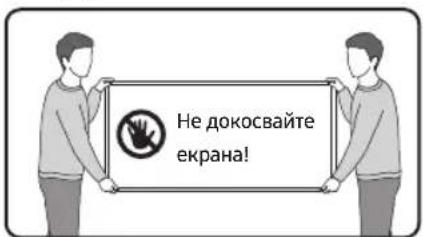
PpeynpeKHeE: EkpaHbT MoKe Da ce NOBpeDu OT dIpeKTeH HATnCK, aKO C Hero ce 6opabu HnnpaBnHo. Korato NobDnirate TeleBn30pa, npenopbYBaMe Da ro DbpXnTe B KpauNtata, KaTTo e noka3Ho. 3a nobeue INΦOpMaunz 3a 6opabEnTo, HanpaBeC cnpaBA b Quick Setup Guide, npedocTaBeNo c npoDyKTA.
02Пьрвонаннанстpoиka
Korato BKNIOUHTe TELEBN3Opa Cn 3a npbB nT, Toi BeHara cIapTnpa NbpBOHaunHata HAcTPOKa. CneBaIte INCTpykUHTe, NOKa3AHn Ha ekpaHa, N KOHfNpypauTe OCHOBHTe HAcTPOKn Ha TELEBN3Opa Cnopeed CpeDaTa Ha rIeJaHe.
I3noI3BaHe Ha KoHTpOJIep Ha TeJeBn3Opa
MooKTe Da BkIIOUHTe TeteBn3Opa c 6yToHa KoHTpOpe Ha TeBn3Opa Hau-dony Ha TeBn3Opa, a nocne n3non3BaTte MeHIO 3a ynpablenHe. MeHIO To MeHIO 3a ynpablenHe ce noRBA, KOrATo Ce HATNCHE 6yTObT KoHTpOep Ha TeBn3Opa npBkIIOUHe TeteBn3Op.
Ekpaht Moke da ce 3aTbMnH, ako npedna3HnT fHIM Ha Ioroto SAMSUNG nIOTOny Ha TeBn3opa He e npemaxhat. Tp6Ba da cBaInte npedna3HnF hIM.
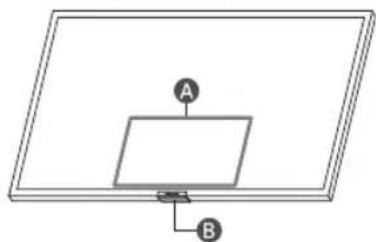
A MeHIO 3a ynpaBHeHne
BytOH KoHTpOneP Ha TeNeBn3Opa/CeH3OpHa nCTaHcNoHHOTo ynpAbeHHe
03 3a 6byToHnTe Ha nCTaHcNoHHOTynpaBneHne
-ИЗбрахенята,6утон'teиФункцинTe HaДиctaHNoHHOynpaBNeHne moKe Na BapnPаT cnopeД moDeNa nIreorgpafcknpernoH.
-AkoN3No13BaTe DnCTaHIOHOYnpaBHeHne, KOeTO ce npedocTABrC TeneBn3Opa 3a ynpabLeHne Ha dpyr TepeBn3Op, HkON FyHKUMOKe Da He pa60T HopMaHNO.
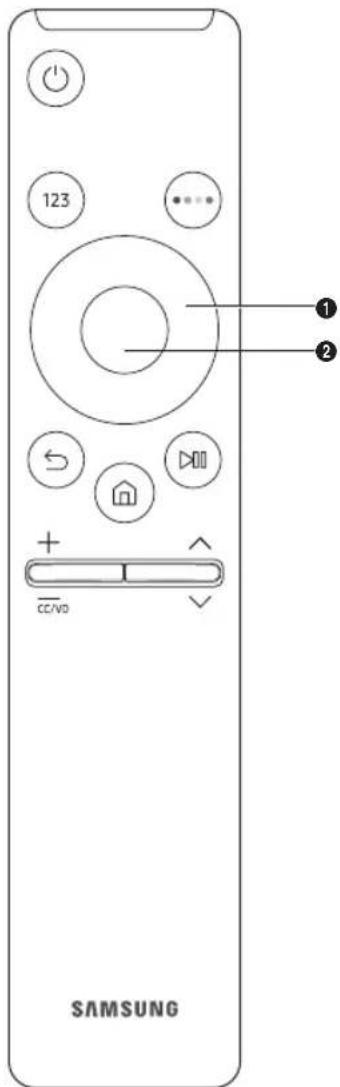
- (EneKtpo3axpaHbaHe) HATNCHEte 3a BkIOUOBAHe IIN N3KIOUOBAHe Ha TeneBn30pa.
- TOH HOpE) HaTnCHete,3a Da NOKaKete BnptyAaHnna UΦpOB nahen Ha ekpaHa. 3nON3BaIte UΦpOBa TkaBnaAtya,3a Da BBBeXdTe UΦpOBu CToHocT.N36epete UΦpN i CneT ToBa n36epete FTOBO,3a Da BbBeDeTe UΦpOBa CToHocT.N3nON3BaIte,3a Da CMeHIne KaHana,BbBeDeTe PIN nn ZIP KOD nT.H.
Korato ce haTnche 3a 1 cekyHda nIIN NOBuee, ce noRBA MeHOTOTTX.
- TOH CBeTeH) PnHaTcKaHe, HaekpHaCe noBBABat CBETHN 6yToHn. H3no3BaIte To3n 6yToH 3a DocTbN DoDnBnHTeHNHTe OuIN, cneuHnHn 3a TeKyuO n3no3BaHaTa FyHKua.
- ① ByToH cBc CTePJIKn (HaIrope, HaIOny, HaJIaBO, HaIaCHO) IpemeCTBa MapKepa I npOMeHr CToiHoCTInTe, KOITo Ce BnKdAT B MeHOTO HA TeJIeBu3Opa.
- 136epn I36npa nnn cnapnpa Mapkpapn enemnt. Pnp Hatackane, dokato rne dae I3nbUbaHa nporpama, ce noRBA noDpo6Ha HHfopmaun 3a nporpamata.
- (Bpuehe) HATNCHE 3a BpuaHe Ha npeduHOTo MeHIO. Korato ce HATNCHE 3a1 cekyHa nn noBuey, pa6oteuata fynKcna Cnnpa. Pn HATNCKaHe, DOkato rIeIate nporpaMa, ce nOBRABa npdunHnT KaHAn.
- (Smart Hub) Bpba ce KbM PbpBn ekpan.
- 33npon3BexJaHe/lay3a) PnHaTnCKaHe ce nOBraBt opraHnte 3a ynpabIeHne Ha B3npon3BexJaHTo.CxHa nomOuMokKeTe da npabIaBte B3npon3BexJaHO MyTmMeDnHO cbDbpKaHne.
- (Eya 3Byk) MecTe 6yToHa Harope nn HaOny, 3a da perynipate cnata Ha 3Byka. 3a da n3KnIOHTe 3Byka, HATNCHE Te TOs 6yToH. Korato ce HATNCHE 3a 1 cekHyda nn NOBuece, ce NOKa3Ba MeHIOTO Pekn nbTuMa 3a DOCTbNHOCT menu appears.
10.(Hann) MecTe6yToHa HArOpE nnHaDolny,3a Da CMeHnTe KaHaHa. 3a Da BnInTe ekpaHa PkoBocCTBO,HatncHe6yToHa.
Korato ce HATNCHE 3a 1 cekyHda nll noBuee, ce noBRAba ekpaHbT Cnncb KaHaII.
04 OTeTpaHЯBaHe Ha HEn3npaBHOCTn I NOIdpbXka
OTCTpaHReBaHe Ha Heu3npaBHOCTn
3a DoIbIHNHTeHa INHΦopMaIg BnKTe,OTcPaHraBaHe Ha Hen3npabHocTn"JIn,3B"Be-Manual.
HactpoKn -Manual OtctpaHbAbe Ha Hen3npaBHOCTN HJIN Y3B
Ako HnTo eAnH OT CbBte Tne B pa3eNa 3a OCTpaHraBaHe Ha Hen3npabHocTn He BN NOMorHe, NocTeTe "WWW.samsung.com" nI pakHe Tbe bpxy ,PoiDpBkKa"nnCe CbBpxTe COTeJa 3a texHnuecko o6cnyKbaHe Ha Samsung.
ToTFTLED naheI ce cbctOn ot cy6nKcei,3a qyeTo npoN3BODCTBOe Heo6xOdIma CnoXHa texHoiGna. Bbnpekn TOBaHa ekpaHa MoKeJa IMa HkoJIKO CBetIIN NITbMHN nKcena. Te3n NkCeIIN HMa Da NOBJIraT Ha KaueCTBOTo Ha pa6otaHa npOdykta.
3aJaNoIbPjKATETeJIeBn3OpaCN BONITMaJHO CbCToHHe, HAnCTpOJeTdoHaN-HOBncofTyep.I3non3BaIte fynHKUInTeOT MeHHTo Ha TeJIeBn3Opa AKTuAn3npaCe cer nAABToMaTHNoAKTuAn3npaHe (m)>FactpOIKn>
Ioppbkka > Aktyaun3npahe Ha coqftyep > Aktyaun3npahe cera nnn ABtomauuHO aKtyaun3npahe).
TeLeBn3OpbT He NsKa Da Ce BkIIOUH.
- YBepTe Ce, Ye aanTpebT 3a npomeHnVB TOK e BKIOueH 3dpaBO B KOHTAKTa N TELEIN3Opa.
- YBepeTeCe, Ye eNeKTPnuecknT KOtAKT pa6oTn UyeceH3OpbT 3a INCTaHcUOnHnOTo ynpabIeHne OToDonyHaTeLEBn3OpaCBETn HnpeKbCHaTO BuePBeHo.
- OnntaTe Da HaTnChTe 6yToHa KoHTpOlep Ha TeLEBn3Opa OTdoNy Ha TeLEBn3Opa, 3a Da ce yBepnte, Ye npo6IembT He e B DnCTAHUOnHOTO ynpabLeHne. Ako TELEBn3OpbT CE BKlIOuH, BnKTe, NCTAHUOnHOTo ynpabLeHne He pa60Tu".
IInctaHcHIOHHOTO ynpabVeHne He pa6oTN.
- Ha NOBeyeTo MOdEnI eTKeTbTe NoCTaBeH Ha Tbp6a Ha TeNeBn3Opa. (Ha HraKoN MoDeIe TKeTbTe Ha BbTpEuHaTa CtpaHa Ha KanaKa Ha TepMHaHaNTe.)
TINHHTa KOHCMAuHa eHepnCe H3MepBa cnopeI EC 62087.
3a da cBpKte LAN ka6en, n3noJ3BaIe Ka6en CAT 7 (*STP TIN) 3a CbP3BaHTo. (100/10 Mbps)
-
Shielded Twisted Pair
-
1306paqhenraTn CneuΦkaunTe B Quick Setup Guide MoKe da ce pa3nUaBt OT cbuHcKn npOdyKT.
- MoXe Da Ce HauNcnn aDmHnCTpaTnBHa TaKca B CneHNTe cnTyauu:
(a)ИЗВИКАн eТexHик no BaIe HactoBaH e NЯMa DeΦeK T B npOуКТa (T.e. He cTe npOчeN pБKOBoDcTBOTO 3a notpe6nTeJI).
(b)3aHacrTe ypeDa B cepBn3e HcHTbP Ha Samsung, Ho He yctaHOBe HdeΦeKt B npOdyKta (T.e. He cTe npOchEn pkoBOCTBOTO 3a Notpe6ntela).
LsE6bDteHnΦopMnpaHn3a aMnHnCTpaTnBHaTa TAKCa npEnI NOceHHeHTo HaTexHnKa.
*UfPnTe H NIOCTpaunTe B TOBA pBKOBOcTBO 3a nOTpe6nteIa C npEOCTaBeHn 3a CnpAbaN MoRat Da ce pa3NIuHaBAt OT NaHnHa, NO KOnTo I3rJIeKJa npOyKTb. TexHnuecknTe cneuNkauMn IN3aHbT Ha npOyKTa NpJExKaT Ha npOMHa 6e3 PpeIN3BecTne.
Pn peMOHT Ha npOyKT OT HeoTOp3nupan DoCTaBnK Ha yCnyr (cepBn3), CamocToTeneH peMOHT nI Ie npOpeCnoHaIe H peMOHT, CamcyHr He Hocn OTROBOPHOCT 3a KaKBTO n Da e 5eTn HA npOyKTA, HapaHbAHN IIN np6IeMn C 6e30nacHOCTTa H npOyKTA IIN dpyrnpOdyKT, pnpUHeH N O T KaKBTO n da e ONIT 3a peMOHT Ha npOyKTA, KOITo He CNEBa BHMaTeHNO HNCTpykUnITE 3a peMOHT N POnDpBxKka. BcKaKBr 5eTn Ha npOyKTA, npuHHeH N OT KaKBTO n Da e ONIT 3a peMOHT Ha npOyKTA OT KoETo n Da e IInCe, pa3IInuHO OT cepTNuPunHOT CaMcyHr DoCTabuHK Ha ycLyr, HMa Da 6bDat NOKpNTn OT rapaHunra.
Mona, nocetete samsung.com/support, 3a da hamepnte dOnbHnTeHa HOpMaun, OTHOCHO CBbp3aHnte C DnpeKtBa Ha EC 3a ekOuHa - ErP perynaphe, BbHnH 3axpaHbAun aAnTepn n dNCTaHcNoHHy npabLeHH
HaMaJIaBaHe Ha KOHCymaIraTa Ha eHepnIa
Korato n3kIIOHTe TELBUNa,TOBn3Ba BpeKIM Ha roTOBHOCT. BpeKIM HA rTOBOHOC TOI npOdbJNkaBa Da n3No3Ba MaIKo KOJIueCTBO eHepn. 3a Da HAMNIte KOHCymuaTHa eHepn, INBAckDaTe Ucncela Ha 3axpaHbUaNna Ka6eI OT KOHTAKTA, KOrato HMA Da n3NO3BaTe TELBUN3Opa npOdbJNKeTIENHO Bpeme.
JIuHcEH3n
Dolby Audio
POWERED BY
QUICKSET
rovi guide
HEVCAvance
HOMI
The terms HDMI and HDMI High-Definition Multimedia Interface, and the HDMI Logo are trademarks or registered trademarks of HDMI Licensing LLC in the United States and other countries.
3aToba Samsung deklapnpa, ye ToBa paAno o6OpdyBaHe cbOTBeCTBa Ha DnpeKtNbBa 2014/53/EC n npInIOxumnte 3aKOHOBu N3NCKBaHn, BAlINHn 3a BeInKo6pTuHa.
Пьнг TeKCT HaДКларaTа 3a CbBmecTmOcT Ie HamePte HA CLEHIN INTEpHET aIpeC:
http://www.samsung.com;otndeHaSupport(PoaPbKa)BbBeTeHMeToHaMoena.
ToBa 06OpUdBaHe MoKe Da Ce H3non3Ba BbB BCnKn CtpaHn Ha EC n BeNko6pntAHn.
HEVCAvance™ Covered by Patents at patentlist.hevcAdvance.com
HOMI
The terms HDMI and HDMI High-Definition Multimedia Interface, and the HDMI Logo are trademarks or registered trademarks of HDMI Licensing LLC in the United States and other countries.
Samsung ovime izjavljube da je ova radijska oprema u skladu s Direktivom 2014/53/EU i relevantnim zakonskim odredbama Ujedinjene Kraljevine.
HEVCAdvance ™Covered by Patents at patentlist.hevcAdvance.com
HOMI
The terms HDMI and HDMI High-Definition Multimedia Interface, and the HDMI Logo are trademarks or registered trademarks of HDMI Licensing LLC in the United States and other countries.
HEVCAvance™ Covered by Patents at patentlist.hevcAdvance.com
HOMI
The terms HDMI and HDMI High-Definition Multimedia Interface, and the HDMI Logo are trademarks or registered trademarks of HDMI Licensing LLC in the United States and other countries.
HEVCAvance™ Covered by Patents at patentlist.hevcAdvance.com
HOMI
The terms HDMI and HDMI High-Definition Multimedia Interface, and the HDMI Logo are trademarks or registered trademarks of HDMI Licensing LLC in the United States and other countries.
The terms HDMI and HDMI High-Definition Multimedia Interface, and the HDMI Logo are trademarks or registered trademarks of HDMI Licensing LLC in the United States and other countries.
HEVCAdvance ™Covered by Patents at patentlist.hevcAdvance.com
HOMI
The terms HDMI and HDMI High-Definition Multimedia Interface, and the HDMI Logo are trademarks or registered trademarks of HDMI Licensing LLC in the United States and other countries.
HEVCAdvance ™ Covered by Patents at patentlist.hevcAdvance.com
HOMI
The terms HDMI and HDMI High-Definition Multimedia Interface, and the HDMI Logo are trademarks or registered trademarks of HDMI Licensing LLC in the United States and other countries.
The terms HDMI and HDMI High-Definition Multimedia Interface, and the HDMI Logo are trademarks or registered trademarks of HDMI Licensing LLC in the United States and other countries.
- Shielded Twisted Pair
OleKovc kal ot npodaypapoc tou Quick Setup Guide evextal va diaepouv ano autec tou npayatko npoiovtoc.
Evexetalva npwaeTe paXpewn dEeepaiwoonc otcapakatw nepttwoec:
HEVCAdvance ™ Covered by Patents at patentlist.hevcAdvance.com
HOMI
The terms HDMI and HDMI High-Definition Multimedia Interface, and the HDMI Logo are trademarks or registered trademarks of HDMI Licensing LLC in the United States and other countries.
Aia nnc npouocn, n Samsung 8nawvei otu autoc o
paioeEonlauoC aumuopwvetai e Tnv Odyia 2014/53/EE ka
tis oxetikcs voukces anaithoeic tou Hwuivovu Baouleiou.
To npeK eievo Tc dwn oumopwnc evai diaeauo
otnv akolouh diaktuakn oleuuvon:
http://www.samsung.com metae te oto npaputo Support
(YnooTpIe) kal eayyete to ovua tou vovteau.
Autoc o Eonaiouc npoei va xpnauonountei oe 0e c tix wepc tnc E.E. kai oTo HvwoEvo Baoueio. H eitoupyia aupuatou dktou WLAN 5 GHz (Wi-Fi) autou tou Eonaiou mnpoei va xpnauonouitei ta movo e eowtepkouc xyoupoc.
Mév. toxuc πouu BT: 100 mW oτa 2,4 GHz-2,4835 GHz
Mév. toxuc πouu Wi-Fi: 100 mW oτa 2,4 GHz-2,4835 GHz, 200 mW oτa 5,15 GHz-5,25 GHz, 100 mW oτa 5,25 GHz-5,35 GHz & 5,47 GHz - 5,725 GHz
(AnoBnTa nAeKtpko uAeKtpovkuO
Eonlaou)
(1xue e xwpe c me Eexwplota ouotnma
oulloync)
Autn anmav n avw o npov, a eouap n 0
auvoetko evtu unodekvue ot to piov kai ta
nlektpvika tou ecaptna (nx. fopntc, akoutka,
kawdbo USB) dev npenei va anoppinovta ua ie alaa
okia anaBnata oto teao tou kukau zwn soc. Ia va
anoeuxbouv n thavoikivduoi yia to nepiabalov n th dnmoia
yieia ato tvavefeleyknt anoppu anoBnTow, diaxwpiote
auta ta EIgn anotouc alouc tounoc anoBnTow kai
avakukwate ta uteuohuva, wote va evuaooet ne npootaeia
biomega n enavaxnpaonoinnc twv ulkuv npov.
Oikaiaki xphote c th npelvi ouubouovtai eite to
kataotma ano otou ayopaav to napov poiov etic tic tonkec
kpatike vtnpeie c yia nnpopopiec oxetka me tov tono
kai topo nou npopoov va diaheouov auta ta EIsn npoc
peipalaovtka aofaahnv avakokwon.
Ol etaipki o xpntec ba npelvi va enikovwovmu ToV
pounthetau Touc kalva eeyoxuv Touc opous kal tic
pounthetaeic tnc oubaong acypac.Auto to pioov kal ta
nektpvika tou aeeovap dev th npelvi va anoppintetai maqI
me allouc tuouc emnpikuv anbetahvy.
Swot anoppuyn twy mataipiwy autou tounpoiovtoc (Ioxue 0e xwpec me Eexwpiota ouothmuataoulambdaovnc)
Autn anjavon navw otynu natapia, oto evxelpidio n otoukeuaia unodeikvoei otl o uatapiecnsou npepixovtae auto to npoiov dev npeneva atoppittovat maqi me alaa okiak a anobnta oto teao tou kukauo wnc tou. Otonu npaxei n oxetik anjavan, ta auubola xnhkuv ouoiuv Hg, Cd npb unodeikvouov ot n uataipia nepiexei ubpapyupo, kaio n oalboe e eniteeda nou utepbaivouv ta emiteda avapopac tnc Osnyiac 2006/66 tnc E.K. Av o u pataies dev anoppfouov owata, autc c ol ouics motei va bawov tn dnoia uyia n to peipalov.
Tva v npoatapeetouqaukoic npouc kal v eviauxuete tvnpoanaeia enavaxpnoiiontowu uikw, dxawpiotetis npataies ano touc alaous tontous antbntw kai avakukwote tic meaw tou tonikov ouotnmuatoc swpeav
entotpohnc matapatiw.
- Shielded Twisted Pair
HEVCAvance™ Covered by Patents at patentlist.hevcAdvance.com
HOMI
The terms HDMI and HDMI High-Definition Multimedia Interface, and the HDMI Logo are trademarks or registered trademarks of HDMI Licensing LLC in the United States and other countries.
The terms HDMI and HDMI High-Definition Multimedia Interface, and the HDMI Logo are trademarks or registered trademarks of HDMI Licensing LLC in the United States and other countries.
HEVCAvance™ Covered by Patents at patentlist.hevcAdvance.com
HOMI
The terms HDMI and HDMI High-Definition Multimedia Interface, and the HDMI Logo are trademarks or registered trademarks of HDMI Licensing LLC in the United States and other countries.
Ar so uzemums Samsung pazino, ka sis radio aprikojums atbilst Direktivai 2014/53/ES un atbilstošajam Apvienotas Karalistes likuma NOTEiktajam prasibam.
Pilns atbilstibas deklaracijas teksts ir pieejams interneta adres: http://www.samsung.com atveriet sadalu „Atbalsts" un ivadiet modela nosaukumu.
HEVCAvance™ Covered by Patents at patentlist.hevcAdvance.com
HOMI
The terms HDMI and HDMI High-Definition Multimedia Interface, and the HDMI Logo are trademarks or registered trademarks of HDMI Licensing LLC in the United States and other countries.
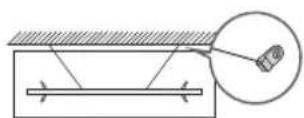
Forhindre at TV-en faller
HEVCAdvance ™Covered by Patents at patentlist.hevcAdvance.com
HDMI
The terms HDMI and HDMI High-Definition Multimedia Interface, and the HDMI Logo are trademarks or registered trademarks of HDMI Licensing LLC in the United States and other countries.
Samsung erklaerer herved at dette radioutstyret er i samsvar med direktiv 2014/53/EU og relevante britske lovkrav.
Hele teksten i samsvarserklæringen er tilgengelig på følgende Internett-adresse:
HEVCAdvance ™ Covered by Patents at patentlist.hevcadvance.com
HOMI
The terms HDMI and HDMI High-Definition Multimedia Interface, and the HDMI Logo are trademarks or registered trademarks of HDMI Licensing LLC in the United States and other countries.
HEVCAdvance™ Covered by Patents at patentlist.hevcAdvance.com
HOMI
The terms HDMI and HDMI High-Definition Multimedia Interface, and the HDMI Logo are trademarks or registered trademarks of HDMI Licensing LLC in the United States and other countries.
HEVCAdvance ™ Covered by Patents at patentlist.hevcAdvance.com
HOMI
The terms HDMI and HDMI High-Definition Multimedia Interface, and the HDMI Logo are trademarks or registered trademarks of HDMI Licensing LLC in the United States and other countries.
HEVCAvance™ Covered by Patents at patentlist.hevcadvance.com
HOMI
The terms HDMI and HDMI High-Definition Multimedia Interface, and the HDMI Logo are trademarks or registered trademarks of HDMI Licensing LLC in the United States and other countries.
HEVCAdvance ™ Covered by Patents at patentlist.hevcAdvance.com
HOMI
The terms HDMI and HDMI High-Definition Multimedia Interface, and the HDMI Logo are trademarks or registered trademarks of HDMI Licensing LLC in the United States and other countries.
HEVCAdvance ™ Covered by Patents at patentlist.hevcAdvance.com
HOMI
The terms HDMI and HDMI High-Definition Multimedia Interface, and the HDMI Logo are trademarks or registered trademarks of HDMI Licensing LLC in the United States and other countries.
S tem druzba Samsung izjavla, da je ta radijska oprema skladna z Direktivo 2014/53/EU in veljavnimi normativnimi zahtevami ZK.
HEVCAvance™ Covered by Patents at patentlist.hevcAdvance.com
HOMI
The terms HDMI and HDMI High-Definition Multimedia Interface, and the HDMI Logo are trademarks or registered trademarks of HDMI Licensing LLC in the United States and other countries.
HEVCAdvance ™ Covered by Patents at patentlist.hevcAdvance.com
HOMI
The terms HDMI and HDMI High-Definition Multimedia Interface, and the HDMI Logo are trademarks or registered trademarks of HDMI Licensing LLC in the United States and other countries.
HEVCAdvance™ Covered by Patents at patentlist.hevcadvance.com
The terms HDMI and HDMI High-Definition Multimedia Interface, and the HDMI Logo are trademarks or registered trademarks of HDMI Licensing LLC in the United States and other countries.
CS & (Maetan-Dong) 129, Samsung-ro, Yeongtong-gu, Environment Suwon-si, Gyeonggi-do, 443-742, Korea Centre of Tel: +82-31-277-7752
Samsung
Electronics
Co., Ltd.
If you have any questions or comments relating to Samsung products, please contact the Samsung service centre.
| Country | Samsung Service Centre® | Web Site |
| ROMANIA | *8000 (apel in retea) 08008-726-78-64 (08008-SAMSUNG) Apel GRATUIT Atentie: Dacă efectuți apelul din rețeaua Digi (RCS/RDS), că rugăm și ne contactuți formânnd numărul Telverde fără ultimele două cifre, astfel: 0800872678. | www.samsung.com/ro/support |
| SERBIA 011 321 6899 www.samsung.com/rs/support | ||
| KOSOVO 0800 10 10 | 1www.samsung.com/support | |
| SLOVAKIA 0800 - SAMSUNG (0800-726 786) www.samsung.com/sk/support | ||
| SPAIN 91 175 00 15 www.samsung.com/es/support | ||
| SWEDEN 0771 726 786 www.samsung.com/se/support | ||
| SWITZERLAND 0800 726 786 | www.samsung.com/ch/support (German) www.samsung.com/ch_fr/support (French) | |
| UK 0333 000 0333 www.samsung.com/uk/support | ||
| IRELAND (EIRE) 0818 717100 | www.samsung.com/ie/support | |
| LITHUANIA | 8-800-77777 www.samsung.com/lt/support | |
| LATVIA | 8000-7267 | www.samsung.com/lv/support |
| ESTONIA | 800-7267 | www.samsung.com/ee/support |
| TURKEY | 444 7711 | www.samsung.com/tr/support |
If you have any questions or comments relating to Samsung products, please contact the Samsung service centre.
Contact SAMSUNG WORLD WIDE
| Country | Samsung Service Centre | Web Site |
| AUSTRIA 0800 72 67 | 864 (0800-SAMSUNG) www.samsung.com/at/support | |
| BELGIUM 02-201-24 | -18 | www.samsung.com/be/support (Dutch) www.samsung.com/be_fr/support (French) |
| BOSNIA 055 233 999 | www.samsung.com/ba/support | |
| ALBANIA 045 620 202 | www.samsung.com/al/support | |
| BULGARIA | *3000 Zeha наedoин градский раztовор 0800 111 31 Бразлaten за восточи оретату | www.samsung.com/bg/support |
| CROATIA 072 726 786 | www.samsung.com/hr/support | |
| CZECH | 800 - SAMSUNG (800-726786) www.samsung.com/cz/support | |
| Samsung Electronics Czech and Slovak, s.r.o. V Parku 2323/14, 148 00 - Praha 4 | ||
| DENMARK 707 019 | 0 www.samsung.com/dk/support | |
| FINLAND 030-6227 | 515 www.samsung.com/fe/support | |
| FRANCE 01 48 63 00 | 00 www.samsung.com/fr/support | |
| GERMANY | 06196 77 555 77 | www.samsung.com/de/support |
| CYPRUS | 8009 4000 only from landline, toll free | www.samsung.com/gr/support |
| GREECE | 80111-SAMSUNG (80111 726 7864) only from land line (+30) 210 6897691 from mobile and land line | |
| HUNGARY | 0680SAMSUNG (0680-726-7864) | www.samsung.com/hu/support |
| ITALIA | 800-SAMSUNG (800.7267864) | www.samsung.com/it/support |
| LUXEMBURG | 261 03 710 | www.samsung.com/be_fr/support |
| MONTENEGRO | 020 405 888 | www.samsung.com/support |
| SLOVENIA | 080 697 267 (brezplačna številka) | www.samsung.com/si/support |
| NETHERLANDS | 088 90 90 100 | www.samsung.com/nl/support |
| NORWAY | 21629099 | www.samsung.com/no/support |
| POLAND | 801-172-678* lub +48 22 607-93-33* * (optata wedtug taryfy operadora) | www.samsung.com/pl/support |
| PORTUGAL | 808 207 267 | www.samsung.com/pt/support |