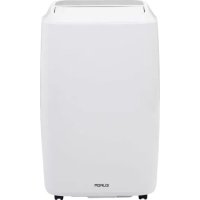
Polar 120 wifi - Air Conditioning Eurom - Free user manual and instructions
Find the device manual for free Polar 120 wifi Eurom in PDF.


| Product type | Mobile air conditioner / dehumidifier |
| Brand | Eurom |
| Model | Polar 120 wifi |
| Cooling capacity | 12000 Btu/h (3400 W) |
| Max electrical consumption | 1346 W |
| Supply voltage | 220-240 V ~ 50 Hz |
| Refrigerant | R290 / 226 g |
| Sound level (acoustic power) | 65 dB(A) |
| Sound level (acoustic pressure) | 55 dB(A) |
| Fan speeds | 3 (Low, Medium, High) |
| Operating temperature | 18 to 35 °C |
| Fuse | F, 250 V AC, 3.15 A |
| Exhaust hose diameter | 150 mm |
| Net weight | 30 kg |
| Dimensions (W x D x H) | 71.5 x 33.5 x 44 cm |
| Max cooling area (low heat load) | 38 m² (105 m³) |
| Functions | Air conditioning, dehumidification, ventilation, timer, oscillation, sleep, WiFi |
| Filter cleaning | Every 2 weeks, with warm water |
| Safety | Thermal (overheat), water tank full |
| Included accessories | Exhaust hose, window bar, plugs, remote control |
Frequently Asked Questions - Polar 120 wifi Eurom
User questions about Polar 120 wifi Eurom
0 question about this device. Answer the ones you know or ask your own.
Ask a new question about this device
Download the instructions for your Air Conditioning in PDF format for free! Find your manual Polar 120 wifi - Eurom and take your electronic device back in hand. On this page are published all the documents necessary for the use of your device. Polar 120 wifi by Eurom.
USER MANUAL Polar 120 wifi Eurom
natural_image
White EUROM air conditioner unit with black wheels and front panel (no visible text or symbols on device body)Polar 120 Wifi
Art.nr. 381689
Polar 140 Wifi
Art.nr. 381696
Hartelijk dank!

natural_image
Illustration of open books, an open book with an 'i' symbol, and an open notebook with a wrench (no text or symbols present)natural_image
Two identical air purifier units with connectors and a cable, shown from different angles (no text or symbols visible)natural_image
Simple line drawing of a rectangular block with a circular hole and an arrow pointing downward (no text or symbols)cm.

natural_image
Technical diagram showing two views of a U-shaped structure with directional arrows and dimension lines (no text or symbols)natural_image
Diagram of a curved pipe or duct with two circular ends, each rotating around it, showing rotational flow (no text or symbols)natural_image
Line drawing of an air conditioner unit connected to a panel with a circular component (no text or symbols)natural_image
Line drawing of an air conditioner unit connected to a door via tubing (no text or symbols)
natural_image
Technical line drawing of two air conditioning units with labeled components, shown from different angles (no text or symbols present)natural_image
Simple line drawing of a portable air purifier with a faucet and a 'X' symbol (no text or labels)
natural_image
Illustration of a portable air purifier with hand cleaning it, no text or symbols presentnatural_image
Symbol of a trash bin crossed with no visible text or labelsnatural_image
Two identical air purifier units with labeled connectors, shown from different angles (no text or symbols present)natural_image
Simple line drawing of a rectangular block with a circular hole and a downward arrow, no text or symbols present.natural_image
Technical diagram showing two views of a door frame with directional arrows and dimension lines (no text or symbols)natural_image
Diagram of a coiled pipe with two rotating ends, showing internal structure and rotation arrows (no text or symbols)
natural_image
Line drawing of a small air conditioner unit connected to a panel with a circular component (no text or symbols)natural_image
Line drawing of a small air conditioner connected to a door via a coiled hose (no text or symbols)natural_image
Technical line drawing of two air purifiers with labeled ports and connectors (no text or symbols)
natural_image
Two identical air purifiers with labeled ports and connectors, shown from different angles (no text or symbols present)flowchart
graph TD
    A["ACV"] --> B["Solar Panel"]
    B --> C["Display Panel"]
    D["Person Using Device"] --> B
natural_image
Symbol of a trash bin crossed with two diagonal lines (no text or numbers present)
Thank you for choosing a EUROM air conditioner / dehumidifier. You have made a good choice! We hope that it will function to your full satisfaction.
To get the best out of your air conditioner / dehumidifier, it is important that you read and understand this operating manual carefully and thoroughly before use. Pay particular attention to the safety instructions; they are mentioned to protect you and your environment!
Then keep the operating manual for future reference. Also keep the packaging: that is the best protection for your air conditioner / dehumidifier during off-season storage. And if you ever transfer the air conditioner / dehumidifier to someone else, please supply the operating manual and packaging.
We wish you a lot of fun with the Polar 120 / 140 !
Eurom
Kokosstraat 20
8281 JC Genemuiden (NL)
info@eurom.nl
www.eurom.nl
This manual has been compiled with the utmost care. Nevertheless, we reserve the right to optimize this manual at any time and to adjust it technically.
Symbol statement

- This appliance is filled with Propane gas R 290. Follow strictly the manufacturer's instruction concerning use and repairs!
- Before using the machine, carefully read this entire instruction manual.
- Do not install, operate or store the device in a room smaller than 15m^2 .
Technical specification
| Polar 120 Wifi | Polar 140 Wifi | |
| Cooling capacity | 12000 Btu/uur (3400 W) | 14000 Btu/uur (3800 W) |
| Max. power usage | 1346 W | 1538 W |
| Air displacement max. | 380 m3/uur | |
| Connected power | 220-240V~50Hz | |
| Cooling fluid | R290 / 226g | |
| Class of insulation | IPX0 | |
| Noise level | Sound power level 65 dB(A Sound pressure level 55 dB(A) | |
| Fan settings | 3 | |
| Operating temperature | 18-35°C | |
| Fuse | F, 250V AC, 3,15A | |
| Waste pipe | ∅ 150 mm | |
| Net weight | 30 kg | 31 kg |
| Dimensions | 71,5 x 33,5 x 44 cm | |
Safety Warnings
Read all safety warnings and other instructions. Failure to follow all instructions can cause injury or material damage.
General safety warnings
- This unit is exclusively intended for household use.
- A mobile air conditioner needs air to be able to discharge heat to the outside!
Therefore, never use a mobile air conditioner in an airproof room. Always make sure there is sufficient ventilation. Without sufficient ventilation, a vacuum is created in an airproof room, while a mobile air conditioner is operating, and this vacuum can disrupt the safe operation of geysers, extractors, mechanical ventilation systems, ovens, fireplaces and gas heaters. The vacuum can cause the exhaust gases, which these appliances usually discharge to the outside, to wind up either partially or entirely in the room.
- Always ensure (even during transport!) that the unit remains upright. If the unit has been lying on its side, wait 2 hours before using. This time is required in order for the compressor to function correctly.
-
Ensure that the unit is always placed on a sturdy, flat and horizontal surface.
-
Ensure that the unit has a free space of at least 30 cm on each side.
-
Make sure that the plug and socket remain visible and accessible at all times.
-
Do not place any objects in front of the air conditioning unit.
-
Never leave a functioning device unsupervised, not even for a moment!
-
Do not use the air conditioning unit in the vicinity of flammable or explosive substances or fuels. Never use any paint, cleaning sprays, anti-insect sprays or similar near the unit; this could deform the plastic or cause electrical damage.
-
Do not use the appliance:
-
close to a fire source;
- close to splashing oil;
- in direct sunlight;
- with splashing water;
-
in a bathroom or at a swimming pool.
-
Never block the grilles for incoming or outgoing air (not even partially).
-
In order to prevent over-heating, never cover the device!
-
Never insert fingers or objects such as pens into the device via the grilles and warn especially children about these dangers.
-
Ensure that the ventilator does not become blocked.
-
Children, incapacitated persons and pets should be supervised.
-
This appliance is not a toy, so children should not play with the appliance.
-
This appliance can be used by children aged from 8 years and above and persons with reduced physical, sensory or mental capabilities or lack of experience and knowledge if they have been given supervision or instruction concerning use of the appliance in a safe way and understand the hazards involved. Children shall not play with the appliance. Cleaning and user maintenance shall not be made by children without supervision. Avoid children coming into contact or playing with the device.
-
Cleaning and user maintenance shall not be made by children without supervision.
-
Remove the plug from the socket when you hear strange noises, smell a strange smell, when there is smoke.
-
Do not turn on the appliance if you have discovered damage to the appliance, cord or plug, if the appliance is malfunctioning, if it has
been dropped or if there are signs of any other defect. Return the complete product to the vendor or to a certified electrician for inspection and/or repair. Always ask for original parts.
- The appliance (incl. cord and plug) may only be opened and/or repaired by properly authorised and qualified persons.
Electrical safety
- The air conditioning unit is only suitable for indoor use.
- Only use the plug that is installed on the device in the factory and no other form of connector!
- The appliance shall be installed in accordance with national wiring.
- Before use, check that the electrical outlet you want to use is earthed, has no defects, and that the power supply to the electrical outlet corresponds to that on the rating plate of the appliance. Damage caused by a faulty voltage is not covered by the warranty!
- If the appliance is not being used, or if you are cleaning, servicing or moving it, switch it off first and then unplug the appliance. Always move and / or move the device quietly!
- Even when you start using the appliance: firstly plug in the mains, then the switch to the ON position and only then use the control button!
- Do not use the device in a damp or wet environment, near a bath, shower or swimming pool and do not splash water, oil or any liquid on or in the appliance.
- Avoid using extension cords as much as possible. If this is unavoidable, use a cord with sufficient capacity (at least 3 × 1.5 mm^2 ) and keep it outside the walking route!
- Do not move the appliance by pulling on the electrical cable and take the plug in your hand if you want to take it out of the socket.
- Do not pull on, deform or modify the electrical cable or immerse it in water. Pulling or misuse of the electrical cable will cause damage to the device and cause an electric shock
- If the electrical cable, plug or the appliance itself is damaged, broken, or malfunctions, do not use it or switch it off immediately and remove the plug from the socket. Device, plug and / or cable must be repaired / replaced by an electrician or similarly qualified person. Repairs by inexperienced people will invalidate the warranty and can cause dangerous situations!
Safety in relation to coolant R290
- This device contains the coolant R290. R290 is a coolant that complies with the relevant European Directives. Never perforate the coolant circuit. R290 is flammable (GWP 3)!
- Never use substances other than those recommended by the manufacturer for the defrosting process.
- This device must be used and stored in a room that does not contain sources of ignition, such as open flames or gas and electrical devices in operation.
- Do not perforate any of the components of the cooling circuit and do not set light to the device
- If the device is installed, working or stored in an un-ventilated you must take measures to prevent fire or explosions caused by leaked coolant. Ensure that there are absolutely no sources of ignition (such as fire, heaters, sparking electrical equipment, lit cigarettes, etc.) in the same room!
- The device must be stored in such a way that mechanical defects are prevented.
- Do not install, operate or store the device in a room smaller than 15m^2 .
- R290 is odourless, which means that you cannot smell leaks!
- Persons working on the cooling circuit must be in possession of the correct qualifications that state the person in question is competent to use coolant in accordance with a special evaluation that is recognised by the sector association.
- The repairs must be executed on the grounds of the recommendations of the manufacturer of the device. Maintenance and repairs that require the assistance of other qualified persons must be executed under supervision of someone who is specialised in the use of flammable coolant.
Maximum effect
The maximum surface area, which this air conditioner can cool, depends on various conditions. Conditions that cause the air conditioner to cool smaller spaces are, for example:
- Higher outdoor temperature
- Many and/or large windows
- Flat roof
- Many people in the room
- Many electrical appliances in the room
If these conditions are present to a lesser extent (i.e. lower heat loads), the air conditioner can cool a larger surface area better than if more of these conditions are present (i.e. higher heat loads).
| Polar 120 Wifi | Polar 140 Wifi | |
| Lower heat loads | 38 m^2 | 44 m^2 |
| 105 m^3 | 120 m^3 | |
| Higher heat loads | 24 m^2 | 27 m^2 |
| 66 m^3 | 75 m^3 |
- Do not place the unit in the vicinity of a heat source or in direct sunlight.
- Close windows and doors and keep curtains or hatches closed during the sunniest hours in the day
- Keep filters clean
- Modify temperature and ventilation settings once the area has reached the required condition.
Description
Description of the device
- Flaps horizontal
- Controlpanels
- Frontpanel
- Backpanel
- Caster wheel
- Air inlet
- Water drainage high
- Air outlet
- Elektrical cable with plug
- Water drainage low

Description of the accessories
| Part | Description | Number |
 | Outlet hose hot air | 1 |
 | Connector airconditioner | 1 |
 | Connector windowpanel | 1 |
 | Windowpanel | 1 |
 | Dowels | 2 |
 | Wall connector | 1 |
 | Waterdrainhose | 1 |
 | Remote control | 1 |
Installation
The Polar is a mobile airconditioning/dehumidifying units that can be moved from room to room. Install as follows:
- Remove all packaging material, keep it away from children and ensure that the
unit remains in an upright position.
- Before use, check that all accessories are present and that there is no damage to the accessories or the unit itself. Do not use a damaged unit; take it back to your supplier!
- Place the unit on a sturdy, flat, dry and horizontal base near an electrical socket and a discharge point for hot air, e.g. a window that can be opened slightly. Make sure that the unit has at least 30

cm of free space on all sides and take all safety instructions into account.
Installation to dehumidifier
To use the dehumidification function, connect the water drainage hose to the water drainage point (high) (see picture). This hose should lead to a bucket or drain. The hose should not run upwards! Your unit is now ready for use.

natural_image
Two identical air purifier units with labeled connectors and a close-up of the plug inserted into one (no text or symbols present)Installation to cool
- In order to use the cooling function, you do not need to connect the water drainage hose. Check that the sealing caps of the water drainage connections are in place.
- Install the window panel in the window. Adjust the length of the window panel to the width or height of the window and secure it with the dowels. The length of the window panel is adjustable from 67.5 to 123 cm.

natural_image
Simple line drawing of a rectangular block with a circular hole and a downward arrow, no text or symbols present.
natural_image
Technical diagram showing two views of a U-shaped structure with directional arrows and dimension lines (no text or symbols)- Turn clockwise the connector for the air conditioning on one end and for the window panel on the other end of the drain hose.

natural_image
Diagram of a curved pipe with two circular ends, showing rotational flow arrows (no text or symbols)- Slide the connector for the air conditioner into the appropriate slot on the rear of the unit.

- Secure the other end of the outlet hose in the window panel opening so that it can remove hot air outside.

natural_image
Line drawing of a small air conditioner unit connected to a panel with a circular component (no text or symbols)- You can also hang the outlet hose out of an open window; this method is less efficient however.

natural_image
Line drawing of a small air conditioner connected to a door via coiled tubing (no text or symbols)- Avoid bends or pinches in the pipe. These will lead to a build-up of damp, waste air which can cause leaks, overheating or lead to the air conditioning unit switching off.
- Warning! Do not use your air conditioner before it is installed according to the instructions described above!
- Warning! Ensure that no water can enter the device!
- Warning! The length of the drain pipe is specially adapted to the technology of this air conditioning. Do not replace it, therefore, and do not extend it with its own hose, as this can negatively affect the functioning of the air conditioner. The hose can be stretched, but in order to achieve an optimal effect you should keep the length as short as possible.
- Remember your intrusion prevention!
Operation
Description controlpanel

A. On / off button 1. Cooling function indicator light
B. Fan speed button 2. Dehumidifying function indicator light
C. Temperature up button 3. Fan function indicator light
D. Temperature down button 4. Wifi indicator light
E. Selection function mode button 5. Fan speed high indicator light
F. Timer on / off button 6. Fan speed medium indicator light
G. Swing on / off button 7. Fan speed low indicator light
H. Sleep mode button 8. Water tank full indicator light
Description remote control
- On / Off button
- Timer on/off button
- Selection function mode button
- °C / °F selection button
- Temperatuur up button
- Temperatuur low button
- LED display on/off button
- Swing button
- Fan Speed button
- Sleep mode button

Description LED display remote control
- Signal reception wirelessly
- Cooling function
- Dehumidifying function
- Fan function
- Swing function
- Timer set number of hours
- Timer on / off
- Sleep function
- Fan speed
- Temperature display

The control panel en the remote control have basically the same buttons. At the back of the remote control, insert two batteries (AAA-1.5V) into the appropriate compartment.
Before using the air conditioner, check:
- That it has been installed according to safety instructions
- That it is not damaged or broken
- That the electrical socket that you wish to use has the same voltage as is given on the unit's specification plate (220-240V\~50Hz)
- That no other devices are connected to the same socket
If this has all been checked, you can insert the plug into the socket.
Switch the device on with the 'power' button.
Cooling function
➢ Press the 'Mode' button until the 'Cool' light is shown on the display.
The display shows 25°C.
➢ Set the required temperature with the Temp ▲ / Temp▼ button. The display shows the configured temperature. The temperature can be set between 16 and 31°C.
➢ Press the 'Speed' button to set the ventilator speed at low, medium or high.
Observe an interval of at least 3 minutes between every on/off.
Dehumidification function
➢ Press the 'Mode' button until the 'Dehum' light is shown on the display.
➢ Check if the water discharge is connected correctly.
The display automatically shows 2^ C below the room temperature.
The temperature cannot be changed.
The ventilator speed is automatically set to low.
Observe an interval of at least 3 minutes between every on/off.
Ventilation function
➢ Press the 'Mode' button until the 'Fan' light is shown on the display.
The display shows 25°C.
➢ Set the power to low, medium or high with the 'Speed' button.
The temperature cannot be changed.
Timerfunction
Automatic start:
➢ First set at which temperature and in which mode (cooling, dehumidifying or ventilating) you want the air conditioner to start.
Switch off the air conditioner using the
➢ Press the
Using the
➢ Press the
The air conditioner will automatically start with the entered settings after the lapsing of the set number of hours.
Automatic stop:
➢ Press the
Using the
➢ Press the
The air conditioner will automatically stop after the lapsing of the set number of hours.
Swing function
➢ Press the 'Swing' button, the light on the display lights up.
The flap on top swings continuously from the top to the bottom.
By pressing the button again you switch off the function.
The flap remains in the last position.
Night function
➢ Press on the 'Mode' button until the 'Cool' light shows on the display.
▶ Set the required temperature.
➢ Press the 'Sleep' button, after 1 hour the temperature is reduced by 1^ C and after 2 hours increased by 2^ C.
The device continues operating in this mode.
By pressing the 'sleep' button again you switch of the function.
LED display
The display shows the configured temperature or the timer settings. The display also shows the error codes, see further on in this manual.
Operation via the app
The Polar can, via Wifi, also be operated with an app. See the separate app instruction for this.
Additional comments
- When you start the device and opt for a specific function or change function, the ventilator will work but the compressor will not start immediately: the latter to protect the internal components. The symbol that belongs to the configured function blinks on the display, a sign of the 'waiting mode'. This can last 3 to 4 minutes.
- In case of prolonged strong cooling, ice accretion can occur on the interior of the device. You notice this because the device performs less. To solve this you switch off the device and give it time to defrost.
- When the required cooling or heating temperature has been attained, the device will continue ventilating but the compressor discontinues operating.
Water outlet
During cooling and dehumidification, the device extracts water from the air. This largely evaporates again, but possibly. excess water accumulates in the water reservoirs. When full, the compressor and motor stop automatically and the "water tank full" (W.F) light turns on. In that case, switch off the air conditioning and remove the plug from the socket. You empty the water reservoirs by removing both sealing caps from the top and bottom water drainage point (see pictures) and draining the reservoirs into a drain or collecting them in a container or similar. Do not forget to replace the sealing caps on the drain afterwards! After this you can start using the air conditioning again.

natural_image
Technical line drawing of two air purifiers with labeled ports and connectors (no text or symbols)
natural_image
Two identical air purifiers with attached connectors, shown from different angles (no text or symbols)Safety
The device is fitted with an overheating safeguard that switches the unit off if it overheats. If this should occur, you must remove the plug from the socket and leave the equipment to cool for at least 30 minutes. Remove the cause of
overheating - has the device been (partially) covered? Is it too close to a wall or another obstacle, preventing it sucking in or dispelling sufficient air?
You can then use the device normally again but keep an eye on it for the first 30 minutes to ensure there are no further problems. If the device is showing signs of problems or the overheating recurs, even though there is no obvious assignable cause, ask your supplier or a recognised electrician to check/repair the unit.
Cleaning and maintenance
Note! Before cleaning or carrying out maintenance work on the air conditioning unit, always switch off and remove the plug from the socket! Regular cleaning is vital in order to keep the unit in good working order!
Cleaning the housing
Always remove the plug from the socket before cleaning the housing. Wipe the
cabinet with a clean, soft, lint-free cloth or soft brush. Do not use aggressive cleaning agents, scouring pads or brushes and no chemical cleaning agents; this can damage the material. Never use flammable cleaning agents such as benzene or methylated spirits. Let the device dry completely before using it again. Never immerse the plug, electric cable or any part of the appliance in water or any other liquid. This can lead to an electric shock!

Cleaning of the filter
Clean the filter every two weeks; air conditioning with dirty filter does not operate
properly. The filter is located behind the air intake grid at the back. You can easily open this grid and remove the filter. Use a vacuum cleaner or tap the filters lightly to remove loose dust and dirt. Then rinse the filter clean in, at most, lukewarm water (not warmer than 40°C.), potentially with a mild, neutral cleaning agent. Let the filter dry thoroughly in the shade before placing it back. Attention! Never operate the air conditioning without the filter!

flowchart
graph LR
    A["Air/Condenser"] --> B["Solar Panel Array"]
    B --> C["Water Droplet Detection"]
    style A fill:#f9f,stroke:#333
    style B fill:#ccf,stroke:#333
    style C fill:#cfc,stroke:#333
End of season cleaning
If the device is to be stored for a long period, you must take the following measures!
- Remove the condensed water. Run the unit for a few hours on fan function so that the unit is completely dry inside.
- Then switch the air conditioning unit off and remove the plug from the socket.
- Clean the filters and reposition them or replace with a new ones.
- Unscrew the waste pipe from the device in order to prevent damage.
- Pack the air conditioning unit in its original packaging or in a plastic bag and place in a dry place for storage. Place a heavy object on the unit.
- Remove the batteries from the remote control.
- Store the device in a room smaller than 15m^2 .
Troubleshooting and error codes
Troubleshooting
The unit does not start if I press the ON/OFF button
- Is the plug in the socket?
- Is the earth leakage circuit breaker engaged? No power?
- Is the water tank full? Empty it.
- The room temperature is lower than the set temperature; amend the set temperature.
The unit doesn't seem to be very effective
- Measure the outlet temperature; this must be approx. 10° cooler than room temperature.
- Is there direct sunlight? Shut the curtains.
- Are windows or doors open? Shut them.
- Are there too many people in the room? They produce heat!
- Is the space too big?
- Is there an object in the room that is generating (a great deal of) heat? Switch it off or remove it.
- Are the filters dusty or covered in dirt? Clean them.
- Is the air inlet or outlet (hose) blocked? Make sure there is free air flow.
The unit is making a noise
- Is the surface underneath the machine sturdy and even?
- The flow of coolant in the unit also produces a little noise. This is perfectly normal.
The unit switches itself off
- The overheating safeguard may have switched the unit off. See 'Safety'.
Error codes
| Error code | Cause | What to do |
| E0 | Error temperature sensor | Have it replaced. The unit works without temperature setting. |
| E1 | Condenser temperature sensor defective | Have the sensor replaced by an authorized and qualified person. |
| E2 | Water tank is full during cooling | Switch off the appliance and empty the water tank manually via the lowerwater outlet point. Then turn on the device again. |
| E3 | Evaporator temperature sensor defective | Have the sensor replaced by an authorized and qualified person. |
Warning: Never attempt to repair the device yourself!
Removal

natural_image
Symbol of a trash bin crossed with a diagonal line and a horizontal bar below (no text or labels)In the EU this symbol indicates that this product may not be disposed of as ordinary household waste. Old equipment contains valuable materials, suitable for recycling. These materials should be made suitable for reuse in order to prevent any adverse effects to health and the environment caused by unregulated waste collection. Therefore, please make sure that you bring old equipment to a designated collection point. Alternatively, contact the original supplier, who can make sure that as many of the components as possible can be recycled.
CE conformity Statement
See page 70.
Merci
Description l'accessoires
natural_image
Two identical air purifier units with attached connectors, shown from different angles (no text or symbols visible)Installation climatiser
natural_image
Simple line drawing of a rectangular block with a circular hole and a downward arrow, no text or symbols present.natural_image
Technical diagram showing two views of a U-shaped container with directional arrows and dimension lines (no text or symbols)natural_image
Diagram of a curved pipe with two circular ends, showing rotational flow arrows (no text or symbols)natural_image
Line drawing of a small air conditioner connected to a panel with a circular component (no text or symbols)natural_image
Line drawing of a small air conditioner unit connected to a door via coiled tubing (no text or symbols)natural_image
Technical line drawing of two air purifiers with labeled ports and connectors (no text or symbols)
natural_image
Symbol of a trash bin with crossed lines indicating no waste or discharge, and a solid black rectangle below (no text or labels)declares the following device in sole responsibility:
Product: Mobile airconditioner / dehumidifier
Brand name: EUROM
Model: Polar 120 Wifi / Polar 140 Wifi
Item number: 381689 / 381696
Complies with the following harmonization rules:
Low Voltage Directive: LVD 2014/35 / EU
Electromagnetic compatibility Directive: EMC 2014/30 / EU
Radio equipment Directive: RED 2014/53 / EU
Restriction of Hazardous Substances
RoHS Directive: 2011/65 / EU & (EU)2015/863
Framework Directive Ecodesign requirements: ERP 2009/125/EC
Applied harmonized standards:
EN 60335-1:2012/A2:2019
EN 60335-2-40:2003/A13:2012
EN 62233:2008
EN 55014-1:2017
EN 55014-2:2015
EN 61000-3-2:2014
EN 61000-3-3:2013
EN 61000-3-11:2000
EN 300 328 V2.1.1:2016
EN 301 489-1 V2.2.0:2017
EN 301 489-17 V3.2.0:2017
EN 62311:2008
Genemuiden, 28-10-2020
W.J. Bakker, Alg. Dir

Eurom
Kokosstraat 20
8281 JC Genemuiden
The Netherlands
info@eurom.nl
www.eurom.nl
281020

- Polar 120 Wifi
- Polar 140 Wifi
- Hartelijk dank!
- Symbol statement
- Technical specification
- Safety Warnings
- General safety warnings
- Electrical safety
- Safety in relation to coolant R290
- Maximum effect
- Description
- Description of the accessories
- Installation
- Installation to dehumidifier
- Installation to cool
- Operation
- Description controlpanel
- Description remote control
- Description LED display remote control
- Cooling function
- Dehumidification function
- Ventilation function
- Timerfunction
- Automatic start:
- Automatic stop:
- Swing function
- Night function
- LED display
- Operation via the app
- Additional comments
- Water outlet
- Safety
- Cleaning and maintenance
- Cleaning the housing
- Cleaning of the filter
- End of season cleaning
- Troubleshooting and error codes
- Troubleshooting
- Removal
- CE conformity Statement
- Merci
- Installation climatiser
- Eurom
Brand : Eurom
Model : Polar 120 wifi
Category : Air Conditioning