
ENERGYGC1100 - Gaming chair ACER - Free user manual and instructions
Find the device manual for free ENERGYGC1100 ACER in PDF.
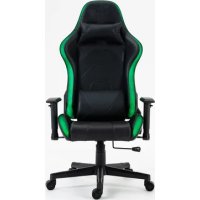



| Brand | Acer |
| Model | ENERGYGC1100 (ENERGY-GC1100) |
| Product type | Ergonomic gaming chair |
| Maximum load | 150 kg |
| Adjustable height | Yes, via pneumatic cylinder |
| Tilting mechanism | Yes, adjustable backrest angle |
| Armrests | Fixed (screw-mounted) |
| LED lighting | Yes, with remote control, USB powered (power bank not included) |
| Casters | 5 casters |
| LED power supply | USB 5V |
| Material | Not specified (likely faux leather/fabric) |
| Dimensions | Not specified in the manual |
| Weight | Not specified in the manual |
| Care | Soft cloth, warm water, mild liquid detergent; avoid harsh products |
| Safety | Do not exceed 150 kg; supervise children; indoor use only |
| Warranty | 2 years on material and workmanship defects (with receipt) |
| Country of manufacture | China |
| Intended use | Gaming, computer work, homework |
Frequently Asked Questions - ENERGYGC1100 ACER
User questions about ENERGYGC1100 ACER
0 question about this device. Answer the ones you know or ask your own.
Ask a new question about this device
Download the instructions for your Gaming chair in PDF format for free! Find your manual ENERGYGC1100 - ACER and take your electronic device back in hand. On this page are published all the documents necessary for the use of your device. ENERGYGC1100 by ACER.
USER MANUAL ENERGYGC1100 ACER
ASSEMBLY INSTRUCTION
Model: ENERGY-GC1100
Part Number: BL.KAKWA.103

Please read this manual carefully. Keep it for future reference.
The user is responsible for all consequences of incorrect use of the product.
Children shall not play with the appliance. Adult supervision is required for minors.
This appliance can be used by persons with reduced physical, sensory, or mental capabilities or lack of experience and knowledge if they have been given supervision or instructions concerning use of the appliance in a safe way and understand the hazards involved.
Cleaning and user maintenance shall not be made by children without supervision.
FEATURES
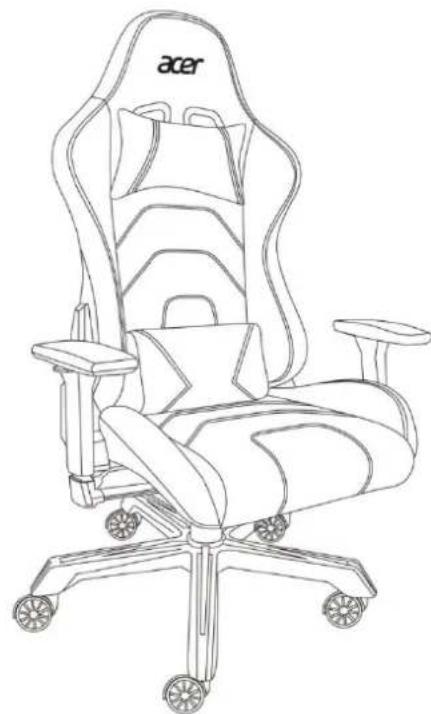
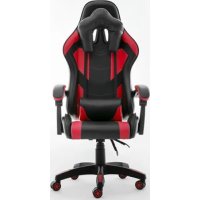
The chair is developed for video players, gamers, computer users, and also for homework.
Ergonomic chair, with tilt mechanism. Height is adjustable.
Not suitable for children up to 3 years old.
User's maximum weight should be 150 kg.
ASSEMBLING INSTRUCTIONS
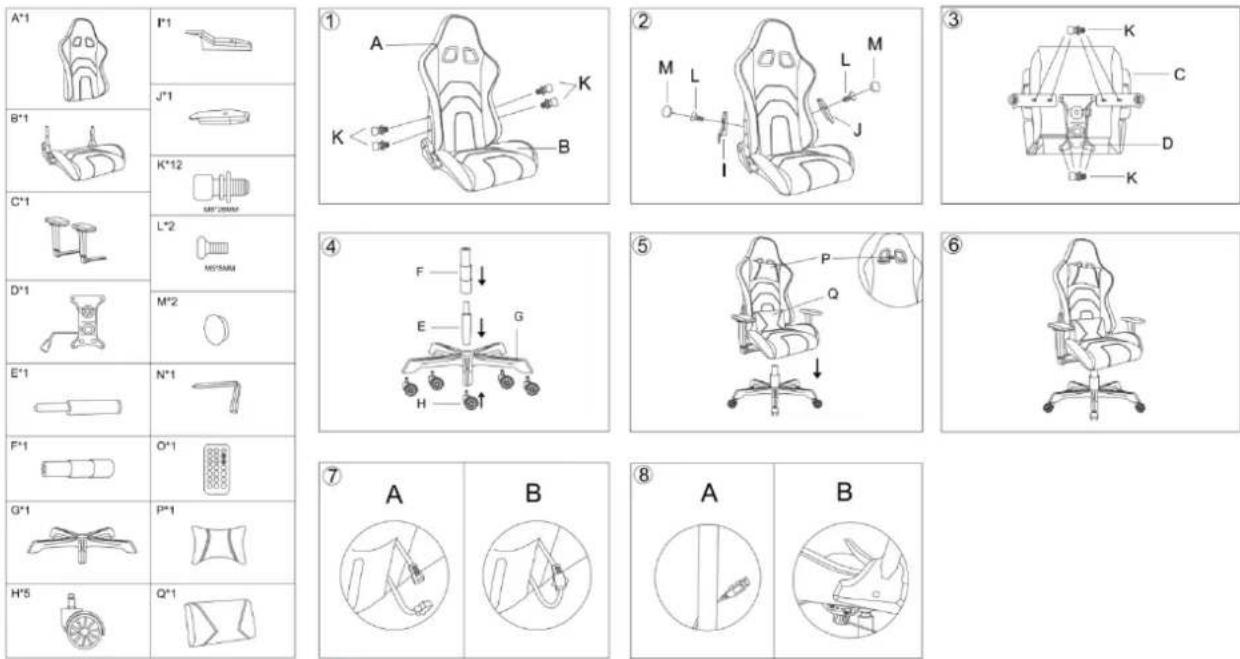
Drawing nr 1: combine the backrest (A) to the seat (B) using the screws (K).
Drawing nr 2: add the (I) bracket and its screw (L) on the side of the lever adjusting the angle of the backrest; add the (J) bracket and its screw (L) on the other side. Place the caps (M) over the two screw holes.
Drawing nr 3: assemble the bracket (D) to the seat (B) using the screws (K). Add the two armrests (C) using the screws (K).
Drawing nr 4: add the wheels (H) to the base frame (G). Add the stem (E and F).
Drawing nr 5: add the cushions (P and Q) and assemble the seat part to the base frame, through the adjustable stem.
Drawing nr 6: the chair is ready.
Drawing nr 7: connect the two cables in the back of the chair to power the lighting system.
Drawing nr 8: connect the USB cable to a power bank (not included) and place it in the pocket under the seat.
The lights will turn on. Use the remote control to adjust them.
MAINTENANCE AND STORAGE
Wipe the product with a soft cloth damped in water. Wipe clean the frame with a mild soapy solution.
Protect from direct sunlight to prevent drying-out. Keep it in a dry indoor place.
Regularly check that all assembly fastenings are properly tightened and retighten when necessary.
Keep the product inside its own packaging or cover it to prevent dust, in case of no use.
AFTER-SALE SERVICE
Please contact your Retailer.
WARRANTY
Carefully read all instructions before using the product.
This product is warranted to be free from defects in materials, workmanship and functionality (aesthetic parts are excluded) for a period of 2 years starting from the date of purchase in case of receipt, for a period of 1 year starting from the date of purchase in case of invoice (see local rules).
This warranty shall not apply to any products that have been subjected to misuse, negligence, accidental or abnormal conditions of operation.
This warranty shall not apply in case of damages or malfunctions due to accidents, improper use, negligence or damages clearly caused by an external agent. The warranty does not cover indirect damages as well as direct and indirect costs, such as: loss of use, telephone, rescue, towing and overnight stay expenses, as well as any other financial burden.
Please refer to qualified and authorized people for the repair of the product.
A non-professional repair may cause malfunction and risks and void your warranty rights.
CORRECT DISPOSAL OF THE PRODUCT
According to the Directive 2012/19/UE
This marking on the product, accessories or literature indicates that the product and its electronic accessories should not be disposed of with other household waste at the end of their working life. To prevent possible harm to the environment of human health from uncontrolled waste disposal, please separate these items from other types of waste and recycle them responsibly to promote the
sustainable reuse of material resources. Household users should contact either the retailer where they purchased this product, or their local government office, for details of where and how they can take these items for environmentally safe recycling.
DECLARATION OF CONFORMITY
We declare that the product is in conformity with the GPSD 2001/95/EC directive, with the R&TTE 2014/53/UE directive, with the EMC 2014/30/EU directive, with the RoHS 2015/863 and 2011/65/EU directives.
Our Company is not responsible for improper use of the product. Our Company reserves the right to modify the product and the content of the product and of this manual without prior notice.


MADE IN CHINA
Imported by
Htrading Srl
Via Luciano Manara 15, 20122 Milano (MI), Italy
Distributed by
Consumer Electronics Spa
Piazza G.Ferrè 10, 20025 Legnano (MI), Italy
www.consumerelectronicsspa.com
The Acer trademarks are licensed to Asia Kingston (HK) Ltd by Acer Incorporated, a Taiwan R.O.C. company.

USER MANUAL
DECLARATION OF CONFORMITY
The company declares that this product complies with the directives GPSD 2001/95/EC, R&TTE 2014/53/EU, EMC 2014/30/EU, RoHS 2015/863 and 2011/65/EU.
Via Luciano Manara 15, 20122 Milano (MI), Italy
Distributed by
Consumer Electronics Spa
Piazza G.Ferrè 10, 20025 Legnano (MI), Italy
www.consumerelectronicsspa.com
The Acer trademarks are licensed to Asia Kingston (HK) Ltd by Acer Incorporated, a Taiwan R.O.C. company.
Via Luciano Manara 15, 20122 Milano (MI), Italy
Distributed by:
Consumer Electronics Spa
Piazza G.Ferrè 10, 20025 Legnano (MI), Italy
www.consumerelectronicsspa.com
The Acer trademarks are licensed to Asia Kingston (HK) Ltd by Acer Incorporated, a Taiwan R.O.C. company.
REMOTE CONTROL FUNCTION
Model: ENERGY-GC1100
Part Number: BL.KAKWA.103
![graph TD A["ON"] --> B["="] C["OFF"] --> D["="] E["OR"] --> F["="] G["S+"] --> H["=>"] I["S-"] --> J["=>"] K["AUTO"] --> L["Color Bar 1"] K --> M["Color Bar 2"] N["M+"] --> O["Color Bar 3"] N --> P["M-"] Q["ON"] --> R["OR"] Q --> S["OFF"] T["S+"] --> U["OR"] T --> V["OFF"]](/content/2026/03/553460/images/d9c7a5547cf97af5a3789c5db81c4d335db4f9afd7435725b7ff97ec518026c7.jpg)
Brand : ACER
Model : ENERGYGC1100
Category : Gaming chair