ManualGo.com
HBB445 SS - Oven TEKA - Free user manual and instructions
Find the device manual for free HBB445 SS TEKA in PDF.



Download the instructions for your Oven in PDF format for free! Find your manual HBB445 SS - TEKA and take your electronic device back in hand. On this page are published all the documents necessary for the use of your device. HBB445 SS by TEKA.
USER MANUAL HBB445 SS TEKA
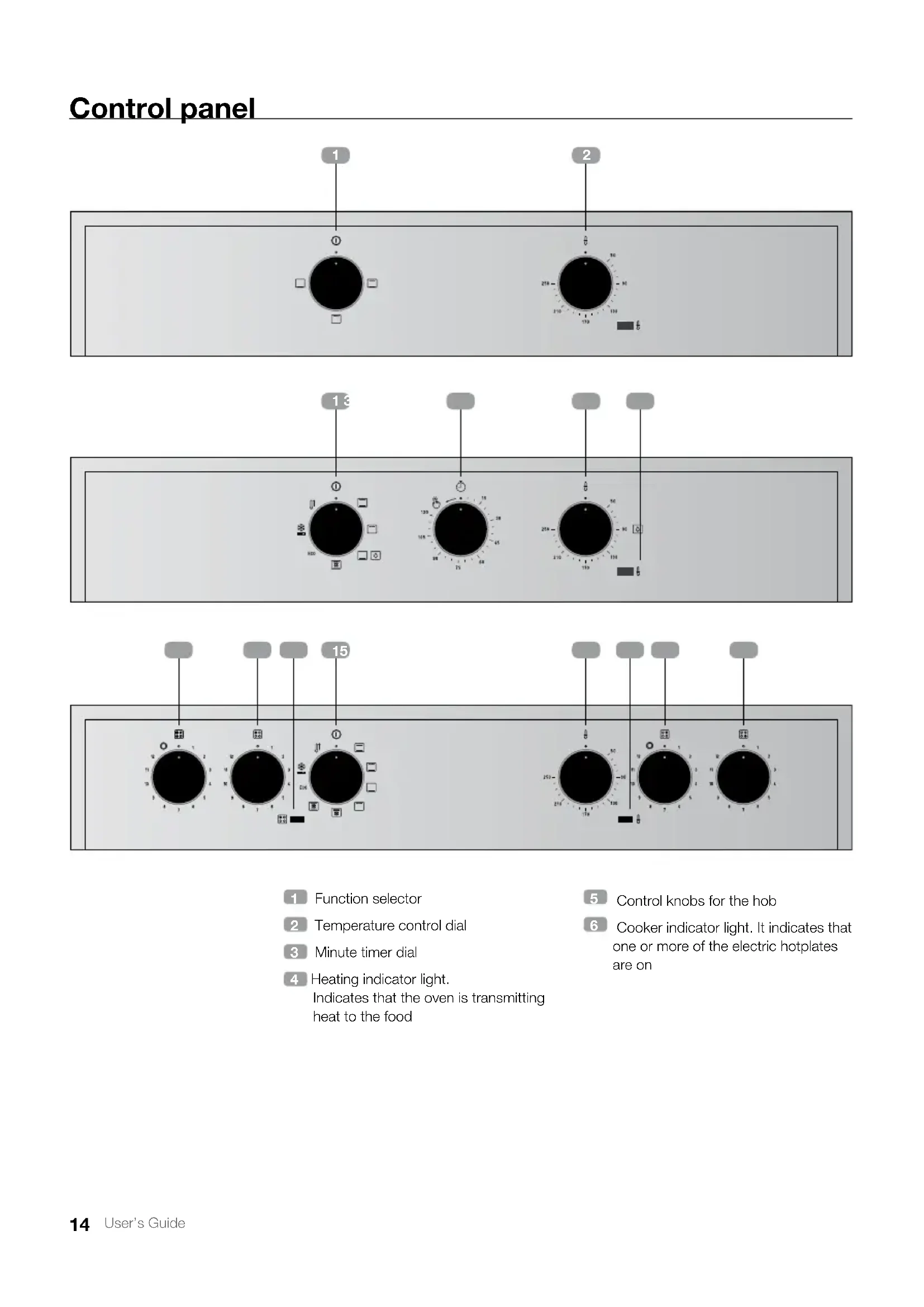
Cooker indicator light. It indicates that one or more of the electric hotplates are on
Temperature control dial
Heating indicator light. Indicates that the oven is transmitting heat to the food
CONVENTIONAL WITH FAN
ECO DEFROSTING FAST PREHEATING HYDROCLEAN INFORMATION For a description of how to use each of the features, see the cooking guide that comes with your oven. HBB 615 GD Model HSB 625 E Model16 User’s Guide TIMER CONTROL Oven use
MODELS WITHOUT A TIMER
1. Select a temperature and a cooking function.
2. When your food has finished cooking, set
the controls to the position to turn off the oven.
1. Turn the timer dial to the left to setting
2. Select a temperature and a cooking function.
3. Set the controls to the position
to turn off the oven. Oven Timer Operation This function allows the cooking time to be pre-set. To do so:
1. Select a cooking function and temperature.
2. Turn the timer knob clockwise to the “120”
minutes setting and then turn it in the oppo- site direction to select the cooking time.
3. When the time is up, the alarm will go off and
the oven will stop heating.
4. Set the controls to
to turn off the oven.17 User’s Guide English Teka Hydroclean
function This function makes it easy to remove grease and other food debris that may have stuck to the sides of the oven. For easier cleaning, do not allow dirt to accu- mulate. Clean the oven frequently.
PROGRAMMING THE TEKA
FUNCTION WARNING Do not pour water into a hot oven as this can damage the enamel of the oven. Always run the cycle on a cold oven. The result could be affected and the varnish damaged if it is run when the oven is too hot. First remove the trays and all accessories from the oven interior, including the tray supports and telescopic guide rails. To do this, follow the instructions in the in- stallation and maintenance guide accom- panying the oven.
1. With the oven cold, spread a cloth out on
the bottom of the oven. INFORMATION For best results, add a teaspoon of mild washing up detergent to the glass of water before pouring onto the cloth
3. Turn the control dial to position
5. Programme a duration of 4 minutes on the
6. After 4 minutes, an alarm will sound and the
oven will stop heating.
7. Turn the control dial to position
8. Wait for about 20 minutes for the interior of
the oven to cool. IMPORTANT Do not open the oven until the cooling phase is complete. This is necessary for the Hydroclean® func- tion to work properly.
9. Any traces of dirt and excess water can now
be removed from the oven with the damp cloth. The Hydroclean
function takes place at a low temperature. However, cooling times can vary depending on the room temperature. WARNING Before touching the inside surface of the oven, make sure that it has cooled properly. If a deeper clean is required after using the Hy- droclean
function, use neutral detergents and non-abrasive sponges.