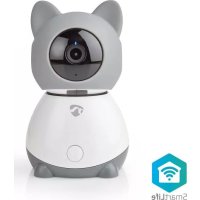
WIFICI30CGY - Baby monitors NEDIS - Free user manual and instructions
Find the device manual for free WIFICI30CGY NEDIS in PDF.



| Product type | Full HD IP Baby Camera |
| Brand | Nedis |
| Model | WIFICI30CGY |
| Dimensions (L x W x H) | 83 x 84 x 135 mm |
| Weight | 0.2 kg |
| Power supply | 5 VDC (USB power adapter) |
| Video resolution | 1920 x 1080p (Full HD) |
| Viewing angle | 105 degrees |
| Pan (horizontal) | 355 degrees |
| Tilt (vertical) | 60 degrees |
| Wireless connection | Wi-Fi 2.4 GHz (802.11 b/g/n) |
| Internal memory | SD card slot (8-128 GB, not included) |
| Motion detection | Yes |
| Sound detection | Yes |
| Two-way audio | Yes (built-in microphone and speaker) |
| Push-to-talk function | Yes |
| Operating temperature | -20 °C to 50 °C |
| Package contents | Camera, mounting bracket, micro USB cable, power adapter, quick start guide |
| Safety instructions | Do not expose to water, indoor use only, consult local laws |
| Maintenance | Clean with a dry, soft cloth. Do not use abrasive products. |
| Repairability | Repair by qualified technician only. |
| General information | Compliant with RED Directive 2014/53/EU |
Frequently Asked Questions - WIFICI30CGY NEDIS
User questions about WIFICI30CGY NEDIS
0 question about this device. Answer the ones you know or ask your own.
Ask a new question about this device
Download the instructions for your Baby monitors in PDF format for free! Find your manual WIFICI30CGY - NEDIS and take your electronic device back in hand. On this page are published all the documents necessary for the use of your device. WIFICI30CGY by NEDIS.
USER MANUAL WIFICI30CGY NEDIS
with auto-tracking, lullabies and climate sensor
WIFICI30CGY
natural_image
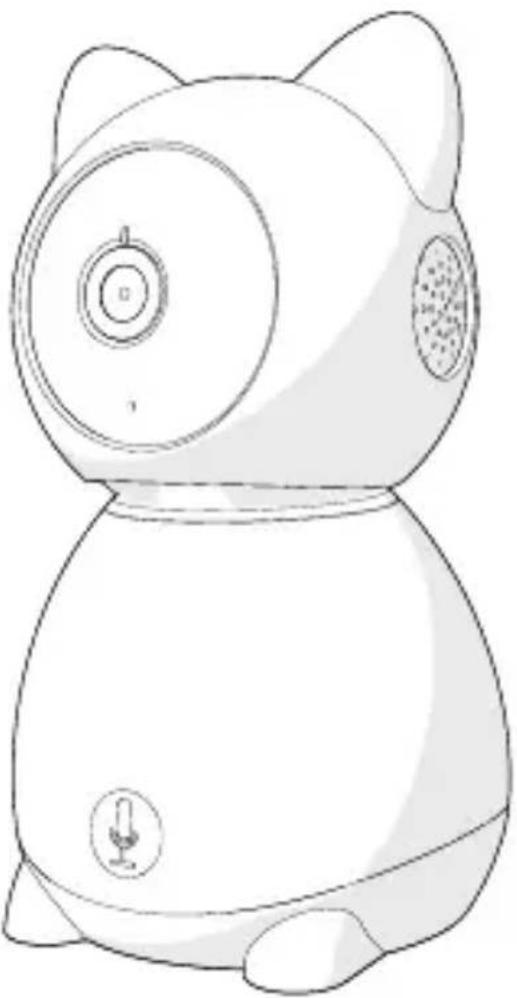
Line drawing of a stylized cartoon character with cat ears, camera lens, and microphone (no text or symbols)EN Quick start guide 4
DE Kurzanleitung 7
FR Guide de démarrage rapide 11
NL Snelstartgids 15
IT Guida rapida all'avvio 19
ES Guía de inicio rápido 23
PT Guia de iniciação rápida 27
SV Snabbstartsguide 31
FI Pika-aloitusopas 34
NO Hurtigguide 38
DA Vejledning til hurtig start 42
HU Gyors beüzemelési útmutató 46
PL Przewodnik Szybki start 50
EL Οδηγός γρήγορης εκκίνησης 54
SK Rýchly návod 58
CS Rychlý návod 62
RO Ghid rapid de inițiere
A

Full HD IP Camera
WIFICI30CGY
For more information see the extended manual online: ned.is/wifici30cgy
Intended use
The Nedis WIFICI30CGY is an IP security camera with a viewing angle of 105 degrees.
If the security camera detects movement or sound, you will receive a warning message on your phone.
With the app you can watch live video images, play back, but also listen in and talk back.
The security camera can easily be attached with the supplied mounting bracket.
The product is exclusively intended as an IP security camera for indoor use.
Consult the local laws and regulations for this product before installing and using.
Any modification of the product may have consequences for safety, warranty and proper functioning.
Specifications
| Product Full HD IP Camera | |
| Article number WIFICI30CGY | |
| Dimensions (l x w x h) 83 x 84 x 135 mm | |
| Weight 0.2 kg | |
| Ambient temperatures -20 °C – 50 °C | |
| Input power 5 VDC | |
| Wireless connection 2.4G Wi-Fi, AP | |
| Memory SD card (8 - 128 GB) (not included) | |
| Resolution 1920 x 1080p | |
| Frame speed 25 fps | |
| Viewing angle 105 degrees |
| Max. radio transmit power 18.5 dBm |
| Pan (horizontal) 355 degrees |
| Tilt (vertical) 60 degrees |
| Antenna gain 3 dBi |
| Frequency range 2412 - 2472 MHz |
Main parts (image A)
1 Status indicator LED
2 Camera lens
3 Microphone
4 SD card slot
5 Reset button
6 Speaker
7 Push-to-talk (PTT)
8 Micro USB port
9 Reset pin
10 Mounting bracket
11 Micro USB cable
12 USB power adapter
Safety instructions
WARNING
- Ensure you have fully read and understood the instructions in this document before you install or use the product. Keep this document for future reference.
- Only use the product as described in this document.
- Do not use the product if a part is damaged or defective. Replace a damaged or defective product immediately.
- Do not drop the product and avoid bumping.
- This product may only be serviced by a qualified technician for maintenance to reduce the risk of electric shock.
- Unplug the product from the power source and other equipment if problems occur.
- Do not expose the product to water or moisture.
- Do not unplug the product by pulling on the cable. Always grasp the plug and pull.
- Consult the local laws and regulations for this product before installing and using.
Preparing the security camera
Use an SD card with a minimum of 8 GB and a maximum of 128 GB.
- Insert the new SD card into the SD card slot A 4.
-
Connect the USB cable A 11 to the micro USB port A 8.
-
Connect A11 to the USB power adapter.
- Connect the USB power adapter to a power outlet to charge the camera.
The product switches on automatically.
Installing the Nedis SmartLife app
- Download the Nedis Smartlife app for Android or iOS on your phone via Google Play or the Apple App Store.
- Open the Nedis Smartlife app on your phone.
- Create an account with your e-mail address and tap Continue.
- Enter the received verification code.
- Create a password and tap Done.
- Tap Add Home to create a SmartLife Home.
- Set your location, choose the rooms you want to connect with and tap Done.
Connecting the product
- Open the Nedis Smartlife app on your phone.
- Tap + in the Nedis SmartLife app.
- Select the device type you want to add from the list.
- Confirm the status indicator LED A1 is blinking.
- Enter the Wi-Fi network data and tap Confirm.
- Tap Continue and a QR-code will appear.
- Hold your phone with a 15 – 20 cm distance in front of the camera.
- If the camera has detected the QR-code, you will hear a sound.
- Tap to confirm you heard the sound.
- Give the camera a name and tap Done. A 1 will turn blue.
- The product is now ready for use.
- If the camera failed to connect, A① will be continuously red. To reset the camera, push the reset pin A⑨ in the reset button A⑤ for 5 seconds until you heard the sound. Then repeat step 1 to 10 closer to the router.
Important instructions to reduce false alarms
- Do not place the camera facing the sun or any objects with bright lights.
- The ideal viewing distance is 2 - 10 meters.
- Do not place the camera close to frequently moving vehicles. The recommended distance between the camera and moving vehicles is 15 meters.
-
Stay away from air outlets, including air conditioner and heat transfer vents, etc.
-
Do not place the camera facing a mirror or highly reflective object.
- Keep the camera at least 1 meter away from any wireless devices, including Wi-Fi routers and phones, in order to avoid wireless interference.
Declaration of Conformity
We, Nedis B.V. declare as manufacturer that the product WIFICI30CGY from our brand Nedis ^® , produced in China, has been tested according to all relevant CE standards and regulations and that all tests have been passed successfully. This includes, but is not limited to the RED 2014/53/EU regulation.
The complete Declaration of Conformity (and the safety datasheet if applicable) can be found and downloaded via:
nedis.com/WIFICI30CGY#support
For additional information regarding the compliance, contact the customer service:
Web: www.nedis.com
E-mail: service@nedis.com
Nedis B.V., de Tweeling 28
5215 MC 's-Hertogenbosch, the Netherlands

Kurzanleitung
WIFICI30CGY
Full-HD IP-Kamera
Telecamera IP Full HD
WIFICI30CGY
5215 MC 's-Hertogenbosch, the Netherlands
Full HD IP kamera
WIFICI30CGY
5215 MC 's-Hertogenbosch, the Netherlands
Full HD IP kamera
WIFICI30CGY
- Full HD IP Camera
- Intended use
- Main parts (image A)
- Safety instructions
- WARNING
- Preparing the security camera
- Installing the Nedis SmartLife app
- Connecting the product
- Important instructions to reduce false alarms
- Declaration of Conformity
- Kurzanleitung
- Full-HD IP-Kamera
- Telecamera IP Full HD
- Full HD IP kamera
Brand : NEDIS
Model : WIFICI30CGY
Category : Baby monitors