ManualGo.com
RMC634TPS - Cooker ROSIERES - Free user manual and instructions
Find the device manual for free RMC634TPS ROSIERES in PDF.


Download the instructions for your Cooker in PDF format for free! Find your manual RMC634TPS - ROSIERES and take your electronic device back in hand. On this page are published all the documents necessary for the use of your device. RMC634TPS by ROSIERES.
USER MANUAL RMC634TPS ROSIERES
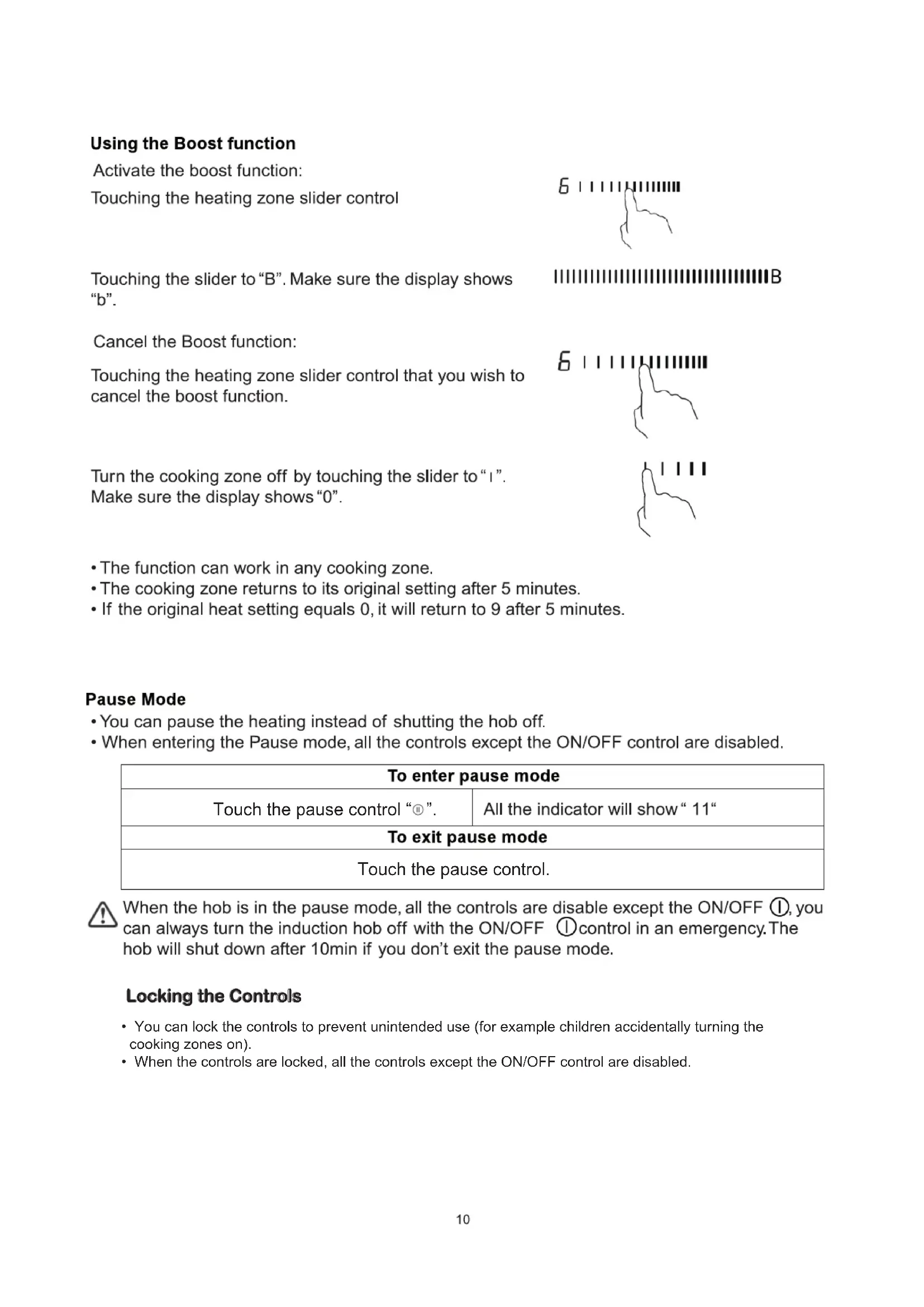
RMC634TPSRosieres Rosieres• You can lock the controls to prevent unintended use (for example children accidentally turning the cooking zones on).
- When the controls are locked, all the controls except the ON/OFF control are disabled. Locking the Controls Touch the pause control. Touch the pause control “ ”.• it is possible to set a maximum power absorption level for the induction hob, choosing up to different power ranges.• induction hobs are able to limit themselves automatically in order to work at lower power level, to avoid the risk of overloading. Power Management Function To lock the controls Touch and hold the Timer “ ” and Timer ”
at the same time for a while. The timer indicator will show “ Lo ” To unlock the controls Touch and hold the Timer “ ” and Timer ” ” at the same time for a while. When the hob is in the lock mode, all the controls are disable except the ON/OFF , you can always turn the induction hob off with the ON/OFF control in an emergency, but you shall unlock the hob first in the next operation. To enter Power Management Function Turn on the hob, then Press at the same time the Pause key and Timer ”
The timer indicator will show “ P5“ which means power level 5。The default mode is on 7.0Kw。 To switch to another level press +/- of the timer
There are 5 power levels, from “P1” to “p5”. The timer indicator will show one of them. “P1” : the maximum power is 2.5Kw. “P2” : the maximum power is 3.5Kw. “P3” : the maximum power is 4.5Kw. “P4” : the maximum power is 5.5Kw. “P5” : the maximum power is 7.0Kw.You can use the timer in two different ways:
- You can use it as a minute minder. In this case, the timer will not turn any cooking zone off when the set time is up.
- You can set it to turn one or more cooking zones off after the set time is up. The timer of maximum is 99min. If you are not selecting any cooking zone Timer control a) Using the Timer as a Minute Minder Make sure the cooktop is turned on. Note: you can use the minute minder even if you’re not selecting any cooking zone. Touch “+” the controls of the timer. The minder indicator will start flashing and “10” will show in the timer display.
Set the time by touching the “-” or “+” control of the timer Hint: Touch the “-” or “+” control of the timer once to decrease or increase by 1 minute. Touch and hold the “-” or “+” control of the timer to decrease or increase by 10 minutes. Touching the “-” and "+” together, the timer is cancelled, and the “00” will show in the minute display. When the time is set, it will begin to count down immediately. The display will show the remaining time and the timer indicator will flash for 5 seconds. Buzzer will beep for 30 seconds and the timer indicator shows “- - “ when the setting time finished.
Confirmation and Exit Power Management Function Press at the same time Pause key and Timer ”” for confirmation.
Then the hob will be turned off.13 Set one zone Touching the heating zone slider control Set the time by touching the or control of the timer Hint: Touch the “-“ or “+” control of the timer once will decrease or increase by 1 minute. Touch and hold the ”-“ or “+”control of the timer will decrease or increase by 10 minutes. Touching the “-” and “+” together, the timer is cancelled, and the “00” will show in the minute display.
When the time is set, it will begin to count down immediately. The display will show the remaining time and the timer indicator flash for 5 seconds. NOTE: The red dot next to power level indicator will illuminate indicating that zone is selected.
When cooking timer expires, the corresponding cooking zone will be switched off automatically.
b) Setting the timer to turn one or more cooking zones off Other cooking zone will keep operating if they are turned on previously.14 c) Cancel the timer set more zones: The steps for setting more zones are similar to the steps of setting one zone; When you set the time for several cooking zones simultaneously, decimal dots of the relevant cooking zones are on. The minute display shows the min. timer. The dot of the corresponding zone flashes. The shown as below: (set to 15 minutes)
(set to 45 m inutes) Once the countdown timer expires, the corresponding zone will switch off. Then it will show the new min. timer and the dot of corresponding zone will flash. The shown as right:
(set to 30 minutes) Touch the heating zone selection control, the corresponding timer will be shown in the timer indicator. Keep warm Touching the heating zone slider control that you want to cancel the timer Touching the ”-“ and “+” together, the timer is cancelled, and the ”00” will show in the minute display.
Activate the Keep warm function Touching the heating zone slider control , and a indicator next to the key will flash.
Touching the keep warm control , the zone indicator show
Cancel the keep warm function Touching the heating zone slider control that you want to cancel keep warm.15 The base diameter of induction cookware Cooking zone 1 & 2 140