RFI 4553 MIN - Oven ROSIERES - Free user manual and instructions
Find the device manual for free RFI 4553 MIN ROSIERES in PDF.


| Product type | Built-in oven |
| Brand | Rosieres |
| Model | RFI 4553 MIN |
| Power supply | 230 V~, 50 Hz, cable type H05RR-F / H05VV-F / H05V2V2F |
| Cooking functions | Bottom heat, Bottom heat with fan, Natural convection, Fan-assisted, Hot air, Grill, Turbo grill, Rotisserie with fan, Defrosting, Steaming |
| Automatic recipes | Bread, Lasagna, Meat, Roast, Fish, Pie |
| Cleaning | Pyrolysis (Eco 90 min and Sup 120 min cycles) |
| Interior lighting | Bulb 25 W, base E14, heat resistance 300 °C |
| Child safety | Two levels: locking selector and central touch button, or full lock |
| Door lock | Automatic during pyrolysis |
| Accessories included | Simple grid, drip tray, baking tray, flat grill, handle, rotisserie, telescopic guides |
| Installation | Built-in, fixing with screws provided, compartment ventilation required |
| Repairability | Spare parts available through approved after-sales service; replaceable power cable (H05RR-F, H05VV-F, H05V2V2F) |
| Compliance | EEC directives 89/109, 89/336, 73/23, NFC 15100, WEEE 2002/96/EC |
| Display contrast | Adjustable from 1 to 9 (default C5) |
Frequently Asked Questions - RFI 4553 MIN ROSIERES
User questions about RFI 4553 MIN ROSIERES
0 question about this device. Answer the ones you know or ask your own.
Ask a new question about this device
Download the instructions for your Oven in PDF format for free! Find your manual RFI 4553 MIN - ROSIERES and take your electronic device back in hand. On this page are published all the documents necessary for the use of your device. RFI 4553 MIN by ROSIERES.
USER MANUAL RFI 4553 MIN ROSIERES
NOTICE D'EMPLOI ET D'INSTALLATION DES FOURS ENCASTRABLES ____
FR
USER INSTRUCTIONS OVENS ____
GB
INSTRUCTIONS GENERALES
natural_image
Close-up of a hand holding a tool near a dark panel with labeled point A (no readable text or symbols)natural_image
Close-up of a mechanical component with directional arrows indicating movement (no visible text or symbols)natural_image
Close-up of a mechanical component with labeled parts (no readable text or symbols)natural_image
Illustration of a person inside a kitchen with a large bowl and a downward arrow indicating motion (no text or symbols)ENTRETIEN GENERAL DU FOUR
Read the instructions carefully to make the most of your oven. We recommend you keep the instructions for installation and use for later reference, and before installing the oven, note its serial number below in case you need to get help from the after-sales service.
When you have unpacked the oven, make sure that it has not been damaged in any way. If you have any doubts at all, do not use it: contact a professionally qualified person. Keep packing materials such as plastic bags, polystyrene, or nails out of the reach of children because they are dangerous for children.
The company shall not be liable if the instructions provided in this document are not complied with.
DECLARATION OF COMPLIANCE
- The parts of this appliance that may come into contact with foodstuffs comply with the provisions of EEC Directive 89/109.

This appliances complies with Directives 89/336/EEC, 73/23/EEC and following changes.
SAFETY HINTS
- The oven must be used only for the purpose for which it was designed: it must only be used for cooking food.
Any other use, e.g. as a form of heating, is an improper use of the oven and is therefore dangerous. - All accessible parts and heating elements are hot during the functioning. Take care to not touch these elements.
- The manufacturers cannot be held responsible for any damage caused by improper, incorrect or unreasonable use. When using any electrical appliance you must follow a few basic rules.
- Do not pull on the power cable to remove the plug from the socket.
- Do not touch the oven with wet or damp hands or feet.
- Do not use the oven unless you are wearing something on your feet.
- Do not allow children or irresponsible people to use the oven unless they are carefully supervised.
- It is not generally a good idea to use adapters, multiple sockets for several plugs or cable extensions.
- If the oven breaks down or develops a fault switch it off at the mains and do not touch it.
- If the cable is damaged it must be replaced promptly. When replacing the cable, follow these instructions. Remove the power cable and replace it with one of the HO5RR-F, H05VV-F, H05V2V2-F type. The cable must be able to bear the electrical current required by the oven. Cable replacement must be carried out by properly qualified technicians.
The earthing cable (yellow-green) must be 10 mm longer than the power cable.
Use only an approved service centre for repairs and ensure that only original parts are used. If the above instructions are not adhered to the manufacturers cannot guarantee the safety of the oven.
- The oven you have just acquired has the described technical characteristics and you must not make any modifications to it.
- Never use a steam or high-pressure spray to clean the oven.
- Do not store flammable products in the oven; they can catch fire if the oven comes on accidentally.
- Do not press on and do not let children sit on the oven door.
- Use kitchen oven gloves, when putting into or removing a dish from the oven.
RECOMMENDATIONS
• After each use of the oven, a minimum of cleaning will help keep the oven perfectly clean.
- Do not line the oven walls with aluminium foil or single-use protection available from stores. Aluminium foil or any other protection, in direct contact with the hot enamel, risks melting and deteriorating the enamel of the insides.
- In order to prevent excessive dirtying of your oven and the resulting strong smoky smells, we recommend not using the oven at too high a temperature. It is better to extend the cooking time and lower the temperature a little.
- In addition to the accessories supplied with the oven, we advise you only use dishes and baking moulds resistant to very high temperatures.
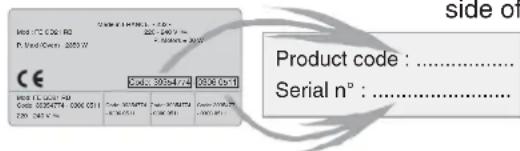
Identification plate (located on the side of the oven)
INSTALLATION
The manufacturers have no obligation to carry this out. If the assistance of the manufacturer is required to rectify faults arising from incorrect installation, this assistance is not covered by the guarantee.
The installation instructions for professionally qualified personnel must be followed. Incorrect installation may cause harm or injury to people, animals or belongings. The manufacturer cannot be held responsible for such harm or injury.
The kitchen unit in which the oven is to be fitted must be made of material resistant to temperatures of at least 70°C.
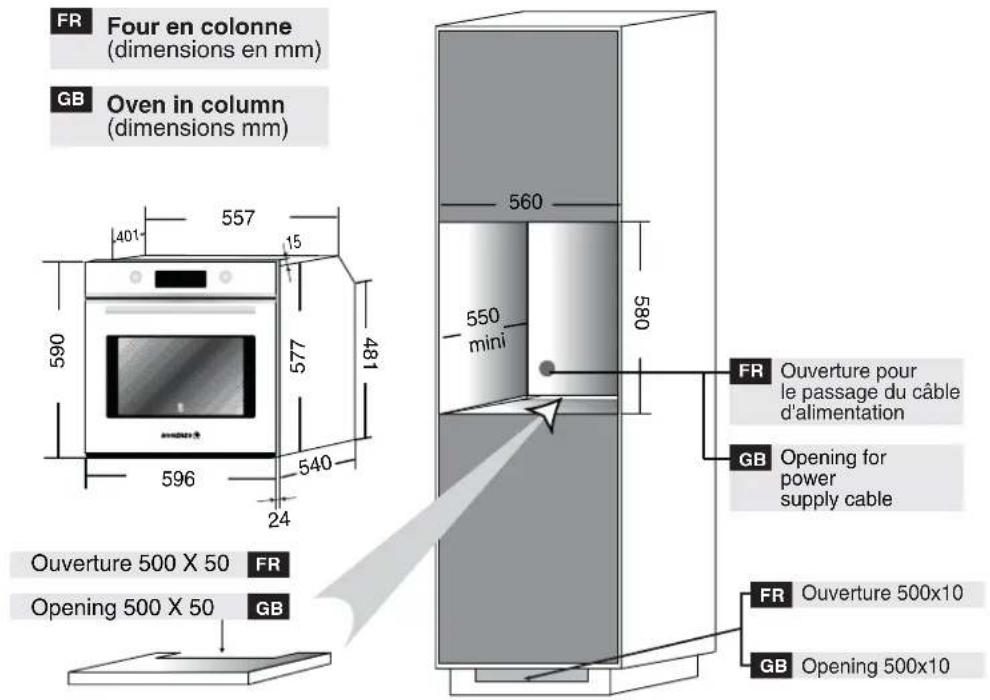
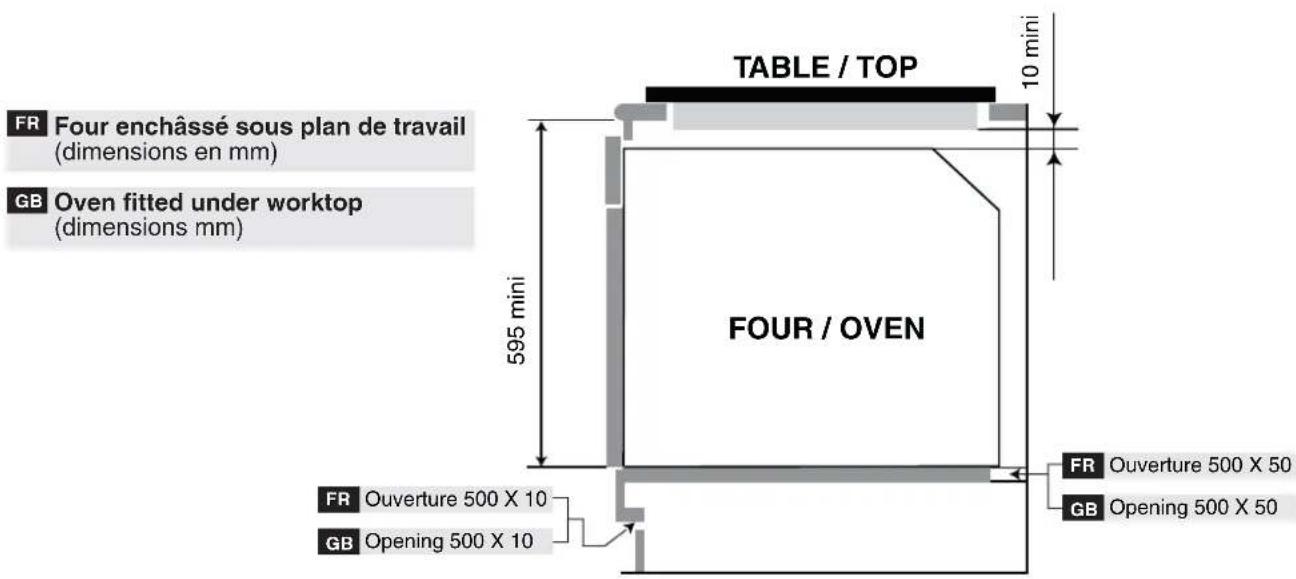
The oven can be located high in a column or under a worktop. Before fixing: you must ensure good ventilation in the oven space to allow proper circulation of the fresh air required for cooling and protecting the internal parts. Make the openings specified on last page according to the type of fitting.
ELECTRICAL CONNECTION
THE ELECTRICAL CONNECTION SHOULD BE CARRIED OUT BY AN APPROVED CONTRACTOR OR TECHNICIAN WITH SIMILAR QUALIFICATIONS.
The installation receiving the appliance must comply with the standard in force in the installation country.
The manufacturer does not accept any responsibility if this provision is not complied with.
Connection to the network must be by earthed socket outlet, or by means of a multipole circuit-breaker having a distance between contacts of at least 3 mm.
The installation must be protected by suitable fuses, and have wires with a large enough cross-section to supply the oven normally.
CONNECTION:
The oven is fitted with a power lead for connecting exclusively to a voltage of 230 V AC across the phases or across phase and neutral.
Connection must be carried out having first checked: . the supply voltage indicated on the meter,
. the circuit-breaker setting.
The lead protection wire (green/yellow) connected to the earth terminal of the oven must be connected to the earth terminal of the installation.
Caution:
. Have the earth continuity of the installation checked by an electrician before making the connection.
. The manufacturer will not be liable for any incident, or the possible consequences that may arise from the use of the oven not earthed, or connected to an earth with defective continuity.
NB: Do not forget that the oven may require after-sales service. Also, locate the socket outlet so that the oven can be connected once it is removed from its space.
Power supply cable: if the power supply cable has to be changed, please have this done by the after-sales service or by someone with similar qualifications.
OVEN EQUIPMENT ACCORDING TO THE MODEL
It is necessary to do an initial cleaning of the equipment before the first use of each of them. Wash them with a sponge. Rinse and dry off.
The shelf can take moulds and dishes.
The drip tray catches the juices from grilled foods.
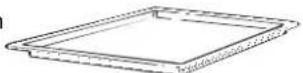
Never use he drip tray as a roasting tray as fat deposits can be quickly spread throughout the oven, which produces excess smoke.
The pastry tray must be placed on
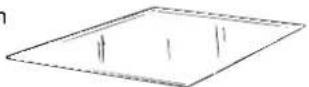
the shelf. It is for cooking small pastries like choux, biscuits, meringues, etc...
Never place the pastry tray directly on the oven bottom.
The Gril pan can be used for all types of grilling and is also suitable for toasting. The grill pan is supplied with a detachable handle inside the oven.
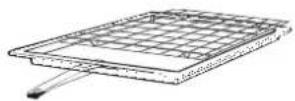
When the oven is in use, any unused accessories should be removed from the oven.
TELESCOPIC SHELF KIT
natural_image
Two labeled containers with internal structures and arrows, one containing a dark liquid and the other a white rectangular object (no text or symbols)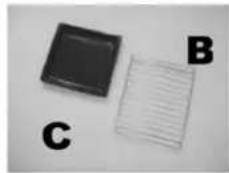
natural_image
Three labeled objects: a black square, a white grid, and a letter B on a plain background (no text or symbols on the objects themselves)INSTRUCTIONS FOR ASSEMBLY
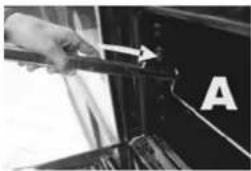
natural_image
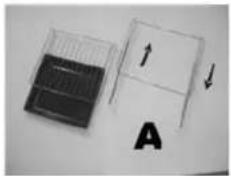
Close-up of a hand holding a tool near a black object, labeled 'A' (no readable text or symbols)PLACE THE TELESCOPIC RUNNERS A IN THE OVEN
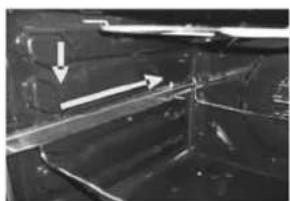
natural_image
Close-up of a metallic mechanical component with two white arrows indicating direction (no text or symbols)ENSURE THE RUNNERS A ARE FIRMLY PUSHED TO THE WALL OF THE OVEN
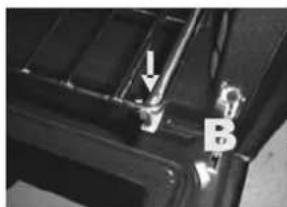
natural_image
Close-up of a mechanical component with labeled parts (arrow and letter B) and no visible text or symbolsSLIDE OUT THE RUNNERS AND POSIZION THE SHELF SUPPORT B BEHIND THE SHELF SUPPORT B BEHIND THE SHELF STOP LOCATED AT THE FRONT SIDE OF THE KIT.
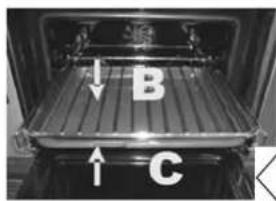
COMPLETE ASSEMBLY BY INSERTING PLAIN SHELF B AND DRIP TRAY C
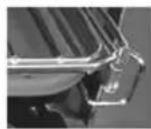
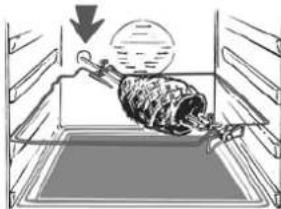
ROTISSERIE
No pre-heating is required for rotisserie cooking. Cooking with the door closed.
natural_image
Illustration of a person sitting inside an oven with a large bowl and a downward arrow indicating motion (no text or symbols)CLEANING THE OVEN
.Wait for the oven to cool down before doing any cleaning by hand.
. Never clean your oven with abrasive cleaners, wire wool or sharp objects, or the enamel may be damaged beyond repair. . Only use soapy water or bleach (ammonia) cleaners.
GLASS PARTS
We recommend you wipe clean the glass door with absorbent kitchen paper every time you use the oven. If the spattering is heavy, then you can clean with a well squeezed sponge and detergent, and rinse. Never use abrasive cleaners or sharp objects.
OVEN DOOR SEAL
If this gets dirty, clean the oven seal with a slightly damp sponge.
ACCESSORIES
Clean them with a sponge soaked in soapy water. Rinse with clean water and dry off. Avoid abrasive cleaners.
DRIP TRAY
After grilling, remove the drip tray from the oven. Take care to pour the warm grease into a container. Wash and rinse the drip tray in hot water with a sponge soaked in washing up liquid. If residues remain attached, soak them off in water and detergent. It can also go in a dish washer or be cleaned with a commercial oven cleaner.
Never placer a soiled drip tray in the oven.
OVEN LIGHTING
Disconnect the power supply from the oven before cleaning or replacing the lamp.
The bulb and its cover are made of material resistant to high temperatures.
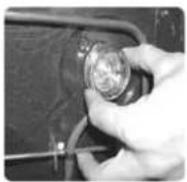
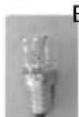
Bulb characteristics:
230 V AC - 25 W - E 14 base Temperature 300°C
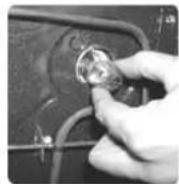
To change a defective bulb, just
. unscrew the glass cover,
. unscrew the bulb,
. replace it with the same type: see characteristics above,
. after replacing the defective bulb, screw back the protective glass cover.
SERVICE CENTRE
Before calling the Service Centre.
If the oven is not working, we recommend that:
- you check that the oven is properly plugged into the power supply.
If the cause of the fault cannot be detected:
disconnect the oven from the mains, do not touch the oven and call the after sales service.
Before calling the Service Centre remember to make a note of the serial number on the serial number specifications plate.
The oven is supplied with a guarantee certificate that ensures that it will be repaired free of charge by the Service Centre whilst under guarantee.

This appliance is marked according to the European directive 2002/96/EC on Waste Electrical and Electronic Equipment (WEEE). By ensuring this product is disposed of correctly, you will help prevent potential negative consequences for the environment and human health, which could otherwise be
caused by inappropriate waste handling of this product. The symbol on the product indicates that this
product may not be treated as household waste. Instead it shall be handed over to the applicable collection point for the recycling of electrical and electronic equipment Disposal must be carried out in accordance with local environmental regulations for waste disposal.
For more detailed information about treatment, recovery and recycling of this product, please contact your local city office, your household waste disposal service or the shop where you purchased the product.
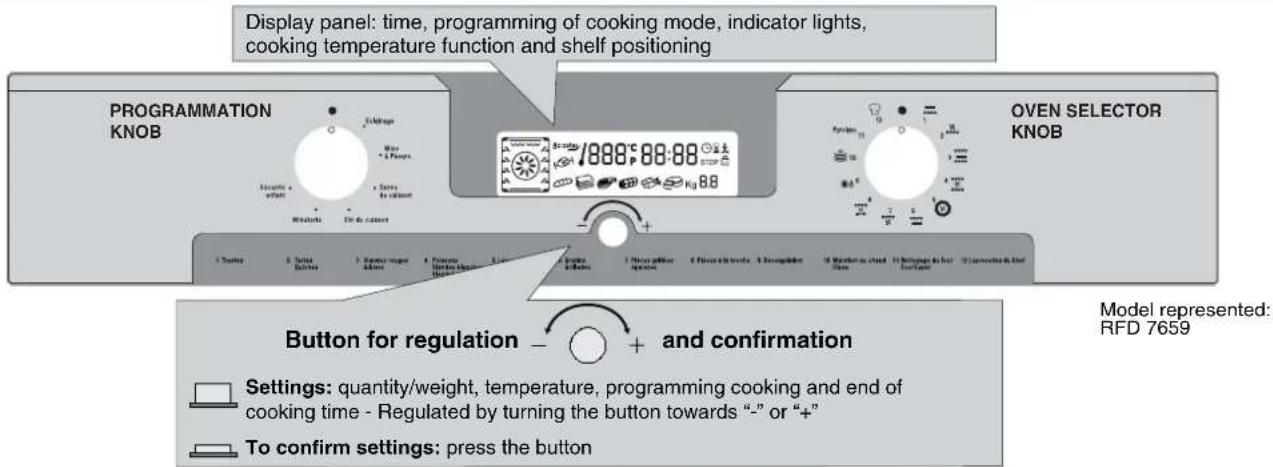
CONTROL PANEL DESCRIPTION
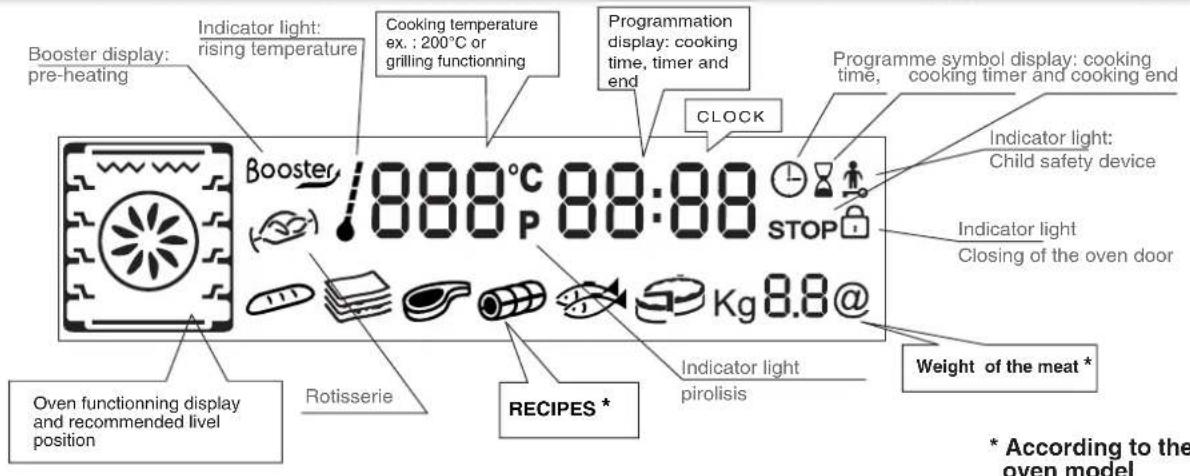
DESCRIPTION OF THE DISPLAY
BEFORE USING THE OVEN FOR THE FIRST TIME
• PRELIMINARY CLEANING
- clean the oven before using for the first time: . wipe over external surfaces with a damp soft cloth. . Wash all accessories and wipe inside the oven with a solution of hot water and washing up liquid.
. Set the empty oven to the maximum temperature and leave on for about 1 hour, this will remove any lingering smells of newness. Ensure that the room is well ventilated while this is being done.
• THINGS TO REMEMBER
Confirmation of operation: modification must be confirmed by pressing the central button, during 1 second.
Stopping the oven: this may be necessary if you have input an incorrect instruction.
To stop the oven .... turn back the function selector knob to the ● Position.
Child safety device: To lock the oven controls, select the child safety device. Refer to the section entitled "Programming - The child safety device".
The cooling fan: this protects the control panel and electronics from heat damage.
It begins and then stops automatically even when the oven is switched off.
Oven lighting: By turning to the light symbol, you can switch on the oven light when it is not in use.
When the oven is in use, the light stays on during all of the oven functions and when the door is opened.
• CLOCK SETTING
When the oven is connected to the electricity supply or after a long power cut, the clock must be re-set.
. To set the clock :
1- Turn the control knob to the "Clock" symbol :
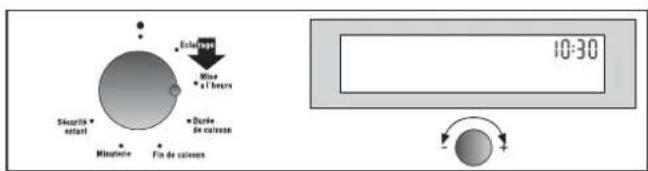
2- When the minutes flash, set the central button by turning to the "-" or "+" symbol. Confirm by pressing the central button.
3- The hours will then flash, set with the central button by turning to the "-" or "+" , confirm by pressing the central button.
4- Turn back the control to the ● position, the new hour is set.
• THE MANUAL MODE
The cooking methods suggested in manual mode are set out in the table below. A temperature is also suggested for each cooking method. This can be modified within a pre-determined range.
| FUNCTION MODE according to the oven model | Pre-set Temperature °C | Pre-determined Temperature °C | Function Booster* |
| BOTTOM HEAT | 160 50-240 | BOOSTER | |
| BOTTOM HEAT + FAN | 210 50-240 | BOOSTER | |
| NATURAL CONVECTION | 220 50-280 | ||
| FAN ASSISTED COOKING | 210 50-240 | ||
| FAN COOKING | 180 50-240 | ||
| GRILL | L2 L1-L3 | ||
| GRILL + FAN | 210 180-230 | BOOSTER | |
| ROTISSERIE + FAN | 240 180-240 | BOOSTER | |
| DEFROST | 40 no | ||
| KEEP WARM | 60 no | ||
| * Booster: rapid temperature raised | |||
1- Turn the oven selector knob to the function required to the cooking.
The heating elements in operation for the selected cooking method are displayed.
2- The appropriate temperature according to the cooking method selected is displayed. It can be modified within a pre-determined range - see the table above.
To modify the temperature setting, turn the central button and confirm the setting by pressing the same button. ... the temperature display is fixed but can be modified during the cooking cycle.
The oven will start cooking and will start to heat up.
The indicator light flashes until the selected temperature has been reached. An audible signal sounds at the end of this operation and the indicator light becomes fixed.
3- A cooking time and an end of cooking time can be programmed by turning the programme selector knob to "cooking time" or "end of cooking time".
The "cooking time" or "end of cooking time" display starts flashing. Using the central button, modify the settings as required and confirm.
When you have done this, do not forget to turn the programme selector knob back to ● to confirm the new setting.
For more details about programming, refer to the chapter entitled PROGRAMMING.
4- At the end of the cooking cycle, turn the function selector knob back to ●.
The indicator flashes again, it will remain also turned on after having extinguished the oven and it will extinguish when the inside temperature of the oven is sufficiently low.
ALL COOKING SHOULD BE CARRIED OUT WITH THE DOOR CLOSED -
• BOTTOM HEAT -
Using the lower element. Ideal for cooking all pastry based dishes. Use this for flans, quiches, tarts, pâté and any cooking that needs more heat and radiation from below.
• BOTTOM HEAT + FAN -
The combination of the bottom heating element and fan is ideal for fruit flans, tarts, quiches and pastries. It prevents food from becoming too dry and encourages bread dough to rise. Place the shelf in the bottom position in the oven.
• NATURAL CONVECTION -
Both top and bottom heating elements are in use. This method is ideal for all traditional roasting and baking. When cooking red meat, roast beef, leg of lamb, game, bread or foil wrapped foods.
• FAN ASSISTED COOKING -
Both top and bottom heating elements are used in conjunction with the fan, which circulates hot air throughout the oven. We recommend this method for poultry, pastries, fish and vegetables. By using this method better heat penetration is achieved and cooking and preheating times are also reduced. The fan cooking option allows you to cook different foods together at different positions in the oven all at the same time, providing even heat distribution but without the risk of mingling tastes and smells. When cooking different foods at the same time allow a further 10 minutes.
- FAN COOKING - Both top and bottom heating elements are used in conjunction with the circular heating element, which circulates hot air throughout the oven. Its definition is the same as that of the Fan Cooking method.
• GRILL -
using the top heating element. Success is guaranteed for mixed grills, kebabs and gratin dishes. The grill should be pre-heated to a high temperature for 5 minutes. White meats should always be placed at some distance from the grill element, the cooking time is slightly longer but the meat will be more succulent. Red meat and fish fillets can be placed directly onto the shelf with the drip tray placed beneath on lower shelf position.
- GRILL + FAN -
The top heating element is used in conjunction with the fan which circulates the hot air around the oven. Pre heating is recommended for red meats but is not necessary for white meats. Grilling is ideal for cooking thicker food items such as pork or poultry. Food to be grilled should be placed directly at the centre of the middle shelf. By sliding the drip tray underneath the shelf it will ensure that any juices are collected. For best results always make sure that the food is not too close to the grill element and turn the food over half way through the cooking time.
• ROTISSERIE + FAN -
The advantage of using the top oven element at the same time as the fan and rotisserie is that the food is evenly cooked, preventing it from becoming dry and tasteless. The rotisserie is programmed to continue rotating for approximately five minutes after cooking, making full use of the residual oven heat. No pre-heating is required for rotisserie cooking.
- RECIPE MODE according to the oven model
The recipes are described on the table below. For each mode of cooking a temperature is pre-programmed according to the weight, it is not adjustable.
1- Turn the oven selector knob to the Recipe position 📋.
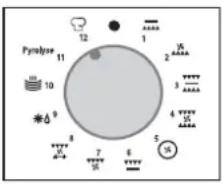
The first Recipe display "Bread" will start flashing. With the central button, select the most appropriate recipe to the food to be cooked and confirm by pressing the same button. The Recipe display becomes fixed.
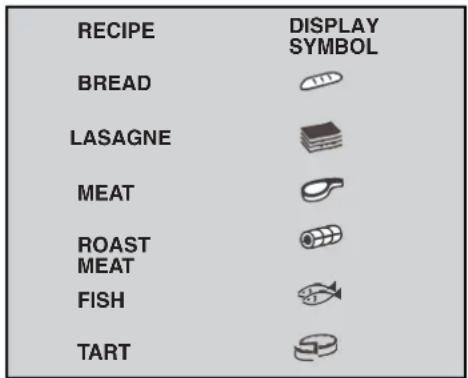

According to the recipe selected, the oven determines the heating elements, as well as the suggested shelf position to the food and the temperature.
Then, the indication of the weight of the food to be cooked flashes. 2- Select the most appropriate setting by turning the central button and confirm by pressing the same button. According to the weight, the oven determines the cooking time, it is not adjustable. ... Place the food in the oven.
The oven begins the cooking and the oven starts to heat up.

The indicator light flashes until the selected temperature has been reached. An audible signal sounds at the end of this operation and the indicator becomes fixed.
3- Each recipe is recorded with a cooking time.

The cooking time indicator light and the End of cooking time indicator light appear on the display.
These settings can be adjusted by turning the programme selector knob to "cooking time" or "end of cooking". The "cooking time" or "end of cooking" display will start flashing. Using the central button, modify the settings as required and then confirm them. When you have finished, do not forget to turn the programme selector knob back to ●, to confirm a new programme.
For more details about programming, refer to the chapter entitled PROGRAMMING.
4- When the cooking time is up, the oven switches itself off automatically. An audible signal sounds for 15 seconds to tell you the cycle has ended and the "cooking time" and STOP symbols flash.
. Turn the function selector knob to ● . If you do not do this the "cooking time" and STOP symbols will continue flashing.
The cooling fan will continue operating for a while and will only stop when the oven has cooled down sufficiently. At the end of the cooking, the indicator flashes again and stays lighted even if the oven is switched off. It disappears only when the temperature is sufficiently low.
NB: please note that all Recipe cooking programmes are done without preheating. This means that the food must be placed in the oven right at beginning of the programme. except for the "Bread".
* WARNING: baking bread is a delicate process and cannot be done without the oven having been pre-heated. Place the dough in the oven when the pre-heating is finished, or when the audible signal sounds.
THE PROGRAMMATION
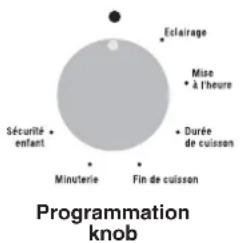
Cooking time programming
STOP End of cooking time programming

Child safety device operational

Locking oven door
THE TIMER:
The timer works independently of the oven and has no effect on the heating elements. It is simply a reminder.
- Turn the knob to the Timer position. The Timer symbol will appear. The digits 00:00 will appear on the display.
- The minutes will then flash, turn the central button to the required number of minutes and confirm by pressing the same button.
- The hours will flash, turn the central button to the required number of hours and confirm by pressing the same button.
- Turn the knob back to the ● position.
When the time is up, the cooking time will disappear. An audible signal will sound for 15 seconds and the Timer display will flash (to stop it before the 15 seconds are up, just press the central button).
PROGRAMMING THE COOKING TIME:
various recipes are pre-programmed with a cooking time. In Manual mode, Defrosting or Keep warm Mode can be pre-set, if required.
- Turn the knob to the Cooking time position. The Cooking time symbol will appear. A pre-programmed cooking time for the various recipes will appear, or 00:00 for other functions of the oven.
- With the minutes flashing, turn the central button to the required number of minutes and confirm by pressing the same button.
- With the hours flashing, turn the central button to the required number of hours and confirm by pressing the same button.
- Turn the programme selector knob back to the ● position to confirm the new cooking time.
When the time is up, the cooking time will disappear from the display. An audible signal will sound for 15 seconds and the Cooking time and STOP symbols will flash.
- Turn the programme selector knob back to ● . If you do not do this, the Cooking time and STOP symbols will continue flashing.
PROGRAMMING THE END OF COOKING TIME:
various recipes are pre-programmed with a cooking time and therefore with an end of cooking time. In Manual Mode, Defrosting or Keep warm mode can be pre-set, if required.
- Turn the knob to the End of cooking position. The STOP symbol will appear. A pre-programmed end of cooking time for the various recipes will appear, or 00:00 for other oven functions or the time of day will be shown.
- Turn the programme selector knob to confirm the end time.
- The minutes will flash. Turn the central button to indicate the required number of minutes, and confirm your choice by pressing the same button.
- The hours will then flash. Turn the central button to indicate the required number of hours, and confirm your choice by pressing the same button.
NB : with a delayed start, the end of programme time will appear on the display with the "Cooking time" and "STOP" symbols, and only the function Recipe mode of the oven remains. The oven automatically calculates the start time (end time minus cooking time).
At the end of the cycle the oven switches itself off automatically. For 15 seconds, an audible signal lets you know that the cycle has ended and the "Cooking time" and STOP symbols will flash.
- Turn the function selector knob to ●. Unless you do this, the symbols will continue flashing.
COOKING TIPS
It is better not to salt meats until after cooking as salt encourages the meat to spatter fat. This will dirty the oven and make a lot of smoke.
Joints of white meat, pork, veal, lamb and fish can be put into the oven cold. The cooking time is longer than in a preheated oven, but it cooks through to the centre better as the heat has more time to penetrate the joint.
Correct preheating is the basis of successful red meat cookery.
GRILLS
• Before loading the grill:
Remove the meat from the refrigerator a few hours before grilling. Lay it on several layers of kitchen paper: this improves seizing, making it tastier and avoids it staying cold at the centre.
Add pepper and spices to the meat before grilling, but add any salt after cooking. This way it will seize better and stay juicy. Baste all the food to be cooked with a little oil. This is best done with a wide flat basting brush. Then sprinkle with more pepper and herbs (thyme, etc.).
- During cooking:
Never pierce the food during cooking even when you turn it. This lets the juice out and it becomes dry.
BAKING
Avoid using shiny tins, they reflect the heat and can spoil your cakes. If your cakes brown too quickly, cover them with grease-proof paper or aluminium foil. Caution: the correct way to use foil is with the shiny side in towards the cake. If not the heat is reflected by the
shiny surface and does not penetrate the food. Avoid opening the door during the first 20 to 25 minutes of cooking: soufflés, brioches, sponge cakes, etc. will tend to fall. You can check if cakes are done by pricking the centre with a knife blade or metal knitting needle. If the blade comes out nice and dry, your cake is ready and you can stop cooking. If the blade comes out moist or with bits of cake attached, continue baking but slightly lower the thermostat so that it is finished off without burning.
PYROLYTIC CYCLE
The oven is equipped with a pyrolyser cleaning system, which destroys food residues at high temperature. The operation is carried out automatically by means of the programmer. The resulting fumes are rendered "clean" by passing over a Pyrolyser wich starts as soon as cooking begins. As very high temperatures are required by the Pyrolyser, the oven door is fitted with a safety lock. The pyrolyser can be stopped at any time. The door cannot be opened until the safety lock is displayed.
NOTA : if a hob has been fitted above the oven, never use the gas burners or the electric hot-plates while the Pyrolyser is working, this will prevent the hob from overheating.
TWO PYROLYTIC CYCLE are pre-set.
. ECO PYROCLEAN : cleans a moderately stained oven. Operates for a period of 90 minutes.
. SUPER PYROCLEAN : cleans an heavily stained oven. Operates for a period of 120 minutes.
Never use commercially available cleaning products on a Pyrolytic oven!
Tip : carrying out Pyrolytic cleaning immediately after cooking allows you to take advantage of residual heat, thus saving energy.
Before carrying out a Pyrolytic cycle :
- Remove all accessories from the oven: they cannot withstand the high temperatures and would be damaged by pyrolytic temperatures.
- Remove any large spillages or stains as it would take too long to destroy them. Also excessively large amounts of grease could ignite when subject to the very high temperatures of the Pyrolytic-cycle.
- Close the oven door.
Using the pyrolytic cycle :
1-Turn the function selector knob to "Pyrolytic Mode". The symbol "P" will appear.
2- By using the central button select the required Pyrolytic mode, according to the degree of staining :
.. ECO PYROCLEAN or SUPER PYROCLEAN .
Confirm the choice by pressing the central button.
the oven starts the pyrolytic cycle.
On the display, the time of the end pyrolytic cycle and the "time" and "stop" indicator lights will appear.
During the pyrolytic cycle, the locking oven door appears, it indicates that the door is locked. The cooling fan will operate. The indicator light flashes until the temperature required is not reached and then it becomes fixed.
* The start of the pyrolytic cycle can be delayed by selecting an end of time. Turn the programmation control knob to the end of time and set the end of time required.
At the end of the pyrolytic cycle the oven will automatically switch off.
For 15 seconds, an audible signal lets you know that the cycle has ended and the "time" and "Stop" indicator lights will flash. Turn the selector knob to ●. Unless you do this, the symbols will continue flashing. The symbol "P" disappears.
The oven door will remain locked until the temperature is high. So, as the locking oven door is light, the oven can not be opened. The cooling fan does not switch itself off until the temperature of the oven components is reasonable.
At the end of the cycle, the indicator flashes again, it will remain also turned on after having extinguished the oven and it will extinguish when the inside temperature of the oven is sufficiently low.
Pyrolysis leaves a white residue on the oven walls. Wait for the oven to cool completely then clean the inside of the oven with a damp sponge to wipe off the residue.
CHILD SAFETY
This function is essential, especially when children are around. It prevents children from switching the oven on or altering the preset programmes.
This safety system locks the oven control panel while it is operating.
There are two levels of safety :
LIVEL 1 : Locking selector control knob and the central button.
. To activate : turn the programmation control knob to child safety.
. Action : the control knobs are inactive*.
. To deactivate : turn the programmation control knob to 0.
LIVEL 2 : Locking function selector knobs
. To activate : turn the function selector knob to child safety and keep the central button pressed in for 3 seconds.
. Action : all the controls are inactive*.
. To dactivate : the same procedure as for activating. Turn the function selector knob to child safety and keep the central button pressed in for 3 seconds.
*Nota : in all cases, for reasons of safety, even when the controls are locked, the oven can be switched off by turning the selector knob to 0.
ADJUSTING THE DISPLAY CONTRAST
The display contrast can be adjusted at any time.
The default setting is "C5". To adjust the setting, carry out the following:
- Turn the programme selector to "Light" and the function selector to "0". Press in the central key for 3 seconds and "CX" will appear on the display (where X = the contrast level). Turn the central key to adjust the contrast setting: the settings go from 1 to 9. Confirm the new setting by pressing the central key for 3 seconds.
COOKING TIPS
Temperatures and cooking times are given for information only to facilitate using the oven.
Personal experience should then let you adapt these settings to your taste and habits.
Remember that cooking at higher temperatures causes more spattering, and the oven can become dirty and smokey. It is better to slightly reduce the cooking temperature, even if it means increasing the cooking time.
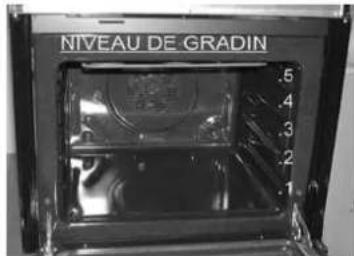
The sides of the oven are equipped with different positions numbered from the bottom.
FISH
| Recipes | Cooking method | Quantity | Cooking °C | Cooking time | Shelf level |
| Tilefish or bream Conv cooking 1kg whole 220°C | 130 min | ||||
| Monk fish or Salmon | Conv cooking | 1kg braised | 220°C | 30 min | 1 |
| Salmon steak Fan cooking 6 pieces 110-15 min | 140-160°C | ||||
| Fillet of sole | Fan cooking | 6 pieces | 160°C | 15-20 min | 1 |
| Grilled fish | Grill | 6 fillets | 275°C | 2x5 min | 4 |
VEGETABLES - OTHERS
| Recipes | Cooking method | Quantity | Cooking °C | Cooking time | Tips |
| Braised cabbage | Conv cooking | for 6 | 200-220°C | 1 hour | |
| Pâté en croûte | Conv cooking | 200-220°C 1 hour/kg | |||
| Chicory with gruyere | Fan cooking | for 6 | 180-200°C | 25-30 min | |
| Potatoes in their jackets | Fan cooking | for 6 | 200-220° | about 1 hour | |
| Soufflé savoury/sweet | Fan cooking | for 6 | 180-200°C | 50-60 min | ∅ 22 |
| Stuffed tomatoes | Fan cooking | 6-8 pieces | 200-220°C | 40-45 min | |
| Leek flan | Fan + lower element | for 6 | 220°C | 35-40 min | |
| Quiche Lorraine | Fan + lower element | for 6 | 220°C | 45-50 min | |
| Toast with crottin* | Turbo grill | 6 pieces | 210°C | 3 min to toast one side + 4 min/crottin | Flat steak pan |
| Dauphiné cheese-topped dish | Turbo grill | 6 portions | 200°C | 45 mins | Oval earthenware |
| Toulouse sausages* | Turbo grill | 4 pieces | 210°C | 2x10 min turn over in mid cooking | Flat steak pan |
All the cooking was done at shelf position "1" except cooking marked thus "*", which requires cooking at a middle position.
MEAT
| Recipes | Cooking method | Quantity | Cooking °C | Cooking time | Tips |
| Beef with carrots Conv cooking for 6 200-220°C | about 1 hours | ||||
| Duck Conv cooking 1,5 kg 200-220°C 1 hours | 12 | ||||
| Turkey 5/6 kg 2 - 3 hours | Conv cooking | 160-180°C | 12 | ||
| Goose 160-180°C 2 - 2 Cbours300kg | 12 | ||||
| Leg of lamb 200-220°C 1Gonin400kg | |||||
| Roast chicken | Conv cooking | 1/1,5 kg | 220°C | about 1 hour | |
| Roast beef | Conv cooking | 240°C | 15 min/pound | ||
| Roast rabbit | Fan cooking | 800-1 kg | 200-220°C | 50-60 mins | |
| Roasted white meat | Fan cooking | 200-220°C | 40-50 mins/kg | ||
| Veal / poultry | Rotisserie | 1 kg 200 | 275°C | 60-70 mins/kg | No preheat |
| Veal / poultry Rotisserie | 1 kg | 275°C | 40-50 min | No preheat | |
| Beef | Rotisserie | 1kg | 275°C | 15-20 min | No preheat |
| Lamb / Mutton | Rotisserie | 1 kg | 275°C | 20-25 min | No preheat |
| Pork | Rotisserie | 1 kg | 275°C | 45-50 min | No preheat |
| Kebabs | Grill | 6 pieces | 275°C | 2x8 min | Turn over in mid cooking |
| Pork chop | Grill | 6 pieces | 275°C | 2x8 min | Turn over in mid cooking |
* All cooking was done at shelf position "1".
BAKING
| Recipes | Cooking method | Quantity | Cooking °C | Cooking time | Shelf level | Tips |
| Cake | Conv cooking 1,5 kg | 180-200°C | 50+60 min | 1 | ||
| Fruit tart in batter | Conv cooking | for 6 | 200-220°C | 40-50 min | 1 | ∅ 27 |
| Pound cake | Conv cooking | 1,5 kg | 200-220°C | 45-50 min | 1 | |
| Filled pie | Conv cooking | for 6 | 200-220°C | 40-45 min | 1 | ∅ 27 |
| Brioche | Fan cooking | 800 grs | 200°C | 40-40 min | 1 | |
| Sponge cake | Fan cooking | 180-200°C | 35-40 min | 1 | ∅ 27 mould | |
| Genoese cake | Fan cooking | 180-200°C | 30-35 min | 1 | ∅ 27 mould | |
| Choux pastry | Fan cooking | 40 pieces | 190°C | 35 min | 1 / 3 | 2 trays |
| Pastry base | Fan cooking | for 6 | 180-200°C | 20-30 min | 1 | ∅ 27 |
| Puff pastry | Fan cooking | 6 pieces | 200°C | 15-20 min | 1 | e.g. Bouchée |
| Meringues | Fan+Lower element* | 1 tray | 80-85°C | 4 12 hours | 1 | ∅ profiteroles |
| Fruit tart | Fan+Lower element* | for 6 | 220°C | 35-40 min | 1 | |
| St Honoré | Fan+Lower element* | 6 pieces | 190°C | 30-35 min | 1 |
* with fan and lower element, we recommend preheating with fan cooking to save time.
GBAFICA 01-2007 • Cod. 41023361
FR
natural_image
Interior view of an oven with a screwdriver inside, showing no text or symbols on the diagram itself.GB
Fixing in the location
Inside the oven is a bag with four fixing screws.
Fixing:
when the oven door is open, holes are accessible, they are located on each side.
Use the screws provided to fix the oven.
FR
The manufacturer will not be responsible for any inaccuracy resulting from printing or transcript errors contained in this brochure. We reserve the right to carry out modifications to products as required, including the interests of consumption, without prejudice to the characteristics relating to safety or function.
- INSTRUCTIONS GENERALES
- ENTRETIEN GENERAL DU FOUR
- DECLARATION OF COMPLIANCE
- SAFETY HINTS
- RECOMMENDATIONS
- INSTALLATION
- ELECTRICAL CONNECTION
- THE ELECTRICAL CONNECTION SHOULD BE CARRIED OUT BY AN APPROVED CONTRACTOR OR TECHNICIAN WITH SIMILAR QUALIFICATIONS.
- CONNECTION:
- Caution:
- OVEN EQUIPMENT ACCORDING TO THE MODEL
- TELESCOPIC SHELF KIT
- INSTRUCTIONS FOR ASSEMBLY
- ROTISSERIE
- CLEANING THE OVEN
- GLASS PARTS
- OVEN DOOR SEAL
- ACCESSORIES
- DRIP TRAY
- OVEN LIGHTING
- SERVICE CENTRE
- If the oven is not working, we recommend that:
- If the cause of the fault cannot be detected:
- CONTROL PANEL DESCRIPTION
- DESCRIPTION OF THE DISPLAY
- BEFORE USING THE OVEN FOR THE FIRST TIME
- • PRELIMINARY CLEANING
- • THINGS TO REMEMBER
- • CLOCK SETTING
- • THE MANUAL MODE
- ALL COOKING SHOULD BE CARRIED OUT WITH THE DOOR CLOSED -
- • BOTTOM HEAT -
- • BOTTOM HEAT + FAN -
- • NATURAL CONVECTION -
- • FAN ASSISTED COOKING -
- • GRILL -
- - GRILL + FAN -
- • ROTISSERIE + FAN -
- - RECIPE MODE according to the oven model
- THE PROGRAMMATION
- THE TIMER:
- PROGRAMMING THE COOKING TIME:
- PROGRAMMING THE END OF COOKING TIME:
- COOKING TIPS
- GRILLS
- BAKING
- PYROLYTIC CYCLE
- TWO PYROLYTIC CYCLE are pre-set.
- Before carrying out a Pyrolytic cycle :
- Using the pyrolytic cycle :
- CHILD SAFETY
- ADJUSTING THE DISPLAY CONTRAST
- FR
- GB
- Fixing in the location
- Fixing:
Brand : ROSIERES
Model : RFI 4553 MIN
Category : Oven