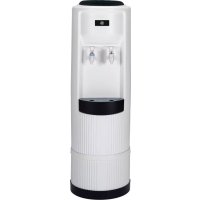
GXCF03E - Water filter GE - Free user manual and instructions
Find the device manual for free GXCF03E GE in PDF.


| Product Type | Cold and room temperature water dispenser |
| Brand | GE |
| Model | GXCF03E |
| Bottle Capacity | 15 or 20 liters (3 or 5 gallons) |
| Cooling Rate | Approximately 2 liters per hour |
| Maximum Power Consumption | 114 watts |
| Power Supply | 120 V, 60 Hz (standard grounded outlet) |
| Main Functions | Cold and room temperature water dispensing |
| Safety | Grounding instructions, do not use with unsafe water, child supervision required |
| Maintenance and Cleaning | Separator cleaning, tank disinfection, drain before vacations, exterior cleaning |
| Replacement Parts | Support collar (WS28X10046), separator (WS28X10020), drip tray (WS28X10021), grid (WS28X10022), caps (WS30X10006-09) |
| Warranty | 1 year limited (product replacement) |
Frequently Asked Questions - GXCF03E GE
User questions about GXCF03E GE
0 question about this device. Answer the ones you know or ask your own.
Ask a new question about this device
Download the instructions for your Water filter in PDF format for free! Find your manual GXCF03E - GE and take your electronic device back in hand. On this page are published all the documents necessary for the use of your device. GXCF03E by GE.
USER MANUAL GXCF03E GE
Cold and Room Temperature Water Dispenser
Safety Instructions .....2, 3
Using the Water Dispenser
Assembling the Base ....4
Features and Parts List .....4
Loading the Dispenser .....4
Specifications....6
Care and Cleaning .....5, 6
Troubleshooting Tips ....6
Consumer Support
Consumer Support ....Back Cover
Warranty ....Back Cover
Français
*ENERGY STAR® qualified product.

As an ENERGY STAR ^® partner, GE has determined that this product meets the ENERGY STAR ^® guidelines for energy efficiency.
215C1002P039 49-50223 02-07 JR
▲ WARNING!
Use this appliance only for its intended purpose as described in this Owner's Manual.

SAFETY PRECAUTIONS
When using electrical appliances, basic safety precautions should be followed, including the following:
This water dispenser must be properly installed and located in accordance with these instructions before it is used.
Do not allow children to climb, stand or hang on the outside of the dispenser, or on the shelves inside the storage cabinet (on some models). They could tip the dispenser over and damage it and seriously injure themselves.
Do not store or use gasoline or other flammable vapors and liquids in the vicinity of this or any other appliance.
■ Unplug the water dispenser before cleaning or making repairs.
NOTE: GE does not support any servicing of the dispenser. We strongly recommend that you do not attempt to service the dispenser yourself.
Do not use this dispenser to dispense anything other than water.
Do not plug in the power cord or turn on the power switches when the water dispenser is empty.
■ Wipe up any water spills immediately after loading or unloading water bottles.
WARNING: Do not use with water that is microbiologically unsafe or of unknown quality.
■ CAUTION: Children should be supervised by a parent when using this product.

PROPER INSTALLATION AND LOCATION
Allow at least 1" (2.5 cm) of space between the back of the water dispenser and the wall to allow for proper air circulation.
Do not install the water dispenser where the temperature will go below 50^ F ( 10^ C) or above 100^ F ( 38^ C).
■ Install the water dispenser on a level floor or counter strong enough to support it when fully loaded. Do not install where it will be subject to direct sunlight, heat or moisture.

GROUNDING INSTRUCTIONS
WARNING—Improper use of the grounding plug can result in a risk of electric shock.
This appliance must be grounded. In the event of an electrical short circuit, grounding reduces the risk of electric shock.
This appliance is equipped with a power cord having a grounding wire with a grounding plug. The plug must be plugged into an outlet that is properly installed and grounded.
Consult a qualified electrician if the grounding instructions are not completely understood, or if doubt exists as to whether the appliance is properly grounded.
If the outlet is a standard 2-prong wall outlet, it is your personal responsibility and obligation to have it replaced with a properly grounded 3-prong wall outlet.
Do not under any circumstances cut or remove the third (ground) prong from the power cord.
Do not use an adapter plug with this appliance.
Do not use an extension cord with this appliance. If the power cord is too short, have a qualified electrician install an outlet near the appliance.
For best operation, plug the appliance into its own electrical outlet on a dedicated circuit to prevent flickering of lights, blowing of fuse or tripping of circuit breaker.
PROPER DISPOSAL OF THE WATER DISPENSER
Refrigerant Disposal
Your old water dispenser may have used a regulated refrigerant in its cooling system. These refrigerants are believed to harm stratospheric ozone. If you are throwing away your old dispenser, make sure the refrigerant is removed and recovered for proper disposal by an EPA-certified technician. If you intentionally release this refrigerant, you can be subject to fines and imprisonment under provisions of environmental legislation.

READ AND FOLLOW THIS SAFETY INFORMATION CAREFULLY.
SAVE THESE INSTRUCTIONS
Using the water dispenser.

Features and Parts List
7 Bottle Support Collar (WS28X10046)
2 Separator (WS28X10020)
3 Cold Water Tank
4 Cold (Blue) Faucet
5 Room Temperature (White) Faucet
6 Dispenser Drip Tray (WS28X10021) and Grille (WS28X10022)
7 Base (Top Cover – WS30X10006) (Back Side – WS30X10007) (Bottom Cover – WS30X10008) (Front Side – WS30X10009)
See the back page of this manual for ordering instructions.
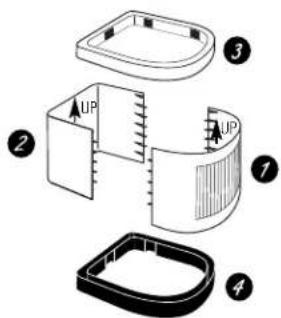
NOTE: The top (3) and bottom (4) pieces can be found in the top and bottom of the carton packaging foam.
Assembling the Base
-
Align the front and back pieces of the base (pieces labeled 1 and 2), with "UP" pointing up, and snap together. If it does not go together, make sure "UP" is in the same direction on both pieces.
-
Place the top cover (piece 3) on top of pieces 1 and 2 (front and back). Press down firmly until it snaps into place.
-
Turn the assembly over and place the bottom cover (piece 4) on top of pieces 1 and 2 (front and back). Press down firmly until it snaps into place.
-
Turn base over and place the dispenser on top of the base.
natural_image
Line drawing of a hand pouring liquid into a container, with no text or symbols presentLoading the Dispenser
Sanitize the dispenser water tank prior to installing a full bottle of water for the first time (see "Cleaning and Sanitizing the Water Tank").
IMPORTANT: Make sure the dispenser is unplugged. Before placing the water bottle on the dispenser, wash hands and wipe the top of the bottle with a clean cloth. Avoid touching the part of the bottle that will be in contact with the water dispenser.
Make sure the water level in the top of the dispenser is low enough to allow for proper bottle installation. Failure to do so may cause the dispenser to overflow.
-
Peel the label from the top cover of the bottle (if present). Do not remove the entire bottle cap.
-
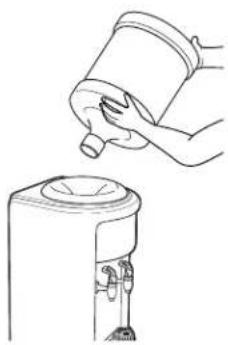
Place the bottle on top of the dispenser as shown, aligning the dispensing valve probe to the center of the water bottle cap. Press down until the probe penetrates the bottle cap, allowing the bottle to rest on the support collar.
-
IMPORTANT: Press both dispense levers until water runs from both taps.
-
Plug in the dispenser.
-
Allow 30 minutes for water to reach cold temperatures.
Contact a local water bottle distributor to purchase water bottles.
Care and cleaning of the dispenser.
Cleaning the Drip Tray and Grille
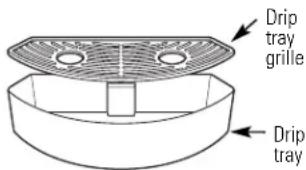
The dispenser drip tray is not self-draining. To reduce water spotting or deposits, the tray and its grille should be emptied, cleaned and wiped dry regularly.
Clean with mild soap or on the top rack in the dishwasher.
Cleaning the Separator
IMPORTANT: Unplug the water dispenser before cleaning.
- Remove the water bottle and drain the dispenser (see Draining the Dispenser).
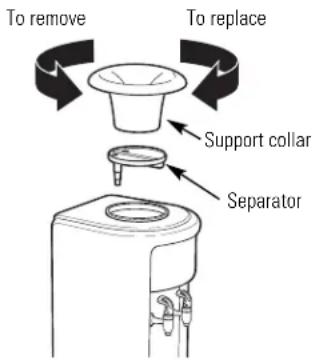
- Remove the support collar by turning counterclockwise and pulling straight off.
- Remove the plastic separator by pulling straight out (you may need to twist slightly to loosen).
-
Clean the separator with dish soap and water or in the top rack of the dishwasher.
-
Dry the separator thoroughly on both sides.
- Using a clean cloth or paper towel, thoroughly dry the cold water reservoir.
- Place the separator back in the dispenser. Make sure the long, tapered end of the separator is positioned firmly on the metal pipe on the bottom of the reservoir.
- Replace the support collar and turn clockwise until it is firmly in place.
- Install a full water bottle on the dispenser (see Loading the Dispenser).
Sanitizing and Cleaning the Water Tank
IMPORTANT: Periodically the water dispenser tank must be sanitized to prevent unpleasant tastes in the water and cleaned to remove mineral deposits that can impair flow.
To Sanitize:
- Before cleaning, unplug the water dispenser. NOTE: For first time installation, skip steps 2 and 3.
- Empty the water bottle, then remove it from the dispenser.
- Drain the water tank (see Draining the Dispenser).
- DO NOT ADD BLEACH FIRST OR DIRECTLY TO THE DISPENSER. Concentrated bleach may damage plastic.
Add 1/2 teaspoon (2.5 ml) of ordinary 6.0% maximum household bleach to a 2 quart (2 liter) pitcher filled with tap water.
- Pour the solution in the opening at the top of the dispenser.
- Repeat steps 4 and 5 until the dispenser is full.
- Press the room temperature and cold dispenser faucets until the water just begins to flow from the taps.
- Allow to sit for 15-20 minutes.
9. Rinse out the bleach solution:
— Drain the water tank by dispensing water through the room temperature and cold dispenser faucets (see Draining the Dispenser).
— IMPORTANT: Remove the separator and wipe out the cold water reservoir (see Cleaning the Separator).
— Clean, then reinstall the separator and collar (see Cleaning the Separator).
— Pour approximately 1 gallon (4 quarts or 4 liters) of fresh tap water into the top and drain through the faucets.
— Flush with an additional 1 gallon (4 quarts or 4 liters) of fresh tap water and drain.
- Install a fresh water bottle (see Loading the Dispenser).
- Dispense 1 quart (1 liter) of water from each tap and taste to make sure the bleach solution is completely removed.
If you continue to taste the chlorine from the bleach solution, repeat steps 9–11 until the taste is gone.
- Plug in the dispenser.
To Remove Mineral Deposits:
Mix 2 quarts (2 liters) of water with two quarts of vinegar OR mix 1 gallon of water (4 liters) with 16 ounces (454 g) of citric acid crystals. Bleach does not remove mineral deposits. Do this in place of step 4 when removing mineral deposits.
Care and cleaning of the dispenser.
Cleaning the Outside and Storage Cabinet (on some models)
IMPORTANT: Unplug the water dispenser before cleaning.
The inside and outside of the cabinet can be washed with mild soap and water. Rinse thoroughly with clear water. Never use commercial cleaners or abrasive scouring powders.
Sweep away or vacuum any dust from the condenser coils on the back of the unit. For best results, use a brush specially designed for this purpose. It is available at most appliance stores.
Draining the Dispenser
The dispenser should be drained before cleaning the tank and before leaving for long vacations or absences.
Drain water through the faucets into a container.
Preparing for Vacation
For long vacations or absences.
-
Unplug the water dispenser.
-
Remove the water bottle.
-
Drain the water tank (see Draining the Dispenser).
-
Dry the separator thoroughly on both the top and bottom (see Cleaning the Separator).
After returning from vacation, make sure to sanitize the water tank before using the dispenser (see Cleaning and Sanitizing the Water Tank).
Specifications
Chilling Rate: approx. 0.5 gallons (2 L) per hour
Power Consumption: 114W max.
Capacity: 3 or 5 gallon bottle
Troubleshooting Tips.
Problem Possible Causes What To Do
| Water has poor taste or odor | Separator needs cleaning. | • See Cleaning the Separator. |
| Unit needs to be sanitized. | • See Cleaning and Sanitizing the Water Tank. | |
| Water not cold enough | Dispenser is unplugged. | • Push the plug completely into the outlet. |
| The fuse is blown/circuit breaker is tripped. | • Replace house fuse or reset the house circuit breaker. • If too many items are plugged into a single circuit, move some items to a different circuit. | |
| All the water in the water tank has been used. | • Wait 30 minutes for water to cool. | |
| Temperature limiter tripped. | • Unplug the unit. Wait five minutes; then plug the unit back in. Wait 30 minutes for water to cool. | |
| Water dispenser does not work | Empty water bottle. | • Replace with a new bottle of water. |
| Mineral deposits clogging tank. | • See Care and Cleaning. | |
| Water dispenser leaks from the outside | Crack or pin hole in bottle. | • Replace with a new bottle of water. |
| Water dispenser is noisy | Water dispenser is uneven. | • Make sure the water is installed on a level floor or counter strong enough to support it when fully loaded. |
| Bottle making a gurgling noise as water fills the tanks. | • This is normal. | |
| Dispenser or water bottle shakes when the cooling system cycles off. | • This is normal. | |
| Particles floating in water | Water has high mineral content. | • Find a water source with lower hardness. |
| Mineral deposits in water system. | • Follow cleaning instructions for mineral deposits. |
INFORMATIONS IMPORTANTES EN MATIÈRE DE SÉCURITÉ. LISEZ TOUTES LES INSTRUCTIONS AVANT D'UTILISER CET APPAREIL.
▲ AVERTISSEMENT!
natural_image
Line drawing of a hand pouring liquid into a container, with no text or symbols presentGarant : General Electric Company, Louisville, KY 40225.
¡ADVERTENCIA!
natural_image
Line drawing of a hand pouring liquid into a container, with no text or symbols presentGeneral Manager, Customer Relations
GE Appliances, Appliance Park
Louisville, KY 40225
GARANTÍA LIMITADA POR UN AÑO
Garante: General Electric Company, Louisville, KY 40225.
GE Appliances Website
ge.com
Have a question or need assistance with your appliance? Try the GE Appliances Website 24 hours a day, any day of the year! For greater convenience and faster service, you can now download Owner's Manuals or even order parts on-line.
Real Life Design Studio ge.com
GE supports the Universal Design concept—products, services and environments that can be used by people of all ages, sizes and capabilities. We recognize the need to design for a wide range of physical and mental abilities and impairments. For details of GE's Universal Design applications, including kitchen design ideas for people with disabilities, check out our Website today. For the hearing impaired, please call 800.TDD.GEAC (800.833.4322).
Parts and Accessories ge.com
Individuals can have parts sent directly to their homes (VISA, MasterCard and Discover cards are accepted). Order on-line today, 24 hours every day or by phone, in the U.S., at 800.626.2002 during normal business hours. In Canada, call 800.663.6060.
Instructions contained in this manual cover procedures to be performed by any user. GE does not support any servicing of the dispenser. We strongly recommend that you do not attempt to service the dispenser yourself.

Contact Us ge.com
If you are not satisfied with the service you receive from GE, contact us on our Website with all the details including your phone number, or write to: General Manager, Customer Relations
GE Appliances, Appliance Park
Louisville, KY 40225
LIMITED 1-YEAR WARRANTY
• What does this warranty cover?
— Any defect in materials or workmanship in the manufactured product.
• What does this warranty not cover?
— Water bottles.
— Service trips to your home to teach you how to use the product.
— Improper installation, delivery or maintenance.
— Failure of the product if it is abused, misused, altered, used commercially or used for other than the intended purpose.
— Products that are used outside a residential or office environment.
— Replacement of house fuses or resetting of circuit breakers.
— Use of this product where water is microbiologically unsafe or of unknown quality.
— Damage to the product if used to dispense anything other than water.
— Damage to the product caused by accident, fire, floods or acts of God.
— Any service to the product.
— Incidental or consequential damage caused by possible defects with this appliance, its installation or repair.
- For how long after the original purchase?
— One (1) year.
• How do I make a warranty claim?
— Return to the retailer from which it was purchased, along with a copy of the "Proof of Purchase." A new or reconditioned unit will be provided. This warranty excludes the cost of shipping the product to your home.
EXCLUSION OF IMPLIED WARRANTIES—Your sole and exclusive remedy is product exchange as provided in this Limited Warranty. Any implied warranties, including the implied warranties of merchantability or fitness for a particular purpose, are limited to one year or the shortest period allowed by law.
This warranty is extended to the original purchaser and any succeeding owner for products purchased for home or office use within the USA. In Alaska, the warranty excludes the cost of shipping or service to your home or office.
Some states do not allow the exclusion or limitation of incidental or consequential damages. This warranty gives you specific legal rights, and you may also have other rights, which vary from state to state. To know what your legal rights are, consult your local or state consumer affairs office or your state's Attorney General.
Contact us at ge.com, or call toll-free at 800.952.5039 in the U.S., or 866.777.7627 in Canada.
Warrantor: General Electric Company, Louisville, KY 40225.

- Cold and Room Temperature Water Dispenser
- ▲ WARNING!
- SAFETY PRECAUTIONS
- PROPER INSTALLATION AND LOCATION
- GROUNDING INSTRUCTIONS
- WARNING—Improper use of the grounding plug can result in a risk of electric shock.
- PROPER DISPOSAL OF THE WATER DISPENSER
- Refrigerant Disposal
- READ AND FOLLOW THIS SAFETY INFORMATION CAREFULLY.
- SAVE THESE INSTRUCTIONS
- Using the water dispenser.
- Features and Parts List
- Assembling the Base
- Loading the Dispenser
- Care and cleaning of the dispenser.
- Cleaning the Drip Tray and Grille
- Cleaning the Separator
- Sanitizing and Cleaning the Water Tank
- To Sanitize:
- Rinse out the bleach solution:
- To Remove Mineral Deposits:
- Cleaning the Outside and Storage Cabinet (on some models)
- Draining the Dispenser
- Preparing for Vacation
- Specifications
- Troubleshooting Tips.
- INFORMATIONS IMPORTANTES EN MATIÈRE DE SÉCURITÉ. LISEZ TOUTES LES INSTRUCTIONS AVANT D'UTILISER CET APPAREIL.
- ▲ AVERTISSEMENT!
- ¡ADVERTENCIA!
- GARANTÍA LIMITADA POR UN AÑO
- GE Appliances Website
- Real Life Design Studio ge.com
- Parts and Accessories ge.com
- Contact Us ge.com
- LIMITED 1-YEAR WARRANTY
Brand : GE
Model : GXCF03E
Category : Water filter