ManualGo.com
MKK178RE6A - Fridge BOSCH - Free user manual and instructions
Find the device manual for free MKK178RE6A BOSCH in PDF.



Download the instructions for your Fridge in PDF format for free! Find your manual MKK178RE6A - BOSCH and take your electronic device back in hand. On this page are published all the documents necessary for the use of your device. MKK178RE6A by BOSCH.
USER MANUAL MKK178RE6A BOSCH
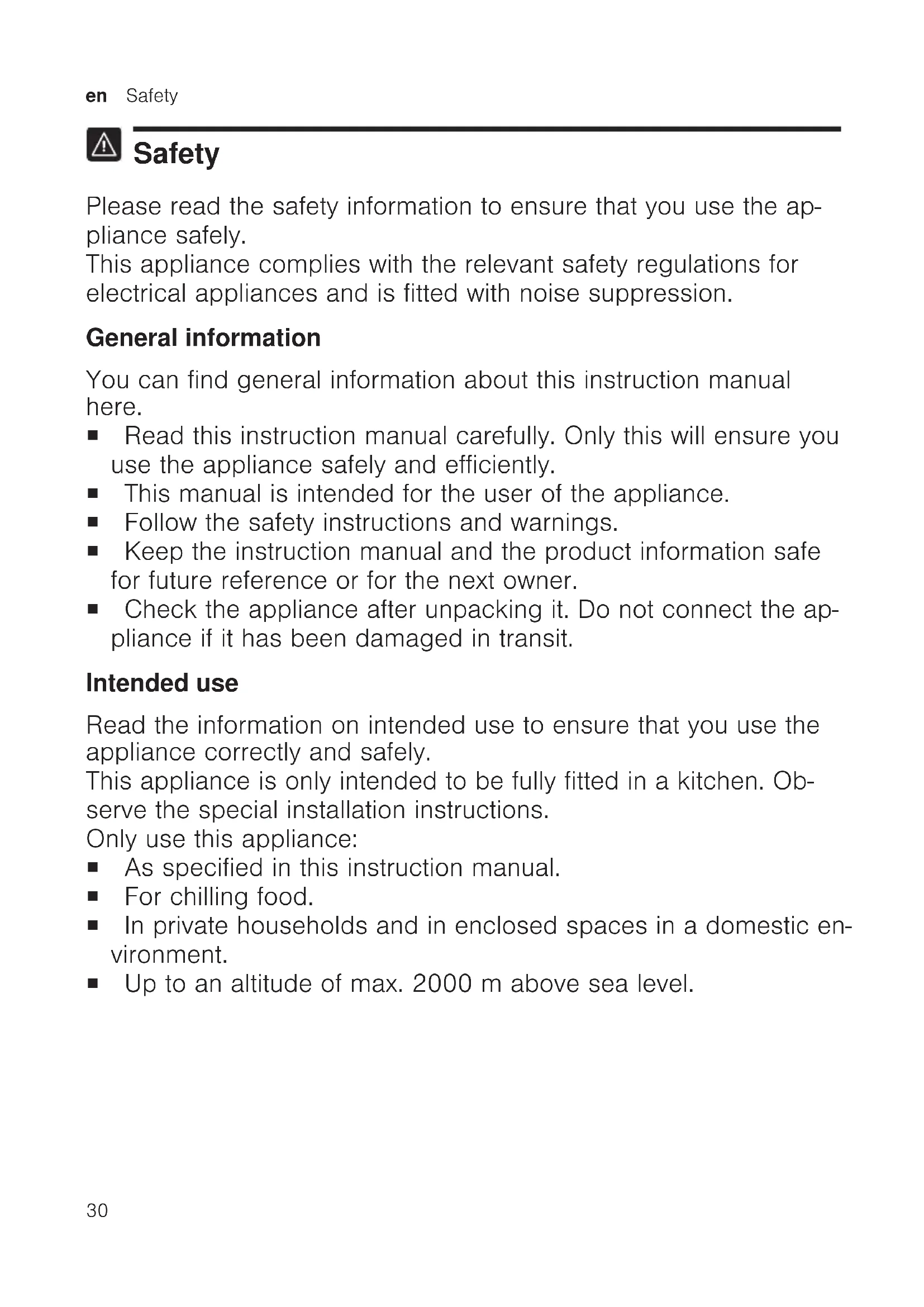
Safety Please read the safety information to ensure that you use the ap- pliance safely. This appliance complies with the relevant safety regulations for electrical appliances and is fitted with noise suppression. General information You can find general information about this instruction manual here. ¡ Read this instruction manual carefully. Only this will ensure you use the appliance safely and efficiently. ¡ This manual is intended for the user of the appliance. ¡ Follow the safety instructions and warnings. ¡ Keep the instruction manual and the product information safe for future reference or for the next owner. ¡ Check the appliance after unpacking it. Do not connect the ap- pliance if it has been damaged in transit. Intended use Read the information on intended use to ensure that you use the appliance correctly and safely. This appliance is only intended to be fully fitted in a kitchen. Ob- serve the special installation instructions. Only use this appliance: ¡ As specified in this instruction manual. ¡ For chilling food. ¡ In private households and in enclosed spaces in a domestic en- vironment. ¡ Up to an altitude of max. 2000m above sea level.Safety en
Restriction on user group Avoid risks to children and vulnerable persons. This appliance may be used by children aged 8 or over and by people who have reduced physical, sensory or mental abilities or inadequate experience and/or knowledge, provided that they are supervised or have been instructed on how to use the appliance safely and have understood the resulting dangers. Children must not play with the appliance. Cleaning and user maintenance must not be performed by chil- dren unless they are being supervised. Keep children under the age of 8 years away from the appliance and power cable. Children above the age of three years old and younger than eight years old may load and unload the the fridge-freezer. Safe transport Follow these safety instructions when transporting the appliance. WARNING‒Risk of injury! The high weight of the appliance may result in injury when lif- ted.
Do not lift the appliance on your own. Safe installation Follow these safety instructions when installing the appliance. WARNING‒Risk of electric shock! Improper installation is dangerous.
Connect and operate the appliance only in accordance with the specifications on the rating plate.
Connect the appliance to a power supply with alternating current only via a properly installed socket with earthing.
The protective conductor system of the domestic electrical installation must be properly installed.
When the appliance is installed, the mains plug of the power cord must be freely accessible. If free access is not possible, an all-pole isolating switch must be installed in the permanent electrical installation according to the installation regulations.
When installing the appliance, check that the power cable is not trapped or damaged. WARNING‒Risk of fire! ¡ It is dangerous to use an extended power cord and non-ap- proved adapters.
Do not use extension cables or multiple socket strips.
If the power cord is too short, contact Customer Service.
Only use adapters approved by the manufacturer.
Portable multiple socket strips or portable power supply units may overheat and cause a fire.
Do not position portable multiple socket strips or portable power supply units behind the appliance. Safe use Follow these safety instructions when using the appliance. WARNING‒Risk of electric shock! ¡ If the insulation of the power cord is damaged, this is danger- ous.
Never let the power cord come into contact with hot appli- ance parts or heat sources.
Never let the power cord come into contact with sharp points or edges.
Only use the appliance in enclosed spaces.
Never expose the appliance to intense heat or humidity.
Do not use steam- or high-pressure cleaners to clean the appliance.Safety en
WARNING‒Risk of suffocation! ¡ Children may put packaging material over their heads or wrap themselves up in it and suffocate.
Keep packaging material away from children.
Do not let children play with packaging material. ¡ Children may breathe in or swallow small parts, causing them to suffocate.
Keep small parts away from children.
Do not let children play with small parts. WARNING‒Risk of explosion! ¡ Electrical devices within the appliance may explode (e.g. heat- ers or electric ice makers).
Do not operate electrical devices within the appliance. ¡ Mechanical devices or other devices may damage the refri- geration circuit; flammable refrigerant may escape and ex- plode.
To accelerate the defrosting process, do not use any other mechanical devices or devices other than those recommen- ded by the manufacturer. ¡ Products which contain flammable propellants and explosive substances may explode, e.g. spray cans.
Do not store products which contain flammable propellants (e.g. spray cans) or explosive substances in the appliance. WARNING‒Risk of fire! The vapours from flammable liquids may catch fire (explo- sion).
Store high-percentage alcohol tightly closed and standing up. WARNING‒Risk of injury! ¡ Injury to the eyes caused by escaping flammable refrigerant and hazardous gases.
Do not damage the pipes of the refrigerant circuit or the in- sulation.en Safety
Do not stand or support yourself on the base, runners or doors. WARNING‒Risk of burns! Individual parts of the appliance become hot during operation.
Never touch these hot parts.
Keep children at a safe distance. CAUTION‒Risk of harm to health! To prevent food from being contaminated, you must observe the following instructions.
If the door is open for an extended period of time, this may lead to a considerable temperature increase in the compart- ments of the appliance.
Regularly clean the surfaces that may come into contact with food and accessible drain systems.
Store raw meat and fish in suitable containers in the refri- gerator so that they do not touch or drip on other food.
If the fridge/freezer is empty for an extended period of time, switch off the appliance, defrost it, clean it and leave the door open to prevent the formation of mould. Damaged appliance Follow the safety instructions if your appliance is damaged. WARNING‒Risk of electric shock! ¡ If the appliance or the power cord is damaged, this is danger- ous.
Never operate a damaged appliance.
Never operate an appliance with a cracked or fractured sur- face.
Never pull on the power cord to unplug the appliance. Al- ways unplug the appliance at the mains.
If the appliance or the power cord is damaged, immediately unplug the power cord or switch off the fuse in the fuse box.
Call Customer Service. →Page48Safety en
Repairs to the appliance should only be carried out by trained specialist staff. ¡ Improper repairs are dangerous.
Repairs to the appliance should only be carried out by trained specialist staff.
Only use genuine spare parts when repairing the appliance.
If the power cord of this appliance is damaged, it must be replaced by the manufacturer, the manufacturer's Customer Service or a similarly qualified person in order to prevent any risk. WARNING‒Risk of fire! If the tubes are damaged, flammable refrigerant and harmful gases may escape and ignite.
Keep naked flames and ignition sources away from the ap- pliance.
Unplug the appliance from the mains or switch off the cir- cuit breaker in the fuse box.
Call after-sales service. →Page48en Preventing material damage
Preventing material damage Preventing material dam- age Follow these instructions to prevent material damage to your appliance, accessories or other objects in your kitchen. ATTENTION! ¡ Contamination with oil or fat may cause plastic parts and door seals to become porous.
Keep plastic parts and door seals free of oil and grease. ¡ Using the base, runners or appli- ance doors as a seat surface or climbing surface may damage the appliance.
Do not stand or support yourself on the base, runners or doors. Environmental protection and saving energy Environmental protection and saving energy Help protect the environment by us- ing your appliance in a way that con- serves resources and by disposing of reusable materials properly. Disposing of packaging The packaging materials are environ- mentally compatible and can be re- cycled.
Sort the individual components by type and dispose of them separ- ately. Information about current disposal methods are available from your specialist dealer or local authority. Saving energy If you follow these instructions, your appliance will use less power. Selecting the installation location Follow these instructions when in- stalling your appliance. ¡ Keep the appliance out of direct sunlight. ¡ Install the appliance as far away as possible from heating ele- ments, cookers and other heat sources: – Maintain a 30mm clearance to electric or gas cookers. – Maintain a 30cm clearance to oil or solid-fuel cookers. The appliance needs to cool less frequently at low ambient temper- atures. ¡ Use a niche depth of 560mm. ¡ Do not cover or block ventilation openings. ¡ Ventilate the room daily. The air on the back wall of the ap- pliance does not warm up so in- tensely. The appliance must cool less fre- quently. Saving energy during use Follow these instructions when using your appliance. Note:The arrangement of the fittings does not affect the energy consump- tion of the appliance. ¡ Do not cover or block ventilation openings. The air on the back wall of the ap- pliance does not warm up so in- tensely.Installation and connection en
¡ Open the appliance door only briefly. ¡ Transport purchased food in a cool bag and place in the appli- ance quickly. ¡ Allow warm food and drinks to cool down before placing them in the appliance. ¡ Thaw frozen food in the refriger- ator compartment to utilise the low temperature of the food. The air in the appliance does not warm up so intensely. The appliance must cool less fre- quently. ¡ Always leave some space between the food and to the back panel. ¡ Pack the food airtight. The air can circulate and the air humidity remains constant. Installation and connection Installation and connec- tion You can find out where and how best to install your appliance here. You will also learn how to connect your appliance to the power supply. Scope of delivery After unpacking all parts, check for any transport damage and check the completeness of the delivery. If you have any complaints, contact your dealer or our after-sales service
- Page48. The delivery consists of the following: ¡ Built-in appliance ¡ Equipment and accessories
¡ Energy label ¡ Product data sheet ¡ Information on the energy con- sumption and noises Installing and connecting the appliance Requirement:The scope of delivery of the appliance is checked.
ance's installation location.
2. Install the appliance in accordance
with the enclosed installation in- structions.
3. Prepare the appliance for first use.
4. Electrically connect the appliance.
- Page38 Criteria for the installation location Follow these instructions when in- stalling your appliance. WARNING Risk of explosion! If the appliance is in a space that is too small, a leak in the refrigeration circuit may result in a flammable mix- ture of gas and air.
Only install the appliance in a space with a volume of at least
per 8g refrigerant. The volume of refrigerant is indicated on the rating plate. →Fig.
Depending on the appliance specifications
Not in all countriesen Familiarising yourself with your appliance
The weight of the appliance ex works may be up to 70kg depending on the model. The subfloor must be of sufficient sta- bility to bear the weight of the appli- ance. Permitted room temperature The permitted room temperature de- pends on the appliance's climate class. The climate class can be found on the rating plate. →Fig.
Climate class Permitted room temperat- ure SN 10°C to 32°C N 16°C to 32°C ST 16°C to 38°C T 16°C to 43°C The appliance is fully functional within the permitted room temperature. If an appliance with climate class SN is operated at colder room temperat- ures, the appliance will not be dam- aged up to a room temperature of 5°C. Niche dimensions Observe the niche dimensions if you install your appliance in the furniture recess. If this is not the case, prob- lems may occur when installing the appliance. Niche depth Install the appliance in the recom- mended niche depth of 560mm. If the niche depth is smaller, the en- ergy consumption increases slightly. The niche depth must be a minimum 550mm. Niche width An inside niche width of at least 560mm is required for the appli- ance. Preparing the appliance for the first time
1. Remove the informative material.2. Remove the protective foil and
transit bolts, e.g. remove the ad- hesive strips and carton.
3. Clean the appliance for the first
time. →Page43 Connecting the appliance to the electricity supply
1. Insert the mains plug of the appli-
ance's power cable in a socket nearby. The connection data of the appli- ance can be found on the rating plate. →Fig.
2. Check the mains plug is inserted
properly. a The appliance is now ready for use. Familiarising yourself with your appliance Familiarising yourself with your appliance Familiarise yourself with the parts of your appliance. Appliance You can find an overview of the parts of your appliance here.
Fruit and vegetable container with hu- midity control →Page39
Butter and cheese compartment
Door storage compartment for large bottles Note:Deviations between your appli- ance and the diagrams may differ with regard to their features and size. Controls The controls are used to configure all functions of your appliance and to obtain information about the operat- ing status.
switches the warning signal off.
/ sets the temperature of the refri- gerator compartment.
Displays the set temperature for the refrigerator compartment in°C.
switches Super cooling on or off.
switches the appliance on or off. Features Features Here you can see an overview of the features of your appliance and their use. The features of your appliance de- pend on the model. Shelf To vary the shelves as required, re- move the shelf and re-insert it else- where.
- "Removing the shelf", Page43 Variable shelf Use the variable shelf to the store tall items, e.g. cans or bottles, on the shelf below. You can remove the front section of the variable shelf and slide it below the rear part of the shelf.
Extendable shelf In order to achieve an improved over- view and to remove food more quickly, remove the shelf. Fruit and vegetable container with humidity control Store fresh fruit and vegetables in the fruit and vegetable container. You can adjust the humidity in the fruit and vegetable container via the humidity controller and a special seal. This allows fresh fruit and veget- ables to be stored for twice as long as with conventional storage.
The air humidity in the fruit and vegetable container can be set according to the type and amount of food to be stored: ¡ Low humidity required when primarily storing fruit or if the appli- ance is very full. ¡ Higher humidity required when primarily storing vegetables as well as when the appliance is filled with mixed items or is not very full. Condensation may form in the fruit and vegetable container depending on the food and quantity stored. Remove the condensation with a dry cloth and adjust the air humidity in the vegetable container using the hu- midity controller. To ensure that the quality and aroma are retained, store fruit and veget- ables that are sensitive to cold out- side of the appliance at temperatures of approx. 8°C to 12°C.en Basic operation
- "Removing door racks", Page43 Accessories Only use original accessories. These have been made especially for your appliance. Here you can find an over- view of your appliance's accessories and how to use them. The accessories for your appliance depend on the model. Egg tray Store eggs safely on the egg tray. Bottle holder The bottle holder prevents bottles from falling over when the appliance door is opened and closed.
Basic operation Basic operation You can find out everything you need to know about operating your appli- ance here. Switching on the appliance
a The appliance begins to cool.
2. Set the required temperature.
- Page40 Operating tips ¡ Once you have switched on the appliance, the set temperature is only reached after several hours. Do not put in any food in the appli- ance until the temperature is reached. Switching off the appliance
Press . a The appliance stops cooling. Setting the temperature After you have switched on the appli- ance, you can set the temperature. Setting the refrigerator compartment temperature
Press / repeatedly until the tem- perature display shows the re- quired temperature. The recommended temperature in the refrigerator compartment is 4°C.
- ""OK" sticker", Page42Additional functions en
Additional functions Additional functions Find out which additional functions which can be used for your appli- ance. Super cooling Super cooling cools the refrigerator compartment to make it as cold as possible. This cools food and drinks quickly through. Switch on Super cooling before pla- cing large quantities of food in the freezer compartment. Note:When Super cooling is switched on, increased noise may occur. Switching on Super cooling
Press . a lights up. Note:After approx. 15hours, the ap- pliance switches to normal operation. Switching off Super cooling
Press . a The previously set temperature is displayed. Alarm Alarm Your appliance is equipped with alarm functions. Door alarm If the appliance door is open for a longer period, the door alarm switches on. Switching off the warning signal (door alarm)
a The warning tone is switched off. Refrigerator compartment Refrigerator compartment You can keep meat, sausage, fish, dairy products, eggs, ready meals and pastries in the refrigerator com- partment. You can set the temperature in the refrigerator compartment from 2°C to 8°C. The recommended temperature in the refrigerator compartment is 4°C.
- ""OK" sticker", Page42 The refrigerator compartment can also be used to store highly perish- able foods in the short to medium term. The lower the selected temper- ature, the longer the food remains fresh. Tips for storing food in the re- frigerator compartment Follow the tips if you store food in your refrigerator compartment. ¡ To ensure that the freshness and quality of the food is retained for longer, only store fresh and un- spoiled food. ¡ In the case of ready-made products and bottled goods, do not exceed the best-before date or use-by date specified by the manu- facturer. ¡ To retain aroma, colour and fresh- ness or to prevent taste transfer and discolouration of the plastic parts, store food well wrapped or covered. ¡ Leave warm food and beverages to cool down before placing them in the refrigerator compartment.en Defrosting
Chill zones in the refrigerator compartment The air circulation in the refrigerator compartment creates different chill zones. Coldest zone The coldest zone is between the ar- row stamped on the side and the shelf underneath. Tip:Store perishable food (e.g. fish, sausage, meat) in the coldest zone. Warmest zone The warmest zone is at the very top of the door and in the lower veget- able container. Tip:Store food that does not spoil easily in the warmest zone, e.g. hard cheese and butter. Cheese can then continue to release its aroma and the butter will still be easy to spread. "OK" sticker The "OK" sticker lets you check whether the refrigerator compartment reaches the safe temperature ranges of +4°C or colder recommended for food. The "OK" sticker is not included with all models. If the sticker does not indicate "OK", gradually reduce the temperature.
- "Setting the refrigerator compart- ment temperature", Page40 Once the appliance is switched on, it may take up to 12hours until the set temperature is reached. Correct setting Defrosting Defrosting Observe the information when you want to defrost your appliance. Defrosting in the refrigerator compartment When the appliance is operating, condensation droplets or frost form on the rear panel of the refrigerator compartment due to functional reas- ons. The back panel in the refriger- ator compartment defrosts automatic- ally. Condensation or frost run through the condensation channel into the drain- age hole to the evaporation pan and do not have to be wiped away. To ensure that the condensation can drain and odours do not form, ob- serve the following information:
- "Cleaning the condensation chan- nel and drainage hole", Page43. Cleaning and servicing Cleaning and servicing To keep your appliance working effi- ciently for a long time, it is important to clean and maintain it carefully. Preparing the appliance for cleaning Find out how to prepare your appli- ance for cleaning.
1. Switch off the appliance.
2. Disconnect the appliance from the
power supply. Unplug the appliance from the mains or switch off the circuit breaker in the fuse box.
3. Take out all of the food and store it
in a cool location.Cleaning and servicing en
Place ice packs (if available) onto the food.
4. If there is a layer of hoarfrost, allow
5. Remove all fittings from the appli-
ance. →Page43 Cleaning the appliance Clean the appliance as specified to ensure that it is not damaged by in- correct cleaning or unsuitable clean- ing products. WARNING Risk of electric shock! ¡ An ingress of moisture can cause an electric shock.
Do not use steam- or high-pres- sure cleaners to clean the appli- ance. ¡ Liquid in the lighting can be dan- gerous.
The rinsing water must not run into the light. ATTENTION! ¡ Unsuitable cleaning products may damage the surfaces of the appli- ance.
Do not use hard scouring pads or cleaning sponges.
Do not use harsh or abrasive detergents.
Do not use cleaning products with a high alcohol content. ¡ If you clean fittings and accessor- ies in the dishwasher, this may cause them to become deformed or discolour.
Never clean shelves or contain- ers in the dishwasher.
1. Prepare the appliance for cleaning.
2. Clean the appliance, the fittings
and the door seals clean with a dish cloth, lukewarm water and a little pH-neutral washing-up liquid.
3. Dry thoroughly with a soft, dry
4. Insert the fittings.
5. Electrically connect the appliance.
6. Switch on the appliance.
7. Putting the food into the appliance.
Cleaning the condensation channel and drainage hole Regularly clean the condensation channel and drainage hole to ensure that the condensation can drain.
Carefully clean the condensation channel and the drainage hole, e.g. using a moistened cotton bud.
Removing the fittings If you want to clean the fittings thor- oughly, remove these from your ap- pliance. Removing the shelf
Pull out and remove the shelf. Removing the extendable shelf
1. Pull out the extendable shelf until
the locking catch is released.
2. Lower the shelf and swing it out to
the side. Removing door racks
Lift the door rack upwards and re- move it.
- Fig. 8en Cleaning and servicing
Removing the fruit and vegetable container
1. Pull the container out all the way.
2. Press the latch on the pull-out rail
downwards and remove the con- tainer .
Removing the shelf above the vegetable container
1. Pull out the fruit and vegetable
2. Remove the shelf and rotate .
3. Press the fastenings for the lower
glass plate outwards.
4. Lift the glass plate at the front
and pull it out at the rear .
- Fig. 12Troubleshooting en
Troubleshooting Troubleshooting You can rectify minor faults on your appliance yourself. Read the troubleshoot- ing information before contacting after-sales service. This will avoid unneces- sary costs. WARNING Risk of electric shock! Improper repairs are dangerous.
Repairs to the appliance should only be carried out by trained specialist staff.
Only use genuine spare parts when repairing the appliance.
If the power cord of this appliance is damaged, it must be replaced by the manufacturer, the manufacturer's Customer Service or a similarly qualified person in order to prevent any risk. Malfunctions Errors Cause Troubleshooting The appliance is not work- ing. No displays light up. The mains plug has not been inserted properly.
Connect the mains plug. Fuse has been tripped.
Check the fuses. The power has failed. 1. Check whether the power is on.
2. Place ice packs (if available) on the
top shelf. The appliance is not cooling, the displays and lighting light up. Showroom mode is switched on.
Carry out the appliance self-test.
- Page48 a Once the appliance self-test has ended, the appliance switches to normal operation. The LED lamp is defective. Different causes are pos- sible.
Call the after-sales service.
- "Customer Service", Page48 The refrigeration unit is switching on more fre- quently and for longer. The appliance door was opened frequently.
Do not open appliance door unne- cessarily. The ventilation openings are covered up.
Remove any obstructions from in front of the ventilation openings. The base of the refrigerator compartment is wet. The condensation channel or drainage hole are blocked.
Clean the condensation channel and the drainage hole. →Page43en Troubleshooting
Information on display panel Errors Cause Troubleshooting Message showing "D" or "E" appears in the display. The electronics have detec- ted a fault.
Call the after-sales service.
- "Customer Service", Page48 A warning signal sounds and lights up. Different causes are pos- sible.
Press . a The alarm is switched off. The appliance door is open.
Close the appliance door. Temperature problem Errors Cause Troubleshooting The temperature differs greatly from the setting. Different causes are pos- sible.
1. Switch off the appliance.
2. Switch the appliance back on after
fiveminutes. →Page40 ‒ If the temperature is too warm, check the temperature again after a couple of hours. ‒ If the temperature is too cold, check the temperature again on the following day. Noise Errors Cause Troubleshooting Appliance has a humming sound. Not a fault. A motor is run- ning, e.g. refrigerating unit, fan. No action required. The appliance bubbles, buzzes or gargles. Not a fault. Refrigerant flows through the pipes. No action required. The appliance clicks. Not a fault. Motor, switches or solenoid valves are switching on or off. No action required. The appliance makes noises. The appliance is not level.
Align the appliance using a spirit level. If required, place something underneath it. Fittings wobble or stick.
Check the removable fittings and, if required, replace these. Bottles or containers are touching.
Move the bottles or containers away from each other.Troubleshooting en
Odours Errors Cause Troubleshooting The appliance has an un- pleasant smell. Different causes are pos- sible.
1. Prepare the appliance for cleaning.
2. Clean the appliance. →Page43
3. Clean all food packaging.
4. To prevent odours from forming,
store strong smelling food in air- tight containers.
5. After 24hours, check whether
odours are still forming.en Storage and disposal
Conducting an appliance self- test
1. Switch off the appliance.
2. Switch the appliance back on after
approx. fiveminutes. →Page40 a The appliance self-test starts. a While the appliance self-test is run- ning, a long audible signal sounds. a If, at the end of the appliance self- test, two audible signals sound and the temperature display indic- ates the set temperature, your ap- pliance is OK. The appliance then switches to normal operation. a If, at the end of the appliance self- test, five audible signals sound and flashes for 10seconds, inform the after-sales service. Storage and disposal Storage and disposal You can find out here how to prepare your appliance for storage. You will also find out how to dispose of old appliances. Switching off the appliance
1. Switch off the appliance.
2. Disconnect the appliance from the
power supply. Unplug the appliance from the mains or switch off the circuit breaker in the fuse box.
Clean the appliance. →Page43
5. Leave the appliance door open.
Disposing of old appliance Valuable raw materials can be re- claimed by recycling. WARNING Risk of harm to health! Children can lock themselves in the appliance, thereby putting their lives at risk.
Leave shelves and containers in- side the appliance to prevent chil- dren from climbing in.
Keep children away from the re- dundant appliance.
1. Unplug the appliance from the
2. Cut through the power cord.
3. Dispose of the appliance in an en-
vironmentally friendly manner. This appliance is labelled in ac- cordance with European Direct- ive 2012/19/EU concerning used electrical and electronic appliances (waste electrical and electronic equipment - WEEE). The guideline determines the framework for the return and re- cycling of used appliances as applicable throughout the EU. Customer Service Customer Service If you have any queries, are unable to rectify faults on the appliance your- self or if your appliance needs to be repaired, contact Customer Service. You can solve many problems your- self by consulting the information on troubleshooting in these instructions or on our website. If this is not the case, contact our Customer Service.Technical data en
We will always find an appropriate solution and try to avoid unnecessary visits being made by a Customer Ser- vice technician. With any warranty claims we will make sure that your appliance is re- paired by trained Customer Service technicians using genuine spare parts, including after the manufac- turer's warranty has expired. For safety reasons repairs to the ap- pliance should only be carried out by trained specialist staff. The warranty claim becomes void if repairs or in- terventions have been carried out by persons not authorised by us for that purpose or if our appliances have been fitted with spare, supplementary or accessory parts that were not genuine parts and then resulted in a defect. Function-relevant genuine spare parts according to the corresponding Eco- design Order can be obtained from Customer Service for a period of at least 10 years from the date on which your appliance was placed on the market within the European Eco- nomic Area. Note:Under the terms of the manu- facturer's warranty applicable to the location the use of Customer Service is free of charge. The minimum dura- tion of the warranty (manufacturer's warranty for private consumers) in the European Economic Area is 2 years (except for Denmark and Sweden, where it is 1 year) accord- ing to the terms of warranty applic- able to the location. The terms of warranty do not affect other rights or claims held by yourself under local legislation. Detailed information about the war- ranty period and terms of warranty in your country are available from Cus- tomer Service, your dealer or our website. When contacting Customer Service, you will need the product number (E- Nr.) and the production number (FD) of your appliance. The contact details for Customer Ser- vice can be found in the enclosed Customer Service directory or on our website. Product number (E-Nr.) and production number (FD) The product number (E-Nr. ) and the production number (FD) can be found on the rating plate of the appli- ance.
Make a note of your appliance's de- tails and the Customer Service tele- phone number to find them again quickly. Technical data Technical data Refrigerant, cubic capacity and fur- ther technical specifications can be found on the rating plate.
More information about your model can be found online at https:// www.bsh-group.com/energylabel
This web address is linked to the offi- cial EU EPREL product database. At the time of printing its web address had not yet been published. Please then follow the instructions on searching for models. The model identifier is made up of the charac- ters before the slash in the product number (E-Nr. ) on the rating plate.
Only applies to countries in the European Economic Areaen Technical data
Alternatively you can also find the model identifier in the first line of the EU energy label.fr
- Expert tips & tricks for your appliance
- Warranty extension options
- Discounts for accessories & spare-parts
- Digital manual and all appliance data at hand
- Easy access to Bosch Home Appliances Service Free and easy registration – also on mobile phones: www.bosch-home.com/welcome Looking for help? You'll find it here. Expert advice for your Bosch home appliances, help with problems or a repair from Bosch experts. Find out everything about the many ways Bosch can support you: www.bosch-home.com/service Contact data of all countries are listed in the attached service direc- tory. Robert Bosch Hausgeräte GmbH Carl-Wery-Straße 34 81739 München GERMANY www.bosch-home.com *9001482943* 9001482943 (991002) de, en, fr, it, nl