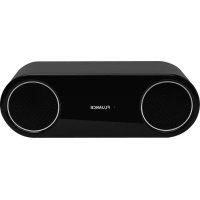
Fi30 - Loudspeaker Fluance - Free user manual and instructions
Find the device manual for free Fi30 Fluance in PDF.


| Product Type | Wireless Bluetooth Speaker |
| Brand | Fluance |
| Model | Fi30 |
| Dimensions (L x W x H) | 420 x 140 x 140 mm (16.5 x 5.5 x 5.5 in) |
| Weight | 3.8 kg (8.3 lb) |
| Power Supply | Mains (AC power cord) |
| Speaker Type | 2 x 7.5 cm (3 in) glass fiber woofers with butyl rubber surround |
| Frequency Response | 65 Hz - 20 kHz |
| Amplifier Power (RMS) | 6 W per channel (2 channels) |
| Enclosure | Internally reinforced MDF, rear-ported bass reflex design |
| Wireless Connectivity | Bluetooth with aptX audio technology |
| Bluetooth Range | Up to 10 m (33 ft) line of sight |
| Inputs | 3.5 mm auxiliary audio input, USB 2.1 A charging input |
| Main Functions | Wireless streaming, multi-pairing (up to 8 profiles), USB charging for mobile devices, playback via auxiliary cable |
| Care and Cleaning | Clean only with a dry cloth |
| Safety Instructions | Do not expose to water, rain, or humidity; do not block ventilation openings; do not place near heat sources; use only specified accessories |
| Warranty | 2 years parts and labor (active speakers) |
| General Information | Brand Fluance, model Fi30, speaker category |
Frequently Asked Questions - Fi30 Fluance
User questions about Fi30 Fluance
0 question about this device. Answer the ones you know or ask your own.
Ask a new question about this device
Download the instructions for your Loudspeaker in PDF format for free! Find your manual Fi30 - Fluance and take your electronic device back in hand. On this page are published all the documents necessary for the use of your device. Fi30 by Fluance.
USER MANUAL Fi30 Fluance
natural_image
Simple line drawing of a two-port electronic device with 'FLUANCE' text in the center (no other symbols or text)Fi30 High Performance Wireless Bluetooth Wood Speaker System Fi30 Système haut-parleur sans fil Bluetooth performant en bois
FCC STATEMENT

This device complies with part 15 of the FCC rules. Operation is subject to the following two conditions:
(1) this device may not cause harmful interference, and
(2) this device must accept any interference received, including interference that may cause undesired operation
WARNING:
This equipment has been tested and is found to comply with the limits for a Class B digital device, pursuant to Part 15 of the FCC Rules. These limits are designed to provide reasonable protection against harmful interference in a residential installation. This equipment generates, uses and can radiate radio frequency energy and, if not installed and used in accordance with the instructions, may cause harmful interference to radio communications. However, there is no guarantee that interference will not occur in a particular installation. If this equipment does cause harmful interference to radio or television reception, which can be determined by turning the equipment off and on, the user is encouraged to try to correct the interference by one or more of the following measures:
■ Reorient or relocate the receiving antenna
- Increase the separation between the equipment and receiver
- Connect the equipment into an outlet on a circuit different from that to which the receiver is connected
- Consult the dealer or an experienced radio/TV technician for help
WARNING:
Changes or modifications not expressly approved by the party responsible for compliance with the FCC Rules could void the user's authority to operate this equipment.
IC STATEMENT / CAN ICES-3 (B)/NMB-3(B)
Industry Canada Statement
Operation is subject to the following two conditions:
(1) this device may not cause interference, and
(2) this device must accept any interference, including interference that may cause undesired operation of the device.
SAFETY INFORMATION
- Read all instructions.
- Keep these instructions.
- Heed all warnings.
- Follow all instructions.
- Do not use this apparatus near water.
- Clean only with a dry cloth.
- Do not block any ventilation openings. Install in accordance with the manufacturer's instructions.
- Do not install near any heat sources such as radiators, heat registers, stoves, or other apparatus (including amplifiers) that produce heat.
- Do not defeat the safety purpose of the polarized or grounding-type plug. A polarized plug has two blades with one wider than the other. A grounding type plug has two blades and a third grounding prong. The wide blade or the third prong are provided for your safety. If the provided plug does not fit into your outlet, consult an electrician for replacement of the obsolete outlet.
- Protect the power cord from being walked on or pinched particularly at plugs, convenience receptacles, and the point where they exit from the apparatus.
- Only use attachments/accessories specified by the manufacturer.
- Unplug this apparatus during lightning storms or when unused for long periods of time.
- Refer all servicing to qualified service personnel. Servicing is required when the apparatus has been damaged in any way, such as power-supply cord or plug is damaged. Liquid has been spilled or objects have fallen into the apparatus, the apparatus has been exposed to rain or moisture, does not operate normally, or has been dropped.
- Apparatus shall not be exposed to dripping or splashing, and that no objects filled with liquids, such as vases, shall be placed on the apparatus.
- The battery shall not be exposed to excessive heat such as sunshine, fire or the like.
- The direct plug-in adapter is used as disconnect device, the disconnect device shall remain readily operable.
- WARNING: To reduce the risk of fire or electric shock, do not expose this apparatus to rain or moisture.
This device complies with part 15 of the FCC Rules. Operation is subject to the following two conditions:
(1) This device may not cause harmful interference, and
(2) This device must accept any interference received, including interference that may cause undesired operation.
This Class [B] apparatus complies with Canadian ICES-003.
natural_image
Simple line drawing of a trash bin with no text or symbolsThis marking indicates that this product should not be disposed with other household wastes throughout North America. To prevent possible harm to the environment or human health from uncontrolled waste disposal, recycle it responsibly to promote the sustainable reuse of material resources. To return your used device, please use the return and collection systems or contact the retailer where the product was purchased. They can take this product for environmental safe recycling.
TABLE OF CONTENTS
FCC Statement....2
IC Statement 2
Safety Information....3
What's Included....4
Features....4
Buttons and Connections....5
Setup 6
For Bluetooth® enabled Smartphones 6
Using a 3.5mm Auxiliary Audio Cable 6
Operation....7
Pairing multiple devices 7
Reconnecting your device 7
Out of Range or Lost Signal 7
USB Input 8
Reset Pairing....8
Troubleshooting....9
Specifications....9
FLUANCE Warranty....10
■ High performance wireless Bluetooth wood speaker
- 6 ft 3.5mm Auxiliary Audio Cable
- Quick Start Guide
■ 2 Year Parts and Labor Warranty
- Lifetime Customer Support
FEATURES
■ Room filling, high fidelity sound.
- Wirelessly stream music from any Bluetooth device
■ Audio grade MDF wood cabinetry
- Powered by aptX enhanced audio technology
natural_image
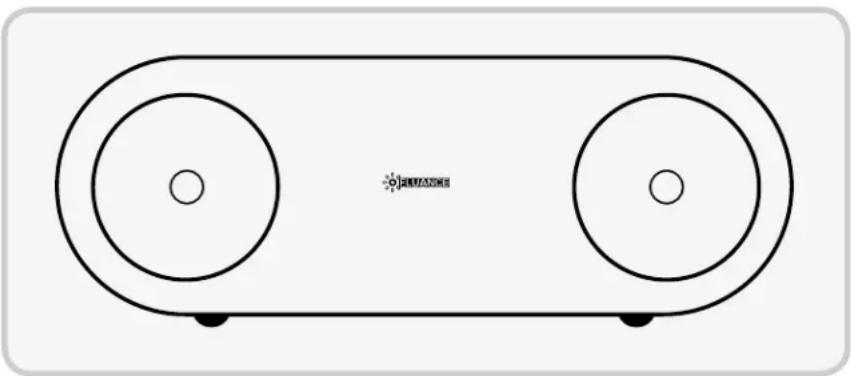
Line drawing of a two-tiered electronic device with circular tops and base (no text or symbols)DISCLAIMERS
Maximum line of sight for Bluetooth transmission range is 33 feet. Obstacles may decrease transmission distance.
Certain Bluetooth features, including those listed, may not be supported by all compatible Bluetooth-enabled devices, and/or the functionality of such features may be limited in certain devices, or by certain wireless carriers.
We reserve the right to change models, configuration, or specifications without notice or liability. Product may not be exactly as shown.
©2013 FLUANCE®. FLUANCE®, the FLUANCE® logo, and any other FLUANCE® marks may be registered. All other trademarks are property of their respective owners.
BUTTONS AND CONNECTIONS
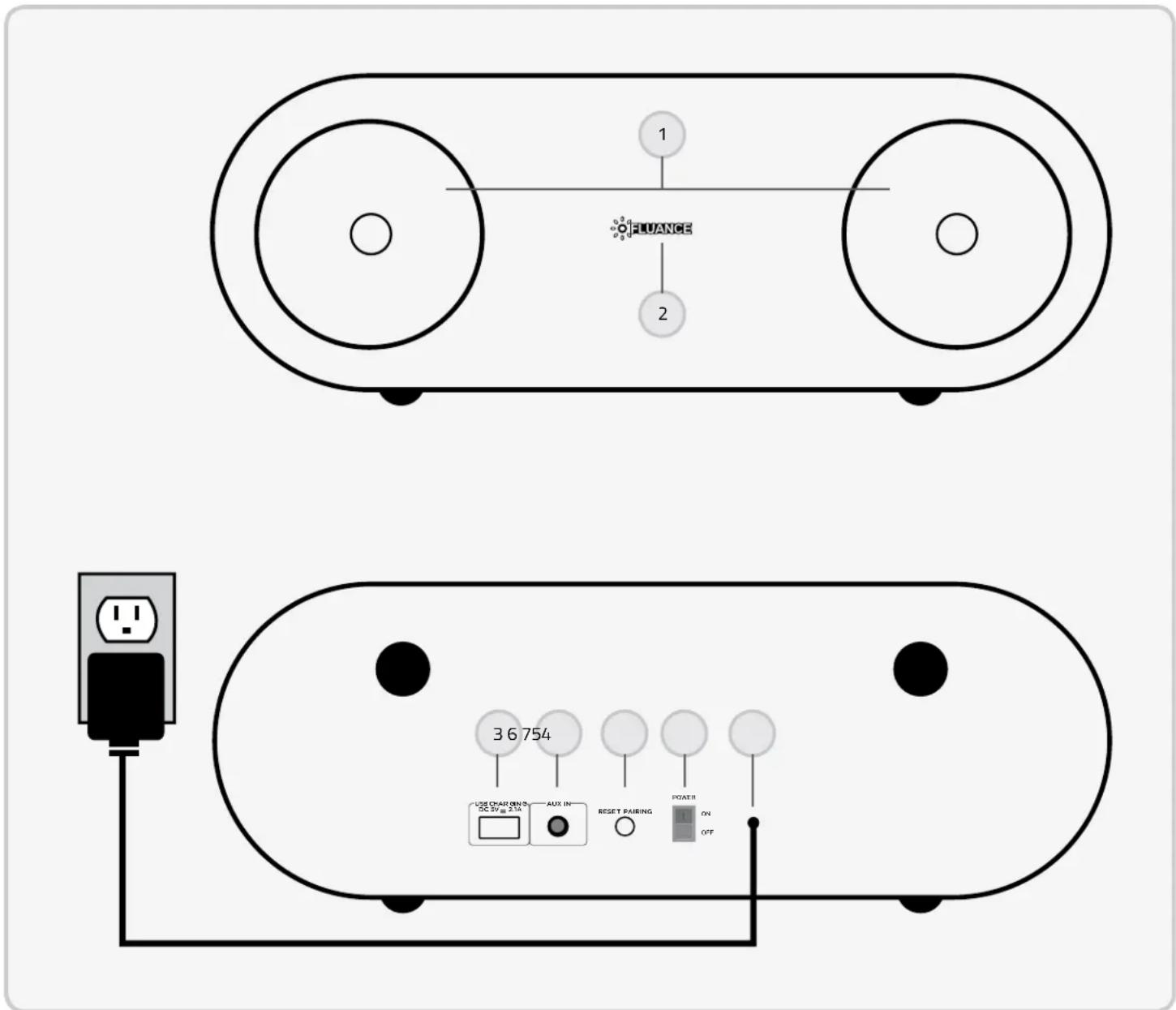
- SPEAKERS
- POWER LED
- USB CHARGING
-
AUXILIARY AUDIO INPUT
-
RESET PAIRING BUTTON
- POWER ON/OFF SWITCH
- AC POWER CORD
SETUP
1
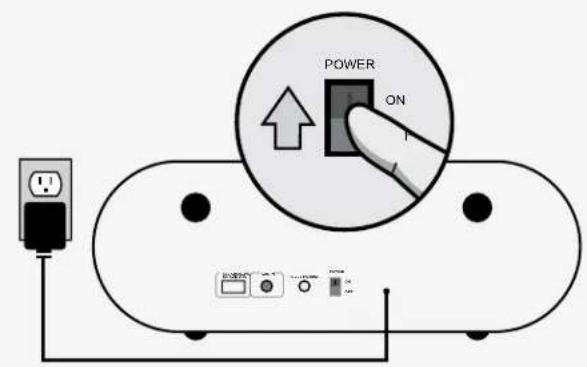

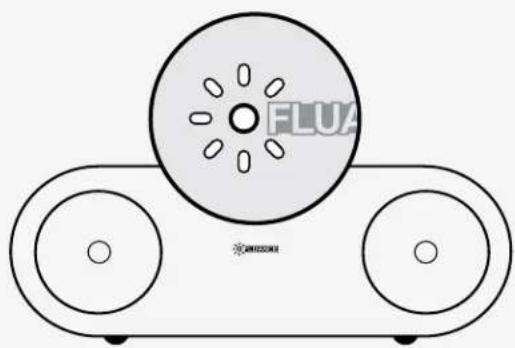
natural_image
Diagram of a mechanical device with two circular components and a central disc labeled 'FLUX' (no text or symbols on the diagram itself)2a
Bluetooth®
flowchart
graph TD
    A["Device Icon with gear, Bluetooth, and checkmark"] --> B["FLUANCE Fi30 Sensor"]
    C["BLOOP!"] --> D["Communication System"]
2b
AUX
Optimal Audio Performance
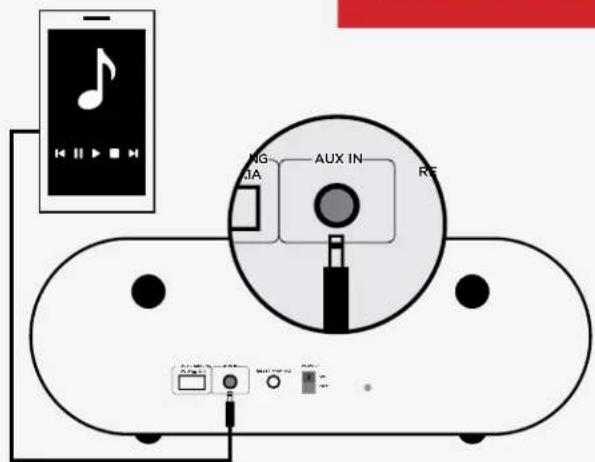
*Bluetooth is disabled when 3.5mm Auxiliary Audio Cable is plugged into AUX IN input
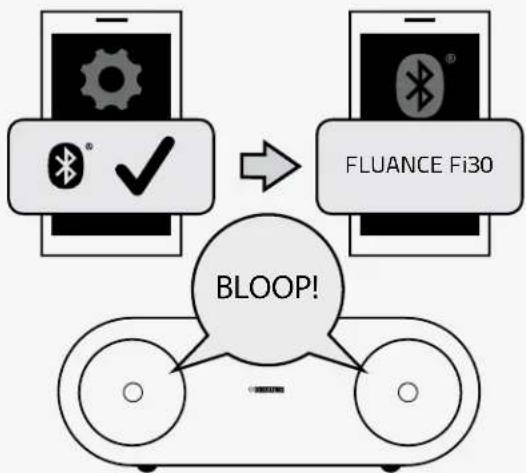
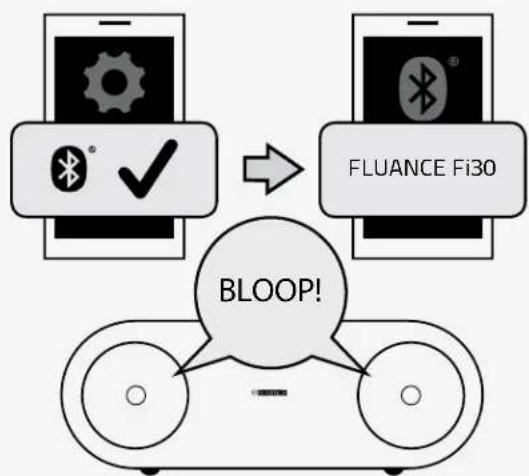
For Bluetooth® enabled Smartphones
- Go to SETTINGS → turn on Bluetooth.
- A list of Bluetooth devices will appear.
- Select "Fluance Fi30".
- Click YES if asked to connect.
- You will hear "BLOOP!" when connected and the Power LED will glow brightly.
- You can now control your music using your Smartphone. The "Bluetooth Active" icon will appear on the main screen when connected.
TO DISCONNECT
- Go to SETTINGS 📂en to your Bluetooth settings.
- A list of Bluetooth devices will appear.
- Select "Fluance Fi30".
- Select YES if asked to disconnect.
- You will hear "BLOOP!" when disconnected.
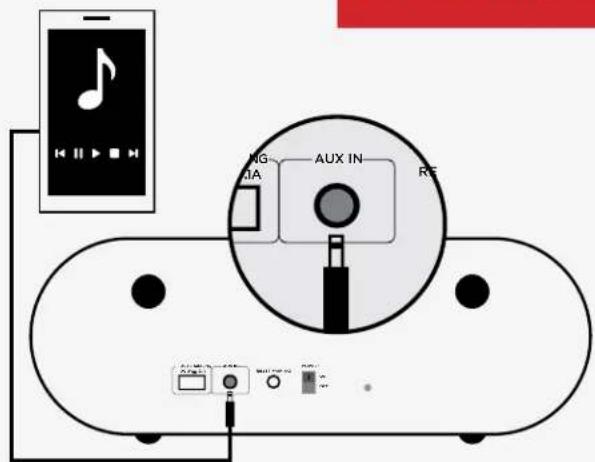
Using a 3.5mm Auxiliary Audio Cable
- Connect one end of the 3.5mm Auxiliary Audio Cable to the AUX IN input on the Bluetooth Music Receiver.
- Connect the other end of the 3.5mm Auxiliary Audio Cable to the Headset Input on your Smartphone/Audio Device.
- The Power LED will glow brightly.
- You can now control your music using your Smartphone/Audio Device.
The Power LED glows dimly when not
connected to an audio device.
SETUP
3
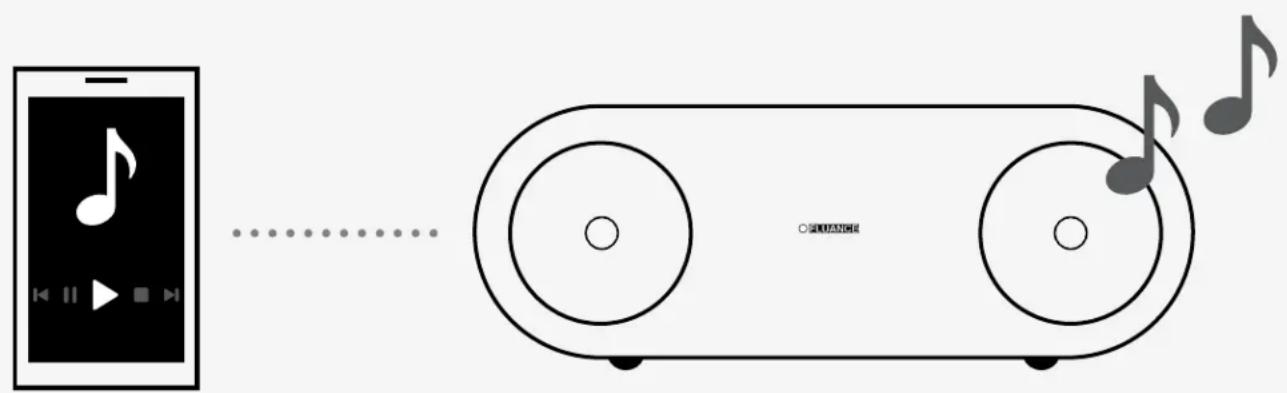
How you access your Bluetooth Settings may vary from one manufacturer to another.
Maximum line of sight for Bluetooth transmission range is 33 feet. Obstacles may decrease transmission distance.
OPERATION
Pairing multiple devices
Although the Fluance Fi30 can only play music from one device at a time, it can memorize up to 8 device profiles.
Switching from one device to another:
- Access the SETTINGS and turn Bluetooth function of the device OFF.
- The Fluance Fi30 can now be connected to a different device.
- Follow the "For Bluetooth® enabled Smartphones" instructions to pair a new device.
Reconnecting your device
If you move out of range or turn off the Bluetooth feature on your device, the Fluance Fi30 will disconnect from your device. To reconnect, simply turn the Bluetooth feature back on or move within 33 feet (line of sight) of the Fluance Fi30.
Unit will auto-pair if it was the last device connected. If not, please refer to the pairing instructions.
Out of Range or Lost Signal
If the music device is out of range (beyond 33 feet) of the Fluance Fi30 or if there is something blocking the Bluetooth signal, the Power LED will glow dimly to indicate that the
Bluetooth connection with the music device has been lost. To avoid a lost connection:
- Move the music device back into range (within 33 feet), and/or make sure there's a clear line of sight and that there are no obstructions between the Fluance Fi30 and the device.
- Within 15 seconds, the connection will automatically be reestablished and the LED light will turn on.
- If the connection is lost for more than 15 seconds, the connection will need to be reestablished. Follow the instructions in the "Reconnecting your device" section.
OPERATION
USB CHARGING
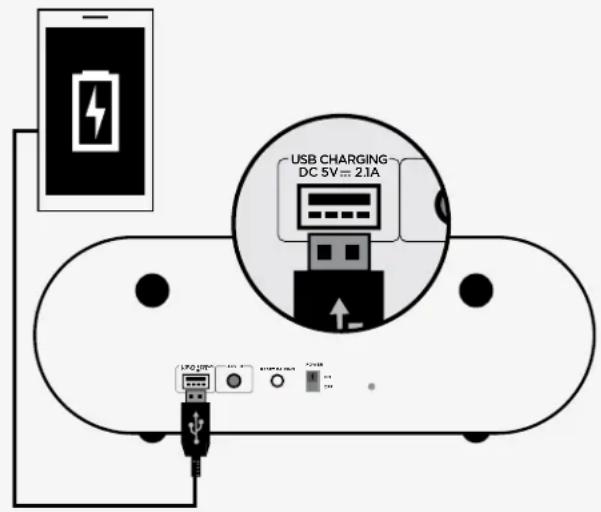
USB Input
The USB input allows for quick and easy charging of your smartphone or tablet while still enjoying your music.
- Connect one end of the USB Cable to the 2.1 A USB Charging Input on the Fluance Fi30.
- Connect the other end of the USB Cable to your Smartphone/Audio Device.
- You can continue to enjoy your music using your Smartphone/Audio Device while it is charging.
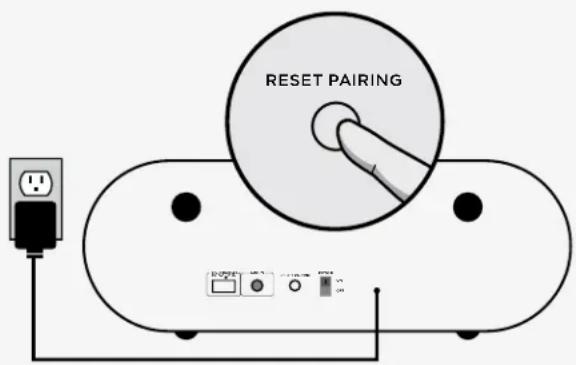
Reset Pairing
The Reset Pairing button is used to unpair another paired device, allowing you to connect a new device to the Fluance Fi30.
- Press the Reset Pairing button on the Fluance Fi30 to break any existing Bluetooth connections.
- The unit will search for a new device for 30 seconds. After 30 seconds, if no new connection is made, it will autopair back to the previous device.
- You can also unpair the connection directly from your Smartphone by disabling the Bluetooth connection.
TROUBLESHOOTING
| Issue Device Fluance Fi30 | ||
| No music from Fluance Fi30 speakers using Bluetooth | Confirm that your Smartphone/ Audio Device is powered ONConfirm that the Bluetooth function is ONConfirm you are connected via Bluetooth with the Fluance Fi30Confirm you are playing music from your Smartphone/Audio DeviceConfirm that the volume is set to a comfortable listening levelConfirm you are within range of the Fluance Fi30Confirm that the Auxiliary Audio Cable is NOT connected to the Headset Input of your device | Confirm that the Fluance Fi30 is powered ONConfirm you are within range of the Smartphone/Audio DeviceConfirm that the Auxiliary Audio Cable is NOT connected to the AUX IN input of the Fluance Fi30 |
| No music from Fluance Fi30 speakers using Auxiliary Audio Cable | Confirm that your Smartphone/ Audio Device is powered ONConfirm that the Auxiliary Audio Cable is correctly and firmly connected to the Headset Input of your deviceConfirm you are playing music from your Smartphone/Audio DeviceConfirm that the volume is set to a comfortable listening level | Confirm that the Fluance Fi30 is powered ONConfirm that the Auxiliary Audio Cable is correctly and firmly connected to the AUX IN input of the Fluance Fi30 |
SPECIFICATIONS
| System Type Full Range 2 D | Driver Bluetooth Music System with Integrated Amplifier |
| Woofer Dual 3" Woven Fiberglass Drivers with Butyl Rubber Surrounds | |
| Input 3.5mm Auxiliary Audio Input, 2.1 A USB Charging Input | |
| Frequency Response 65Hz - 20KHz | |
| Amplifier Power (RMS) 6 Watts Continuous Average Output (x 2 channels) | |
| Enclosure Tuned Rear Port Bass Reflex Design | |
| Cabinet Precision Crafted MDF Internally Braced | |
| Dimensions 16.5 x 5.5 x 5.5 in (420 x 140 x 140 mm) | |
| Weight 8.3 lbs (3.8kg) | |
| Specifications are subject to change without notice. Measurements and weights may vary slightly. | |
FLUANCE® WARRANTY
Thank you for choosing FLUANCE® Speaker Products!
FLUANCE ^® gives the following warranty to the original customer of each new FLUANCE ^® product purchased from a dealer authorized by FLUANCE ^® . FLUANCE ^® warrants that each new product, under normal use, is free from defects, subject to the terms and conditions set forth. If a defect should occur within the warranty period, repairs will be made free of charge for parts and labor when such defects are determined by us to be attributable to faulty materials or workmanship at time of manufacture.
WARRANTY PERIOD: The FLUANCE® products listed below are warranted for parts and labor for the stated period from the date of original purchase and are subject to the terms and conditions of the warranty.
HOME AUDIO PASSIVE SPEAKERS: LIFETIME WARRANTY
ACTIVE/POWERED SPEAKERS: 2 YEAR WARRANTY
WARRANTY EXCLUSIONS: Products purchased from a dealer not authorized by FLUANCE®. Products with the serial number defaced, altered or missing. Defects resulting from disaster, accident, abuse, misuse, lightning, power surges, neglect, unauthorized modification or water damage. Defects or damage as a result of repairs performed by a person or party not authorized by FLUANCE®. Defects or damage occurring during shipping (claims should be made with the shipping company).
To Obtain Warranty Service: Should your FLUANCE® product need warranty service, please contact your FLUANCE® Authorized Dealer and send your product, fully insured and freight prepaid to the nearest FLUANCE® authorized service center. Before sending to FLUANCE®, you will be required to get a Return Authorization Number from your dealer. Products shipped without a valid Return Authorization Number will be refused. To avoid possible shipping damage, make sure the product is properly packaged and well protected. Include a copy of your original bill of sale (including date of purchase and invoice number), serial number, your name, email address, home and/or work telephone number(s), a complete return address and a detailed description of the faults. Products repaired within warranty will be returned freight prepaid. When applying for warranty repairs, you must present the original copy of your bill of sale.
TO OBTAIN THE NAME AND ADDRESS OF THE NEAREST AUTHORIZED FLUANCE® SERVICE CENTRE OR FOR MORE INFORMATION ON THIS WARRANTY
- Contact FLUANCE® Support by Email: sales@fluance.com
- Visit www.FLUANCE.com
Mail your inquiry to: FLUANCE Customer Service, 4080 Montrose Road, Niagara Falls, ON L2H 1J9 - Call toll free 1.888.61.SOUND (1.888.617.6863)
FLUANCE® is a registered trademark of Circus World Displays Limited
01.2014
natural_image
Simple line drawing of a two-port electronic device with 'FLUANCE' text in the center (no other symbols or text)Fi30 Système haut-parleur sans fil Bluetooth performant en bois Fi30 High Performance Wireless Bluetooth Wood Speaker System
DÉCLARATION DE LA FCC

natural_image
Simple line drawing of a trash bin with no text or symbolsnatural_image
Line drawing of a two-tiered analog device with circular wheels and a small sun icon (no text or symbols)AVIS DE NON-RESPONSABILITÉ
natural_image
Diagram of a CD or DVD drive system with two circular wheels and a central disc labeled 'FLUX' (no text beyond label)2a
Bluetooth ^MD
flowchart
graph TD
    A["Device 1: Gear icon"] --> B["Device 2: Bluetooth icon"]
    B --> C["FLUANCE Fi30"]
    C --> D["BLOOP!"]
    D --> E["Device 3: Two circular wheels"]
2b
AUX
Performance audio optimale
Entrée USB

- FCC STATEMENT
- WARNING:
- IC STATEMENT / CAN ICES-3 (B)/NMB-3(B)
- SAFETY INFORMATION
- TABLE OF CONTENTS
- FEATURES
- DISCLAIMERS
- BUTTONS AND CONNECTIONS
- SETUP
- For Bluetooth® enabled Smartphones
- TO DISCONNECT
- Using a 3.5mm Auxiliary Audio Cable
- OPERATION
- Pairing multiple devices
- Reconnecting your device
- Out of Range or Lost Signal
- USB Input
- Reset Pairing
- TROUBLESHOOTING
- SPECIFICATIONS
- FLUANCE® WARRANTY
- DÉCLARATION DE LA FCC
- AVIS DE NON-RESPONSABILITÉ
- Entrée USB
Brand : Fluance
Model : Fi30
Category : Loudspeaker