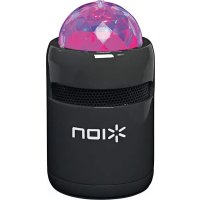
Party Starter - Speaker ION - Free user manual and instructions
Find the device manual for free Party Starter ION in PDF.



| Product type | Portable audio speaker with LED lighting |
| Brand | ION |
| Model | Party Starter |
| Power | Rechargeable lithium-ion battery via mini-USB port |
| Charging time | 3 hours |
| Connectivity | Bluetooth |
| Bluetooth range | 10 meters (estimated) |
| Power | 10 W (estimated) |
| Volume | Rotary control (on/off and volume) |
| Lighting | Built-in LED lighting switch |
| LED indicators | Power (green, orange, red) and Bluetooth (blue) |
| Bluetooth reset button | Yes |
| Included cable | Mini-USB charging cable |
| Warranty | See ionaudio.com/warranty |
| Safety | Do not expose to water or liquids; do not look directly at the dome light |
| Cleaning | Clean with a soft dry cloth |
| Use | Indoors, on a stable surface |
Frequently Asked Questions - Party Starter ION
User questions about Party Starter ION
0 question about this device. Answer the ones you know or ask your own.
Ask a new question about this device
Download the instructions for your Speaker in PDF format for free! Find your manual Party Starter - ION and take your electronic device back in hand. On this page are published all the documents necessary for the use of your device. Party Starter by ION.
USER MANUAL Party Starter ION
- Party Starter
USB Charging Cable - Quickstart Guide
- Safety & Warranty Manual
Support
For the latest information about this product (system requirements, compatibility information, etc.) and product registration, visit ionaudio.com/partystarter.
For additional product support, visit ionaudio.com/support.
For safety and warranty information. See ionaudio.com/warranty.
WARNING: DO NOT splash or immerse in water or other liquids.
Not for use in rain. Use only in dry locations.
WARNING: DO NOT look directly into the dome light.
Quick Setup
For optimal performance, place Party Starter in a location that is unobstructed by walls, furniture, etc.
- Turn up the Volume dial to power Party Starter on.
- Open Bluetooth settings on your music device (smartphone, tablet, etc.).
- In Bluetooth settings, find and connect to ION Speaker.
- Play music and adjust Party Starter's Volume dial. For best results, use it in a dark room!
*WARNING: Do not look directly into the dome light. Do not apply pressure on the dome light.
Charging Party Starter
If the party lights or LEDs appear dim, or if your music cuts out or fails to play, your battery may require recharging.
Note: Party Starter lights must be powered off in order for charging to occur.
Use the included mini-USB cable to connect Party Starter to (A) a USB power adapter connected to a power outlet or (B) your computer (powered on) for 3 hours.
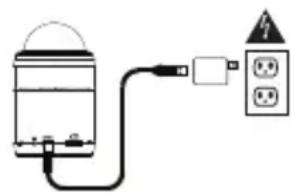
(A)
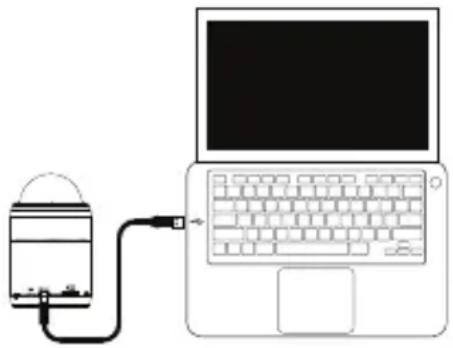
(B)
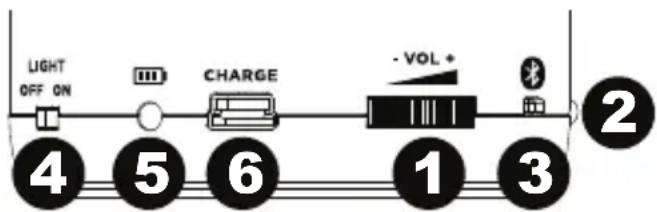
Features
- Volume / Power - Turn this dial to the right to power on Party Starter and also adjust the level of the speaker volume.
- Bluetooth Pairing Light - The Paired LED will be lit when a device is paired to Party Starter.
- Bluetooth Reset Button - Press this button to disconnect a paired Bluetooth device and pair with another Bluetooth device.
- Party Light Switch - Adjust this switch to turn the lights on/off.
- Power / Battery Light - Indicates whether Party Starter is powered on and shows the state of the battery. If the party lights or LEDs appear dim, or if your music cuts out or fails to play, your battery may require recharging. See the Party Starter LED activity box for more information on the LED states.
- Mini-USB Charging Port Connect the included mini-USB cable to connect Party Starter to a USB power adapter connected to a power outlet or to your computer.
Party Starter LED activity:
Power LED
Green LED = Party Starter is powered on
Orange LED = Battery is charging with the power on
Red LED = Battery is charging with the power off
Bluetooth LED
Solid Blue LED = Paired to a Bluetooth device
No LED = Party Starter is unpaired/in pairing mode (but powered on)
Connecting with a Bluetooth Device
- Turn on your Bluetooth device.
- Power on Party Starter and it will automatically go into pairing mode to search for Bluetooth devices.
- If your Bluetooth device is not able to pair to Party Starter, press the 'reset' button on Party Starter to break the previous Bluetooth connection and reset the Bluetooth module.
- Navigate to your Bluetooth device's setup screen, find "ION Speaker" and connect. Note: If your Bluetooth device prompts for a pairing code, enter '0000'.
- The Paired LED will light up solid when it is 'paired'. Note: If you experience trouble pairing or playing music, update your device's OS.
- To disconnect a paired Bluetooth device, press the 'reset' button on Party Starter.
- To connect to another Bluetooth device, repeat steps 3-4.
Troubleshooting
If the sound is distorted: Try lowering the volume control of your sound source. Also, try to reduce the overall volume of Party Starter.
If there is too much bass: Try adjusting the tone or EQ control on your sound source to lower the bass level. This will allow you to play the music louder before clipping (distortion) occurs.
Guía del usuario
Introduccion
Assistance technique
Groene LED = Party Starter is ingeschakeld
Technical Specifications
Power: 3.7v/500mAh battery (charges via mini-USB)
Battery Life: 1.5 hours with lights/3 hours with just music
Recharge time: 3 hours
Dimensions: 2.48" (diameter), 4.25" (height); 63 mm (diameter), 108 mm (height)
Weight: .41 lbs; .19 kg
Specifications are subject to change without notice.
Trademarks and Licenses
ION Audio is a trademark of inMusic Brands, Inc., registered in the U.S. and other countries.
The Bluetooth word mark and logos are owned by the Bluetooth SIG, Inc. and any use of such marks by ION Audio is under license.
All other product or company names are trademarks or registered trademarks of their respective owners.
ionaudio.com
Manual Version 1.0
Brand : ION
Model : Party Starter
Category : Speaker