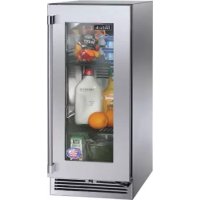
HP15RO33R - Refrigerator Perlick - Free user manual and instructions
Find the device manual for free HP15RO33R Perlick in PDF.


| Product Type | 15" Built-in Refrigerator (Signature Series) |
| Brand | Perlick |
| Model | HP15RO33R |
| Power Supply | 115 V / 60 Hz (AC) |
| Temperature Range (Refrigerator) | 33 °F to 42 °F (digital adjustment) |
| Temperature Control | Digital with LED display, SET button, arrows, ON/OFF and defrost |
| Interior Lighting | LED, turns on when door opens, built-in manual switch |
| Exterior Material | Commercial grade stainless steel |
| Removable Front Grille | Yes, for access to condenser and main switch |
| Main Switch | Yes, located behind front grille |
| Storage Capacity | Not specified, suitable for residential use |
| UL Listed for Outdoor Use | Yes, with winterization and seasonal startup procedures |
| Condenser Maintenance | Clean every 3 months with soft brush and vacuum |
| Stainless Steel Surface Cleaning | Use non-abrasive, chloride-free detergents, rinse and dry |
| Bulb Replacement | Series C, ADA and low-profile models: standard bulb (ref. Perlick 67026) |
| Base Warranty | 3 years parts and labor (2 years if not registered within 90 days) |
| Extended Warranty (Sealed System) | 6 additional years (parts only, labor not included) |
| Safety | Unplug power before any maintenance; do not use hydrochloric acid |
| Customer Service | Tel. 800-558-5592, email warranty@perlick.com, website www.perlick.com |
Frequently Asked Questions - HP15RO33R Perlick
User questions about HP15RO33R Perlick
0 question about this device. Answer the ones you know or ask your own.
Ask a new question about this device
Download the instructions for your Refrigerator in PDF format for free! Find your manual HP15RO33R - Perlick and take your electronic device back in hand. On this page are published all the documents necessary for the use of your device. HP15RO33R by Perlick.
USER MANUAL HP15RO33R Perlick
natural_image
Modern kitchen interior with open refrigerator doors and storage compartments, brick wall background (no visible text or symbols)Perlick
PERLICK RESIDENTIAL INSTALLATION MANUAL
TABLE OF CONTENTS
Warranty Information 2
Safety Information 4
Operation 4
Digital Temperature Control 4
Dial Temperature Control....6
CONGRATULATIONS
Congratulations on your purchase of a Perlick high quality residential refrigeration product. Perlick's innovative product offering gives you the opportunity to enjoy the functionality and user friendliness in just about any room of your home, including kitchens, bedrooms, entertainment rooms, basements and even bathrooms.
All Perlick products are built with commercial grade stainless steel, providing you with the beauty and durability for a lifetime of use. This installation guide will show you how to properly install your new perlick product.
We dedicate considerable time to ensure that our products provide the highest level of customer satisfaction. If, however, service is required, call Perlick at 800.558.5592. For your own protection, never return merchandise for credit without our approval.
We thank you again for selecting a high quality Perlick product. We hope you enjoy using it.
Model Number: ____
Serial Number: ____
Purchase Date: ____
Dealer Name/Address:
Phone Number: ____


Outdoor Model Start-Up/Winterizing 7
LED/Light Bulb Replacement....7
Stainless Steel Care and Cleaning 8
Product/Replacement Part Information....9
Troubleshooting....10
PERLICK RESIDENTIAL PRODUCTS WARRANTY
WARRANTY:
Perlick Corporation ("Perlick") warrants to the original retail purchaser that during the Basic Warranty Period, Perlick's products will be free from free from defects in material and workmanship, and during the Extended Warranty Period, the hermetically sealed refrigeration system contained in Perlick's undercounter refrigerator will be free from defects in material and workmanship. This system consists entirely of the compressor, condenser, drier, connecting tubing, evaporator and hot gas bypass valve.
The Basic Warranty Period is as follows:
- For a new product or floor display model, other than the H50IM Clear Ice Maker: The three (3) year period commencing on the date of purchase by the original retail purchaser, except that the Basic Warranty Period will be the two (2) year period commencing on the date of purchase by the original retail purchaser if the purchase of the product is not registered with Perlick within ninety (90) days of purchase in the manner described below.
- For the H50IM Clear Ice Maker or a factory second (B-Stock) product: The one (1) year period commencing on the date of purchase by the original retail purchaser.
The Extended Warranty Period applies only to the hermetically sealed refrigeration system contained in Perlick's undercounter refrigerators. The Extended Warranty Period is the portion of the six (6) year period commencing on the date of purchase by the original retail purchaser that is not covered by the Basic Warranty Period.
REMEDY:
Perlick will provide the parts and labor necessary to repair or replace (at Perlick's option) any parts proven to be defective in material or workmanship during the Basic Warranty Period. Perlick will provide the replacement parts, but not the labor, for any parts of the hermetically sealed refrigeration system proven
IMPORTANT!
Read and understand all information in this manual before attempting the installation. All plumbing and electrical work must be performed by a qualified technician and conform to all applicable state and local codes.
to be defective in materials or workmanship during the Extended Warranty Period. The cost of freight to ship the replacement parts will be paid by Perlick. Replacement parts are warranted for the remainder of the original warranty period, or ninety (90) days, whichever is longer.
REGISTRATION:
Your Perlick product can be registered via the online Warranty Registration form at http://www.perlick.com/residential-products/service-support/warranty-registration/.
OTHER TERMS AND CONDITIONS:
This Warranty applies only to products installed in the fifty states of the United States, the District of Columbia and the ten provinces of Canada.
To obtain the warranty coverage described in this Warranty, Perlick or its authorized distributor or dealer must receive written notice of the warranty claim within the applicable warranty period. To receive parts and/or service and the name and telephone number of the nearest Perlick authorized service representative, please contact your Perlick dealer or distributor, or Perlick's Customer Service Department by writing to it at Perlick Corporation, Attn: Customer Service Department, 8300 West Good Hope Road, Milwaukee, Wisconsin 53223; or by calling Perlick's Customer Service Department at 800-558-5592; or by e-mailing Perlick's Customer Service Department at warrantyserv@perlick.com. In addition, you can notify Perlick of a warranty claim by visiting Perlick's website at http://www.perlick.com/residential-products/service-support/ and filling out and submitting the Technical Service Request form that appears there.
All service provided by Perlick under this Warranty must be performed by Perlick's authorized service representatives, unless otherwise specified by Perlick in writing. Service will be provided during normal business hours.
This Warranty applies only to the original retail purchaser of the Perlick product, and may not be assigned or transferred.
THIS WARRANTY DOES NOT APPLY TO:
- Damage to Products occurring during transportation.
- Products that are used in a manner that is not normal residential or light commercial use.
- Products that are: improperly installed; misused or abused; operated with low voltage; wired in a manner not conforming to electrical codes; not properly operated in accordance with Perlick's instructions; not cleaned or maintained in accordance with Perlick's instructions; modified; or damaged by lightning or other acts of nature.
- Consumable items such as light bulbs.
- Cosmetic damage.
-
Adjustments to controls, door reversal, cleaning the condenser or other routine maintenance.
-
Products for which the original proof of purchase, delivery date or serial number cannot be verified.
- Products for which the defective parts are not returned for inspection if requested by Perlick.
- Damage to other property caused by the products, including but not limited to loss of food due to spoilage and damage caused by water leakage.
THIS LIMITED WARRANTY IS IN LIEU OF ANY OTHER WARRANTY, EXPRESSED OR IMPLIED, INCLUDING BUT NOT LIMITED TO ANY IMPLIED WARRANTY OF MERCHANTABILITY OR FITNESS FOR A PARTICULAR PURPOSE; PROVIDED HOWEVER, THAT TO THE EXTENT REQUIRED BY LAW, IMPLIED WARRANTIES ARE INCLUDED BUT DO NOT EXTEND BEYOND THE DURATION OF THE EXPRESS WARRANTY FIRST SET ABOVE.
PERLICK'S SOLE LIABILITY AND YOUR EXCLUSIVE REMEDY UNDER THIS WARRANTY ARE SET FORTH IN THE PARAGRAPH ENTITLED "REMEDY" SET FORTH ABOVE.
PERLICK SHALL HAVE NO LIABILITY WHATSOEVER FOR ANY INCIDENTAL, CONSEQUENTIAL OR SPECIAL DAMAGES ARISING FROM THE SALE, USE OR INSTALLATION OF THE PRODUCT OR FROM ANY OTHER CAUSES WHATSOEVER, WHETHER BASED ON WARRANTY (EXPRESS OR IMPLIED) OR OTHERWISE BASED ON CONTRACT, TORT OR ANY OTHER THEORY OF LIABILITY. IN NO EVENT SHALL PERLICK'S LIABILITY WITH RESPECT TO A PRODUCT EXCEED THE PURCHASE PRICE OF THE PRODUCT.
Some states do not allow limitations on how long an implied warranty lasts, or the exclusion or limitation of incidental or consequential damages, so the above limitations and exclusions may not apply to you. This Warranty gives you specific legal rights, and you may also have other rights, which vary from state to state.
SAFETY
PLEASE READ all instructions completely before attempting to install or operate the unit. Take particular note of the DANGER, WARNING and CAUTION information in the manual. The information is important for the safe and efficient installation, operation and care of your Perlick unit.
DANGER
Indicates a hazard that WILL result in serious injury or death if precautions are not followed.
WARNING
Indicates a hazard MAY cause serious injury or death if precautions are not followed.
CAUTION
Indicates a hazard where minor injury or product damage may occur if precautions are not followed.
OPERATION
MASTER SWITCH
Signature Series products come equipped with a master power switch located behind the louvered toe kick. Remove the toe kick to turn power on or off to the unit.
INTERIOR LIGHT
Door units are equipped with an interior light that illuminate when the door is opened. All HP24 and HH24 models come standard with adjustable blue and white LED lighting. HC and HA come with a specialty appliance light located on back wall or ceiling depending on the model. The cabinet also comes equipped with a manual light switch for displaying the products through a glass door.
Always ensure that the manual light switch is in the OFF position before closing a solid wood or stainless steel door. If manual light switch is left on for an extended period of time, it may increase the cabinet temperature, and cause the refrigeration system to run harder.
LOADING PRODUCT
Before storing perishables, turn unit on and allow it to operate for a minimum of 24 hours to allow temperatures to stabilize. When loading items into the unit, do not block internal louvers and fan guard openings or performance will be decreased.
CHECKING PRODUCT TEMPERATURE
1). To accurately check the temperature of product stored in the refrigerated compartment, insert an accurate thermometer into a plastic unbreakable bottle, partially filled with water. Tighten bottle cap securely.
2). Place the bottle in the desired area for 24 hours. Refrain from opening the unit during the testing period. After 24 hours, check the temperature of the water. Adjust the temperature accordingly using the following procedures:
DIGITAL TEMPERATURE CONTROL
Signature Series Models
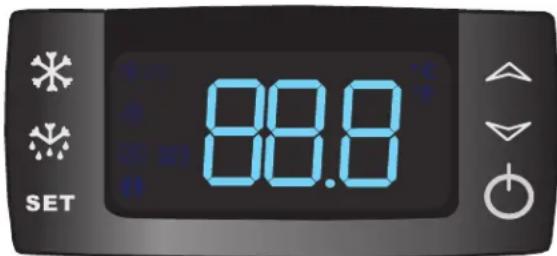
Figure 1. Digital Temperature Controller
Perlick Signature Series, C-Series and ADA Compliant freezer units come standard with state-of-the-art digital control. Please note there are three sets of instructions; one for 24" Signature Series Dual-Zone models, one for C-Series, and another set for 15", 24" Single-Zone and Sottile, and 48" Signature Series and ADA-Compliant Freezer models.
Programming Button Definitions:
SET SET button

DEFROST button (melting snowflake)

UP arrow

DOWN arrow

ON/OFF button
Signature Series Dual-Zone Control Instructions Upper Compartment:
To view the upper compartment temperature, press and release the DEFROST button (melting snowflake).
Lower Compartment (Must be coldest zone):
Display reading always shows the lower compartment temperature.
Setpoint Display:
Press and release the SET button; display will read St1. Press SET again and the LOWER compartment setpoint will be displayed.
Press SET again; the display will read St2. Press SET again and the UPPER compartment temperature will be displayed.
Changing the Lower Compartment Temperature:
- Press and hold the SET button until the display shows St1 with "F" flashing.
- Press SET again to display the upper compartment's current temperature ("F" will continue to flash).
- Use the UP or DOWN arrow key to scroll to the desired temperature. The controller will memorize the new temperature.
Changing the Upper Compartment Temperature:
- Press and hold the SET button until the display shows St1 with "F" flashing. Press the DOWN arrow once; the display will read St2,
- Press SET again to display the upper compartment's current temperature ("F" will continue to flash).
- Use the UP or DOWN arrow key to scroll to the desired temperature. The controller will memorize the new temperature.
NOTE: Dependent on the model and configuration, the controllers have been programmed to only allow a temperature adjustment within a specified range. See the chart below for the specified range allowed for your unit.
| Signature Series – Dual-Zone Units |
| Model Range (F) |
| HP24D Upper 51° - 65° / Lower 45° - 60° |
Dual-Zone Temperature Scale
To change F to C, press and hold the down arrow for 3 seconds.
Signature Series 15", 24" Single-Zone and Sottile, and 48", ADA Freezer Control Instructions
To Set Target Temperature
Press and release the SET button. Display will show the current temperature setpoint.
To Change Setpoint Temperature
- Press and hold the SET button until the display shows the current setpoint temperature with the "F" flashing.
- Use the UP and DOWN arrow button to scroll to the desired temperature.
To Start A Manual Defrost (Freezer Models Only)
Press the DEFROST button (melting snowflake)
To Set Maximum Stored Temperature
Press the UP arrow button to see the maximum stored temperature. To reset the maximum stored temperature, while displayed, press and hold the SET button until 'rst' flashes in the display.
To Set Minimum Stored Temperature
Press the DOWN arrow button to see the minimum stored temperature. To reset the minimum stored temperature, while displayed, press and hold the SET button until 'rst' flashes in the display.
On/Off
Press the ON/OFF button to turn the unit on or off.
Key Combinations:

Press the UP and DOWN arrow buttons to lock and unlock the keyboard

Press the SET and DOWN arrow buttons simultaneously to enter programming mode.

Press the SET and UP arrow buttons simultaneously to return to room temperature display.
NOTE: Dependent on the model and configuration, the controllers have been programmed to only allow a temperature adjustment within a specified range. See the chart below for the specified range allowed for your unit.
| Signature Series – HP15 Models | ||
| Model Min Temp Set Max Temp Set | ||
| HP15R 33° F 42° F | ||
| HP15B 33° F 48° F | ||
| HP15W 45° F 65° F | ||
| HP15T 33° F 42° F | ||
| Signature Series – HP24 Models | ||
| Model Min Temp Set Max Temp Set | ||
| HP24R 33° F 42° F | ||
| HP24F -10° F 10° F | ||
| HP24B 33° F 48° F | ||
| HP24W 45° F 65° F | ||
| HP24T 33° F 42° F | ||
| Signature Series – HP48 Models | ||
| Model Min Temp Set Max Temp Set | ||
| HP48WO 40° F 65° F | ||
| HP48WW | 40° F 65° F | |
| Signature Series Sottile | ||
| Model Min Temp Set Max Temp Set | ||
| HH24RS | 33° | 42° |
| HH24BS | 33° | 48° |
| HH24WS 45° | 65° | |
| ADA-Compliant Series | ||
| Model Min Temp Set Max Temp Set | ||
| HA24FB | -10° | 10 |
LED Functions
The following table describes LED functions
| LED | Mode | Function |
 | ON | Compressor is on |
 | Flashing Anti-short cycle delay is on | |
 | ON | Defrost is on |
 | ON | Alarm is on |
 | Flashing | You are in the process of programming the unit |
Perlick
PERLICK RESIDENTIAL INSTALLATION MANUAL
DIGITAL TEMPERATURE CONTROL
C-Series Models
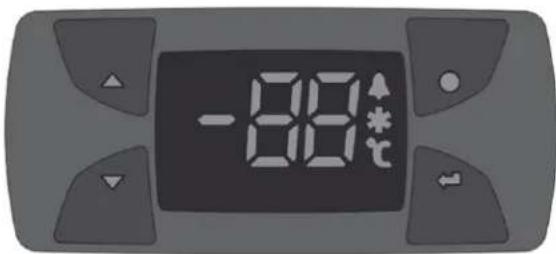
Figure 2. nEW 961 Digital Temperature Controller
Perlick C-Series units come standard with digital control.
Programming Button Definitions:
| [2Kx8]STAND-BY (ESC)Press and releaseReturns to the previous menu levelConfirms parameter valuePress for at least 5 sec.Activates the Standby function (off) (When outside the menus) |  SET (ENTER)Press and releaseOpens Machine Status menu and displays alarms (if active)Press for at least 5 sec.Opens Programming menuConfirm commands SET (ENTER)Press and releaseOpens Machine Status menu and displays alarms (if active)Press for at least 5 sec.Opens Programming menuConfirm commands |
 UPPress and releaseScroll menu itemsIncreases valuesPress for at least 5 sec.Activates the Manual Defrost function UPPress and releaseScroll menu itemsIncreases valuesPress for at least 5 sec.Activates the Manual Defrost function |  DOWNPress and releaseScroll menu itemsDecreases valuesPress for at least 5 sec.Function can be configured by the user DOWNPress and releaseScroll menu itemsDecreases valuesPress for at least 5 sec.Function can be configured by the user |
To Change Setpoint Temperature
- Press ← JP" will be displayed. Press again to display current setpoint temperature.
- Press ▲nd to▼modify it and or ◀save●he change.
On/Off
To turn the unit off, press and hold ● for at least 5 seconds. "OF" will be displayed. To turn the unit on again, press and hold ● for at least 5 seconds.
NOTE: Dependent on the model and configuration, the controllers have been programmed to only allow a temperature adjustment within a specified range. See the chart below for the specified range allowed for your unit.
| C-Series Models | |
| Model Temp | Range |
| HC24R 33° - 42° F | |
| HA24BB 33° - 48° F | |
| HA24WB 45° - 65° F | |
LED Functions
The following table describes LED Funtions
| [X62X] | Defrost LEDPermanently on: defrost activeFlashing: manual defrost activeOff: otherwise | [H820] | Alarm LEDPermanently on: alarm activeFlashing: alarm acknowledgedOff: otherwise |
| [OKXT] | Evaporator LEDPermanently on: fans activeOff: otherwise | [3HXO] | Compressor LEDPermanently on: compressor activeFlashing: a delay, a protection or a locked start-upOff: otherwise |
 | Aux LEDPermanently on: Aux output activeOff: otherwise |  | °C LEDPermanently on: display the temperatureOff: otherwise |
NOTE: When switched on, the device performs a Lamp Test; the display and LEDs will flash for several seconds to check that they all function correctly.
DIAL TEMPERATURE CONTROL
ADA-Compliant Models
(Excludes ADA Freezer - HA24F models use digital controller found on page 5)
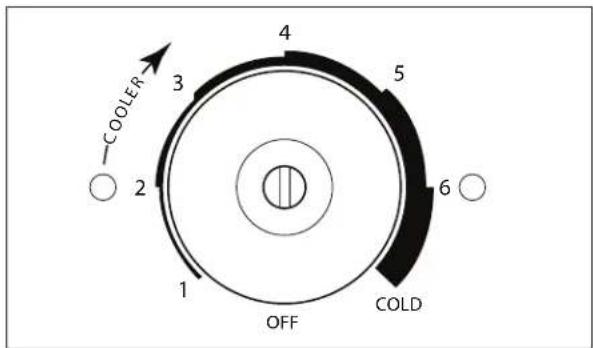
Figure 3. Dial Temperature Controller
Use a straight slot screwdriver to adjust the dial temperature control. The control is located at the top rear panel of the cabinet. Approximate temperature ranges are as follows:
| ADA-Compliant Series | |
| Model Temp | Range |
| HA24RB 33° - 42° F | |
| HA24BB 35° - 48° F | |
| HA24WB 45° - 65° F | |
Adjust the temperature as follows:
Colder Temperature:
Turn the adjusting screw clockwise (to the right).
Warmer Temperature:
Turn the adjusting screw counterclockwise (to the left).
Temperature Control OFF:
Turn the adjusting screw completely counterclockwise to the OFF position until a click is heard.
NOTE: The condenser fan motor turns off with the compressor.
MAINTENANCE
SEASONAL MAINTENANCE FOR UL-APPROVED OUTDOOR MODELS
Winterizing
This process should occur when the daily low temperatures is at or below the temperatures stated below:
Freezer models: 32° F
Refrigerator models: 38°F
Beverage Center: 42°F
Wine Reserve: 45°F
It is best to winterize your unit before the low temperatures listed above.
- Turn the unit to OFF position by pressing the OFF button on the controller. The controller displays the word "OFF" and for Signature Series models, turn the master switch located behind the grille off (if the power cord is accessible, unplug the power cord. If not, turn off the circuit breaker to the electrical receptacle the cabinet is plugged into). For C-Series units, unplug or turn off the circuit breaker.
- Remove all contents from the unit.
- Remove the front grille.
- Clean the condenser by using a vacuum cleaner to remove loose debris (leaves, dirt, etc.) that may have accumulated inside the grille.
- Reinstall the front grille.
- Clean the interior of the unit using stainless steel cleaner and polish (see page 9).
- Clean the exterior of the unit using stainless steel cleaner and polish (see page 9).
NOTE: Do not place a cover over the unit. While not required, you may choose to remove the unit from the outdoor location and store indoors.
CAUTION
Operating the unit at temperatures lower than those recommended will void the warranty.
Spring Start-Up
This process should occur after the daily low temperatures is below the temperatures stated below:
Freezer models: 32° F
Refrigerator models: 38°F
Beverage Center: 42°F
Wine Reserve: 45°F
- Remove the grille.
- Check the condensing unit to ensure it is clear of loose debris, and clean as necessary with a vacuum cleaner.
- Reattach front grille to the unit.
- Clean the interior of the unit using stainless steel cleaner and polish (see page 9).
- Clean the exterior of the unit using stainless steel cleaner and polish (see page 9).
- Plug the unit into the electrical receptacle or turn on the circuit breaker.
- Turn on the master switch located behind the grille if model is Signature Series. Press the OFF button one time to turn the unit on. The controller display will show the actual temperature inside the cabinet.
- The cooling process will begin to bring the unit to the set temperature. It's recommended you run the unit for 24 hours to stabilize the operating temperature before using.
DANGER
Never attempt to repair or perform maintenance on the unit until the main electrical power to the unit has been disconnected!
LED REPLACEMENT (SIGNATURE SERIES)
Call your Perlick Factory Authorized Service Center. For the location of the Service Center in your area, contact your selling dealer, inquire via the web at www.perlick.com, E-mail us at warrantyserv@perlick.com, or call (800) 558-5592 during normal business hours.
LIGHT BULB REPLACEMENT (C-SERIES, ADA-COMPLIANT & SHALLOW-DEPTH SERIES)
To replace a defective or burnt out bulb, remove the glass light cover by pulling out on the cover, unscrew the bulb and replace it with an identical or smaller bulb. The Perlick replacement part number is 67026.
Perlick
STAINLESS STEEL CARE & CLEANING
General
Stainless steel is a “passive” metal because it contains other metals like chromium, nickel and manganese that stabilize the atoms. Chromium provides an invisible passive film that covers the steel surface, acting as a shield against corrosion. As long as the film is intact and not contaminated, the metal is passive and stainless. If the passive film of stainless steel has been broken, equipment can start to corrode and rust.
Three materials or processes can break down stainless steel's passive layer and allow corrosion to occur:
- Mechanical abrasion
- Deposits and water
- Chlorides
Mechanical abrasion refers to items that will scratch a steel surface. Steel pads, wire brushes and scrapers are prime examples.
Water comes out of the faucet in varying degrees of hardness. Hard water may leave spots. When allowed to sit, these deposits will break down the passive chromium layer and rust stainless steel. Other deposits from food preparation must be promptly removed with an appropriate cleaning agent.
Chlorides are found nearly everywhere. They are in water, food and table salt. Household and industrial cleaners are the worst offenders.
Preventing Stainless Steel Rust
Use non-abrasive tools to clean stainless steel products. Soft cloths and plastic scouring pads will not harm the steel's passive layer.
Clean with polish lines. Some stainless steels have visible polishing lines or "grain". When visible lines are present, always scrub in a motion parallel to the lines. When the grain cannot be seen, polish in a consistent straight pattern and not in a circular motion.
Use alkaline, alkaline chlorinated or non-chloride containing cleaners. While many traditional cleaners are loaded with chlorides, the industry is providing an ever-increasing choice of non-chloride cleaners. If you are not sure of chloride content in the cleaner being used, contact your cleaner supplier. If your present cleaner contains chlorides, ask your supplier for an alternative. Avoid cleaners containing quaternary salt; it also can attack stainless steel and cause pitting and rusting.
Keep food equipment clean. Use alkaline, alkaline chlorinated or non-chloride cleaners at recommended strength. Clean frequently to avoid build-up of hard, stubborn stains. The single most likely cause of damage is chlorides in the water. Remember, adding heat to cleaners that contain chlorides dramatically increases their effect on stainless steel.
If chlorinated cleaners are used, immediately rinse and wipe equipment and supplies dry. The sooner you wipe standing water, especially when it contains cleaning agents, the better. After wiping equipment down, allow it to air dry. Oxygen helps maintain the stainless steel passive film.
Cleaning the Cabinet Interior/Exterior
CAUTION
NEVER use hydrochloric acid (muriatic acid) on stainless steel. Do not use abrasive cleansers or cloths on any interior or exterior surfaces or removeable parts.
Glass panels may be cleaned using any standard glass cleaner available on the market.
To clean interior and exterior non-metallic surfaces and removable parts, wash with mild solution of soap and lukewarm water with a little baking soda. Rinse and dry thoroughly. Avoid getting water on the lights, controllers, fan motors and unfinished wood wine rack faces.
Cleaning the Condenser
The condenser (located behind the front grille cover) should be cleaned every three (3) months. Use a soft bristle brush and vacuum to remove dust and lint.
CAUTION
Avoid damaging or crushing the condenser fins or tubing.
Recommended Cleaners for Specific Situations
| Job Cleaning Agent Comments | ||
| Routine cleaning Soap, ammonia, detergent Apply with sponge or soft cloth | ||
| Fingerprints and smears Areal 20, Lac-O-Nu, Lumin Wash, O-Cedar Cream Polish | Provides barrier film to minimize fingerprints. Can be used on all finishes. Rub the surface with a cloth as directed on the package. | |
| Stubborn stains and discolorations AllChem Con | Centrated Cleaner, Samae, Twinkle, Cameo Copper Cleaners, Grade FFF Italian Pumice Whiting, Steel Bright, Lumin Cleaner, Zud Restoro, Sta-Clean, Highlite Cooper's Stainless Steel Cleaner or Revere Stainless Steel Cleaner | Apply with a damp sponge or cloth, then rinse with clear water and wipe dry. |
| Old Dutch, Lighthouse Sunbrite, Wyandotte Bab-O, Gold Dust, Sapollo, Bon Ami or Comet | For these household cleaners, rub with a damp cloth. They may contain chlorine bleaches so rinse thoroughly after use and wipe dry. | |
| Liquid NuSteel or Dubois Temp For these products, rub the surface with a dry cloth using only a small amount of cleanser. Rinse with water and dry. | ||
| Heat tint or heavy discoloration Penny-Brite, Co | Oper Brite, Paste Nu-Steel, Dubois Temp or Tarnite | Rub onto surface with a dry cloth |
| Bar Keepers Friend, Revere Stainless Steel Cleaner, Allen Polish, Steel Bright Wyandotte Bab-O or Zud | When using these cleaners, apply with a damp sponge or cloth, rinse thoroughly and wipe dry. | |
| Tenacious deposits, rust, discoloration, industrial atmospheric stains | Oakite No. 33 Dilac, Texo NY, Flash-Klenz Caddy Cleaner, Turco Scale 4368 or Permag 57 | Swab and soak with a clean cloth. Let stand for 15 minutes or more according to directions on package, then rinse and wipe dry. |
| Rust dicoloration or corrosion caused by cleaning agents containing hydrochloric (muriatic) acid or chlorine bleach | 3M Scotch Pad, type A, grade "fine" Clean off the surface soil using cleaning methods above. Then rub discolored or corroded areas lightly with a dry pad. | |
| Use of property names is intended only to indicate a type of cleaner and does not constitute an endorsement. Omission of any proprietary cleaner does not imply its inadequacy. All products should be used in strict accordance with instructions on the package.NOTE: Do NOT use steel wool or scouring pads to clean stainless steel. | ||
For Product Information
- Contact your selling dealer
• Inquire via the web at www.perlick.com - Call 800-558-5592 for factory assistance on planning installation or product information
- Write to Perlick Corporation, Customer Service Department, 8300 West Good Hope Road, Milwaukee, WI 53223
- Email us at warrantyserv@perlick.com
For Product Service
- Check the model and serial number of your unit located on the label attached to the inside top of the cabinet.
- Inquire via the web at www.perlick.com, or call 800-558-5592.
For Replacement Parts and Accessories
- Use only genuine Perlick replacement parts and accessories. Genuine Perlick parts and accessories are designed to work correctly with Perlick products and offer superior service life. The use of non-Perlick parts can damage the unit and may void the warranty.
- Check the model and serial number of your unit located on the label attached to the inside top of the cabinet. Call your Perlick Factory Authorized Service Center.
• Inquire via the web at www.perlick.com, or call 800-558-5592.
TROUBLESHOOTING
If the unit appears to be malfunctioning, read through the OPERATION section of this manual first. If the problem persists, check this troubleshooting section to see if you can refer to the cause and remedy of the problem and resolve it without a service call.
! DANGER
Never attempt to repair or perform maintenance on the unit until the main electrical power to the unit has been disconnected!
| Problem Cause Solution | ||
| No interior light Bulb is loose • Tighten bulb | ||
| Bulb is burnt out • Replace bulb | ||
| LED board is inoperable • Contact Perlick Technical Service at 800-558-5592 | ||
| Light stays on when door switch is closed Manual switch is on • Turn manual switch off | ||
| Door is not making contact with the door switch | • Makre sure the door closes tightly | |
| Noisy operation Soft sounds from compressor, fan motor and valves heard | • Normal operation | |
| "Crackling" sound during defrost • Normal operation | ||
| LED Controller display is flashing "P1"* Thermostat probe has failed • Contact Perlick Technical Service at 800-558-5592 | ||
| LED Controller display is flashing "P2"* | Evaporator probe has failed | • Contact Perlick Technical Service at 800-558-5592 |
| LED Controller display is flashing "HA"* | Internal compartment has exceeded the high temperature alarm preset value for over 30 minutes. | • Make sure the door is completely closed.• Check the door gasket seal. Replace if necessary.• Check the condenser and clean it if necessary.• Make sure the louvered plate is unobstructed. If surrounding ambient temperature has recently changed dramatically, the compartment may be affected.• Make sure the interior light is off.• Warm product was recently placed in the cabinet. Wait 24 hours for the product to chill and then recheck the temperature. |
| LED Controller display is flashing "LA"* | Internal compartment has exceeded the low temperature alarm preset value for over 30 minutes. | • Make sure the door is completely closed.• Check the door gasket seal. Replace if necessary.• If the surrounding ambient temperature has recently changed dramatically, the compartment temperature may be affected. |
| Unit is not running | No power is going to the unit. | • Home circuit breaker was tripped. Reset the circuit breaker.• ON/OFF keypad is turned off. Turn it on.• If it is a Dual-Zone model, check the Dual-Zone power switch (see page 4). |
| Condenser is dirty. | • Clean the condenser | |
* Applies to Signature Series models only
| Problem Cause Solution | ||
| Compartments are warmer than usual Control | preset is set to warm • Lower the setpoint temperature. Refer to changing the set point for the specific model | |
| Light is staying on • Turn the manual light switch off. | ||
| Condenser is dirty or obstructed • Clean the condenser and clear obstruction. | ||
| The door is open or has been opened more frequently lately. | • Wait 24 hours and recheck the temperature. | |
| Internal louvers and/or the fan guard is obstructed. | • Reset the preset temperature if necessary – refer to page 5 and 6 of this guide.• Make sure the louvers and/or the fan are not obstructed. | |
| Warm product product was recently placed in the cabinet. | • Wait 24 hours for product to chill, then recheck the temperature. | |
| System runs for a long period of time. Condenser is dirty or obstructed. • Clean the condenser and clear the obstruction. | ||
| Condensation forms inside the compartments | High humidity and/or frequent door opening • Normal operation | |
| Door is not closing and sealing properly • Make sure the door is closing properly.Check the door seal and replace if necessary.• If condensation persists, contact Perlick Technical Service at 800-558-5592 | ||
Perlick
MANUEL D'INSTALLATION RÉSIDENTIELLE PERLICK
TABLE DES MATIÈRES
CHARGEMENT DU PRODUIT
REPLACEMENT DES AMPOULES (SÉRIE SIGNATURE)
- Perlick
- TABLE OF CONTENTS
- CONGRATULATIONS
- PERLICK RESIDENTIAL PRODUCTS WARRANTY
- WARRANTY:
- The Basic Warranty Period is as follows:
- REMEDY:
- IMPORTANT!
- REGISTRATION:
- OTHER TERMS AND CONDITIONS:
- THIS WARRANTY DOES NOT APPLY TO:
- SAFETY
- DANGER
- WARNING
- CAUTION
- OPERATION
- MASTER SWITCH
- INTERIOR LIGHT
- LOADING PRODUCT
- CHECKING PRODUCT TEMPERATURE
- Programming Button Definitions:
- Signature Series Dual-Zone Control Instructions Upper Compartment:
- Lower Compartment (Must be coldest zone):
- Setpoint Display:
- Changing the Lower Compartment Temperature:
- Changing the Upper Compartment Temperature:
- Dual-Zone Temperature Scale
- Signature Series 15", 24" Single-Zone and Sottile, and 48", ADA Freezer Control Instructions
- To Set Target Temperature
- To Change Setpoint Temperature
- To Start A Manual Defrost (Freezer Models Only)
- To Set Maximum Stored Temperature
- To Set Minimum Stored Temperature
- On/Off
- Key Combinations:
- LED Functions
- DIAL TEMPERATURE CONTROL
- ADA-Compliant Models
- Colder Temperature:
- Warmer Temperature:
- Temperature Control OFF:
- MAINTENANCE
- SEASONAL MAINTENANCE FOR UL-APPROVED OUTDOOR MODELS
- Winterizing
- Spring Start-Up
- LED REPLACEMENT (SIGNATURE SERIES)
- LIGHT BULB REPLACEMENT (C-SERIES, ADA-COMPLIANT & SHALLOW-DEPTH SERIES)
- STAINLESS STEEL CARE & CLEANING
- General
- Preventing Stainless Steel Rust
- Cleaning the Cabinet Interior/Exterior
- Cleaning the Condenser
- For Product Information
- For Product Service
- For Replacement Parts and Accessories
- TROUBLESHOOTING
- ! DANGER
- MANUEL D'INSTALLATION RÉSIDENTIELLE PERLICK
- TABLE DES MATIÈRES
- CHARGEMENT DU PRODUIT
- REPLACEMENT DES AMPOULES (SÉRIE SIGNATURE)
Brand : Perlick
Model : HP15RO33R
Category : Refrigerator