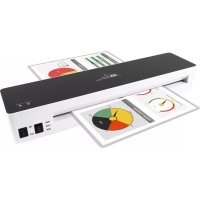
IL1326W - Laminating machine Royal Sovereign - Free user manual and instructions
Find the device manual for free IL1326W Royal Sovereign in PDF.


| Product Type | 2-Roller Laminator |
| Brand | Royal Sovereign |
| Model | IL1326W |
| Maximum Entry Width | 330 mm (13 inches) |
| Supported Pouch Thickness | 3 to 5 mils (0.076 to 0.127 mm) |
| Laminating Speed | 480 mm/min (18.9 in/min) |
| Preheating Time | Approximately 60 seconds |
| Power Supply | 120 V, 60 Hz, 760 W |
| Dimensions (L × D × H) | 435 × 105 × 75 mm (17.10 × 4.13 × 2.95 in) |
| Weight | 1.76 kg (3.88 lb) |
| Number of Rollers | 2 |
| Lamination Modes | Hot (3 mil, 5 mil) and Cold |
| Release System | Rear release switch |
| Overheat Protection | Auto shut-off after 30 minutes of inactivity |
| Cooling Fan | Automatic after power-off, turns off when the device is cool |
| Certification | cTUVus |
| Warranty | 1 year (limited) for original purchaser |
| Recommended Ambient Temperature | 20 to 25 °C (68 to 77 °F) |
| Maintenance and Cleaning | Unplug before cleaning; do not immerse; use a dry cloth |
| Spare Parts and Repairability | Contact customer service at +1-800-397-1025 |
Frequently Asked Questions - IL1326W Royal Sovereign
User questions about IL1326W Royal Sovereign
0 question about this device. Answer the ones you know or ask your own.
Ask a new question about this device
Download the instructions for your Laminating machine in PDF format for free! Find your manual IL1326W - Royal Sovereign and take your electronic device back in hand. On this page are published all the documents necessary for the use of your device. IL1326W by Royal Sovereign.
USER MANUAL IL1326W Royal Sovereign
natural_image
Exterior view of a Royal Sovereign air conditioner unit (no visible text or symbols on body)IL-926W
IL-1326W
Royal Sovereign International, Inc.
Please read and retain these instructions.
To register your product, please go to www.royalsovereign.com
Thank you for purchasing the Royal Sovereign 2 Roller IL Series Pouch Laminator. This manual will provide you with safety information, instructions for optimal use, and proper care and maintenance for your product. Please read this manual carefully before operating.
CONTENTS
SAFETY INSTRUCTIONS.... 3
PRODUCT VIEW / FEATURES 4
PRODUCT OPERATION.... 5 - 6
TROUBLESHOOTING 6
SPECIFICATIONS 7
WARRANTY 8
SAFETY INSTRUCTIONS
When using this machine follow these safety precautions to reduce risk of fire, electric shock, or injury.

WARNING
Electrical
- The machine should be placed near an electrical outlet so that the outlet is easily accessible.
- Make sure the voltage meets the machine's electricity requirements.
- Do not operate if the electrical plug or power cord is damaged.
- Do not under any circumstances alter the electric plug in anyway.
- Do not immerse the machine in water or permit liquid to get inside the machine.
- Ensure that the power cord is inserted properly into the electrical outlet.
- Turn off the power when unattended or not in use.

CAUTION
Operating
- Do not allow foreign articles inside the machine.
- Do not attempt to laminate items that exceed total recommended material thickness.
- Do not insert pouch film with the back end first. (Front of film: sealed side, Back of film: open side) This may cause the pouch to jam the rollers.
- Do not cut pouches before inserting them into the laminator, as this will cause the laminator to jam.
- Do not laminate leaves, flowers, clothes etc.
- When unplugging the unit please grip the plug body, not the supply cord.
- Do not place objects on the power cord and do not bend it excessively.
- The laminator creates heat, so keep out of the reach of children. This machine should not be used by children.
- When not using the machine for long periods of time, unplug the power cord from the outlet.
- Do not operate the machine for any other purpose other than its intended use.
- The LED ready light may take longer to turn on in lower room temperature environments. (less than 64°F / 17.8 °C.)
- This unit is recommended to be used in a normal room temperature environment. (68°F - 77°F / 20°C - 25°C)
- This unit is intended for indoor use in a dry environment only.
- Always place the equipment on a suitable, stable table only.
- To protect against fire, ensure that the cover ventilation of the unit is not obstructed during operation.
PRODUCT VIEW
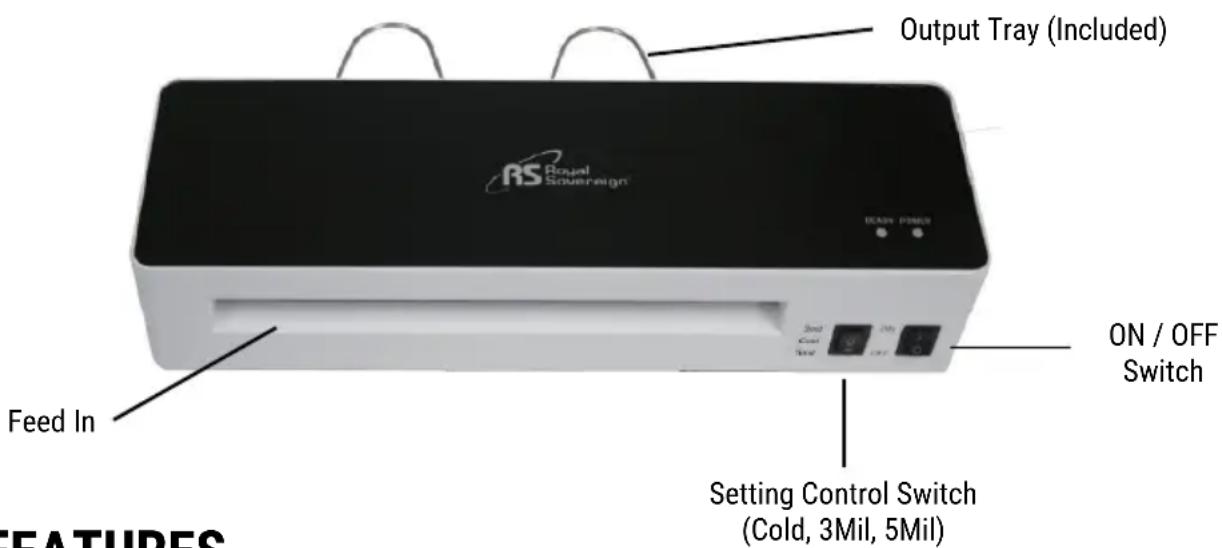
FEATURES
Two Roller System
- The two roller system provides precise heat and pressure to ensure high quality lamination. To assist with jams, this unit is equipped with a jam release switch located on the back of the unit.
Hot and Cold Lamination
• The laminator can easily be adjusted to handle both hot and cold lamination pouch film.
Temperature Control
• Use the setting control switch to change settings for different film thicknesses from 3-5 Mil.
Fast Speed
•Laminates up to 18.9" (480 mm) per minute.
Overheat Protection
- This machine is equipped with overheat protection and will automatically turn off the unit after 30 minutes of non-use.
PRODUCT OPERATION
Before laminating important or unique documents, always test a pouch through the laminator using a similar document.
Hot/Cold Lamination
- Place the machine on a flat, sturdy surface and flip the power switch to turn on the machine.
- Use the setting control switch to toggle between Cold Lamination and Hot Lamination options ranging from 3-5 Mil.
• For hot lamination, the machine will take approximately 60 seconds to warm-up.
NOTE: Standard temperature setting is based on 20lb/80g/m2 copy paper thickness. When laminating thicker materials, the temperature may not be high enough. In this case, please select the 5 Mil film setting.
NOTE: A red light may be visible on Feed In before the product is ready. This is due to the laminator heating up.
- Cold lamination does not require any warm up. As soon as the unit is turned on, it is ready for use.
NOTE: If the machine was previously used in hot mode, allow approximately 25 minutes to cool down.
- Place the item to be laminated into the laminating pouch.
- For Cold Lamination you need adhesive Cold Laminating or Self-Seal Pouches. To laminate, place the item on the adhesive side of the cold film with the document face down.
- Insert the pouch film into the front opening of the laminator. Make sure to place the sealed end of the pouch film in first.
- For Cold Lamination remove the paper liner from the cold film slowly while the document is being inserted into the machine.
PRODUCT OPERATION
- The document or photo will then automatically feed out through the back of the machine.
NOTE: Laminated items exiting the machine may be too hot to touch.
- If the item is not completely laminated, repeat steps 4-5.
NOTE: For Hot lamination, laminated items will be hot and will easily bend. To keep the item flat, place on a flat surface and allow to cool.
- If you turn the unit off, the fan will continue to run to cool down the laminator. The fan will automatically turn off when the unit is cool. This will take approximately 15 - 20 minutes.
TROUBLESHOOTING
| SymptomSolutions | |
| Motor does not work | Check to make sure the machine is plugged in.Check to make sure the power button is turned on. |
| Pouches are not laminating correctly | Make sure that the machine is set to the correct Mil setting. |
| The rollers are moving, but the laminate item is not (Machine is jammed) | Press the jam release button on the back of the unit and pull out the pouch through the front by hand. Try laminating again after 8 seconds. |
NOTE: For all replacements and repairs that need to be made, contact Royal Sovereign Customer Service at +1) 800-397-1025
SPECIFICATIONS
| MODEL | IL-926W | IL-1326W |
| Power Supply Voltage 1 | 20V (60 Hz) 120V (60 Hz) | |
| Power Consumption (W) | 500W 760W | |
| Number of Rollers 2 2 | ||
| Speed 18.9 in. (480 mm) per minute 18.9 in. (480 mm) per minute | ||
| Maximum Entry Width 9 | in. (230 mm) 13 in. (330 mm) | |
| Pouch Mil. Thickness | 3 Mil. – 5 Mil. | 3 Mil. – 5 Mil. |
| Warm-up Time 60 seconds 60 seconds | ||
| Unit Dimensions(W x D x H) | 13.58" x 4.13" x 2.95"345 mm x 105 mm x 75 mm | 17.10" x 4.13" x 2.95"435 mm x 105 mm x 75 mm |
| Unit Weight | 2.65 lbs. (1.2 kg) | 3.88 lbs. (1.76 kg) |
| Certification | cTUVus | cTUVus |
ONE YEAR LIMITED WARRANTY
Royal Sovereign International, Inc. warranties this product to be free from defects in material and workmanship for a period of one (1) year. This warranty is extended to the original purchaser only.
This warranty only covers products that are properly installed, properly maintained, and properly operated in accordance with the instructions provided. This limited warranty does not cover any failures or operating difficulties due to normal wear and tear, accident, abuse, misuse, alteration, misapplication, improper installation, or improper maintenance and service by you or any third party.
Returned product will not be accepted without a Return Authorization number. To request a Return Authorization number, please visit us at www.royalsovereign.com. All transportation costs for the return of damaged product or parts will be the responsibility of the purchaser. Return defective product, in original packaging, to the address below.
Royal Sovereign International, Inc. requires reasonable proof of your date of purchase from an authorized retailer or distributor. Therefore, you should keep your receipt, invoice, or canceled check from the original purchase. The limited warranty shall be limited to the repair or replacement of parts which prove defective under normal use and service within the warranty period.
Royal Sovereign International, Inc. (and its affiliated companies) SHALL HAVE NO LIABILITY WHATSOEVER TO PURCHASER OR ANY THIRD PARTY FOR ANY SPECIAL, INDIRECT, PUNITIVE, INCIDENTAL, OR CONSEQUENTIAL DAMAGES. Some states do not allow the exclusion or limitation of incidental or consequential damages so the above exclusion and limitations may not apply to you.
ROYAL SOVEREIGN INTERNATIONAL, INC.
2 Volvo Dr., Rockleigh, NJ 07647 USA
TEL:+1)800-397-1025
Email: info@royalsovereign.com
RS INTERNATIONAL CANADA INC.
191 Superior Blvd, Mississauga Ontario L5T 2L6 CANADA
TEL: +1) 905-461-1095 TF #: +1) 866-961-6673
FAX: +1) 905-461-1096
www.royalsovereign.ca
Guide d'utilisation

natural_image
Exterior view of a Royal Sovereign air conditioner unit (no visible text or symbols on body)IL-926W
IL-1326W
Royal Sovereign International, Inc.
Email: info@royalsovereign.com
RS INTERNATIONAL CANADA INC.
191 Superior Blvd, Mississauga Ontario L5T 2L6 CANADA
TEL : +1) 905-461-1095 TF # : +1) 866-961-6673
FAX: +1) 905-461-1096
www.royalsovereign.ca
Brand : Royal Sovereign
Model : IL1326W
Category : Laminating machine