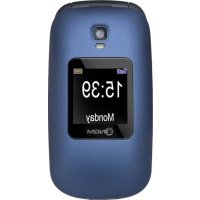
Facile Top - Mobile Phone NGM - Free user manual and instructions
Find the device manual for free Facile Top NGM in PDF.


| Product Type | Mobile phone |
| Brand | NGM |
| Model | Facile Top |
| Battery | Rechargeable lithium-ion, inserted in the back compartment |
| Charger | Micro USB, NGM recommended wall charger |
| SIM card type | Standard (slot under battery) |
| Memory card | Micro SD (not included), up to unspecified capacity |
| Screen | External and main screen (not specified) |
| Camera | Built-in, activation from main menu |
| FM Radio | Internal antenna, playback without headphones, speaker |
| Bluetooth | Yes, activation from Settings > Connection |
| SOS button | On the back, sends SMS and emergency calls to 5 numbers |
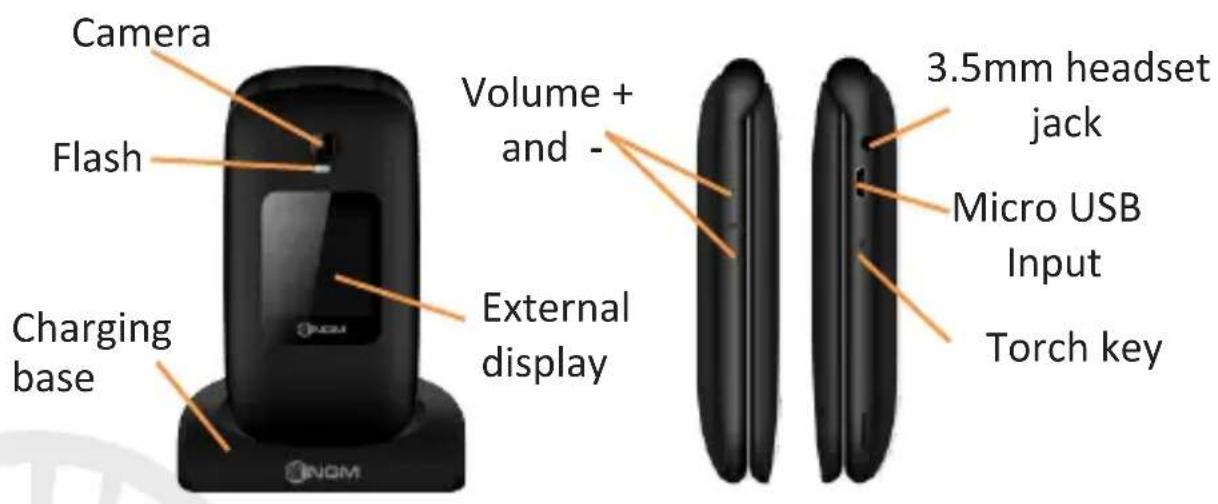
| Flashlight | Right side button, activate/deactivate |
| Connectivity | Micro USB for charging and data transfer |
| Ringtone | Customizable, vibration can be activated via # key |
| Audio profiles | General with ringtone and vibration options |
| Memory | Phone and SIM, variable number of positions |
| Power supply | Mains charger via base or micro USB cable |
| Care and cleaning | Clean with a soft dry cloth, avoid moisture |
| Safety | Use NGM accessories, SOS function, not a life-saving device |
| Spare parts | Battery, charger, USB cable (originals recommended) |
| General information | Manufactured by NGM Italia, website www.ngm.eu |
Frequently Asked Questions - Facile Top NGM
User questions about Facile Top NGM
0 question about this device. Answer the ones you know or ask your own.
Ask a new question about this device
Download the instructions for your Mobile Phone in PDF format for free! Find your manual Facile Top - NGM and take your electronic device back in hand. On this page are published all the documents necessary for the use of your device. Facile Top by NGM.
USER MANUAL Facile Top NGM
Copyright © 2015 NGM Italia
Welcome to the NGM world. Thank you for purchasing NGM FACILE Top. With this device you can easily make phone calls, send and receive SMS. Thanks to the SOS key, you can start the automatic procedure to call some previously set numbers in case of emergency. By visiting the official website www.ngm.eu you can appreciate the whole range of NGM mobile phones, ask for after sales assistance, access the forum for technical assistance and download software updates.
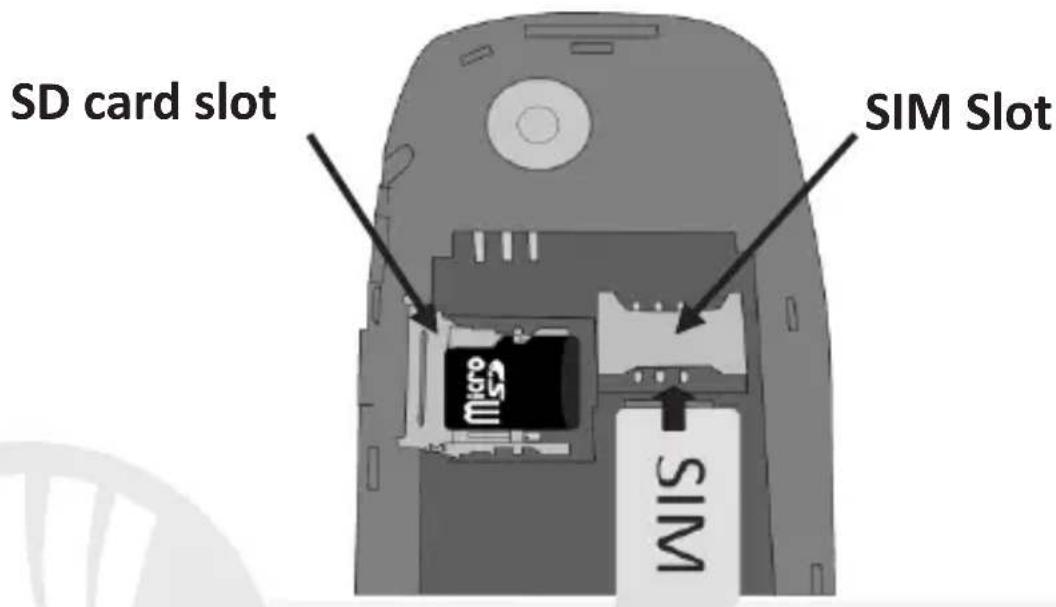
Inserting the SIM card: the SIM card contains your phone number, PIN code, links to operator services, contacts and SMS messages. To access the compartment containing the SIM slot, turn off the phone and lift up the cover starting from the slit on the bottom right corner. Remove the battery. Insert the SIM card into the slot with its gold contacts facing downwards.
25ENGLI
Inserting a memory card: in order to use the camera and media player functions of NGM FACILE Top, a micro-SD memory card is required (not included in the package): the card must be placed into the backside of the phone, left from the SIM slot. Insert the micro-SD card, as shown, with the gold contacts facing downwards: open the metal shutter by pushing it towards "open" and lock it again after inserting the card, by pushing it into the opposite direction ("close").
Turn ON, Turn OFF and keypad lock: to turn on and turn off the phone, press and hold the red end call key. Keypad locks by closing the flip.
Connecting to a PC: use the USB cable to connect NGM FACILE Top to a computer. Select USB Storage on your phone. You can save songs to play with the music player in the "My Music" folder, on the SD card.
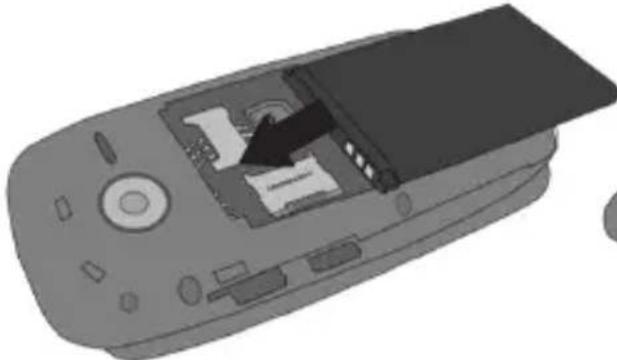
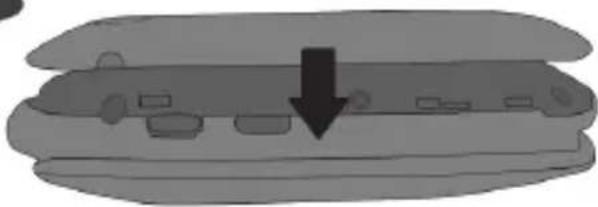
Inserting the Battery: your device is provided with a lithium-ion battery and is designed to be used exclusively with original NGM batteries and chargers. The battery must be inserted into the backside of the phone. Insert the battery into the battery compartment with the contacts facing up, matching those of the phone. When done, put the hind cover back into position as shown in the following illustrations.
Inserting the battery
Placement of the cover
Charging the battery: charge the battery before starting to use the device. Connect the charger to a mains wall socket, and then plug the jack into the charging base (wait for a moment until the red charging led on the base lights up, before inserting the phone) or put it directly into the micro USB port on the right side of the phone. When the display notifies that charging is complete, the phone can be removed from the charging base.
28ENGLISH
Attention: To preserve the functionality of the product and the integrity of the warranty, we recommend the use of original NGM chargers. Please charge the battery indoors, in a dry and favorable environment. It's normal for the battery to get slightly warm during the charging process. The battery will reach its full capacity when cycled several times.
30ENGLISH
FM radio: NGM FACILE Top has an internal radio antenna so that no headset is needed to listen to the radio. To power ON/OFF the Radio, access FM Radio from the main menu. By selecting Options you have access to the following functions:
- Automatic Search: to automatic search radio stations
- Channel list to manually browse saved channels
- Save: to save the searched stations
- Manual search: for the manual search of radio channels
- Speaker: It reproduces the radio with the speaker instead of the headphones
- Background: keeps playing in background even when leaving the radio app
-
FM Record: to record the current radio channel
-
File list: List of recorded files
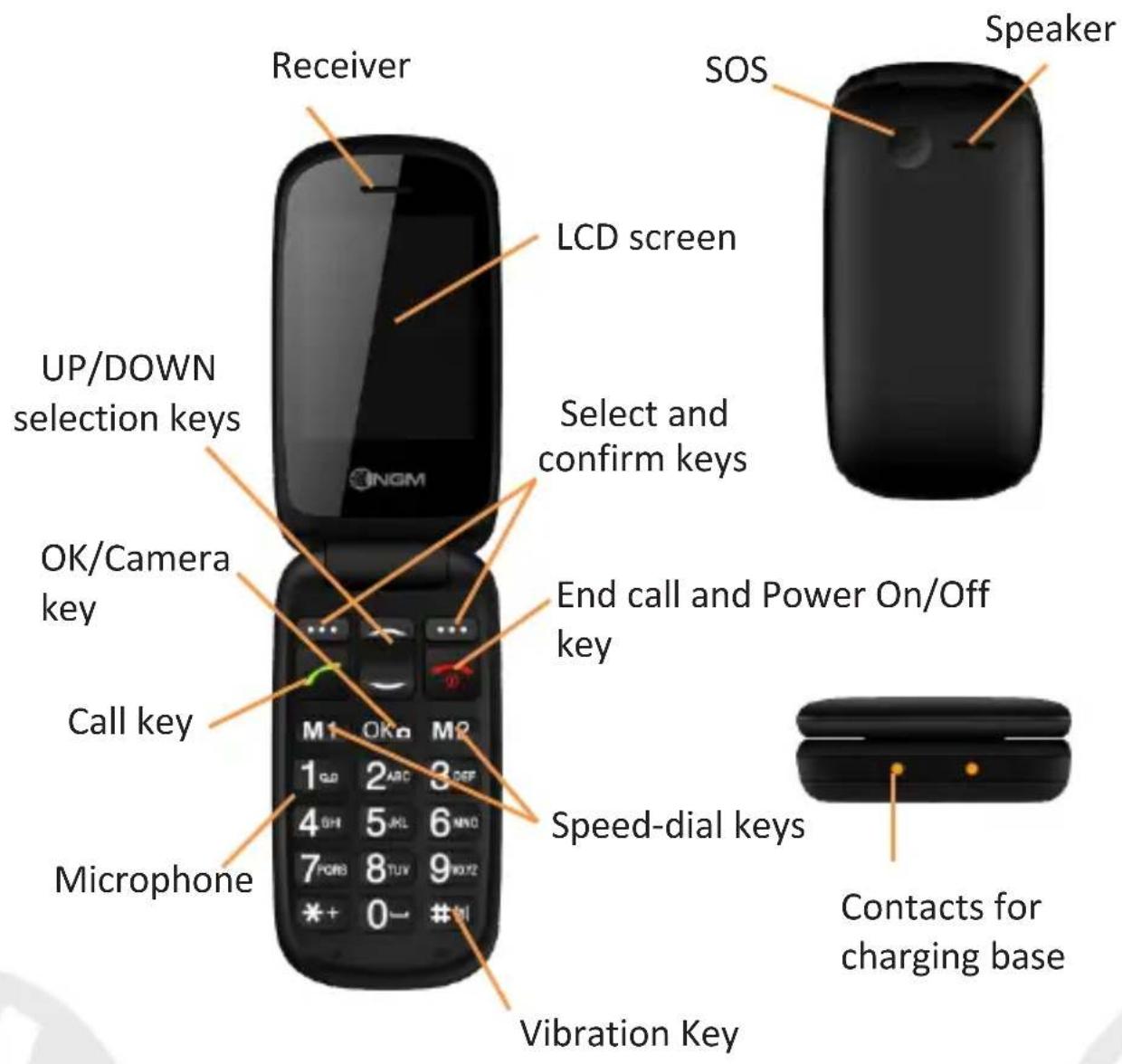
Use the UP and DOWN selection keys for volume, M1 and M2 for searching the stations and the OK button to power ON and OFF the radio.
Camera: To activate the camera from the main menu press the OK key. Take a photo pressing the same key. By using Options you can access to various camera settings and you can switch to
Camcorder .
Torch: to turn the torch on and off, use the torch key on the right side of the phone.
Dedicated keys: UP and DOWN selection keys can open some shortcuts; by default, the UP selection key directly enters the Music Player, while the DOWN selection key opens the alarm list.
Main menu
To access the Main Menu on your phone, press the selection key on the top left.
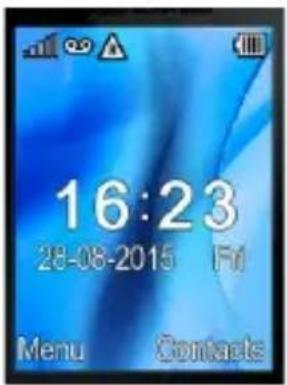
Home Screen
- Messaging to write and read SMS text messages
- Phonebook to manage and save contacts
- Calls Log: Missed Calls, made calls...
- Multimedia: camera, radio, gallery...
- FM Radio: to turn on and off the radio
- Settings to customize your phone
- Tools: with Calendar, Bluetooth, Calculator, Alarms...
- SOS: to enable and customize the SOS function
Making a call: to make a call from the Home screen, select the desired number by using the keypad and then press the green call button. To end the call, press the red end call key.
Call a number from phonebook: from the main screen, press the upper right selection key; this will automatically open the Phonebook. Scroll through contacts with the UP and DOWN keys and press the green call button to call the desired contact.
Call a number from the call log:From the main screen, press the green call key, the missed, received, and outgoing calls will be automatically displayed. Scroll them with UP and DOWN keys and press the green call button when you found the number you want to call.
Add contacts to the Phonebook
Select Menu > Phonebook > Options > New,
choosing to save the number on the SIM or the
Phone. Enter the name and the new number, then
press Save.
Speed dial: in Menu > Phonebook > Options >
More > Speed Dial > Options > Edit, you can assign
to keys 2-9 some numbers that will be called
automatically if you press and hold the related
button.
The device has two other additional quick dial keys
M1 and M2, to which you could associate phone
numbers in the same menu. These keys, placed to
the left and to the right of the OK button, will be
activated with a simple pressure.
Memory status: this feature within the phonebook settings allows you to see how much free storage there is on the phone and the SIM card.
Speech Dial: NGM FACILE Top speaks out each number you press. To activate this function, select Menu > Settings > Profiles > General > Options > More > Dialpad > Speech Dial [Warning: available for Italian language only]
Send and read SMS
Send SMS: from the main screen, choose Menu > Messaging > Write message and write your message. Press Options > Send to > Enter Number and enter the number using the numeric keypad or
Add from phonebook to select from the
Phonebook the contact you want to text.
Read SMS: when you receive a new text message, the phone displays an envelope icon on the external display (as long as the message is unread) and a notification pop up appears on the main screen. Press the upper left selection key to enter the Inbox or access it from the main screen by selecting Menu > Messages > Inbox. On SMS settings you can see the Memory Status, which allows you to check the number of messages on the phone and on the SIM card.
Bluetooth: In Settings > Connectivity > Bluetooth > Power on you can turn on BT and search for other devices (headsets, phones...). Select the device you would like to associate with and confirm.
S.O.S. Function: NGM FACILE Top is equipped with a dedicated button for fast forwarding emergency calls (*). This feature can be turned on and off by selecting Menu > SOS > Status.
SOS button is placed on the backside of the phone In case of emergency, use this function to ask for help up to five phone numbers, previously set in Menu > SOS > SOS numbers; press and hold the SOS button for 2-3 seconds.
As soon as the SOS function is activated, the phone will send out a high volume alarm (that can be turned on and off in SOS > SOS alarm On/Off). So, it will send a customizable SOS message to the chosen SOS numbers. Afterwards, the phone will
38ENGLISH
call the 5 SOS numbers, for about 25 seconds each. If there is no answer, there will be a second cycle of calls. This procedure will be repeated for 5 times. If one of the called numbers answers, the cycle will be interrupted and the call will automatically switch to speaker phone (handsfree).
Attention: The S.O.S. calls cycle will be interrupted if the answering machine or voicemail of one of the called SOS numbers takes the call.
Set Ringtones: select Menu > Settings > Profiles > General > Options > Ringtone settings. Select Ringtone and set the desired tone from those available.
Quickly turn on/off vibration mode: To quickly turn off incoming calls ringtone and messages tone, and activate vibration, press and hold #. Pressing again #, the phone will enter in General mode.
Phone Settings: from Menu > Settings > Phone, you will access to various settings such as Date and Time, Language, and Display. Select Restore to reset the factory settings of NGM FACILE Top: enter the phone password 1122 to confirm the restoring.
*Limitation of Liability
this is not a life-saving device but a mobile phone.
NGM will not be liable for any indirect, special, incidental or consequential damage arising from, or in connection with the use of this product.
Warning: The manufacturer assumes no responsibility for any failure of the policies set out above, or for any misuse of the phone. NGM reserves the right to modify any of the content in this user guide without previous public announcement. The content of this manual may vary from the actual content displayed in the mobile phone. In that case, the latter shall govern.
Copyright © 2015 NGM Italia
No part of this manual may be reproduced, distributed, translated, or transmitted in any form or by any means, electronic or mechanical, including photocopying, recording, or storing in any information storage and retrieval system, without the prior written permission of NGM Italia.
Facile TOP
Copyright © 2015 NGM Italia
Copyright © 2015 NGM Italia
Copyright © 2015 NGM Italia
Brand : NGM
Model : Facile Top
Category : Mobile Phone