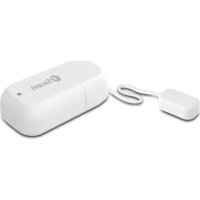
SWIFILEAK - Leak sensor SWANN - Free user manual and instructions
Find the device manual for free SWIFILEAK SWANN in PDF.


| Product Type | Connected water leak sensor |
| Brand | Swann |
| Model | SWIFILEAK |
| Dimensions | Approximately 60 x 60 x 20 mm |
| Weight | Approximately 50 g |
| Power Supply | 2 AAA batteries (included) |
| Connectivity | Wi-Fi 2.4 GHz |
| App | Swann Security (iOS and Android) |
| Sensor | Metal contacts for water detection |
| LED Indicator | Flashing blue (pairing), solid blue (leak detected) |
| Mounting | Double-sided adhesive tape included |
| Main Functions | Leak detection, push alerts, detection history |
| Operating Temperature | 0 °C to 40 °C |
| Maintenance | Clean the metal contacts with a dry cloth, replace batteries if necessary |
| Safety | Low voltage, no risk of electrocution |
| Spare Parts | AAA batteries, adhesive tape, cable ties |
| Repairability | Battery replacement by user possible |
| Box Contents | Sensor, batteries, screwdriver, double-sided adhesive tape, cable ties, quick start guide |
Frequently Asked Questions - SWIFILEAK SWANN
User questions about SWIFILEAK SWANN
0 question about this device. Answer the ones you know or ask your own.
Ask a new question about this device
Download the instructions for your Leak sensor in PDF format for free! Find your manual SWIFILEAK - SWANN and take your electronic device back in hand. On this page are published all the documents necessary for the use of your device. SWIFILEAK by SWANN.
USER MANUAL SWIFILEAK SWANN
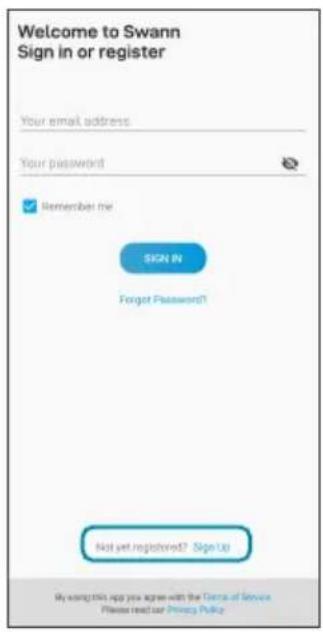
1 Download the latest version of the Swann Security app from the Apple App Store® or Google Play™ Store on your iOS or Android device. Simply search for "Swann Security".
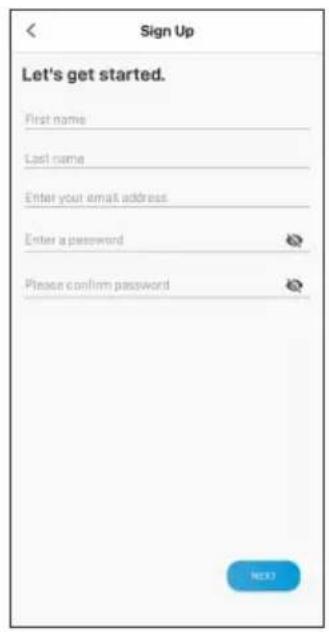
2 Open the app and create your Swann Security account by tapping "Not yet registered? Sign Up" at the bottom of the screen. Then, activate your Swann Security account by confirming the verification email that is sent to the registered email address.
BATTERY INSTALLATION
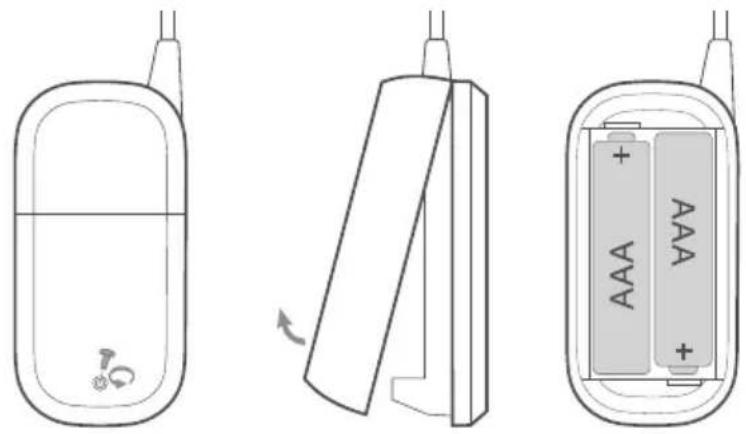
1 Unscrew the sensor cover with the supplied screwdriver and lift it off.
2 Insert the supplied two AAA batteries into the battery compartment according to the polarity markings (+ and -) shown. Pairing mode will automatically activate on the sensor for 3 minutes when batteries are inserted. The sensor status light will blink blue slowly during pairing mode. Note: Pairing mode on the sensor can be activated at any time by re-inserting the batteries.
3 Proceed to the Swann Security app on your mobile device to pair the sensor (see next page) with your Wi-Fi network.
4 Once the sensor has been successfully set up via the Swann Security app, screw the sensor cover back in place.
Note: Should you need to replace the batteries in the future, there is no need to re-pair the sensor. Simply wait for pairing mode to timeout (3 minutes), after which the sensor will automatically reconnect to the previously configured Wi-Fi network.
SET UP THE SENSOR
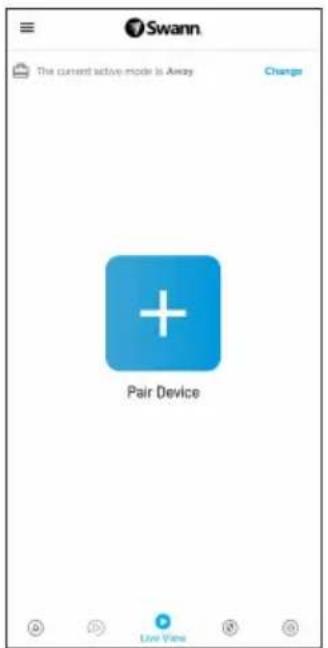
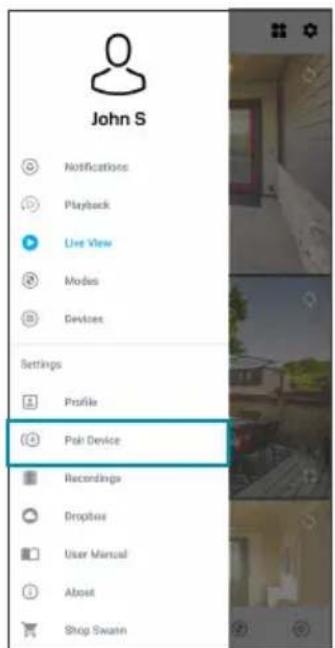
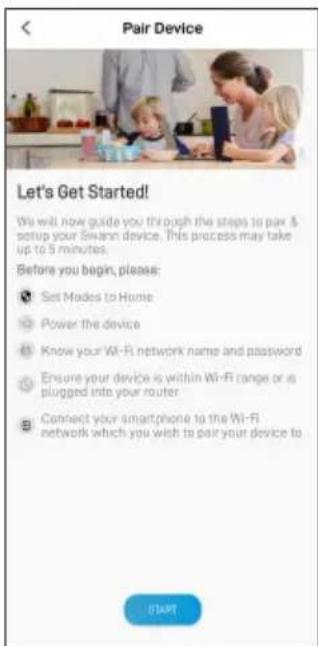
Open the Swann Security app and tap the Pair Device button on the screen. If you have already paired a device, tap the menu icon in the top left and select "Pair Device". The app will now guide you through the pairing process and set up the sensor.
Before you begin, have the sensor with you and be close to your router. Please note that the sensor can connect to a 2.4GHz Wi-Fi network only.
MOUNT THE SENSOR
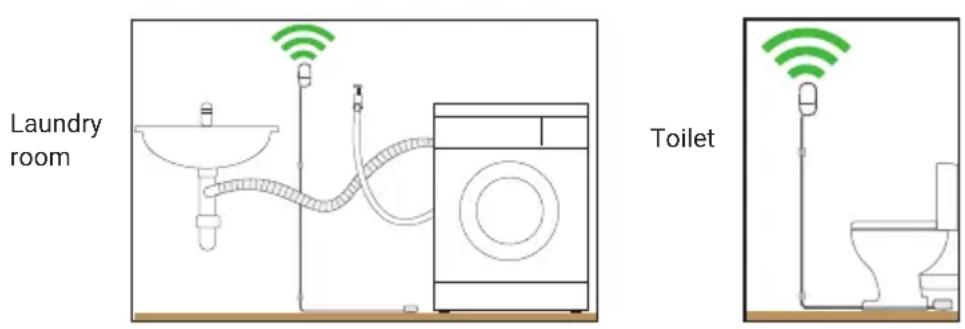
- Place the sensor using the included double-sided tape in areas around your home where there is the potential for water leaks, for example, under the kitchen sink, near the washing machine, next to the toilet, water heater, etc. Also included is a pack of cable clips to keep the cable tidy and out of the way.
- Make sure the sensor location has strong, reliable Wi-Fi reception available so you can get timely alerts. As a general rule, the nearer your sensor is to your Wi-Fi router, the better the wireless connection quality. You can expand the Wi-Fi coverage of your current network by installing a Wi-Fi range extender.
- For reliable bonding, clean the mounting surface with an alcohol/cleaning wipe, and let dry. When mounting the sensor, press firmly to the surface for 60 seconds to ensure proper adhesion.
- Make sure the sensor cover will be accessible in the final position (in case of battery replacement/re-pairing). For the sensor to activate, the water-sensing metal contacts should always be placed flat, facing down on the floor.
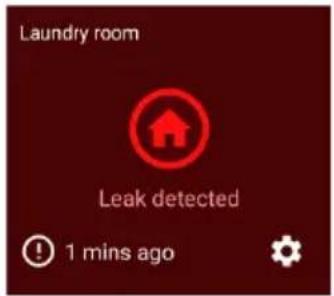
- To test the sensor, put a drop of water on your finger and touch the water-sensing metal contacts. The app will send you a push notification, for example, "Leak has been detected on Laundry Room". The sensor tile will also automatically update its status in the app, as shown on the right. Pat dry the water-sensing metal contacts. The app will send you another notification, for example, "Leak has been fixed on Laundry Room".
HELP AND RESOURCES
Mounting Examples
Status Light Guide
The status light on the sensor tells you what is happening with the device connection. When the sensor is functioning normally, the status light will be off (unless it is out of battery/unpaired).
Slow Blinking Blue Pairing mode
Solid Blue (5 seconds) Leak Detected. Connecting to Wi-Fi.
Sensor Battery Level
You can check the battery level of the sensor in the app: Devices tab > Sensor > Battery %
Swann Security App Manual
Access the Swann Security app manual (Menu >User Manual) at any time to learn more about navigating through the various screens and functions in the app.
GENERALIDADES
We're here to help! Visit our Support Center at support.swann.com
You can also email us at any time via: tech@swann.com
FCC STATEMENT
This equipment has been tested and found to comply with the limits for Class B digital device, pursuant to part 15 of the FCC Rules. These limits are designed to provide reasonable protection against harmful interference in a residential installation. This equipment generates, uses and can radiate radio frequency energy and, if not installed and used in accordance with the instructions, may cause harmful interference to radio communications. However, there is no guarantee that interference will not occur in a particular installation. If this equipment does cause harmful interference to radio or television reception, which can be determined by turning the equipment off and on, the user is encouraged to try to correct the interference by one or more of the following measures: Reorient or relocate the receiving antenna • Increase the separation between the equipment and the receiver • Connect the equipment into an outlet on a circuit different from that to which the receiver is connected • Consult the dealer or an experienced radio/TV technician for help.
This device complies with Part 15 of the FCC Rules. Operation is subject to the following two conditions: (1) this device may not cause harmful interference, and (2) this device must accept any interference received, including interference that may cause undesired operation.
FCC RF Radiation Exposure Statement Caution: To maintain compliance with the FCC's RF exposure guidelines, place the product at least 20cm from nearby persons.
WARNING: Modifications not approved by the party responsible for compliance could void user's authority to operate the equipment.
CE DECLARATION OF CONFORMITY
Hereby, Swann Communications, declares that this product is in compliance with the essential requirements and other relevant provisions of Directive 2014/53/EU. The full test of the EU declaration of conformity is available at the following internet address: www.swann.com/uk/compliance
RECYCLING
This product bears the selective sorting symbol for Waste electrical and electronic equipment (WEEE). This means that this product must be handled pursuant to European directive 2012/19/EU in order to be recycled or dismantled to minimize its impact on the environment. User has the choice to give his product to a competent recycling organization or to the retailer when he buys a new electrical or electronic equipment.
BATTERY SAFETY INFORMATION Replace batteries at the same time. Do not mix new and old batteries or battery types (for example, alkaline and lithium batteries). Keep batteries out of reach of children. Dispose of used batteries promptly in accordance with local regulations. INFORMACION DE SEGURIDAD DE LA BATERIA Susituya las baterias alismo tiempo. No mezcle bacterias新品as y usadas niños de baterías (por exemple, bacterias alcalinas y del litio). Mantenga las baterías fuera del alcance de los niños. Deseche las baterías usadas correctamente de ac器 con las reglamentaciones locales. INFORMATIONS SUR LA SECURITÉ DE LA PILRE Remplacez les piles en même temps. Ne melangez pas des piles ou types de piles neuves et anciennes (par exemple, des piles alcalines et au lithium). Gardez les piles hors de portée des enfants. Débarrasssez-vous rapidement des piles usages conformément aux réglementations locales. INFORMAZIONI DI SICUREZZA DELLA BATTERIA Sostituire contemporaneamente le batterie. Non usare insieme batterie nuove e vecchie o batteri di diverso tipo (ad esempio, batterie alcaline e al litio). Tenere le batterie fuori alla portata dei bambini. Smaltire correttamente le batterie usate nel rispetto delle norme locali. SICHERHEITSHINWEISE ZU BATTERIEN Ersetzen Sie die Batterien gleichzeitig. Mischen Sie niemals neue und alite Batterien oder Batterietypen (z.B. Alkali- und Lithiumbatterien). Batterien von Kindern fernenhalten. Entsorgen Sie verbrauchte Batterien sofort gemäß den örtlichen Bestimmungen.

Swann.
© Swann Communications 2021
FCC
Model: SWIFI-LEAK
QSGSWIFILEAKVER25L
Brand : SWANN
Model : SWIFILEAK
Category : Leak sensor