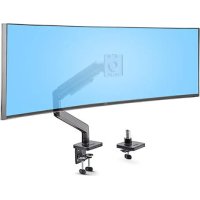
H1M1AG1MONITORARM - Flat screen mount StarTech.com - Free user manual and instructions
Find the device manual for free H1M1AG1MONITORARM StarTech.com in PDF.


| Product Type | Flat Screen Mount |
| Brand | StarTech.com |
| Model | H1M1AG1MONITORARM |
| Weight Capacity | 2 - 20 kg |
| Material | Steel and aluminum |
| VESA Compatibility | 75x75 mm and 100x100 mm |
| Mounting Type | Clamp (desk up to 75 mm) or grommet mount (up to 50 mm) |
| Movements | Tilt, 360° rotation, 180° pivot |
| Maximum Extension | 500 mm |
| Adjustable Height | Yes |
| Arm Weight | Approximately 2 kg |
| Dimensions (Package) | 400 x 200 x 100 mm |
| Power Supply | None (mechanical arm) |
| Warranty | 1 year |
| Usage | Indoor only |
| Assembly | Requires two people |
| Maintenance | Clean with a dry, soft cloth |
| Safety | Keep out of reach of children; pinch risk |
| Model Number | H1M1AG1MONITORARM |
| Color | Black |
| Tool-free adjustment | Yes |
| Installation | Certified professional recommended |
Frequently Asked Questions - H1M1AG1MONITORARM StarTech.com
User questions about H1M1AG1MONITORARM StarTech.com
0 question about this device. Answer the ones you know or ask your own.
Ask a new question about this device
Download the instructions for your Flat screen mount in PDF format for free! Find your manual H1M1AG1MONITORARM - StarTech.com and take your electronic device back in hand. On this page are published all the documents necessary for the use of your device. H1M1AG1MONITORARM by StarTech.com.
USER MANUAL H1M1AG1MONITORARM StarTech.com
Heavy-Duty Monitor Desk Mount - Height Adjustable - For up to 49" Monitors
Full-Product Manual H1M1AG1-MONITOR-ARM
Actual products may vary from photos
Safety Statements
Safety measures
- Product installation and/or mounting should be completed by a certified professional as per the local safety and building code guidelines.
Mesures de sécurité
To view manuals, videos, drivers, downloads, technical drawings, and more visit www.StarTech.com/support
Warning Statements
StarTech.com Ltd. is not responsible for any property damage and/or personal injury resulting from the installation procedures outlined in this technical document.
-
Assemble this product according to the instructions. Read the entire manual and ensure the instructions are fully understood before assembling and/or using this product.
-
Always assess the product's stability, with the aid of a second person, during and after the initial display mounting and whenever adjustments are made.
-
Do not exceed the weight capacity of this product. Overloading this product might result in personal injury or property damage.
The weight capacity of the monitor arm: 4.4-44 lb (2-20 kg).
- Do not allow children to climb on this product or to use this product without proper supervision.
This product is intended for indoor use only and should not be used outdoors.
-
Do not over-tighten the screws. If any resistance is encountered, stop tightening.
-
Assembling this product is a two-person task. Do not attempt to assemble this product and install equipment without assistance.
-
Before adding equipment to this product, ensure the product has been properly assembled, and that the product can support the weight of the added equipment.
-
Make sure all of the equipment has been properly secured before adjusting this product.
-
Stored Energy Hazard! This product contains a spring mechanism which can cause the mounted display to move forcibly, and quickly, upwards. Always exercise caution when adjusting the position of, or in close proximity to, the mounted display.
-
'Pinch hazards! Keep hands away from any pinch points created by the mechanical components when lowering or raising the display. Failure to do so may result in serious personal injury.
-
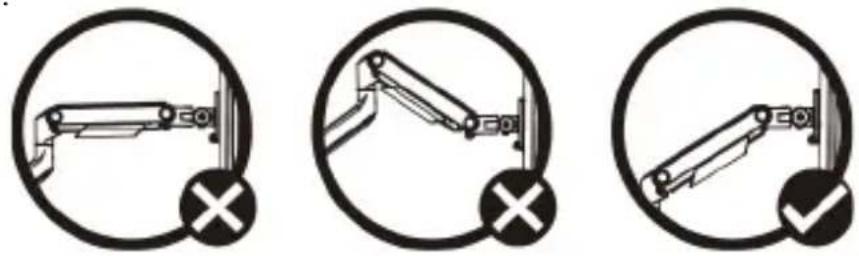
To avoid damage to the monitor or mount, do not make adjustments while the arm is in a horizontal position.
-
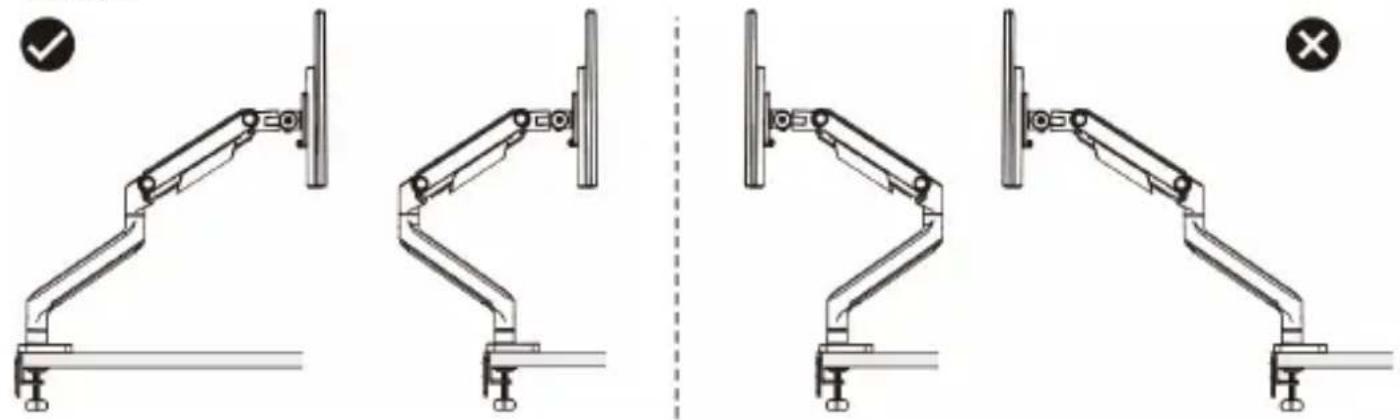
Do not position the monitor beyond the rear edge of the desk to maintain the mount's stability and prevent it from detaching from the desk. Failure to do so could result in personal injury and/or property damage.
To view manuals, videos, drivers, downloads, technical drawings, and more visit www.StarTech.com/support
Avertissements
To view manuals, videos, drivers, downloads, technical drawings, and more visit www.StarTech.com/support
Waarschuwingen
Safety Statements. 2
Warning Statements 3
Requirements 11
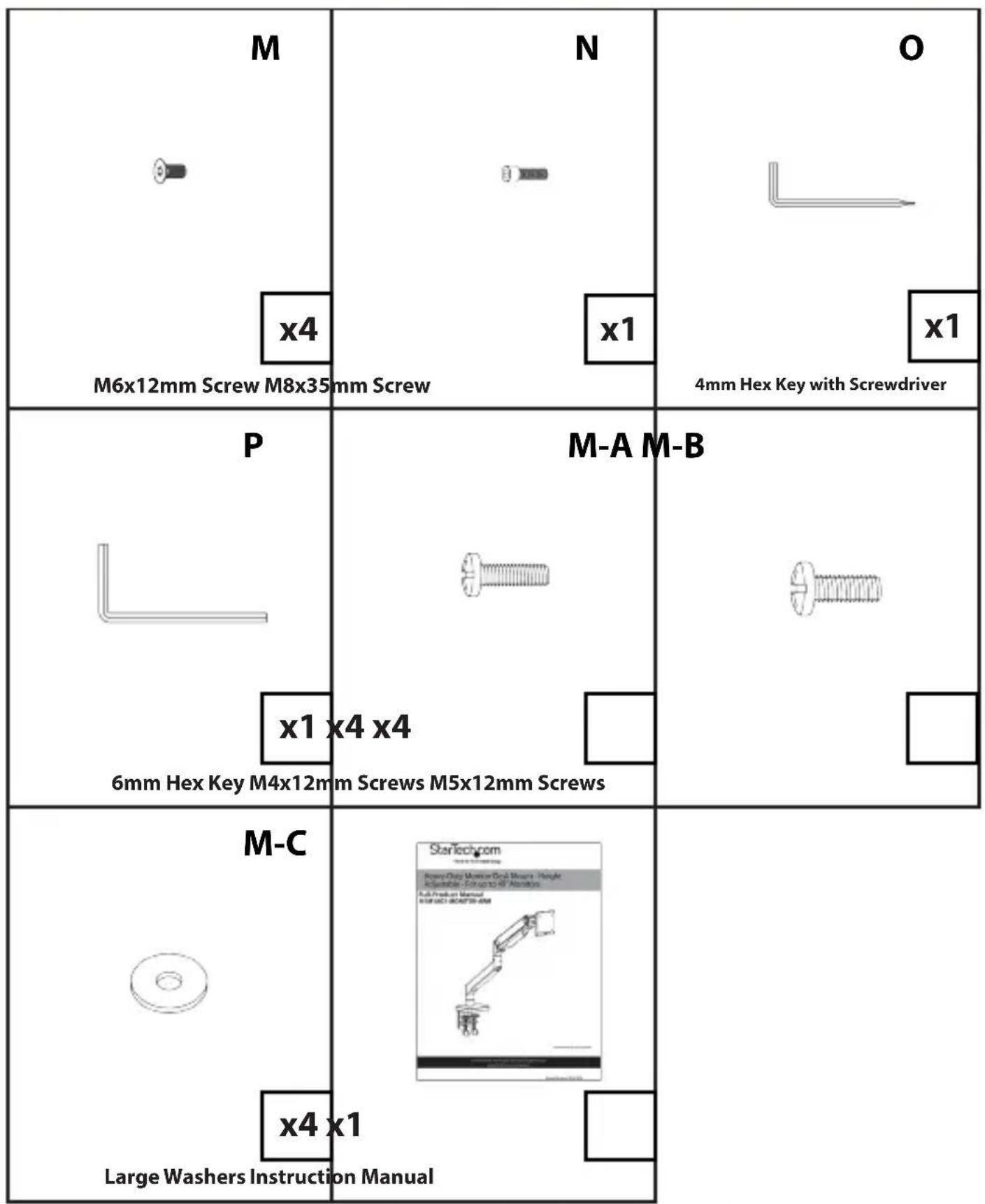
Package Contents. 11
Product Diagrams 14
Assembly 18
- Desk Clamp Assembly 18
Method A) For Surface Edge Clamp Mount. 18
Method B) For Grommet Mount 21
- Swivel Arm Assembly 22
Method A) For +90^ Rotation 22
Method B) For +180^ Rotation 22
-
Spring Arm Assembly 23
-
VESA Mount Assembly and Monitor Installation 24
-
Monitor Balancing 26
6.Cable Management 27
Operation 28
Tilt 28
Pan 28
Rotation 28
Warranty Information. 31
Limitation of Liability 31
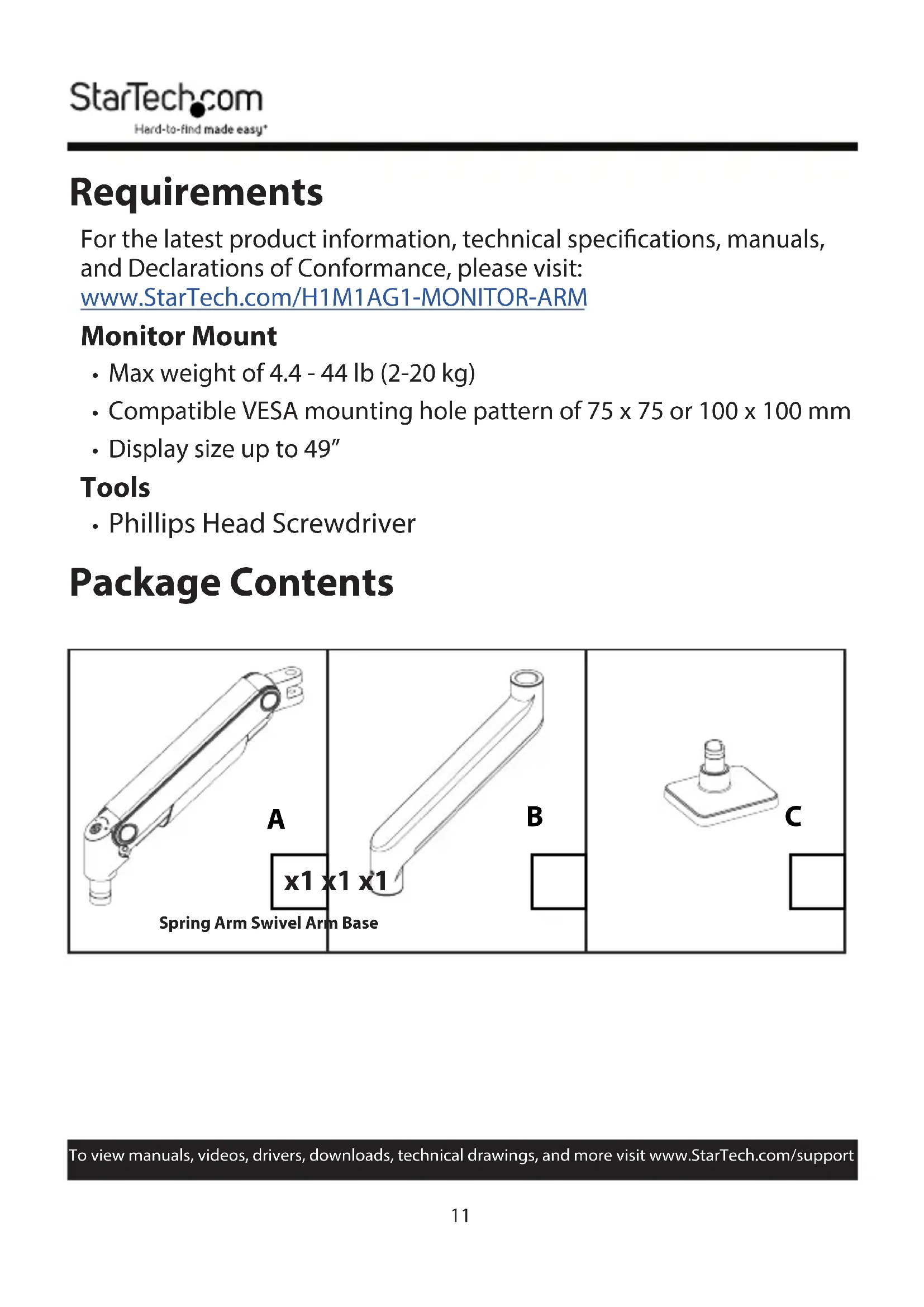
Requirements
For the latest product information, technical specifications, manuals, and Declarations of Conformance, please visit: www.StarTech.com/H1M1AG1-MONITOR-ARM
Monitor Mount
- Max weight of 4.4 - 44 lb( 2 - 20 kg)
- Compatible VESA mounting hole pattern of 75 × 75 or 100 × 100 ~mm
- Display size up to 49''
Tools
- Phillips Head Screwdriver
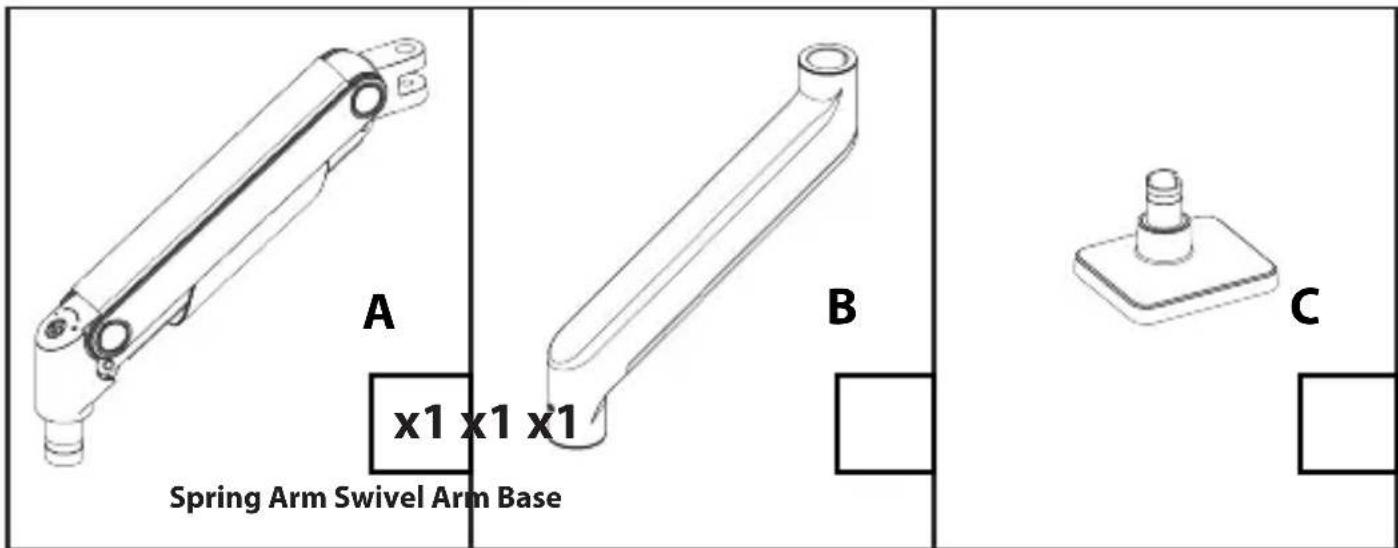
Package Contents
To view manuals, videos, drivers, downloads, technical drawings, and more visit www.StarTech.com/support
| D x1 x1 x1 VESA Mount Assembly Des Clamp Bracket, Upper Desk Clamp Bracket, Lower | E F G H I J K L O P Q R S T U V W A B C D E F G H I J K L O P Q R S T U V W A B C D E F G H I J K L O P Q R S T U V W A B C D E F G H I J K L | |
| G x1 x2 x2 Grommet Plate Clamping Discs Clamping Screws | ||
| J x1 x2 x2 VESA Mount Nut Small Washers M4x10mm Screws | ||
To view manuals, videos, drivers, downloads, technical drawings, and more visit www.StarTech.com/support
To view manuals, videos, drivers, downloads, technical drawings, and more visit www.StarTech.com/support
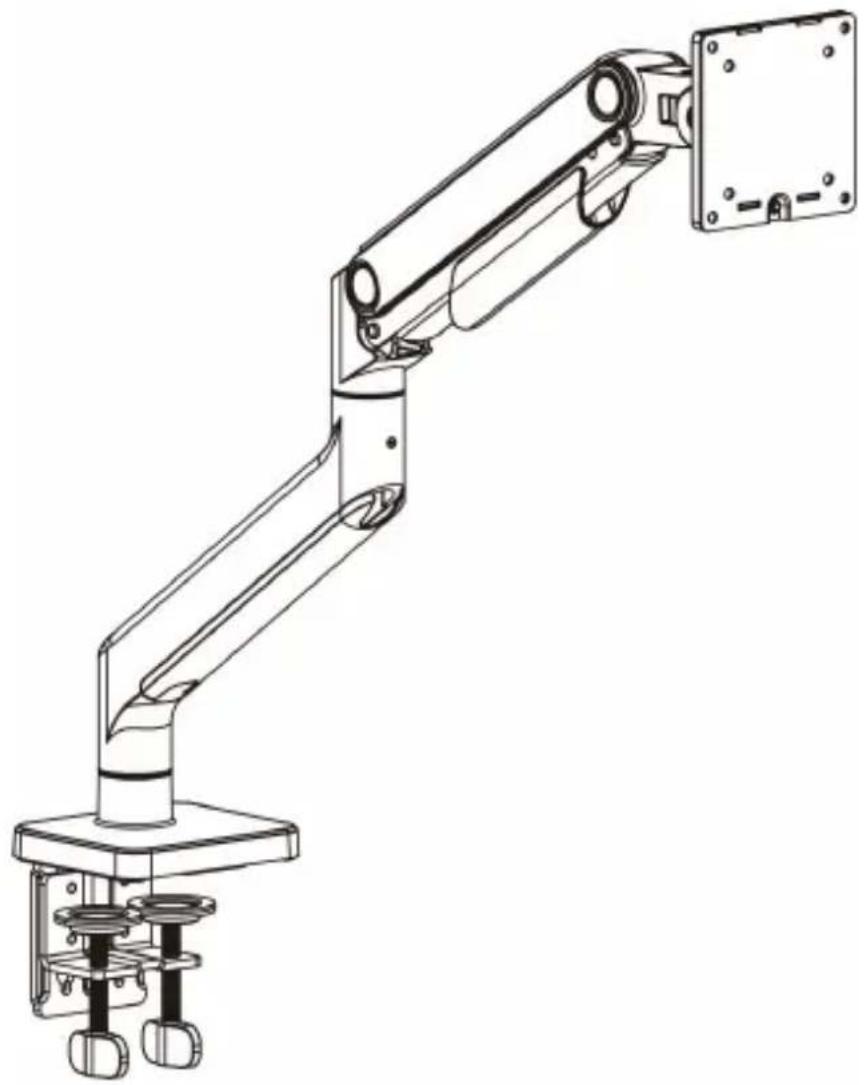
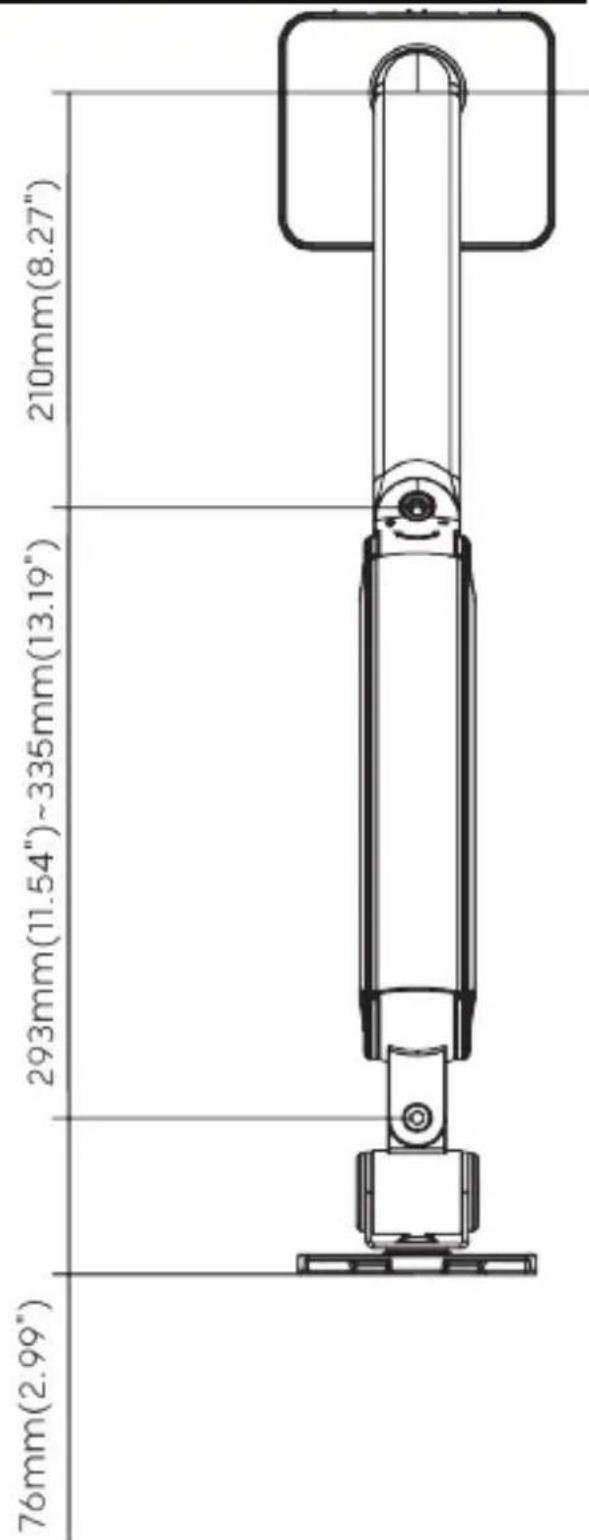
Product Diagrams
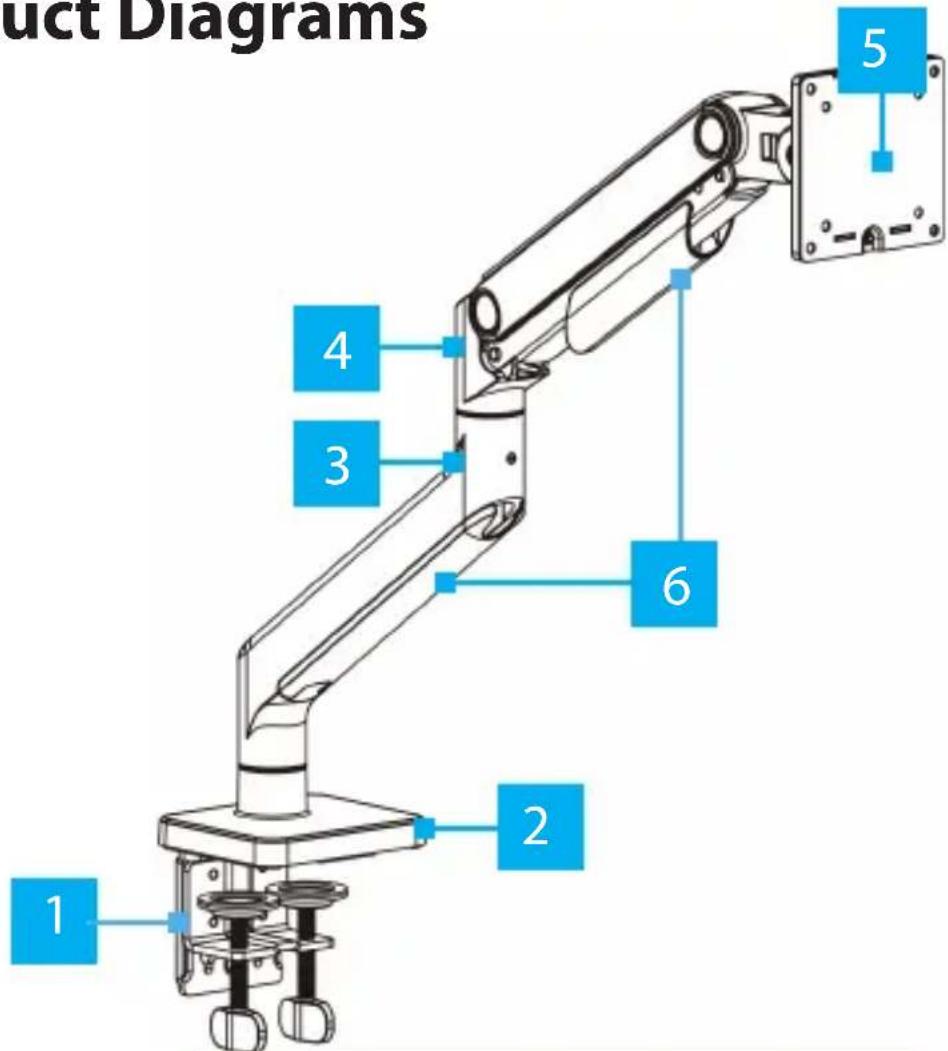
| Component | |
| 1 | Desk Clamp |
| 2 | Base |
| 3 | Swivel Arm |
| 4 | Spring Arm |
| 5 | Monitor VESA Mount |
| 6 | Cable Covers |

Front View Top View
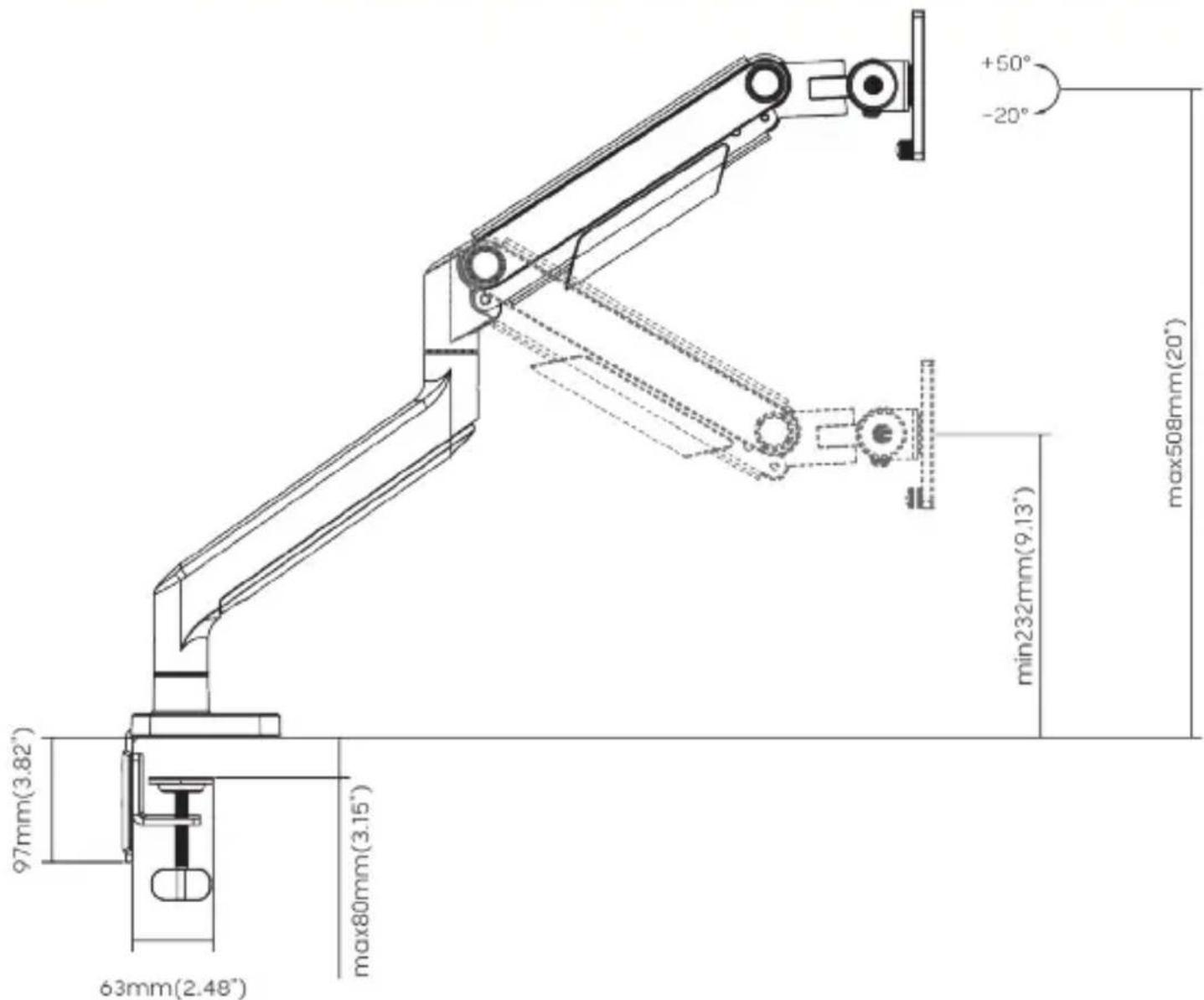
Side View
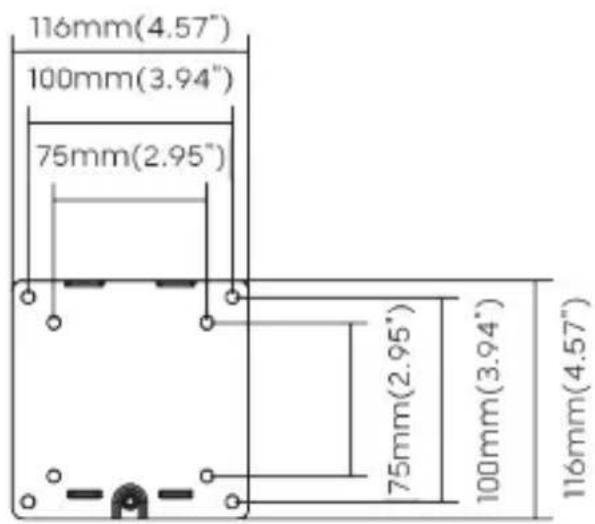
VESA Mount
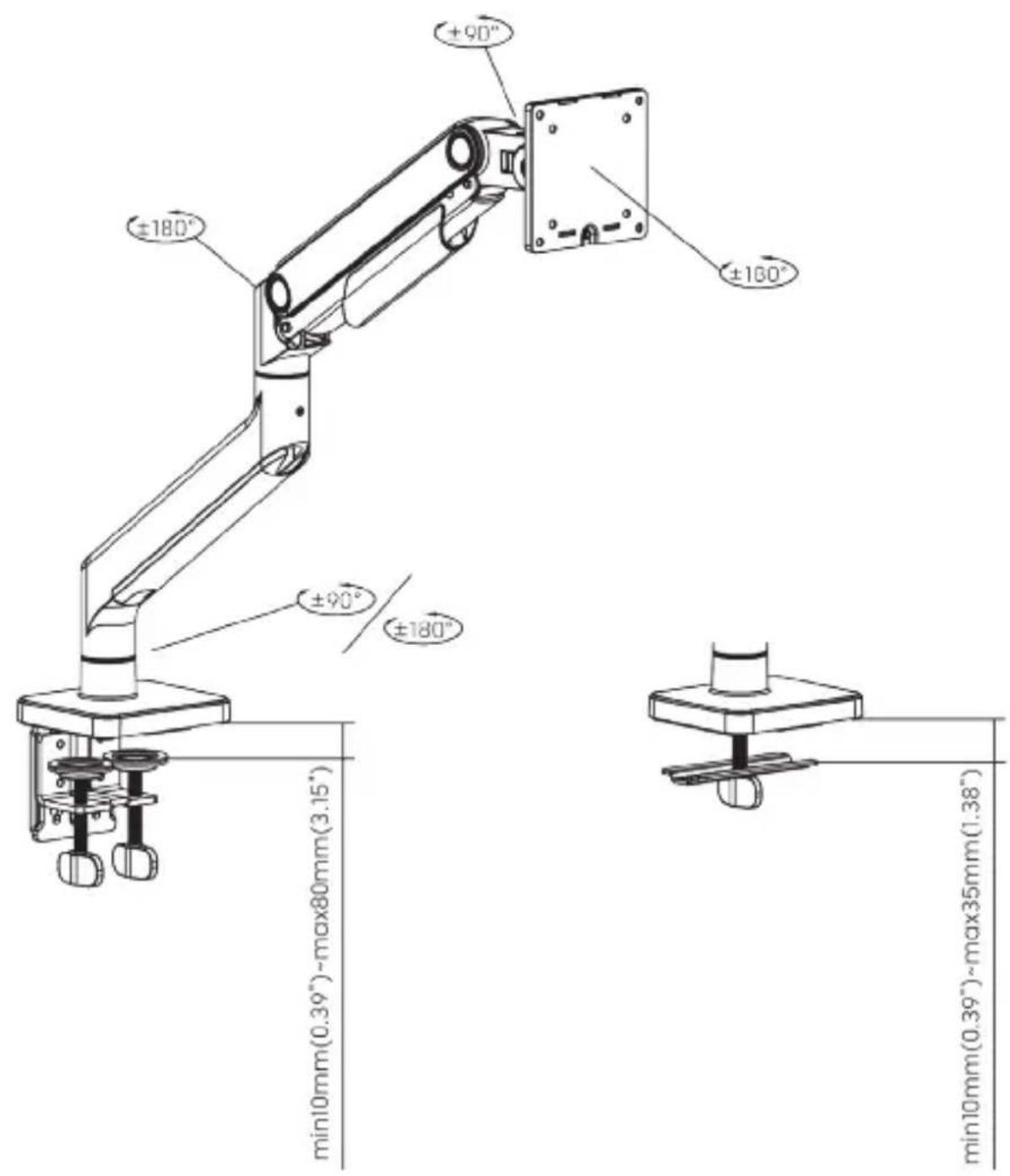
Assembly
WARNING!
Pinch hazards! Keep hands away from any pinch points created by the mechanical components when lowering or raising the display. Failure to do so may result in serious personal injury.
Do not over-tighten the screws. If any resistance is encountered, stop tightening.
1. Desk Clamp Assembly
Method A) For Surface Edge Clamp Mount
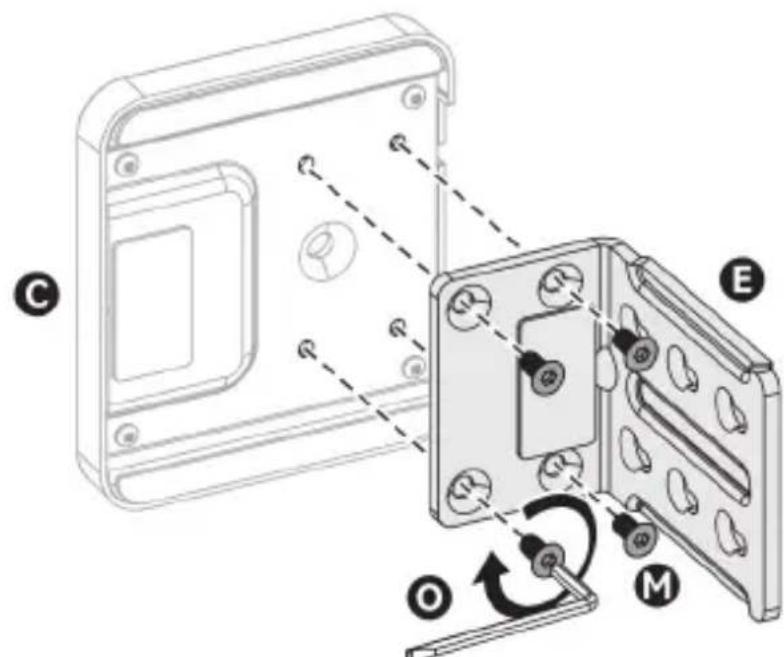
i)
Figure 1
To view manuals, videos, drivers, downloads, technical drawings, and more visit www.StarTech.com/support
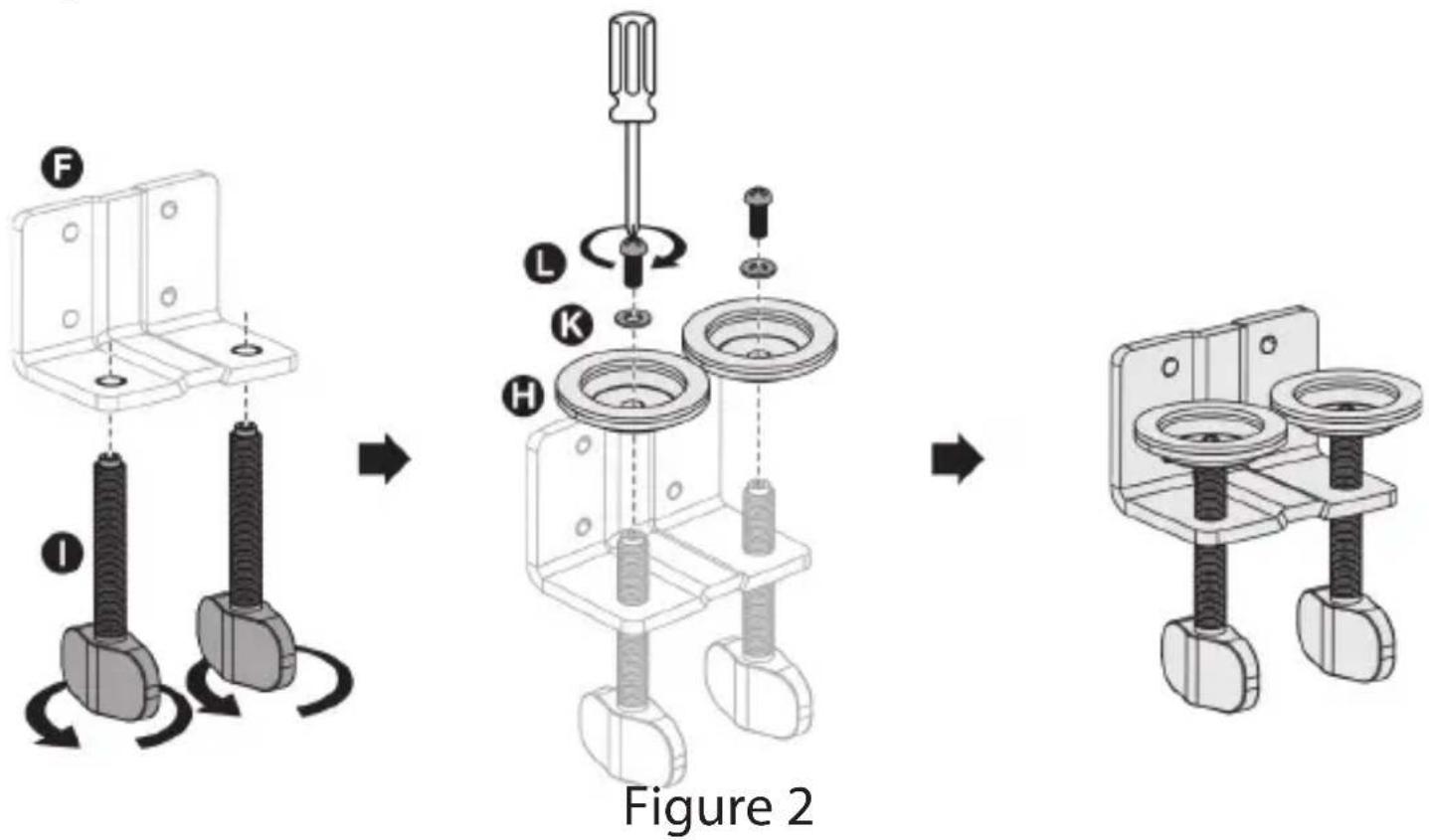
ii)
iii)
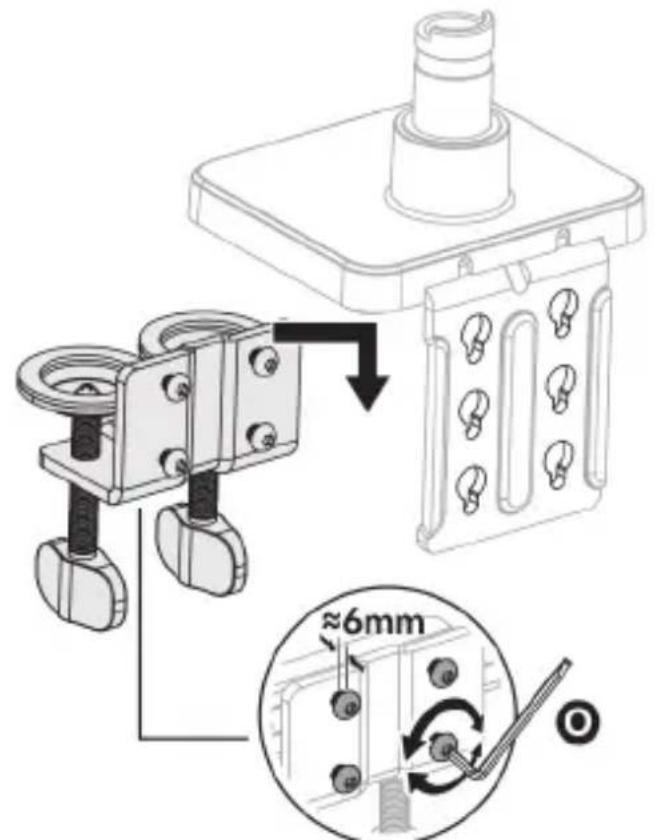
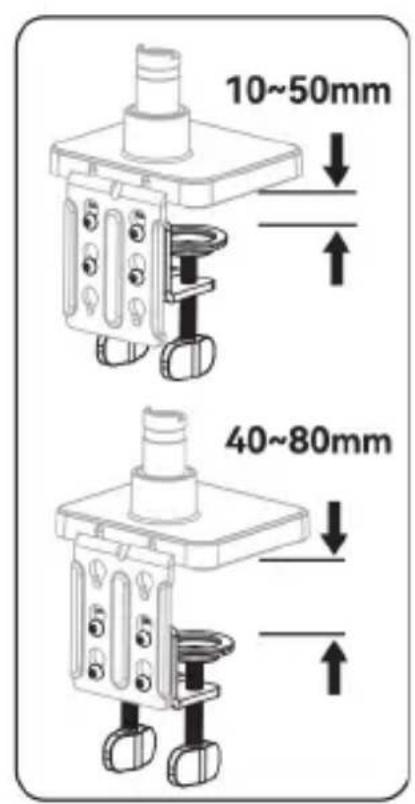
Figure 3
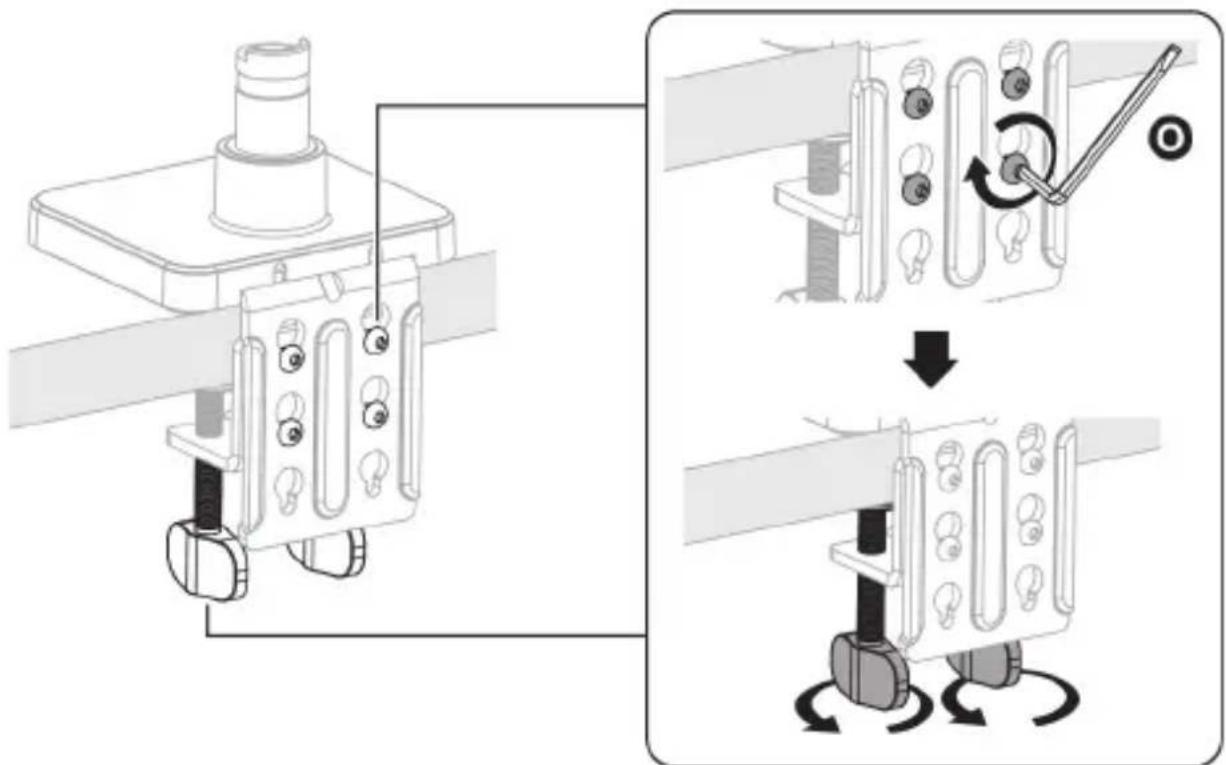
iv)
Figure 4
To view manuals, videos, drivers, downloads, technical drawings, and more visit www.StarTech.com/support
Method B) For Grommet Mount
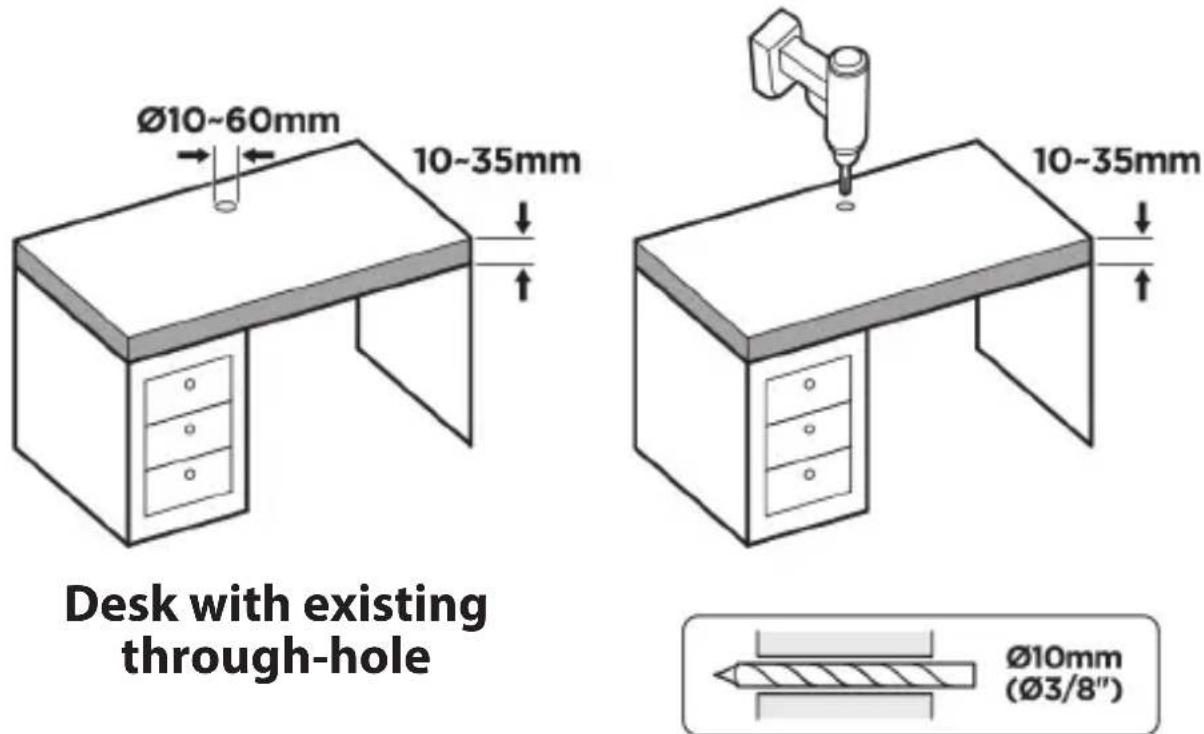
i)
Figure 5
ii)
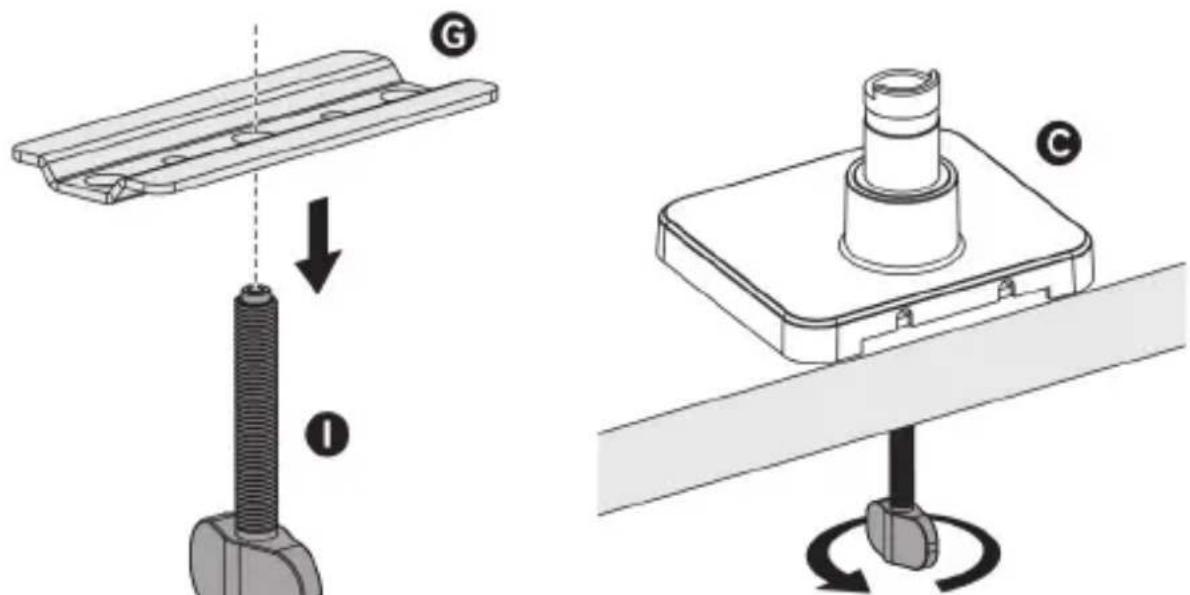
Figure 6
2. Swivel Arm Assembly
Method A) For +90^ Rotation
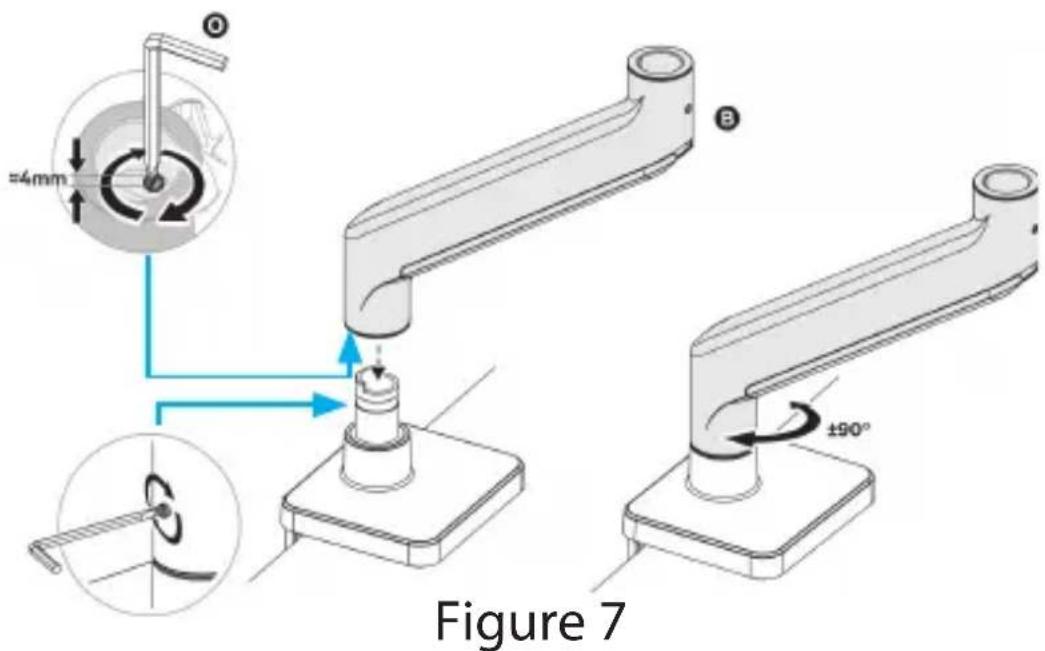
Method B) For +180^ Rotation
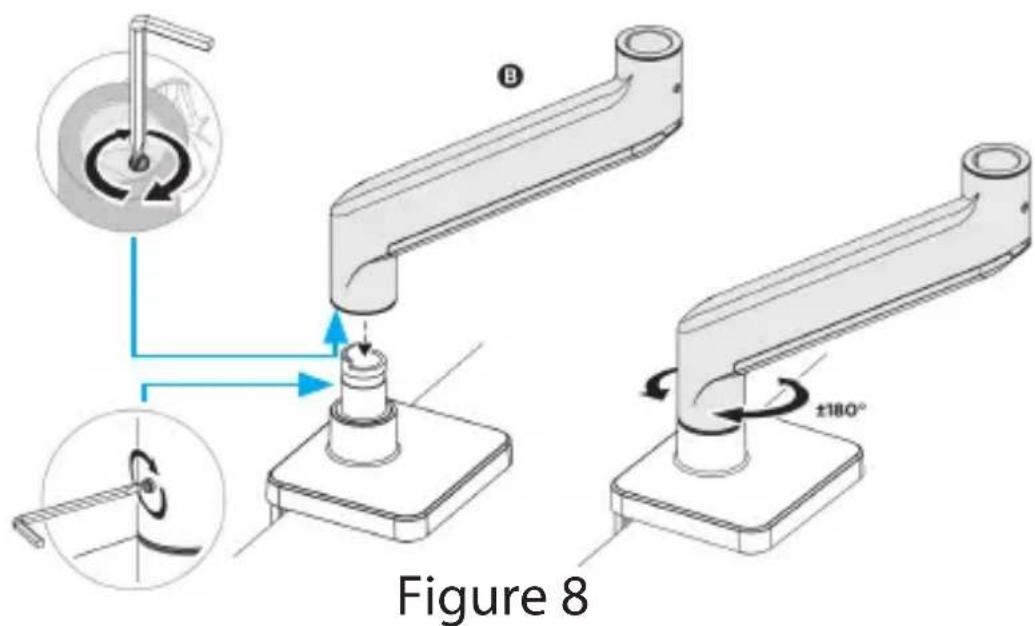
To view manuals, videos, drivers, downloads, technical drawings, and more visit www.StarTech.com/support
WARNING!
Stored Energy Hazard! This product contains a spring mechanism which can cause the mounted display to move forcibly, and quickly, upwards. Always exercise caution when adjusting the position of, or in close proximity to, the mounted display.
3. Spring Arm Assembly
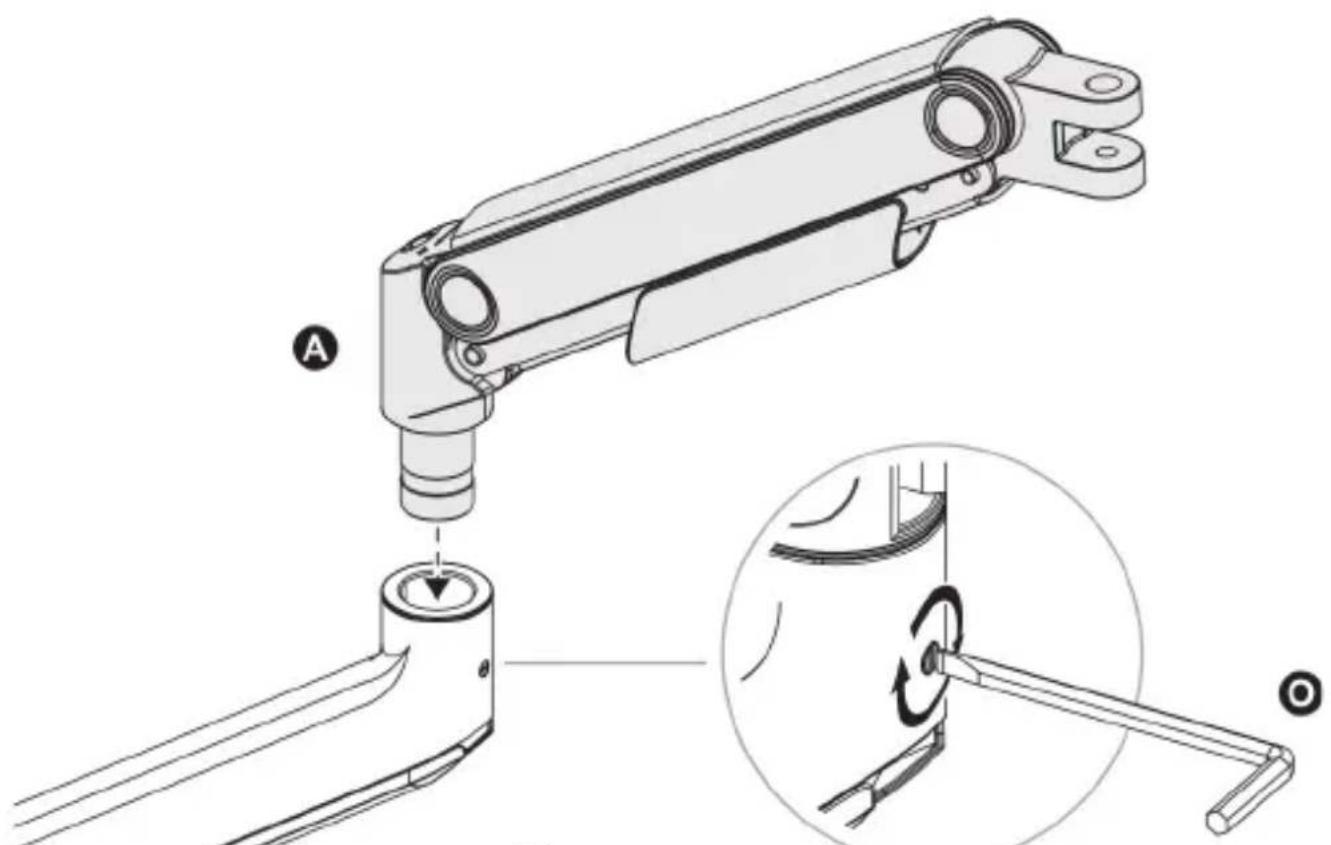
Figure 9
To view manuals, videos, drivers, downloads, technical drawings, and more visit www.StarTech.com/support
4. VESA Mount Assembly and Monitor Installation
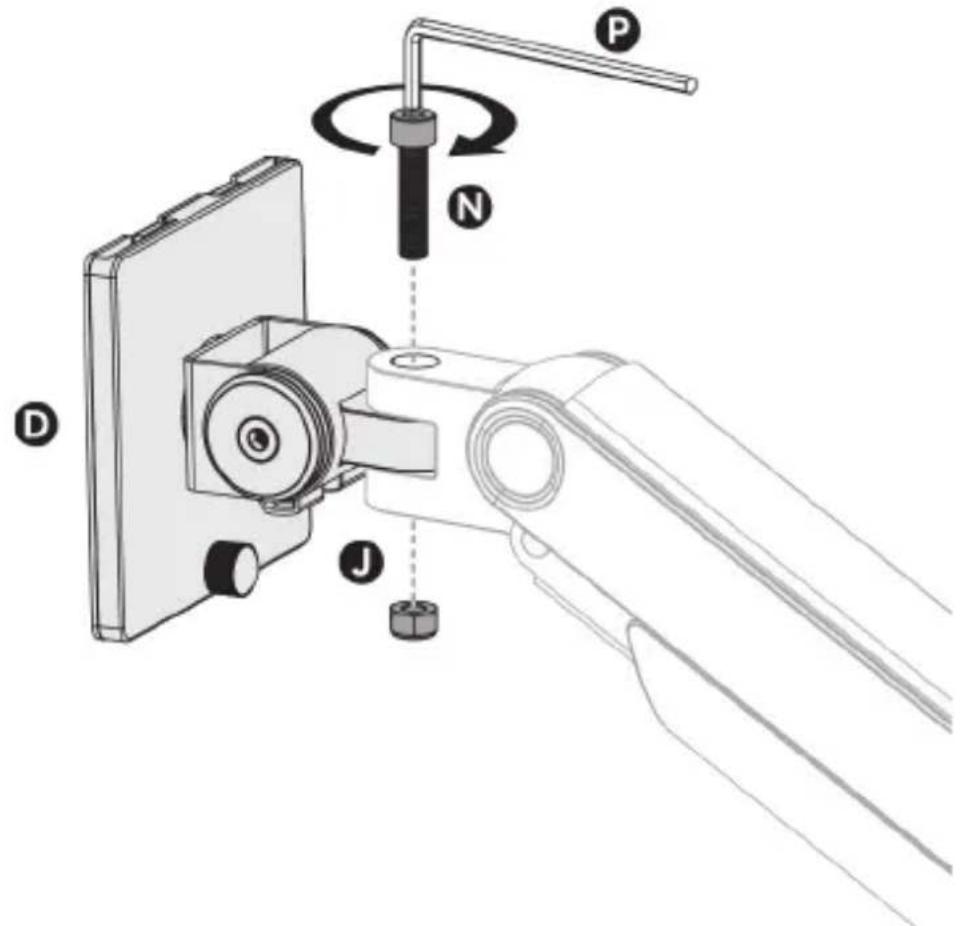
i)
Figure 10
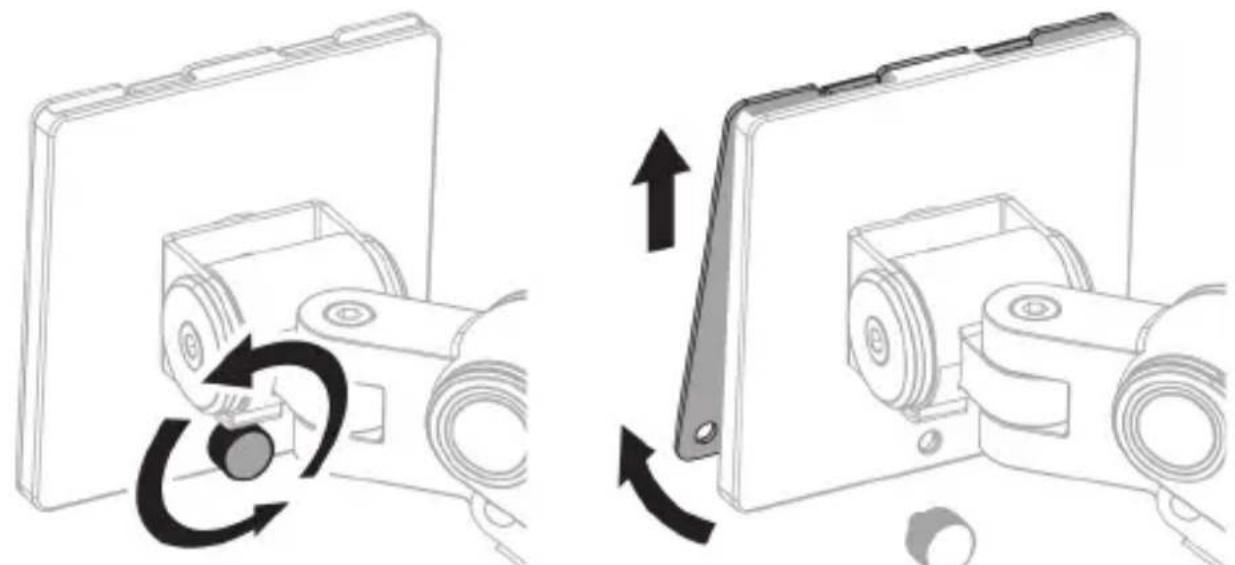
ii)
Figure 11
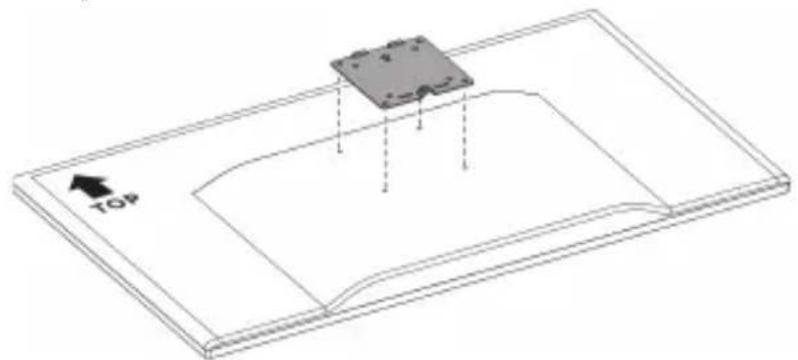
iii)
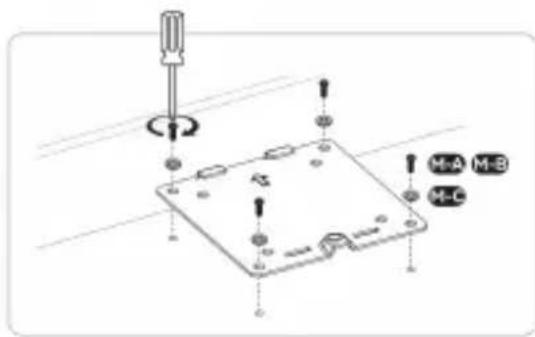
Figure 12
Use either set of the included monitor mounting screws, M4x12mm (M-A) or M5x12mm (M-B) depending on which the monitor supports
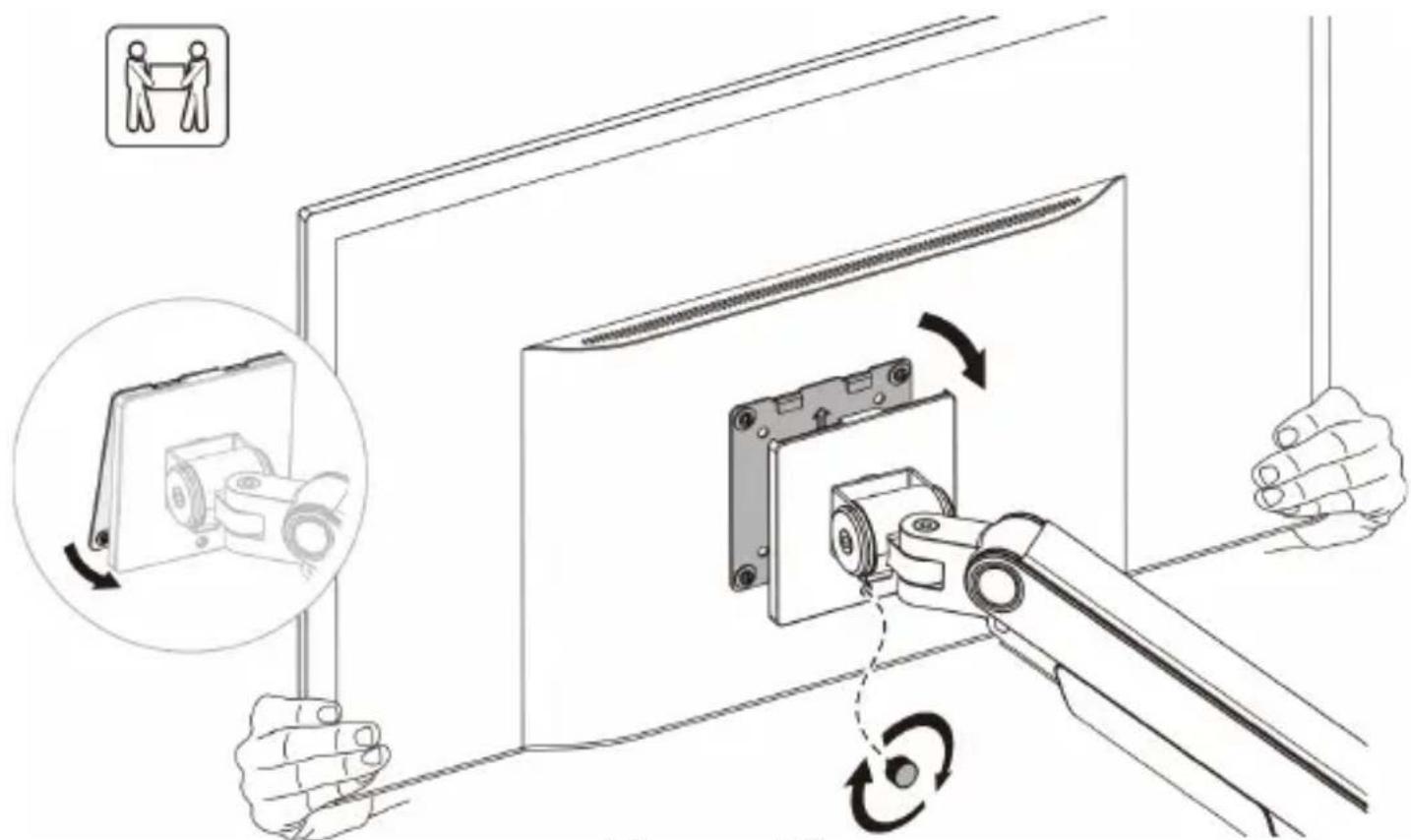
iv)
Figure 13
To view manuals, videos, drivers, downloads, technical drawings, and more visit www.StarTech.com/support
5. Monitor Balancing
To properly balance the arm with the monitor mounted adjust the spring tension using the 6mm Hex Key.
Position and firmly hold the arm (as shown in Figure 14) to make sure that the adjustment screw on the upper arm can be properly adjusted.
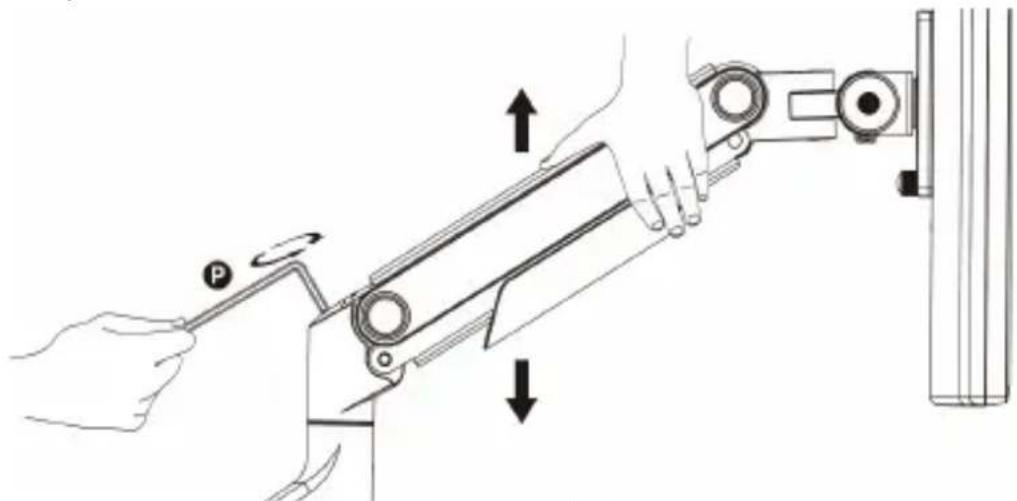
Figure 14
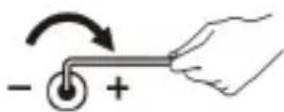
If the arm drops, turn the adjustment screw clockwise until it stays in a horizontal position.
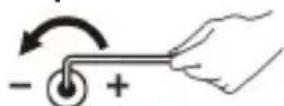
If the arm rises, turn the adjustment screw counter-clockwise until it stays in a horizontal position.
To view manuals, videos, drivers, downloads, technical drawings, and more visit www.StarTech.com/support
WARNING!
To avoid damage to the monitor or mount, do not make adjustments while the arm is in a horizontal or downward position.
Do not position the monitor beyond the rear edge of the desk to maintain the mount's stability and prevent it from detaching from the desk. Failure to do so could result in personal injury and/or property damage.
6. Cable Management
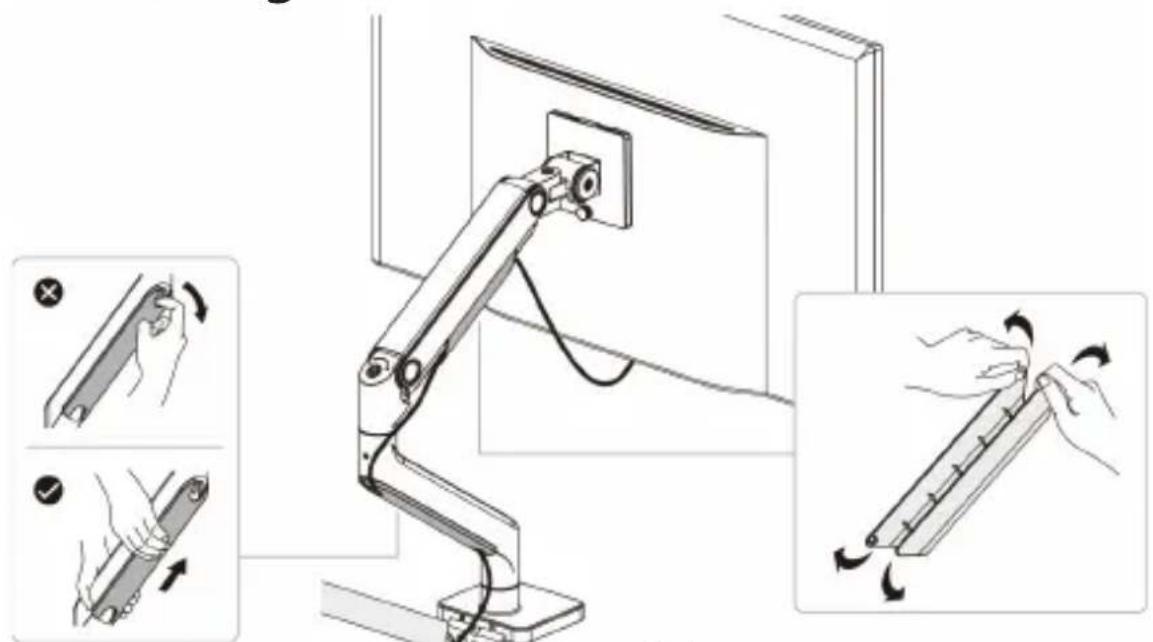
Figure 15
To view manuals, videos, drivers, downloads, technical drawings, and more visit www.StarTech.com/support
Operation
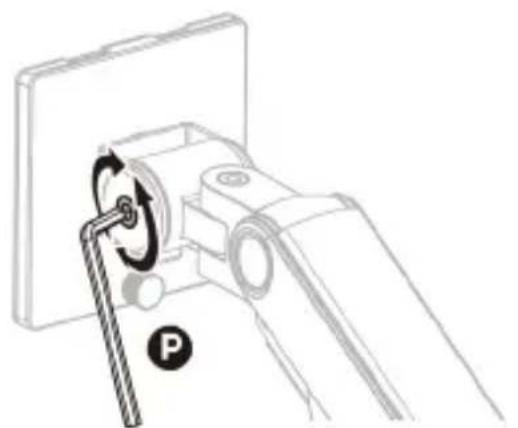
Tilt
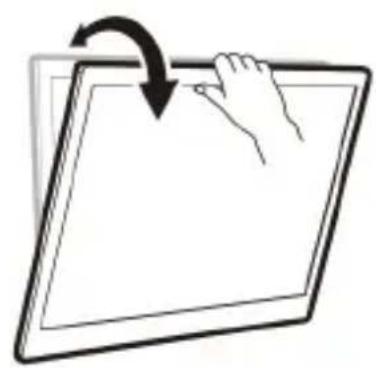
Figure 16
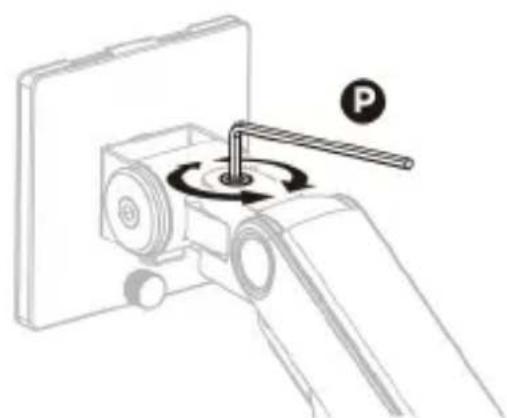
Pan
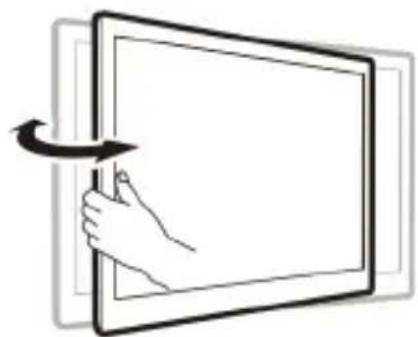
Figure 17
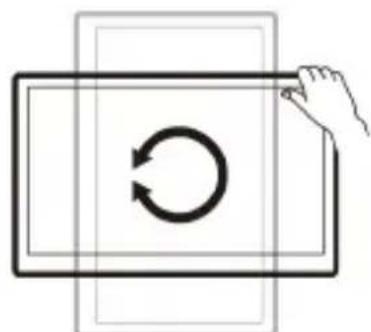
Rotation
Figure 18
Page Left Intentionally Blank
To view manuals, videos, drivers, downloads, technical drawings, and more visit www.StarTech.com/support
Page Left Intentionally Blank
To view manuals, videos, drivers, downloads, technical drawings, and more visit www.StarTech.com/support
Warranty Information
This product is backed by a five-year warranty.
For further information on product warranty terms and conditions, please refer to www.startech.com/warranty.
Limitation of Liability
In no event shall the liability of StarTech.com Ltd. and StarTech.com USA LLP (or their officers, directors, employees or agents) for any damages (whether direct or indirect, special, punitive, incidental, consequential, or otherwise), loss of profits, loss of business, or any pecuniary loss, arising out of or related to the use of the product exceed the actual price paid for the product.
Some states do not allow the exclusion or limitation of incidental or consequential damages. If such laws apply, the limitations or exclusions contained in this statement may not apply to you.
Hard-to-find made easy. At StarTech.com, that isn't a slogan. It's a promise.
StarTech.com is your one-stop source for every connectivity part you need. From the latest technology to legacy products — and all the parts that bridge the old and new — we can help you find the parts that connect your solutions.
We make it easy to locate the parts, and we quickly deliver them wherever they need to go. Just talk to one of our tech advisors or visit our website. You'll be connected to the products you need in no time.
Visit www.startech.com for complete information on all StarTech.com products and to access exclusive resources and time-saving tools.
StarTech.com is an ISO 9001 registered manufacturer of connectivity and technology parts since 1985 with operations around the world.
Reviews
Share your experiences using StarTech.com products, including product applications and setup, what you love about the products, and areas for improvement.
www.quefairedemesdechets.fr
StarTech.com Ltd.
45 Artisans Crescent London, Ontario N5V 5E9 Canada
StarTech.com LLP
4490 South Hamilton
Road
Groveport,Ohio
43125
U.S.A.
StarTech.com Ltd.
Unit B, Pinnacle 15
Gowerton Road
Brackmills,
Northampton
NN4 7BW
United Kingdom
StarTech.com Ltd.
Siriusdreef 17-27 2132 WT Hoofddorp The Netherlands
FR: fr.startech.com
DE: de.startech.com
ES: es.startech.com
NL: nl.startech.com
IT: it.startech.com
JP: jp.startech.com
To view manuals, videos, drivers, downloads, technical drawings, and more visit www.startech.com/support
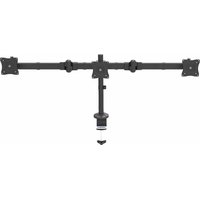
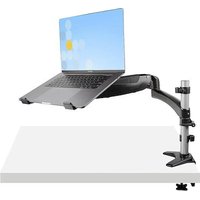
- Heavy-Duty Monitor Desk Mount - Height Adjustable - For up to 49" Monitors
- Full-Product Manual H1M1AG1-MONITOR-ARM
- Safety Statements
- Safety measures
- Mesures de sécurité
- Warning Statements
- Avertissements
- Waarschuwingen
- Requirements
- Monitor Mount
- Tools
- Package Contents
- Product Diagrams
- Assembly
- WARNING!
- Desk Clamp Assembly
- Method A) For Surface Edge Clamp Mount
- Method B) For Grommet Mount
- Swivel Arm Assembly
- Method A) For +90° Rotation
- Method B) For +180° Rotation
- Spring Arm Assembly
- VESA Mount Assembly and Monitor Installation
- Monitor Balancing
- Cable Management
- Operation
- Page Left Intentionally Blank
- Warranty Information
- Limitation of Liability
- Hard-to-find made easy. At StarTech.com, that isn't a slogan. It's a promise.
- Reviews
- StarTech.com Ltd.
- StarTech.com LLP
Brand : StarTech.com
Model : H1M1AG1MONITORARM
Category : Flat screen mount