 ManualGo.com
WDP3V - Uncategorized LG - Free user manual and instructions
Find the device manual for free WDP3V LG in PDF.



Download the instructions for your Uncategorized in PDF format for free! Find your manual WDP3V - LG and take your electronic device back in hand. On this page are published all the documents necessary for the use of your device. WDP3V by LG.
USER MANUAL WDP3V LG
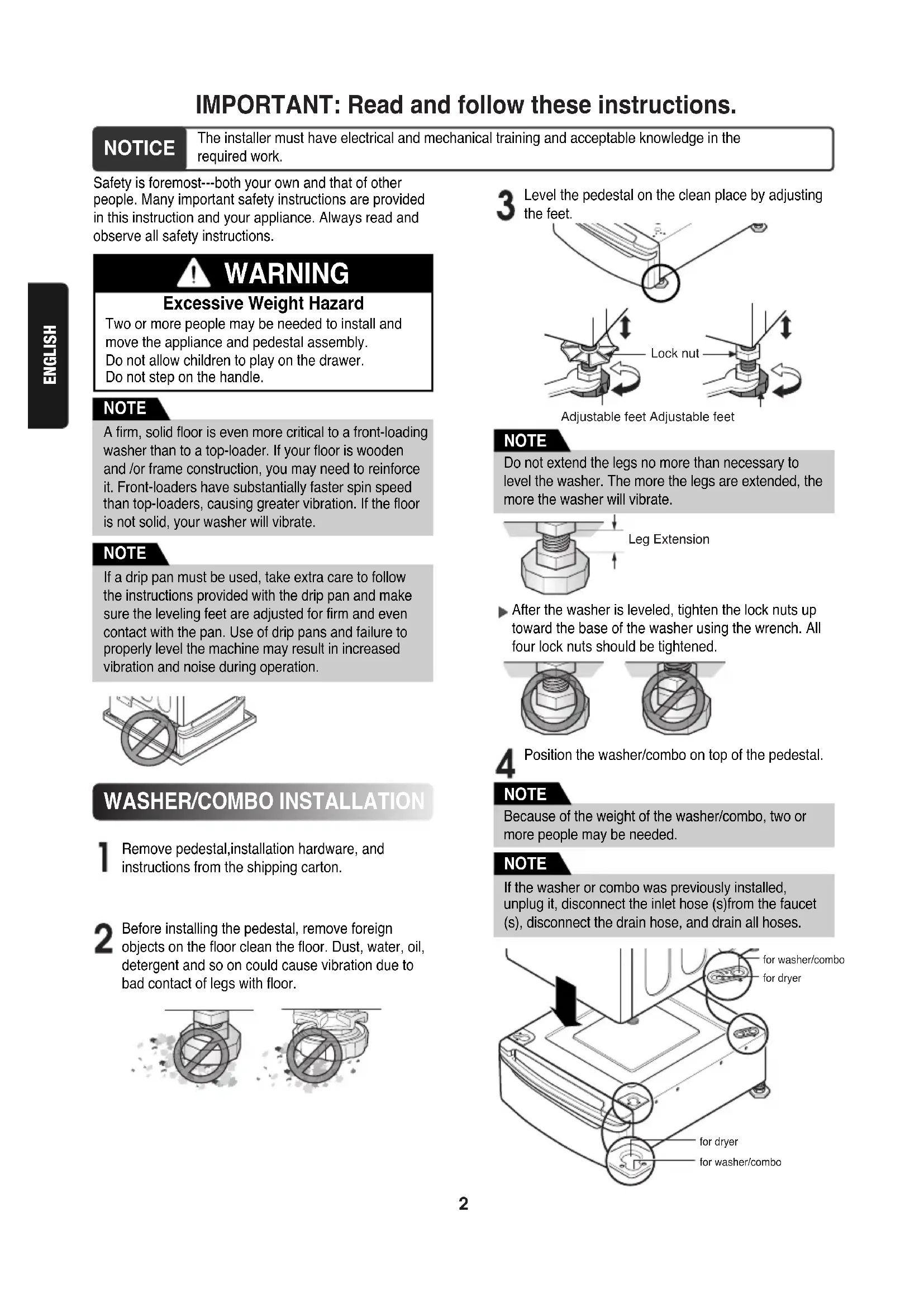
ENGLISHFRANÇAISfor washer/combofor dryerfor dryerfor washer/comboLock nutAdjustable feet Adjustable feetLeg Extension IMPORTANT: Read and follow these instructions. NOTICE The installer must have electrical and mechanical training and acceptable knowledge in therequired work.Safety is foremost---both your own and that of otherpeople. Many important safety instructions are providedin this instruction and your appliance. Always read andobserve all safety instructions.Remove pedestal,installation hardware, andinstructions from the shipping carton.Position the washer/combo on top of the pedestal. WARNING Excessive Weight Hazard Two or more people may be needed to install andmove the appliance and pedestal assembly.Do not allow children to play on the drawer.Do not step on the handle.A firm, solid floor is even more critical to a front-loadingwasher than to a top-loader. If your floor is woodenand /or frame construction, you may need to reinforceit. Front-loaders have substantially faster spin speedthan top-loaders, causing greater vibration. If the flooris not solid, your washer will vibrate.
WASHER/COMBO INSTALLATION
Before installing the pedestal, remove foreignobjects on the floor clean the floor. Dust, water, oil,detergent and so on could cause vibration due tobad contact of legs with floor.After the washer is leveled, tighten the lock nuts uptoward the base of the washer using the wrench. Allfour lock nuts should be tightened.Level the pedestal on the clean place by adjustingthe feet. NOTE If a drip pan must be used, take extra care to followthe instructions provided with the drip pan and makesure the leveling feet are adjusted for firm and evencontact with the pan. Use of drip pans and failure toproperly level the machine may result in increasedvibration and noise during operation. NOTE Do not extend the legs no more than necessary tolevel the washer. The more the legs are extended, themore the washer will vibrate. NOTE Because of the weight of the washer/combo, two ormore people may be needed. NOTE If the washer or combo was previously installed,unplug it, disconnect the inlet hose (s)from the faucet(s), disconnect the drain hose, and drain all hoses. NOTE3 ENGLISH Remove the paper from the four pedestal brackets. Attach the double-faced tape of the bracket to the washer/combo as shown so the bent parts of the brackets align with the edge and can be attached to the pedestal with screws. Be sure to press the adhesive parts of the brackets firmly to the appliance. Install the eight (8)screws (supplied)to attach the brackets to the pedestal. Level the washer/combo before attaching the bracket. Rub this part about 10 times for better attachment. If this part is not attached, heavy vibration and noise may result. NOTE Level the washer/combo on the pedestal by adjusting the feet. Lock nut Adjustable feet Adjustable feet Attach the lower side first. NOTE4 ENGLISH Move the washer/combo to the desired place. Diagonal Check When pushing down the edges of the washing machine top plate diagonally, the machine should not move up and down at all.(Please check both directions.) If the machine rocks when pushing the machine top plate diagonally, adjust the feet again. NOTE To make sure that the washer is properly level, run the washer with a test load: place approximately 6 pounds of laundry in the machine. Then press POWER, press RINSE+SPIN, and then press the START/PAUSE button. See the following sections for additional information on cycle selection and operation. Verify that the washer does not rock or vibrate excessively during the spin cycle. If the washer vibrates or shakes, adjust the leveling feet until the washer is stable and retest. NOTE The appliance and pedestal assembly must be placed on a solid and level floor for proper operation. Adjust the legs of the appliance and pedestal by turning with a wrench. Then, adjust the lock nut toward the pedestal while holding the pedestal leg using a wrench. NOTE Lock nut Adjustable feet Adjustable feet Because of the weight of the dryer, two or more people may be needed. NOTE Remove pedestal,installation hardware, and instructions from the shipping carton. DRYER INSTALLATION Position dryer on top of the pedestal. for washer/ combo for dryer for dryer for washer/ combo If dryer was previously installed, uninstall it as follows: REMARQUE A. Uninstalling an electric dryer:
1) Unplug the power supply cord,
2) Pull the dryer away from the wall enough to loosen
the vent clamp. Loosen the clamp and carefully remove the exhaust vent from the dryer exhaust outlet. B. Uninstalling a gas dryer:
1) Unplug power supply cord.
2) Turn off the gas supply.
3) Pull the dryer away from the wall enough to loosen
the vent clamp. Loosen the clamp and carefully remove the exhaust vent from the dryer exhaust outlet. Remove the paper from the four pedestal brackets.5 ENGLISH Lock nut Adjustable feet Adjustable feet Adjustable feet Higher Lower Attach the double-faced tape of the bracket to the dryer as shown so the bent parts of the brackets align with the edge and can be attached to the pedestal with screws. Move the dryer to the desired place. Be sure to press the adhesive parts of the brackets firmly to the appliance. Install the eight (8)screws(supplied)to attach the brackets to the pedestal. Attach the lower side first. NOTE The appliance and pedestal assembly must be placed on a solid and level floor for proper operation. Adjust the legs of the appliance and pedestal by turning with a wrench. Then, adjust the lock unt toward the pedestal while holding the pedestal leg using a wrench. NOTE Level the washer/combo before attaching the bracket. Rub this part about 10 times for better attachment. If this part is not attached, heavy vibration and noise may result. NOTELG Electronics Inc., Will repair or at its option replace, without charge, your product if it proves to be defective material or workmanship under normal use during the warranty period set forth below, effective from the date of original consumer purchase of the product. This limited warranty is good only to the original purchaser of the product and effective only when used in the United states including Alaska, Hawail, and U.S. Territories; and Canada. WARRANTY PERIOD: 1Year from the Date of Purchase. Call 1-800-243-0000 (USA) or 1-888-LGCANADA and choose the appropriate prompt. Please have product type, model number, serial number, and ZIP code ready. HOW SERVICE IS HANDLED: THIS WARRANTY IS IN LIEU OF ANY OTHER WARRANTIES, EXPRESS OR IMPLIED, INCLUDING WITHOUT LIMITATION, ANY WARRANTY OF MERCHANTABILITY OR FITNESS FOR A PARTICULAR PURPOSE. TO THE EXTENT ANY IMPLIED WARRANTY IS REQUIRED BY LAW, IT IS LIMITED IN DURATION TO THE EXPRESS WARRANTY PERIOD ABOVE. LG WILL NOT BE LIABLE FOR ANY CONSEQUENTIAL, INDIRECT, OR INCIDENTAL DAMAGES OF ANY KIND, INCLUDING LOST REVENUSE OR PROFITS, IN CONNECTION WITH THE PRODUCT. SOME STATES DO NOT ALLOW LIMITATION ON HOW LONG AN IMPLIED WARRANTY LASTS OR THE EXCLUSION OF INCIDENTAL OR CONSEQUENTIAL DAMAGES, SO THE ABOVE LIMITATIONS OR EXCLUSIONS MAY NOT APPLY TO YOU. THIS LIMITED WARRANTY DOES NOT APPLY TO: 1. Service trips to your home to deliver, pick up, and/or install the product, instruct, or replace house fuses or correct wiring, or correction of unauthorized repairs; and
2. Damages or operating problems that result from misuse, abuse, operation outside environmental specifications or
contrary to the requirements or precautions in the Operating Guide, accident, vermin, fire, flood, improper installation, acts of God, unauthorized modification or alteration, incorrect electrical current or voltage, or commercial use, or use for other than intended purpose.
3. Therefore, the cost of repair or replacement of such a defective product shall be borne by the consumer.
CUSTOMER INTER-ACTIVE CENTER NUMBERS: To Prove Warranty Coverage To Obtain Nearest Authorized Service Center or Sales Dealer, or to Obtain Product,Customer, or Service Assistance Retain your Sales Receipt to prove date of purchase. A copy of your Sales Receipt must be submitted at the time warranty service is provided. Call 1-800-243-0000 or 1-888-LGCANADA and choose the appropriate prompt from the menu, and have your product type, model number, serial number, and ZIP Code; or visit our website at http://www.lgservice.com
25.4" (64.5cm) 18.4" (46.7 cm)
(7.7cm) 27" (68.6cm) 13.6" (34.5cm)