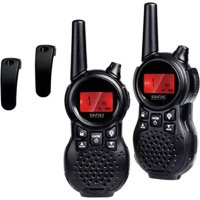
WTA446 - Radio DENVER - Free user manual and instructions
Find the device manual for free WTA446 DENVER in PDF.



| Product type | PMR radio (walkie-talkie) |
| Brand | Denver |
| Model | WTA446 |
| Frequency band | 446.00625 - 446.09375 MHz (PMR446) |
| Maximum output power | ≤ 0.5 W |
| Number of channels | 8 preset channels |
| Power supply | Batteries (not included, likely type: AA or AAA) |
| Volume levels | 8 levels |
| Estimated battery life | varies depending on usage and batteries |
| Maximum range | Up to several kilometers in open field (typical PMR446) |
| Main functions | Transmission/reception, channel change, volume adjustment, PTT button |
| Low battery indicator | Not specified but likely |
| Maintenance and cleaning | Wipe with a soft dry cloth; do not use abrasive products |
| Safety | Do not open, use only recommended batteries, follow recycling instructions |
| Spare parts and repairability | Contact Denver support for parts; professional repair recommended |
| General information | Compliant with Directive 2014/53/EU; Declaration of Conformity available at www.denver-electronics.com |
| Dimensions (estimated) | Approximately 160 x 55 x 30 mm (typical PMR) |
| Weight (estimated) | Approximately 120 g (without batteries) |
Frequently Asked Questions - WTA446 DENVER
User questions about WTA446 DENVER
0 question about this device. Answer the ones you know or ask your own.
Ask a new question about this device
Download the instructions for your Radio in PDF format for free! Find your manual WTA446 - DENVER and take your electronic device back in hand. On this page are published all the documents necessary for the use of your device. WTA446 by DENVER.
USER MANUAL WTA446 DENVER
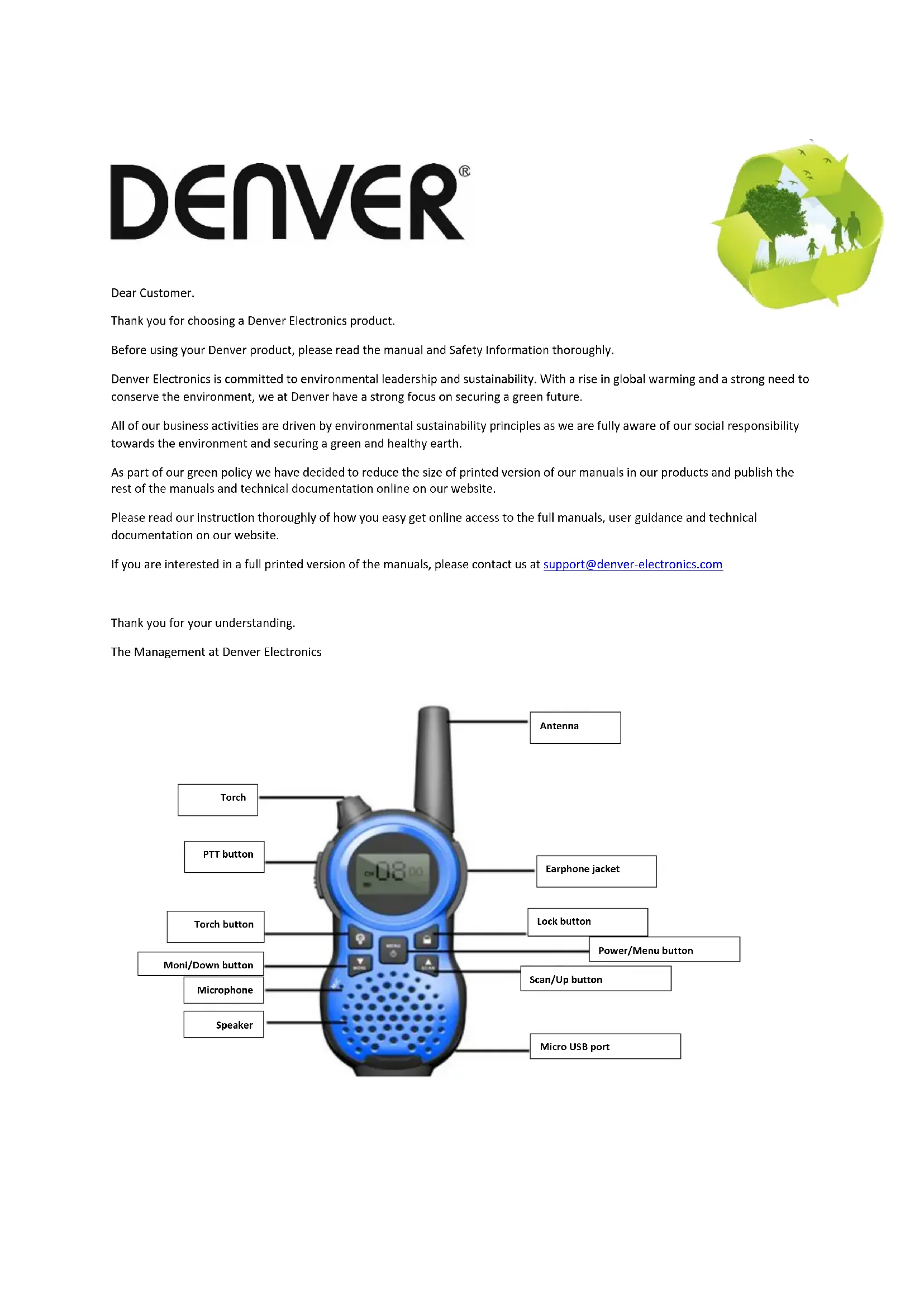
Thank you for choosing a Denver Electronics product.
Before using your Denver product, please read the manual and Safety Information thoroughly.
Denver Electronics is committed to environmental leadership and sustainability. With a rise in global warming and a strong need to conserve the environment, we at Denver have a strong focus on securing a green future.
All of our business activities are driven by environmental sustainability principles as we are fully aware of our social responsibility towards the environment and securing a green and healthy earth.
As part of our green policy we have decided to reduce the size of printed version of our manuals in our products and publish the rest of the manuals and technical documentation online on our website.
Please read our instruction thoroughly of how you easy get online access to the full manuals, user guidance and technical documentation on our website.
If you are interested in a full printed version of the manuals, please contact us at support@denver-electronics.com
Thank you for your understanding.
The Management at Denver Electronics
Turning on/off:
- Switching on
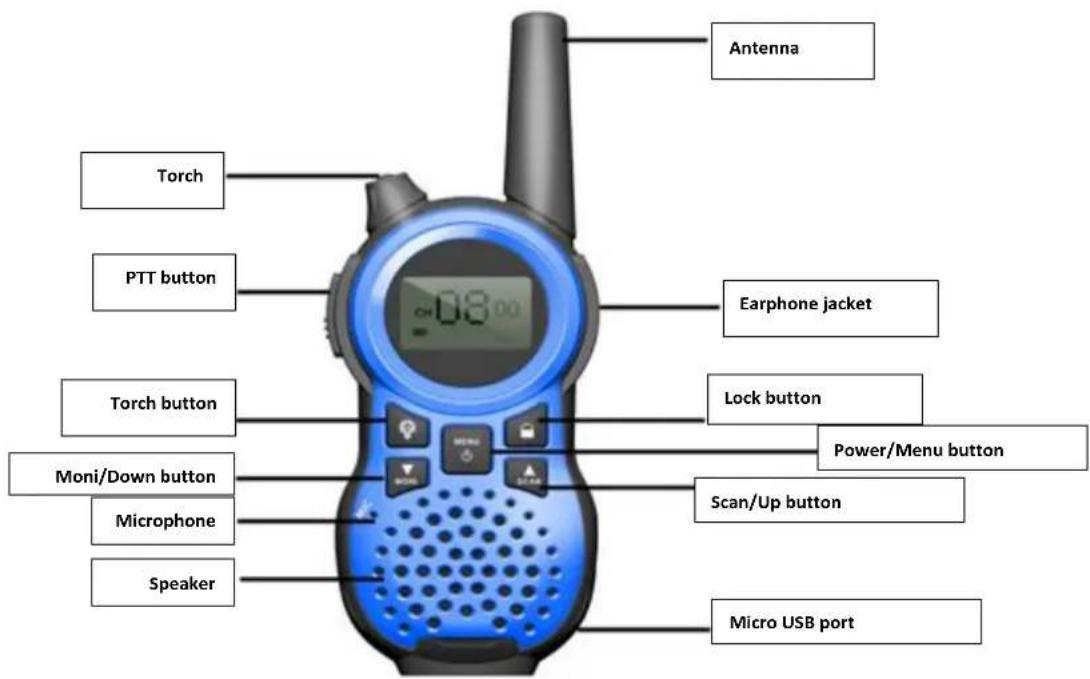
Press and hold the Menu/PWR until you hear a beep sound.
- Switching off
Press and hold the Menu/PWR until you hear a beep sound.
Adjusting the Volume:
You have 8 preset volume levels. To raise the volume, press the Up / Scan button. To decrease the volume, press the Down / Moni button. And press PTT button or Menu/PWR button to confirm.
Changing Channels
You have channels with the legal frequency at your disposal. To communicate with another device, you must be on the same channel. To change channels, once you have turned your unit on, press the Menu/PWR once and use the Up/Down buttons to scroll through to your desired channel. To set your desired channel, press the PTT button to confirm changes.
Your unit is simple "one way at a time". While you are speaking, you cannot receive a Transmission.
Your unit is an open-license band. Always identify yourself when transmitting on the same channel.
IMPORTANT: Before transmitting on a channel, listen to ensure that it is not already in use.
Your more advanced user manual can be found on our website: www.denver-electronics.com
Enter the search field and write your model number (WTA-446) and then user manuals can be found next to the pictures, underneath the model number.

Please notice - All products are subject to change without any notice. We take reservations for errors and omissions in the manual.
ALL RIGHTS RESERVED, COPYRIGHT DENVER ELECTRONICS A/S
DENVER
www.denver-electronics.com

Electric and electronic equipment and included batteries contains materials, components and substances that can be hazardous to your health and the environment, if the waste material (discarded electric and electronic equipment and batteries) is not handled correctly.
Electric and electronic equipment and batteries is marked with the crossed out trash can symbol, seen above. This symbol signifies that electric and electronic equipment and batteries should not be disposed of with other household waste, but should be disposed of separately.
As the end user it is important that you submit your used batteries to the appropriate and designated facility. In this manner you make sure that the batteries are recycled in accordance with legislature and will not harm the environment.
All cities have established collection points, where electric and electronic equipment and batteries can either be submitted free of charge at recycling stations and other collection sites, or be collected from the households. Additional information is available at the technical department of your city.
Hereby, Inter Sales A/S declares that the radio equipment type WTA-446 is in compliance with Directive 2014/53/EU. The full text of the EU declaration of conformity is available at the following internet address: www.denver-electronics.com and then click the search ICON on topline of website. Write model number: WTA-446. Now enter product page, and red directive is found under downloads/other downloads.
Operating Frequency Range: 446.00625-446.09375mhz
Max Output Power: ≤ 0.5W
DENVER ELECTRONICS A/S
Omega 5A, Soeften
DK-8382 Hinnerup
Denmark
www.facebook.com/denveretelectronics
DENVER

Cher client,


Brand : DENVER
Model : WTA446
Category : Radio