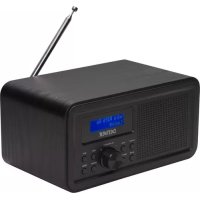
DAB30 - Radio DENVER - Free user manual and instructions
Find the device manual for free DAB30 DENVER in PDF.

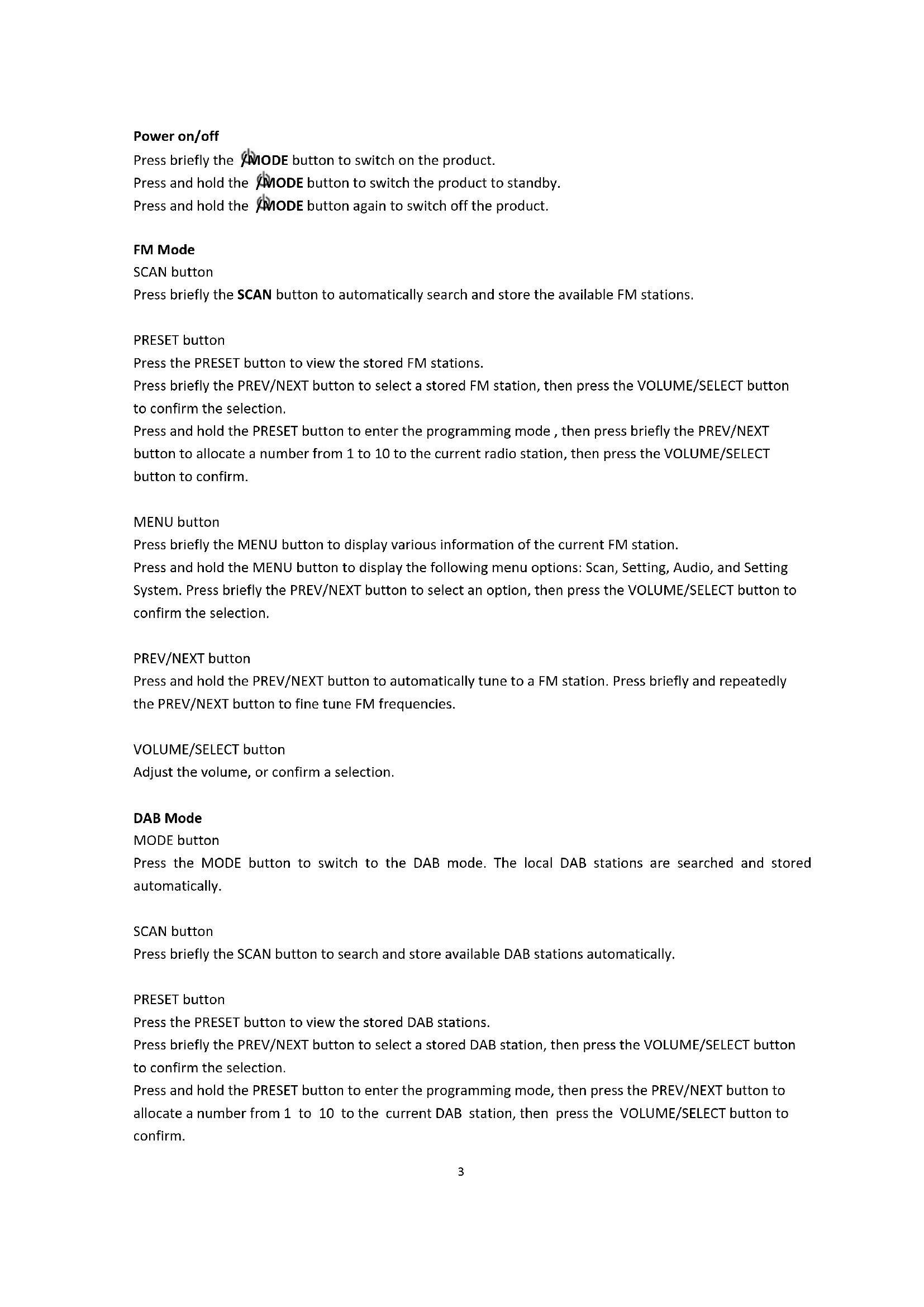


| Product Type | DAB+/FM Radio with alarm clock |
| Power Supply | 6V DC 1000mA mains adapter (100-240V AC input) or 4 AA batteries (not included) |
| Frequency Ranges | DAB: 174-240 MHz; FM: 87.5-108 MHz |
| Main Functions | DAB, FM, Auxiliary, Alarm, Snooze, Presets (10 stations per band), Auto search, Info menu |
| Controls | Volume/Selection knob, Previous/Next buttons, Mode, Menu/Info, Search, Preset, Alarm, Snooze |
| Connections | Auxiliary input (LINE IN), headphone output, DC power jack |
| Display | LCD screen |
| Antenna | Built-in telescopic antenna |
| Care and cleaning | Wipe with a soft, dry cloth. Do not use abrasive cleaners or solvents. |
| Safety | Do not expose to moisture or extreme temperatures. Disconnect the adapter if not used for extended periods. |
| General Information | Brand: Denver; Model: DAB30; Complies with directive 2014/53/EU. Manufactured by Inter Sales A/S. |
Frequently Asked Questions - DAB30 DENVER
User questions about DAB30 DENVER
0 question about this device. Answer the ones you know or ask your own.
Ask a new question about this device
Download the instructions for your Radio in PDF format for free! Find your manual DAB30 - DENVER and take your electronic device back in hand. On this page are published all the documents necessary for the use of your device. DAB30 by DENVER.
USER MANUAL DAB30 DENVER
denver-electronics.com
DAB+ FM RADIO
DAB-30
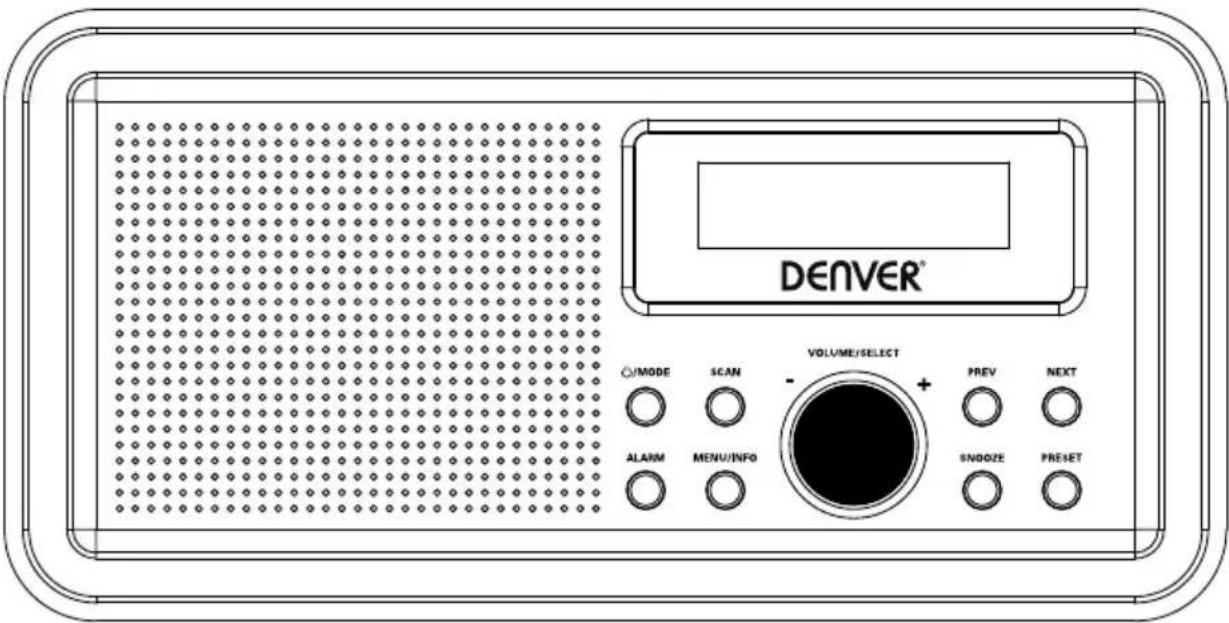
INSTRUCTION MANUAL
Please read this manual carefully before using, and keep it for future reference.
Content
English 2
Deutsche 6
Espanol 10
Francais 14
Italiano 18
Nederlands 22
Portugues 26
Polski 30
Svenska 34
Suomalainen 38
Dansk 42
Norsk 46
Short Operating Instructions
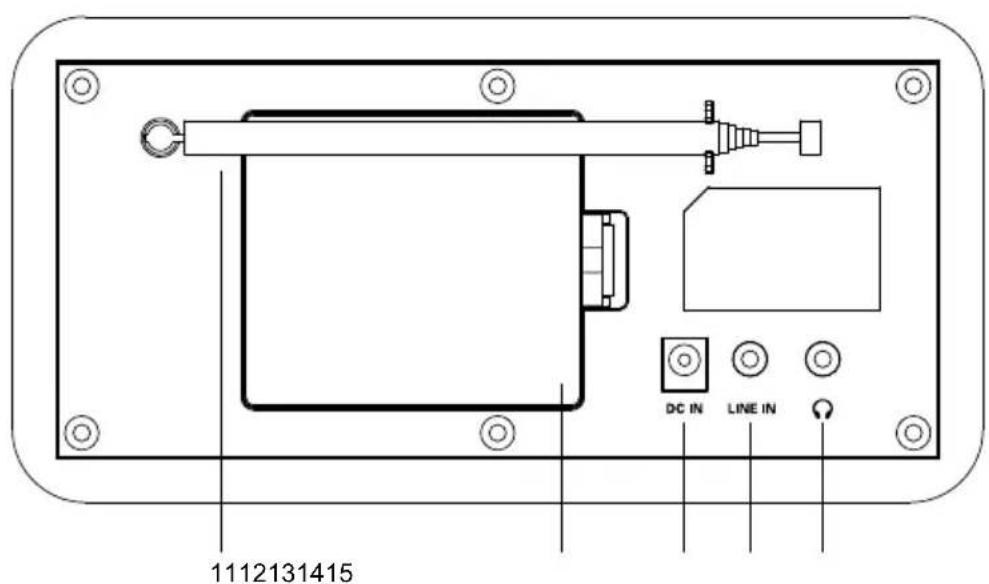
PRODUCT OVERVIEW
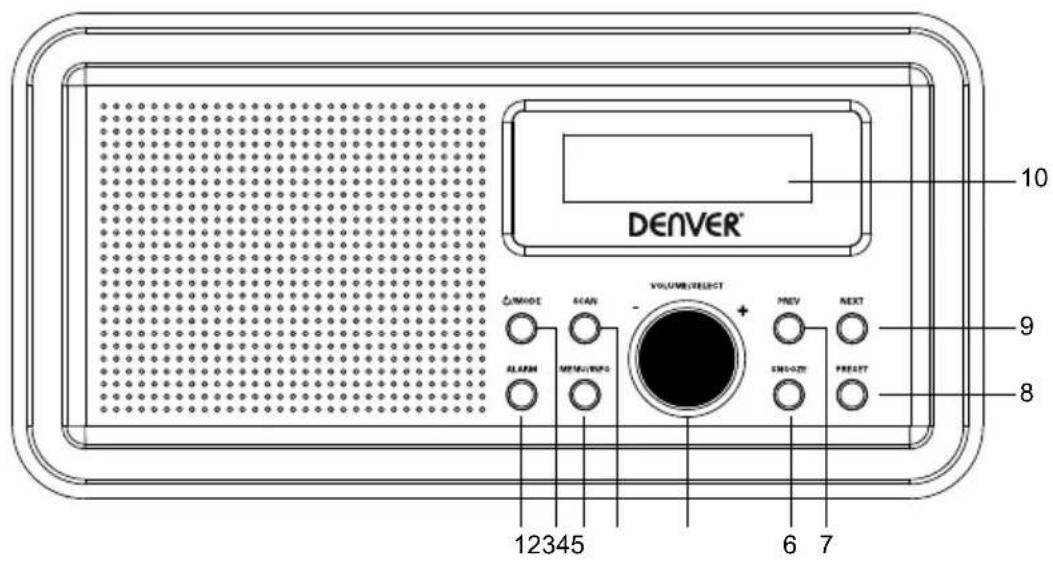
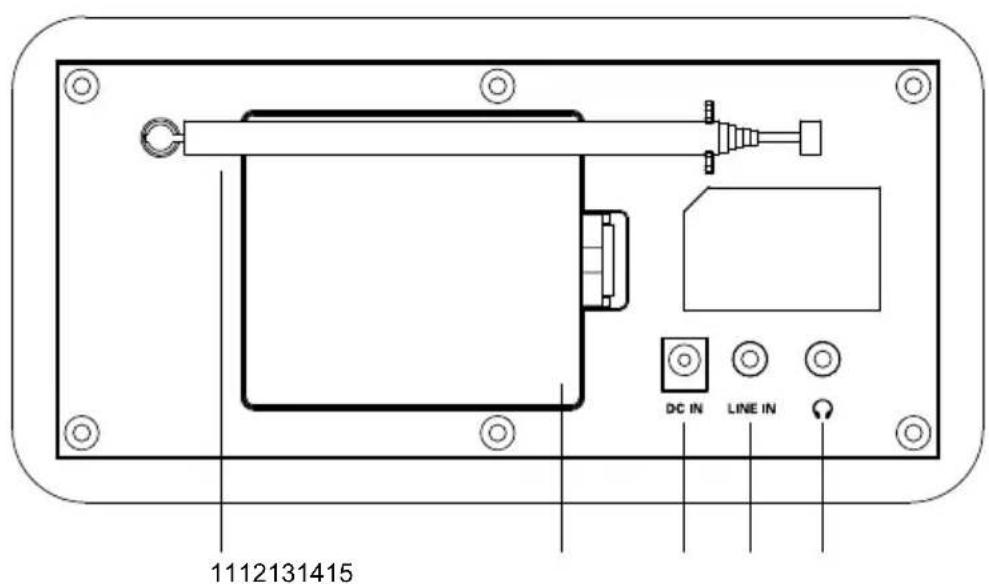
1 ALARM button
8 PRESET button
2 /MODE button
9 NEXT button
3 MENU/INFO button
10 LCD display
4 SCAN button
11 Antenna
5 VOLUME/SELECT button
12 Battery compartment
6 SNOOSE button
13 DC input jack
7 PREV button
14 LINE IN jack
15 Earphone jack
Power on/off
Press briefly the MODE button to switch on the product.
Press and hold the MODE button to switch the product to standby.
Press and hold the MODE button again to switch off the product.
FM Mode
SCAN button
Press briefly the SCAN button to automatically search and store the available FM stations.
PRESET button
Press the PRESET button to view the stored FM stations.
Press briefly the PREV/NEXT button to select a stored FM station, then press the VOLUME/SELECT button to confirm the selection.
Press and hold the PRESET button to enter the programming mode, then press briefly the PREV/NEXT button to allocate a number from 1 to 10 to the current radio station, then press the VOLUME/SELECT button to confirm.
MENUButton
Press briefly the MENU button to display various information of the current FM station.
Press and hold the MENU button to display the following menu options: Scan, Setting, Audio, and Setting System. Press briefly the PREV/NEXT button to select an option, then press the VOLUME/SELECT button to confirm the selection.
PREV/NEXT button
Press and hold the PREV/NEXT button to automatically tune to a FM station. Press briefly and repeatedly the PREV/NEXT button to fine tune FM frequencies.
VOLUME/SELECT button
Adjust the volume, or confirm a selection.
DAB Mode
MODE button
Press the MODE button to switch to the DAB mode. The local DAB stations are searched and stored automatically.
SCAN button
Press briefly the SCAN button to search and store available DAB stations automatically.
PRESET button
Press the PRESET button to view the stored DAB stations.
Press briefly the PREV/NEXT button to select a stored DAB station, then press the VOLUME/SELECT button to confirm the selection.
Press and hold the PRESET button to enter the programming mode, then press the PREV/NEXT button to allocate a number from 1 to 10 to the current DAB station, then press the VOLUME/SELECT button to confirm.
MENUButton
Press the MENU button to display various information of the current DAB station.
Press and hold the MENU button to display the following menu options: Full scan, Manual tune, and DRC
Prune System. Press briefly the PREV/NEXT button to select an option, then press the VOLUME/SELECT
button to confirm the selection.
NEXT button
Press briefly the PREV/NEXT button to select a stored DAB station, then press the VOLUME/SELECT button to confirm the selection.
VOLUME/SELECT button
Adjust the volume, or confirm a selection.
Alarm Mode
ALARM button
Press briefly the ALARM button to select alarm 1, and press again the ALARM button to select alarm 2.
Press briefly the PREV/NEXT button to select alarm options, then press the VOLUME/SELECT button to confirm the selection.
SNOOZE button
When the alarm rings, press the SNOOZE button to stop ringing, and the alarm rings at a 9-minute interval.
AUX mode
Press the MODE button to switch to the AUX mode, and connect an external audio device to the LINE IN jack.
MENUButton
Press briefly the MENU button to display various information of AUX mode. Press and hold the MENU button to display an option, then press the VOLUME/SELECT button to confirm the selection.
VOLUME/SELECT button
Adjust volume.
SCAN /PRESET /PREV/NEXT buttons are invalid in the AUX mode.
Using earphones
You can connect your earphones with a 3.5mm plug (not included) to the Earphone jack on this product.
SPECIFICATIONS
| Power supply | Output DC6V 1000mA Input: AC 100-240V 50/60Hz |
| Battery type | 4 x AA batteries (not supplied) |
| DAB | 174 MHz to 240 MHz |
| FM | 87.5 MHz to 108 MHz |
Please notice - All products are subject to change without any notice. We take reservations for errors and omissions in the manual.
ALL RIGHTS RESERVED, COPYRIGHT DENVER ELECTRONICS A/S
DENVER
www.denver-electronics.com



Electric and electronic equipment contains materials, components and substances that can be hazardous to your health and the environment, if the waste material (discarded electric and electronic equipment) is not handled correctly.
Electric and electronic equipment is marked with the crossed out trash can symbol, seen above. This symbol signifies that electric and electronic equipment should not be disposed of with other household waste, but should be disposed of separately.
All cities have established collection points, where electric and electronic equipment can either be submitted free of charge at recycling stations and other collection sites, or be collected from the households. Additional information is available at the technical department of your city.
Hereby, Inter Sales A/S declares that the radio equipment type DAB-30 is in compliance with Directive 2014/53/EU. The full text of the EU declaration of conformity is available at the following internet address: www.denver-electronics.com and then click the search ICON on topline of website. Write modelnumber: DAB-30. Now enter product page, and red directive is found under downloads/other downloads
Operating Frequency Range: DAB:174 MHz to 240 MHz / FM: 88 MHz to 108 MHz
Max Output Power: DC 6V 1000MHz
DENVER ELECTRONICS A/S
Omega 5A, Soeften
DK-8382 Hinnerup
Denmark
www.facebook.com/denveretelectronics
Kurzanleitung
PRODUKTÜBERSICHT
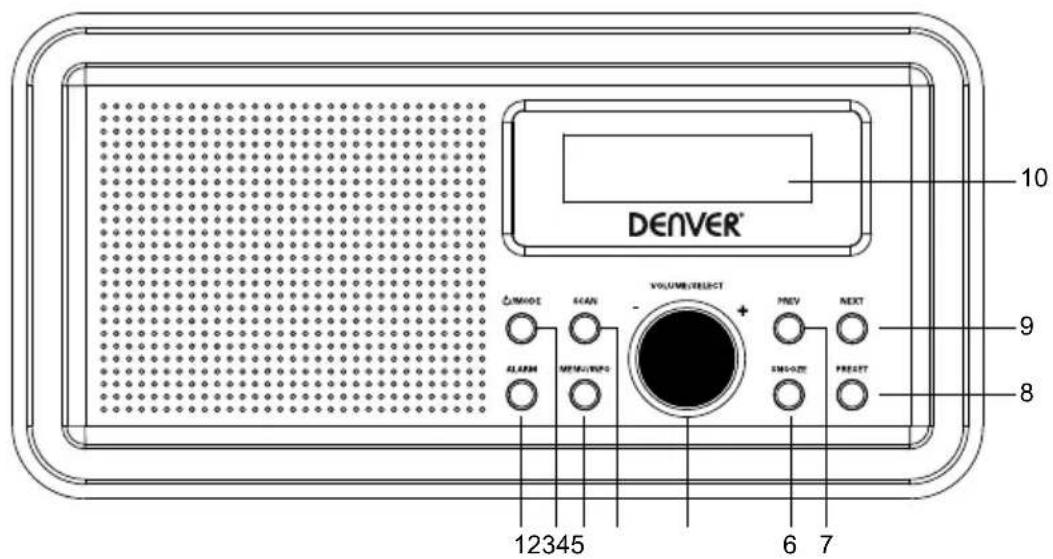
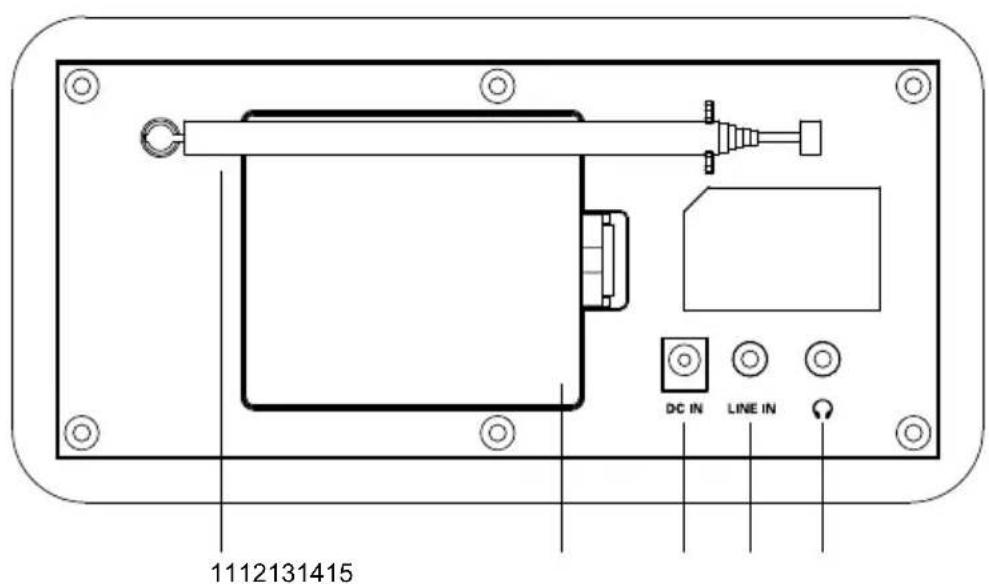
1 WECKRUF-Taste
8 SPEICHERPLATZ-Taste
2 /MODUS-Taste
9 VOR-Taste
3 MENU/INFO-Taste
10 LCD-Display
4 SCAN-Taste
11 Antenne
5 LAUTSTARKE/AUSWAHL-Taste
12 Batteriefach
6 SCHLUMMER-Taste
VUE D'ENSEMBLE DU PRODUIT
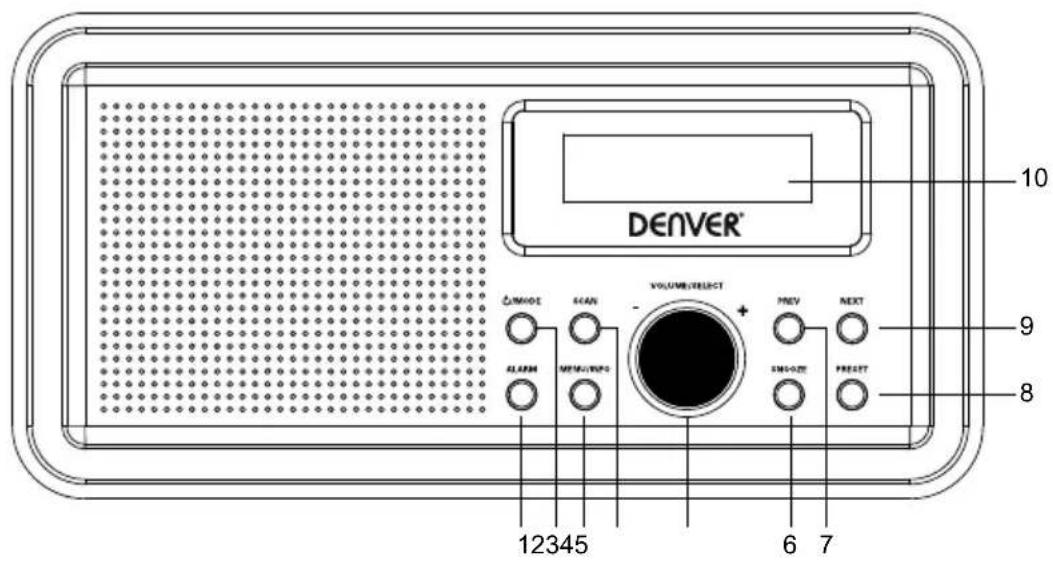
1 Touche ALARME
8 Touche PRERÉGLAGE
2 Touche /MODE
9 Touche SUIVANT
3 Touche MENU/INFOS
10 Ecran LCD
4 Touche RECHERCHE
11 Antenne
5 Bouton VOLUME/SELECTION
DAB:174 MHz to 240 MHz / FM:88 MHz to 108 MHz
DAB:174 MHz to 240 MHz / FM: 88 MHz to 108 MHz
DAB:174 MHz to 240 MHz / FM: 88 MHz to 108 MHz
3 VALIKKO/INFO-painike
10 LCD-näytö
4 KANAVAHAKU-painike
11 Antenni
5 AANENVOIMAKKUUS/VALITSE-painike
12 Paristolokero
6 TORKKU-painike
13 Virtaliitanta
7 EDELLINEN painike
Knappen LYDSTYRKE/V/ELG
Knappen LYDSTYRKE/VaelG
Justerer lydstyrken.


- DAB+ FM RADIO
- INSTRUCTION MANUAL
- Content
- Short Operating Instructions
- PRODUCT OVERVIEW
- Power on/off
- FM Mode
- PRESET button
- MENUButton
- PREV/NEXT button
- VOLUME/SELECT button
- DAB Mode
- SCAN button
- NEXT button
- Alarm Mode
- ALARM button
- SNOOZE button
- AUX mode
- Using earphones
- SPECIFICATIONS
- DENVER
- Kurzanleitung
- PRODUKTÜBERSICHT
- VUE D'ENSEMBLE DU PRODUIT
Brand : DENVER
Model : DAB30
Category : Radio