 ManualGo.com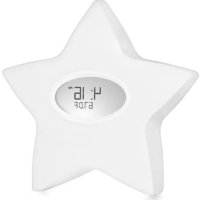
serenity star 9902G - Clock Aden + Anais - Free user manual and instructions
Find the device manual for free serenity star 9902G Aden + Anais in PDF.



Download the instructions for your Clock in PDF format for free! Find your manual serenity star 9902G - Aden + Anais and take your electronic device back in hand. On this page are published all the documents necessary for the use of your device. serenity star 9902G by Aden + Anais.
USER MANUAL serenity star 9902G Aden + Anais
Renowned for bringing together the legacy of muslin with fashion forward design, our philosophy at aden + anais is to improve the lives of babies and their caregivers, no matter who they are or where they live, through creating products that are as stylish as they are useful, and as simple as they are beautiful. A multi-tasking must for every nursery, the serenity star
electronic sleep and feeding system combines helpful technology with signature aden + anais style. The unique feeding diary simplifies bottle feeding and nursing by allowing you to record the time feeding started and, to easily recall which side you last fed from. The stylish star design adds to any nursery décor, and the portable size makes life easy. As an all-in-one soothing sound machine, room temperature indicator, and nightlight, as well as clock and feeding diary, the serenity star ensures your baby can sleep safely and soundly while you find peace of mind. ... sweet dreams for baby and you ...
KEY FEATURES OF YOUR SERENITY STAR™
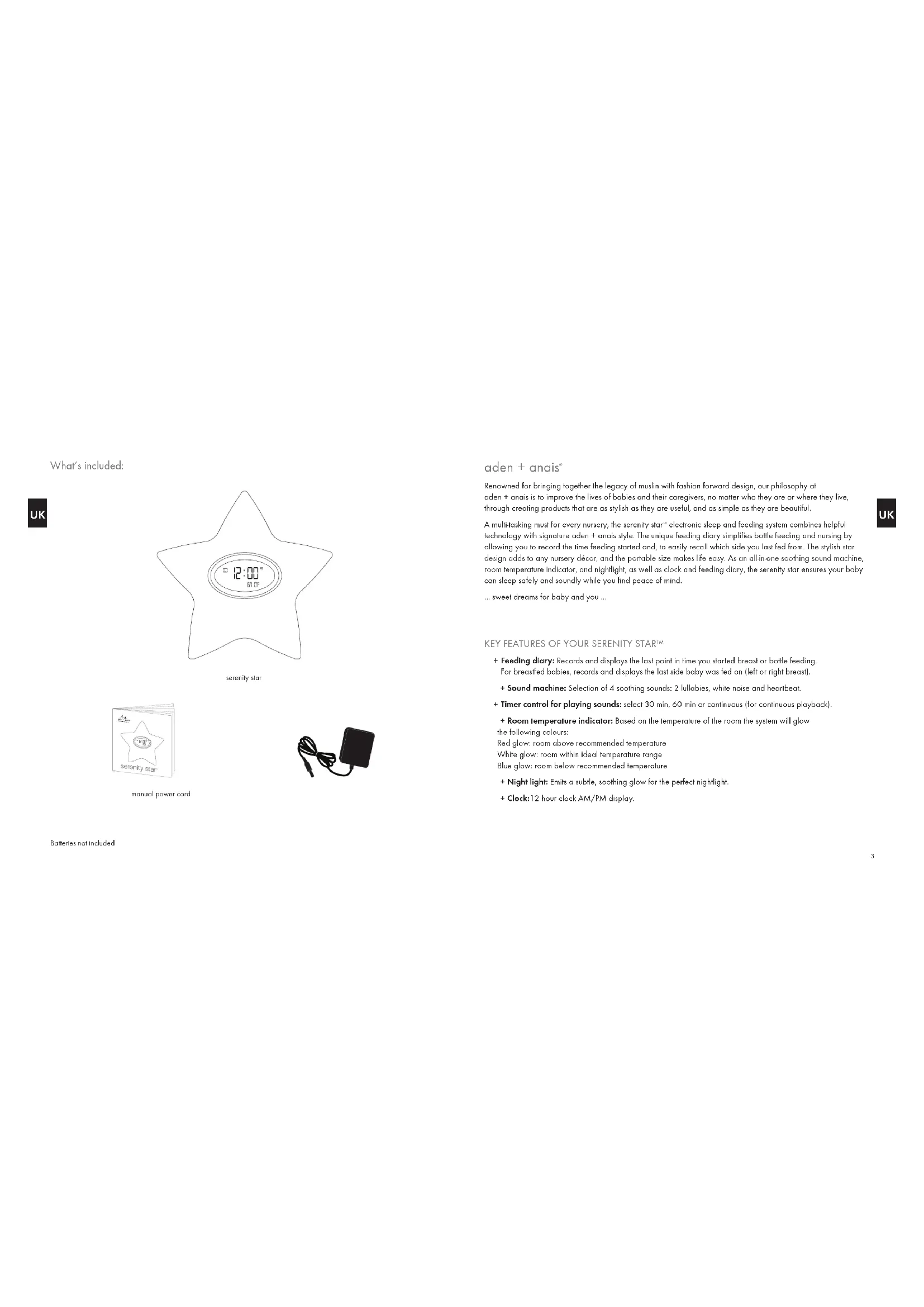
+ Feeding diary: Records and displays the last point in time you started breast or bottle feeding. For breastfed babies, records and displays the last side baby was fed on (left or right breast). + Sound machine: Selection of 4 soothing sounds: 2 lullabies, white noise and heartbeat. + Timer control for playing sounds: select 30 min, 60 min or continuous (for continuous playback). + Room temperature indicator: Based on the temperature of the room the system will glow the following colours: Red glow: room above recommended temperature White glow: room within ideal temperature range Blue glow: room below recommended temperature + Night light: Emits a subtle, soothing glow for the perfect nightlight. + Clock:12 hour clock AM/PM display. manual power cord What’s included: serenity starBatteries not included UKUK4 5 CAUTION + TO REDUCE THE RISK OF ELECTRIC SHOCK, DO NOT REMOVE COVER. THERE ARE NO SERVICEABLE PARTS INSIDE. + TO REDUCE THE RISK OF FIRE OR ELECTRIC SHOCK, DO NOT EXPOSE THIS UNIT TO RAIN OR MOISTURE. The lightning flash with arrow-head symbol within an equilateral triangle is intended to alert the user to the presence of uninsulated with and dangerous voltage within the unit’s enclosure that may be of sufficient magnitude to constitute a risk of electric shock.The exclamation point within an equilateral triangle is intended to alert the user to the presence of important operating and maintenance (Servicing) instructions in the literature accompanying the unit. IMPORTANT SAFETY INSTRUCTIONS - SAVE THESE INSTRUCTIONS All of the safety and operating instructions should be read and adhered to before the unit is operated. DANGER To reduce the risk of electric shock, burns, fire or injury: 1. Do not use while bathing or in a shower.Do not place or store unit where it can fall or be pulled into a bathtub or basin. 1. Do not place in or drop into water or other liquid. 2. Do not reach for unit that has fallen into water. Unplug it immediately. 3. Care should be taken so that objects do not fall onto, and liquids are not spilled on the unit. WARNING 1. Close supervision is necessary when this unit is used by or near children.2. Use this unit only for its intended use as described in this manual. 3. Unplug this unit during lightning storms or when unused for long periods of time. 4. Never drop or insert an object into any opening on/within the unit. 5. Protect the power cord from being walked on or pinched, particularly at plug sockets and the point where it exits the unit.
6. Do not allow cord to touch hot surfaces. Wrap cord loosely around the unit when storing.
7. The unit should be situated away from direct sunlight or heat sources such as radiators, electric heaters, or heat registers, as well as stoves, or other units (including amplifiers) that produce heat. Avoid placing on top of stereo equipment that radiates heat. 8. Never block the air openings of the unit with materials such as clothing, plastic bags or papers, or place on a soft surface such as a bed or couch, where the air openings may be blocked. 9. Do not overload electrical outlet. Use only the power source as indicated. 10. Do not carry this unit by the cord or use the cord as a handle. 11. Never operate this unit if it has a damaged cord or plug, if it is not working properly, or if it has been dropped, damaged, or come into contact with water. If the unit’s power supply cord or plug is damaged do not attempt to fix it yourself. 12. To avoid the risk of electric shock do not disassemble or attempt to repair the unit. Incorrect repair can create a risk of electric shock or injury when unit is used. 13. Do not operate in the presence of explosive and/or flammable fumes. BATTERY PRECAUTIONS
1. Dispose of the used battery properly. Do not dispose of the battery in a fire.
2. Do not leave the battery where a child or animal could play with or swallow it. If the battery is swallowed, contact a physician immediately.
3. The battery may explode if mistreated. Do not attempt to recharge or disassemble the battery.
4. Always replace with a new battery of the required size and type. Do not mix old and new batteries, different types of batteries, or rechargeable batteries of different capacities. FCC INFORMATION Warning: Changes or modifications to this unit not expressly approved by the party responsible for compliance could void the user’s authority to operate the unit. This equipment has been tested and found to comply with the specifications for a Class B Digital Device, pursuant to Part 15 of the FCC Rules. These specifications are designed to provide reasonable protection against harmful interference in a residential installation. This equipment generates, uses and can radiate radio frequency energy and, if not installed and used in accordance with the instructions, may cause harmful interference to radio communications . However, there is no guarantee that interference will not occur in a particular installation. If this equipment does cause harmful interference to radio or television reception, which can be determined by turning the equipment off and on, the user is encouraged to try to correct the interference by one or more of the following measures: + Reorient or relocate the receiving antenna. + Increase the distance between the equipment and receiver. + Connect the equipment to an outlet on a circuit different from that to which the receiver is connected. + Consult the dealer or an experienced radio/TV technician for assistance.
or last time feeding started in memory function.
3. TEMPERATURE BACK LIGHT: emits soft coloured glow depending on room temperature.
4. FEEDING DIARY: displays last feeding side in memory function.
2. MEMORY: Displays the time feeding last started and last side fed on (left or right breast).
3. R: Increases (+) hour, minute or switches from F to C in setting mode / press to record right side as last side fed on when nursing. 4. L: Decreases (-) hour, minute or switches from F to C in setting mode / press to record left side as last side fed on when nursing.
5. SELECT: Selects a sound (Lullaby 1/Lullaby 2/ White Noise/ Heartbeat).
6. PLAY/STOP: Plays/stops sound.
7. 30/60/C: Set sound timer for 30 minutes / 60 minutes or continuous sound play.
11. BATTERY COMPONENT: 3 AAA batteries are required to operate the unit (not included).
UKUK8 9 Reading+the+room+temperature+indicator+ + + + + The backlight of the system will change colour depending on the current room temperature. Glow+Color Temperature+Meaning Temperature++ Fahrenheit+&+Celsius Blue Room colder than recommended temperature range below 64°F or 17.7°C White Room within ideal temperature range 64.1 − 73.9°F or 17.8 − 23.2°C Red Room warmer than recommended temperature range above 74°F or 23.3°C Selecting+and+playing+a+sound Press the “Play/Stop” button to play and stop the sound. You can choose between 4 soothing sounds by pressing the “Select” button:
1. Lullaby A 2. Lullaby B 3. White Noise 4. Heartbeat
To move between sounds repress the “Select” button. Adjusting+the+sound+timer You can adjust the timer for how long you want the sound to play. Slide the sound timer switch to select:
1. 30 minutes 2. 60 minutes 3. Continuous soothing sound
Resetting+the+unit Should you experience problems with the proper function of your unit, you may need to reset the unit. To reset the unit, unplug the unit from the electrical outlet (if plugged in) and remove the batteries from the battery component for 60 secs. Unplugging your unit or removing the batteries will result in the recorded memory being erased. If problems persist, please contact your nearest aden + anais
1. Plug the 500m A 4.5V adapter (included) into the adapter jack and plug the ADAPTER into a power outlet.
2. The first time you connect your new system to an outlet the time will display 12:00AM.
Using+Batteries+to+operate+your+system
1. When unable to use the power adapter, batteries can be used to power your Serenity Star system.
2. Open the battery door to insert batteries.
3. Insert 3 x AAA batteries in line with the + and – polarity signs inside the battery compartment.
4. Always remove batteries when not in use or when using the AC adapter.
Setting+the+clock+time + 1.+Press and hold the “Set” button for 2 seconds to enter the clock setting mode. The hour time will flash.
2. Press “R” to increase hour time or “L” to decrease the hour time. Increase past 12 hours to enter PM time.
3. Press “Set” button to set the hour display. The minute time will flash.
4. Press “R” to increase or “L” to decrease the minute time.
5. Press “Set” button to set the minute display. The temperature indicator will flash.
6. Press “R” or “L” to change temperature reading to Fahrenheit or Celsius in the temperature display.
7. Press “Set” button to return to normal display.
Using+the+electronic+feeding+diary 1. Press and hold the “Memory” button for 2 seconds to record the feeding start time. Unit will display the feeding start time in the temperature field. 2. If breastfeeding, press the left or right button at the end of your feeding session to record last breast fed on. L or R will be displayed in the display window for 5 seconds. 3. To recall the last feeding start time and last side fed on, press the “Memory” button. The LCD will show the time feeding started in temperature field field and an L or R in the last side fed display field. If no other key is pressed, after 5 seconds the LCD will return to normal display mode. UKUK10 11
warrants this product against defects in materials and/or workmanship under normal use for a period of ONE (1) YEAR from the date of purchase by the original consumer purchaser (“Warranty Period”). If a defect arises and a valid claim is received within the Warranty Period, aden + anais
will either 1) replace the product with a new product that is at least functionally equivalent to the original product, or 2) provide a credit in the amount of the purchase price of the original product. When a product is exchanged, any replacement item becomes your property and the replaced item becomes aden + anais
’s property. When a credit is given, the original product must be returned to aden + anais
and becomes aden + anais
’s property. Obtaining service: To obtain warranty service, call aden + anais
in your region. Please be prepared to describe the nature of the problem. Evidence of purchase is required. All replacements must be authorised in advance. You are responsible for delivery and the cost of delivery of the product per the company instructions. Limits and exclusions: This Limited Warranty applies only to products manufactured for aden + anais
that can be identified by the “aden + anais” trademark, trade name, or logo affixed to them or their packaging. The Limited Warranty does not apply to any non-aden + anais
products. Manufacturers or suppliers other than aden + anais
may provide their own warranties to the purchaser, but aden + anais
, in so far as permitted by law, provides these products “as is”. This warranty does not apply to: a) damage caused by failure to follow instructions relating to product’s use or the installation of components; b) damage caused by accident, abuse, misuse, fire, floods, earthquake or other external causes; c) damage caused by service performed by anyone who is not a representative of aden + anais
d) accessories used in conjunction with a covered product; e) a product or part that has been modified to alter functionality or capability; f) items intended to be periodically replaced by the purchaser during the normal life of the product, including, without limitation, batteries or light bulbs; g) any product sold “as is” including, without limitation, floor demonstration models and refurbished items; or h) a product that is used commercially or for a commercial purpose. aden + anais
shall not be liable for incidental or consequential damages resulting from the use of this product, or arising out of any breach of this warranty to the extent permitted by applicable law. aden + anais
disclaims any and all statutory or implied warranties, including, without limitation, warranties of merchantability, fitness for a particular purpose and warranties against hidden or latent defects. If aden + anais
cannot lawfully disclaim statutory or implied warranties, then to the extent permitted by law, all such warranties shall be limited in duration to the duration of this express warranty. Some states or regions disallow the exclusion or limitation of incidental or consequential damages or the duration of an implied warranty, so the above exclusions or limitations may not apply to you. These provisions will not operate to exclude or limit any specific rights which you may enjoy as a consumer purchaser and which it would be illegal or unlawful for us to exclude or attempt to exclude. This warranty gives you specific legal rights and you may also have other rights, which vary from state or region.
DISPOSAL OF YOUR OLD PRODUCT
Your product is designed and manufactured with high quality materials and components, which can be recycled and reused. When this crossed-out wheelie bin symbol is attached to a product it means the product is covered by the European Directive 2002/96/EC. Please inform yourself about the local separate collection system for electrical and electronic products. Please act according to your local rules and do not dispose of products along with your normal household waste. The correct disposal will help prevent potential negative impact on the environment and human health.
DISPOSAL OF FLAT BATTERIES / ACCUMULATORS
You, as the end user, are legally obliged (Battery Ordinance) to dispose of all flat batteries and rechargeable batteries. Disposal in the household waste is prohibited. “European Directive 2006/66/EC” Batteries, including rechargeable batteries, which contain hazardous substances are marked by symbols which indicate the prohibition of disposal in the household waste. The designations for the heavy metals concerned are as follows: Cd = cadmium, Hg = mercury, Pd = lead. You can deposit flat batteries/ rechargeable batteries free of charge at collection points in your community or anywhere eles where batteries/rechargeable batteries are sold. You thus fulfill your statutory obligations and help protect the environment. CAUTION Danger of explosion if battery is incorrectly replaced. Replace only with the same or equivalent type. Please refer to the markings inside the battery compartment for the correct battery polarity (+) and (-). UKUK13 © 2011 Aden & Anais, Inc., All rights reserved. “aden + anais” and “Made For Baby. Designed For You.” are registered trademarks of Aden & Anais, Inc. “serenity star” is a trademark of Aden & Anais, Inc. Designed in the USA. Made in China. Aden & Anais Inc., Brooklyn, NY 11201 Contact aden + anais