18637 Minimalist - Wristwatch Lotus - Free user manual and instructions
Find the device manual for free 18637 Minimalist Lotus in PDF.


| Product type | Quartz watch |
| Brand | Lotus |
| Model | 18637 Minimalist |
| Movement | Analog quartz |
| Main functions | Hours, minutes, seconds, 24h, chronograph 30 min |
| Chronograph | Measures up to 29 min 59 s, accuracy to the second |
| Case diameter | Approximately 40 mm |
| Case thickness | Approximately 10 mm |
| Case material | Stainless steel |
| Crystal | Mineral glass |
| Strap | Genuine leather |
| Closure | Pin buckle |
| Water resistance | 3 ATM (30 m) – splash resistant |
| Power supply | Button cell (type SR626SW or equivalent) |
| Approximate battery life | 2 to 3 years depending on use |
| Care and cleaning | Clean with a soft, dry cloth. Avoid chemical products. |
| Battery replacement | Entrust to a professional watchmaker |
| Chronograph reset | Pull the crown to the first click, press A to align the hands to zero |
| Recycling (WEEE) | Do not dispose of with household waste. Drop off at an approved collection point. |
Frequently Asked Questions - 18637 Minimalist Lotus
User questions about 18637 Minimalist Lotus
0 question about this device. Answer the ones you know or ask your own.
Ask a new question about this device
Download the instructions for your Wristwatch in PDF format for free! Find your manual 18637 Minimalist - Lotus and take your electronic device back in hand. On this page are published all the documents necessary for the use of your device. 18637 Minimalist by Lotus.
USER MANUAL 18637 Minimalist Lotus
ILMJS00
CRONOGRAPH
■ MANUAL DE INSTRUCCIONES ____ 5
■ INSTRUCTION MANUAL ____ 11
■ MANUEL D'INSTRUCTION____ 17
■ BETRIEBSANLEITUNG ____ 23
■ MANUALE DI FUNZIONAMENTO ____ 29
LOTUS
LOTUS
ILMJS00
Displays and buttons 12
Setting the time 13
Using the Stopwatch 14
Stopwatch reset (Inc. after replacing Battery) 15

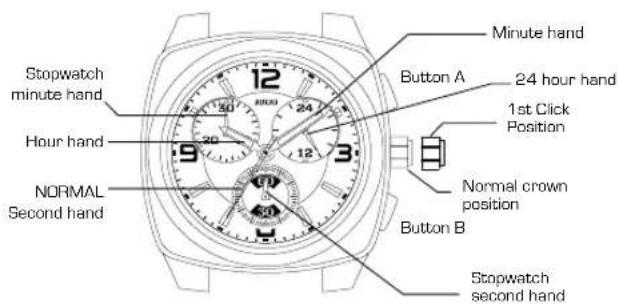
DISPLAYS AND BUTTONS
ILMJS00
SETTING THE TIME
- Pull the crown out to the 1st Click Position.
- Turn the crown to set hour and minute hands.
- When the crown is pushed back to the normal position in synchronization with a time signal, second hand begins to run.
USING THE STOPWATCH STOPWATCH RESET
This stopwatch is able to measure and display time in 1second united up to maximum of 29min 59sec. Stopwatch will stop automatically after running continuously for 30 minutes.
[Measuring time with the stopwatch]
- Press button "A" to start the stopwatch.
- The stopwatch can be started and stopped each time button "A" is pressed.
- Pressing button "B" resets the stopwatch and stopwatch minute and second hands return to their ZERO positions.
* Button A / B does not function during resetting the stopwatch.
![Lotus 18637 Minimalist - [Measuring time with the stopwatch] - 1](/content/2026/03/498031/images/aad891b497766d470ffcedb8304f41e3a2cb95d032619e1d3e097ebecd4e56d9.jpg)
flowchart
graph TD
    A["Reset Stop"] -->|A| B["Time measurement"]
    B -->|A| C["End"]
    B -->|B| A
[incl. after replacing battery]
This procedure should be performed when the stopwatch second hand does not return to the ZERO second position after the stopwatch has been reset, and including after the battery has been replaced.
- Pull the crown out to the 1st Click Position.
- Press button "A" to set the stop watch second hand to the ZERO position. *The stopwatch minute hand is synchronized with stopwatch second hand. *The stop watch second hand can be advanced rapidly by continuously pressing button "A".
- Once the hands have been zeroed, reset the time and return the crown to its normal position.
ILMJS00
MANUEL D'INSTRUCTION
CHRONOMÈTRE
By virtue of the regulations pursuant to the handling of waste products deriving from electronic and electrical equipment, end of lifecycle watch making products must be selectively collected for processing. You may therefore dispose of your quartz watch
making products at any of our retail outlets or any other authorized collection point. The selective collection, processing, rating and recycling of these products helps contribute to safeguarding the environment and protecting our health.
ILMJS00
LOTUS

natural_image
Empty white rectangle with black border (no text or symbols)
Brand : Lotus
Model : 18637 Minimalist
Category : Wristwatch