JCN14024F9 - Refrigerator JUNO - Free user manual and instructions
Find the device manual for free JCN14024F9 JUNO in PDF.



| Product type | Built-in refrigerator |
| Brand | JUNO |
| Model | JCN14024F9 |
| Dimensions (H x W x D) | 1400 x 560 x 550 mm |
| Total net volume | Approximately 200 L (refrigerator) |
| Climate class | SN, N, ST, T |
| Electrical supply | 230-240 V ~ 50 Hz |
| Refrigerant | Isobutane (R600a) |
| Lighting type | Long-life LED |
| NaturaFresh compartment | Yes, with humidity control |
| Special functions | Shopping, ChildLock, DrinksChill, Open door alarm, Fan |
| Display | Digital with indicators |
| Temperature setting | Electronic, recommended range +5°C |
| Defrosting | Automatic (refrigerator) |
| Maintenance and cleaning | Interior cleaning with warm soapy water; regular cleaning of gaskets; cleaning of condenser if accessible |
| Safety | ChildLock, earthing, flammable gas R600a, installation precautions |
| Spare parts | Original parts available through authorized after-sales service |
| Repairability | Intervention by qualified professional recommended |
| General information | Instruction manual included; installation by professional; wait 4 hours before connecting |
Frequently Asked Questions - JCN14024F9 JUNO
User questions about JCN14024F9 JUNO
0 question about this device. Answer the ones you know or ask your own.
Ask a new question about this device
Download the instructions for your Refrigerator in PDF format for free! Find your manual JCN14024F9 - JUNO and take your electronic device back in hand. On this page are published all the documents necessary for the use of your device. JCN14024F9 by JUNO.
USER MANUAL JCN14024F9 JUNO
Safety information 18
Safety instructions 19
Installation 21
Operation 22
Daily use 24
Hints and tips 28
Care and cleaning 28
Troubleshooting 30
Technical data 32
Subject to change without notice.
SAFETY INFORMATION
Before the installation and use of the appliance, carefully read the supplied instructions. The manufacturer is not responsible for any injuries or damages that are the result of incorrect installation or usage. Always keep the instructions in a safe and accessible location for future reference.
Children and vulnerable people safety
- This appliance can be used by children aged from 8 years and above and persons with reduced physical, sensory or mental capabilities or lack of experience and knowledge if they have been given supervision or instruction concerning the use of the appliance in a safe way and understand the hazards involved.
- This appliance may be used by children between 3 and 8 years of age and persons with very extensive and complex disabilities, if they have been properly instructed.
- Children of less than 3 years of age should be kept away unless continuously supervised.
- Do not let children play with the appliance.
- Children shall not carry out cleaning and user maintenance of the appliance without supervision.
- Keep all packaging away from children and dispose of it appropriately.
General Safety
- This appliance is intended to be used in household and similar applications such as:
-Farm houses; staff kitchen areas in shops, offices and other working environments
- By clients in hotels, motels, bed and breakfast and other residential type environments
- WARNING: Keep ventilation openings, in the appliance enclosure or in the built-in structure, clear of obstruction.
- WARNING: Do not use mechanical devices or other means to accelerate the defrosting process, other than those recommended by the manufacturer.
- WARNING: Do not damage the refrigerant circuit.
- WARNING: Do not use electrical appliances inside the food storage compartments of the appliance, unless they are of the type recommended by the manufacturer.
- Do not use water spray and steam to clean the appliance.
- Clean the appliance with a moist soft cloth. Only use neutral detergents. Do not use abrasive products, abrasive cleaning pads, solvents or metal objects.
- Do not store explosive substances such as aerosol cans with a flammable propellant in this appliance.
- If the supply cord is damaged, it must be replaced by the manufacturer, its Authorised Service Centre or similarly qualified persons in order to avoid a hazard.
SAFETY INSTRUCTIONS
Installation

WARNING! Only a qualified person must install this appliance.
- Remove all the packaging and the transit bolts.
- Do not install or use a damaged appliance.
- Follow the installation instructions supplied with the appliance.
- Always take care when moving the appliance as it is heavy. Always use safety gloves and enclosed footwear.
-
Make sure the air can circulate around the appliance.
-
At first installation or after reversing the door wait at least 4 hours before connecting the appliance to the power supply. This is to allow the oil to flow back in the compressor.
- Before carrying out any operations on the appliance (e.g. reversing the door), remove the plug from the power socket.
- Do not install the appliance close to radiators or cookers, ovens or hobs.
- Do not expose the appliance to the rain.
- Do not install the appliance where there is direct sunlight.
-
Do not install this appliance in areas that are too humid or too cold.
-
When you move the appliance, lift it by the front edge to avoid scratching the floor.
The appliance contains a bag of desiccant. This is not a toy. This is not food. Please dispose of it immediately.
Electrical connection

WARNING! Risk of fire and electric shock.

WARNING! When positioning the appliance, ensure the supply cord is not trapped or damaged.

WARNING! Do not use multiplug adapters and extension cables.
- The appliance must be earthed.
- Make sure that the parameters on the rating plate are compatible with the electrical ratings of the mains power supply.
- Always use a correctly installed shockproof socket.
- Make sure not to cause damage to the electrical components (e.g. mains plug, mains cable, compressor). Contact the Authorised Service Centre or an electrician to change the electrical components.
- The mains cable must stay below the level of the mains plug.
- Connect the mains plug to the mains socket only at the end of the installation. Make sure that there is access to the mains plug after the installation.
- Do not pull the mains cable to disconnect the appliance. Always pull the mains plug.
Use

WARNING! Risk of injury, burns, electric shock or fire.
-
Do not change the specification of this appliance.
-
Do not put electrical appliances (e.g. ice cream makers) in the appliance unless they are stated applicable by the manufacturer.
- Be careful not to cause damage to the refrigerant circuit. It contains isobutane (R600a), a natural gas with a high level of environmental compatibility. This gas is flammable.
- If damage occurs to the refrigerant circuit, make sure that there are no flames and sources of ignition in the room. Ventilate the room.
- Do not let hot items to touch the plastic parts of the appliance.
- Do not store flammable gas and liquid in the appliance.
- Do not put flammable products or items that are wet with flammable products in, near or on the appliance.
- Do not touch the compressor or the condenser. They are hot.
Internal lighting

WARNING! Risk of electric shock.
- The type of lamp used for this appliance is for household appliances only. Do not use it for house lighting.
Care and cleaning

WARNING! Risk of injury or damage to the appliance.
- Before maintenance, deactivate the appliance and disconnect the mains plug from the mains socket.
- This appliance contains hydrocarbons in the cooling unit. Only a qualified person must do the maintenance and the recharging of the unit.
- Regularly examine the drain of the appliance and if necessary, clean it. If the drain is blocked, defrosted water collects in the bottom of the appliance.
Service
To repair the appliance contact an Authorised Service Centre.
- Use original spare parts only.
Disposal

WARNING! Risk of injury or suffocation.
- Disconnect the appliance from the mains supply.
- Cut off the mains cable and discard it.
-
Remove the door to prevent children and pets to be closed inside of the appliance.
-
The refrigerant circuit and the insulation materials of this appliance are ozone-friendly.
- The insulation foam contains flammable gas. Contact your municipal authority for information on how to discard the appliance correctly.
- Do not cause damage to the part of the cooling unit that is near the heat exchanger.
INSTALLATION

WARNING! Refer to Safety chapters.
Location

Refer to the assembly instructions for the installation.
To ensure best performance, install the appliance well away from sources of heat such as radiators, boilers, direct sunlight etc. Make sure that air can circulate freely around the back of the cabinet.
Positioning
Install the appliance in a dry, well ventilated indoors where the ambient temperature corresponds to the climate class indicated on the rating plate of the appliance.
| Climate class | Ambient temperature |
| SN +10°C to + 32°C | |
| N +16°C to + 32°C | |
| ST +16°C to + 38°C | |
| T +16°C to + 43°C | |

Some functional problems might occur for some types of models when operating outside of that range. The correct operation can only be guaranteed within the specified temperature range. If you have any doubts regarding where to install the appliance, please turn to the vendor, to our customer service or to the nearest Authorised Service Centre.
Electrical connection
- Before plugging in, ensure that the voltage and frequency shown on the rating plate correspond to your domestic power supply.
- The appliance must be earthed. The power supply cable plug is provided with a contact for this purpose. If the domestic power supply socket is not earthed, connect the appliance to a separate earth in compliance with current regulations, consulting a qualified electrician.
The manufacturer declines all responsibility if the above safety precautions are not observed. - This appliance complies with the E.E.C. Directives.
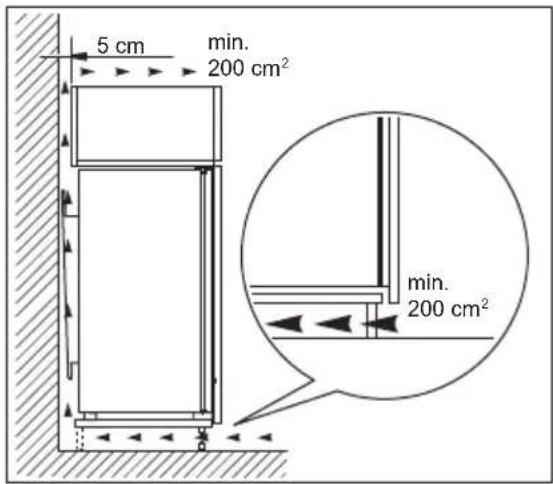
Ventilation requirements
The airflow behind the appliance must be sufficient.

CAUTION! Refer to the assembly instructions for the installation.
OPERATION
Control Panel
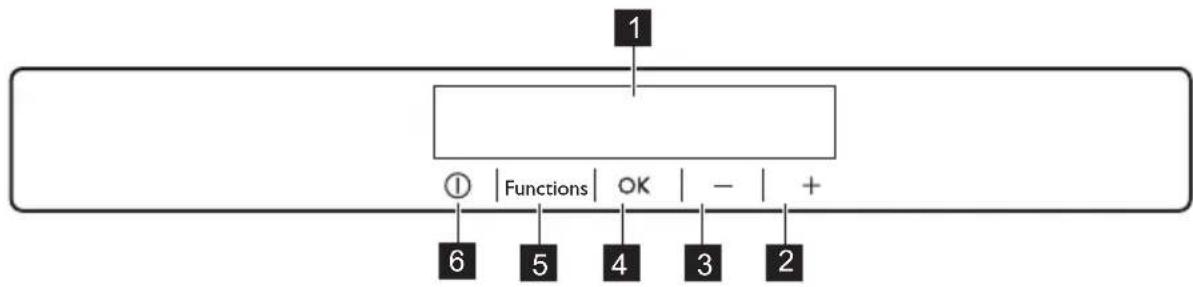
1 Display
2 Temperature warmer button
3 Temperature colder button
4 OK
5 Functions
6 ON/OFF
It is possible to change predefined sound of buttons by pressing together Functions
and temperature colder button for a few seconds. Change is reversible.
Display
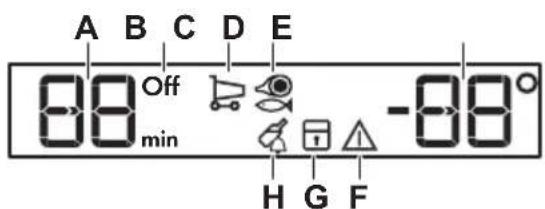
A. Timer indicator
B. ON/OFF indicator
C. Shopping function
D. NaturaFresh function
E. Temperature indicator
F. Alarm indicator
G. ChildLock function H. DrinksChill function
Switching on
- Connect the mains plug to the power socket.
- Press the appliance ON/OFF if the display is off. The temperature indicators show the set default temperature.
To select a different set temperature refer to "Temperature regulation".
If "dEMo" appears on the display, refer to "Troubleshooting".
Switching off
- Press the appliance ON/OFF for 5 seconds.
The display switches off. - Disconnect the mains plug from the power socket.
Temperature regulation
Set the temperature of the appliance by pressing the temperature regulators.
Default set temperature:
+5^ for the fridge
The temperature indicators show the set temperature.

The set temperature will be reached within 24 hours.
After a power failure the set temperature remains stored.
Shopping function
If you need to insert a large amount of warm food, for example after doing the grocery shopping, we suggest activating the Shopping function to chill the products more rapidly and to avoid warming the other food which is already in the refrigerator.
- Press the Functions until the corresponding icon appears.
The Shopping indicator flashes. - Press the OK to confirm.
The Shopping indicator is shown.
The Shopping function shuts off automatically after approximately 6 hours.
To switch off the function before its automatic end, repeat the procedure.

The function switches off by selecting a different fridge set temperature.
NaturaFresh compartment setting
- Press Functions until the corresponding icon appears.
The display shows 3. This is the default setting that ensures the most effective performance. - Press the temperature buttons on the control panel to select necessary setting.
- Press OK to confirm the setting.
The indicator returns to the fridge temperature setting in a few seconds.
Setting
Application
1-3 Meat and fish
4-5 Meat, fish, vegetables and fruit stored together
ChildLock function
Activate the ChildLock function to lock the buttons from unintentional operation.
- Press Functions until the corresponding icon appears.
The ChildLock indicator flashes.
- Press OK to confirm.
The ChildLock indicator is shown.
To deactivate the ChildLock function, repeat the procedure until the ChildLock indicator goes off.
DrinksChill function
The DrinksChill function is to be used to set an acoustic alarm at the preferred
time, useful for example when a recipe requires to cool down food products for a certain period of time.
- Press Functions until the corresponding icon appears. The DrinksChill indicator flashes. The Timer shows the set value (30 minutes) for a few seconds.
- Press the Timer regulator to change the Timer set value from 1 to 90 minutes.
- Press OK to confirm.
TheDrinksChill indicator is shown.
The Timer start to flash (min).
At the end of the countdown the DrinksChill indicator flashes and an audible alarm sounds. Press OK to switch off the sound and terminate the function.
DAILYUSE

WARNING! Refer to Safety chapters.
Cleaning the interior
Before using the appliance for the first time, the interior and all internal accessories should be washed with lukewarm water and some neutral soap to remove the typical smell of a brand-new product, then dried thoroughly.

CAUTION! Do not use detergents, abrasive powders, chlorine or oil-based cleaners as they will damage the finish.
Positioning the door shelves
To permit storage of food packages of various sizes, the door shelves can be placed at different heights.
- Gradually pull the shelf up until it comes free.
To switch off the function repeat the procedure until the DrinksChill goes off.

It is possible to change the time at any time during the countdown and at the end by pressing the Temperature colder button and the Temperature warmer button.
Door open alarm
If the door is left open for approximately 90 seconds, the acoustic alarm starts and alarm indicator flashes.
The alarm stops after closing the door. During the alarm, the acoustic signal can be muted by pressing any button.
- Reposition as required.
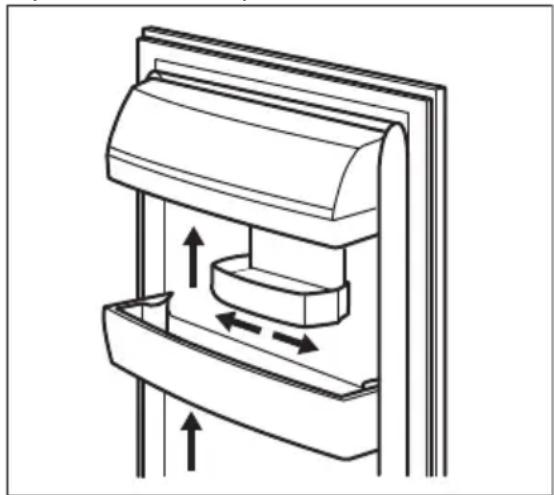
This model is equipped with a variable storage box which can be moved sideways.
Movable shelves
The walls of the refrigerator are equipped with a series of runners so that the shelves can be positioned as desired.
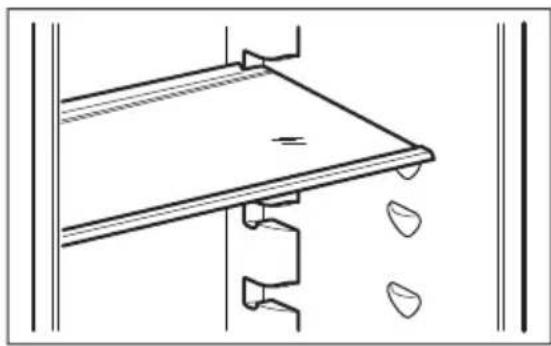

Do not move the glass shelf above the vegetable drawer to ensure correct air circulation.
NaturaFresh Compartment
The storage temperature and the relative humidity (between 45 and 90% ) provide optimal conditions for the storage of various kinds of food.
To learn about the temperature settings in the NaturaFresh compartment please refer to the "NaturaFresh compartment setting" section.
NaturaFresh compartment is suitable for the storage of a variety of fresh food as it preserves its high nutritional values as well as high humidity level much longer in comparison to the regular refrigerator.
The NaturaFresh compartment is also suitable for defrosting food.
The thawed food can be stored up to two days.
Humidity control
The compartment has stops that prevent the drawers from falling out when fully extended. To remove the drawer:
- Pull the drawer to the maximum.
- Lift and pull out the drawer.
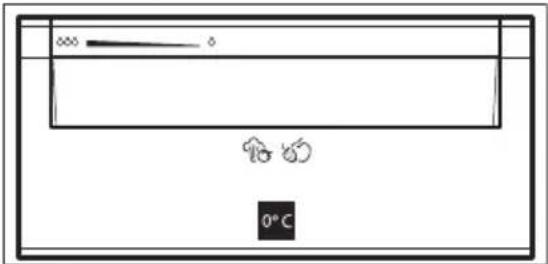
The drawers marked with water drop symbols: and can be used according to the desired storage conditions independently of each other with lower or higher humidity.
Regulation for each drawer is separate and is controlled using the slide valve at the front of the drawer.
- "Dry": low air humidity - up to 50 % relative humidity.
This humidity level is reached when both sliders are set into this position and the ventilation openings are wide open.
- Humid": high relative humidity - up to 90%.
This humidity level is reached when both sliders are set in this position and the ventilation openings are closed. Humidity is kept and can not escape.
| Type of food Air humidity adjustment Storage time | ||
| Onion | ♂ "dry" | up to 5 months |
| Butter | ♂ "dry" | up to 1 month |
| Type of food Air humidity adjustment Storage time | ||
| Beef, venison, small meat cuts, poultry | ♂ "dry" | up to 7 days |
| Tomato sauce | ♂ "dry" | up to 4 days |
| Fish, shellfish, cooked meat products | ♂ "dry" | up to 3 days |
| Cooked seafood | ♂ "dry" | up to 2 days |
| Salad, vegetables Carrots, herbs, brussels sprouts, celery | xxxx "humid" | up to 1 month |
| Artichokes, cauliflower, chicory, iceberg lettuce, en-dive, lamb's lettuce, lettuce, leeks, radicchio | xxxx "humid" | up to 21 days |
| Broccoli, Chinese leaves, kale, cabbage, radishes, Savoy cabbage | xxxx "humid" | up to 14 days |
| Peas, kohlabi | xxxx "humid" | up to 10 days |
| Spring onions, radishes, as-paragus, spinach | xxxx "humid" | up to 7 days |
| Fruit Pears, dates (fresh), strawberries, peaches | xxxx "humid" | up to 1 month |
| Plums rhubarb, gooseberries | xxxx "humid" | up to 21 days |
| Apples (not sensitive to cold), quinces | xxxx "humid" | up to 20 days |
| Apricots, cherries | xxxx "humid" | up to 14 days |
| Damsons, grapes | xxxx "humid" | up to 10 days |
| Blackberries, currants | xxxx "humid" | up to 8 days |
| Figs (fresh) | xxxx "humid" | up to 7 days |
| Blueberries, raspberries | xxxx "humid" | up to 5 days |

Cakes containing cream and other kinds of pastry products can be stored in the NaturaFresh compartment for 2 or 3 days.

Not to be placed in the NaturaFresh compartment:
- Cold sensitive fruit which have to be stored at cellar or room temperature like pineapple, bananas, grapefruit, melons, mango, papaya, oranges, lemons, kiwi fruit.
- The types of food not mentioned above should be stored in the refrigerator compartment (e.g. all sorts of cheese, cold cuts, etc.).

The level of air humidity in the drawers depends on the content of humidity in the stored food, vegetable and fruit and on the frequency of door opening.
The NaturaFresh compartment is also suitable for slow thawing of food. In this case the thawed food can be stored in the NaturaFresh compartment for up to two days.
- Pay attention to the freshness of the food, especially on the expiry date. Quality and freshness influence the storage time.
- The whole storage cycle time will depend on the preservation conditions made prior to the final storage in the fridge.
- Food, fruit or vegetables should always be packed or wrapped up before storage.
- Animal food: always store packed and dry.
-
Food rich in proteins will go bad quicker. This means seafood will spoil before fish which in turn will spoil before meat. While storing food in a NaturaFresh compartment storage time for that kind of food can be increased by up to three times as well without loss on quality.
-
All food stored in a NaturaFresh compartment should be taken out of the drawers roughly 15 - 30 min before consumption, particularly fruit and vegetables to be consumed without any additional cooking process. Allowing fruit and vegetables to return to room temperature will improve the texture and flavour.
Temperature indicator
For proper storage of food the refrigerator is equipped with the temperature indicator. The symbol on the side wall of the appliance indicates the coldest area in the refrigerator.
If OK is displayed (A), put fresh food into area indicated by symbol, if not (B), adjust the temperature controller to a colder setting and wait 12 hours before checking the temperature indicator again.
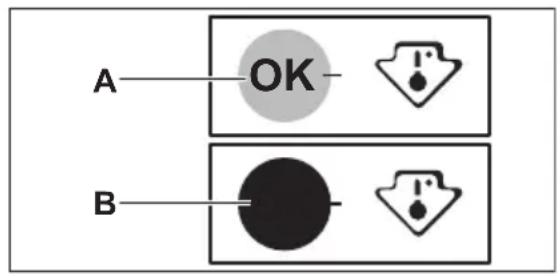

After putting fresh food into the appliance or after opening the door repeatedly or for a long period, it is normal for the indicator not to show OK. Wait at least 12 hours before readjusting the temperature controller.
Fan
The refrigerator compartment is equipped with a device that allows rapid cooling of food and keeps a more uniform temperature in the compartment.
This device activates automatically when needed, for example for a quick temperature recovery after door opening or when the ambient temperature is high.
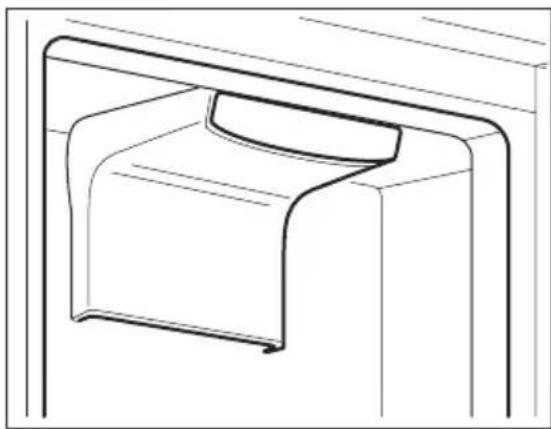

The Fan device stops when the door is open and restarts immediately after the door closing.
HINTS AND TIPS
Normal operating sounds
The following sounds are normal during operation:
- A faint gurgling and bubbling sound from coils sound when refrigerant is pumped.
- A whirring and pulsating sound from the compressor when refrigerant is pumped.
- A sudden cracking noise from inside appliance caused by thermic dilatation (a natural and not dangerous physical phenomenon).
- A faint click noise from the temperature regulator when the compressor switches on or off.
Hints for energy saving
- Do not open the door frequently or leave it open longer than absolutely necessary.
Hints for fresh food refrigeration
- Do not store warm food or evaporating liquids in the refrigerator.
CARE AND CLEANING
- Cover or wrap the food, particularly if it has a strong flavour.
- Position food so that air can circulate freely around it.
Hints for refrigeration
Useful hints:
- Meat (all types): wrap in a suitable packaging and place it on the glass shelf above the vegetable drawer. Store meat for at most 1-2 days.
Cooked foods, cold dishes: cover and place on any shelf. - Fruit and vegetables: clean thoroughly and place in a special drawer. Bananas, potatoes, onions and garlic must not be kept in the refrigerator if not packed.
Butter and cheese: place in a special airtight container or wrap in an aluminium foil or a polythene bag to exclude as much air as possible. - Bottles: close with a cap and place on the door bottle shelf, or (if available) on the bottle rack.

WARNING! Refer to Safety chapters.
General warnings

CAUTION! Unplug the appliance before carrying out any maintenance operation.

This appliance contains hydrocarbons in its cooling unit; maintenance and recharging must therefore only be carried out by authorized technicians.

The accessories and parts of the appliance are not suitable for washing in a dishwasher.
Periodic cleaning

CAUTION! Do not pull, move or damage any pipes and/or cables inside the appliance.

CAUTION! Do not damage the cooling system.
The equipment has to be cleaned regularly:
- Clean the inside and accessories with lukewarm water and some neutral soap.
- Regularly check the door seals and wipe them clean to ensure they are clean and free from debris.
- Rinse and dry thoroughly.
- If accessible, clean the condenser and the compressor at the back of the appliance with a brush.
This will improve the performance of the appliance and save electricity consumption.
Defrosting of the refrigerator
Frost is automatically eliminated from the evaporator of the refrigerator compartment every time the motor compressor stops, during normal use. The defrost water drains out through a trough into a special
container at the back of the appliance, over the motor compressor, where it evaporates.
It is important to periodically clean the defrost water drain hole in the middle of the refrigerator compartment channel to prevent the water overflowing and dripping onto the food inside.
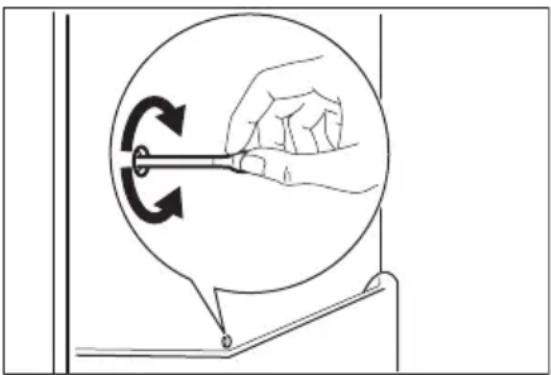
Defrosting of the refrigerator
Defrosting of the fridge compartment is automatic. The water that forms flows into a recipient on the compressor and evaporates. The recipient cannot be removed.
Periods of non-operation
When the appliance is not in use for long periods, take the following precautions:
- Disconnect the appliance from electricity supply.
- Remove all food.
- Clean the appliance and all accessories.
- Leave the door/doors open to prevent unpleasant smells.

CAUTION! If you want to keep the appliance switched on, ask somebody to check it once in a while to prevent the food inside from spoiling in case of a power failure.

WARNING! Refer to Safety
chapters.
What to do if...
| Problem Possible cause Soution | ||
| The appliance does not operate. | The appliance is switched off. | Switch on the appliance. |
| The mains plug is not con- nected to the mains sock- et correctly. | Connect the mains plug to the mains socket correctly. | |
| There is no voltage in the mains socket. | Connect a different electrical appliance to the mains socket. Contact a qualified electrician. | |
| The door is left open. Close the door. Refer to "Door open alarm" | ||
| A or o symbol is shown instead of numbers on the Temperature Display. | Temperature sensor prob- lem. | Contact the nearest Author- ised Service Centre (the cool- ing system will continue to keep food products cold, but temperature adjustment will not be possible). |
| The lamp does not work. The lamp is in stand-by. Close and open the door. | ||
| The lamp is defective. Contact the nearest Author- ised Service Centre. | ||
| The compressor operates continually. | Temperature is set incor- rectly. | Refer to "Operation". |
| Many food products were put in at the same time. | Wait few hours and then check the temperature again. | |
| The room temperature is too high. | Refer to climate class chart on the rating plate. | |
| Food products placed in the appliance were too warm. | Allow food products to cool to room temperature before stor- ing. | |
| The door is not closed cor- rectly. | Refer to "Closing the door". | |
| The "Shopping" is switch- ed on. | Refer to "Shopping function". | |
| The compressor does not start immediately after pressing the "Shopping", or after changing the temperature. | This is normal, no error has occurred. | The compressor starts after a period of time. |
| Water flows inside the refrigerator. | Food products prevent the water to flow into the water collector. | Make sure that food products do not touch the rear plate. |
| The water outlet is clogged. | Clean the water outlet. | |
| Water flows on the floor. The melting water outlet is not connected to the evaporative tray above the compressor. | Attach the melting water outlet to the evaporative tray. | |
| Temperature cannot be set. The "Shopping function" is switched on. | Switch off "Shopping function" manually, or wait until the function resets automatically to set the temperature. Refer to "Shopping function". | |
| dEMo appears on the display. | The appliance is in demonstration mode. | Keep the OK pressed for approximately 10 seconds until a long sound is heard and display shuts off for a short time. |
| The temperature in the appliance is too low/too high. | The temperature regulator is not set correctly. | Set a higher/lower temperature. |
| The door is not closed correctly. | Refer to "Closing the door". | |
| The food products' temperature is too high. | Let the food products temperature decrease to room temperature before storage. | |
| Many food products are stored at the same time. | Add less food products at the same time. | |
| The door has been opened often. | Open the door only if necessary. | |
| The "Shopping function" is switched on. | Refer to "Shopping function". | |
| There is no cold air circulation in the appliance. | Make sure that there is cold air circulation in the appliance. | |

If the advice does not lead to the desired result, contact the nearest Authorised Service Centre.
Replacing the lamp
The appliance is equipped with a longlife LED interior light.
Only service is allowed to replace the lighting device. Contact your Authorised Service Centre.
Closing the door
- Clean the door gaskets.
- If necessary, adjust the door. Refer to assembly instructions.
- If necessary, replace the defective door gaskets. Contact the Authorised Service Centre.
TECHNICAL DATA
| Dimensions of the recess | ||
| Height mm 1400 | ||
| Width mm 560 | ||
| Depth mm 550 | ||
| Voltage Volts 230 - 240 | ||
| Frequency Hz 50 |
The technical information is situated in the rating plate, on the external or internal
side of the appliance and in the energy label.
ENVIRONMENTAL CONCERNS
Recycle materials with the symbol Put the packaging in relevant containers to recycle it. Help protect the environment and human health by recycling waste of electrical and electronic appliances. Do
not dispose of appliances marked with the symbol with the household waste.
Return the product to your local recycling facility or contact your municipal office.
TABLE DES MATIÈRES
Réglage du compartment NaturaFresh
Compartment NaturaFresh
- SAFETY INFORMATION
- Children and vulnerable people safety
- General Safety
- SAFETY INSTRUCTIONS
- Installation
- Electrical connection
- Use
- Internal lighting
- Care and cleaning
- Service
- Disposal
- Location
- Positioning
- Ventilation requirements
- OPERATION
- Control Panel
- Display
- Switching on
- Switching off
- Temperature regulation
- Shopping function
- NaturaFresh compartment setting
- Setting
- Application
- ChildLock function
- DrinksChill function
- DAILYUSE
- Cleaning the interior
- Positioning the door shelves
- Door open alarm
- Movable shelves
- NaturaFresh Compartment
- Humidity control
- Temperature indicator
- Fan
- HINTS AND TIPS
- Normal operating sounds
- Hints for energy saving
- Hints for fresh food refrigeration
- Hints for refrigeration
- General warnings
- Periodic cleaning
- Defrosting of the refrigerator
- Periods of non-operation
- Replacing the lamp
- Closing the door
- TECHNICAL DATA
- ENVIRONMENTAL CONCERNS
- TABLE DES MATIÈRES
- Réglage du compartment NaturaFresh
- Compartment NaturaFresh
Brand : JUNO
Model : JCN14024F9
Category : Refrigerator