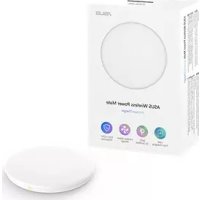
Wireless Power Mate W1GAWPM - Wireless Charger ASUS - Free user manual and instructions
Find the device manual for free Wireless Power Mate W1GAWPM ASUS in PDF.



| Product Type | Wireless Charger |
| Brand | Asus |
| Model | Wireless Power Mate W1GAWPM |
| Wireless Charging Standard | Qi 1.2.4 |
| Charging Temperature | 0°C – 35°C |
| Input Port | USB Type-C |
| Input Voltage | 5V / 9V / 12V (3A / 2A / 1.5A) |
| Output Voltage | 5V – 12V |
| Maximum Power | 15 W |
| Operating Frequency | 110 kHz – 148 kHz |
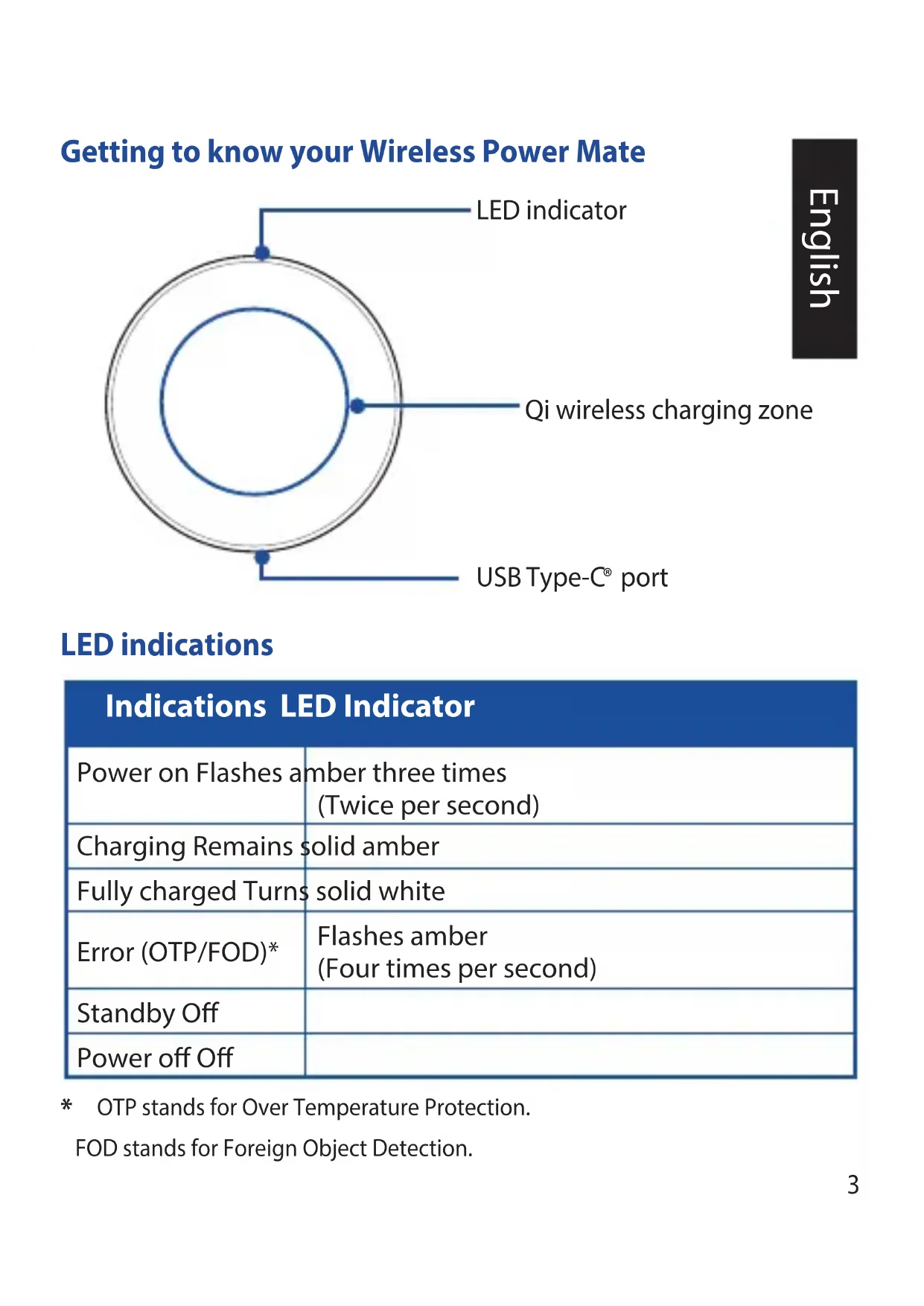
| LED Indicator | Amber (power on, charging, error), white (battery full), off (standby/power off) |
| Safety | Over-Temperature Protection (OTP) and Foreign Object Detection (FOD) |
| Power Adapter Compatibility | Recommended 18 W or higher adapter with Qualcomm Quick Charge 2.0 or later for 15 W charging |
| Box Contents | Wireless charger, USB Type-C cable, quick start guide |
| Maintenance | Clean with a soft, dry cloth; avoid liquids |
| Weight | Approximately 100 g (estimate) |
| Dimensions | Approximately 100 mm diameter, 10 mm thickness (estimate) |
Frequently Asked Questions - Wireless Power Mate W1GAWPM ASUS
User questions about Wireless Power Mate W1GAWPM ASUS
0 question about this device. Answer the ones you know or ask your own.
Ask a new question about this device
Download the instructions for your Wireless Charger in PDF format for free! Find your manual Wireless Power Mate W1GAWPM - ASUS and take your electronic device back in hand. On this page are published all the documents necessary for the use of your device. Wireless Power Mate W1GAWPM by ASUS.
USER MANUAL Wireless Power Mate W1GAWPM ASUS
ASUS Wireless Power Mate Model:W1G-AWPM

natural_image
Simple line drawing of a circular object with a small square mark at the base (no text or symbols)Quick Start Guide
Contents
English....3
简体中文 ……6
繁體中文 9
Français 12
Deutsch....15
Italiano....18
Русский....21
日本語....24
27
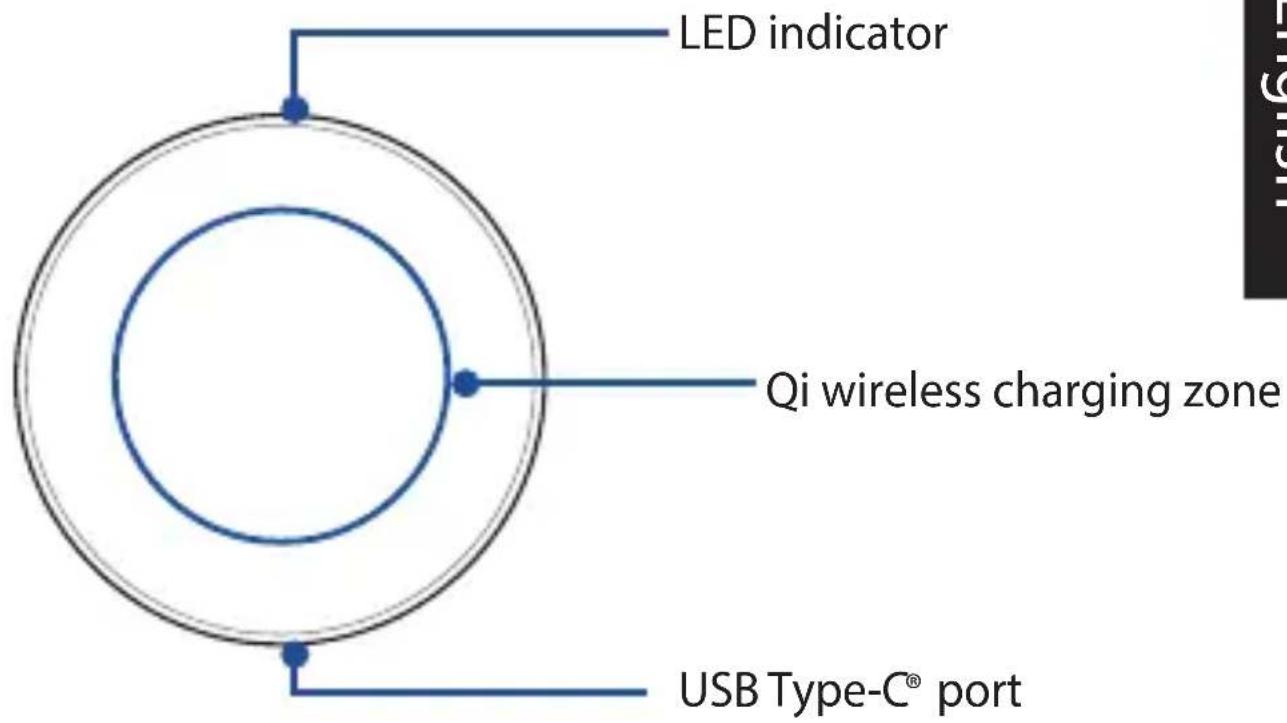
Getting to know your Wireless Power Mate
LED indications
| Indications LED Indicator | |
| Power on Flashes amber three times (Twice per second) | |
| Charging Remains solid amber | |
| Fully charged Turns solid white | |
| Error (OTP/FOD)* | Flashes amber (Four times per second) |
| Standby Off | |
| Power off Off | |
* OTP stands for Over Temperature Protection.
FOD stands for Foreign Object Detection.
Specifications
| Wireless charging standard | Qi 1.2.4 |
| Charging temperature | 0°C-35°C |
| Input port | USB Type-C® port |
| Input | 5V-3A/9V 2A/12V 1.5A |
| Output | 5V-12V/15W (Max) |
| Working frequency | 110KHz~148KHz |
NOTES:
• The actual charging power varies depending on your Qi-compatible devices.
- 15W wireless charging is only available for selected Qi-compatible devices with an 18W (or higher) power adapter that supports Qualcomm® Quick Charge™ 2.0 or later.
- To activate 10W, 7.5W, and 5W wireless charging, use a power adapter that supports Qualcomm® Quick Charge™ 2.0 or later.
Using your Wireless Power Mate
-
Connect one end of a USB Type-C® cable to a power adapter.
-
Connect the other end of the USB Type-C® cable to your Wireless Power Mate.
-
Plug the power adapter to a grounded power outlet.
-
Place a Qi-compatible mobile device on your Wireless Power Mate.
-
When fully charged, remove the Qi-compatible mobile device from your Wireless Power Mate.

NOTES:
- Use ONLY the bundled USB Type-C® cable to avoid damaging your Wireless Power Mate and prevent the risk of injury.
• We recommend that you remove the thick case from the Qi-compatible mobile device before placing the mobile device on your Wireless Power Mate. - Align the wireless charging zone of the Qi-compatible device with that of your Wireless Power Mate to get charged successfully.
• DO not place any foreign objects on your Wireless Power Mate to avoid damaging your Wireless Power Mate and prevent charging failure.
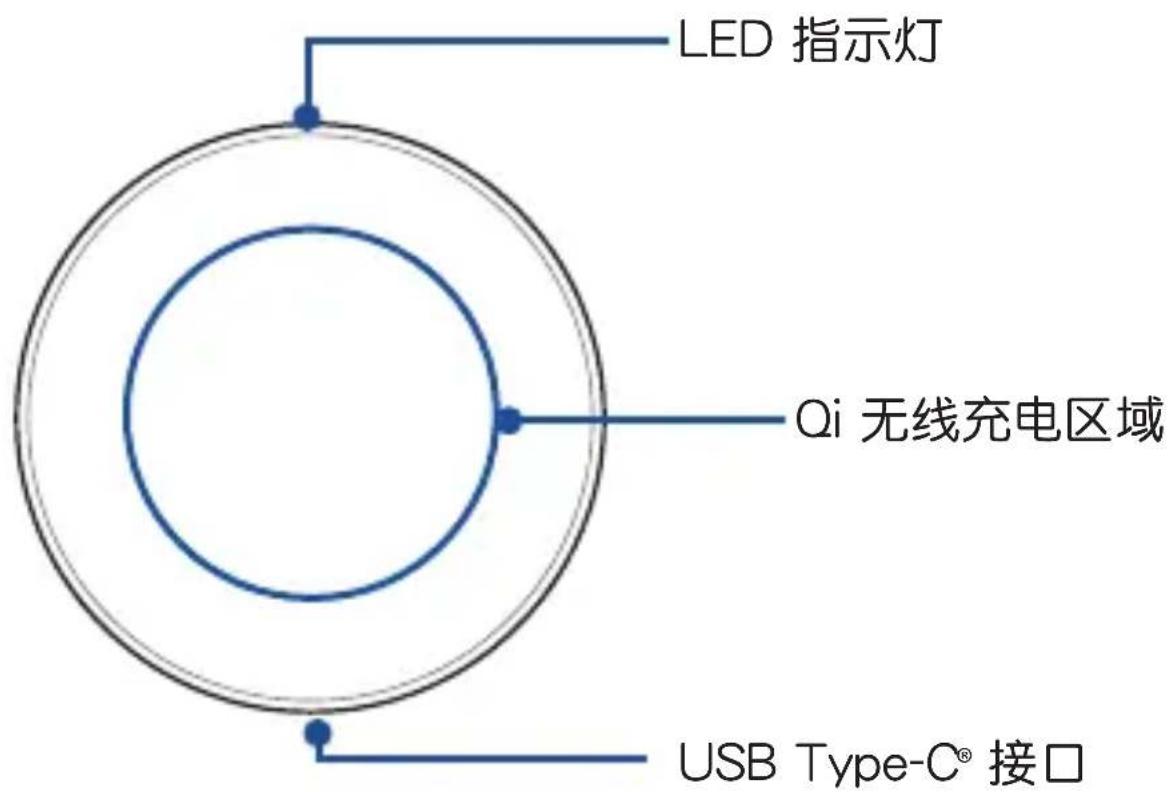
认识您的无线充电盘
注意:
注意:
REMARQUES :
HINWEISE:
NOTE:
ПРИМЕЧАНИЯ:
ご参考:
NOTAS:
POZNÁMKY:
OPMERKINGEN:
HUOMAUTUKSIA:
टिप:
MEGJEGYZÉSESK:
주의사항:
MERKNADER:
UWAGI:
NOTE:
NOTAS:
POZNÁMKY:
NOTER:
NOTLAR:
ПРИМИТКИ:
- If your Power Mate gets abnormal, disconnect the power adapter from the ground power outlet and contact ASUS Customer Service.
- Do not place any magnetically sensitive devices and media containing magnets such as credit cards, bank cards, and tapes near your Power Mate to reduce the potential for magnetic interference between your Power Mate and other devices or corruption of magnetically stored data.
- Do not disassemble your Wireless Power Mate by yourself to avoid damaging it.
- Any attempt to modify the software of your Power Mate by yourself may cause your Power Mate to malfunction or result in hazards.
- Do not expose your Power Mate to moisture and temperature extremes to avoid damaging it and prevent hazards.
• Use tape to remove dust from the surface of your Power Mate.
• Use a soft cloth dampened with water to clean your Power Mate. - Never use oil and chemicals such as benzene and ethyl alcohol to clean your Power Mate to prevent damaging it.
- This product is intended for use with a LPS-complied power adapter or DC power source with a rated output of 5V= 3A, 9V = 2A, or 12V = 1.5A. Contact ASUSTeK Computer Inc. or your retailer for further information on purchasing the power source.
Simplified EU Declaration of Conformity
ASUSTek Computer Inc. hereby declares that this device is in compliance with the essential requirements and other relevant provisions of Directive 2014/53/EU. Full text of EU declaration of conformity is available at https://www.asus.com/support/.
Federal Communications Commission Statement
This device complies with part 15 of the FCC Rules. Operation is subject to the following two conditions: (1) This device may not cause harmful interference, and (2) this device must accept any interference received, including interference that may cause undesired operation.
This equipment has been tested and found to comply with the limits for a Class B digital device, pursuant to part 15 of the FCC Rules. These limits are designed to provide reasonable protection against harmful interference in a residential installation. This equipment generates, uses and can radiate radio frequency energy and, if not installed and used in accordance with the instructions, may cause harmful interference to radio communications. However, there is no guarantee that interference will not occur in a particular installation. If this equipment does cause harmful interference to radio or television reception, which can be determined by turning the equipment off and on, the user is encouraged to try to correct the interference by one or more of the following measures:
- Reorient or relocate the receiving antenna.
- Increase the separation between the equipment and receiver.
- Connect the equipment into an outlet on a circuit different from that to which the receiver is connected.
- Consult the dealer or an experienced radio/TV technician for help.
Regional notice for Singapore
This ASUS product complies with IMDA Standards.
Complies with IMDA Standards DB103778
安全注意事项
| Manufacturer: ASUSTeK Computer Inc. | |
| Address: 1F., No.15, Lide Rd., Beitou Dist., Taipei City 112, Taiwan |
FCC COMPLIANCE INFORMATION
Per FCC Part 2 Section 2.1077(a)

Responsible Party: Asus Computer International
Address: 800 Corporate Way, Fremont, CA 94539.
Phone/Fax No: (510)739-3777/(510)608-4555
hereby declares that the product
Product Name : ASUS Wireless Power Mate
Model Number : W1G-AWPM
compliance statement:
This device complies with part 15 of the FCC Rules. Operation is subject to the following two conditions: (1) This device may not cause harmful interference, and (2) this device must accept any interference received, including interference that may cause undesired operation.
Ver. 180125
- ASUS Wireless Power Mate Model:W1G-AWPM
- Contents
- Specifications
- NOTES:
- Using your Wireless Power Mate
- 注意:
- REMARQUES :
- HINWEISE:
- NOTE:
- ПРИМЕЧАНИЯ:
- ご参考:
- NOTAS:
- POZNÁMKY:
- OPMERKINGEN:
- HUOMAUTUKSIA:
- टिप:
- MEGJEGYZÉSESK:
- 주의사항:
- MERKNADER:
- UWAGI:
- NOTER:
- NOTLAR:
- ПРИМИТКИ:
- Simplified EU Declaration of Conformity
- Federal Communications Commission Statement
- Regional notice for Singapore
- 安全注意事项
- FCC COMPLIANCE INFORMATION
Brand : ASUS
Model : Wireless Power Mate W1GAWPM
Category : Wireless Charger