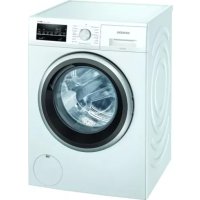
USER MANUAL iQ500 WM14UT00NL SIEMENS

Repair

WARNING!
- Remove the screws (1).
- Release the fasteners (2, 3).
3.1.2 Installing the worktop
▶ Install in reverse order.

Repair
3.2 Replacing the plate

Sharp edges on the housing!
Cuts
▶ Wear protective gloves.


Risk of slipping of tilted appliances!
- Disconnect the control unit connector.
- Remove the panel.
3.2.2 Installing the panel
▶ Install in reverse order.

Repair
3.3.2 Installing the detergent drawer
▶ Install in reverse order.

Repair
- Remove the detergent drawer handle.
3.4.2 Installing the detergent drawer handle
▶ Install in reverse order.

Repair
3.5 Replacing the door
CAUTION
- Remove the door upwards.
3.5.2 Installing the door
▶ Reassemble in reverse order.

Repair
- Lower the device.
Repair
- Remove the screws in the pump area (2). 5. 1. Loosen the screws on the back of the device (1).
- Remove the worktop (2, 3).

Repair
- Remove the screws (1).
- Loosen the panel's retaining elements (2, 3).
- Loosen the dispenser housing screws.
9.

CAUTION
Risk of damage to the surface!
- Remove the door seal.
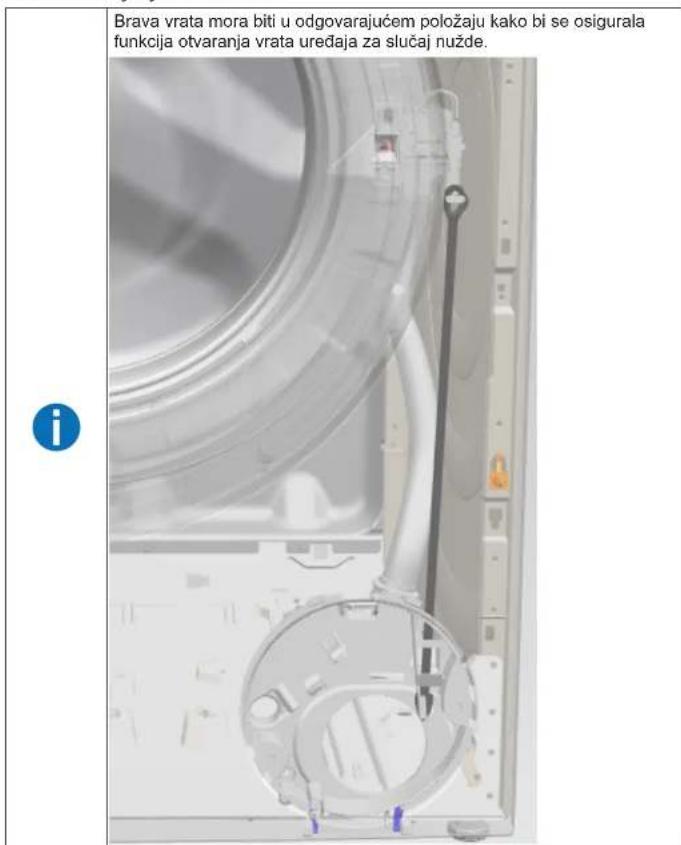
- Remove the door lock.

Repair
3.8.2 Installing the door lock
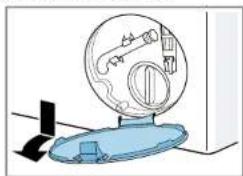
- Remove the pump cover.
3.10.2 Installing the pump cover
▶ Install in reverse order.

Repair
- Lower the appliance.

Repair
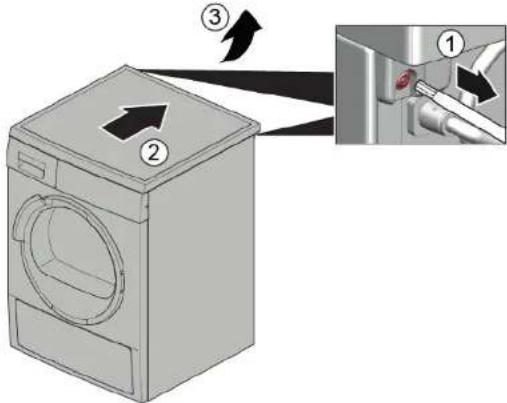
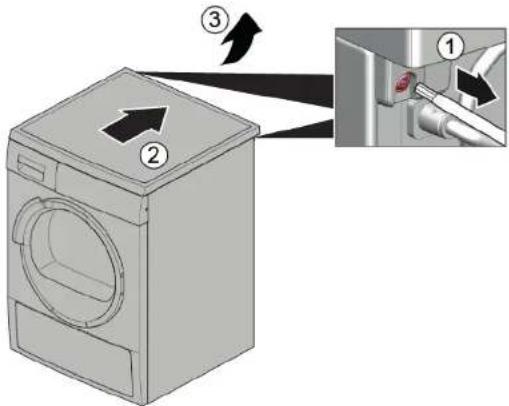
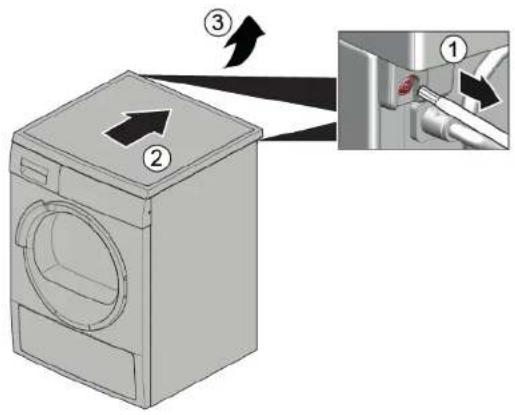
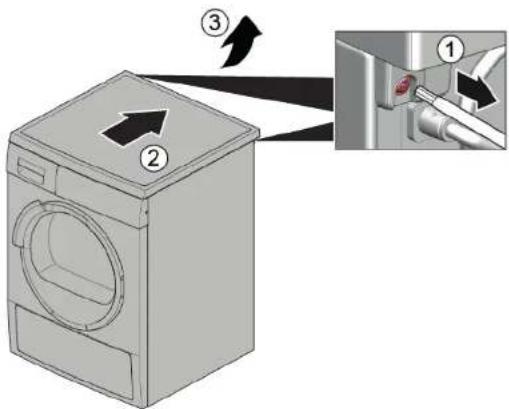
- Remove the screws (1).
- Push the worktop to the rear of the appliance (2).
- Move the worktop upwards (3) to remove it.
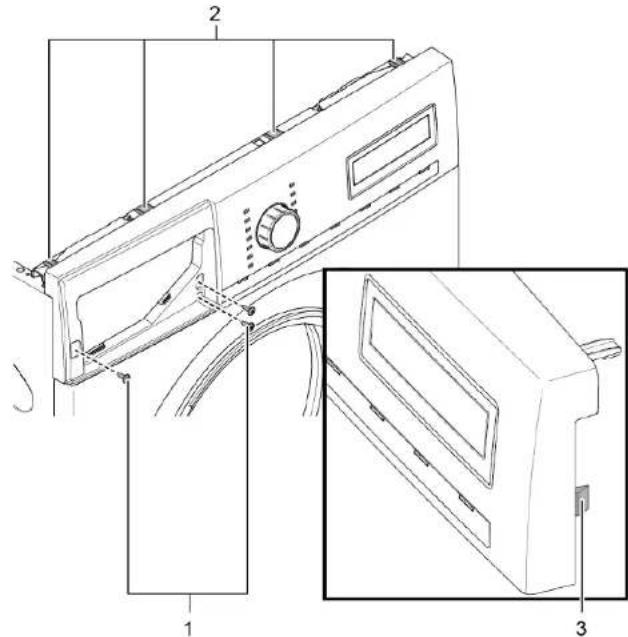
- Remove the screws (1).
- Loosen the retaining elements (2, 3).
- Remove the panel.
7.


CAUTION
- Remove the front panel.
- Lay the appliance down.

Repair

Repair

CAUTION
- Lay the appliance down.

Repair
- Remove the door upwards.
- Lower the appliance.

Repair
- Remove the screws in the pump area (2). 5. 1. Loosen the screws at the back of the appliance (1).
- Remove the top panel (2, 3).

Repair
- Remove the screws (1).
- Release the locking elements of the control panel (2, 3).
- Loosen the screws of the dispenser housing.
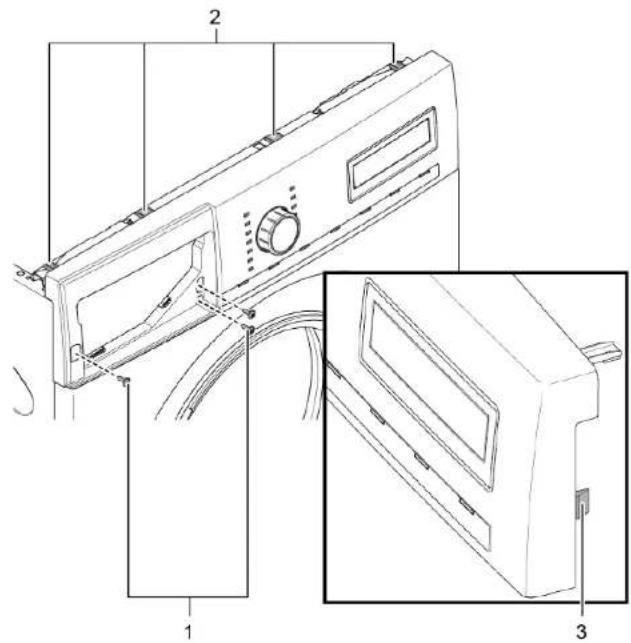
- Remove the control panel.
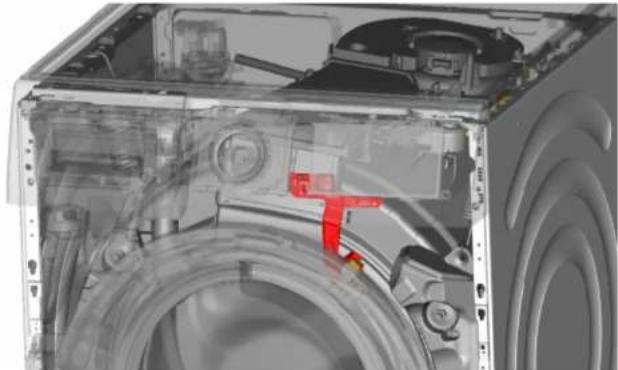
- Remove the drum light holder at the top.

NOTE
Caution: damaged surface!
- Remove the door seal.
- Remove the door lock.

Repair
▶ Make sure to secure appliances against slipping.


- Open the pump cover.
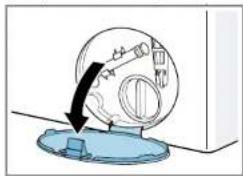
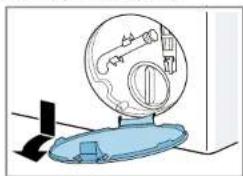
- Remove the pump cover.
▶ Make sure to secure appliances against slipping.
Lift the appliance at the front.
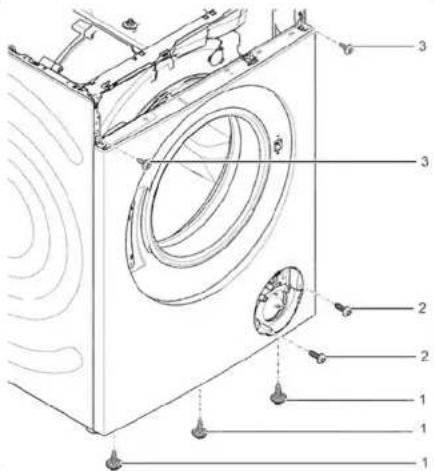
- Remove the screws at the bottom (1).
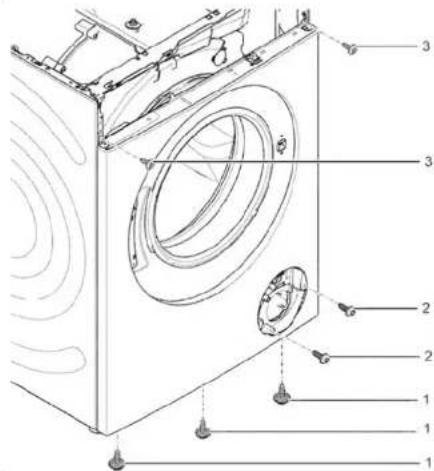
- Lower the appliance.

Repair
- Remove the control panel.
7.


CAUTION!
- Remove the front panel.
3.11.2 Mounting the front panel
3.1.2 Mounting the worktop
3.3.2 Mounting the detergent drawer
3.6.2 Mounting the door components

Repair
NOTE!
3.10.2 Mounting the pump cover
Repair hints - Washing machine
i About this document.... 108
1.1 Important information.... 108
1.1.1 Purpose.... 108
1.2 Explanation of symbols 108
1.2.1 Danger levels.... 108
1.2.2 Hazard symbols 108
1.2.3 Structure of the warnings.... 109
1.2.4 General symbols.... 109
Repair 111
3.1 Replacing worktop.... 111
3.1.1 Removing worktop 111
3.1.2 Installing worktop 111
3.2 Replacing fascia panel.... 112
3.2.1 Removing fascia panel 112
3.2.2 Installing fascia panel 112
3.3 Replacing detergent drawer 113
3.3.1 Removing detergent drawer.... 113
3.3.2 Installing detergent drawer.... 113
3.4 Replacing detergent drawer handle 114
3.4.1 Removing detergent drawer handle.... 114
3.4.2 Installing detergent drawer handle.... 114
3.5 Replacing door 115
3.10.1 Removing pump cover 124
3.10.2 Installing pump cover 124
3.11 Replacing front panel 125
3.11.1 Removing front panel.... 125
3.11.2 Installing front panel.... 127
i Concerning this document
1.1.1 Purpose
These repair hints support consumer to repair appliances by himself according to the applicable eco-design regulation (as of 03/2021).
They contain information how to exchange defined spare parts including warnings and risks.
In case of questions, please contact our customer service. We will only be liable for damages if the repair hints have been followed properly.
1.2 Explanation of symbols
1.2.1 Danger levels
The warning levels consist of a symbol and a signal word. The signal word indicates the severity of the danger.
| Warning level Meaning | |
| Danger | Non-observance of the warning message will result in death or serious injuries. |
| Warning | Non-observance of the warning message could result in death or serious injuries. |
| Caution | Non-observance of the warning message could result in minor injuries. |
| Notice | Non-observance of the warning message could result in damage to property. |
Table 1: Danger levels
1.2.2 Hazard symbols
Hazard symbols are symbolic representations which give an indication of the kind of danger.
The following hazard symbols are used in this document:
| Hazard symbol Meaning | |
 | | General warning message |
 | | Danger from electrical voltage |
 | | Risk of explosion |
 | | Danger of cuts |
 | | Danger of crushing |
i Concerning this document
| Hazard symbol Meaning | |
 | | Danger from hot surfaces |
 | | Danger from strong magnetic field |
 | | Danger from non-ionizing radiation |
Table 2: Hazard symbols
1.2.3 Structure of the warnings
Warnings in this document have a standardised appearance and a standardised structure.

Type and source of danger!
Possible consequences of ignoring the danger / warning.
▶ Measures and prohibitions for preventing the danger.
The following example shows a warning that warns against electric shock due to live parts. The measure for avoiding the danger is mentioned.

Risk of electric shock due to live parts!
Death by electrocution
- Disconnect appliances from electrical supply at least 60 seconds before starting repairs.
1.2.4 General symbols
The following general symbols are used in this document:
| Gen. symbol Meaning | |
| Identification of a special tip (text and/or graphic) |
| Identification of a simple tip (only text) |
| Identification of a link to a video tutorial |
| Gen. symbol Meaning | |
| Identification of required tools |
| Identification of required preconditions |
| Identification of a condition (if ..., then ...) |
| Identification of a result |
| StartIdentification of a key or button | |
| [00123456] Identification of a material number |
| StatusIdentification of displayed text / window(in the appliance's display) |
Table 3: General symbols

| Designation Details Images | |
| Auxiliary tool[15000155] | Tool for loosening out of plastic parts | 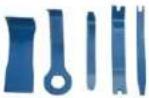 |
| Screwdriver Torx T20 with bore hole [00340764] | 100 mm, for screws with safety pin |  |
| Torque spanner [15000441] | Torque spanner 20 - 100 Nm | |
| Slot screwdriver [00340854] | Blade 3.5 mm x 0.6 mm x 100 mm, Protective Insulation 1000 V AC |  |
| Slot screwdriver [00340855] | Blade 5.5 mm x 1.0 mm x 125 mm, Protective Insulation 1000 V AC |  |
| Needle-nose pliers, angled pattern [00341269] | Length 200 mm | 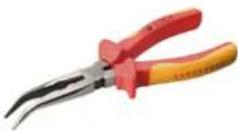 |
| Side-cutting pliers [00342182] | Length: 200 mm | 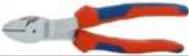 |
| Designation Details Images | |
| Combination wrench[00340811] | Wrench size 10°mm, M6 |  |
| Combination wrench[00340814] | Wrench size 13°mm, M8 |  |
| Combination wrench[00340817] | Wrench size 17 mm, M10 |  |
| Combination wrench[15000459] | Wrench size 16°mm, M10 |  |

Repair
3.1 Replacing worktop
Required tools:
Torx Bit TX20 with hole, long 6.3 mm (1/4") 152 mm, for screws [00341272] with safety pin
Prerequisite:
√ Appliance is disconnected from power supply. √ Appliance is disconnected from water supply.
3.1.1 Removing worktop
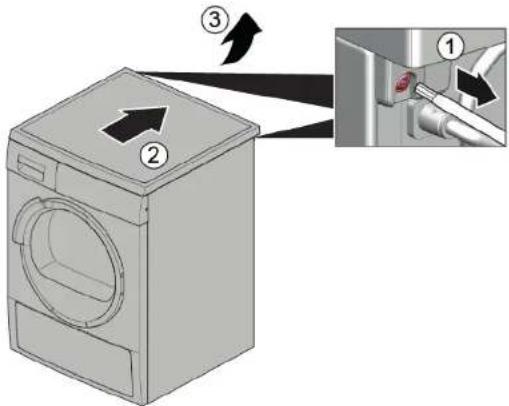
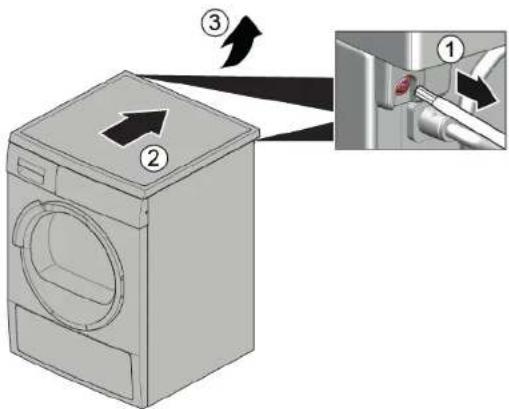
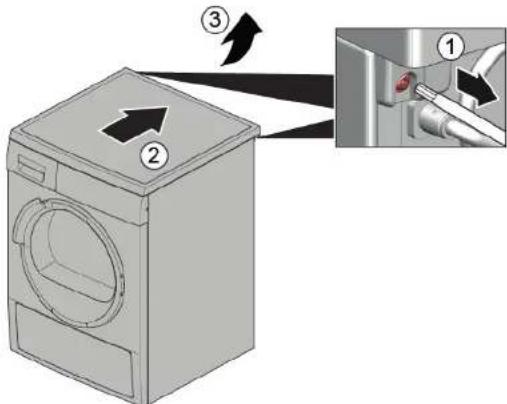
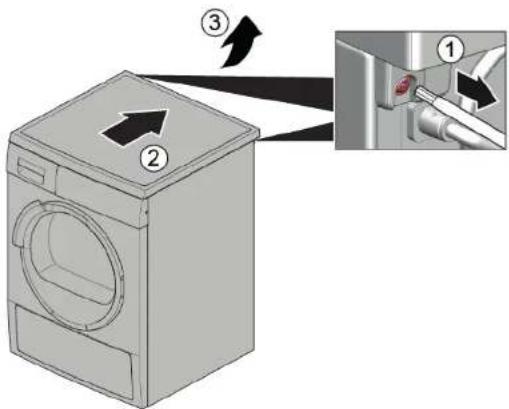
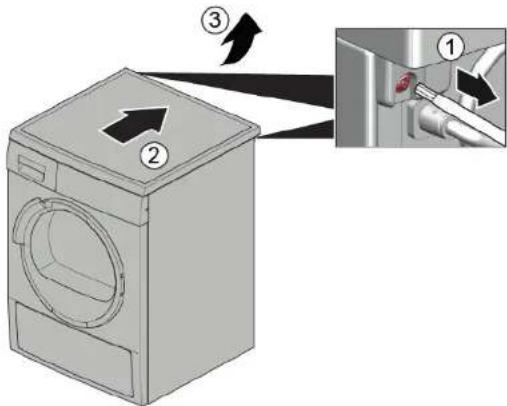
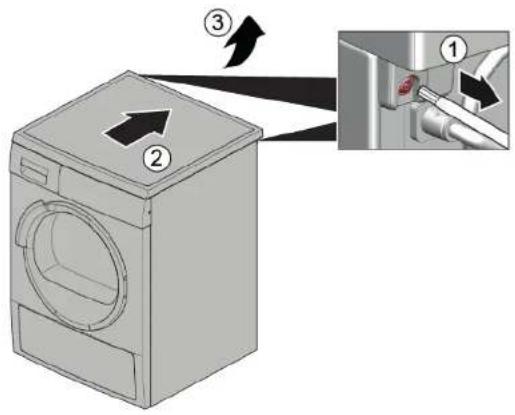
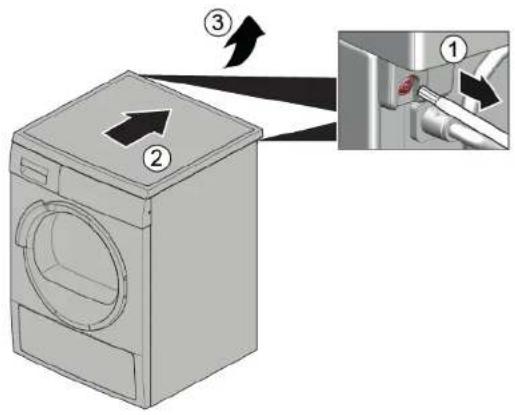
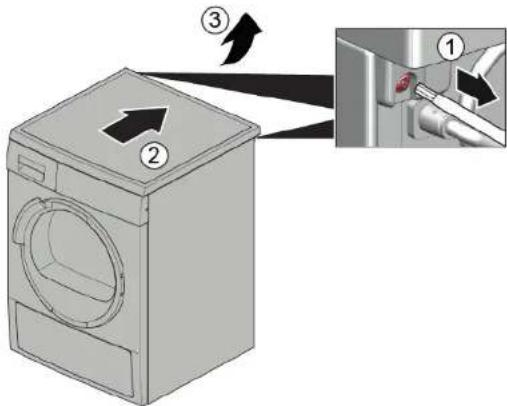
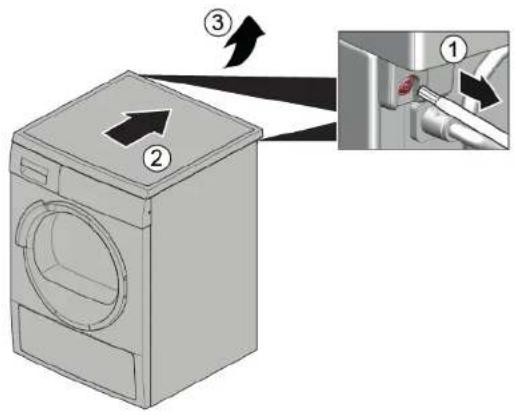
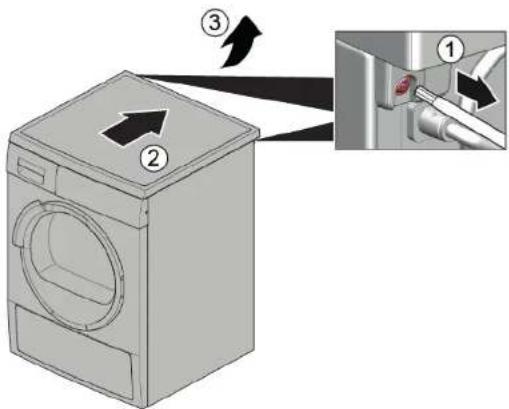
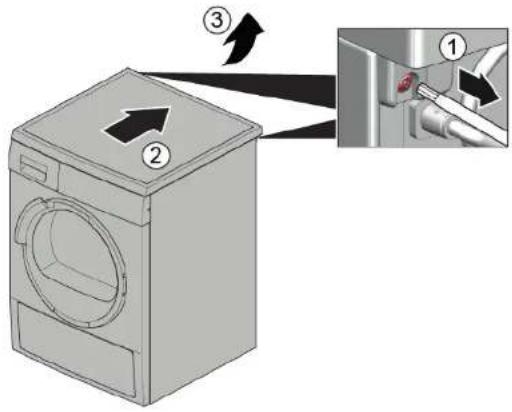
- Remove screws (1).
- Push worktop to the back of the appliance (2).
- Move worktop upwards (3) to remove it.
3.1.2 Installing worktop
Install in reverse order.

Repair
3.2 Replacing fascia panel
Prerequisite:
√ Appliance is disconnected from power supply. √ Appliance is disconnected from water supply. √ Worktop has been removed.→ Page 111 √ Detergent drawer has been removed.→ Page 113
3.2.1 Removing fascia panel
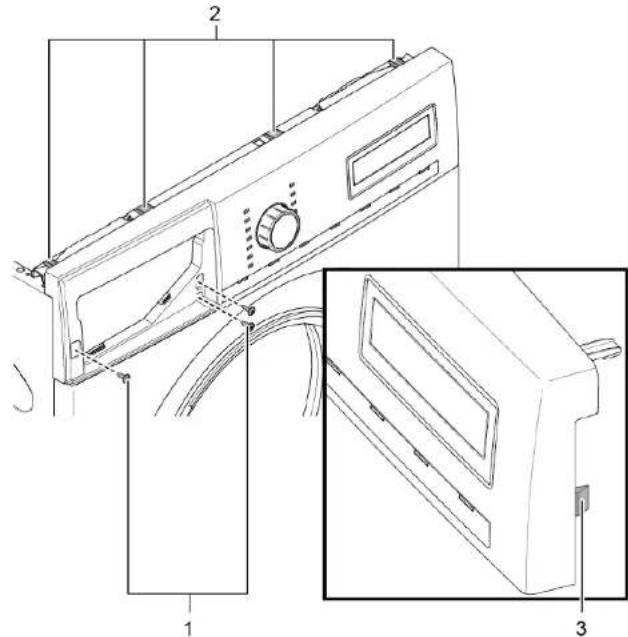
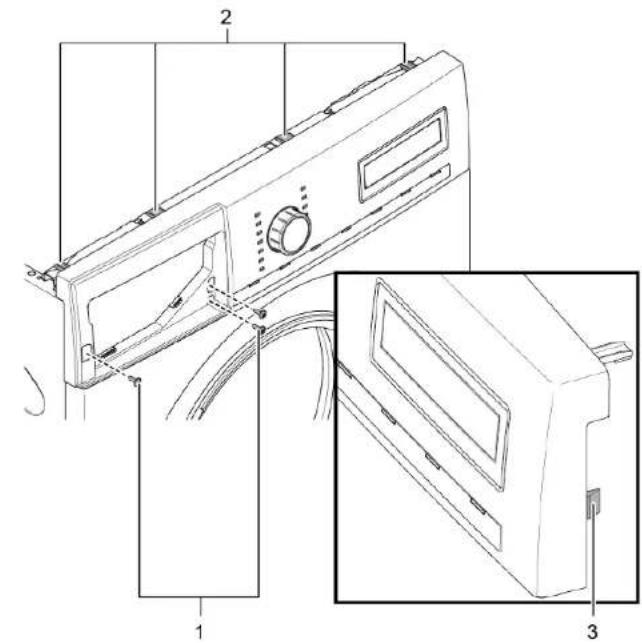
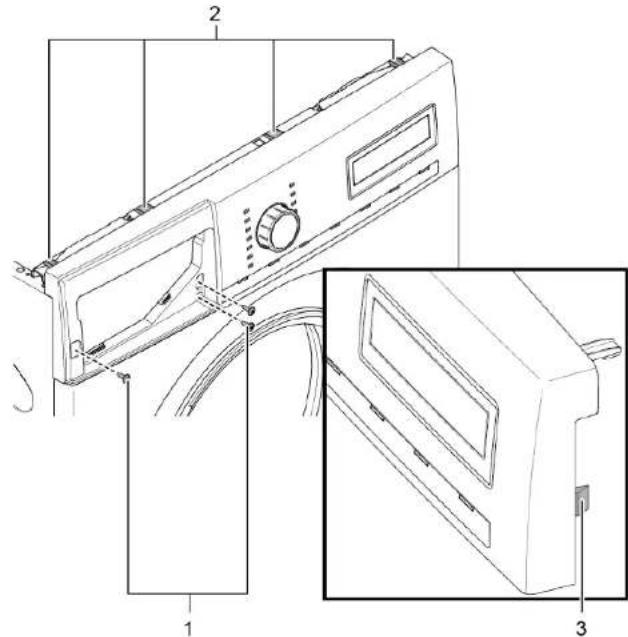
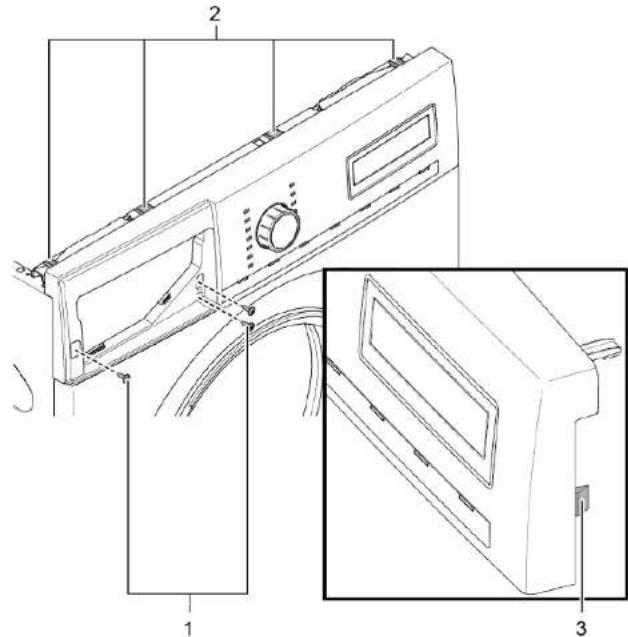
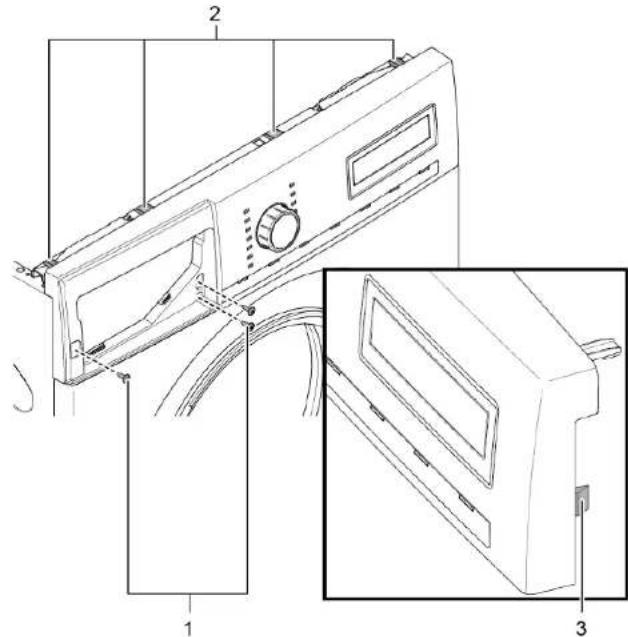
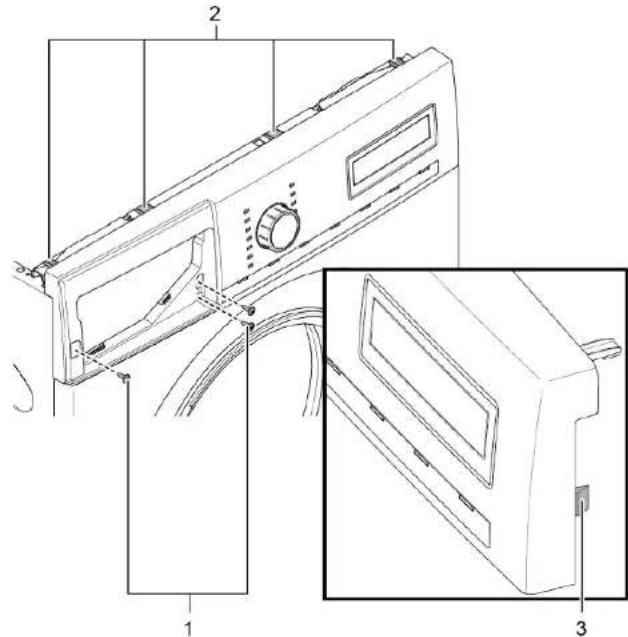
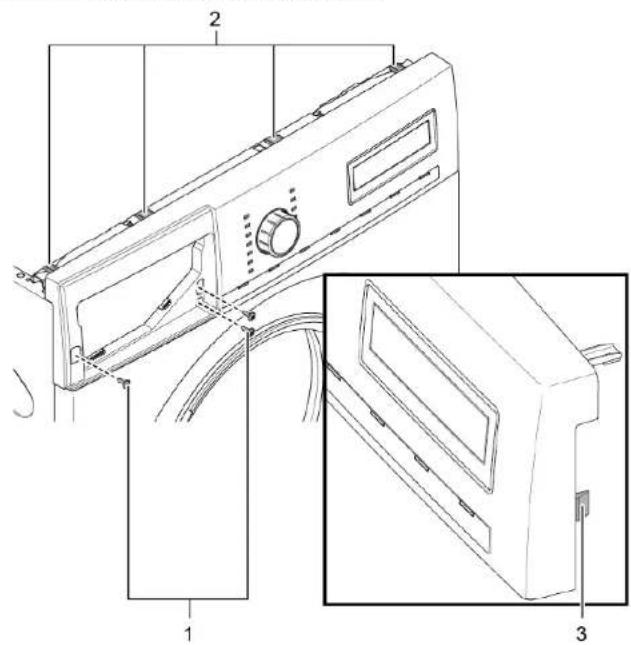
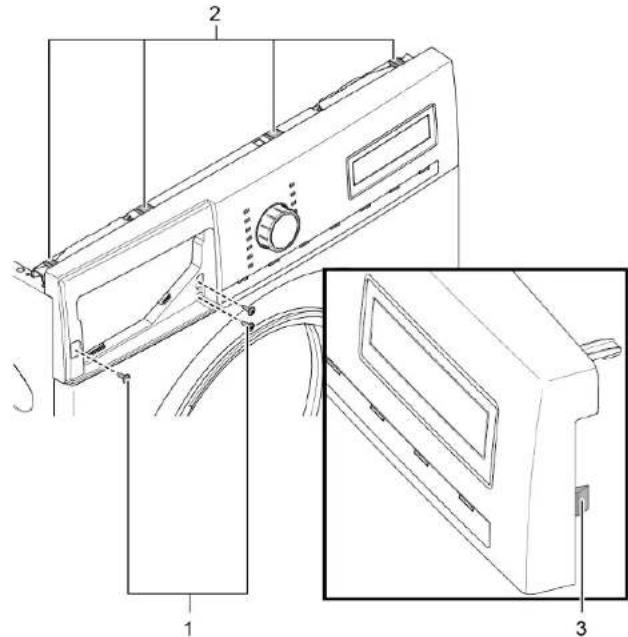
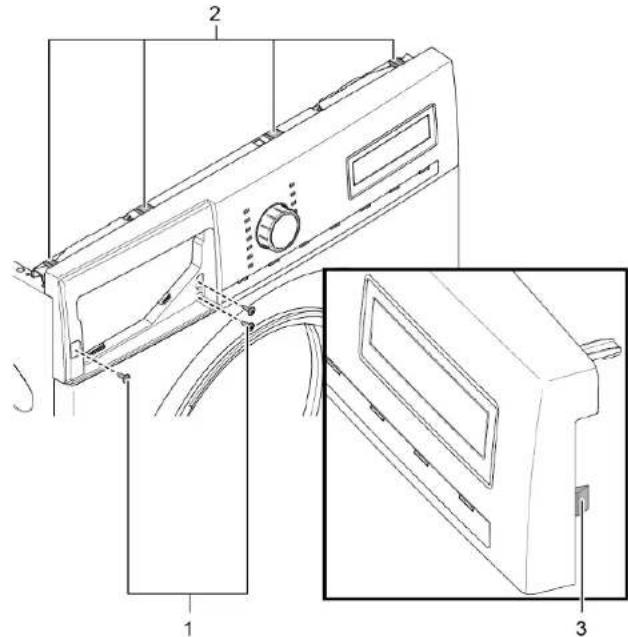
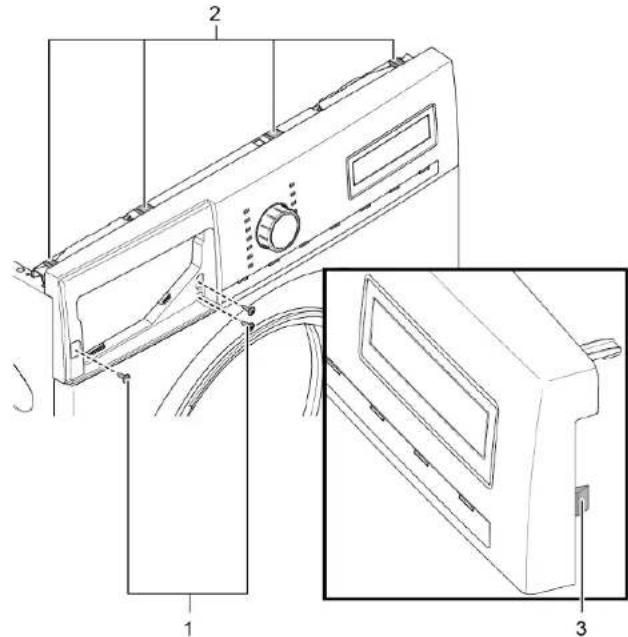
- Remove screws (1).
- Release catch elements (2, 3).
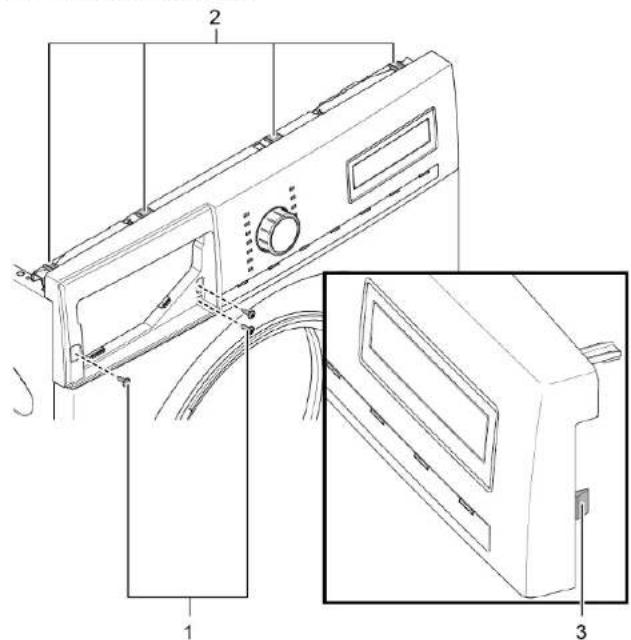
- Release plug contact of control unit.
- Remove fascia panel.
3.2.2 Installing fascia panel
Install in reverse order.
Repair
3.3 Replacing detergent drawer
Prerequisite:
Appliance is disconnected from power supply. Appliance is disconnected from water supply.
3.3.1 Removing detergent drawer
- Pull out detergent drawer. 2.1. Press down on insert (1).
- Remove detergent drawer (2).
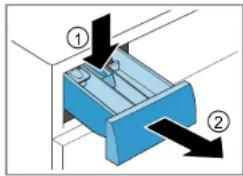
3.3.2 Installing detergent drawer
Install in reverse order.

Repair
3.4 Replacing detergent drawer handle
Prerequisite:
Appliance is disconnected from power supply. Appliance is disconnected from water supply. Detergent drawer has been removed. → Page 113
3.4.1 Removing detergent drawer handle
- Release catch elements.
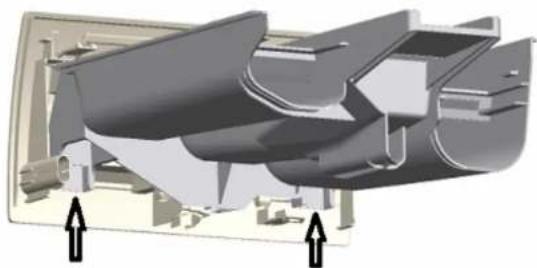
- Remove detergent drawer handle.
3.4.2 Installing detergent drawer handle
Install in reverse order.

Repair
3.5 Replacing door

Open hinge area
Finger crushing / entrapment
Do not reach into the hinge area.
Wear protective gloves.
Prerequisite:
Appliance is disconnected from power supply. Appliance is disconnected from water supply. Door is opened.
3.5.1 Removing door
1.

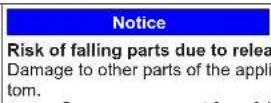
Notice
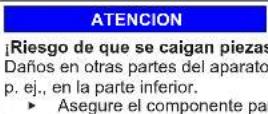
Risk of falling parts due to released screws!
Damage to other parts of the appliance or at customer's home, e.g., bottom.
- Secure component from falling down.


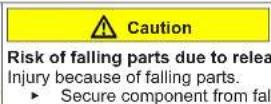
Risk of falling parts due to released screws!
Injury because of falling parts.
- Secure component from falling down.
Remove screws (1).
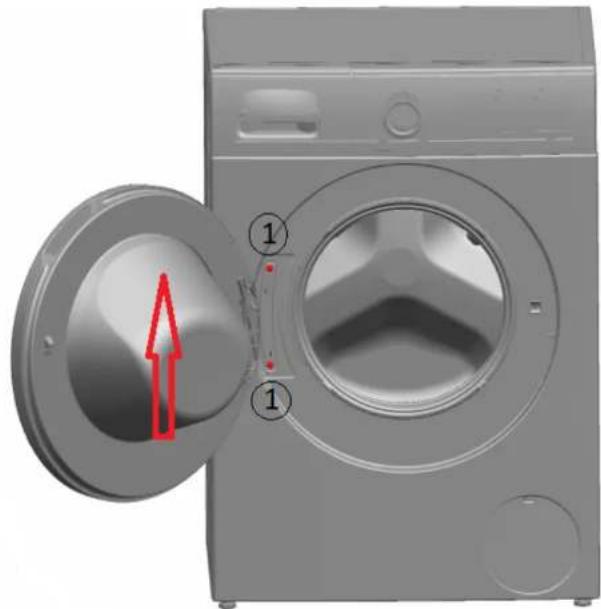
- Remove door upwards.
▶ Install in reverse order.

Repair
3.6 Replacing door components

Open hinge area
Finger crushing / entrapment
▶ Do not reach into the hinge area.
▶ Wear protective gloves.
Prerequisite:
√ Appliance is disconnected from power supply. √ Appliance is disconnected from water supply. √ Door has been removed.→ Page 115
3.6.1 Removing door components
- Disassemble door from outside to inside.
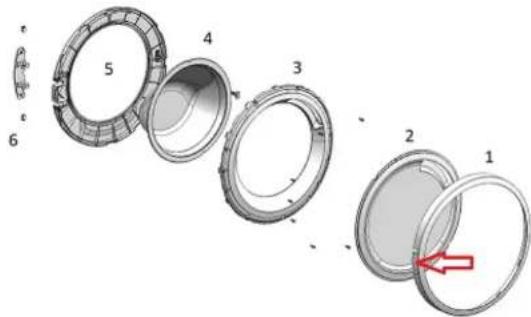
3.6.2 Installing door components
▶ Install in reverse order.

Repair
3.7 Replacing door seal


Sharp housing edges!
Cut injuries
▶ Wear protective gloves.


Risk of falling parts due to released screws!
Injury because of falling parts.
- Secure component from falling down.

Risk of falling parts due to released screws!
Damage to other parts of the appliance or at customer's home, e.g. bot-
tom.
- Secure component from falling down.
Prerequisite:
√ Appliance is disconnected from power supply. √ Appliance is disconnected from water supply. Detergent drawer has been removed.→ Page 113 √ Door has been removed.→ Page 115 √ Pump cover has been removed.→ Page 124
Slipping of tilted appliances!
Bone fractures / crush injuries
- Secure appliances against slipping.
Lift up appliance at front.
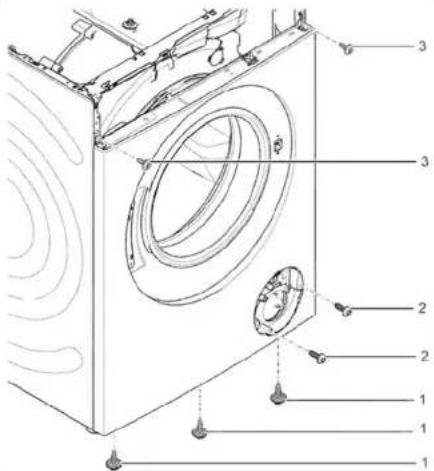
- Release screws at bottom of front panel (1).
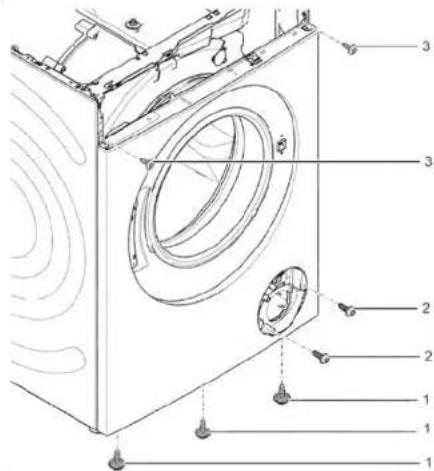
- Lower appliance down.

Repair
- Remove screws in pump area (2). 5. 1. Release screws at back of appliance (1).
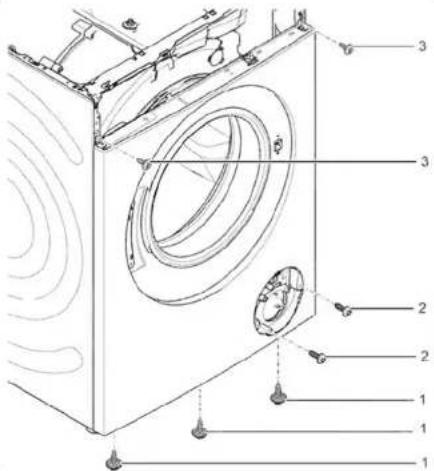
- Remove worktop (2, 3).
Repair
- Remove screws (1).
- Release catch elements of fascia panel (2, 3).
- Release screws of dispenser housing.
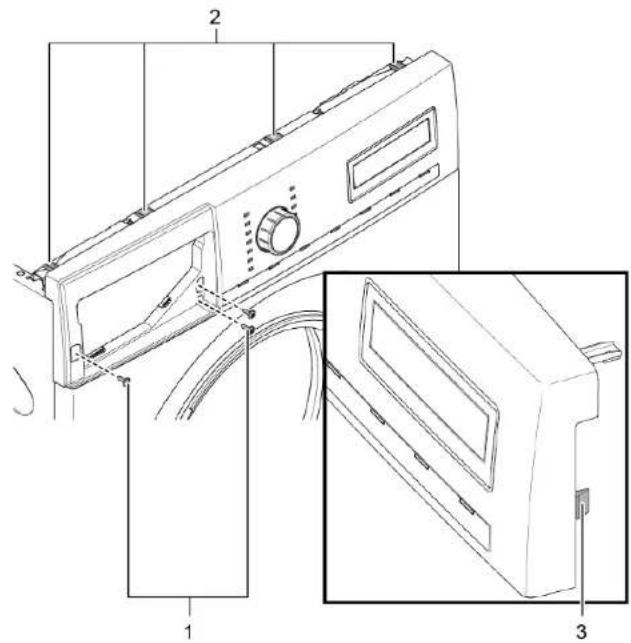
- Remove fascia panel.
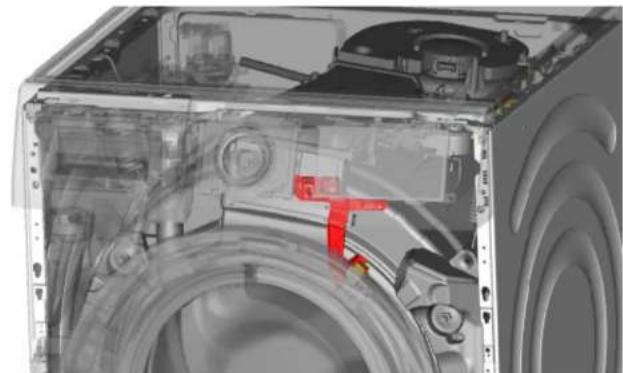
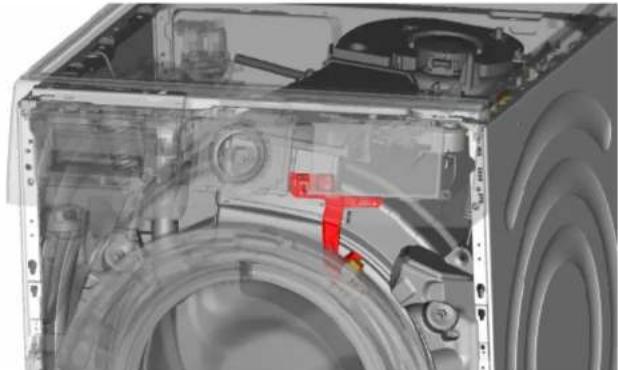
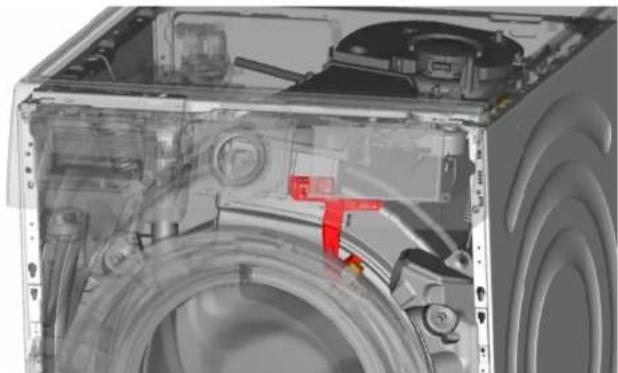
- Remove drum light holder at top.
9.

Notice
Risk of damaged surface!
Surface of appliance can be scratched by using wrong tools.
▶ Only use plastic tools to replace the tension ring.
Remove tension ring from gasket with a plastic tool.
- Release door seal from front panel.
- Release cable connector from door lock.

Repair
- Release screws on top of front panel (3).
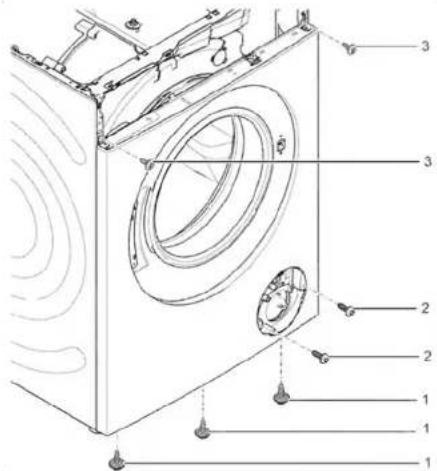
- Remove front panel.
- Release all hose connections.
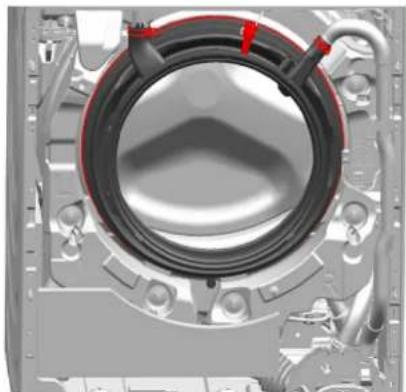
- Remove door seal.
Warning
Risk of falling parts due to inco
Injury or damage to the appliance
▶ Tighten tension ring of boo
▶ Install in reverse order.

Repair
3.8 Replacing door lock
As a manufacturer, we are obliged to provide consumers with the spare part door lock including repair instructions in accordance with Regulation (EU) 2019/2023. However, we would like to point out that after replacing a door lock, an electrotechnical safety test by a qualified electrician is required before the device is put into operation. This person must be verifiably qualified according to the country-specific laws, regulations and standards.

Risk of electric shock due to live parts!
Danger to life through electric shock in case of improper repair
Electric parts should be repaired by qualified electricians.
After the repair, have a safety test performed according to VDE 0701 or country-specific regulations.

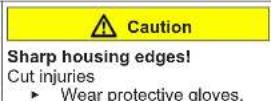
Sharp housing edges!
Cut injuries
▶ Wear protective gloves.

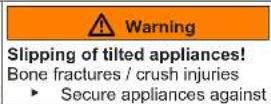
Slipping of tilted appliances!
Bone fractures / crush injuries
▶ Secure appliances against slipping.

Risk of falling parts due to released screws!
Injury because of falling parts.
- Secure component from falling down.

Risk of falling parts due to released screws!
Damage to other parts of the appliance or at customer's home, e.g., bottom.
- Secure component from falling down.
Prerequisite:
√ Appliance is disconnected from power supply. √ Appliance is disconnected from water supply.
√ Appliance is freely accessible. √ Worktop has been removed. → Page 111 √ Fascia panel has been removed. √ Door has been removed. → Page 115 √ Tension ring has been removed. √ Front panel has been removed. √ Door seal has been removed.
- Disconnect door lock plug.
- Release door lock.
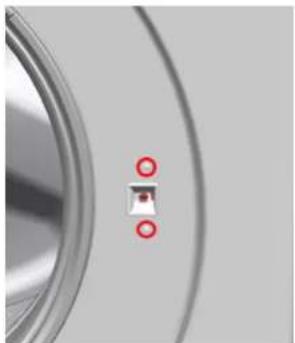
- Remove door lock.

Repair
▶ Install in reverse order.

Repair
3.9 Replacing drum light


Sharp housing edges!
Cut injuries
▶ Wear protective gloves.


Slipping of tilted appliances!
Bone fractures / crush injuries
- Secure appliances against slipping.


Risk of falling parts due to released screws!
Injury because of falling parts.
- Secure component from falling down.


Risk of falling parts due to released screws!
Damage to other parts of the appliance or at customer's home, e.g., bottom.
- Secure component from falling down.
Prerequisite:
√ Appliance is disconnected from power supply. √ Appliance is disconnected from water supply. √ Appliance is freely accessible. √ Worktop has been removed. → Page 111 √ Detergent drawer has been removed. → Page 113 √ Fascia panel has been removed.
3.9.1 Removing drum light
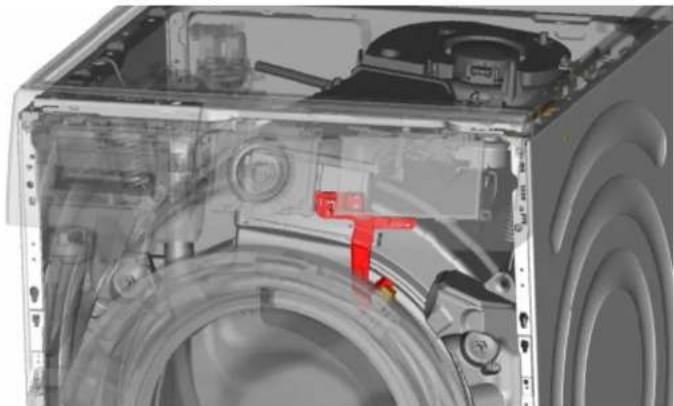
- Pull drum light holder out of appliance.
- Disconnect electrical connections.
- Remove drum light from drum light holder.
3.9.2 Installing drum light
Install in reverse order.

Repair
3.10 Replacing pump cover
Prerequisite:
Appliance is disconnected from power supply. Appliance is disconnected from water supply.
3.10.1 Removing pump cover
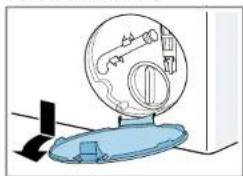
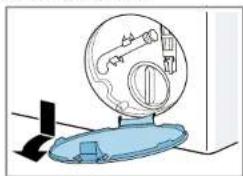
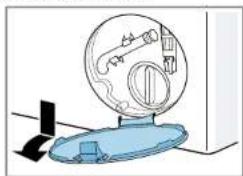
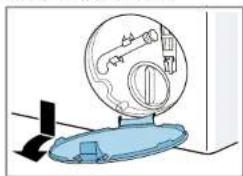
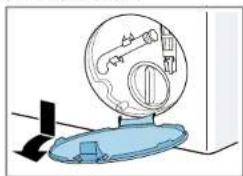
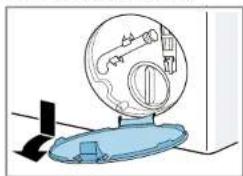
- Open pump cover.
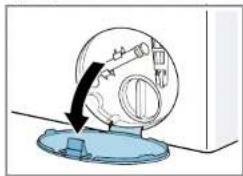
- Remove pump cover.
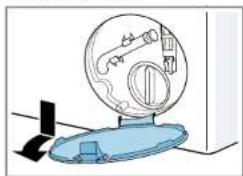
3.10.2 Installing pump cover
Install in reverse order.

Repair
3.11 Replacing front panel


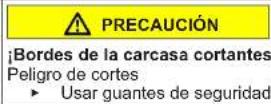
Sharp housing edges!
Cut injuries
Wear protective gloves.
Prerequisite:
√ Appliance is disconnected from power supply. √ Appliance is disconnected from water supply. √ Detergent drawer has been removed. → Page 113 √ Door has been removed. → Page 115 √ Door seal has been removed. √ Pump cover has been removed. → Page 124
3.11.1 Removing front panel
1.


Slipping of tilted appliances!
Bone fractures / crush injuries
Secure appliances against slipping.
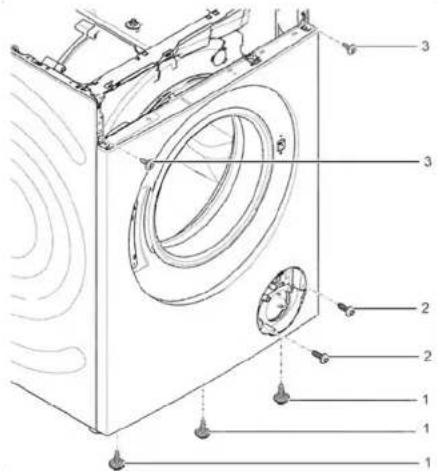
Lift up appliance at front.
- Remove screws at bottom (1).
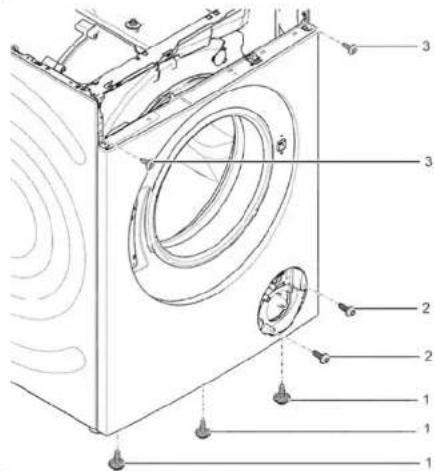
- Lower appliance down.

Repair
- Remove screws (1).
- Push worktop to the back of the appliance (2).
- Move worktop upwards (3) to remove it.
- Remove screws (1).
- Release catch elements (2, 3).
- Remove fascia panel.
7.


Caution
Risk of falling parts due to released screws!
Injury because of falling parts.
▶ Secure component from falling down.

Repair
Notice
Risk of falling parts due to released screws!
Damage to other parts of the appliance or at customers home e.g. bottom.
▶ Secure component from falling down.
Remove screws at front beginning from bottom to top (2, 3).
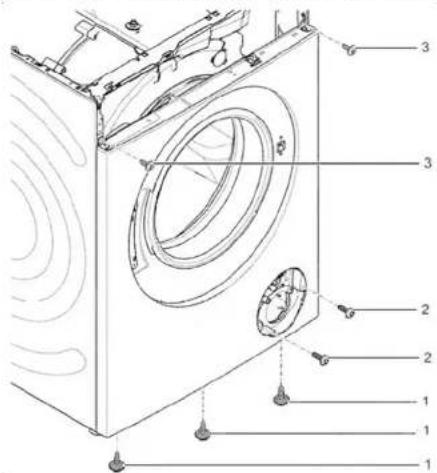
- Remove front panel.
3.11.2 Installing front panel
Install in reverse order.
3.1.2 Installing worktop
Install in reverse order.

3.3.2 Installing detergent drawer
Install in reverse order.
Repair
3.6.2 Installing the pump cover
▶ Install in reverse order.
Repair
- Lower the device.

Repair

Repair

CAUTION!
- Remove the door lock.

Repair
- Remove the pump cover.
3.10.2 Installing the pump cover
- Lower the device.

Repair
- Remove the screws (1).
- Release the fastening elements (2, 3).
- Remove the front panel.
3.11.2 Installing the front panel
▶ Install in reverse order.
3.3.2 Installing the detergent drawer
- Lower the machine.

Repair
Repair
9.

CAUTION!
- Remove the door seal.
- Remove the pump cover.
- Lower the machine.

Correction
- Remove the screws (1).
- Release the locking parts (2, 3).
- Remove the front panel.
3.11.2 Installing the front panel

Repair
ATTENTION!
Risk of surface damage!
- Remove the door seal.
- Remove the door lock.

Repair

Repair

ATTENTION

Repair

CAUTION!

Repair
WARNING!
Repair

ATTENTION!
- Lower the device.

Repair
- Remove the worktop (2, 3).

Repair

WARNING!
- Remove the door lock.

Repair
- Remove the pump cover.
- Lower the device.

Repairs
- Remove the worktop (2, 3).

Repair

ATTENTION!
- Remove the pump cover.
3.10.2 Fitting the pump cover
- Remove the belt.
7.

⚠️ WARNING
Risk of parts falling when loosening screws!
Falling parts can cause injury.
- Disconnect the control unit plug.
- Remove the instrument panel.
- Lower the appliance.

Repair
- Remove the screws in the pump area (2). 5. 1. Loosen the screws on the back of the appliance (1).
Repair
- Remove the screws (1).
- Release the instrument panel's locking elements (2, 3).
- Loosen the screws in the dispenser housing.
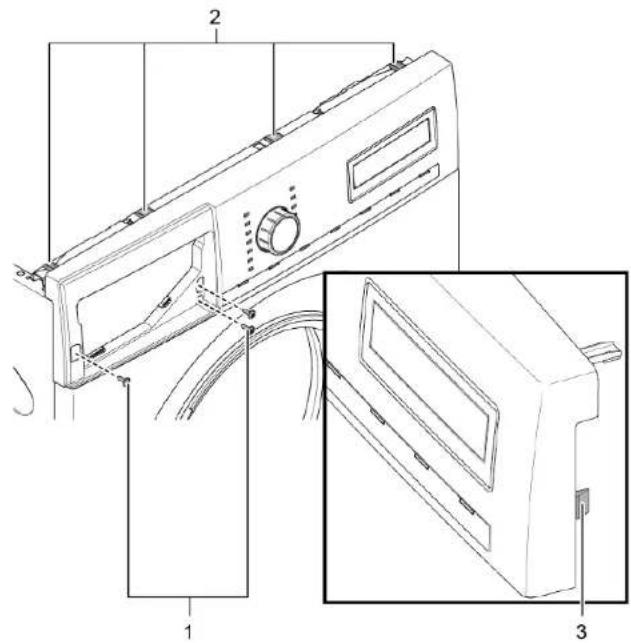
- Remove the instrument panel.
- Remove the drum lamp holder at the top.
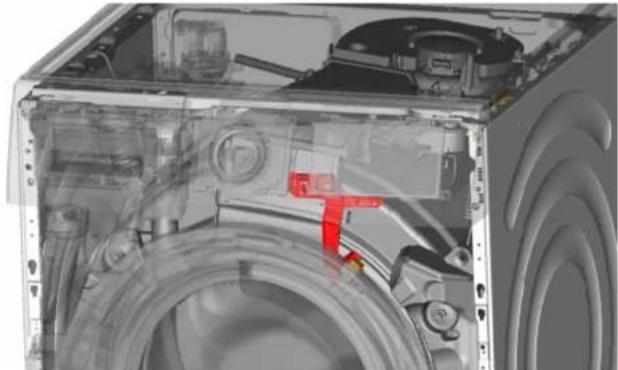
9.

CAUTION!
Risk of damage to the surface!
- Remove the front panel.
- Loosen all hose connections.
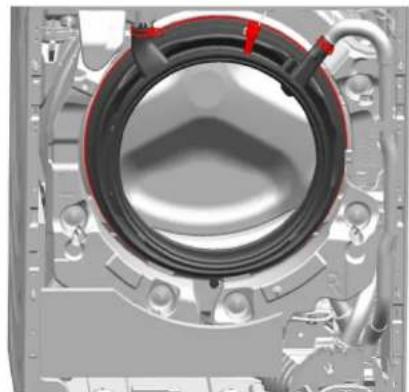
- Disassemble the door lock.

Repair
- Remove the pump cover.
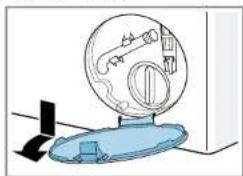
- Lower the appliance.

Repair
- Remove the screws (1).
- Slide the worktop to the back of the appliance (2).
- Move the worktop upward (3) to remove it.
- Remove the screws (1).
- Loosen the locking elements (2, 3).
- Remove the instrument panel.
7.


CAUTION
- Remove the front panel.
- Lower the appliance.

Repairs

Repairs

NOTE
- Remove the pump cover.
- Lower the appliance.

Repairs
3.1.2 Install the cap
3.3.2 Install the detergent drawer
- Lower the appliance.

Repair

Repair
- Remove the screws (1).
- Release the snap-in elements of the front panel (2, 3).
- Loosen the screws of the dispenser housing.

WARNING!
- Remove the pump cover.
3.10.2 Installing the pump cover
- Lower the appliance.

Repair
- Remove the screws (1).
- Release the snap-in elements (2, 3).
- Remove the facade panel.
7.


CAUTION
- Remove the front panel.
3.11.2 Install the front panel
3.6.2 Mounting the door components
- Lower the appliance.

Repair

Repair
- Lower the appliance.

Repair
- Disconnect the control unit plug connector.
- Remove the trim panel.
3.2.2 Installing the trim panel
- Remove the door upwards.
3.5.2 Door installation

Repair
- Remove the trim panel.
- Remove the drum light holder at the top.

CAUTION!
Risk of surface damage!
- Remove the door lock.

Repair
- Pull out the appliance's drum light holder.
- Disconnect the electrical connections.
- Remove the drum light from the drum light holder.
- Remove the screws (1).
- Release the retaining elements (2, 3).
- Remove the trim panel.
7.


WARNING
- Remove the detergent drawer handle.
- Remove the door in an upward direction.
- Lower the appliance.
Repair
- Remove the worktop (2, 3).

Repair
- Remove the plinth panel.
- Remove the drum light holder at the top.

CAUTION
- Remove the door seal.
- Remove the door lock.

Repair
- Pull the drum light holder out of the appliance.
- Disconnect the electrical connectors.
- Remove the drum light from the drum light holder.
- Lower the appliance.

Repair
- Remove the screws (1).
- Push the worktop towards the rear of the appliance (2).
- Move the worktop upwards (3) to remove it.
- Remove the screws (1).
- Release the retaining elements (2, 3).
3.1.2 Mount the top cover
▶ Mount in reverse order.

Repair
3.2 Replace the control panel
Requirement:
- Lower the appliance.
Repair
Repair
CAUTION
3.10.2 Mount the pump cover
▶ Mount in reverse order.

Repair
3.11 Replacing the front panel

Requirement:
- Lower the appliance.

Repair
- Disconnect the power cord from the control unit.
- Remove the control panel.
3.2.2 Installing the control panel
3.6.2 Installing the door components
- Lower the machine.

Repair

Repair

Note!
- Remove the front panel.
- Remove all hose connections.
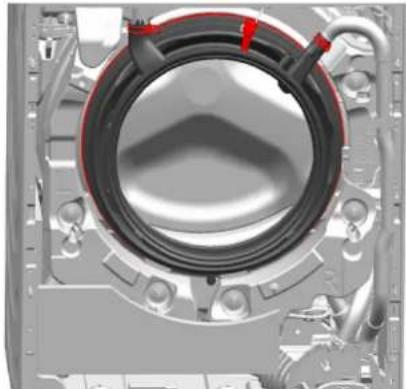
- Remove the door lock.

Repair
- Remove the pump housing.
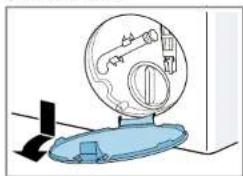
3.10.2 Mounting the pump housing
- Lower the machine.

Repair
- Remove the control panel.
7.


CAUTION!
- Remove the front panel.
3.11.2 Mounting the front panel
- Lower the device.

Repair

Repair

WARNING
- Lower the device.

Repair
- Remove the front panel.