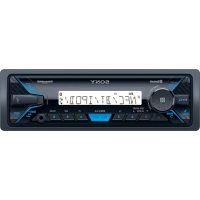
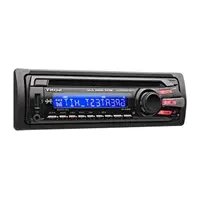
USER MANUAL DSXM55BT SONY
Operating Instructions
GB
User Manual
FR
The model and serial numbers are located on the bottom of the unit. Record the serial number in the space provided below.
Refer to these numbers whenever you call upon your Sony dealer regarding this product.
Model No. DSX-M55BT Serial No. ____
To cancel the demonstration (DEMO) display, see page 21.
To switch the FM/AM tuning step, see page 9.
For the connection/installation, see page 33.
For safety, be sure to install this unit in the dashboard of the boat as the rear side of the unit becomes hot during use.
For details, see "Connection/Installation" (page 33).
The nameplate indicating operating voltage, etc., is located on the bottom of the chassis.
Warning
FOR THE CUSTOMERS IN THE USA. NOT APPLICABLE IN CANADA, INCLUDING IN THE PROVINCE OF QUEBEC.
FOR CUSTOMERS IN THE USA. NOT APPLICABLE IN CANADA, INCLUDING THE PROVINCE OF QUEBEC.
This equipment has been tested and found to comply with the limits for a Class B digital device, pursuant to Part 15 of the FCC Rules. These limits are designed to provide reasonable protection against harmful interference in a residential installation. This equipment generates, uses, and can radiate radio frequency energy and, if not installed and used in accordance with the instructions, may cause harmful interference to radio communications. However, there is no guarantee that interference will not occur in a particular installation. If this equipment does cause harmful interference to radio or television reception, which can be determined by turning the equipment off and on, the user is encouraged to try to correct the interference by one or more of the following measures:
— Reorient or relocate the receiving antenna. — Increase the separation between the equipment and receiver. — Connect the equipment into an outlet on a circuit different from that to which the receiver is connected. — Consult the dealer or an experienced radio/TV technician for help.
You are cautioned that any changes or modifications not expressly approved in this manual could void your authority to operate this equipment.
This device complies with Part 15 of the FCC Rules and Industry Canada's licence-exempt RSSs. Operation is subject to the following two conditions:
(1) This device may not cause interference; and (2) This device must accept any interference, including interference that may cause undesired operation of the device.
This transmitter must not be co-located or operated in conjunction with any other antenna or transmitter.
Under Industry Canada regulations, this radio transmitter may only operate using an antenna of a type and maximum (or lesser) gain approved for the transmitter by Industry Canada. To reduce potential radio interference to other users, the antenna type and its gain should be so chosen that the equivalent isotropically radiated power (e.i.r.p.) is not more than that necessary for successful communication.
This equipment complies with FCC/IC radiation exposure limits set forth for an uncontrolled environment and meets the FCC radio frequency (RF) Exposure Guidelines and RSS-102 of the IC radio frequency (RF) Exposure rules. This equipment has very low levels of RF energy that is deemed to comply without maximum permissive exposure evaluation (MPE).
For the State of California, USA only
Perchlorate Material – special handling may apply, See
www.dtsc.ca.gov/hazardouswaste/perchlorate
Made in Thailand

Hereby, Sony Corporation declares that this equipment is in compliance with Directive 2014/53/EU.
The full text of the EU declaration of conformity is available at the following internet address:
http://www.compliance.sony.de/
This product has been manufactured by or on behalf of Sony Corporation.
EU Importer: Sony Europe B.V.
Inquiries to the EU Importer or related to product compliance in Europe should be sent to the manufacturer's authorized representative, Sony Belgium, bijkantoor van Sony Europe B.V., Da Vincilaan 7-D1, 1930 Zaventem, Belgium.
Disposal of waste batteries and electrical and electronic equipment (applicable in the European Union and other European countries with separate collection systems)
This symbol on the product, the battery or on the packaging indicates that the product and the battery shall not be treated as household waste. On certain batteries this symbol might be used in combination with a chemical symbol. The chemical symbols for mercury (Hg) or lead (Pb) are added if the battery contains more than 0.0005% mercury or 0.004% lead.
By ensuring these products and batteries are disposed of correctly, you will help prevent potentially negative consequences for the environment and human health which could otherwise be caused by inappropriate waste handling. The recycling of the materials will help to conserve natural resources.
In case of products that for safety, performance or data integrity reasons require a permanent connection with an incorporated battery, this battery should be replaced by qualified service staff only.
To ensure that the battery and the electrical and electronic equipment will be treated properly, hand over these products at end-of-life to the applicable collection point for the recycling of electrical and electronic equipment. For all other batteries, please view the section on how to remove the battery from the product safely. Hand the battery over to the applicable collection point for the recycling of waste batteries.
For more detailed information about recycling of this product or battery, please contact your local Civic Office, your household waste disposal service or the shop where you purchased the product or battery.

WARNING: Do not ingest battery, Chemical Burn Hazard.
The remote commander contains a coin/ button cell battery. If the coin/button cell battery is swallowed, it can cause severe internal burns in just 2 hours and can lead to death.
Keep new and used batteries away from children. If the battery compartment does not close securely, stop using the product and keep it away from children.
If you think batteries might have been swallowed or placed inside any part of the body, seek immediate medical attention.
Note on the lithium battery
Do not expose the battery to excessive heat such as direct sunlight, fire or the like.
CAUTION
The following frequency 1,606.5 - 1,710 kHz range is not allocated to sound broadcasting in the European Common Allocations table and cannot be used in Europe.
Warning if your boat's ignition has no ACC position
Be sure to set the AUTO OFF function (page 21). The unit will shut off completely and automatically in the set time after the unit is turned off, which prevents battery drain. If you do not set the AUTO OFF function, press and hold OFF until the display disappears each time you turn the ignition off.
Disclaimer regarding services offered by third parties
Services offered by third parties may be changed, suspended, or terminated without prior notice. Sony does not bear any responsibility in these sorts of situations.
Important notice
Caution
IN NO EVENT SHALL SONY BE LIABLE FOR ANY INCIDENTAL, INDIRECT OR CONSEQUENTIAL DAMAGES OR OTHER DAMAGES INCLUDING, WITHOUT LIMITATION, LOSS OF PROFITS, LOSS OF
REVENUE, LOSS OF DATA, LOSS OF USE OF THE PRODUCT OR ANY ASSOCIATED EQUIPMENT, DOWNTIME, AND PURCHASER'S TIME RELATED TO OR ARISING OUT OF THE USE OF THIS PRODUCT, ITS HARDWARE AND/OR ITS SOFTWARE.
Dear customer, this product includes a radio transmitter.
According to UNECE Regulation no. 10, vessel manufacturers may impose specific conditions for installation of radio transmitters into boats.
Please check your boat's operation manual or contact the manufacturer or your boat dealer, before you install this product.
Emergency calls
This BLUETOOTH boat handsfree and the electronic device connected to the handsfree operate using radio signals, cellular, and landline networks as well as user-programmed function, which cannot guarantee connection under all conditions. Therefore do not rely solely upon any electronic device for essential communications (such as medical emergencies).
On BLUETOOTH communication
- Microwaves emitting from a BLUETOOTH device may affect the operation of electronic medical devices. Turn off this unit and other BLUETOOTH devices in the following locations, as it may cause an accident.
- where inflammable gas is present, in a hospital, train, airplane, or petrol station
- near automatic doors or a fire alarm
- This unit supports security capabilities that comply with the BLUETOOTH standard to provide a secure connection when the BLUETOOTH wireless technology is used, but security may not be enough depending on the setting. Be careful when communicating using BLUETOOTH wireless technology.
- We do not take any responsibility for the leakage of information during BLUETOOTH communication.
If you have any questions or problems concerning your unit that are not covered in this manual, consult your nearest Sony dealer.
Table of Contents
Warning.... 2
Guide to Parts and Controls 6
Getting Started
Detaching the Front Panel....8
Switching the FM/AM Tuning Step. 9
Setting the Clock 9
Preparing a BLUETOOTH Device 9
Connecting a USB Device 11
Connecting Other Portable Audio Device ..... 12
Listening to the Radio
Listening to the Radio 12
Using Radio Data System (RDS) ..... 13
Listening to the SiriusXM Radio (US/Canada only)....13
Playback
Playing a USB Device 15
Playing a BLUETOOTH Device....15
Searching and Playing Tracks 16
Listening to Pandora®
Setting up Pandora® ..... 17
Streaming Pandora® 17
Available Operations in Pandora® .....17
Handsfree Calling (via BLUETOOTH only)
Receiving a Call 18
Making a Call 18
Available Operations during Call 19
Useful Functions
Using Siri Eyes Free 20
Settings
Canceling the DEMO Mode.... 21
Basic Setting Operation 21
General Setup (GENERAL) 21
Sound Setup (SOUND)....22
Display Setup (DISPLAY) 22
BLUETOOTH Setup (BT) 22
Precautions 23
Maintenance 24
Specifications....25
Troubleshooting 27
Connection/Installation
Cautions 33
Parts List for Installation 33
Connection....34
Installation 36
Guide to Parts and Controls
Main unit
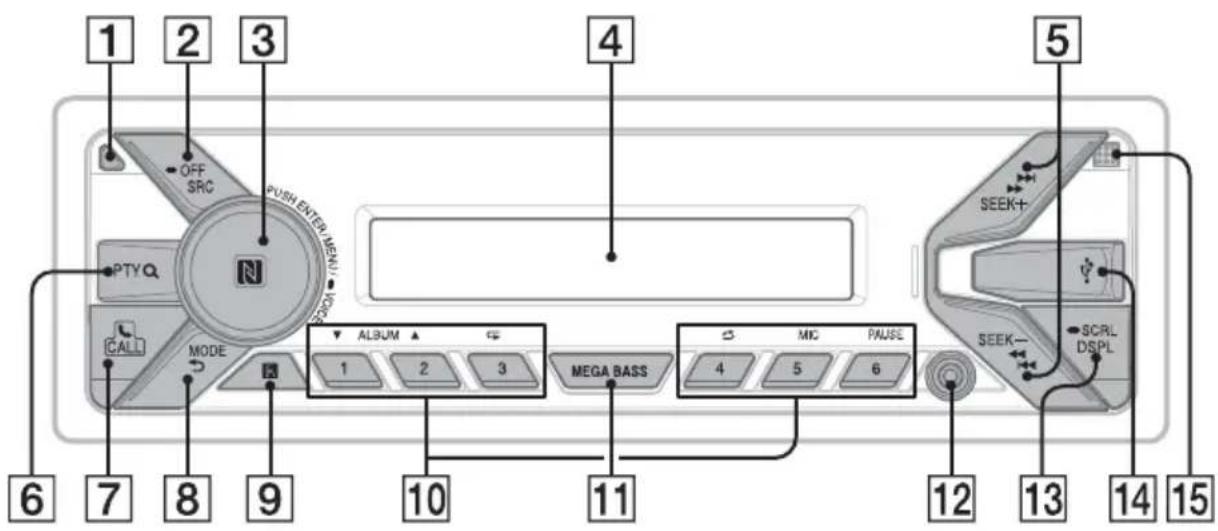
1 Front panel release button 2 SRC (source)
Turn on the power.
Change the source.
OFF
Press and hold for 1 second to turn the source off and display the clock.
Press and hold for more than 2 seconds to turn off the power and the display.
If the unit is turned off and the display disappears, operation by the remote commander is not available.
3 Control dial
Rotate to adjust the volume.
PUSH ENTER
Enter the selected item.
Open the setup menu.
- VOICE (page 19, 20)
Press and hold for more than 2 seconds to activate voice dial or the Siri function (iPhone only).
N-Mark
Touch the control dial with Android™ smartphone to make Bluetooth® connection.
* Not available when the BT phone is selected.
4 Display window 5 SEEK +/-
Tune in radio stations automatically. Press and hold to tune manually.


6 PTY (program type)
Select PTY in RDS.
Q (browse) (page 14, 16, 17)
Enter the browse mode during playback.
7 CALL
Enter the call menu. Receive/end a call. Press and hold for more than 2 seconds to switch the BLUETOOTH signal.
8 MODE (page 12, 14, 15, 17, 19)
( back )
Return to the previous display.
9 Receptor for the remote commander
Receive stored radio stations. Press and hold to store stations.
Call a stored phone number. Press and hold to store a phone number.
ALBUM ▼/▲
Skip an album for audio device. Press and hold to skip albums continuously.
Press ▲ to thumbs up, or ▼ to thumbs down in Pandora® (page 17).
⊂ (repeat)
(shuffle)
MIC (page 19)
PAUSE
11 MEGA BASS
Reinforces bass sound in synchronization with the volume level. Press to change the MEGA BASS setting: [1], [2], [OFF].
13 DSPL (display)
Press to change display items.
- SCRL (scroll)
Press and hold to scroll a display item.
14 USB port
15 Microphone (inner panel)
In order for the handsfree function to work properly, do not cover the microphone with tape, etc.
RM-X232 Remote commander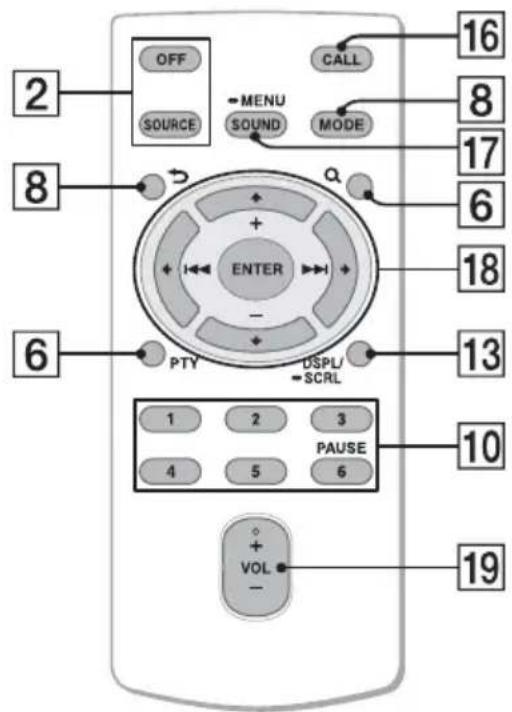
The VOL (volume) + button has a tactile dot.
16 CALL
Enter the call menu. Receive/end a call.
17 SOUND*
Open the SOUND menu directly.
MENU*
Press and hold to open the setup menu.
* Not available when the BT phone is selected.
18 ← /↑/↓/→
Select a setup item, etc.
ENTER
Enter the selected item.
I◄◄/►►I (prev/next)
+/- (album +/-)
19 VOL (volume) +/-
Remove the insulation film before use.
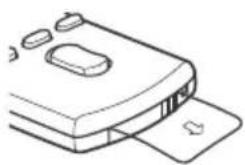
RM-X11M Marine remote commander (not supplied)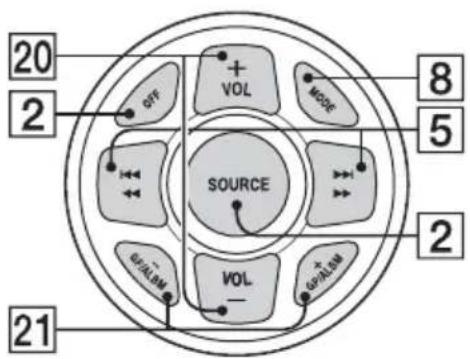
20 VOL (volume) +/- 21 GP (group)/ALBM (album) +/- Receive stored stations.
Getting Started
Detaching the Front Panel
You can detach the front panel of this unit to prevent theft.
1 Press and hold OFF ① until the unit turns off, press the front panel release button ②, then pull the panel towards you to remove.
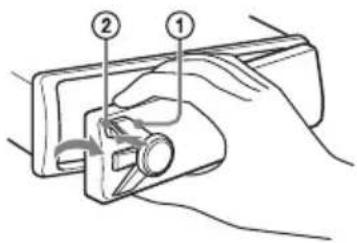
Caution alarm
If you turn the ignition switch to the OFF position without detaching the front panel, the caution alarm will sound for a few seconds. The alarm will only sound if the built-in amplifier is used.
Serial numbers
Make sure the serial numbers on the bottom of the unit and the back of the front panel are matched correctly. Otherwise you cannot make BLUETOOTH pairing, connection and disconnection by NFC.
Attaching the front panel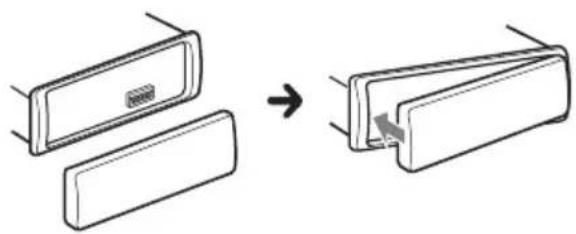
Switching the FM/AM Tuning Step
Set the FM/AM tuning step of your country. This setting appears only while the source is off and the clock is displayed.
1 Press MENU, rotate the control dial to select [SET GENERAL], then press it. 2 Rotate the control dial to select [SET TUNER-STP], then press it. 3 Rotate the control dial to select from [SET 50K/9K], [SET 100K/10K] or [SET 200K/10K], then press it.
Setting the Clock
1 Press MENU, rotate the control dial to select [SET GENERAL], then press it. 2 Rotate the control dial to select [SET CLOCK-ADJ], then press it.
The hour indication flashes. 3 Rotate the control dial to set the hour and minute.
To move the digital indication, press SEEK +/- 4 After setting the minute, press MENU.
The setup is complete and the clock starts.
To display the clock
Press DSPL.
Preparing a BLUETOOTH Device
You can enjoy music, or perform handsfree calling depending on the BLUETOOTH compatible device such as a smartphone, cellular phone and audio device (hereafter "BLUETOOTH device" if not otherwise specified). For details on connecting, refer to the operating instructions supplied with the device.
Before connecting the device, turn down the volume of this unit; otherwise, loud sound may result.
Connecting with a Smartphone by One touch (NFC)
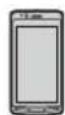
By touching the control dial on the unit with an NFC* compatible smartphone, the unit is paired and connected with the smartphone automatically.
* NFC (Near Field Communication) is a technology enabling short-range wireless communication between various devices, such as mobile phones and IC tags. Thanks to the NFC function, data communication can be achieved easily just by touching the relevant symbol or designated location on NFC compatible devices.
For a smartphone with Android OS 4.0 or lower installed, downloading the app "NFC Easy Connect" available at Google Play™ is required. The app may not be downloadable in some countries/regions.
1 Activate the NFC function on the smartphone.
For details, refer to the operating instructions supplied with the smartphone.
2 Touch the N-Mark part of the unit with the N-Mark part of the smartphone.
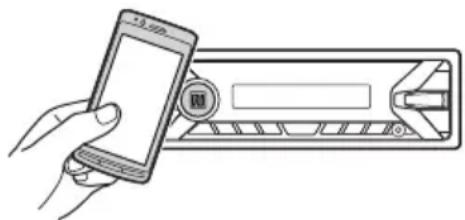
Make sure that lights up on the display of the unit.
To disconnect by One touch
Touch the N-Mark part of the unit with the N-Mark part of the smartphone again.
Notes
- When making the connection, handle the smartphone carefully to prevent scratches.
- One touch connection is not possible when the unit is already connected to another NFC compatible device. In this case, disconnect the other device, and make connection with the smartphone again.
Pairing and connecting with a BLUETOOTH device
When connecting a BLUETOOTH device for the first time, mutual registration (called "pairing") is required. Pairing enables this unit and other devices to recognize each other.
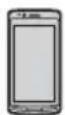

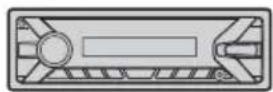
1 Place the BLUETOOTH device within 1 m (3 ft) of this unit. 2 Press CALL, rotate the control dial to select [SET PAIRING], then press it.
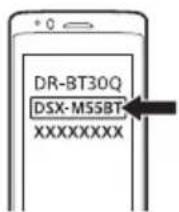
☒ flashes while the unit is in pairing standby mode. 3 Perform pairing on the BLUETOOTH device so it detects this unit. 4 Select [DSX-M55BT] shown in the display of the BLUETOOTH device.
If your model name does not appear, repeat from step 2.
5 If passkey* input is required on the BLUETOOTH device, input [0000].
* Passkey may be called "Passcode," "PIN code," "PIN number" or "Password," etc., depending on the device.
![Input passkey [0000]](/content/2026/03/477147/images/8b5fcd0c1d68ca38c670101f083f2990cf5f15445258d4a7fc80baaeb5bff7de.jpg)
When pairing is made, stays lit.
6 Select this unit on the BLUETOOTH device to establish the BLUETOOTH connection.
or lights up when the connection is made.
Note
While connecting to a BLUETOOTH device, this unit cannot be detected from another device. To enable detection, enter the pairing mode and search for this unit from another device.
To start playback
For details, see "Playing a BLUETOOTH Device" (page 15).
To cancel pairing
Perform step 2 to cancel the pairing mode after this unit and the BLUETOOTH device are paired.
Connecting with a paired BLUETOOTH device
To use a paired device, connection with this unit is required. Some paired devices will connect automatically.
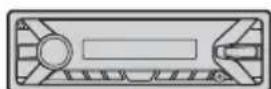
1 Press CALL, rotate the control dial to select [SET BT SIGNL], then press it. Make sure that lights up. 2 Activate the BLUETOOTH function on the BLUETOOTH device.
3 Operate the BLUETOOTH device to connect to this unit.
or lights up.
Icons in the display:
| Lights up when handsfree calling is available by enabling the HFP (Handsfree Profile). |
| Lights up when the audio device is playable by enabling the A2DP (Advanced Audio Distribution Profile). |
To connect the last-connected device from this unit
Activate the BLUETOOTH function on the BLUETOOTH device.
Press SRC to select [BT PHONE] or [BT AUDIO]. Press ENTER to connect with the cellular phone, or PAUSE to connect with the audio device.
Note
While streaming BLUETOOTH audio, you cannot connect from this unit to the cellular phone. Connect from the cellular phone to this unit instead.
Tip
With BLUETOOTH signal on: when the ignition is turned on, this unit reconnects automatically to the last-connected cellular phone.
Connecting with an iPhone/iPod (BLUETOOTH Auto Pairing)
When an iPhone/iPod with iOS5 or later installed is connected to the USB port, the unit is paired and connected with the iPhone/iPod automatically. To enable BLUETOOTH Auto Pairing, make sure [AUTOPAIR] in [BT] is set to [ON] (page 23).
1 Activate the BLUETOOTH function on the iPhone/iPod.
2 Connect an iPhone/iPod to the USB port.
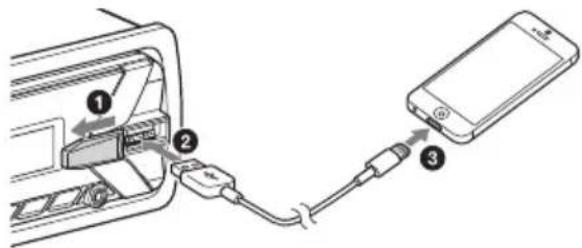
Make sure that lights up on the display of the unit.
Notes
- BLUETOOTH Auto Pairing is not possible if the unit is already connected to another BLUETOOTH device. In this case, disconnect the other device, then connect the iPhone/iPod again.
- If BLUETOOTH Auto Pairing is not established, see "Preparing a BLUETOOTH Device" for details (page 9).
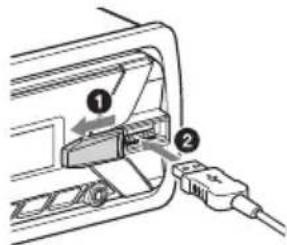
Connecting a USB Device
1 Turn down the volume on the unit. 2 Connect the USB device to the unit.
To connect an iPod/iPhone, use the USB connection cable for iPod (not supplied).
Connecting Other Portable Audio Device
1 Turn off the portable audio device. 2 Turn down the volume on the unit. 3 Connect the portable audio device to the AUX input jack (stereo mini jack) on the unit with a connecting cord (not supplied)*.
* Be sure to use a straight type plug.
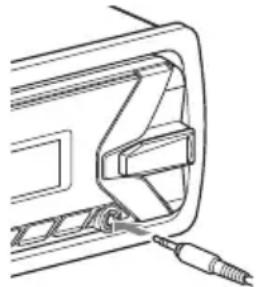
Press SRC to select [AUX].
To match the volume level of the connected device to other sources
Start playback of the portable audio device at a moderate volume, and set your usual listening volume on the unit.
Press MENU, then select [SET SOUND] → [SET AUX VOL] (page 22).
Listening to the Radio
Listening to the Radio
Tuning step setting is required (page 9).
To listen to the radio, press SRC to select [TUNER].
Storing automatically (BTM)
1 Press MODE to change the band (FM1, FM2, FM3, AM1 or AM2). 2 Press MENU, rotate the control dial to select [SET GENERAL], then press it. 3 Rotate the control dial to select [SET BTM], then press it.
The unit stores stations in order of frequency on the number buttons.
Tuning
1 Press MODE to change the band (FM1, FM2, FM3, AM1 or AM2). 2 Perform tuning.
To tune manually
Press and hold SEEK +/- to locate the approximate frequency, then press SEEK +/- repeatedly to fine adjust to the desired frequency.
To tune automatically
Press SEEK +/-.
Scanning stops when the unit receives a station.
Storing manually
1 While receiving the station that you want to store, press and hold a number button (1 to 6) until [MEM] appears.
Receiving the stored stations
1 Select the band, then press a number button (1 to 6).
Using Radio Data System (RDS)
Selecting program types (PTY)
1 Press PTY during FM reception. 2 Rotate the control dial until the desired program type appears, then press it. The unit starts to search for a station broadcasting the selected program type.
Type of programs (tuner step: 200 kHz/10 kHz)
NEWS (News), INFORM (Information), SPORTS (Sports), TALK (Talk), ROCK (Rock), CLS ROCK (Classic Rock), ADLT HIT (Adult Hits), SOFT RCK (Soft Rock), TOP 40 (Top 40), COUNTRY (Country), OLDIES (Oldies), SOFT (Soft), NOSTALGA (Nostalgia), JAZZ (Jazz), CLASSICL (Classical), R & B (Rhythm and Blues), SOFT R&B (Soft Rhythm and Blues), LANGUAGE (Foreign Language), REL MUSC (Religious Music), REL TALK (Religious Talk), PERSNLTY (Personality), PUBLIC (Public), COLLEGE (College), HABL ESP (Spanish Talk), MUSC ESP (Spanish Music), HIP HOP (Hip-Hop), WEATHER (Weather)
Type of programs (tuner step: 100 kHz/10 kHz, 50 kHz/9 kHz)
NEWS (News), AFFAIRS (Current Affairs), INFO (Information), SPORT (Sports), EDUCATE (Education), DRAMA (Drama), CULTURE (Culture), SCIENCE (Science), VARIED (Varied), POP M (Pop Music), ROCK M (Rock Music), EASY M (M.O.R. Music), LIGHT M (Light classical), CLASSICS (Serious classical), OTHER M (Other Music), WEATHER (Weather), FINANCE (Finance), CHILDREN (Children's program), SOCIAL A (Social Affairs), RELIGION (Religion), PHONE IN (Phone In), TRAVEL (Travel), LEISURE (Leisure), JAZZ (Jazz Music), COUNTRY (Country Music), NATION M (National Music), OLDIES (Oldies Music), FOLK M (Folk Music), DOCUMENT (Documentary)
Setting clock time (CT)
The CT data from the RDS transmission sets the clock.
1. Set [SET CT-ON] in [SET GENERAL] (page 21).
Listening to the SiriusXM Radio (US/Canada only)
Activating your SiriusXM Subscription
Only SiriusXM brings you more of what you love to listen to, all in one place. Get over 140 channels, including commercial-free music plus the best sports, news, talk, comedy and entertainment. Welcome to the world of satellite radio. A SiriusXM Connect Vehicle Tuner and Subscription are required. For more information, visit www.siriusxm.com
After installing your SiriusXM Connect Vehicle Tuner and antenna, press SRC to select [SIRIUSXM]. You should be able to hear the SiriusXM preview channel on Channel 1. After verifying that you can hear the preview channel, select Channel 0 to find
the Radio ID of your tuner. In addition, the Radio ID is located on the bottom of the SiriusXM Connect Vehicle Tuner and its packaging. You will need this number to activate your subscription. Write the number down for reference.
In the USA, you can activate online or by calling SiriusXM Listener Care:
• Online: Visit www.siriusxm.com/activatenow • Phone: Call 1-866-635-2349
In Canada, you can activate online or by calling SiriusXM Listener Care:
• Online: Visit www.siriusxm.ca/activatexm • Phone: Call 1-877-438-9677
As part of the activation process, the SiriusXM satellites will send an activation message to your tuner. When your radio detects that the tuner has received the activation message, your radio will display: [SUBSCRIPTION UPDATED - ENTER TO CONTINUE]. Once subscribed, you can tune to channels in your subscription plan.
Notes
- The activation process usually takes 10 to 15 minutes, but may take up to an hour.
- Your radio will need to be turned on and receiving the SiriusXM signal to receive the activation message.
Selecting channels for SiriusXM
1 Press Q (browse). 2 Rotate the control dial to select [CHANNEL], then press it. 3 Rotate the control dial to select the desired channel, then press it.
To select channels from categories
1 Press Q (browse). 2 Rotate the control dial to select [CATEGORY], then press it. 3 Rotate the control dial to select the desired category, then press it.
To store channels
1 While receiving the channel that you want to store, press and hold a number button (1 to 6) until [MEM] appears.
To receive the stored channel, press MODE to select [SX1], [SX2] or [SX3], then press a number button (1 to 6).
To set a parental control
The parental control feature allows you to limit access to SiriusXM channels with mature content. When enabled, the parental control feature requires you to enter a passcode to tune to the locked channels. Information on setting up the passcode and locking channels can be found below.
1 Press MENU and rotate the control dial. 2 Select [SET GENERAL] → [SET PARENTAL] → [SET LOCK SEL] → [SET LOCK-ON]. 3 Enter the passcode by rotating the control dial on the unit or pressing ↑/↓ on the remote commander.
To move the entry position, press SEEK +/- on the unit or ←/→ on the remote commander. The initial passcode is [0000].
4 After entering the passcode, press ENTER.
To unlock the channels, select [SET LOCK-OFF].
To change the passcode
1 Press MENU and rotate the control dial. 2 Select [SET GENERAL] → [SET PARENTAL] → [SET CODEEDIT]. 3 Enter the current passcode on the current passcode input display, then press ENTER.
The initial passcode is [0000]. 4 Enter your new 4-digit passcode on the new passcode input display, then press ENTER.
To change display items
Press DSPL to change as follows:
Channel Number (Default) → Channel Name → Artist Name → Song Title → Content Info → Category Name → Clock
Playback
Playing a USB Device
In these Operating Instructions, "iPod" is used as a general reference for the iPod functions on an iPod and iPhone, unless otherwise specified by the text or illustrations.
For details on the compatibility of your iPod, see "About iPod" (page 24) or visit the support site on the back cover.
MSC (Mass Storage Class) and MTP (Media Transfer Protocol) type USB devices (such as a USB flash drive, digital media player, Android smartphone) compliant with the USB standard can be used. Depending on the digital media player or Android smartphone, setting the USB connection mode to MTP is required.
Notes
- For details on the compatibility of your USB device, visit the support site on the back cover.
- Playback of the following files is not supported. MP3/WMA/FLAC:
— copyright-protected files — DRM (Digital Rights Management) files - Multi-channel audio files MP3/WMA:
— lossless compression files
1 Connect a USB device to the USB port (page 11).
Playback starts.
If a device is already connected, to start playback, press SRC to select [USB] ([IPD] appears in the display when the iPod is recognized).
2 Adjust the volume on this unit.
To stop playback
Press and hold OFF for 1 second.
To remove the device
Stop playback, then remove the device.
Caution for iPhone
When you connect an iPhone via USB, phone call volume is controlled by the iPhone, not the unit. Do not inadvertently increase the volume on the unit during a call, as a sudden loud sound may result when the call ends.
Operating an iPod directly (Passenger control)
1 During playback, press and hold MODE until [MODE IPOD] appears.
Operations of the iPod become available. Note that the volume can be adjusted only by the unit.
To exit passenger control
Press and hold MODE until [MODE AUDIO] appears.
Playing a BLUETOOTH Device
You can play contents on a connected device that supports BLUETOOTH A2DP (Advanced Audio Distribution Profile).
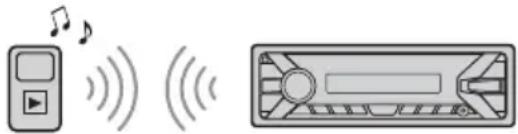
1 Make BLUETOOTH connection with the audio device (page 10). 2 Press SRC to select [BT AUDIO]. 3 Operate the audio device to start playback. 4 Adjust the volume on this unit.
Notes
- Depending on the audio device, information such as title, track number/time and playback status may not be displayed on this unit.
- Even if the source is changed on this unit, playback of the audio device does not stop.
To match the volume level of the BLUETOOTH device to other sources
Start playback of the BLUETOOTH audio device at a moderate volume, and set your usual listening volume on the unit.
Press MENU, then select [SET SOUND] → [SET BTA VOL] (page 22).
Searching and Playing Tracks
Repeat play and shuffle play
1 During playback, press (repeat) or (shuffle) repeatedly to select the desired play mode.
Playback in the selected play mode may take time to start.
Available play modes differ depending on the selected sound source.
Searching a track by name (Quick-BrowZer™)
1 During USB playback, press Q (browse)* to display the list of search categories. When the track list appears, press (back) repeatedly to display the desired search category. * During USB playback, press (browse) for more than 2 seconds to directly return to the beginning of the category list. 2 Rotate the control dial to select the desired search category, then press it to confirm. 3 Repeat step 2 to search the desired track.
Playback starts.
To exit the Quick-BrowZer mode
Press Q (browse).
Searching by skipping items (Jump mode)
1 Press Q (browse). 2 Press SEEK +. 3 Rotate the control dial to select the item. The list is jumped in steps of 10% of the total number of items. 4 Press ENTER to return to the Quick-BrowZer mode.
The selected item appears.
5 Rotate the control dial to select the desired item, then press it.
Playback starts.
Listening to Pandora®
Pandora® is available to stream music through your iPhone and Android smartphone. You can control Pandora® on a USB-connected iPhone or BLUETOOTH-connected Android smartphone from this unit.
Pandora® is only available in certain countries.
Please visit
http://www.pandora.com/legal
for more information.
Setting up Pandora®
1 Check the compatibility of your mobile device by visiting the support site on the back cover. 2 Download the latest version of the Pandora® application from your smartphone's app store. A list of compatible devices can be found at www.pandora.com/everywhere/mobile
Streaming Pandora®
1 Connect this unit with the mobile device. - iPhone via USB (page 11) - Android smartphone via BLUETOOTH function (page 10) 2 Press SRC to select [PANDORA USB] or [BT PANDORA]. 3 Launch Pandora® application on your mobile device. 4 Press PAUSE to start playback.
If the device number appears
Make sure that the same numbers are displayed (e.g., 123456) in this unit and the mobile device, then press ENTER on this unit and select [Yes] on the mobile device.
When activating the BLUETOOTH function
You can adjust the volume level.
Press MENU, then select [SET SOUND] → [SET BTA VOL] (page 22).
Available Operations in Pandora®
"Thumbs" feedback
"Thumbs Up" or "Thumbs Down" feedback allows you to personalize stations.
1 During playback, press ▲ (Thumbs Up) or ▼ (Thumbs Down).
Using the station list
The station list allows you to easily select a desired station.
1 During playback, press (browse). 2 Press SEEK + to select the sorting order [BY DATE] or [A TO Z]. 3 Rotate the control dial to select the desired station, then press it.
Playback starts.
Bookmarking
The track currently being played can be bookmarked and stored in your Pandora® account.
1 During playback, press MODE.
Handsfree Calling (via BLUETOOTH only)
To use a cellular phone, connect it with this unit. For details, see "Preparing a BLUETOOTH Device" (page 9).

Receiving a Call
1 Press CALL when a call is received with a ringtone.
The phone call starts.
Note
The ringtone and talker's voice are output only from the front speakers.
To reject the call
Press and hold OFF for 1 second.
To end the call
Press CALL again.
Making a Call
You can make a call from the phonebook or call history when a cellular phone supporting PBAP (Phone Book Access Profile) is connected.
From the phonebook
1 Press CALL, rotate the control dial to select [PHONE BOOK], then press it. 2 Rotate the control dial to select an initial from the initial list, then press it. 3 Rotate the control dial to select a name from the name list, then press it.
4 Rotate the control dial to select a number from the number list, then press it.
The phone call starts.
From the call history
1 Press CALL, rotate the control dial to select [RECENT CALL], then press it. A list of the call history appears.
2 Rotate the control dial to select a name or phone number from the call history, then press it.
The phone call starts.
1 Press CALL, rotate the control dial to select [DIAL NUMBER], then press it. 2 Rotate the control dial to enter the phone number, and lastly select [ ] (space), then press ENTER*. The phone call starts. * To move the digital indication, press SEEK +/-.
Note
[_] appears instead of [#] on the display.
By redial
1 Press CALL, rotate the control dial to select [REDIAL], then press it.
The phone call starts.
By preset number
1 Press SRC to select [BT PHONE]. 2 Press a number button (1 to 6) to select the contact you want to call.
3 Press ENTER.
The phone call starts.
Presetting phone numbers
You can store up to 6 contacts in the preset dial.
1 Select a phone number that you want to store in the preset dial, from the phonebook, call history or by inputting the phone number directly. The phone number appears in the display of this unit.
2 Press and hold a number button (1 to 6) until [MEM] appears. The contact is stored in the selected preset number.
You can make a call by saying the voice tag stored in a connected cellular phone that has a voice dialing function.
1 Press CALL, rotate the control dial to select [VOICE DIAL], then press it.
Alternatively, press and hold VOICE for more than 2 seconds.
2 Say the voice tag stored on the cellular phone.
Your voice is recognized, and the call is made.
To cancel voice dialing
Press VOICE.
Available Operations during Call
To adjust the ringtone volume
Rotate the control dial while receiving a call.
To adjust the talker's voice volume
Rotate the control dial during a call.
To adjust the volume for the other party (Mic gain adjustment)
Press MIC.
Adjustable volume levels: [MIC-LOW], [MIC-MID], [MIC-HI].
To reduce echo and noise (Echo Canceler/Noise Canceler Mode)
Press and hold MIC.
Settable mode: [EC/NC-1], [EC/NC-2].
To switch between handsfree mode and handheld mode
During a call, press MODE to switch the phone call audio between the unit and cellular phone.
Note
Depending on the cellular phone, this operation may not be available.
Useful Functions
Using Siri Eyes Free
Siri Eyes Free allows you to use an iPhone handsfree by simply speaking into the microphone. This function requires you to connect an iPhone to the unit via BLUETOOTH. Availability is limited iPhone 4s or later. Make sure that your iPhone is running the latest iOS version.
You must complete BLUETOOTH registration and connection configurations for the iPhone with the unit in advance. For details, see "Preparing a BLUETOOTH Device" (page 9).
1 Activate the Siri function on the iPhone.
For details, refer to the operating instructions supplied with the iPhone.
2 Press and hold VOICE for more than 2 seconds.
The voice command display appears.
3 After the iPhone beeps, speak into the microphone.
The iPhone beeps again, then Siri starts responding.
To deactivate Siri Eyes Free
Press VOICE.
Notes
- The iPhone may not recognize your voice depending on usage conditions. (For example, if you are in a moving boat.)
- Siri Eyes Free may not function properly, or the response time may lag in locations where iPhone signals are difficult to receive.
- Depending on the iPhone's operating condition, Siri Eyes Free may not function properly, or may quit.
- If you play a track with an iPhone using the BLUETOOTH audio connection, when the track starts playback via BLUETOOTH, Siri Eyes Free automatically quits and the unit switches to the BLUETOOTH audio source.
- When Siri Eyes Free is activated during audio playback, the unit may switch to the BLUETOOTH audio source even if you do not specify a track to play.
- When connecting the iPhone to the USB port, Siri Eyes Free may not function properly, or may quit.
- When connecting the iPhone to the unit via USB, do not activate Siri with the iPhone. Siri Eyes Free may not function properly, or may quit.
- There is no audio sound while Siri Eyes Free is activated.
Settings
Canceling the DEMO Mode
You can cancel the demonstration display which appears when the source is off and the clock is displayed.
1 Press MENU, rotate the control dial to select [SET GENERAL], then press it. 2 Rotate the control dial to select [SET DEMO], then press it. 3 Rotate the control dial to select [SET DEMO-OFF], then press it.
The setting is complete. 4 Press (back) twice.
The display returns to normal reception/play mode.
Basic Setting Operation
You can set items in the following setup categories: General setup (GENERAL), Sound setup (SOUND), Display setup (DISPLAY), BLUETOOTH setup (BT) (Not available when the BT phone is selected.)
1 Press MENU. 2 Rotate the control dial to select the setup category, then press it.
The items that can be set differ depending on the source and settings.
3 Rotate the control dial to select the options, then press it.
To return to the previous display
Press ↩ (back).
General Setup (GENERAL)
DEMO (demonstration)
Activates the demonstration: [ON], [OFF].
CLOCK-ADJ (clock adjust) (page 9)
TUNER-STP (tuner step) (page 9)
(Available only while the source is off and the clock is displayed.)
CAUT ALM (caution alarm)
Activates the caution alarm: [ON], [OFF] (page 8).
(Available only while the source is off and the clock is displayed.)
BEEP
Activates the beep sound: [ON], [OFF].
AUTO OFF
Shuts off automatically after a desired time when the unit is turned off: [NO], [30S] (30 seconds), [30M] (30 minutes), [60M] (60 minutes).
CT (clock time)
Activates the CT function: [ON], [OFF].
BTM (best tuning memory) (page 12)
(Available only when the tuner is selected.)
PARENTAL
Sets the parental lock to [ON], [OFF], and edits the passcode (page 14).
(Available only when SiriusXM is selected.)
SXMRESET (SiriusXM reset)
Initializes the SiriusXM Connect Vehicle Tuner settings (preset channels/parental lock): [YES], [NO].
(Available only when SiriusXM is selected.)
Sound Setup (SOUND)
This setup menu is available when any source except for the BT phone is selected.
EQ5 PRESET
Selects an equalizer curve from 10 equalizer curves or off: [OFF], [R&B], [ROCK], [POP], [DANCE], [HIP-HOP], [ELECTRONICA], [JAZZ], [SOUL], [COUNTRY], [CUSTOM].
The equalizer curve setting can be memorized for each source.
EQ5 SETTING
Sets [CUSTOM] of EQ5.
BASE
Selects a preset equalizer curve as a basis for further customizing: [BAND1] (low frequency), [BAND2] (mid-low frequency), [BAND3] (mid frequency), [BAND4] (mid-high frequency), [BAND5] (high frequency).
The volume level is adjustable in 1 dB steps, from -10 dB to +10 dB.
BALANCE
Adjusts the sound balance: [RIGHT-15] - [CENTER] - [LEFT-15].
FADER
Adjusts the relative level: [FRONT-15] - [CENTER] - [REAR-15].
([ATT] is displayed at the lowest setting.)
Selects the subwoofer phase: [NORM], [REV].
LPF FREQ (low pass filter frequency)
Selects the subwoofer cut-off frequency: [80Hz], [100Hz], [120Hz].
AUX VOL (AUX volume level)
Adjusts the volume level for each connected auxiliary device: [+18 dB] - [0 dB] - [-8 dB].
This setting negates the need to adjust the volume level between sources.
BTA VOL (BLUETOOTH audio volume level)
Adjusts the volume level for each connected BLUETOOTH device: [+6 dB] - [0 dB] - [-6 dB]. This setting negates the need to adjust the volume level between sources.
Display Setup (DISPLAY)
DIMMER
Changes the display brightness: [ON], [OFF].
SND SYNC (sound synchronization)
Activates the synchronization of the illumination with the sound: [ON], [OFF].
Scrolls long items automatically: [ON], [OFF]. (Not available when the AUX or tuner is selected.)
BLUETOOTH Setup (BT)
PAIRING (page 10)
PHONE BOOK (page 18)
REDIAL (page 18)
RECENT CALL (page 18)
VOICE DIAL (page 19)
DIAL NUMBER (page 18)
RINGTONE
Selects whether this unit or the connected cellular phone outputs the ringtone: [1] (this unit), [2] (cellular phone).
AUTO ANS (auto answer)
Sets this unit to answer an incoming call automatically: [OFF], [1] (about 3 seconds), [2] (about 10 seconds).
AUTOPAIR (auto pairing)
Start BLUETOOTH pairing automatically when iOS device version 5.0 or later is connected via USB: [ON], [OFF].
BT SIGNL (BLUETOOTH signal) (page 10)
Activates/deactivates the BLUETOOTH function.
BT INIT (BLUETOOTH initialize)
Initializes all the BLUETOOTH related settings (pairing information, preset number, device information, etc.): [YES], [NO].
When disposing the unit, initialize all the settings.
(Available only while the source is off and the clock is displayed.)
Precautions
- Cool off the unit beforehand if your boat has been moored in direct sunlight.
- Do not leave the front panel or audio devices brought in inside the boat, or it may cause malfunction due to high temperature in direct sunlight. • Power antenna (aerial) extends automatically.
To maintain high sound quality
Do not splash liquid onto the unit.
Playback order of audio files![graph TD A["1"] --> B["1"] A --> C["2"] A --> D["3"] A --> E["4"] B --> F["Folder (album)"] C --> G["Audio file (track)"] D --> H["Folder (track)"] E --> I["Folder (track)"]](/content/2026/03/477147/images/7baa6f741d3a9f368a8819dd16129786a23079db8a20f5c32ebff7145728d50b.jpg)
About iPod
- You can connect to the following iPod models. Update your iPod devices to the latest software before use.
Compatible iPhone/iPod models
| Compatible Model USB | |
| iPhone 6 O | |
| iPhone 6 Plus O | |
| iPhone 5s O | |
| iPhone 5c O | |
| iPhone 5 O | |
| iPhone 4s O | |
| iPhone 4 O | |
| iPhone 3GS O | |
| iPod touch(5th generation) | O |
| iPod touch(4th generation) | O |
| iPod touch(3rd generation) | O |
| iPod classic O | |
| iPod nano(7th generation) | O |
| iPod nano(6th generation) | O |
| iPod nano(5th generation) | O |
- Use of the Made for Apple badge means that an accessory has been designed to connect specifically to the Apple product(s) identified in the badge, and has been certified by the developer to meet Apple performance standards. Apple is not responsible for the operation of this device or its compliance with safety and regulatory standards.
Please note that the use of this accessory with an Apple product may affect wireless performance.
If you have any questions or problems concerning your unit that are not covered in this manual, consult your nearest Sony dealer.
Maintenance
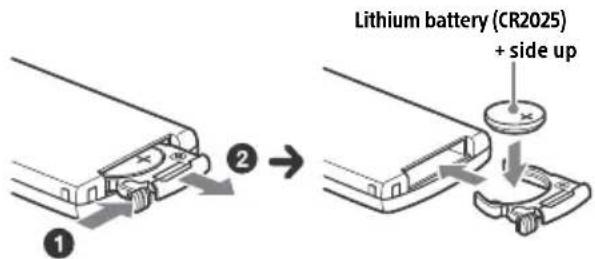
Replacing the lithium battery (CR2025) of the remote commander
When the battery becomes weak, the range of the remote commander becomes shorter.
CAUTION
Danger of explosion if battery is incorrectly replaced. Replace only with the same or equivalent type.
Note on the lithium battery
Keep the lithium battery out of the reach of children. Should the battery be swallowed, immediately consult a doctor.
Cleaning the connectors
The unit may not function properly if the connectors between the unit and the front panel are not clean. In order to prevent this, detach the front panel (page 8) and clean the connectors with a cotton swab. Do not apply too much force. Otherwise, the connectors may be damaged.
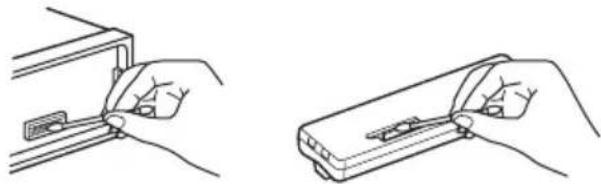
Notes
- For safety, turn off the ignition before cleaning the connectors, and remove the key from the ignition switch.
- Never touch the connectors directly with your fingers or with any metal device.
Specifications
FOR THE CUSTOMERS IN THE USA. NOT APPLICABLE IN CANADA, INCLUDING IN THE PROVINCE OF QUEBEC.
FOR CUSTOMERS IN THE USA. NOT APPLICABLE IN CANADA, INCLUDING THE PROVINCE OF QUEBEC.
AUDIO POWER SPECIFICATIONS

CTA2006 Standard
Power Output: 17 Watts RMS × 4 at 4
Ohms < 1% THD+N
SN Ratio: 80 dBA
(reference: 1 Watt into 4 Ohms)
Tuner section
FM
Tuning range:
87.5 - 108.0 MHz (at 50 kHz step)
87.5 - 108.0 MHz (at 100 kHz step)
87.5 - 107.9 MHz (at 200 kHz step)
FM tuning step:
50 kHz/100 kHz/200 kHz switchable
Antenna (aerial) terminal:
External antenna (aerial) connector
Intermediate frequency:
FM CCIR: -1,956.5 to -487.3 kHz and
+500.0 to +2,095.4 kHz
Usable sensitivity: 7 dBf
Selectivity: 75 dB at 400 kHz
Signal-to-noise ratio: 73 dB
Separation: 50 dB at 1 kHz
Frequency response: 20 - 15,000 Hz
AM
Tuning range:
531 - 1,602 kHz (at 9 kHz step)
530 - 1,710 kHz (at 10 kHz step)
AM tuning step:
9 kHz/10 kHz switchable
Antenna (aerial) terminal:
External antenna (aerial) connector
Sensitivity: 26 μV
USB Player section
Interface: USB (Full-speed)
Maximum current: 1 A
The maximum number of recognizable tracks:
— folders (albums): 256
— files (tracks) per folder: 256
Corresponding codec:
MP3 (.mp3)
Bit rate: 8 - 320 kbps (Supports VBR (Variable Bit Rate))
Sampling rate: 16 – 48 kHz
WMA (.wma)
Bit rate: 32 – 192 kbps (Supports VBR (Variable Bit Rate))
Sampling rate: 32 kHz, 44.1 kHz, 48 kHz
FLAC (.flac)
Bit depth: 16 bit, 24 bit
Sampling rate: 44.1 kHz, 48 kHz
Wireless Communication
Communication System:
BLUETOOTH Standard version 3.0
Output:
BLUETOOTH Standard Power Class 2 (Max. +4 dBm)
Maximum communication range*1:
Line of sight approx. 10 m (33 ft)
Frequency band:
2.4 GHz band (2.4000 - 2.4835 GHz)
Modulation method: FHSS
Compatible BLUETOOTH Profiles 2 :
A2DP (Advanced Audio Distribution Profile) 1.3 AVRCP (Audio Video Remote Control Profile) 1.3
HFP (Handsfree Profile) 1.6
PBAP (Phone Book Access Profile)
Corresponding codec:
SBC (.sbc)
*1 The actual range will vary depending on factors such as obstacles between devices, magnetic fields around a microwave oven, static electricity, reception sensitivity, antenna (aerial)'s performance, operating system, software application, etc.
*2 BLUETOOTH standard profiles indicate the purpose of BLUETOOTH communication between devices.
NFC Communication
Frequency band and maximum power spec
NFC: 13.56 MHz < 60 dBμA/m at 10 m
Power amplifier section
Output: Speaker outputs
Speaker impedance: 4 – 8 ohms
Maximum power output: 55 W × 4 (at 4 ohms)
General
Outputs:
Audio outputs terminal (REAR, SUB)
Power antenna (aerial)/Power amplifier control terminal (REM OUT)
Inputs:
SiriusXM input terminal (US/Canada only)
Remote controller input terminal
Antenna (aerial) input terminal
Power requirements: 12 V DC boat battery (negative ground (earth))
Rated current consumption: 10 A
Dimensions:
Approx. 178 mm × 50 mm × 120 mm
(7 1/8 in × 2 in × 4 3/4 in) (w/h/d)
Mounting dimensions:
Approx. 182 mm × 53 mm × 102 mm
(7 1/4 in × 2 1/8 in × 4 1/8 in) (w/h/d)
Mass: Approx. 0.7 kg (1 lb 9 oz)
Package contents:
Main unit (1)
Remote commander (1): RM-X232
Parts for installation and connections (1 set)
Optional accessories/equipment*:
SiriusXM Connect Vehicle Tuner: SXV100
Marine remote commander: RM-X11M
* Accessories/equipment other than the marine remote commander RM-X11M are not waterproof. Do not subject them to water.
Your dealer may not handle some of the above listed accessories. Please ask the dealer for detailed information.
Design and specifications are subject to change without notice.
Copyrights
((Siriusxm)) READY
SiriusXM Connect Vehicle Tuner and Subscription sold separately.
www.siriusxm.com
Sirius, XM and all related marks and logos are trademarks of Sirius XM Radio Inc. All rights reserved.
The Bluetooth® word mark and logos are registered trademarks owned by the Bluetooth SIG, Inc. and any use of such marks by Sony Corporation is under license. Other trademarks and trade names are those of their respective owners.
The N-Mark is a trademark or registered trademark of NFC Forum, Inc. in the United States and in other countries.
Windows Media is either a registered trademark or trademark of Microsoft Corporation in the United States and/or other countries.
This product is protected by certain intellectual property rights of Microsoft Corporation. Use or distribution of such technology outside of this product is prohibited without a license from Microsoft or an authorized Microsoft subsidiary.
Apple, iPhone, iPod, iPod nano, iPod touch, and Siri are trademarks of Apple Inc., registered in the U.S. and other countries.
IOS is a trademark or registered trademark of Cisco in the U.S. and other countries and is used under license.
Pandora®, the Pandora® logo, and the Pandora® trade dress are trademarks or registered trademarks of Pandora Media, Inc., used with permission.
Google, Google Play and Android are trademarks of Google LLC.
libFLAC
Copyright (C) 2000-2009 Josh Coalson
Copyright (C) 2011-2013 Xiph.Org Foundation
Redistribution and use in source and binary forms, with or without modification, are permitted provided that the following conditions are met:
- Redistributions of source code must retain the above copyright notice, this list of conditions and the following disclaimer.
- Redistributions in binary form must reproduce the above copyright notice, this list of conditions and the following disclaimer in the documentation and/or other materials provided with the distribution.
- Neither the name of the Xiph.org Foundation nor the names of its contributors may be used to endorse or promote products derived from this software without specific prior written permission.
THIS SOFTWARE IS PROVIDED BY THE COPYRIGHT HOLDERS AND CONTRIBUTORS "AS IS" AND ANY EXPRESS OR IMPLIED WARRANTIES, INCLUDING, BUT NOT LIMITED TO, THE IMPLIED WARRANTIES OF MERCHANTABILITY AND FITNESS FOR A PARTICULAR PURPOSE ARE DISCLAIMED. IN NO EVENT SHALL THE FOUNDATION OR CONTRIBUTORS BE LIABLE FOR ANY DIRECT, INDIRECT, INCIDENTAL, SPECIAL, EXEMPLARY, OR CONSEQUENTIAL DAMAGES (INCLUDING, BUT NOT LIMITED TO, PROCUREMENT OF SUBSTITUTE GOODS OR SERVICES; LOSS OF USE, DATA, OR PROFITS; OR BUSINESS INTERRUPTION) HOWEVER CAUSED AND ON ANY THEORY OF LIABILITY, WHETHER IN CONTRACT, STRICT LIABILITY, OR TORT (INCLUDING NEGLIGENCE OR OTHERWISE) ARISING IN ANY WAY OUT OF THE USE OF THIS SOFTWARE, EVEN IF ADVISED OF THE POSSIBILITY OF SUCH DAMAGE.
Troubleshooting
The following checklist will help you remedy problems you may encounter with your unit. Before going through the checklist below, check the connection and operating procedures. For details on using the fuse and removing the unit from the dashboard, see "Connection/Installation" (page 33). If the problem is not solved, visit the support site on the back cover.
General
No power is being supplied to the unit.
- If the unit is turned off and the display disappears, the unit cannot be operated with the remote commander.
- Turn on the unit.
No sound or the sound is very low.
- The position of the fader control [FADER] is not set for a 2-speaker system.
- The volume of the unit and/or connected device is very low.
- Increase the volume of the unit and connected device.
No beep sound.
- An optional power amplifier is connected and you are not using the built-in amplifier.
The contents of the memory have been erased.
→ The power supply lead or battery has been disconnected or not connected properly.
Stored stations and correct time are erased. The fuse has blown.
Makes a noise when the position of the ignition is switched.
→ The leads are not matched correctly with the boat's accessory power connector.
During playback or reception, the demonstration mode starts.
→ If no operation is performed for 5 minutes with [DEMO-ON] set, the demonstration mode starts.
— Set [DEMO-OFF] (page 21).
The display disappears from/does not appear in the display window.
→ The dimmer is set to [DIM-ON] (page 22). → The display disappears if you press and hold OFF.
— Press OFF on the unit until the display appears. → The connectors are dirty (page 24).
The display/illumination flashes.
→ The power supply is not sufficient. - Check that the boat battery supplies enough power to the unit. (The power requirement is 12 V DC.)
→ The connection is not correct. - Check the connection of the unit.
If the situation does not improve, press DSPL and (back)/MODE for more than 2 seconds to reset the unit. The contents stored in memory are erased. For your safety, do not reset the unit while you are driving.
Radio reception
Stations cannot be received. The sound is hampered by noises.
→ The connection is not correct. - If your boat has built-in radio antenna (aerial) in the rear/side glass, connect an REM OUT lead (blue/white striped) or accessory power supply lead (red) to the power supply lead of a boat's antenna (aerial) booster. - Check the connection of the boat antenna (aerial). - If the auto antenna (aerial) will not extend, check the connection of the power antenna (aerial) control lead. → The tuning step setting has been erased. — Set the tuning step again (page 9).
Preset tuning is not possible.
→ The broadcast signal is too weak.
RDS
PTY displays [----].
→ The current station is not an RDS station. → RDS data has not been received. → The station does not specify the program type.
USB device playback
You cannot play items via a USB hub.
→ This unit cannot recognize USB devices via a USB hub.
A USB device takes longer to play.
→ The USB device contains files with a complicated tree structure.
The sound is intermittent.
→ The sound may be intermittent at a high-bit-rate. → DRM (Digital Rights Management) files may not be playable in some cases.
Audio file cannot be played.
→ USB device formatted with file systems other than FAT16 or FAT32 are unsupported.*
* This unit supports FAT16 and FAT32, but some USB device may not support all of these FAT. For details, refer to the operating instruction of each USB device or contact the manufacturer.
NFC function
One touch connection (NFC) is not possible.
→ If the smartphone does not respond to the touching. — Check that the NFC function of the smartphone is turned on. — Move the N-Mark part of the smartphone closer to the N-Mark part on this unit. — If the smartphone is in a case, remove it.
→ NFC receiving sensitivity depends on the device. If One touch connection with the smartphone fails several times, make BLUETOOTH connection manually.
BLUETOOTH function
The connecting device cannot detect this unit.
→ Before the pairing is made, set this unit to pairing standby mode. → While connected to a BLUETOOTH device, this unit cannot be detected from another device.
— Disconnect the current connection and search for this unit from another device. → When the device pairing is made, set the BLUETOOTH signal output to on (page 10).
Connection is not possible.
→ The connection is controlled from one side (this unit or BLUETOOTH device), but not both. - Connect to this unit from a BLUETOOTH device or vice versa.
The name of the detected device does not appear.
→ Depending on the status of the other device, it may not be possible to obtain the name.
No ringtone.
→ Adjust the volume by rotating the control dial while receiving a call. → Depending on the connecting device, the ringtone may not be sent properly. — Set [RINGTONE] to [1] (page 22). → The front speakers are not connected to the unit. - Connect the front speakers to the unit. The ringtone is output only from the front speakers.
The talker's voice cannot be heard.
→ The front speakers are not connected to the unit. - Connect the front speakers to the unit. The talker's voice is output only from the front speakers.
A call partner says that the volume is too low or high.
→ Adjust the volume accordingly using mic gain adjustment (page 19).
Echo or noise occurs in phone call conversations.
→ Lower the volume. → Set EC/NC Mode to [EC/NC-1] or [EC/NC-2] (page 19). → If the ambient noise other than the phone call sound is loud, try reducing this noise. E.g.: If a window is open and outside noise, etc., is loud, shut the window. If an air conditioner is loud, lower the air conditioner.
The phone is not connected.
→ When BLUETOOTH audio is played, the phone is not connected even if you press CALL. — Connect from the phone.
The phone sound quality is poor.
→ Phone sound quality depends on reception conditions of cellular phone. - Move your boat to a place where you can enhance the cellular phone's signal if the reception is poor.
The volume of the connected audio device is low (high).
→ Volume level will differ depending on the audio device. - Adjust the volume of the connected audio device or this unit.
The sound skips during playback of a BLUETOOTH audio device.
→ Reduce the distance between the unit and the BLUETOOTH audio device. → If the BLUETOOTH audio device is stored in a case which interrupts the signal, remove the audio device from the case during use. → Several BLUETOOTH devices or other devices which emit radio waves are in use nearby. — Turn off the other devices. — Increase the distance from the other devices. → The playback sound stops momentarily when the connection between this unit and the cellular phone is being made. This is not a malfunction.
The connected BLUETOOTH audio device cannot be controlled.
→ Check that the connected BLUETOOTH audio device supports AVRCP.
Some functions do not work.
→ Check if the connecting device supports the functions in question.
A call is answered unintentionally.
→ The connecting phone is set to answer a call automatically.
Pairing failed due to a timeout.
→ Depending on the connecting device, the time limit for pairing may be short.
— Try completing the pairing within the time.
BLUETOOTH function cannot operate.
→ Turn off the unit by pressing OFF for more than 2 seconds, then turn the unit on again.
No sound is output from the boat's speakers during handsfree call.
→ If the sound is output from the cellular phone, set the cellular phone to output the sound from the boat's speakers.
Siri Eyes Free is not activated.
→ Perform the handsfree registration for an iPhone that supports Siri Eyes Free. → Set the Siri function on the iPhone to on. → Cancel the BLUETOOTH connection with the iPhone and the unit, and reconnect.
Pandora® operation
Pandora® connection is not possible.
→ Shut down the Pandora® application on the mobile device, and then launch it again.
Error displays/Messages
HUB NO SUPRT: USB hubs are not supported.
IPD STOP: iPod playback has finished.
→ Operate your iPod/iPhone to start playback.
NO DEV: A USB device is not connected or recognized.
→ Make sure the USB device or USB cable is securely connected.
OVERLOAD: The USB device is overloaded.
→ Disconnect the USB device, then press SRC to select another source. → The USB device has a fault, or an unsupported device is connected.
→ Wait until reading is complete and playback starts automatically. This may take some time depending on the file organization.
USB ERROR: The USB device cannot be played.
→ Connect the USB device again.
USB NO MUSIC: There is no playable file.
→ Connect a USB device containing playable files (page 25).
USB NO SUPRT: The USB device is not supported.
→ For details on the compatibility of your USB device, visit the support site on the back cover.
For BLUETOOTH function:
ERROR: The selected operation could not be performed.
→ Wait for a while, then try again.
NO DEV: The BLUETOOTH device is not connected or recognized.
→ Make sure the BLUETOOTH device is securely connected, or the BLUETOOTH connection is established with the BLUETOOTH device.
P EMPTY: No phone numbers are stored.
UNKNOWN: A name or phone number cannot be displayed.
WITHHELD: The phone number is hidden by the caller.
For Pandora® operation:
CANNOT SKIP: Skipping tracks is not allowed.
→ Wait until the commercial ends, next track begins, or select another station on the list. Pandora® limits the number of skips allowed on their service.
NO NETWORK: The network connection is unstable or lost.
→ Make the network connection again on the device, or wait until the network connection is established.
NO STATION - PLEASE - CREATE - STATION - IN - PANDORA APP: No stations on your account.
→ Create the station on the mobile device.
NOT ALLOWED: The selected operation is not allowed.
→ "Thumbs" feedback is not allowed. — Wait until the commercial ends. — Some functions, such as Shared Station, do not permit feedback. Wait until the next track begins, or select another station on the list. → Bookmark is not allowed. — Wait until the commercial ends. — Select another track or station, then try it again.
PAN ERROR: The selected operation could not be performed.
→ Wait for a while, then try again.
PAN MAINT: The Pandora® server is under maintenance.
→ Wait for a while, then try again.
PAN NO SUPRT: The connected device is not supported.
→ For details of compatible devices, visit the support site.
PAN OPEN APP: Pandora® is not running when connecting via the USB port.
→ Launch the Pandora® application on the iPhone.
PAN OPEN APP - PRESS PAUSE: Pandora® is not running when connecting via the BLUETOOTH function.
→ Launch the Pandora® application on the mobile device, then press PAUSE.
PAN RESTRICT: Pandora® is not available outside your country.
PLEASE LOGIN - PANDORA APP: You are not logged into your Pandora® account.
→ Disconnect the device, log into your Pandora® account, then connect the device again.
UPDATE PAN: An old version of Pandora® is connected.
→ Update the Pandora® application to the latest version.
For SiriusXM operation:
CH LOCKED
→ The channel that you have requested is locked by the radio parental control feature. See "To set a parental control" (page 14) for more information on the parental control feature and how to access locked channels.
CH UNAVAIL
→ The channel that you have requested is not a valid SiriusXM channel or the channel that you were listening to is no longer available. → You may also see this message briefly when first connecting a new SiriusXM Connect Vehicle Tuner. Visit www.siriusxm.com in the USA or www.siriusxm.ca in Canada for SiriusXM channel lineup information.
CHAN UNSUB
The channel that you have requested is not included in your SiriusXM subscription package or the channel that you were listening to is no longer included in your SiriusXM subscription package.
If you have questions about your subscription package or would like to subscribe to this channel, please contact SiriusXM.
In the USA, visit www.siriusxm.com or call 1-866-635-2349.
In Canada, visit www.siriusxm.ca or call 1-877-438-9677.
CHK ANT
→ The radio has detected a fault with the SiriusXM antenna. → The antenna cable may be either disconnected or damaged.
— Verify that the antenna cable is connected to the SiriusXM Connect Vehicle Tuner.
— Inspect the antenna cable for damage and kinks. - Replace the antenna if the cable is damaged. SiriusXM products are available at your local boat audio retailer or online at - www.shop.siriusxm.com
CHECK TUNER
→ The radio is having difficulty communicating with the SiriusXM Connect Vehicle Tuner. → The tuner may be disconnected or damaged.
- Verify that the SiriusXM Connect Vehicle Tuner cable is securely connected to the radio.
NO SIGNAL
→ SiriusXM Connect Vehicle Tuner is having difficulty receiving the SiriusXM satellite signal.
— Verify that your boat is outdoors with a clear view of the sky. - Verify that the SiriusXM magnetic mount antenna is mounted on a metal surface on the outside of the boat. — Move the SiriusXM antenna away from any obstructions. — Inspect the antenna cable for damage and kinks. — Consult the SiriusXM Connect Vehicle Tuner installation manual for more information on antenna installation. - Replace the antenna if the cable is damaged. SiriusXM products are available at your local boat audio retailer or online at - www.shop.siriusxm.com
SUBSCRIPTION UPDATE - ENTER TO CONTINUE
→ The radio has detected a change in your SiriusXM subscription status.
- Press ENTER to clear the message.
If you have questions about your subscription, please contact SiriusXM.
In the USA, visit www.siriusxm.com or call 1-866-635-2349.
In Canada, visit www.siriusxm.ca or call 1-877-438-9677.
If these solutions do not help improve the situation, consult your nearest Sony dealer.
Connection/Installation
Cautions
- Run all ground (earth) leads to a common ground (earth) point.
- Do not get the leads trapped under a screw, or caught in moving parts (e.g., seat railing).
- Before making connections, turn the boat's ignition off to avoid short circuits.
- Connect the yellow and red power supply leads only after all other leads have been connected.
- Be sure to insulate any loose unconnected leads with electrical tape for safety.
Precautions
- Choose the installation location carefully so that the unit will not interfere with normal boating or car driving operations.
- Avoid installing the unit in areas subject to dust, dirt, excessive vibration, or high temperature, such as in direct sunlight or near heater ducts.
- Select carefully the mounting location to avoid internal damage by water entering the unit. Areas subject to water splashes should be avoided. The Waterproof Car Stereo Cover (not supplied) is recommended.
- Use only the supplied mounting hardware for a safe and secure installation.
Note on the power supply lead (yellow)
When connecting this unit in combination with other stereo components, the amperage rating of the boat circuit to which the unit is connected must be higher than the sum of each component's fuse amperage rating.
Mounting angle adjustment
Adjust the mounting angle to less than 45 degrees.
Parts List for Installation
①
②
③
④
5 × max. 8 mm
(7/32 × max. 5/16 in)

⑤
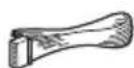
- This parts list does not include all the package contents.
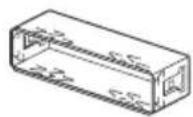
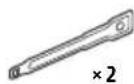
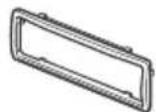
- The bracket ① and the protection collar ③ are attached to the unit before shipping. Before mounting the unit, use the release keys ② to remove the bracket ① from the unit. For details, see "Removing the protection collar and the bracket" (page 36).
- Keep the release keys ② for future use as they are also necessary if you remove the unit from your boat.
Connection![graph TD A["FUSE 10A"] --> B["SUB AUDIO OUT"] A --> C["REAR AUDIO OUT"] A --> D["SIRIUSXM IN"] D --> E["Satellite radio tuner (SiriusXM)*16"] A --> F["ANT IN"] F --> G["from a boat antenna (aerial)"] subgraph A H["White"] --> I["Front speaker*1*2*6"] H --> J["Rear speaker*1*2*6"] H --> K["L"] H -->…](/content/2026/03/477147/images/378e54fa922492bb786b74009256bad4e9c83c1212fc69e68ea3f2f89dc90713.jpg)
*1 Not supplied *2 Speaker impedance: 4 - 8 Ω × 4 *3 RCA pin cord (not supplied) *4 Depending on the type of boat, use an adaptor for a wired remote control (not supplied).
*5 Supplied with the marine remote commander.
*6 Not waterproof
Making connections
To battery or distribution block ground
First connect the black ground (earth) lead, then connect the yellow and red power supply leads. ② To the +12 V power terminal which is energized at all times
Be sure to connect the black ground (earth) lead to the battery or distribution block ground first. 3 To the +12 V power terminal which is energized when the ignition switch is set to the accessory position
If there is no accessory position, connect to the +12 V power (battery) terminal which is energized at all times.
Be sure to connect the black ground (earth) lead to the battery or distribution block ground first.
4 To the power antenna (aerial) control lead or the power supply lead of the antenna (aerial) booster
It is not necessary to connect this lead if there is no power antenna (aerial) or antenna (aerial) booster, or with a manually-operated telescopic antenna (aerial).
To AMP REMOTE IN of an optional power amplifier
This connection is only for amplifiers and a power antenna (aerial). Connecting any other system may damage the unit.
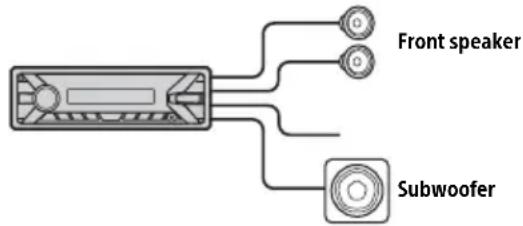
Subwoofer Easy Connection
You can use a subwoofer without a power amplifier when it is connected to a rear speaker cord.
Note
Use a subwoofer with an impedance of 4 to 8 ohms, and with adequate power handling capacities to avoid damage.
Memory hold connection
When the yellow power supply lead is connected, power will always be supplied to the memory circuit even when the ignition switch is turned off.
Speaker connection
• Before connecting the speakers, turn the unit off. - Use speakers with an impedance of 4 to 8 ohms, and with adequate power handling capacities to avoid damage.
Installation
Removing the protection collar and the bracket
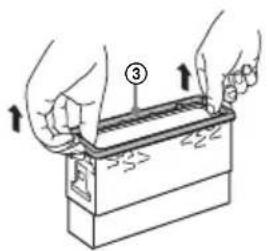
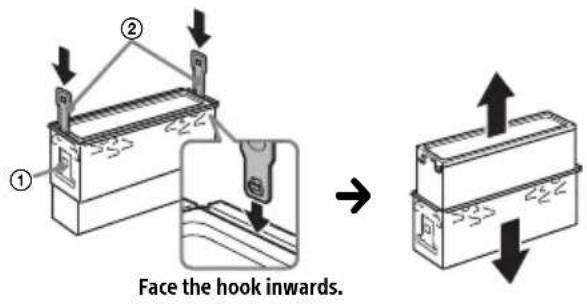
Before installing the unit, remove the protection collar ③ and the bracket ① from the unit.
1 Pinch both edges of the protection collar ③, then pull it out.
2 Insert both release keys ② until they click, and pull down the bracket ①, then pull up the unit to separate.
Mounting the unit in the dashboard or the cutout hole on boat
- Before installing, make sure the catches on both sides of the bracket ① are bent inwards 2 mm (3/32 in).
- For Japanese cars, see "Mounting the unit in a Japanese car" (page 37).
1 Position the bracket ① inside the dashboard, then bend the claws outward for a tight fit.
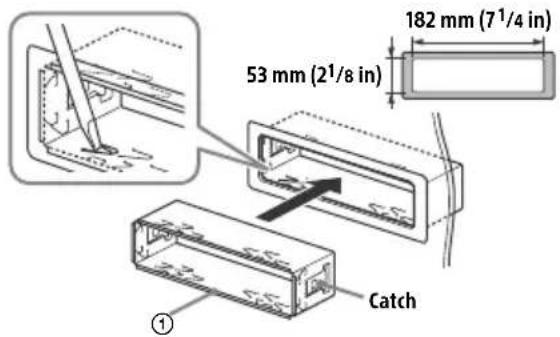
2 Mount the unit onto the bracket ①, then attach the protection collar ③.
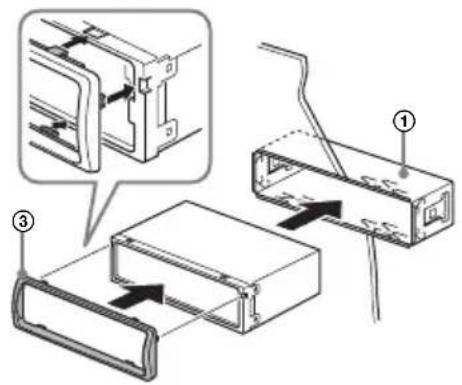
Notes
- If the catches are straight or bent outwards, the unit will not be installed securely and may spring out.
- Make sure the 4 catches on the protection collar ③ are properly engaged in the slots of the unit.
Mounting the unit in a Japanese car
You may not be able to install this unit in some makes of Japanese cars. In such a case, consult your Sony dealer.
TOYOTA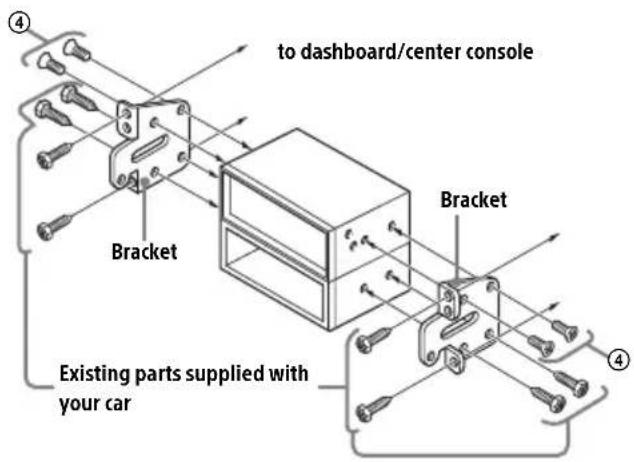
NISSAN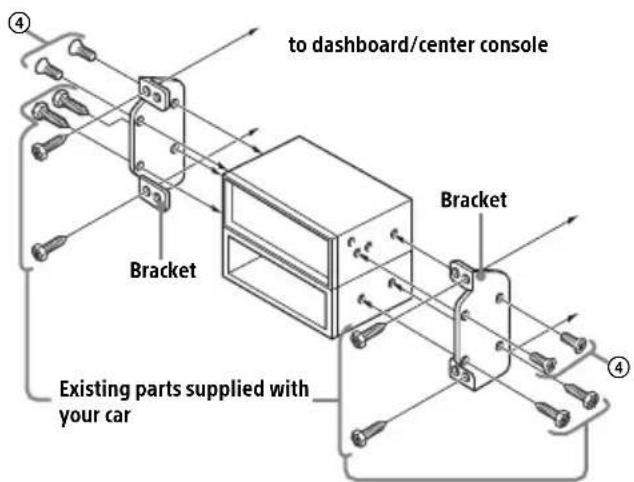
Note
To prevent malfunction, install only with the supplied screws ④.
Detaching and attaching the front panel
For details, see "Detaching the Front Panel" (page 8).
Fuse replacement
When replacing the fuse, be sure to use one matching the amperage rating stated on the original fuse. If the fuse blows, check the power connection and replace the fuse. If the fuse blows again after replacement, there may be an internal malfunction. In that case, consult your nearest Sony dealer.
Fuse (10 A)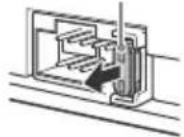
BLUETOOTH communication
Connection/Installation
Precautions 35
Q (navigation) (pages 15, 17, 19)
8 MODE (pages 13, 15, 16, 19, 21)
(back)
Playback starts.
Playback starts.
Playback starts.
Listening to Pandora®
Playback starts.
Bookmarking
Notes
Switchable 9 kHz/10 kHz
Antenna terminal:
BLUETOOTH standard version 3.0
Output:
BLUETOOTH standard Power Class 2
(Max. +4 dBm)
A2DP (Advanced Audio Distribution Profile) 1.3
AVRCP (Audio Video Remote Control Profile) 1.3
HFP (Handsfree Profile) 1.6
PBAP (Phone Book Access Profile)
Main unit (1)
Connection/Installation
Warnings
Notes
8 MODE (page 13, 15, 16, 19, 21)
(back)
20 VOL (volume) +/- 21 GP (group)/ALBM (album) +/-
Caution alarm
4 Press SRC to select [AUX].
"Thumbs" comments
Notes
Notes
Hereby, Sony Corporation declares that this equipment is in compliance with Directive 2014/53/EU.
The full text of the EU declaration of conformity is available at the following internet address:
If you have any questions or for the latest support information on this product, please visit the web site below:
Support website
If you have any questions/problems regarding this product, try the following:
1 Read Troubleshooting in these Operating Instructions. 2 Please contact (U.S.A. only); Call 1-800-222-7669 URL http://www.SONY.com
Made for

iPhone
iPod
WORKS WITH
PANDORA
((Siriusxm))
READY


Bluetooth®