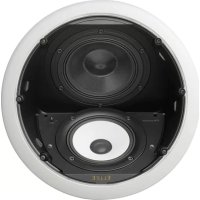
SIC691A - Telephone PIONEER - Free user manual and instructions
Find the device manual for free SIC691A PIONEER in PDF.

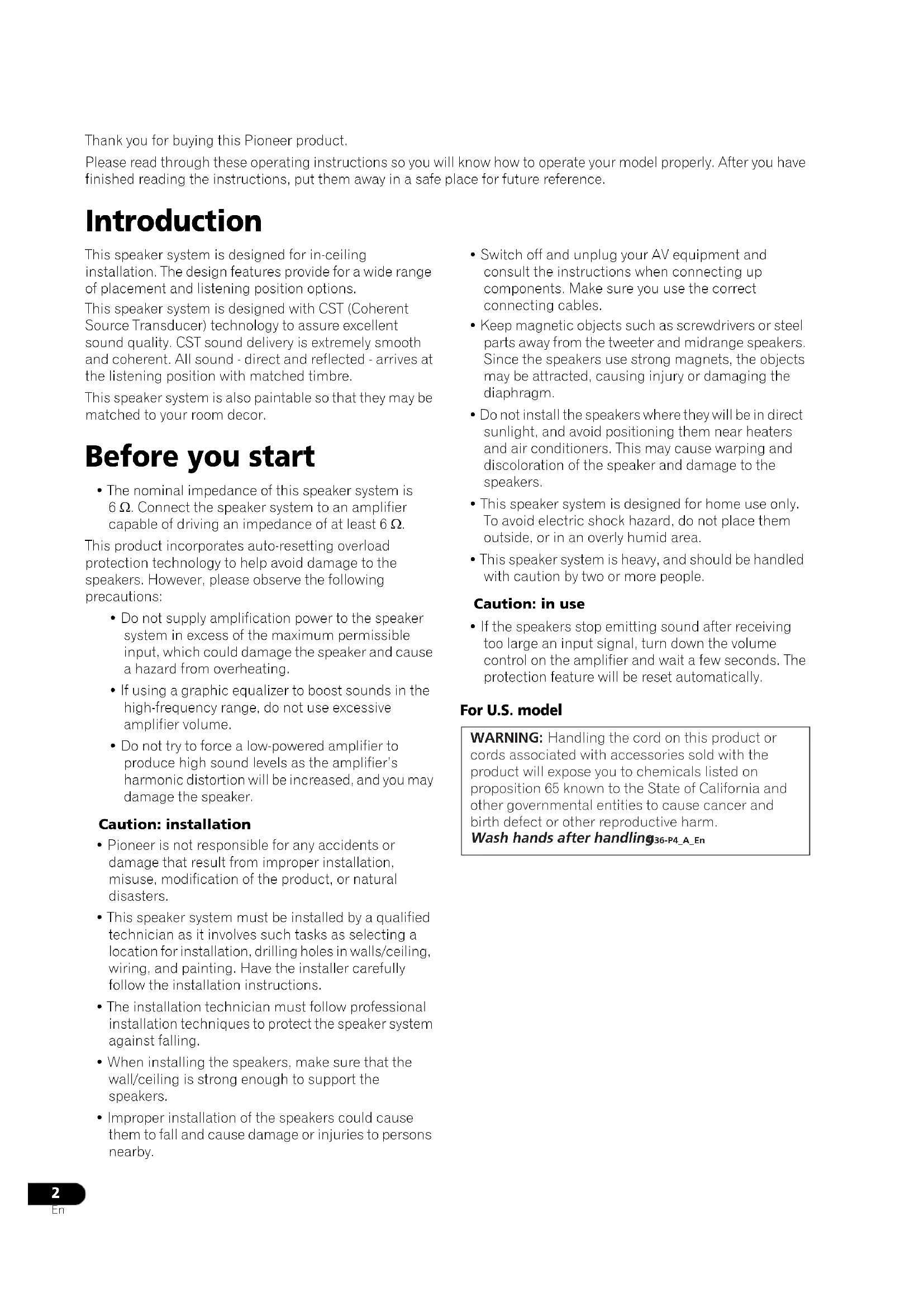

| Product type | In-ceiling acoustic speaker |
| Brand and model | Pioneer S-IC691A |
| Category | 3-way speaker |
| Configuration | 16 cm, 3-way |
| Woofer | 16 cm carbon-aramid composite cone |
| Midrange driver | 14 cm magnesium cone |
| Tweeter | 3 cm ceramic graphite HSDOM |
| Technology | CST (Coherent Source Transducer) for time alignment |
| Nominal impedance | 6 Ω |
| Frequency response | 28 Hz to 100 kHz |
| Sensitivity | 87 dB (2.83 V) |
| Maximum input power | 150 W |
| Crossover frequencies | 480 Hz / 2 kHz |
| External dimensions | φ340 mm × 225 mm (depth) |
| Weight | 4.7 kg |
| Enclosure material | Not specified, paintable |
| Installation | Flush-mounted in ceiling or wall (ceiling thickness 13–25 mm) |
| Use | Indoor only |
| Included accessories | Grille, template, paint mask, grille removal tool, butyl rubber strips (6), instruction manual |
| Built-in protection | Automatic reset against overloads |
| Care and cleaning | Dust with a soft brush; do not use wax, detergent, or chemicals |
| Safety | Disconnect power before connection; installation by a qualified technician; attach a safety cord |
| Spare parts and repairability | Spare parts available from Pioneer after-sales service |
| General information | Limited warranty provided; registration recommended on Pioneer website |
Frequently Asked Questions - SIC691A PIONEER
User questions about SIC691A PIONEER
0 question about this device. Answer the ones you know or ask your own.
Ask a new question about this device
Download the instructions for your Telephone in PDF format for free! Find your manual SIC691A - PIONEER and take your electronic device back in hand. On this page are published all the documents necessary for the use of your device. SIC691A by PIONEER.
USER MANUAL SIC691A PIONEER
Operating Instructions
Mode d'emploi
ELITE
In-Ceiling Speaker/Enceinte de plafond encastrable
s-1c691a
S - I C 8 9 1 _ A
Thank you for buying this Pioneer product.
Please read through these operating instructions so you will know how to operate your model properly. After you have finished reading the instructions, put them away in a safe place for future reference.
Introduction
This speaker system is designed for in-ceiling installation. The design features provide for a wide range of placement and listening position options.
This speaker system is designed with CST (Coherent Source Transducer) technology to assure excellent sound quality. CST sound delivery is extremely smooth and coherent. All sound - direct and reflected - arrives at the listening position with matched timbre.
This speaker system is also paintable so that they may be matched to your room decor.
Before you start
- The nominal impedance of this speaker system is 6 . Connect the speaker system to an amplifier capable of driving an impedance of at least 6 .
This product incorporates auto-resetting overload protection technology to help avoid damage to the speakers. However, please observe the following precautions:
- Do not supply amplification power to the speaker system in excess of the maximum permissible input, which could damage the speaker and cause a hazard from overheating.
- If using a graphic equalizer to boost sounds in the high-frequency range, do not use excessive amplifier volume.
- Do not try to force a low-powered amplifier to produce high sound levels as the amplifier's harmonic distortion will be increased, and you may damage the speaker.
Caution: installation
- Pioneer is not responsible for any accidents or damage that result from improper installation, misuse, modification of the product, or natural disasters.
- This speaker system must be installed by a qualified technician as it involves such tasks as selecting a location for installation, drilling holes in walls/ceiling, wiring, and painting. Have the installer carefully follow the installation instructions.
- The installation technician must follow professional installation techniques to protect the speaker system against falling.
- When installing the speakers, make sure that the wall/ceiling is strong enough to support the speakers.
-
Improper installation of the speakers could cause them to fall and cause damage or injuries to persons nearby.
-
Switch off and unplug your AV equipment and consult the instructions when connecting up components. Make sure you use the correct connecting cables.
- Keep magnetic objects such as screwdrivers or steel parts away from the tweeter and midrange speakers. Since the speakers use strong magnets, the objects may be attracted, causing injury or damaging the diaphragm.
- Do not install the speakers where they will be in direct sunlight, and avoid positioning them near heaters and air conditioners. This may cause warping and discoloration of the speaker and damage to the speakers.
- This speaker system is designed for home use only. To avoid electric shock hazard, do not place them outside, or in an overly humid area.
- This speaker system is heavy, and should be handled with caution by two or more people.
Caution: in use
- If the speakers stop emitting sound after receiving too large an input signal, turn down the volume control on the amplifier and wait a few seconds. The protection feature will be reset automatically.
For U.S. model
WARNING: Handling the cord on this product or cords associated with accessories sold with the product will expose you to chemicals listed on proposition 65 known to the State of California and other governmental entities to cause cancer and birth defect or other reproductive harm.
Wash hands after handling36-P4_A_En
What's in the box
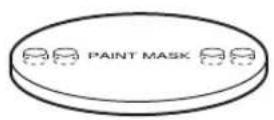
(Transparent)
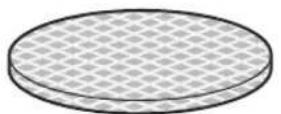
Grille x 1Paint ma
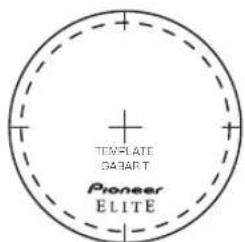
Template × 1
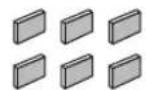
Butyl rubber tapes x 6
Installation
Standard surround setup
Sounds reproduced through speaker systems are easily affected in subtle ways by the conditions in the listening space. To assure optimum performance from this speaker system, give adequate consideration to the installation location before setup.
Use the graphic below as a guide to determine optimal speaker placement.
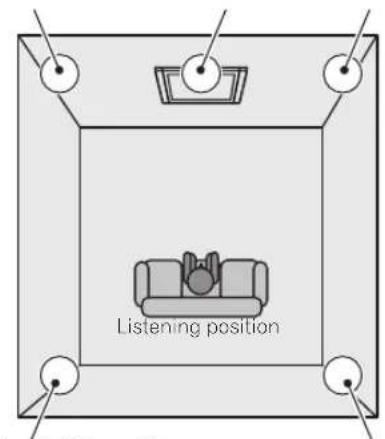
Front left Front right Center
Rear left Rear right
- Place the left and right speakers equal distances from your listening position for good stereo imaging. Use speaker cables of the equal length for each speaker.
- Keep the speaker system at least 50~cm (20 in.) away from the edge of the wall or ceiling. If this is not possible, adjust the sound balance by using the speakers' treble level control.

Important
- This speaker system is not magnetically shielded. It should therefore not be placed near TVs or monitors that are sensitive to magnetic fields, as the interaction of magnetic materials can cause distortion of the colors on your TV screen. Magnetic storage media (such as floppy discs and tape or video cassettes) should also not be kept close to this speaker system.
For the installer

Important
- Give adequate consideration to the location of installation before the setup of this speaker system.
- Check the walls/ceiling to see if they are strong enough to withstand the weight of the speaker system.
- Installation is possible on ceiling from 13mm (1/2 in.) to 25mm (1 in.) thick.
- Check the walls/ceiling to confirm there is no wiring, plumbing, beams, studs or air conditioning systems that may interfere with installation.
- Pioneer disclaims any liability whatsoever for damage resulting from assembly, improper mounting, insufficient reinforcement, misuse of the product, acts of nature, etc.
Painting the speakers
While the speaker and grille can be painted after it is installed, painting it beforehand is much easier.
It is recommended to use spray paint, as brushed paint may clog the holes in the grille and reduce the sound quality significantly.
1 Remove the fabric scrim from the inside of the grille.
Carefully peel off the fabric scrim and lay it down flat so as not to get it wrinkled.
2 Use the supplied paint mask to cover the speaker.
If you don't have the paint mask, use paper and masking tape.
3 Paint the speaker and grille the desired color.
As previously mentioned, it is strongly recommended that you paint before installation and that you use spray paint.
4 After the speaker and grille have dried completely, remove the paint mask and carefully replace the fabric smear on the back of the grille.
Before installing
- Before installing the speakers, run the speaker cables to the installation location.
- To maximize sound quality, choose the correct speaker gauge cables from the table below. If the resistance of the speaker cable is too high, the signal will be attenuated and the speakers' frequency response will be degraded.
| AWG feet | |
| 16 or 14 | less than 25 |
| 14 or 12 | 25 to 50 |
| 12 or 10 | 50 to 75 |
| 10 | more than 75 |
| mm2 | meters |
| 1.5 to 2.5 | less than 8 |
| 2.5 to 4 | 8 to 16 |
| 4 to 6 | 16 to 24 |
| 6 | more than 24 |
How to install
Make sure you have read and understood all the information above, For the installer on page 3 and Before installing above.
1 Once you have decided on the installation location, prepare the supplied template.
Cut out the inside of the template along the dotted line and discard the inner section.
2 Attach the template (outer section) to the wall/ ceiling using tape.
Make sure the template is aligned properly.
3 Trace a line onto the wall/ceiling, following the inner perimeter of the template.
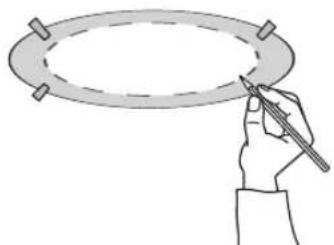
4 Cut a hole where you have drawn the outline.
Be careful when cutting the hole, and use a proper cutting tool.
5 Pull the speaker cable through the hole that has been opened.
Be careful not to apply to much force when pulling on the speaker cable or bend the cable at sharp angles.
6 Connect the cable wire to the speaker as shown below.
When connecting the speakers, be careful not to touch the diaphragms of the drivers.
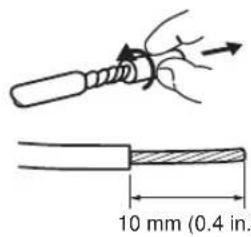
Twist and pull off the protective shields on each wire.
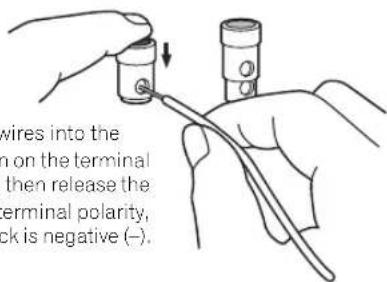
Insert the speaker cable wires into the holes while pressing down on the terminal posts on the speaker, and then release the terminal posts. For input terminal polarity, red is positive (+) and black is negative (-) .
After connecting the wires, pull lightly on them to make sure that the ends of the wires are securely connected to the terminals. Poor connections can create noise and interruptions in the sound.
- If the wires are pulled out of the terminal posts and the conductors come into contact with each other or surrounding devices, an excessive additional load may be placed on the amplifier. This may cause the amplifier to stop functioning, and may even cause it damage.
- Be careful to observe the correct polarity of the connections between the cables and the speaker. If the polarity (+, -) of one of the speakers (left or right) is reversed the stereo image will be severely degraded.
CAUTION
These speaker terminals carry HAZARDOUS LIVE voltage. To prevent the risk of electric shock when connecting or disconnecting the speaker cables, disconnect the power cord before touching any uninsulated parts. D3-4-2-2-3_A_En
7 Where available, use the eye bolt located on the back of the speaker system and attach a reinforced wire, such as stainless steel wire rope, to the studs or beams of the walls/ceiling.

Caution
- It is strongly recommended that you take double safe precautions to prevent the speaker from falling by accident.
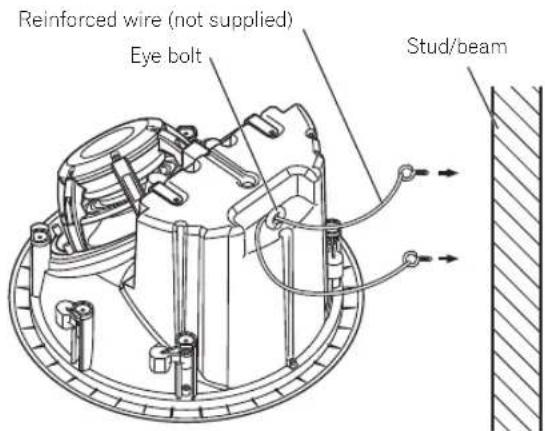
- Put the reinforced wire through the eye bolt and attach to the studs or beams. Make sure the stud/beam that you are attaching it to is strong enough to support the weight of the speaker system.
8 Place sound-absorbing material (such as fiberglass) around the speakers as necessary to improve sound quality.
Use only sound-absorbing materials that comply with regional safety regulations.
9 Place the speaker into the hole you have cut.
Make sure the rotating clamps are turned inward.
- A Phillips screwdriver is required for loosening them.
- When using electric screwdrivers, first find out the minimum torque required for the installation of the speaker system. Begin by setting the electric screwdriver to its minimum torque and gradually raise the torque until the screw starts to rotate. Check what torque setting you are on at this point (this will be the minimum torque required for the setup). After confirming the torque, return the rotating clamps toward the inside by reversing the direction of rotation of the screws. When doing this, take care that the screws do not come all the way out.
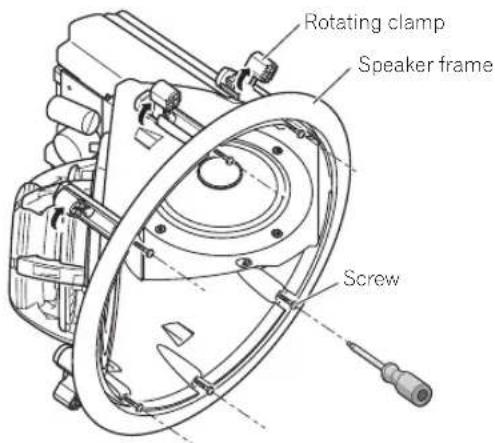
10 Attach the speaker frame to the wall/ceiling, and tighten the screws lightly (temporary attachment).
At this point the rotating clamp will rotate so that the rotating clamp and frame are clamped on to the wall/ ceiling.
Gently try pulling the speaker forward and check that all of the rotating clamps have rotated outwards and are lightly clamping to the wall/ceiling.
11 Adjust the mounting orientation to point the CST toward the listening position.
12 Tighten the screws firmly using no more than the maximum torque specified.
Allowable maximum torque: 1.0N· m

Caution
- Screwing them in too tightly could break the rotating clamps, twist the frames, damage the walls/ceilings and make it difficult to attach the grille.
13 Make sure that the screws are not crooked and that there is no gap between the wall/ceiling and frame.
14 Adjust the setting of the treble control as necessary.
The standard setting is 0.
- The treble switch located in the front of the speaker has two positions to choose from, +/0.
15 Attach the butyl rubber tapes on the inside of the grille.
Attach the eight butyl rubber tapes to each grille, lining up the butyl rubber tapes to the marks on the inside of the grille. Then peel off the protective paper.
16 Attach the grille to the speaker.
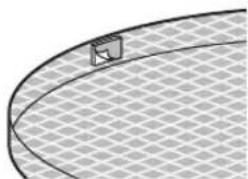
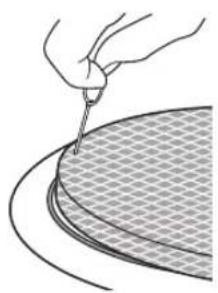
The grille is designed with a specific mounting orientation. Gently push the grille onto the speaker, lining up the one section of the edge of the grille to the groove in the speaker. Then line up the entire grille to the groove in the speaker and attach the grille by pressing in all around the edge.
Orientate the grille so that the notch is positioned adjacent to the ELITE logo.
Make sure to press on the edges. Pressing on the middle of the grille will cause it to be deformed.
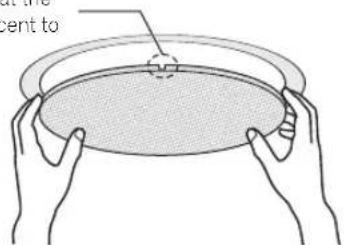
- Once you have pushed it in, make sure you press it firmly against the speaker so that the grille doesn't fall off and cause an accident.
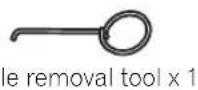
- To remove the grille, use the supplied tool to hook into the holes located near the edges and pull the grille out. When doing this, make sure to pull the edges out evenly. Forcing the grille out from one edge alone will cause the grille to be deformed.
Connections
Connecting to an amplifier
Make sure you have read the connection instructions in the manual supplied with the amplifier and that all equipment is turned off before making any connections.
- When using a set of speakers connected to an amplifier, you won't be able to obtain the correct stereo effect if the polarity (+, -) of one of the speakers (left or right) is reversed.
Additional Information
Cleaning the speaker
Use a dust brush to wipe off dust and dirt.
Never use furniture wax, cleaners, thinners, benzine, insecticide sprays or other chemicals on or near the speakers, since these will corrode the surfaces.
Specifications
Speaker system
S-IC691A
Speaker units . In-ceiling type
Configuration 16 cm (6^1 / 2 in.)3-way
Woofer. 16 cm (6 ^1 /2 in.)
Aramid/Carbon composite cone type
CST: Mid/Tweeter . . . . 14 cm (5 1/2 in.) Magnesium cone/3 cm (1 3/16 in.) Ceramic graphite HSDOM type
Impedance. 6Ω
Frequency response. 28 Hz to 100 kHz
Sensitivity. .87 dB (2.83 V)
Maximum input power 150 W
Crossover frequency. 480 Hz/2 kHz
External dimensions. 340 mm x 225 mm
13^3 / 8 in. × 8^7 /8 D)in.
Weight 4.7 kg/10 lbs 6 oz
S-IC891A
Speaker units .In-ceiling type
Configuration 18 cm (7^1 / 16 in.) 3-way
Woofer 18 cm (7 116 in.)
Aramid/Carbon composite shell cone type
CST: Mid/Tweeter . . . . 14 cm (5 1/2 in.) Magnesium cone/
3 cm (1 ^3 /16 in.) Ceramic graphite HSDOM type
Impedance. 6Ω
Frequency response. 26 Hz to 100 kHz
Sensitivity. .87 dB (2.83 V)
Maximum input power 150 W
Crossover frequency. 480 Hz/2 kHz
External dimensions. 340 mm x 225 mm
13^3 / 8 in. × 8^7 /8(D) in.
Weight. 5.0 kg/11 lbs
Accessories
Paint mask 1
Grille 1
Template. 1
Butyl rubber tapes 6
Grille removal tool 1
Operating instructions

Note
- Specifications and design subject to modification without notice.
CST (Coherent Source Transducer) is a three-dimensionally-aligned sound source for the tweeter and midrange, allowing the sound directivity to be precisely controlled at all frequency.

is a trademark placed on a product with
Pioneer's Phase Control technology. This technology enables high-grade sound reproduction through each component by improving overall phase matching.


Dear Customer:
Selecting fine audio equipment such as the unit you've just purchased is only the start of your musical enjoyment. Now it's time to consider how you can maximize the fun and excitement your equipment offers. This manufacturer and the Electronic Industries Association's Consumer Electronics Group want you to get the most out of your equipment by playing it at a safe level. One that lets the sound come through loud and clear without annoying blaring or distortion-and, most importantly, without affecting your sensitive hearing.
Sound can be deceiving. Over time your hearing "comfort level" adapts to higher volumes of sound. So what sounds "normal" can actually be loud and harmful to your hearing. Guard against this by setting your equipment at a safe level BEFORE your hearing adapts.
To establish a safe level:
- Start your volume control at a low setting.
- Slowly increase the sound until you can hear it comfortably and clearly, and without distortion.
Once you have established a comfortable sound level:
- Set the dial and leave it there.
Taking a minute to do this now will help to prevent hearing damage or loss in the future. After all, we want you listening for a lifetime.
We Want You Listening For A Lifetime
Used wisely, your new sound equipment will provide a lifetime of fun and enjoyment. Since hearing damage from loud noise is often undetectable until it is too late, this manufacturer and the Electronic Industries Association's Consumer Electronics Group recommend you avoid prolonged exposure to excessive noise. This list of sound levels is included for your protection.
Decibel
Level Example
30 Quiet library, soft whispers
40 Living room, refrigerator, bedroom away from traffic 50 Light traffic, normal conversation, quiet office
60 Air conditioner at 20 feet, sewing machine
70 Vacuum cleaner, hair dryer, noisy restaurant
80 Average city traffic, garbage disposals, alarm clock at two feet.
THE FOLLOWING NOISES CAN BE DANGEROUS UNDER CONSTANT EXPOSURE
90 Subway, motorcycle, truck traffic, lawn mower
100 Garbage truck, chain saw, pneumatic drill
120 Rock band concert in front of speakers, thunderclap
140 Gunshot blast, jet plane
180 Rocket launching pad
Information courtesy of the Deafness Research Foundation.


S001 En
Attention: installation
Should this product require service in the U.S.A. and you wish to locate the nearest Pioneer Authorized Independent Service Company, or if you wish to purchase replacement parts, operating instructions, service manuals, or accessories, please call the number shown below.
1-800-421-1404
Please do not ship your product to Pioneer without first calling the Customer Support at the above listed number for assistance.
Pioneer Electronics Service, Inc.
P.O. BOX 1760, Long Beach,
For warranty information please see the Limited Warranty sheet included with your product.
Should this product require service in Canada, please contact a Pioneer Canadian Authorized Dealer to locate the nearest Pioneer Authorized Service Company in Canada. Alternatively, please contact the Customer Satisfaction Department at the following address:
Pioneer Electronics of Canada, Inc.
Customer Satisfaction Department
300 Allstate Parkway, Markham, Ontario L3R 0P2
1-877-283-5901
905-479-4411
For warranty information please see the Limited Warranty sheet included with your product.
300, Allstate Parkway, Markham, Ontario L3R 0P2
1-877-283-5901
905-479-4411
Register Your Product at
http://www.pioneerelectronics.com (US)
http://www.pioneerelectronics.ca (Canada)
http://www.pioneerelectronics.com (US)
http://www.pioneerelectronics.ca (Canada)
PIONEER CORPORATION
4-1, Meguro 1-Chome, Meguro-ku, Tokyo 153-8654, Japan
PIONEER ELECTRONICS (USA) INC.
P.O. BOX 1540, Long Beach, California 90801-1540, U.S.A. TEL: (800) 421-1404
PIONEER ELECTRONICS OF CANADA, INC.
300 Allstate Parkway, Markham, Ontario L3R 0P2, Canada TEL: 1-877-283-5901, 905-479-4411
PIONEER EUROPE NV
Haven 1087, Keetberghlaan 1, B-9120 Melsele, Belgium TEL: 03/570.05.11
PIONEER ELECTRONICS ASIACENTRE PTE. LTD.
253 Alexandra Road, #04-01, Singapore 159936 TEL: 65-6472-7555
PIONEER ELECTRONICS AUSTRALIA PTY. LTD.
178-184 Boundary Road, Braeside, Victoria 3195, Australia, TEL: (03) 9586-6300
PIONEER ELECTRONICS DE MEXICO S.A. DE C.V.
Blvd.Manuel Avila Camacho 138 10 piso Col.Lomas de Chapultepec, Mexico,D.F. 11000 TEL: 55-9178-4270
K002_B_En
Published by Pioneer Corporation.
Copyright © 2008 Pioneer Corporation.
All rights reserved.
Publication de Pioneer Corporation.
© 2008 Pioneer Corporation.
- Introduction
- Before you start
- Caution: installation
- Caution: in use
- For U.S. model
- What's in the box
- Installation
- Standard surround setup
- Important
- For the installer
- Painting the speakers
- Remove the fabric scrim from the inside of the grille.
- Use the supplied paint mask to cover the speaker.
- Paint the speaker and grille the desired color.
- Before installing
- How to install
- Once you have decided on the installation location, prepare the supplied template.
- Attach the template (outer section) to the wall/ ceiling using tape.
- Trace a line onto the wall/ceiling, following the inner perimeter of the template.
- Cut a hole where you have drawn the outline.
- Pull the speaker cable through the hole that has been opened.
- Connect the cable wire to the speaker as shown below.
- CAUTION
- Where available, use the eye bolt located on the back of the speaker system and attach a reinforced wire, such as stainless steel wire rope, to the studs or beams of the walls/ceiling.
- Place sound-absorbing material (such as fiberglass) around the speakers as necessary to improve sound quality.
- Place the speaker into the hole you have cut.
- Attach the speaker frame to the wall/ceiling, and tighten the screws lightly (temporary attachment).
- Adjust the mounting orientation to point the CST toward the listening position.
- Make sure that the screws are not crooked and that there is no gap between the wall/ceiling and frame.
- Adjust the setting of the treble control as necessary.
- Attach the grille to the speaker.
- Connections
- Connecting to an amplifier
- Additional Information
- Cleaning the speaker
- Specifications
- Speaker system
- S-IC691A
- S-IC891A
- Accessories
- Note
- Dear Customer:
- To establish a safe level:
- Once you have established a comfortable sound level:
- We Want You Listening For A Lifetime
- Decibel
- Level Example
- THE FOLLOWING NOISES CAN BE DANGEROUS UNDER CONSTANT EXPOSURE
- Attention: installation
- PIONEER CORPORATION
- PIONEER EUROPE NV
- PIONEER ELECTRONICS ASIACENTRE PTE. LTD.
Brand : PIONEER
Model : SIC691A
Category : Telephone