10031895 - Microwave Oven Klarstein - Free user manual and instructions
Find the device manual for free 10031895 Klarstein in PDF.


| Product type | Combi microwave oven with grill and hot air |
| Brand | Klarstein |
| Model | 10031895 |
| Power supply | 220-240 V ~ 50-60 Hz |
| Microwave power | 1500 W |
| Grill power | 1250 W |
| Hot air power | 2150 W |
| Cooking functions | Microwave, grill, hot air, micro+grill, micro+convection, quick defrost, defrost by weight, auto menu (meat, vegetables, pizza, coffee, fish, spaghetti, popcorn) |
| Additional functions | Timer, child lock, quick start, multi-cooking (2 sequences), program memory |
| Display | Digital display of time, power and duration |
| Included accessories | Glass turntable, grill rack, baking tray |
| Safety | Child lock, automatic stop in case of overheating (E01), low temperature (E02), short circuit (E3), cooling function after cooking |
| Cleaning | Clean with a damp cloth; do not use steam cleaner or abrasive products |
| Compliance | EU Directives 2014/30/EU (EMC), 2014/35/EU (LVD), 2011/65/EU (RoHS) |
| Intended use | Household only, for heating and cooking food |
Frequently Asked Questions - 10031895 Klarstein
User questions about 10031895 Klarstein
0 question about this device. Answer the ones you know or ask your own.
Ask a new question about this device
Download the instructions for your Microwave Oven in PDF format for free! Find your manual 10031895 - Klarstein and take your electronic device back in hand. On this page are published all the documents necessary for the use of your device. 10031895 by Klarstein.
USER MANUAL 10031895 Klarstein
Bedienfeld
natural_image
Symbol of a trash bin crossed with a diagonal line, no text or numbers presentCongratulations on purchasing this equipment. Please read this manual carefully and take care of the following hints to avoid damages. Any failure caused by ignoring the mentioned items and cautions mentioned in the instruction manual are not covered by our warranty and any liability.
CONTENT
Technical Data 16
Declaration of Conformity 16
Safety Instructions 17
Product Description 19
Care and Cleaning 27
Hints on Disposal 28
TECHNICAL DATA
| Item number 10031895 | |
| Power supply 220-240 V ~ 50-60 Hz | |
| Power microwave 1500 W | |
| Power grill 1250 W | |
| Power convection 2150 W |
DECLARATION OF CONFORMITY

Producer:
Chal-Tec GmbH, Wallstraße 16, 10179 Berlin, Germany.
This product is conform to the following European Directives:
2014/30/EU (EMC)
2014/35/EU (LVD)
2011/65/EU (RoHS)
SAFETY INSTRUCTIONS
Read all the safety and operating instructions carefully and retain them for future reference. Make sure the voltage in your living area corresponding to the one shown on the rating label of the appliance. And the wall socket is properly grounded.
To reduce the risk of fire in the oven cavity:
- Do not overcook the food.
- Remove wire twist ties from paper or plastic bags before placing bags in the oven.
- Do not heat oil or fat for deep drying as the temperature of oil cannot be controlled.
- After use wipe the waveguide cover with a damp cloth, followed by dry cloth to remove any food splashes and grease.
• Built up grease may overheat and begin to cause smoke or catch fire. - If materials inside the oven should smoke or ignite, keep oven door closed, turn oven off and disconnect the power supply.
- When heating food in plastic or paper containers, keep an eye on the oven due to the possibility of ignition.
To reduce the risk of explosion and sudden boiling:
- Liquids and other foods must not be heated in sealed container since they are liable to explode; Baby bottles fitted with a screw cap or teat are considered to be sealed containers.
- Use the wide mouthed container to cook liquid, and the cooked liquid should not be removed out immediately. Several moments should be waited before removing. In order to avoid possible hazards caused by delayed eruptive boiling of liquids.
- Potatoes, sausage and chestnut should be peeled or pierced before cooking. Eggs in their shell, whole hard boiled eggs should not be heated in microwave ovens since they may explode, even after microwave heating has ended.
- The contents of feeding bottles and baby food jars are to be stirred or shaken and the temperature is to be checked before consumption, in order to avoid burns.
- If the supply cord is damaged, it must be replaced by the manufacturer or its service agent or a qualified technician in order to avoid a shock hazard.
- After cooking, the container is very hot. Using gloves to take out the food and avoid steam burns by directing steam away from the face and hands.
- Slowly lift the furthest edge of dishes cover and microwave plastic wrap and carefully open popcorn and oven cooking bags away from the face.
To prevent the turntable from breaking:
- Let the turntable cool down before cleaning.
- Do not place hot foods or utensils on the cold turntable.
- Do not place frozen foods or utensils on the hot turntable.
General Instructions
- Make sure the utensils do not touch the interior walls during cooking. Only use utensils that are suitable for use in microwave ovens. Do not store food or any other things inside the oven.
- Do not operate the oven without any liquid or food inside the oven. This would do damage the oven.
- When the appliance is operated in the combination mode, children should only use the oven under adult supervision due to the temperatures generated.
- Any accessories not recommended by the manufacturer may cause injuries to persons.
- Do not use outdoors.
- If the door or door seals are damaged or the oven is malfunctioned, the oven must not be operated until it has been repaired by a competent person;
- It is hazardous for anyone other than a competent person to carry out any service or repair operation that involves the removal of a cover which gives protection against exposure to microwave energy.
- If smoke is emitted, switch off or unplug the appliance and keep the door closed in order to stifle any flames.
- Microwave heating of beverages can result in delayed eruptive boiling; therefore care must be taken when handling the container.
- Do not use harsh abrasive cleaners or sharp metal scrapers to clean the oven door glass since they can scratch the surface, which may result in shattering of the glass.
- The appliances are not intended to be operated by means of an external timer or separate remote control system.
- This appliance is intended to be used in household and similar applications, such as: Staff kitchen areas in shops, offices and other working environments; Farm houses; By clients in hotels, motels and other residential environments; Bed and breakfast type environments.
- The microwave oven is intended for heating food and beverages. Drying of food or clothing and heating of warming pads, slippers, sponges, damp cloth and similar may lead to risk of injury, ignition or fire.
- This appliance can be used by children aged from 8 years and above and persons with reduced physical, sensory or mental capabilities or lack of experience and knowledge if they have been given supervision or instruction concerning use of the appliance in a safe way and understand the hazards involved. Children shall not play with the appliance.
• A steam cleaner is not to be used. - The door or the outer surface may get hot when the appliance is operating.
- During use the appliance becomes hot. Care should be taken to avoid touching heating elements inside the oven.
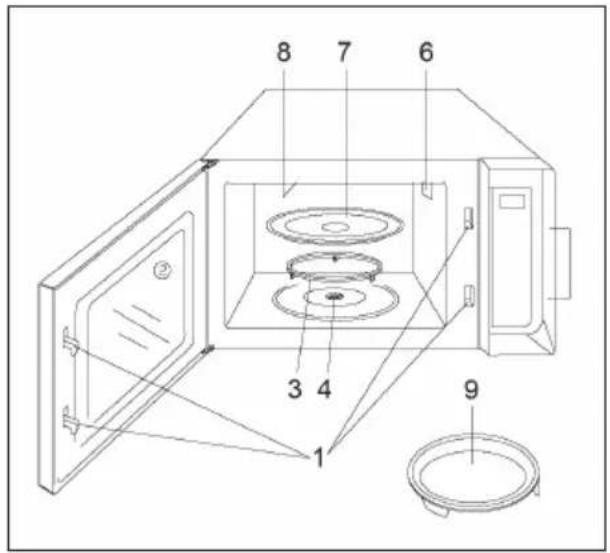
PRODUCT DESCRIPTION
Mikrowave
1 Door Safety Lock System
2 Oven Window
3 Roller Ring
4 Shaft
5 Control Panel
6 Wave Guide
7 Glass Tray
8 Grill Heater
9 Baking Plate
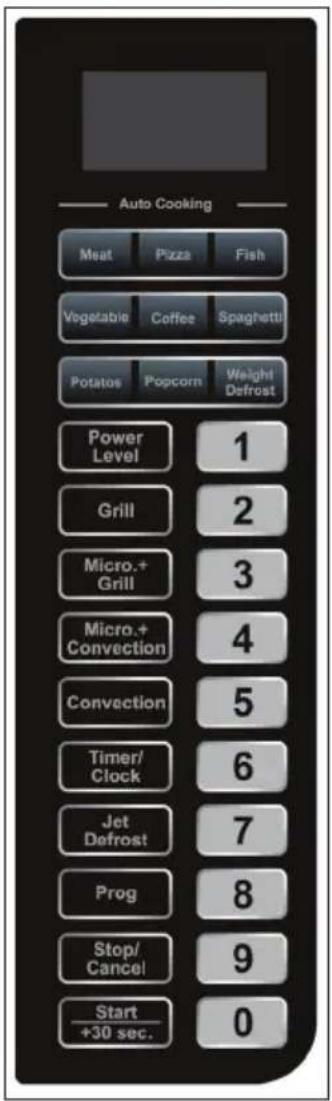
Control Panel
• Display: Cooking time, power, indicators and present time are displayed
• Auto Cooking Menu: Include popular foods menu and weight defrost menu
• Power Level: Press to select microwave power level.
• Grill: Press to set a grill-cooking program
- Micro+Grill: Press to select one of two combination cooking settings
- Micro+Convection: Press to select one of four combination cooking settings
- Convection: Press to program convection cooking
- Timer/Clock: Use to set the oven clock or timer
• Jet Defrost: Touch to defrost food by the time
• Prog: Touch to memory the cooking settings
- Stop/Cancel: Touch to stop cooking program or clear all previous settings before cooking starts
- Start/+30sec: Press to start cooking program. Touch to start the oven quickly at full power. Use the minute plus feature to add to cooking time.
• Number pads: Use to set clock, cooking time or enter convection temperature.
UTENSILS GUIDELINE
It is strongly recommended to use the containers which are suitable and safe for microwave cooking. Generally speaking, the containers which are made of heat-resistant ceramic, glass or plastic are suitable for microwave cooking. Never use the metal containers for microwave cooking and combination cooking as spark is likely to occur. You can take the reference of below table.
| Cookware Microwave | Grill Convection Combination* | |||
| Heat-Resistant Glass | Yes Yes Yes | Yes | ||
| Non Heat-Resistant Glass | No No No No | |||
| Heat-Resistant Ceramics | Yes Yes Yes | Yes | ||
| Microwave-Safe Plastic Dish | Yes No No No | |||
| Kitchen Paper Yes No No No | ||||
| Metal Tray No Yes Yes No | ||||
| Baking plate No Yes Yes No | ||||
| Aluminum Foil & Foil Container | No Yes Yes No | |||
*Combination applicable for both microwave +grill and microwave+convection.
OPERATION
Each time a button is touched, a beep will sound to acknowledge the touch.
During the setting mode, the system will return to waiting mode if there is not any operation within 20 seconds.
During cooking program, press STOP/CANCEL to pause the program, then press START/+30SEC to resume. Press STOP/CANCEL twice to cancel the program.
End will display with beeps to remind the program is over, and it will sound every two minutes until you press any pad or open the door.
Setting the Clock
This is a 12 and 24 hour clock. You can take the steps below to set the clock. Press and hold TIMER/CLOCK button for 3 seconds to set 12 hour clock. Press TIMER/CLOCK button again to set 24 hour clock. Use the number pads to enter clock time. Press TIMER/CLOCK to confirm.
Setting the Timer
You may use the timer feature, when you need to be reminded of the cooking or some other things. Press TIMER/CLOCK once. Use the number pads to enter the time to be counted down. Press START/+ 30 SEC pad.
NOTE: The longest time to be counted down is 99 minutes and 99 seconds. When the countdown ends, the system buzzer will beep. You can check the countdown by pressing the TIMER/CLOCK pad, which is seen in the display for 3 seconds and cancel the timer by pressing the STOP/CANCEL pad within 3 seconds.
Quick Start
Use this feature to program the oven to microwave food at 100% power conveniently. Press START/+ 30 SEC. in quick succession to set the cooking time. The oven will auto-start immediately. You can also press this pad to add 30 SEC. each during cooking; the maximum time you can set is 10 minutes.
Microwave Cooking
Microwave cooking allows you to customize cooking power and time. First, select a power level by pressing the POWER LEVEL button (see the table below). Then set the cooking time (maximum 99 min. 99 sec.) using the number pads, before pushing the START/+30SEC button.
| Press POWER Power Description | ||
| 1 time 100% | High | |
| 2 times 90% | ||
| 3 times 80% | ||
| 4 times 70% | Medium high | |
| 5 times 60% | ||
| 6 times 50% | Medium | |
| 7 times 40% | ||
| 8 times 30% | Medium low | |
| 9 times 20% | ||
| 10 times 10% | Low | |
| 11 times 0% | ||
Example: Suppose you want to cook for 5 minute at 60% power level. Press POWER LEVEL button 5 times. Press number pads to enter cooking time. Press START/+30SEC pad.
Grill
Grill cooking is particularly useful for thin slices of meat, steaks, chops, kebabs, sausages and pieces of chicken. It is also suitable for hot sandwiches and au gratin dishes. Suppose you want to program grill cooking for 12 minutes.
1 Press STOP/CANCEL pad once.
2 Press GRILL button.
3 Use the number pads to enter cooking time.
4 Press START/+30SEC button. The maximum cooking time you can set is 99:99.
Convection
The maximum cooking time is 99 minutes99 sec. During convection cooking, hot air is circulated throughout the oven cavity to make crisp foods quickly and evenly. This oven can be programmed for ten different cooking temperatures. (110°C-200°C). Suppose you want to cook at 200 for 40 minutes.
1 Press CONVECTION button.
2 Press CONVECTION button a number of times to indicate convection temperature 200^ C.
3 Use the number pads to enter cooking time.
4 Press START/+30SEC. pad.
NOTE: You can check the convection temperature during cooking by pressing the CONVECTION pad.
To Preheat and Cook with Convection
Your oven can be programmed to combine preheating and convection cooking operations. Suppose you want to preheat to 170 and then cook 35 minutes.
1 Press CONVECTION button.
2 Press CONVECTION button a number of times to indicate convection temperature 170°C.
3 Press START/+30SEC button. the oven will beeps when it reaches the designated temperature.
4 Open the door and place container of food at the center of the turntable.
5 Use the number pads to enter cooking time.
6 Press START/+30SEC pad.
NOTE: When the oven reaches the programmed temperature, the oven will beep to remind you. If you do not open the door within 30 minutes, the program will be stopped automatically. You can check the convection temperature during cooking by pressing the CONVECTION pad.
Microwave+Grill
Combination 1
30% of time for microwave cooking, 70% for grill cooking. Use for fish or au gratin. Suppose you want to set combination 1 cooking for 25 minutes.
1 Press MICRO+GRILL button once.
2 Use the number pads to enter 25:00.
3 Press START/+30SEC button.
Combination 2
55% of time for microwave cooking, 45% for grill cooking. Use for pudding, omelets, baked potatoes and poultry. Suppose you want to set combination 2 cooking for 12 minutes.
1 Press MICRO+GRILL button twice.
2 Use the number pads to enter 12:00.
3 Press START/+30SEC button.
Microwave+Convection
The longest cooking time is 99 minutes and 99 seconds. Press MICRO+ CONVECTION pad repeatedly to select program convection temperature (110°C > 140°C > 170°C > 200°C). Suppose you want to bake a cake for 24 minutes on 170°C.
1 In waiting mode, place food into oven, and close it.
2 Press MICRO + CONVECTION pad a number of times to indicate convection temperature
3 Press number pads to enter cooking time.
4 Press START/+30SEC pad to confirm.
NOTE: Temperature can be checked by pressing MICRO+CONVECTION pad during the running.
Jet Defrost
The oven can quickly defrost food according to the time you entered.
1 In standby mode, press JET DEFROST pad a number of timers.
2 Press number pads to enter cooking time.
3 Press START/+30SEC pad to confirm.
NOTE: The maximum defrosting time you can enter is 99 min. 99 sec. During defrosting program, the system will pause and sound beeps to remind user to turn food over, and then press START/+30SEC. to resume the defrosting.
Multi-Stage Cooking
Your oven can be programmed for up to 2 automatic cooking sequences.
Suppose you want to set the following cooking program: First Microwave cooking, then Convection cooking (without preheat function).
1 Press POWER LEVEL button to set power level.
2 Use the number pads to enter cooking time.
3 Press CONVECTION.
4 Use the number pads to program convection temperature.
5 Use the number pads to enter convection cooking time.
6 Press START/+30SEC button.
NOTE: DEFROST QUICK START and AUTO MENU can not be set in a multi-stage cooking program.
Memory
To memory the cooking program:
1 In waiting mode, press PROG once.
2 Press the wanted stored number pad once
3 Press POWER LEVEL button to select correct power level
4 Press number pads to enter memory cooking time
5 Press PROG pad to confirm
The memory cooking started:
1 In waiting mode, press the number pad which memorized once.
2 Press START/+30SEC pad to start.
NOTE: A number save up to a microwave cooking program. Set up in a repeat of the key to digital again on memory set, you can replace the number of key before memory.
Child Proof Lock
The child proof lock prevents unsupervised operation by little children.
- To set the child proof lock: Press STOP/CANCEL button for 3 seconds, then a beep will sound and the indicator light will on. In the lock state, all buttons are disabled.
- To cancel the child proof lock: Press STOP/CANCEL button for three seconds, then a beep will sound and the indicator light will turn off.
Automatic Protection Mechanism
- During convection cooking, when the oven cavity temperature reaches a phenomenon of 250°C, the screen displays error code "E 01", and the oven automatically enters into self protection mode with beeps until pressing the STOP/CANCEL button.
- When the system enters into super low temperature protection status, the digital display shows "E 02" and continues to beep till the system comes back to normal condition and then press STOP/CANCEL.
- Error may also occur to the system sensor, open circuit or short circuit will make the oven enter into protection mode with the screen displaying "E 03", and beeps can be heard. pressing STOP/CANCEL button, the oven will back to Norma.
Cooling Feature
The controlling system of the microwave oven has the feature of cooling. As for any cooking mode which cooking time above 2 minutes, after finishing cooking, the oven fan will work about 3 minutes automatically to cool the oven for prolonging the life of the oven.
AUTO COOKING MENU
AUTO COOKING allows you to cook or reheat food automatically without entering power level or time. For some programmer, in the middle of cooking time, the cooking programmer pause and beeps can be heard to remind you to open the door and check its doneness and turn food over; be careful to handle with care of very hot food in the oven. To resume cooking, just close the door, and press start the oven will cook for the remaining time.
| Meat Vegetable | |||||
| Press Weight Time Press Weight Time | |||||
| 1×200 | g 12:00 1x | 200 g 2:30 | |||
| 2×300 | g 15:00 2x | 300 g 3:30 | |||
| 3×400 | g 18:00 3x | 400 g 4:30 | |||
| 4×500 | g 21:00 4x | 500 g 5:30 | |||
| 5×600 | g 24:00 | 5×600 | g 6:30 | ||
| Pizza | ||
| Press Weight Time Press Deal | ||
| 1x | 150 g 15:00 1x | 1 |
| 2x | 300 g | 16:00 |
| 3x | 450 g | 17:00 |
| Fish | ||
| Press Weight Time Press Weight Time | ||
| 1×200 g 2:30 | ||
| 2×300 g 3:50 | ||
| 3× 400 g 5:10 | ||
| 4×500 g 6:30 | ||
| 5×600 g 7:50 |
| Popcorn | 1x | 1 | 4:00 | ||
| Press | Weight | Time | 2x | 2 | 7:00 |
| 1 100g | 2:20 | 3 | 10:00 | ||
Weight Defrost
Weight defrost allows you to defrost food on weight. You can select the weight by pressing WEIGHT DEFROST (100g\~1800g), then press START/+30SEC to confirm. The screen will display the needed time for defrost, and countdown begin. Suppose you want to defrost 600g fish.
1 Place the fish to be defrosted into the oven.
2 Press WEIGHT DEFROST 6 times to select the weight.
3 Press START/+30SEC button
Note: During cooking, the system will sound to remind you to turn over the food and pause until you depress the button START/+30SEC to enter into the next defrosting stage.
CARE AND CLEANING
- The oven should be cleaned regularly and any food deposits removed.
- Remove the power cord from the wall outlet before cleaning. Don't immerse the appliance in water or other fluids when cleaning.
- Failure to maintain the oven in a clean condition could lead to deterioration of the surface that could adversely affect the life of the appliance and possibly result in a hazardous situation
- Never use hard detergent, gasoline, abrasive powder or metal brush to clean any part of the appliance
- Do not remove the waveguide cover
How get rid of strange odors
When the microwave oven has been used for a long time, there may be some strange odors exist in oven. Following 3 methods can get rid of them:
1 Place several lemon slices in a cup, then heat with high Micro Power for 2-3 min.
2 Place a cup of red tea in oven, then heat with high micro power.
3 Put some orange peel into oven, and then heat them with high Micro Power for 1 minute.
Exterior:
Wipe the enclosure with a dampened soft cloth
Door:
Using a dampened soft cloth, wipe clean the door and window Wipe the door seals and adjacent parts to remove any spill or spatter.
Control panel:
Wipe the control panel with a slightly dampened soft cloth
Interior walls:
Wipe clean the cavity with a dampened soft cloth. Wipe clean the waveguide cover to remove any food splashed
Turntable / Rotation ring / Rotation axis:
Wash with mild soap water. Rinse with clean water and allow drying thoroughly.
HINTS ON DISPOSAL
natural_image
Symbol of a trash bin crossed with a diagonal line, no text or numbers presentAccording to the European waste regulation 2012/19/EU this symbol on the product or on its packaging indicates that this product may not be treated as household waste. Instead it should be taken to the appropriate collection point for the recycling of electrical and electronic equipment. By ensuring this product is disposed of correctly, you will help prevent potential negative consequences for the environment and human health, which could otherwise be caused by inappropriate waste handling of this product. For more detailed information about recycling of this product, please contact your local council or your household waste disposal service.
Estimado cliente:
Panel de control
natural_image
Symbol of a trash bin crossed with a diagonal line, no text or numbers presentDÉCLARATION DE CONFORMITÉ

Fabricant :
Chal-Tec GmbH, Wallstraße 16, 10179 Berlin, Allemagne.
CONSIGNES CONCERNANT LES USTENSILES DE CUISSON
natural_image
Symbol of a trash bin crossed with a diagonal line, no text or numbers presentNOTE SULLE STOVIGLIE IDONEE
natural_image
Symbol of a trash bin crossed with a diagonal line, no text or numbers presentbar
| Category | Value | |---|---| | Category 1 | 100 | | Category 2 | 100 | | Category 3 | 100 | | Category 4 | 100 | | Category 5 | 100 | | Category 6 | 100 | | Category 7 | 100 | | Category 8 | 100 | | Category 9 | 100 | | Category 10 | 100 | | Category 11 | 100 | | Category 12 | 100 | | Category 13 | 100 | | Category 14 | 100 | | Category 15 | 100 | | Category 16 | 100 | | Category 17 | 100 | | Category 18 | 100 | | Category 19 | 100 | | Category 20 | 100 | | Category 21 | 100 | | Category 22 | 100 | | Category 23 | 100 | | Category 24 | 100 | | Category 25 | 100 | | Category 26 | 100 | | Category 27 | 100 | | Category 28 | 100 | | Category 29 | 100 | | Category 30 | 100 | | Category 31 | 100 | | Category 32 | 100 | | Category 33 | 100 | | Category 34 | 100 | | Category 35 | 100 | | Category 36 | 100 | | Category 37 | 100 | | Category 38 | 100 | | Category 39 | 100 | | Category 40 | 100 | | Category 41 | 100 | | Category 42 | 100 | | Category 43 | 100 | | Category 44 | 100 | | Category 45 | 100 | | Category 46 | 100 | | Category 47 | 100 | | Category 48 | 100 | | Category 49 | 100 | | Category 50 | 100 | | Category 51 | 100 | | Category 52 | 100 | | Category 53 | 100 | | Category 54 | 100 | | Category 55 | 100 | | Category 56 | 100 | | Category 57 | 100 | | Category 58 | 100 | | Category 59 | 100 | | Category 60 | 100 | | Category 61 | 100 | | Category 62 | 100 | | Category 63 | 100 | | Category 64 | 100 | | Category 65 | 100 | | Category 66 | 100 | | Category 67 | 100 | | Category 68 | 100 | | Category 69 | 100 | | Category 70 | 100 | | Category 71 | 100 | | Category 72 | 100 | | Category 73 | 100 | | Category 74 | 100 | | Category 75 | 100 | | Category 76 | 100 | | Category 77 | 100 | | Category 78 | 100 | | Category 79 | 100 | | Category 80 | 100 | | Category 81 | 100 | | Category 82 | 100 | | Category 83 | 100 | | Category 84 | 100 | | Category 85 | 100 | | Category 86 | 100 | | Category 87 | 100 | | Category 88 | 100 | | Category 89 | 100 | | Category 90 | 100 | | Category 91 | 100 | | Category 92 | 100 | | Category 93 | 100 | | Category 94 | 100 | | Category 95 | 100 | | Category 96 | 100 | | Category 97 | 100 | | Category 98 | 100 | | Category 99 | 100 | | Total (Total) = [sum of bars] / [bar chart] + [line chart] = [bars] * (sum of bars + line chart) * (bars). The total bar is divided into two parts: 'Number of items' and 'Percentage'. The total bar is divided into two parts: 'Percentage' and 'Number of items'. The total bar is divided into two parts: 'Percentage' and 'Number of items'. The total bar is divided into two parts: 'Percentage' and 'Number of items'.KLARSTEIN NIEIJSRYA EIN NIEIJSRYA KLARS KLARSTEIN NIEIJSRYA EIN NIEIJSRYA KLARS KLARSTEIN NIEIJSRYA EIN NIEIJSRYA KLARS KLARSTEIN NIEIJSRYA

- Bedienfeld
- CONTENT
- TECHNICAL DATA
- DECLARATION OF CONFORMITY
- SAFETY INSTRUCTIONS
- To reduce the risk of fire in the oven cavity:
- To reduce the risk of explosion and sudden boiling:
- To prevent the turntable from breaking:
- General Instructions
- PRODUCT DESCRIPTION
- Mikrowave
- Control Panel
- UTENSILS GUIDELINE
- OPERATION
- Setting the Clock
- Setting the Timer
- Quick Start
- Microwave Cooking
- Grill
- Convection
- To Preheat and Cook with Convection
- Microwave+Grill
- Combination 1
- Combination 2
- Microwave+Convection
- Jet Defrost
- Multi-Stage Cooking
- Memory
- Child Proof Lock
- Automatic Protection Mechanism
- Cooling Feature
- AUTO COOKING MENU
- Weight Defrost
- CARE AND CLEANING
- How get rid of strange odors
- Exterior:
- Door:
- Control panel:
- Interior walls:
- Turntable / Rotation ring / Rotation axis:
- HINTS ON DISPOSAL
- Estimado cliente:
- Panel de control
- DÉCLARATION DE CONFORMITÉ
- CONSIGNES CONCERNANT LES USTENSILES DE CUISSON
- NOTE SULLE STOVIGLIE IDONEE
Brand : Klarstein
Model : 10031895
Category : Microwave Oven