USER MANUAL F16362 FESTINA
INSTRUCTION MANUAL
| FESTINA | FESTINA | FESTINA | FESTINA | FESTINA | FESTINA |
| FESTINA | FESTINA | FESTINA | FESTINA | FESTINA | FESTINA |
| FESTINA | FESTINA | FESTINA | FESTINA | FESTINA | FESTINA |
| FESTINA | FESTINA | FESTINA | FESTINA | FESTINA | FESTINA |
| FESTINA | FESTINA | FESTINA | FESTINA | FESTINA | FESTINA |
IFMULTIFUNCTION
■ INSTRUCTION MANUAL 31

FESTINA
IFMULTIFUNCTION
Instructions M6P27 34
Instructions M6P25 36
Instructions M6P29 / M6P79 38
Instructions M6P23 40
Instructions MVX3L 42
Instructions MVX3SE 44
Instructions MVX3JA 46
Instructions MVX3T 48
Instructions MVX3TE 50
Instructions MGP03 52
Instructions MVX46 54
M6P89/M6P77
DISPLAYS AND BUTTONS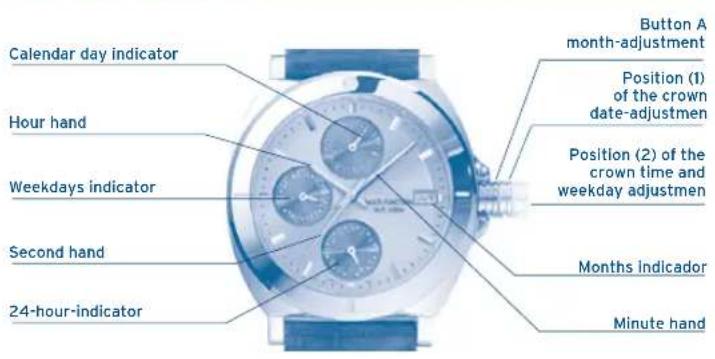
TIME ADJUSTMENT
Adjust crown to position 2 (Pull right out).
By turning the crown adjust minutes and hours to exact time.
WEEKDAY ADJUSTMENT
Adjust crown to position 2 (Pull right out).
The crown must be turned till the 24 hour limit is passed and the hand of the weekdays indicator moves further (to correct weekday).
DATE ADJUSTMENT
Adjust crown to position 1 (Pull out only one step).
Adjust date by turning the crown to the left.
ATTENTION: No date adjustment between 21:00 an 1:00
M6P27
DISPLAYS AND BUTTONS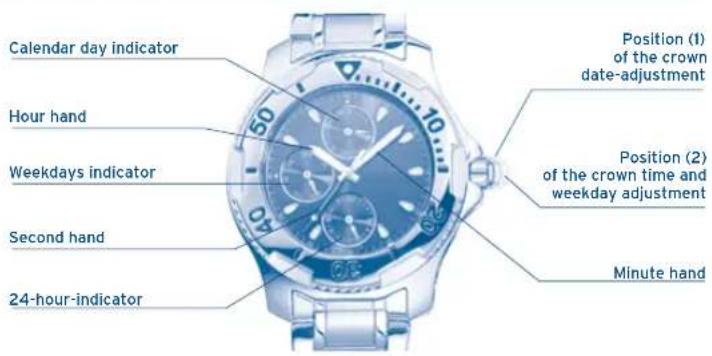
TIME ADJUSTMENT
Adjust crown to position 2 (pull right out). By turning the crown, adjust the minute, hour, and 24-hour hands to the exact time.
ATTENTION: No date adjustment between 21:00 and 01:00!
WEEKDAY ADJUSTMENT
Adjust crown to position 2 (pull right out). The crown must be turned until the 24-hour limit is passed and the hand of the weekday indicator moves further (to correct weekday).
DATE ADJUSTMENT
Adjust crown to position 1 (pull out only one step). Adjust date by turning the crown to the left.
ATTENTION: No date adjustment between 21:00 and 01:00!
M6P25
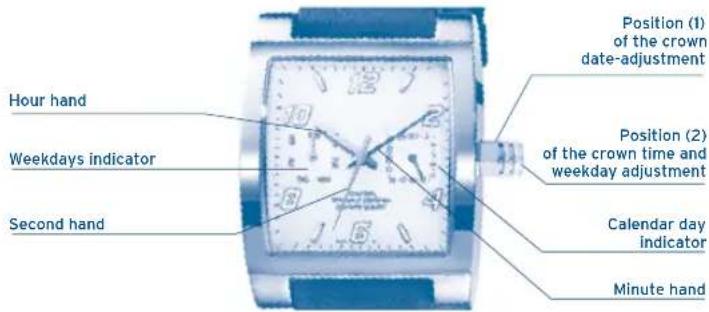
TIME ADJUSTMENT
Adjust crown to position 2 (pull right out).
By turning the crown, adjust minutes and hours to the exact time.
ATTENTION: No date adjustment between 21:00 and 01:00!
WEEKDAY ADJUSTMENT
Adjust crown to position 2 (Pull right out).
The crown must be turned till the 24 hour limit is passed and the hand of the weekdays indicator moves further (to correct weekday).
DATE ADJUSTMENT
Adjust crown to position 1 (Pull out only one step). Adjust date by turning the crown to the left.
ATTENTION: No date adjustment between 21:00 and 01:00!
M6P29/M6P79
DISPLAYS AND BUTTONS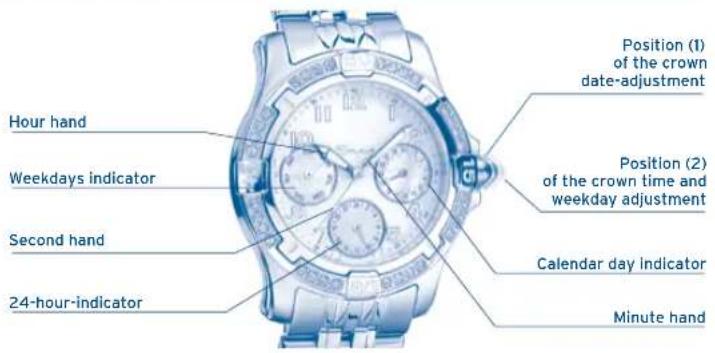
TIME ADJUSTMENT
Adjust crown to position 2 (Pull right out).
By turning the crown adjust minutes and hours to exact time.
WEEKDAY ADJUSTMENT
Adjust crown to position 2 (Pull right out).
The crown must be turned till the 24 hour limit is passed and the hand of the weekdays indicator moves further (to correct weekday).
DATE ADJUSTMENT
Adjust crown to position 1 (Pull out only one step).
Adjust date by turning the crown to the left.
ATTENTION: No date adjustment between 21:00 and 01:00!
M6P23
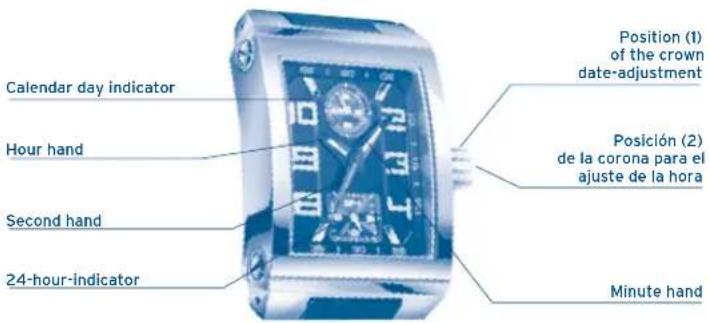
TIME ADJUSTMENT
Adjust crown to position 2 (Pull right out).
By turning the crown adjust minutes and hours to exact time.
DATE ADJUSTMENT
Adjust crown to position 1 (Pull out only one step).
Adjust date by turning the crown to the left.
ATTENTION: No date adjustment between 21:00 and 01:00!
MVX3L
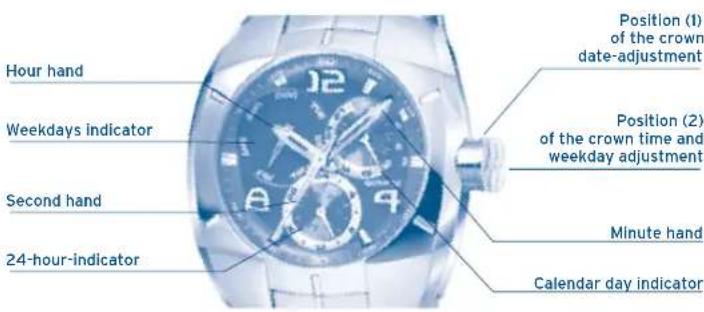
TIME ADJUSTMENT
Adjust crown to position 2 (Pull right out).
By turning the crown, adjust minutes and hours to the exact time.
WEEKDAY ADJUSTMENT
Adjust the crown to position 2 (pull it all the way out).
Turn the crown until the 24-hour limit is passed and the weekday indicator hand moves further (to correct the weekday).
DATE ADJUSTMENT
Adjust the crown to position 1 (pull out only one step).
Adjust the date by turning the crown to the right.
ATTENTION: No date adjustment between 21:00 and 01:00!
MVX3SE
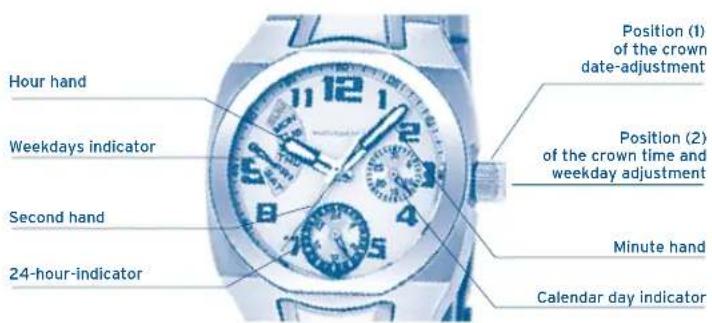
TIME ADJUSTMENT
Adjust the crown to position 2 (pull it all the way out).
By turning the crown, adjust minutes and hours to the exact time.
WEEKDAY ADJUSTMENT
Adjust the crown to position 2 (pull it all the way out).
The crown must be turned until the 24-hour limit is passed and the weekday indicator hand moves further (to correct the weekday).
DATE ADJUSTMENT
Adjust the crown to position 1 (pull out only one step).
Adjust the date by turning the crown to the left.
ATTENTION: No date adjustment between 21:00 and 01:00.
MVX3JA
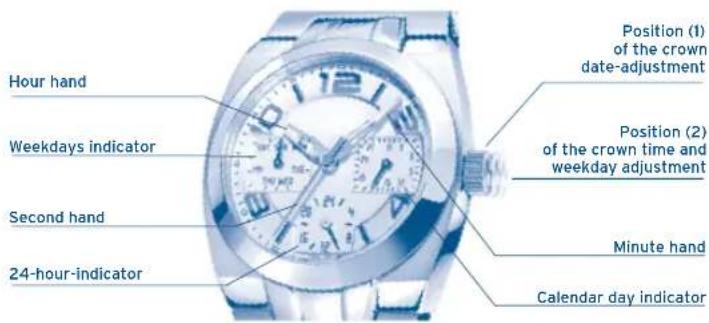
TIME ADJUSTMENT
Adjust the crown to position 2 (pull it all the way out).
By turning the crown, adjust the minutes and hours to the exact time.
WEEKDAY ADJUSTMENT
Adjust the crown to position 2 (pull it all the way out).
The crown must be turned until the 24-hour limit is passed and the weekday indicator hand moves further (to correct the weekday).
DATE ADJUSTMENT
Adjust the crown to position 1 (pull out only one step).
Adjust date by turning the crown to the left.
ATTENTION: No date adjustment between 21:00 and 01:00.
DISPLAYS AND BUTTONS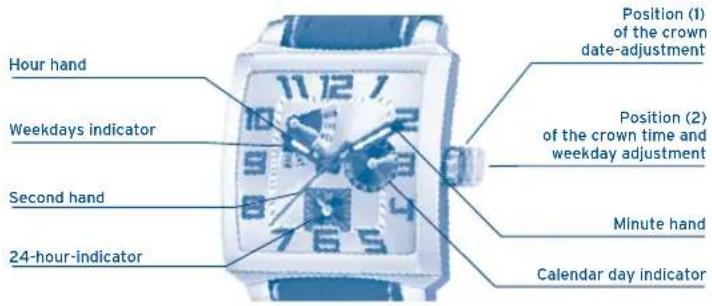
TIME ADJUSTMENT
Adjust crown to position 2 (Pull right out).
By turning the crown adjust minutes and hours to exact time.
WEEKDAY ADJUSTMENT
Adjust crown to position 2 (Pull right out).
The crown must be turned till the 24 hour limit is passed and the hand of the weekdays indicator moves further (to correct weekday).
DATE ADJUSTMENT
Adjust crown to position 1 (Pull out only one step).
Adjust date by turning the crown to the left.
ATTENTION: No date adjustment between 21:00 and 01:00.
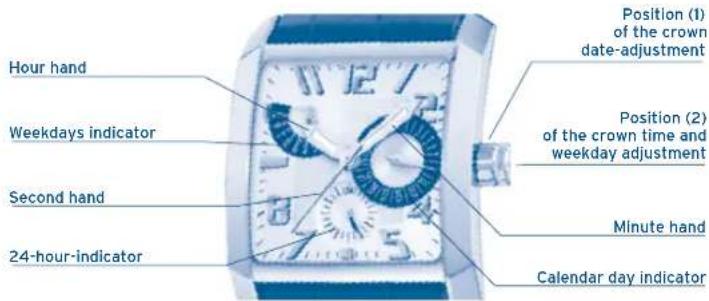
TIME ADJUSTMENT
Adjust crown to position 2 (Pull right out).
By turning the crown adjust minutes and hours to exact time.
WEEKDAY ADJUSTMENT
Adjust crown to position 2 (Pull right out).
The crown must be turned till the 24 hour limit is passed and the hand of the weekdays indicator moves further (to correct weekday).
DATE ADJUSTMENT
Adjust crown to position 1 (Pull out only one step).
Adjust date by turning the crown to the left.
ATTENTION: No date adjustment between 21:00 and 01:00.
MGPO3
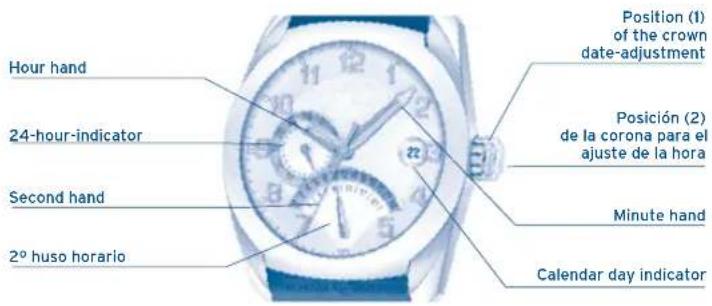
TIME ADJUSTMENT
Adjust crown to position 2 (Pull right out).
By turning the crown, adjust the minutes and hours to the exact time.
DATE ADJUSTMENT
Adjust the crown to position 1 (pull out only one step).
Adjust the date by turning the crown clockwise.
2ND TIMEZONE ADJUSTMENT
Adjust the crown to position 1.
Adjust the 2nd timezone by turning the crown counterclockwise.
MVX46
DISPLAYS AND BUTTONS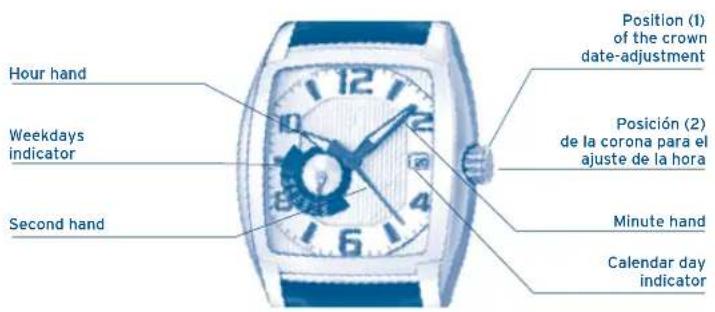
TIME ADJUSTMENT
Adjust the crown to position 2 (pull it all the way out).
By turning the crown, adjust the minutes and hours to the exact time.
WEEKDAY ADJUSTMENT
Adjust the crown to position 1 (pull out only one step).
Adjust the weekday by turning the crown clockwise.
DATE ADJUSTMENT
Adjust crown to position 1 (Pull out only one step).
Adjust date by turning the crown anti-clockwise.
ATTENTION: No date adjustment between 21:00 and 1:00.
IF MULTIFUNCTION
INSTRUCTION MANUAL
Instructions M6P89 / M6P77 58
Instructions M6P27 60
Instructions M6P25 62
Instructions M6P29 / M6P79 64
Instructions M6P23 66
Instructions MVX3L 68
Instructions MVX3SE 70
Instructions MVX3JA 72
Instructions MVX3T 74
Instructions MVX3TE 76
Instructions MGP03 78
Instructions MVX46 80

By virtue of the regulations pursuant to the handling of waste products deriving from electronic and electrical equipment, end of lifecycle watch making products must be selectively collected for processing. You may
therefore dispose of your quartz watch making products at any of our retail outlets or any other authorized collection point. The selective collection, processing, rating and recycling of these products helps contribute to safeguarding the environment and protecting our health.
M6P89/M6P77
DISPLAY AND BUTTONS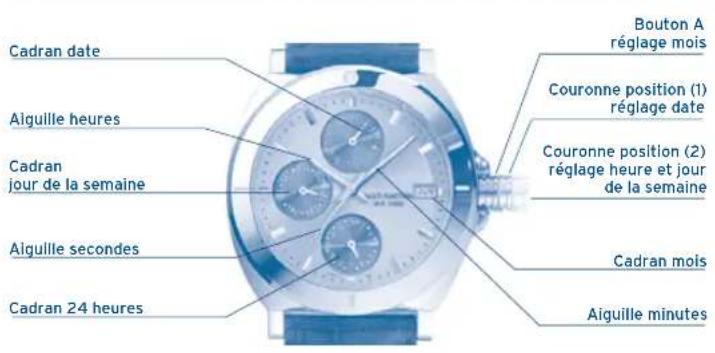
2ND TIMEZONE ADJUSTMENT
MANUAL DE INSTRUÇÕES