SA3400 - Server SYNOLOGY - Free user manual and instructions
Find the device manual for free SA3400 SYNOLOGY in PDF.


| Product Type | 12-bay Rack Server |
| Dimensions (H x W x D) | 88 x 482 x 724 mm (with rails) / 88 x 430.5 x 692 mm (without rails) |
| Weight | 14.5 kg |
| Power Supply | 2 redundant 500 W modules (optional) |
| Maximum Raw Capacity | 192 TB (12 x 16 TB drives) / 1,536 TB with 7 RX1217sas expansion units |
| Compatible Drives | SATA/SAS 3.5" or 2.5" |
| LAN Ports | 4 x 1GbE RJ-45 + 2 x 10GBase-T RJ-45 |
| USB Ports | 2 x USB 3.0 |
| SAS Port | 1 x SAS OUT |
| PCIe Slots | 2 x Gen3 x8 |
| Memory (max) | 128 GB (4 slots DDR4 RDIMM) |
| Supported RAID Types | Basic, JBOD, RAID 0, 1, 5, 6, 10, Synology RAID F1 |
| File Systems | Internal: Btrfs, ext4; External: Btrfs, ext4, ext3, FAT, NTFS, HFS+, exFAT |
| HDD Hibernation | Yes |
| Wake on LAN | Yes |
| Operating Temperature | 0 to 35 °C |
| Fans | 4 replaceable system fans |
| Maintenance and Cleaning | Unplug before cleaning, use a damp cloth, avoid chemicals and aerosols. |
| Safety | Avoid direct light, chemicals, unstable surfaces, and liquids. Unplug all cords to cut power. |
| Spare Parts Available | Memory modules, PCIe cards, RX1217sas/RX2417sas expansion units, fans, power supplies, drive trays, rail kits. |
Frequently Asked Questions - SA3400 SYNOLOGY
User questions about SA3400 SYNOLOGY
0 question about this device. Answer the ones you know or ask your own.
Ask a new question about this device
Download the instructions for your Server in PDF format for free! Find your manual SA3400 - SYNOLOGY and take your electronic device back in hand. On this page are published all the documents necessary for the use of your device. SA3400 by SYNOLOGY.
USER MANUAL SA3400 SYNOLOGY
natural_image
Front view of a server rack with labeled components (a and b) and an inset image showing a monitor, no readable text or symbols present.natural_image
Diagram showing a computer hard drive being processed into a rack-mounted device (no text or symbols present)natural_image
Diagram showing a device being processed from a black plastic housing, with no visible text or symbols.natural_image
Front view of a server rack with multiple drive bays and a blue arrow pointing to a portion of the rack (no visible text or labels)natural_image
Front view of a server rack with multiple drive bays and a highlighted internal component (no visible text or labels)natural_image
Front view of a rack-mounted server unit with numbered ports (1–12) on its side, no visible text or symbols beyond component numbers.natural_image
Two views of a server rack showing internal components and a close-up of the back panel (no text or symbols visible)natural_image
Close-up of a blue circuit board with a green RAM module and two blue circular annotations pointing to the left side (no readable text or symbols)a
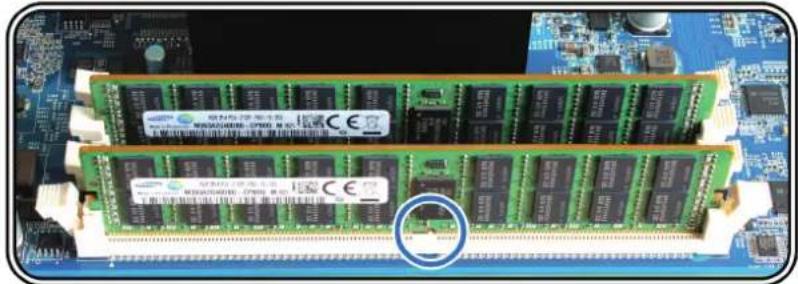
natural_image
Close-up of a computer RAM module with visible slots and circuit board (no readable text or symbols)b
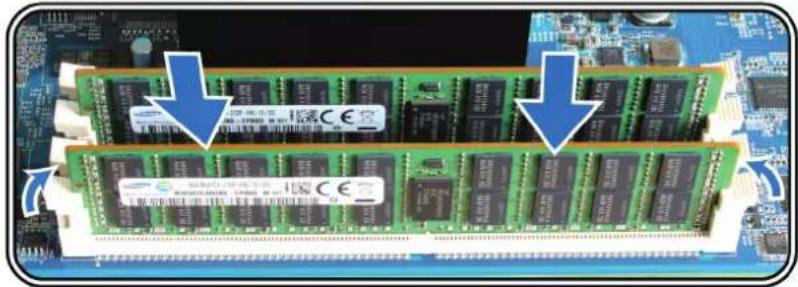
natural_image
Close-up of a blue circuit board with multiple RAM chips and a highlighted memory card (no readable text or symbols)C
natural_image
Exterior view of a server rack with internal components and a magnified inset showing a cable or connector detail (no text or symbols visible)natural_image
Two views of a computer motherboard showing a screwdriver and a close-up of the circuit board (no text or symbols visible)natural_image
Close-up of a computer motherboard with a highlighted component (no visible text or symbols)natural_image
Hand holding a metallic rack with a blue arrow indicating direction (no text or symbols visible)natural_image
Diagram of a computer monitor with an open rear panel and a magnified view showing internal components (no text or symbols)natural_image
Hand holding a network switch device with blue directional arrows indicating data transfer (no text or symbols visible)natural_image
Server rack with multiple drive bays mounted on a black rack, no visible text or labelsnatural_image
Hands installing a rack-mounted server rack into a server cabinet (no visible text or labels)natural_image
Front view of a server rack with front panel, drive bays, and a close-up inset showing a black drive component (no visible text or symbols)natural_image
Back view of a network equipment rack with ports and connectors, showing two circular insets highlighting internal components (no text or symbols visible)natural_image
Front view of a rack-mounted server with multiple drive bays and two blue directional arrows indicating orientation (no text or symbols visible)natural_image
Front view of a server rack unit with multiple drive bays and an open top panel, showing two blue arrows pointing to the rack (no text or symbols visible)natural_image
Exterior view of a computer tower with ventilation ducts and a blue arrow indicating direction (no text or symbols)natural_image
Close-up of a computer tower with fan blades and ventilation system, showing a magnified inset of the next component (no text or symbols visible)SYNOLOGY, INC. GARANTIE PRODUIT LIMITÉ E
CETTE GARANTIE LIMITÉE (« GARANTIE ») S'APPLIQUE AUX PRODUITS (DÉFINIS CI-APRÈS) DE SYNOLOGY, INC. ET DE SES FILIALES, Y COMPRIS SYNOLOGY AMERICA CORP, (COLLECTIVEMENT, « SYNOLOGY »). VOUS ACCEPTEZ ET RECONNAISSEZ VOUS SOUMETTRE AUX TERMES DE CETTE GARANTIE EN OUVRANT ET/OU EN UTILISANT L'EMBALLAGE CONTENANT LE PRODUIT. VEUILLEZ NOTER QUE CETTE GARANTIE LIMITÉE NE S'APPLIQUE PAS AU LOGICIEL CONTENU DANS LES PRODUITS QUI SERA SOUMIS À SON PROPRE CONTRAT DE LICENCE D'UTILISATEUR FINAL ET QUE SYNOLOGY SE RÉSERVE LE DROIT D'AJUSTER ET/OU DE MODIFIER LA PRÉ SENTE GARANTIE PRODUIT DE TEMPS À AUTRE SANS AVIS PRÉALABLE. SI VOUS N'Ê TES PAS D'ACCORD AVEC LES TERMES DE CETTE GARANTIE, N'UTILISEZ PAS LE PRODUIT. AU LIEU DE CELA, VOUS POUVEZ RENVOYER LE PRODUIT AU REVENDEUR CHEZ QUI VOUS L'AVEZ ACHETÉ POUR VOUS FAIRE REMBOURSER, EN RESPECT DE LA POLITIQUE DE RETOUR APPLICABLE AUX REVENDEURS. VEUILLEZ NOTER QUE LA PRISE EN CHARGE INCLUSE DANS LA GARANTIE DE SYNOLOGY N'EST PAS DISPONIBLE DANS TOUS LES PAYS ET QUE SYNOLOGY PEUT REFUSER DE VOUS FOURNIR CETTE PRISE EN CHARGE PAR LA GARANTIE LIMITÉE SI VOUS FAITES UNE DEMANDE DE PRISE EN CHARGE DANS UN PAYS DIFFÉRENT DU PAYS DANS LEQUEL LE PRODUIT A ÉTÉ INITIALEMENT ACHETÉ. LE PAYS DANS LEQUEL LE PRODUIT A É TÉ INITIALEMENT ACHETÉ SERA DÉTERMINÉ EN FONCTION DES ARCHIVES INTERNES DE SYNOLOGY.
Section 1. Produits
FCC Declaration of Conformity
This device complies with Part 15 of the FCC Rules. Operation is subject to the following two conditions: (1) this device may not cause harmful interference, and (2) this device must accept any interference received, including interference that may cause undesired operation.
Safety Instructions - Rack Mount
A) Elevated Operating Ambient -
If installed in a closed or multi-unit rack assembly, the operating ambient temperature of the rack environment may be greater than room ambient. Therefore, consideration should be given to installing the equipment in an environment compatible with the maximum ambient temperature (Tma) specified by the manufacturer.
B) Reduced Air Flow –
Installation of the equipment in a rack should be such that the amount of air flow required for safe operation of the equipment is not compromised.
C) Mechanical Loading –
Mounting of the equipment in the rack should be such that a hazardous condition is not achieved due to uneven mechanical loading.
Consideration should be given to the connection of the equipment to the supply circuit and the effect that overloading of the circuits might have on overcurrent protection and supply wiring. Appropriate consideration of equipment nameplate ratings should be used when addressing this concern.
E) Reliable Earthing –
Reliable earthing of rack-mounted equipment should be maintained. Particular attention should be given to supply connections other than direct connections to the branch circuit (e.g. use of power strips).

Brand : SYNOLOGY
Model : SA3400
Category : Server