
SRU510 - Universal remote PHILIPS - Free user manual and instructions
Find the device manual for free SRU510 PHILIPS in PDF.
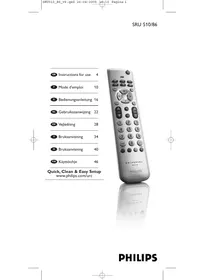


| Product type | Universal remote control |
| Brand | Philips |
| Model | SRU510 |
| Dimensions (approx.) | 170 x 45 x 25 mm |
| Weight (approx.) | 60 g (without batteries) |
| Power supply | 2 AAA 1.5 V batteries |
| Low battery indicator | The LED flashes 4 times after each press |
| Main functions | TV control (standby, volume, channels, menu, teletext, AV input) |
| Automatic programming | Code search by pressing standby button |
| Manual programming | Enter a 4-digit code |
| Number of stored codes | Multiple TV codes (not specified) |
| Special keys | Shift for secondary functions, color teletext keys |
| Factory reset | Press keys 1+6 then 9-8-1 |
| Range (approx.) | 10 meters |
| Care and cleaning | Clean with a soft dry cloth |
| Safety | Remove batteries if not used for extended periods |
| Spare parts | AAA batteries (not included) |
| General information | Manual available in multiple languages, compatible with most TV brands |
Frequently Asked Questions - SRU510 PHILIPS
User questions about SRU510 PHILIPS
0 question about this device. Answer the ones you know or ask your own.
Ask a new question about this device
Download the instructions for your Universal remote in PDF format for free! Find your manual SRU510 - PHILIPS and take your electronic device back in hand. On this page are published all the documents necessary for the use of your device. SRU510 by PHILIPS.
USER MANUAL SRU510 PHILIPS
Quick, Clean & Easy Setup
www.philips.com/urc
Contents
- Introduction 4
- Installing the remote control 4-6
Inserting the batteries 4 Testing the remote control 4 Setting the remote control 5
- Keys and functions 7
- Extra possibilities 8
Adding a function to the remote control 8 Restoring the original functions of your remote control 8
- Troubleshooting 8 6.Need help? 9
Code list of all brands / equipment 52-58
1. Introduction
Congratulations on your purchase of the Philips SRU510 universal remote control. After installing the remote control it can operate the most-used functions of almost any brand of TV.
You can find information about how to prepare this remote control for use in the chapter 'Installing the remote control'.
2. Installing the remote control
Inserting the batteries
1 Press the cover inwards and slide it in the direction of the arrow. 2 Place two AAA type batteries into the battery compartment, as shown. 3 Slide the cover back and click it firmly into place.
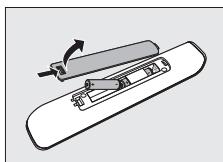
Note: If the LED blinks four times after every key press, the remote control is indicating that its batteries are running low. Replace the old batteries with two new AAA batteries.
Testing the remote control
The remote control has been programmed to operate the most-used functions of almost any brand of TV. Because the SRU510 may use different signals for each make and even for different models of the same brand, it is advisable to test whether your TV responds to the SRU510.
The example below instructs you how to do this.
1 Turn your TV on manually or use the original remote control. Tune to channel 1. 2 Check whether all the keys are working. For an overview of the keys and their functions see '3. Keys and functions'. If the TV responds as it should to all of the key commands, the SRU510 is ready for use.
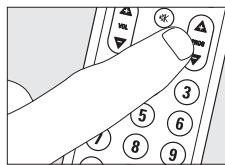
If the TV does not respond at all or not to all of the key commands, follow the instructions under
'Setting the remote control', or for online setup go to: www.philips.com/urc.
Setting the remote control
This is only necessary if your TV does not respond to the SRU510. If that is the case, the SRU510 does not recognize the brand and/or model of your TV and you need to program the remote control to do so. You can set the remote control either automatically or manually.
Automatically setting the remote control
The remote control will now automatically search for the right code for your device.
1 Make sure the TV is switched on and select a channel using the original remote control or the keys on the TV (for example channel 1). The SRU510 emits the 'switch off TV' signal for all models of TV that are stored in the memory. 2 Then keep keys 1 and 3 on the SRU510 pressed simultaneously for three seconds, until the LED flashes twice and then remains lit. 3 Press and hold the Standby key of the SRU510.
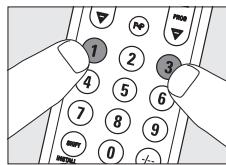
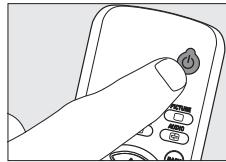
The SRU510 now starts emitting all known TV off' signals, one by one. Each time a code is sent, the LED lights up
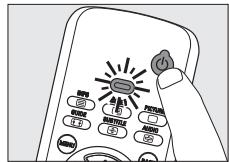
4 When your TV switches off (stand-by), release the Standby key of the SRU510 immediately. The SRU510 has now found a code that works on your TV. 5 Check if you can operate all functions on your TV with the SRU510.
If this is not the case, you can redo the automatic setting. The SRU510 will then search for a code that works better.
After the SRU510 has run through all the known codes, the search will stop automatically and the LED will stop flashing. Automatic programming of a TV takes a maximum of 5 minutes.
Instructions for use
Manually setting the remote control
1 Turn on the TV manually or use the original remote control. Tune in to channel 1. 2 Look up the brand of your TV in the code list at the back of this manual. One or more four-figure codes are shown for each brand. Note the first code.

On our website www.philips.com/urc you can directly select your device typenumber to find the right code.
3 Keep keys 1 and 3 pressed simultaneously for three seconds until the LED flashes twice and then remains lit
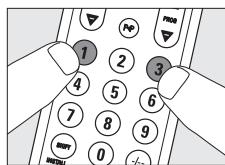
4 Then enter the code noted in step 2 using the digit keys. - The LED will now flash twice and then remains lit. The code has now been stored in the memory of the SRU510. If the LED flashes once for an extended period, the code has not been entered properly or the wrong code has been entered. Start again from step 2. 5 Point the SRU510 at the TV and check that it responds as it should. If the TV responds to all of the key commands, the SRU510 is ready for use. Do not forget to note your code. If the TV does not respond at all, or not to all of the key commands, start again from step 2 and try the next code from the list.
3. Keys and functions
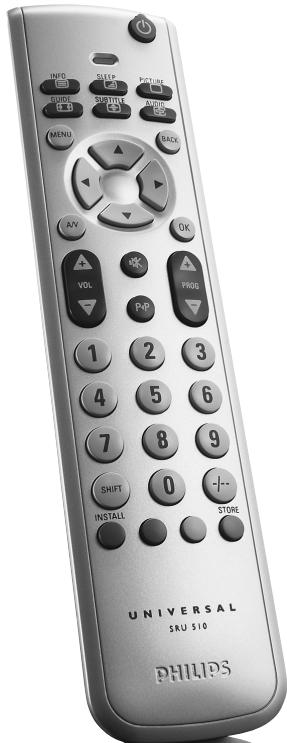
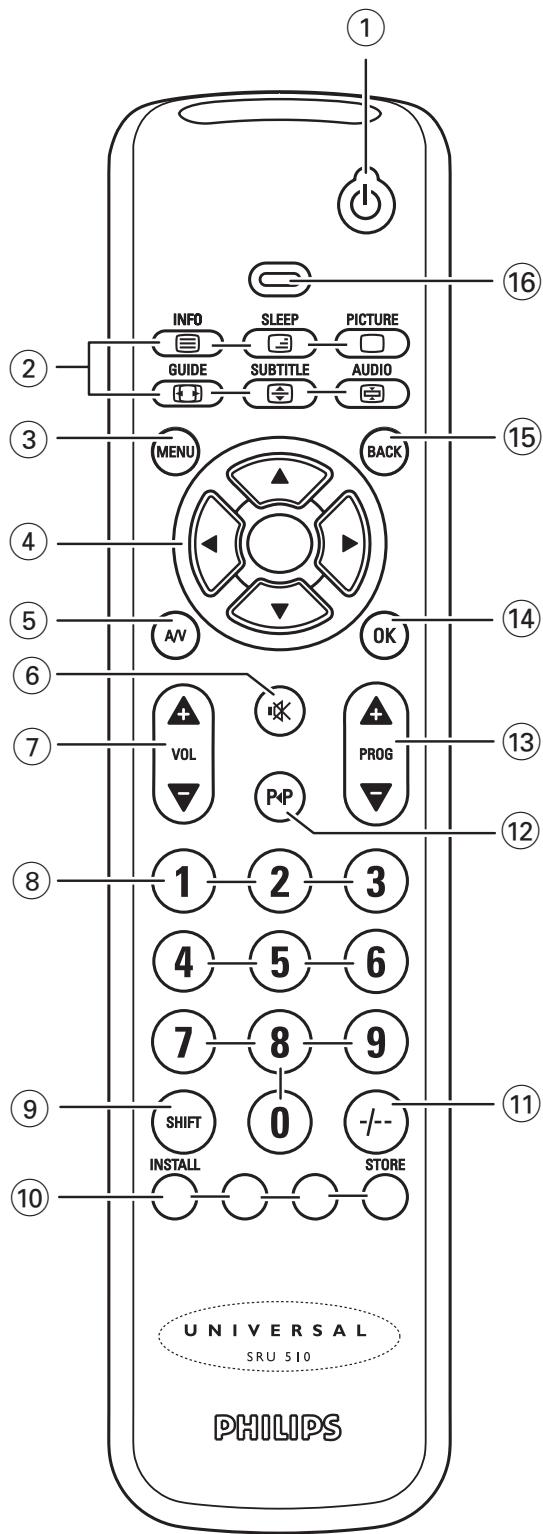
The illustration on page 3 gives an overview of all keys and their functions.
① Standby. switches the TV on or off. ②
- text mix ( );
- text off (□);
- wide screen TV (图); -enlarge (图); -text hold (圆).
(3) MENU turns the menu on and off. ④ Cursor keys: cursor up, down, left, right in a menu. (5) A/V switches between external inputs of your equipment. (6) mutes the sound of the TV. ⑦ -VOL + adjusts the TV volume. ⑧ Digit keys: direct choice of channels and other functions. 9 SHIFT: for extra functions. When pressed at the same time as a second key, the second key will get another function. All blue labelled keys can be used together with SHIFT. For example:
SHIFT + INSTALL installs your TV
SHIFT + STORE stores TV settings
Try out other combinations with the SHIFT-key on your TV in order to find out which functions are available.
Only functions featured on the original remote control are available.
10 Red, green, yellow and blue teletext keys (1) selects between one- and two-figure channel numbers. (12) P4P selects previous programme/channel. 13 - PROG + selects a previous or following channel. (14) OK confirms your selection. 15 BACK jumps back one level in the menu or turns off the menu. 16 LED
If you use the 'memory off' key to get to the next teletext page on your Philips TV, you can press the OK key for this. Also see 'Troubleshooting'.
If the device does not respond at all, or not to all of the key commands, follow the instructions under 'Setting the remote control'. It is possible that you must enter another code for the device.
4. Extra possibilities
Adding a function to the remote control
If you want to add a function to the SRU510, you can contact the Philips service line for Universal Remote Control to ask for the 5-figure code for the extra function.
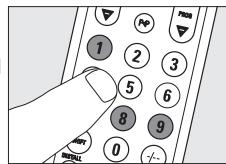
Restoring the original functions of your remote control
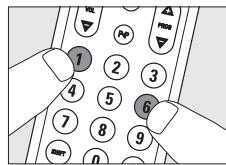
1 Keep keys 1 and 6 on the SRU510 pressed simultaneously for three seconds, until the LED flashes twice and then remains lit.
2 Press keys 9, 8 and 1, in that order
The LED flashes twice. All original functions have now been restored and any extra functions have been deleted.
5. Troubleshooting
Problem Solution The LED blinks four times after every key press. The remote control is indicating that its batteries are running low. Replace the old batteries with two new 1.5 Volt, AAA batteries. - The TV does not respond and the LED does not flash when you press a key. Replace the old batteries with two new 1.5 Volt, AAA batteries. The TV does not respond but the LED does flash when a key is pressed. - Point the SRU510 at the device and make sure that there are no obstructions between the SRU510 and the device. The SRU510 does not respond properly to commands. - Maybe you are using the wrong code. Try programming the RU510 again using another code, which is mentioned under the brand of your device, or reset for automatic search to find the right code. If the TV still does not respond, call our helpline. The Teletext keys do not work. Find out whether your TV is equipped with Teletext. You have difficulties operating all of the functions on your device. - Maybe the SRU510 has to be adapted to the model of the device. Call our helpline for details. - Your brand of device is not in the code list. Try to set the SRU510 automatically. See 'Automatically setting the remote control'. - None of the codes works during manual setting of the remote control. If that is the case, follow the instructions under 'Automatically setting the remote control'.
6. Need help?
If you have any questions about the SRU510, you can always contact us. You will find our contact details after the code list at the back of this manual. Read this manual carefully before you make a call. You can solve most of the problems yourself. If you cannot find any answers to your problems, write down the details of your device shown in the code list at the back of this manual. This will help our operators to assist you better and more quickly. Look up the numbers of the models in the instructions accompanying the device or on the back of your device. When you call our helpline, make sure the device is to hand so that our operators can help you determine whether your remote control is working properly.
The model number of your Philips universal remote control is SRU510/86.
Date of purchase:
/
(day/month/year)
User manual
Table of contents
A.R.Systems .0482,0401
Acura 0036
Admiral. 0190, 0114
Agef. 0114
Aiko .0036
Aim 0064
Aiwa. 0728
Akai. .0583,0064,0575,0741 0742,0633,0388,0036 0190,0398,0099,0507 0378,0500
Akiba .0064, 0482, 0321, 0309
Akito. 0064
Akura.0064,0741,0695,0036 0386,0309
Alba .0064,0741,06951064 0514,0063,0274,0445 0262,0398,0036,0190 0382,0458
Allorgan. 0321
Allstar. 0064
Amplivision. 0397, 0427
Amstrad00641064, 0036, 0398, 0204
Anam .0036
Anglo .0036
Anitech. 0064, 0036, 0309
Ansonic. 0695, 0397, 0131, 0036, 0319
Apollo. 0500
Arc En Ciel. 0426, 0136, 0595, 0528
Ardem. 0064, 0741
Aristona. 0583, 0064
Arthur Martin. 0190, 0427, 0264
ASA. 0114, 0131
Asberg. 0064, 0129
Asora. 0036
Atlantic. 0064, 0286
Atori. 0036
Auchan. 0427, 0190
Audiosonic. 0064, 0741, 0513, 0742, 0397, 0036, 0364, 0136, 0401
Audioton. 0513, 0397
Autovox. 0114, 0274, 0264
Awa. 0633, 0063, 0135, 0036, 0038
Axxent. 0036
Baird. 0099
Bang & Olufsen. 0114, 0592
Basic Line. 0583, 0064, 0695, 1064, 0482, 0401, 0036, 0366, 0309
Baur. 0064, 0388, 0581, 0376, 0562, 0539
Beko. 0064, 0741, 1064, 0513, 0742, 0633, 0397, 0445
Beon. 0064, 0445
Berthen. 0695
Best. 0364
Bestar. 0064, 0397, 0401
Bestar-Daewoo. 0401
Black Diamond. 1064
Black Panther. 0129
Black Star. 0274
Blacktron 0309
Blackway. 0309
Blaupunkt....0222,0063,0482,0581 0562
Blue Sky. 0583,0064,0741, .06951064,0742,0514,0482,0309
Blue Star. 0309
Bondstec. 0274
Boots 0036
BPL. 0064, 0309
Brandt. 0652, 0587, 0595, 0136, 0362, 0314, 0528, 0264, 0426
Brandt Electronic. .0595, 0528
Brandt Electronique.....0595, 0528
Brinkmann....0064, 0695, 0513, 0445
Brionvega. 0114
Bruns .0114
Bush.....0583,0064,0741,06951064, .0725,0514,0388,0063, .0262,0376,0398,0321, .0309,0382,0036,0401
Carad. 06951064, 0637
Carena. 0064, 0482
Carrefour .0063
Cascade. 0064, 0036
Casio. 0064
Cathay. 0064
CCE .0064
Centrum 1064
Centurion. 0064
Century 0114,0274,0265
CGE. 0397, 0274, 0445
Cimline. 0036
City 0036
Clarivox .0064
Clatronic.0064,0741,0397,0036 0274,0129,0398
Clayton. 1064
Concorde. 0036
Condor.0064,0397,0274,0445 0036,0309
Contec. 0064, 0063, 0036
Continental Edison. 0514, 0426 0595, 0314, 0528, 0264
0136
Cosmel. 0064, 0364, 0036
Crosley. 0114, 0374, 0274
Crown.0064,0741,0513,0742 0514,0633,0397,0036 0386,0366,0445
Crystal. 0458
CS Electronics. 0274
CTC. 0274
D-Vision. .0583, 0064
Daewoo.0583,0064,06611936 0036,04011164
Dansai .0064,0063,0036
Dantax. .0741,0742
Dawa. 0064
Dayton .0036
Elbe. .0637,0462,0319,0286 0265
Elekta. 0309
ELG. 0064
Elin .0064,0575,0388,0131 0036,0376
Elman. 0129
Elta .0458, 0036
Emco. 0274
Emerson. .0064, 07411936, 0513, .0388, 0397, 0204, 0114, .0309, 0398, 0274
Emperor. 0309
Erres .0064
ESC .0064
Etron. 0190, 0036
Euroman .0064,0397
Europa. 0064
Europhon. .0129,0458
Expert. 0427, 0286, 0190
Exquisit. 0064, 0274
Fenner. 0036, 0401
Ferguson.....0064, 0652, 0575, 0587
0136,0362,0314,0265 0388,0135,0131,0583
Fidelity.0064,0388,0398,0190 0539
Finlandia.0575,0373,0190,0099 0386
Finlux.0064,0741,0742,0131 0374,0519,0129,0373 .0507,0114,0132,0500 .0099
Firstline0583,0064,0741,06951064, 0388,0265,0376,0036, 0262,0321,0401,0099 .0274
Fisher. .0397, 0063, 0131, 0114, .0099
Flint. 0064, 0637, 0482, 0099
Frontech. 0036, 0458, 0274, 0190 Fujitsu. 0036, 0286, 0099
Fujitsu General. 0036
Funai. 0695, 0321
Galaxi. 0064
Galaxis. 0064, 0397
GBC. 0401, 0036
GE. 0652, 0309
Geant Casino. 0427
GEC. 0064, 0388, 0190, 0099
Geloso. 0401, 0374, 0036
General Technic. 0036
Genesis. 0036
Genexxa. 0064, 0036, 0190
Goldfunk. 0695
GoldStar .0064,0741,0742,0633 0388,0274,0458,0190 0317,0136
Gooding. .0514
Goodmans...0583,0064,0741,0587 0695,066119361064,0514 .0063,0398,0362,0507 0262,0401,0036,0099
Gorenje. 0397
Graetz. 0514, 0388, 0366, 0398, 0190, 0374
Granada.0064,0575,0587,0135 0253,0366,0386,0099 0383,0500,0190,0378 .0427
Grandin0064,0741,06951064,0742 0637,0482,0190,0401 .0036,0309
A
Grundig....0583,0064,0222,0514 0063,0614,0264,0581 0036,0562
Haier. 0725
Hanimex .0321
Hanseatic.0583,0064,0741,0661 0388,0309,0458,0114 0321,0036
Hantarex.....0064,0036,0265,0129
Hantor. 0064
Harwood. 0064, 0514, 0036
Hauppauge. 0064
HCM. 0064, 0036, 0445, 0309
Hema. 0036
Hemmermann. 0376
Hifivox. 0426, 0136, 0595, 0528
Highline. 0064
Hinari. 0064, 0063, 0036, 0262, 0382, 0321
Hisawa. 0741, 0637, 0482, 0309, 0427
Hisense. 0535
Hit. 0114
Hitachi. 0064, 0575, 0661, 1064, 1164, 0063, 0135, 0252, 0383, 0132, 0519, 0190, 0376, 0099, 0507, 0136, 0374, 1252, 0500
Hitachi Fujian. 0135
Hitsu. 0637, 0482, 0036
HMV. 0114
Home Electronics. 0633
Hornyphon. 0064
Hoshai. 0309
Huanyu. 0401
Hyper 0274,0036
Hypson 0064,0741,0695,1064,0742,0482,0309,0427
H'her. .0741
Iberia. .0064
ICE 0398
Imperial.0064,0397,0445,0274,0458
Indesit. 0264
Indiana. 0064
Ingelen.0741,0637,0514,0190
Ingersoll. 0036
Inno Hit. 0099, 0309, 0036, 0274, 0129, 0317
Interbuy .0064, 0274
Internal. 0064
Intervention....0064, 0513, 0514, 0482
0036,0274,0129,0458,0309
IR. .0583,0064,0222,0388
0397,0063,0135,0252
0253,0264,0386,0314
0401,0321,0562,0114
0262,0383,0132,0274
0038,0190,0319,0539
0099,0378,0131,0265
0136,0317,0528,0376
0581,0129
Irradio.0064,0398,0036,0317
0274
Isukai. .0064, 0482, 0309
ITS. 0064,0398,0309
ITT. 0575, 0637, 0388, 0500
0190,0374,0373,0378
0507,0366,0376
ITT Nokia....0575, 0637, 0633, 0388
0507,0373,0378,0500
0366,0376,0458,0190
0374
ITV. 0064, 0401, 0274
Jean. .0063
JMB. 0583, 0661
Jubilee. 0583
JVC. 0633,0063,0680,0445
0398
Kaisui. 0064, 0482, 0036, 0309
Kapsch. 0388, 0190, 0131
Karcher. 0741, 0637, 0309
Kathrein. 0583
Kawa. 0398
KB Aristocrat. 0190, 0374
Kendo. 0064, 0637, 0129, 0321
0274, 0262
Kennedy. 0462, 0190
Kiton. 0064, 0695
Kneissel. 0583, 0064, 0637, 0265
0401, 0319, 0286, 0462
Kolster. 0129, 0376, 0274
Konka. 0064, 0741, 0614, 0445
0398
Kontakt. .0514
Korpel .0064
Korting. 0114
Koyoda. 0036
Kraking. 0265
Kuba. 0376
Kyoshu. .0445
Kyoto. 0190
L&S Electronic. .0741
LaSAT .0513
Leader .0036
Leccson .0064
Lenco. .0064,0401
Lenoir. .0036
Lesa. 0274
Leyco .0064,0321,0099
LG .0274,0317,0741,0742, .0725,0136,0583,0064, .0458,0190
Liesenk & Tter 0064
Liesenkotter. 0064
Lifetec .0064,0741,069510641164 0401,0036
Lloyd's .0036
LME. 0458
Loewe. 0397, 0064, 0539, 0319, .0114
Logik. 0398, 0038
Logix. 0695
Luma. 0286
Lumatron.0064,0286,0190
Lux May. 0064, 0036
Luxor....05751064,0388,0507,0190 0376,0500,0317,0264,0383
M electronic 0064,0741,0661,0131, .0274,0401,0539,0190, .0190,0376,0036,0519, .0132,0373,0507
Madison. 0064
Magnadyne.....0374, 0274, 0129, 0114
Magnafon .0129
Magnavox. .0063, 0038
Magnum .0064,0741,0742
Manesth .0064, 0321, 0262
Manhattan 0064,06951064
Marantz. 0583, 0064, 0883
Marelli. 0114
Mark. 0064, 0741, 0742, 0036, .0401
Masuda. 0036
Matsui..0583,0064,0741,02221064, .0514,0063,0482 .0190,0262,0038,0382 ,.0099,0036,0362,0458 .0204,0321,0398
Mediator .0064
Medion..0741,06951064,07251164 0539,0583,0064
Megas. .0637
MEI 1064
Melvox. 0427
Memorex. 1064, 0036
Memphis. 0364
Mercury. 0064, 0036
Metronic. 0652
Metz. 0064, 0695, 0614, 0114, 0562, 0474, 0394, 0581
Micromaxx. 0064, 0695, 1064
Minato. 0064
Minerva. 0514, 0135, 0264, 0581, 0562
Minoka. 0064, 0386
Mitsubishi. 1064, 0063, 0135, 0114, 0539, 0264, 0562, 0583, 0064
Mivar. 0317, 0636, 0319, 0397
Monaco. 0036
Morgan's. 0064
MTC. 0397,0376,0539
MTlogic. 0741
Multistandard. 0129
Multitec. 0064, 0695, 1064, 0513
Multitech. 0064, 0513, 0274, 0129, 0036
Murphy. 0190
Musikland. 0274
Myryad. 0583
NAD. 0388
Naiko. 0064, 0633
NAT. 0253
National. 0253, 0264, 0267
NEC. 0063, 0482, 0038, 0036, 0401, 1731
Neckermann. 0583, 0064, 0397, 0274, 0445, 0114, 0376, 0581
NEI. 0064, 0458, 0398, 0364
Nesco .0274
Netsat. 0064
Network. 0364
Neufunk.0583,0064,0741,0637 0036
New Tech. 0583, 0064, 0036
Nikkai..0064, 0063, 0364, 0036, 0099
Nobliko. 0129
Nogamatic....0136, 0595, 0528, 0426
Nokia. 0575, 0637, 0633, 0388, 0386, 0500, 0373, 0378, 0401, 0366, 0376, 0190, 0507, 0374
Nordmende.0064,0741,0587,0222 0528,0136,0426,0595 0314
Normerel .0064
Novatronic. 0064, 0401, 0132
Oceanic.0575,0388,0374,0500 0190,0427
Okano. 0064, 0397, 0036
Onimax. 0741
Onwa. 0398, 0129
Opera. 0064
Orbit. 0064
Orion. 0741, 0129, 0321, 0262, 0038, 0204, 0382, 0583, 0064
A
Online. 0064
Ormond. 0695, 1064
Osaki. 0401, 0382, 0099, 0583, 0064
Osio. 0064, 0317
Osume. 0064, 0063, 0099
Otto Versand. 0388, 0063, 0253, 0374, 0539, 0321, 0136, 0581, 0274, 0376, 0562, 0262, 0583, 0064
Pacific. 0583, 0741, 1064, 1164
Palladium. 0064, 0741, 0397, 1164, 0376, 0274, 0445
Palsonic. 0064, 0725, 0445
Panama. 0064, 0274
Panasonic. 0677, 0575, 0388, 0064, 0253, 0267, 0264, 0378, 0374, 0394, 0190
Panavision. 0064
Pathe Cinema. 0427, 0265, 0190, 0458
Pathe Marconi. 0426, 0264, 0595, 0528
Pausa. 0036
Perdio. 0064, 0309, 0190, 0099
Perfekt. 0064
Pershin. 0427
Philco. 0064, 0397, 0445, 0274, 0114
Philex. 0378
Philips. 0632, 0581, 0583, 0064, 0388, 0359, 0036, 0265, 0401, 0114
Phoenix. 0064, 0513, 0114
Phonola. 0064, 0114
Pioneer. 0064, 0513, 0388, 0314, 0539, 0190, 0136
Pionier. 0513, 0397, 0388, 0136, 0064
Plantron .0064,0036
Playsonic.....0064,0741,0742,0366
Policom. 0595, 0528
Poppy .0036
Portland .0401
Powerpoint .0064, 0514
Prandoni-Prince 0388
Prinston 1064
Prinz. 0388, 0099, 0376
Profex. 0388, 0036, 0190
Profi .0036
Profitronic. 0064, 0129
Proline. 0064, 0652, 0661, 0099
Prosonic.0064,0741,0695,0397 0401,0398
Protech. 0064, 06951064, 0513
0445,0364,0036,0274 0458,0129
ProVision. 0583, 0064, 0741
Pye .0583,0064,0376,0114 0581,0401
Pymi. .0036
Quadra Vision. .0427
Quasar .0274,0036
Quelle .0064,0695,0388,0131 0562,0539,0038,0581
Questa. 0063
R-Line .0064
Radialva. .0458, 0364
Radiola .0583,0064
Radiomarelli. 0064, 0114
RadioShack. 0064
Radiotone.0064, 06951064, 0036
Rank Arena. 0063
RCA. 0652
Recor. 0064
Rectiligne 0064
Rediffusion...0575,0388,0063,0378 0373
Reflex. 0064, 06951064
Reoc. 0741
Revox .0064
Rex. .0286,0190
RFT. 0064,0114,0099
Roadstar.0064,06951064,0309 0036,0445
Robotron. 0114
Rowa. 0725
Royal Lux. 0397,0362
Saba. 0652, 0575, 0741, 0587, 0388, 0190, 0374, 0528, 0136, 0595, 0362, 0426, 0114, 0314
Saccs .0265
Sagem .0637,0482
Saisho .0204,0038,0458,0036 0262
Saivod. 0064, 06951064
Sakan. 0190
Salora .0575,0388,0190,0383 0507,0376,0317,0386
Salsa .0362
Sambers .0129
Samsung.0397,0614,0036,0190 0839,0729,0671,0099 0317,0583,0064
Sansui. 0064
Santon .0036
Sanyo .0397,0063,0135,0099 0366,0038,0131
SBR. 0583, 0064
Schaub Lorenz.....0575,0741,0513
0633,0388,0401,0374
Schneider. .0741, 06951064
Scotland .0190
Seaway. .0661
Seelver. 1064
SEG.....0064,0695,06611064,0063
0036,0129,0376
SEI .0064,0129,0321,0114
.0204,0376,0190,0374
Sei-Sinudyne.0064, 0114, 0374, 0321,
0129
Seleco.0373,0462,0286,0398
0190,0374
Sencora. 0036
Serino. 0637,0482
Sharp. 00631220, 0321, 0384
Shintoshi .0064
Shivaki .0064
Shorai .0321
Siarem .0129,0114,0374
Siemens.0064,0222,0581,0562
0374
Siesta .0397
Silva. 0064,0388
Silva Schneider .0064
Silver. 0742, 0388, 0063
Singer .0064,0129,0114,0462
0362,0036
Sinudyne.....0064,0388,0204,0374
0190,0321,0129,0262
0376,0114
Skantic. 0383
SKY. .0064
SLX .0695
Smaragd .0514
Solavox.0064,0575,0388,0378
0190,0099
Soniko. 0064
Sunkai.0637,0514,0482,0382
.0321
Sunstar .0064,0036,0398
Sunwood. .0064
SuperTech. 0583, 0064, 0036
Supra. .0036
Susumu. 0362, 0314
Sutron. 0036
SVA .0614
Swissline. 0274
Systline. .0064
T+A. .0474
Tandberg. 0394
Tandy. 0099, 0190
Targa. .0729
Tashiko. 0063, 0190, 0386
Tatung. 0064, 0038, 0099
TCM. .0741
Teac. 0064, 0695, 0725, 0482
1.0036,0458,0376,0539
Tec. 0064, 0286, 0274, 0364
0036
Tech Line. 0064, 0695
Technics .0583,0677
TechniSat. .0583
Tecnimagen. .0583
Tedexel. .0458,0036
Teleavia.0426, 0595, 0528, 0517
Telecor. 0064, 0286, 0190
Telefunken....0064, 0652, 0587, 0513
0362, 0517, 0595, 0314,
0136,0373,0528
Telefusion. 0064
Telegazi. 0064, 0190, 0286
Telesonic. 0064
Telestar .0583,0064
Teletech. 0064, 06951064, 0274,
0036, 0364
Teleton. 0063, 0376, 0286
Televideoon. 0190
Teleview. 0064
Televiso. 0427
Temco. 0321
Tempest 0036
Tennessee 0064
Tensai. 0064, 0742, 0274,
0401, 0036, 0132, 0398
0131, 0321
Tenson. 0036
Tevion.....0064, 0741, 069510641164
Texet. 0401, 0036
A
Thomson.....0652,0587,0517,0595 0314,0426,02641474,0376 0528,0136,0362,0064
Thorn. .0064,0388,0063,0136 0386,0562,0131,0362 0539,0099,0265
Thorn-Ferguson. 0265 Tokai.0064, 06951064, 0099, 0401, 0364, 0036, 0190
Tokaido 1064
Tomashi. 0309 Toshiba. 0741, 0222, 0063, 0677, 0535, 01361535, 0129, 0517
Toyoda. 0036
Trans Continens.....0064,06951064
Transonic. 0064, 0614, 0036
Triumph .0583,0204,0373
Tsoschi. 0309
TVTEXT 0095,0583
Uher.0064,0513,0401,0507 0445
Ultravox.0064,0274,0129,0114 0378
Unic Linie. .0064,0482
United .0064,0741,0742
Universal. 0064
Universum....0064,06951064,0388 0397,0063,0519,0321 .0562,0132,0507,0317 0539,0038,0131,0500 .0274,0528,0036,0373 .0581,0445,0204
Univox. .0064, 0364, 0190, 0114
Vestel. 0583, 0064, 06951064
Vexa .0064,0036
Videosat. 0274
VideoSystem .0064
Videoton. 0383
Vision. 0064
Vortec. 0064
Voxson .0190,0114,0445
Waltham.0064,06951064,0190 0458,0136,0445,0383 .0517
Watson.0064, 06951064, 0190, 0036
Watt Radio. 0129
Wega .0064,0063,0114
Wharfedale .0583,0064
White Westinghouse.....0364, 0064
Windsor .06951064
Windstar. 0364, 0309
Windy Sam. 0583
Xenius. .0661
Xrypton. .0064
Yamaha .0677
Yamishi. 0064, 0482, 0309
Yokan. 0064
Yoko. 0064,0458,0036,0366 0274
Zanela. 0265
Zenor. 0366

Note your codes!
TV
Equipment
Brand
Model number
Number of original remote
Code
Helpline

Country
Belgium
Denmark
France
Germany
Spain
Elambdavac
Ireland
Italy
Luxembourg
Netherlands
Norway
Austria
Portugal
Finland
Sweden
Switzerland
United Kingdom
Phone number
070 253 011
35258758
0891650007
01805007533
902 889 343
0080031221219
016011158
199 404 043
4066615645
0900 0400 062
22708258
0820 901116
21359 1441
0922948258
087505196
012120045
0906 1010 018
Tariff
€ 0.17
Local tariff
€ 0.23
€ 0.12
€ 0.15
Local tariff
Local tariff
€ 0.25
Local tariff
€ 0.20
Local tariff
Local tariff
Local tariff
Local tariff
Local tariff
Local tariff
£ 0.15
Guarantee certificate Certificate de garantie Garantiebewijs Zaručni list


- CONTENTS
- INTRODUCTION
- INSTALLING THE REMOTE CONTROL
- INSERTING THE BATTERIES
- TESTING THE REMOTE CONTROL
- SETTING THE REMOTE CONTROL
- AUTOMATICALLY SETTING THE REMOTE CONTROL
- INSTRUCTIONS FOR USE
- MANUALLY SETTING THE REMOTE CONTROL
- KEYS AND FUNCTIONS
- EXTRA POSSIBILITIES
- ADDING A FUNCTION TO THE REMOTE CONTROL
- RESTORING THE ORIGINAL FUNCTIONS OF YOUR REMOTE CONTROL
- TROUBLESHOOTING
- NEED HELP
- USER MANUAL
- TABLE OF CONTENTS
- A
- NOTE YOUR CODES
- TV
- HELPLINE
- COUNTRY
- PHONE NUMBER
- TARIFF
Brand : PHILIPS
Model : SRU510
Category : Universal remote