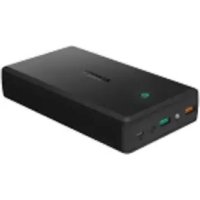
PBT11 - Power bank Aukey - Free user manual and instructions
Find the device manual for free PBT11 Aukey in PDF.



| Product type | Portable battery |
| Brand | Aukey |
| Model | PBT11 |
| Charging technology | Quick Charge 3.0 |
| USB Output 1 (Quick Charge 3.0) | DC 3.6-6.5 V 3 A, 6.5-9 V 2 A, 9-12 V 1.5 A |
| USB Output 2 (Quick Charge 3.0) | DC 3.6-6.5 V 3 A, 6.5-9 V 2 A, 9-12 V 1.5 A |
| Total output power | 39 W |
| Dimensions | 64 x 63 x 28 mm |
| Weight | 116 g |
| Power supply | Built-in rechargeable battery (capacity not specified) |
| Main functions | Fast charging of compatible devices, dual USB ports, backward compatible with Quick Charge 2.0/1.0 |
| Maintenance and cleaning | Keep away from liquids and extreme heat sources |
| Safety | Built-in overcharge protection (according to Quick Charge standards) |
| Spare parts and repairability | Not applicable (product not disassemblable) |
| General information | Package contents: portable battery, user manual, USB charging cable |
Frequently Asked Questions - PBT11 Aukey
User questions about PBT11 Aukey
0 question about this device. Answer the ones you know or ask your own.
Ask a new question about this device
Download the instructions for your Power bank in PDF format for free! Find your manual PBT11 - Aukey and take your electronic device back in hand. On this page are published all the documents necessary for the use of your device. PBT11 by Aukey.
USER MANUAL PBT11 Aukey
Dual-Port USB Turbo Charger with Qualcomm® Quick Charge™ 3.0 Technology
Contents
English 01~04
Deutsch 05~08
François 09~12
Espanol 13~16
Italiano 17~20
Thank you for purchasing the AUKEY PA-T16 Dual-Port USB Turbo Charger with Qualcomm Quick Charge™ 3.0 Technology. Please read this user manual carefully and keep it for future reference. If you need any assistance, please contact our support team with your product model number and Amazon order number.
⑧
Package Contents
Dual-Port USB Turbo Charger
User Manual
Warranty Card
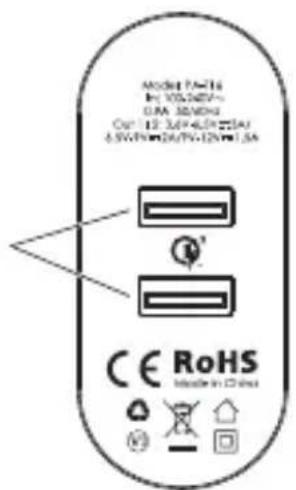
Product Diagram
USB Outputs (Quick Charge 3.0)
Specifications
| Model | PA-T16 |
| Technology | Quick Charge 3.0 |
| Input | AC 100-240V |
| USB Output 1 / 2 (Quick Charge 3.0) | DC 3.6-6.5V 3A, 6.5-9V 2A, 9-12V 1.5A |
| Total Power Output | 39W |
| Dimensions | 64 x 63 x 28mm / 2.52" x 2.48" x 1.10" |
| Weight | 116g / 4.09oz |
What is Quick Charge 3.0?
Charge compatible devices up to four times faster than conventional charging. Quick Charge 3.0 is engineered to refuel devices twice as fast as Quick Charge 1.0 and is up to 38% more efficient than Quick Charge 2.0. Backward-compatible with Quick Charge 2.0/1.0 devices.
Getting Started
- Plug the PA-T16 into a wall outlet
- Connect your charging cable to your device's charging port
- Connect the other end to an output port on PA-T16
- Unplug your device when fully charged
Q&A
How do I know if my device is Quick Charge 3.0 compatible?
For a complete list of Quick Charge-compatible devices, please visit Qualcomm's website: www.QUALCOMM.COM
Can I use the PA-T16 Quick Charge 3.0 ports with devices that don't support Quick Charge?
Yes. Quick Charge 3.0 supports multi-voltage output. You can use the PA-T16 to charge any USB-powered device, but charging speeds will be limited by original device manufacturer's specifications (e.g. you can charge an iPhone, but can't Quick Charge an iPhone).
Product Care
- Keep away from liquids and extreme heat
Warranty & Customer Support
For questions, support, or warranty claims, please contact us at the address below that corresponds with your region. Please include your Amazon order number and product model number.
Amazon US orders: support.us@aukey.com
Amazon EU orders: support.eu@aukey.com
Amazon CA orders: support.ca@aukey.com
Amazon JP orders: support.jp@aukey.com
*Please note, AUKEY can only provide after sales service for products purchased directly from AUKEY. If you have purchased from a different seller, please contact them directly for service or warranty issues.
www.aukey.com | support@aukey.com
No.102, Building P09, Electronics Trade Center
Huanan City, Pinghu Town, Longgang District
Shenzhen, Guangdong, 518111, CN


Made in China

Qualcomm Quick Charge is a product of Qualcomm Technologies, Inc.
Qualcomm is a trademark of Qualcomm Incorporated, registered in the United States and other countries. Quick Charge is a trademark of
Qualcomm Incorporated. All Qualcomm Incorporated trademarks are used with permission.

Brand : Aukey
Model : PBT11
Category : Power bank