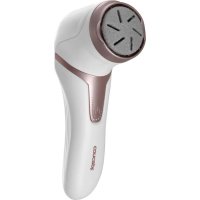
PN3000 - Electric foot care device Concept - Free user manual and instructions
Find the device manual for free PN3000 Concept in PDF.


| Product type | Electric foot file |
| Brand | Concept |
| Model | PN3000 |
| Power supply voltage | 5 V (via USB cable) |
| Battery type | Li-Ion rechargeable |
| Charging time | 2 to 3 hours |
| Operating time | 100 minutes |
| Water resistance | IPX6 (water jets) |
| Speeds | 2 speeds (slow and fast) |
| Grinding heads | 1 removable head (model PN3000) |
| Included accessories | Dust cover, cleaning brush, charging cable, protective sleeve |
| Cleaning | Rinse head and housing under running water; brush for residue |
| Maintenance | Do not use salt water, solvents, alcohol; max temperature 60 °C |
| Safety | Not recommended for diabetes, poor circulation, wounds, or irritations |
| Usage | Domestic use only; do not share heads |
| Automatic shut-off | Yes, in case of excessive force |
| Storage temperature | Between +5 °C and +35 °C |
| Repairability | Repairs by authorized center only |
| Warranty | Void if instructions not followed |
| Manual | Available free in PDF |
Frequently Asked Questions - PN3000 Concept
User questions about PN3000 Concept
0 question about this device. Answer the ones you know or ask your own.
Ask a new question about this device
Download the instructions for your Electric foot care device in PDF format for free! Find your manual PN3000 - Concept and take your electronic device back in hand. On this page are published all the documents necessary for the use of your device. PN3000 by Concept.
USER MANUAL PN3000 Concept
Electric callus remover
natural_image
Two handheld hairless devices, one white and one black, with no visible text or symbols on the device body.PN3000/ PN3020
CZ HU LV ENSK PL
DE FR IT ES RO
(obr.2 pro PN3020) (fig.2 for PN3020)
concept
CZ
Poděkování
Thank you for purchasing a Concept product. We wish you much joy with your new appliance every day you use it.
Please read the instruction manual carefully before initial use and keep it for future reference. Please ensure that other persons who will use this product are familiar with these instructions.
| Technical specifications | |
| Voltage 5 V | |
| Water resistance IPX6 | |
| Battery Li-Ion 1200mAh | |
| Charging time 2-3 hours | |
| Operating time 100 min | |
IMPORTANT SAFETY INFORMATION
- Do not use the device in any other way than as described in this manual.
- Do not use the device if you suffer from diabetes or poor circulation do not use the device.
- Do not use the device if the skin is irritated, red, burned. Do not use the device if you have blisters
on your foot or if you have an infection.
• Each head is recommended for use by one person only. For hygiene reasons, the head should not be shared by more than one person.
- Do not use the device if your foot is hurt, broken or after surgery.
- Do not use the device on one area for too long.
- If you are pregnant or if you have had a heart attack, be careful when using the device.
- Remove all the covering and marketing materials from the device before the first use.
• Make sure the mains voltage corresponds to the values on the rating plate of the device.
- Do not leave the device unattended when it is switched on or connected to the mains.
- If you put the device down during use, always switch it off.
- Before connecting or
EN
concept
disconnecting the device from the mains socket, make sure that the device is switched off.
- When disconnecting the device from the wall outlet, never pull the power cord, grasp the plug end and disconnect it by removing it from the receptacle.
- Do not allow children or unauthorized people to handle the device, use it out of their reach.
- Persons with reduced mobility, reduced sensory perception, mental disadvantage or persons not familiar with the operation must use the device only under the supervision of responsible person, who is familiar with the instructions.
- Pay extra attention if the device is used near children.
- Do not use the device as a toy.
- Before cleaning and after use of the device, switch the device off and disconnect it from the mains.
concept
- Do not let the power cord touch hot surfaces.
- Do not allow the device to hang on the power cord.
- Do not use the device in an environment where there are explosive gases and flammable substances (solvents, varnishes, adhesives etc.).
- Do not use coarse and chemically aggressive substances to clean the device.
- Do not use the device if it is not working properly, has been dropped, damaged or immersed in liquid. Have it checked and repaired by an authorized service centre.
- Do not use the device with a damaged cord or plug and have it repaired immediately by an authorized service centre.
- Do not wrap the power cord around the device body.
- Do not use the device outdoors.
• The device is suitable only for
EN
concept
concept
EN
household use, it is not intended for commercial use.
- Do not immerse the power cord, plug or device in water or any other liquid.
- Do not use any accessories other than those recommended by the manufacturer.
- Do not repair the device yourself. Contact an authorized service centre.
- This device can be used by children aged from 8 years and above and persons with reduced physical, sensory or mental capabilities or lack of experience and knowledge if they have been given supervision or instruction concerning the use of the device in a safe way and understand the hazards involved. Cleaning and maintenance performed by the user must not be carried out by children unless they are 8 years old and under supervision. Children under the age of 8 must be kept
away from the device and its power supply. Do not let children play with the device.
Damages from failure to follow the manufacturer's instructions are not covered by the warranty.
EN
concept
concept
EN
CAUTION
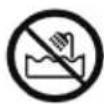
This device is waterproof. It is suitable for cleaning under running water. Do not use or clean the device while it is connected to the power cord.
PRODUCT DESCRIPTION
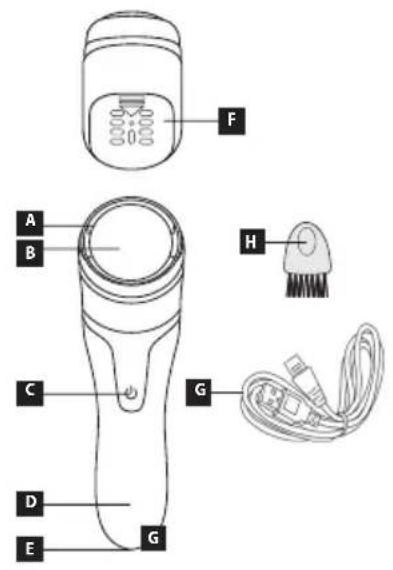
A Protective head cover sleeve
B Grinding head
C On/off/mode switch button
D Indicator light/display (model PN3020)
E Charging port
F Dust cover
G Charging cable
H Cleaning brush
Note: This device contains a built-in lithium battery and can only be charged using the cable included in the package.
INSTRUCTIONS FOR USE
It is recommended to clean or soften the skin first and dry the wet application area before using the product for best results.
- Check that the grinding head is correctly attached, see "Removing the grinding head".
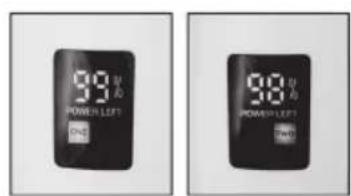
- Press and hold the switch for 2 seconds, the default setting is slow scrolling and the indicator/number "1" lights up in the display.
- Press the switch once to switch to fast scroll mode, the red indicator light will illuminate / "2" will appear in the display.
- Gently rotate (forwards, backwards or right and left) the dry abrasive head on the rough leather for 2-3 seconds. Do not apply excessive force. If too much force is applied, the machine will stop. You can also stop during use to check that the keratin removal is satisfactory. If the effect is not sufficient, you can use the machine again on the same area (stay for 2-3 seconds) and check again. Continue until you achieve a more satisfactory result.
NOTE: If you feel pain or discomfort, do not use the device.
• After use, switch off the device by pressing and holding for 3 seconds.
- Rinse the skin or remove any residue with a damp towel.
- Clean the head according to the cleaning instructions.
- Place the protective cap over the head.
NOTE: place the "arrow" mark on the cap on top of the "rectangle" mark on the head of the device, a click will sound.
EN
concept
concept
EN
CONTROL AND CHARGING
Lower speed - switch on the machine by pressing and holding the button for 3 seconds, the machine will start working at a lower speed.
More speed - Change speed at the touch of a button.
Off - Press and hold the button for 3 seconds.
Charging - If the device has not been used for a long time or is being charged for the first time, charge it continuously for at least 2 hours.
Always charge your device between 2.5 hours and 12 hours. Charge and store between +5 and 35 degrees Celsius.
-
Switch off the device.
-
Insert the charging cable into the charging port.
When the device is charging, the indicator lamp lights up/displays the numbers up to 100% charge (Figure 2).
Fully charged - the indicator light comes on.
GRINDING HEAD REPLACEMENT
For hygiene reasons, it is recommended that each quartz disc is used by one person only, preferably not with others.
-
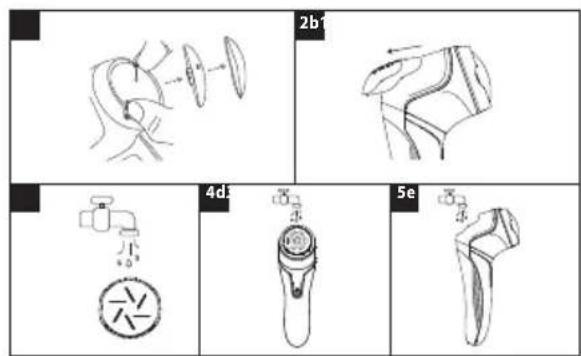
Hold the product with one hand and remove the grinding head with the other.
-
When replacing the abrasive head, install the new abrasive head, you will hear a "click" sound to make sure the newly installed abrasive head is in place. If the abrasive head is not inserted correctly, do not start the machine.
CLEANING AND MAINTENANCE
- First remove the head cap, then remove the grinding head and dust cap.
- Use a cleaning brush to remove leather debris and dust. Do not handle the appliance while cleaning. v The grinding head and body can be rinsed with water.
NOTE: Do not use salt water, water above 60 degrees Celsius, solvents, petrol, alcohol or other chemicals for cleaning.
SERVICE CENTRE
Extensive maintenance or repair, which requires access to internal parts of the product, has to be performed by a qualified service centre.
ENVIRONMENTAL CONCERNS
- Packaging materials and old appliances should be recycled.
- Packaging materials may be disposed of as sorted waste.
- Dispose the plastic bags made of polyethylene (PE) of as sorted waste.
EN
concept
concept
DE
Recycling of the appliance at the end of its lifespan:

This appliance is labelled in accordance with European Directive 2012/19/EU concerning used electrical and electronic appliances (Waste Electrical and Electronic Equipment - WEEE). The symbol on the product or on its packaging indicates that this product may not be treated as household waste. Instead it should be taken to the appropriate collection point for the recycling of electrical and electronic equipment. By ensuring this product is disposed of correctly, you will help prevent potential negative consequences for the environment and human health, which could otherwise be caused by inappropriate waste handling of this product. The disposal of such material has to be done according to the recycling regulations. For more detailed information about recycling of this appliance see the authorized local office or service for household waste disposal or the shop, where you purchased the appliance.

The product meets all the necessary requirements of the EU directives applicable to the specific product.
Changes in text, design, and technical specifications are subject to change without prior notice and we reserve the right to change them.
Danksagung
natural_image
Symbol of a trash bin crossed with no text or numbers, accompanied by a black rectangular block below (no text or symbols present)Brand : Concept
Model : PN3000
Category : Electric foot care device