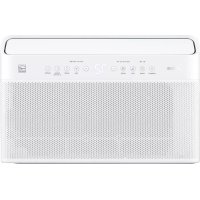
MIDEA MW08MSWBA5RCM - Air Conditioning

MW08MSWBA5RCM - Air Conditioning MIDEA - Free user manual and instructions

Find the device manual for free MW08MSWBA5RCM MIDEA in PDF.

English EN Download 💬 AI Question 10 questions ⚙️ Specs
📄

Document temporarily unavailable

The manual is currently being transferred to our new server. It will be accessible again in a few hours. Thank you for your patience.

View the manual : Français FR English EN
Pick your language and provide your email: we'll send you a specifically translated version.
Product Type Window Air Conditioner
Model MW08MSWBA5RCM
Refrigerant R32 (flammable)
Operating Modes Auto, Cool, Dry, Fan
Fan Speeds Auto, Low, Med, High
Timer 0.5 to 24 hours in 0.5-hour increments (up to 10 hours) then 1 hour
Remote Control Range 8 m (26 ft)
WiFi Connectivity Yes, MSmart Home app (iOS/Android)
Air Filter Clean every 2 weeks, reminder after 250 hours
Electrical Safety Device Power cord with current detection (TEST/RESET buttons)
Operating Temperature (Cool Mode) Indoor: 16°C to 32°C; Outdoor: 18°C to 43°C
Power Supply Grounded wall outlet (115V / 60Hz typical)
Window Opening Required Width 558-914 mm, Height 349 mm
Special Functions Eco, Sleep, Swing, Connect, Silent Mode
Display LED, temperature in °C/°F (switchable)
Mechanical Safety Anti-tip bracket, chassis lock
Warranty 1 year full + 5 years limited on sealed system
Customer Service 1-866-646-4332 (Mon-Fri 8am-6pm, Sat 8am-4pm EST)

Frequently Asked Questions - MW08MSWBA5RCM MIDEA

How to clean the air filter?
Grab the filter by the center, pull upward and outward. Wash it with warm water (40°C max), rinse thoroughly, dry well before reinstalling. Never operate the unit without the filter.
What to do if the air conditioner does not start?
Check the wall outlet and circuit breaker. Make sure the power cord indicator is on; if not, press RESET. Wait 3 minutes after a power outage before restarting.
How to use the timer?
Press Timer. When the unit is on, it sets automatic shut-off; when off, it sets automatic start-up. Use Up/Down buttons to adjust in 0.5-hour increments up to 10 hours, then 1 hour up to 24 hours. Cancel by holding the Timer button for 2 seconds.
What does an error code on the display mean?
If an error code appears, wait 10 minutes; the issue may resolve itself. Otherwise, unplug and replug the unit. If the code persists, contact customer service at 1-866-646-4332.
How to connect the air conditioner to WiFi?
Press the Connect button for 3 seconds. The display shows 'AP'. Open the MSmart Home app on your smartphone, follow the instructions. The connection must be made on 2.4 GHz. Once successful, the Connect indicator lights up.
How to switch the display from °C to °F?
Press the Up (▲) and Down (▼) buttons simultaneously for 3 seconds. The unit toggles between °C and °F.
Why is ice forming on the coil?
This can happen if the outdoor temperature is below 18°C or if the filter is dirty. Set to Fan Only mode to defrost, then clean the filter or increase the thermostat temperature.
How to install the window bracket?
Follow the installation instructions: measure the window opening (width 558-914 mm, height 349 mm). Attach the bracket to the sill using the provided screws. Use a level to ensure an outward tilt. Install the open window support and anti-tip bracket for safety.
What is the warranty period?
The air conditioner has a full warranty of 1 year from the date of purchase, and a limited warranty of 5 years on the sealed system (compressor, condenser, evaporator) for normal household use.
What to do in case of refrigerant leak?
Refrigerant R32 is flammable. Immediately ventilate the room. Do not use electrical appliances. Turn off the air conditioner, unplug it, and contact a certified professional for repair. Do not puncture or burn the unit.

User questions about MW08MSWBA5RCM MIDEA

0 question about this device. Answer the ones you know or ask your own.

Ask a new question about this device

The email remains private: it is only used to notify you if someone responds to your question.

No questions yet. Be the first to ask one.

Download the instructions for your Air Conditioning in PDF format for free! Find your manual MW08MSWBA5RCM - MIDEA and take your electronic device back in hand. On this page are published all the documents necessary for the use of your device. MW08MSWBA5RCM by MIDEA.

USER MANUAL MW08MSWBA5RCM MIDEA

Manual assistant
Powered by Anthropic
Waiting for your message
Product information

Brand : MIDEA

Model : MW08MSWBA5RCM

Category : Air Conditioning