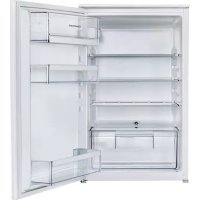
FK2500.0i - Dishwasher Küppersbusch - Free user manual and instructions
Find the device manual for free FK2500.0i Küppersbusch in PDF.


| Product Type | Built-in refrigerator |
| Brand | Küppersbusch |
| Model | FK2500.0i |
| PNC | 933019068 |
| Total Volume | 137 liters |
| Fridge Volume | 137 liters |
| Energy Class | A++ |
| Annual Consumption | 95 kWh |
| Climate Class | SN-N-ST-T (10 °C to 43 °C) |
| Acoustic Emissions | 33 dB(A) |
| Power Supply | 230-240 V, 50 Hz |
| Dimensions (H x W x D) | 873 x 556 x 550 mm |
| Built-in Appliance | Yes |
| Refrigerator Defrost | Automatic |
| Interior Lighting | LED |
| Special Function | IntensiveCooling |
| Refrigerant Type | Isobutane (R600a) |
| Shelves | Removable and foldable |
| Door Bins | Height adjustable |
| Care and Cleaning | Interior cleaning with warm water, condenser cleaning |
| Safety | Child lock not specified, general safety |
| Repairability | Original parts, authorized service |
Frequently Asked Questions - FK2500.0i Küppersbusch
User questions about FK2500.0i Küppersbusch
0 question about this device. Answer the ones you know or ask your own.
Ask a new question about this device
Download the instructions for your Dishwasher in PDF format for free! Find your manual FK2500.0i - Küppersbusch and take your electronic device back in hand. On this page are published all the documents necessary for the use of your device. FK2500.0i by Küppersbusch.
USER MANUAL FK2500.0i Küppersbusch
Please read the users and installation instructions carefully before installation of the appliance and before starting to use it.
natural_image
Technical line drawing of a mechanical assembly with two stacked components and directional arrows indicating movement (no text or symbols)natural_image
Simple line drawing of a roof structure with hanging leaves and structural supports (no text or symbols)
natural_image
Diagram showing a hand holding a tool inside a circular frame with rotational arrows, no text or symbols present.Safety information 16 Safety instructions 17 Installation 19 Operation 20 Daily use 21
Hints and tips 22 Care and cleaning 23 Troubleshooting 24 Technical data 26
Subject to change without notice.
⚠ SAFETY INFORMATION
Before the installation and use of the appliance, carefully read the supplied instructions. The manufacturer is not responsible for any injuries or damages that are the result of incorrect installation or usage. Always keep the instructions in a safe and accessible location for future reference.
Children and vulnerable people safety
- This appliance can be used by children aged from 8 years and above and persons with reduced physical, sensory or mental capabilities or lack of experience and knowledge if they have been given supervision or instruction concerning the use of the appliance in a safe way and understand the hazards involved.
- This appliance may be used by children between 3 and 8 years of age and persons with very extensive and complex disabilities, if they have been properly instructed.
- Children of less than 3 years of age should be kept away from the appliance unless continuously supervised.
- Do not let children play with the appliance.
- Children shall not carry out cleaning and user maintenance of the appliance without supervision.
- Keep all packaging away from children and dispose of it appropriately.
General Safety
- This appliance is intended to be used in household and similar applications such as:
- Farm houses; staff kitchen areas in shops, offices and other working environments - By clients in hotels, motels, bed and breakfast and other residential type environments
- WARNING: Keep ventilation openings, in the appliance enclosure or in the built-in structure, clear of obstruction.
- WARNING: Do not use mechanical devices or other means to accelerate the defrosting process, other than those recommended by the manufacturer.
- WARNING: Do not damage the refrigerant circuit.
- WARNING: Do not use electrical appliances inside the food storage compartments of the appliance, unless they are of the type recommended by the manufacturer.
- Do not use water spray and steam to clean the appliance.
- Clean the appliance with a moist soft cloth. Only use neutral detergents. Do not use abrasive products, abrasive cleaning pads, solvents or metal objects.
- Do not store explosive substances such as aerosol cans with a flammable propellant in this appliance.
- If the supply cord is damaged, it must be replaced by the manufacturer, its Authorised Service Centre or similarly qualified persons in order to avoid a hazard.
SAFETY INSTRUCTIONS
Installation

WARNING! Only a qualified person must install this appliance.
- Remove all the packaging.
- Do not install or use a damaged appliance.
- Do not use the appliance before installing it in the built-in structure due to safety manner.
-
Follow the installation instructions supplied with the appliance.
• Always take care when moving the appliance as it is heavy. Always use safety gloves and enclosed footwear. -
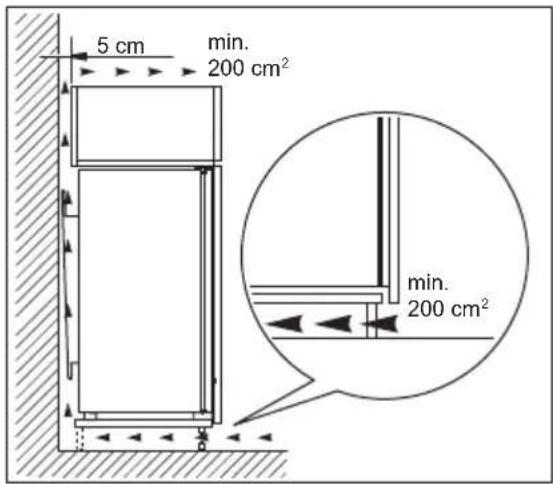
Make sure the air can circulate around the appliance.
- At first installation or after reversing the door wait at least 4 hours before connecting the appliance to the power supply. This is to allow the oil to flow back in the compressor.
- Before carrying out any operations on the appliance (e.g. reversing the door), remove the plug from the power socket.
- Do not install the appliance close to radiators or cookers, ovens or hobs.
- Do not expose the appliance to the rain.
- Do not install the appliance where there is direct sunlight.
- Do not install this appliance in areas that are too humid or too cold.
- When you move the appliance, lift it by the front edge to avoid scratching the floor.
Electrical connection

WARNING! Risk of fire and electric shock.

WARNING! When positioning the appliance, ensure the supply cord is not trapped or damaged.

WARNING! Do not use multi- plug adapters and extension cables.
• The appliance must be earthed.
- Make sure that the parameters on the rating plate are compatible with the electrical ratings of the mains power supply.
• Always use a correctly installed shockproof socket.
- Make sure not to cause damage to the electrical components (e.g. mains plug, mains cable, compressor). Contact the Authorised Service Centre or an electrician to change the electrical components.
- The mains cable must stay below the level of the mains plug.
- Connect the mains plug to the mains socket only at the end of the installation. Make sure that there is access to the mains plug after the installation.
- Do not pull the mains cable to disconnect the appliance. Always pull the mains plug.
Use

WARNING! Risk of injury, burns, electric shock or fire.

The appliance contains flammable sobutane (R600a), a natural gas with level of environmental compatibility. Be careful not to cause damage to the refrigerant circuit containing isobutane.
- Do not change the specification of this appliance.
- Do not put electrical appliances (e.g. ice cream makers) in the appliance unless they are stated applicable by the manufacturer.
- If damage occurs to the refrigerant circuit, make sure that there are no flames and sources of ignition in the room. Ventilate the room.
- Do not let hot items to touch the plastic parts of the appliance.
- Do not store flammable gas and liquid in the appliance.
- Do not put flammable products or items that are wet with flammable products in, near or on the appliance.
- Do not touch the compressor or the condenser. They are hot.
Internal lighting

WARNING! Risk of electric shock.
- The type of lamp used for this appliance is for household appliances only. Do not use it for house lighting.
Care and cleaning

WARNING! Risk of injury or damage to the appliance.
- Before maintenance, deactivate the appliance and disconnect the mains plug from the mains socket.
- This appliance contains hydrocarbons in the cooling unit. Only a qualified person must do the maintenance and the recharging of the unit.
- Regularly examine the drain of the appliance and if necessary, clean it. If the drain is blocked, defrosted water collects in the bottom of the appliance.
Service
• To repair the appliance contact the Authorised Service Centre.
- Use original spare parts only.
Disposal

WARNING! Risk of injury or suffocation.
- Disconnect the appliance from the mains supply.
- Cut off the mains cable and discard it.
- Remove the door to prevent children and pets to be closed inside of the appliance.
-
The refrigerant circuit and the insulation materials of this appliance are ozone-friendly.
-
The insulation foam contains flammable gas. Contact your municipal authority for information on how to discard the appliance correctly.
- Do not cause damage to the part of the cooling unit that is near the heat exchanger.
INSTALLATION

WARNING! Refer to Safety chapters.
Location

Refer to the assembly instructions for the installation.
To ensure best performance, install the appliance well away from sources of heat such as radiators, boilers, direct sunlight etc. Make sure that air can circulate freely around the back of the cabinet.
Positioning
Install the appliance in a dry, well ventilated indoors where the ambient temperature corresponds to the climate class indicated on the rating plate of the appliance.
| Climate class | Ambient temperature |
| SN +10°C to + 32°C | |
| N +16°C to + 32°C | |
| ST +16°C to + 38°C | |
| T +16°C to + 43°C | |

Some functional problems might occur for some types of models when operating outside of that range. The correct operation can only be guaranteed within the specified temperature range. If you have any doubts regarding where to install the appliance, please turn to the vendor, to our customer service or to the nearest Authorised Service Centre.
Electrical connection
- Before plugging in, ensure that the voltage and frequency shown on the rating plate correspond to your domestic power supply.
- The appliance must be earthed. The power supply cable plug is provided with a contact for this purpose. If the domestic power supply socket is not earthed, connect the appliance to a separate earth in compliance with current regulations, consulting a qualified electrician.
• The manufacturer declines all responsibility if the above safety precautions are not observed. - This appliance complies with the E.E.C. Directives.
Ventilation requirements
The airflow behind the appliance must be sufficient.
OPERATION
Control panel
Switching on
- Insert the plug into the wall socket.
- Touch the temperature regulator button if all LED indicators are off.
Switching off
Keep touching the temperature regulator button for 3 seconds. All indicators light off.

CAUTION! Refer to the assembly instructions for the installation.
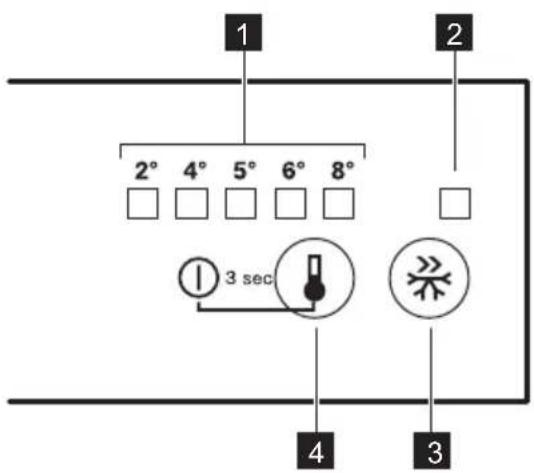
1 Temperature indicator LED
2 IntensiveCooling indicator
3 IntensiveCooling button
4 Temperature regulator ON/OFF button
Temperature regulation
To operate the appliance, touch the temperature regulator until the LED corresponding to the required temperature lights up. Selection is progressive, varying from 2°C to 8°C.

Coldest setting: +2°C. Warmest setting: +8°C. A medium setting is generally the most suitable.
Choose the setting keeping in mind that the temperature inside the appliance depends on:
- room temperature
• frequency of opening the door
• quantity of food stored -
appliance location.
-
Touch temperature regulator. Current temperature indicator blinks. Any time you touch the temperature regulator, the setting moves by one position. The corresponding LED blinks for a while.
-
Touch the temperature regulator until the required temperature is selected.
IntensiveCooling function
If you need to insert a large amount of warm food, for example after doing the
DAILY USE

WARNING! Refer to Safety chapters.
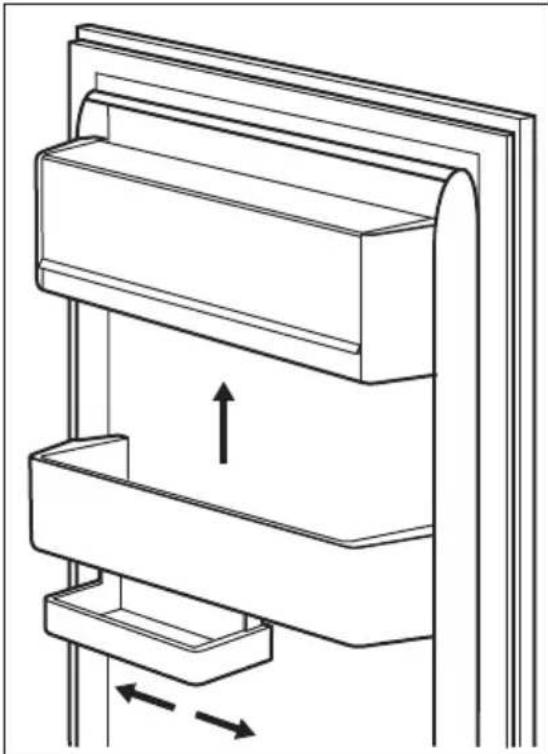
Positioning the door shelves
To permit storage of food packages of various sizes, the door shelves can be placed at different heights.
- Gradually pull the shelf up until it comes free.
grocery shopping, we suggest activating the IntensiveCooling function to chill the products more rapidly and to avoid warming the other food which is already in the refrigerator.
Press the IntensiveCooling button. The IntensiveCooling indicator appears. The IntensiveCooling function shuts off automatically after approximately 6 hours.
To switch off the function before its automatic end, repeat the procedure.

The function switches off by selecting a different fridge set temperature.
- Reposition as required.
natural_image
Technical line drawing of a mechanical assembly with two stacked components and directional arrows indicating movement (no text or symbols)This model is equipped with a variable storage box which can be moved sideways.
Movable shelves
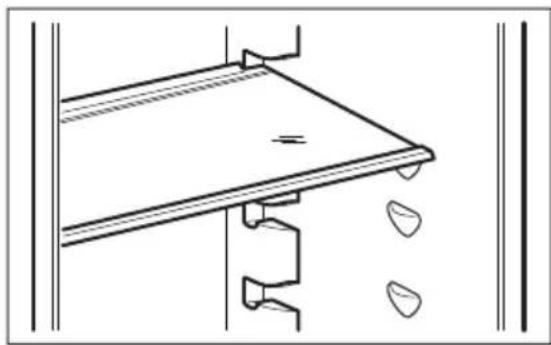
The walls of the refrigerator are equipped with a series of runners so that the shelves can be positioned as desired.
natural_image
Pure technical line drawing of a structural component with no text or symbols
Do not move the glass shelf above the vegetable drawer to ensure correct air circulation.
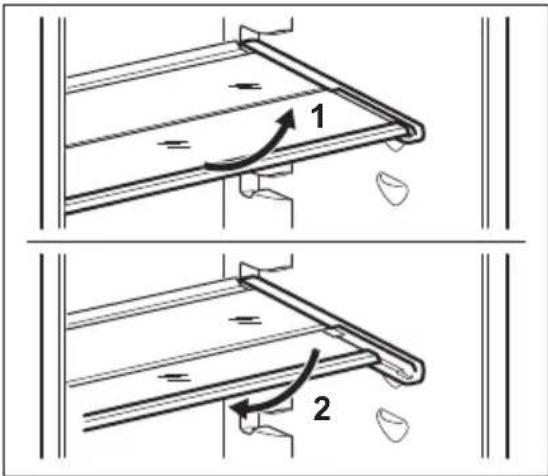
Using a foldable shelf
This appliance is equipped with a shelf consisting of two parts. The front half of
HINTS AND TIPS
Normal operating sounds
The following sounds are normal during operation:
- A faint gurgling and bubbling sound from coils sound when refrigerant is pumped.
- A whirring and pulsating sound from the compressor when refrigerant is pumped.
- A sudden cracking noise from inside appliance caused by thermic dilatation (a natural and not dangerous physical phenomenon).
- A faint click noise from the temperature regulator when the compressor switches on or off.
Hints for energy saving
- Do not open the door frequently or leave it open longer than absolutely necessary.
the shelf can be placed under the second half to make better use of space.
To fold the shelf:
- Take out the front half gently.
- Slide it onto the lower rail and under the second half.
Hints for fresh food refrigeration
- Do not store warm food or evaporating liquids in the refrigerator.
• Cover or wrap the food, particularly if it has a strong flavour. - Position food so that air can circulate freely around it.
Hints for refrigeration
Useful hints:
- Meat (all types): wrap in a suitable packaging and place it on the glass shelf above the vegetable drawer. Store meat for at most 1-2 days.
• Cooked foods, cold dishes: cover and place on any shelf. - Fruit and vegetables: clean thoroughly and place in a special drawer. Bananas, potatoes, onions and garlic must not be kept in the refrigerator if not packed.
- Butter and cheese: place in a special airtight container or wrap in an
aluminium foil or a polythene bag to exclude as much air as possible.
CARE AND CLEANING

WARNING! Refer to Safety chapters.
General warnings

CAUTION! Unplug the appliance before carrying out any maintenance operation.

This appliance contains hydrocarbons in its cooling unit; maintenance and recharging must therefore only be carried out by authorized technicians.

The accessories and parts of the appliance are not suitable for washing in a dishwasher.
Cleaning the interior
Before using the appliance for the first time, the interior and all internal accessories should be washed with lukewarm water and some neutral soap to remove the typical smell of a brand-new product, then dried thoroughly.

CAUTION! Do not use detergents, abrasive powders, chlorine or oil-based cleaners as they will damage the finish.
Periodic cleaning

CAUTION! Do not pull, move or damage any pipes and/or cables inside the appliance.

CAUTION! Do not damage the cooling system.
The equipment has to be cleaned regularly:
- Bottles: close with a cap and place on the door bottle shelf, or (if available) on the bottle rack.
- Clean the inside and accessories with lukewarm water and some neutral soap.
- Regularly check the door seals and wipe them clean to ensure they are clean and free from debris.
- Rinse and dry thoroughly.
- If accessible, clean the condenser and the compressor at the back of the appliance with a brush. This will improve the performance of the appliance and save electricity consumption.
Defrosting of the refrigerator
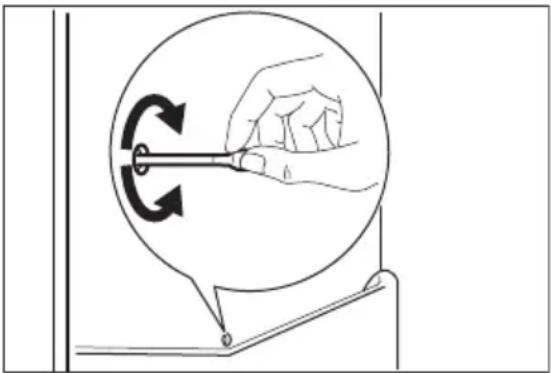
Frost is automatically eliminated from the evaporator of the refrigerator compartment every time the motor compressor stops, during normal use. The defrost water drains out through a trough into a special container at the back of the appliance, over the motor compressor, where it evaporates.
It is important to periodically clean the defrost water drain hole in the middle of the refrigerator compartment channel to prevent the water overflowing and dripping onto the food inside.
natural_image
Illustration of a hand holding a tool inside a circular frame with rotational arrows, no text or symbols present.Periods of non-operation
When the appliance is not in use for long periods, take the following precautions:
- Disconnect the appliance from electricity supply.
- Remove all food.
- Clean the appliance and all accessories.
- Leave the door/doors open to prevent unpleasant smells.

CAUTION! If you want to keep the appliance switched on, ask somebody to check it once in a while to prevent the food inside from spoiling in case of a power failure.
TROUBLESHOOTING

WARNING! Refer to Safety
chapters.
What to do if...
| Problem Possible cause Solution | ||
| The appliance does not operate. | The appliance is switched off. | Switch on the appliance. |
| The mains plug is not connected to the mains socket correctly. | Connect the mains plug to the mains socket correctly. | |
| There is no voltage in the mains socket. | Connect a different electrical appliance to the mains socket. Contact a qualified electrician. | |
| The appliance is noisy. The appliance is not supported properly. | Check if the appliance stands stable. | |
| The lamp does not work. The lamp is in stand-by. Close and open the door. | ||
| The lamp is defective. Contact the nearest Authorized Service Centre. | ||
| The compressor operates continually. | Temperature is set incorrectly. | Refer to "Operation" chapter. |
| Many food products to be frozen were put in at the same time. | Wait a few hours and then check the temperature again. | |
| The room temperature is too high. | Refer to climate class chart on the rating plate. | |
| Food products placed in the appliance were too warm. | Allow food products to cool to room temperature before storing. | |
| The door is not closed correctly. | Refer to "Closing the door". | |
| Problem Possible cause Solution | ||
| The IntensiveCooling function is switched on. | Refer to "IntensiveCooling function". | |
| The compressor does not start immediately after pressing the ,IntensiveCool-ing or after changing the temperature. | This is normal, no error has occurred. | The compressor starts after a period of time. |
| Water flows on the rear plate of the refrigerator. | During the automatic de-frosting process, frost melts on the rear plate. | This is correct. |
| Water flows into the refrigerator. | The water outlet is clogged. Clean the water outlet. | |
| Food products prevent that water flows into the water collector. | Make sure that food products do not touch the rear plate. | |
| Water flows on the floor. The melting water outlet is not connected to the evaporative tray above the compressor. | Attach the melting water outlet to the evaporative tray. | |
| Temperature cannot be set. The IntensiveCooling function is switched on. | Switch off IntensiveCooling manually, or wait until the function resets automatically to set the temperature. Refer to "IntensiveCooling function". | |
| The temperature in the appliance is too low/too high. | The temperature regulator is not set correctly. | Set a higher/lower temperature. |
| The door is not closed cor-rectly. | Refer to "Closing the door". | |
| The food products' temperature is too high. | Let the food products temperature decrease to room temperature before storage. | |
| Many food products are stored at the same time. | Store less food products at the same time. | |
| The door has been opened often. | Open the door only if necessary. | |
| The IntensiveCooling function is switched on. | Refer to "IntensiveCooling function". | |
| Problem Possible cause Solution | ||
| There is no cold air circulation in the appliance. | Make sure that there is cold air circulation in the appliance. | |
| There is too much condensed water on the rear wall of the refrigerator. | Door was opened too frequently. | Open the door only when necessary. |
| Door was not closed completely. | Make sure the door is closed completely. | |
| Stored food was not wrapped. | Wrap food in suitable packaging before storing it in the appliance. | |
| Door does not open easily. You attempted to re-open the door immediately after closing. | Wait a few seconds between closing and re-opening of the door. | |

If the advice does not lead to the desired result, call the nearest Authorized Service Centre.
Replacing the lamp
The appliance is equipped with a longlife LED interior light.
Only service is allowed to replace the lighting device. Contact your Authorised Service Centre.
TECHNICAL DATA
Product information sheet
| Trade Mark Küppersbusch | |
| Model FK2500.0i | PNC933019068 |
| Category 1. Refrigerator with one or more | fresh-food storage compartments |
| Energy efficiency class A++ | |
| Energy consumption in kWh per year, based on standard test results for 24 hours. The actual energy consumption will depend on how the appliance is used and where it is locatedStorage volume in litres, Fridge 137 | 95 |
| Storage volume in litres, Star - | |
| Storage volume in litres, Cellar zone - | |
| Storage volume in litres, Wine - | |
| Storage volume in litres, Total 137 | |
| Storage volume in litres, Freezer - | |
| Storage volume in litres, Chiller - | |
| Storage volume in litres, Other compartments - | |
| Star rating of freezer compartment with highest storage volume (l) | None |
| Design temperature of other compartments > 14 °C (°C), if any | - |
| Frost free (Y/N), Fridge No | |
| Frost free (Y/N), Freezer - | |
| Power cut safe in h - | |
| Freezing capacity in kg/24h - | |
| Climate class SN-N-ST-T | |
| Lowest ambient temperature at which this appliance is intended to be used, in °C | 10 |
| Highest ambient temperature at which this appliance is intended to be used, in °C | 43 |
| Acoustical noise emissions dB(A) re1 pW 33 | |
| Built in appliance Y/N Yes | |
| This appliance is intended to be used exclusively for the storage of wine Y/N | No |
Additional technical data
| Dimensions of the recess | |
| Height 873 mm | |
| Width 556 mm | |
| Depth | 550 mm |
| Voltage | 230 - 240 V |
| Frequency | 50 Hz |
The technical information is situated in the rating plate, on the external or internal side of the appliance and on the energy label.
ENVIRONMENTAL CONCERNS
Recycle materials with the symbol Put the packaging in relevant containers to recycle it. Help protect the environment and human health by recycling waste of electrical and electronic appliances. Do
not dispose of appliances marked with the symbol ☒ with the household waste. Return the product to your local recycling facility or contact your municipal office.
TABLE DES MATIÈRES
natural_image
Technical line drawing of a mechanical assembly with two stacked components and directional arrows indicating movement (no text or symbols)natural_image
Pure technical line drawing of a mechanical assembly or mounting bracket without any text, numbers, or symbols
natural_image
Diagram showing a hand holding a tool inside a circular arrow, with no text or symbols present.natural_image
Technical line drawing of a mechanical assembly with two stacked components and directional arrows indicating movement (no text or symbols)natural_image
Pure technical line drawing of a mechanical assembly or mounting bracket without any text, numbers, or symbols
TIPPS UND HINWEISE
natural_image
Diagram showing a hand holding a tool inside a circular frame with rotational arrows, no text or symbols present.Stillstandszeiten

- ⚠ SAFETY INFORMATION
- Children and vulnerable people safety
- General Safety
- SAFETY INSTRUCTIONS
- Installation
- Electrical connection
- Use
- Internal lighting
- Care and cleaning
- Service
- Disposal
- Location
- Positioning
- Ventilation requirements
- OPERATION
- Control panel
- Switching on
- Switching off
- Temperature regulation
- IntensiveCooling function
- DAILY USE
- Positioning the door shelves
- Movable shelves
- Using a foldable shelf
- HINTS AND TIPS
- Normal operating sounds
- Hints for energy saving
- Hints for fresh food refrigeration
- Hints for refrigeration
- General warnings
- Cleaning the interior
- Periodic cleaning
- Defrosting of the refrigerator
- Periods of non-operation
- TROUBLESHOOTING
- Replacing the lamp
- TECHNICAL DATA
- ENVIRONMENTAL CONCERNS
- TABLE DES MATIÈRES
- TIPPS UND HINWEISE
- Stillstandszeiten
Brand : Küppersbusch
Model : FK2500.0i
Category : Dishwasher