ManualGo.com
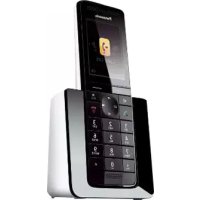
KXTGA950 - Phone PANASONIC - Free user manual and instructions
Find the device manual for free KXTGA950 PANASONIC in PDF.


Download the instructions for your Phone in PDF format for free! Find your manual KXTGA950 - PANASONIC and take your electronic device back in hand. On this page are published all the documents necessary for the use of your device. KXTGA950 by PANASONIC.
USER MANUAL KXTGA950 PANASONIC
Installation Manual Model No. KX-TGA950C Additional Digital Cordless Handset Thank you for purchasing a Panasonic product. This unit is an additional handset compatible with the following series ofPanasonic Digital Cordless Phone:KX-TG9541(The corresponding models are subject to change without notice.)You must register this handset with your base unit before it can be used. Thisinstallation manual describes only the steps needed to register and beginusing the handset. Please read the base unit’s operating instructions forfurther details.Please read this installation manual before using the unit and save it for futurereference. For assistance, please call 1-800-561-5505 or visit us at www.panasonic.ca 5770 Ambler Drive, Mississauga, Ontario L4W 2T3 © Panasonic System Networks Co., Ltd. 2013Printed in China PNQX6078ZA TT0813MU0 (E) TGA950C(en)_0716_ver011.pdf 1 2013/07/16 12:26:13Accessory information Supplied accessories Accessory item Quantity Charger 1 Rechargeable batteries
Belt clip 1 *1 Please read the base unit’s operating instructions for replacement battery information. *2 The handset cover comes attached to the handset. Note: R Please read the base unit’s operating instructions for additional/replacement accessories. – Optional headsets: KX-TCA400, KX-TCA430 Setting up Connections/Wall mounting Connect the AC adaptor to the power outlet. Drive the screws (
) (not supplied) into the wall, if necessary.
Note: R The AC adaptor must remain connected at all times. (It is normal for the adaptor to feel warm during use.) R Make sure that the wall and the fixing method are strong enough to support the weight of the unit.
Installation TGA950C(en)_0716_ver011.pdf 2 2013/07/16 12:26:14Battery installation/Battery charging When the language selection is displayed after installing the batteries for the first time, you can select your desired language. MbN: Select the desired setting. a MSAVEN a MOFFN Important: R Use the supplied rechargeable batteries. For replacement, we recommend using the Panasonic rechargeable batteries noted in the base unit’s operating instructions. R USE ONLY Ni-MH batteries AAA (R03) size (A). R Do NOT use Alkaline/Manganese/Ni-Cd batteries. R Confirm correct polarities (
Charge for about 7 hours. R Confirm “Charging” is displayed (B). R When the batteries are fully charged, “Fully charged” is displayed.
Note: R If the batteries are fully charged, but the operating time seems to be shorter, clean the battery ends ( , ) and the charge contacts with a dry cloth and charge again. Registering a handset to a base unit 1 Base unit: Press and hold MLOCATORN for about 5 seconds. R Depending on the base unit, a registration tone sounds. R If all registered handsets start ringing, press MLOCATORN again to stop, then repeat this step. 2 Handset: Place the handset on the base unit or charger, then wait until a long beep sounds and is displayed.
Installation TGA950C(en)_0716_ver011.pdf 3 2013/07/16 12:26:14Note: R If an error tone sounds, or if is displayed, register the handset according to the base unit’s operating instructions. Display language 1 MMENUN#110 2 MbN: Select the desired setting. a MSAVEN a MOFFN For your safety To prevent severe injury and loss of life/property, read this section carefully before using the product to ensure proper and safe operation of your product. WARNING Power connection R Completely insert the AC adaptor/power plug into the power outlet. Failure to do so may cause electric shock and/or excessive heat resulting in a fire. R Regularly remove any dust, etc. from the AC adaptor/power plug by pulling it from the power outlet, then wiping with a dry cloth. Accumulated dust may cause an insulation defect from moisture, etc. resulting in a fire. R Unplug the product from power outlets if it emits smoke, an abnormal smell, or makes an unusual noise. These conditions can cause fire or electric shock. Confirm that smoke has stopped emitting and contact an authorized service centre. Installation R To prevent the risk of fire or electrical shock, do not expose the product to rain or any type of moisture. R Do not place or use this product near automatically controlled devices such as automatic doors and fire alarms. Radio waves emitted from this product may cause such devices to malfunction resulting in an accident. CAUTION Installation and location R The AC adaptor is used as the main disconnect device. Ensure that the AC outlet is installed near the product and is easily accessible.
Installation TGA950C(en)_0716_ver011.pdf 4 2013/07/16 12:26:14Battery R We recommend using the supplied batteries or additional/replacement batteries noted in the base unit’s operating instructions for replacement battery information. USE ONLY rechargeable Ni-MH batteries AAA (R03) size. R Do not mix old and new batteries. R Do not open or mutilate the batteries. Released electrolyte from the batteries is corrosive and may cause burns or injury to the eyes or skin. The electrolyte is toxic and may be harmful if swallowed. R Exercise care when handling the batteries. Do not allow conductive materials such as rings, bracelets, or keys to touch the batteries, otherwise a short circuit may cause the batteries and/or the conductive material to overheat and cause burns. R Charge the batteries provided with or identified for use with this product only, in accordance with the instructions and limitations specified in this manual. R Only use a compatible base unit (or charger) to charge the batteries. Do not tamper with the base unit (or charger). Failure to follow these instructions may cause the batteries to swell or explode. Attention: A nickel metal hydride battery that is recyclable powers the product you have purchased. Please call 1-800-8-BATTERY (1-800-822-8837) for information on how to recycle this battery.
Installation TGA950C(en)_0716_ver011.pdf 5 2013/07/16 12:26:14Important safety instructions When using your product, basic safety precautions should always be followed to reduce the risk of fire, electric shock, and injury to persons, including the following:
1. Do not use this product near water for example, near a bathtub, washbowl,
kitchen sink, or laundry tub, in a wet basement or near a swimming pool.
2. Do not use the telephone to report a gas leak in the vicinity of the leak.
3. Use only the power cord and batteries indicated in this manual. Do not dispose
of batteries in a fire. They may explode. Check with local codes for possible special disposal instructions.
SAVE THESE INSTRUCTIONS
Other information R Operating the product near electrical appliances may cause interference. Move away from the electrical appliances. CAUTION: Risk of explosion if battery is replaced by an incorrect type. Dispose of used batteries according to the instructions. Routine care R Wipe the outer surface of the product with a soft moist cloth. R Do not use benzine, thinner, or any abrasive powder. Notice for product disposal, transfer, or return R This product can store your private/confidential information. To protect your privacy/confidentiality, we recommend that you erase information such as phonebook or caller list entries from the memory before you dispose of, transfer, or return the product. Compliance with TIA-1083 standard
Compatible withHearing Aid T-CoilTIA-1083 Telephone handsets identified with this logo have reduced noise and interference when used with T-Coil equipped hearing aids and cochlear implants.
Installation TGA950C(en)_0716_ver011.pdf 6 2013/07/16 12:26:14Industry Canada Notices and other information NOTICE: Operation is subject to the following two conditions: (1) this device may not cause interference, and (2) this device must accept any interference, including interference that may cause undesired operation of the device. Privacy of communications may not be ensured when using this telephone. RF Exposure Warning: R This product complies with IC radiation exposure limits set forth for an uncontrolled environment. R This handset may not be collocated or operated in conjunction with any other antenna or transmitter. R The handset may be carried and operated with only the specific provided belt clip. Other non-tested belt clips or similar body-worn accessories may not comply and must be avoided.
EXCHANGE PROGRAM Panasonic Canada Inc. warrants this product to be free from defects in material and workmanship under normal use and for a period as stated below from the date of original purchase agrees to, at its option either (a) repair your product with new or refurbished parts, (b) replace it with a new or a refurbished equivalent value product, or (c) refund your purchase price. The decision to repair, replace or refund will be made by Panasonic Canada Inc. Telephone Accessory/Product One (1) year This warranty is given only to the original purchaser, or the person for whom it was purchased as a gift, of a Panasonic brand product mentioned above sold by an authorized Panasonic dealer in Canada and purchased and used in Canada, which product was not sold “as is”, and which product was delivered to you in new condition in the original packaging. IN ORDER TO BE ELIGIBLE TO RECEIVE WARRANTY SERVICE HEREUNDER, A PURCHASE RECEIPT OR OTHER PROOF OF DATE OF ORIGINAL PURCHASE, SHOWING AMOUNT PAID
AND PLACE OF PURCHASE IS REQUIRED
LIMITATIONS AND EXCLUSIONS
This warranty ONLY COVERS failures due to defects in materials or workmanship, and DOES NOT COVER normal wear and tear or cosmetic damage. The warranty ALSO DOES NOT COVER damages which occurred in shipment, or failures which are caused by products not supplied by Panasonic Canada Inc., or failures which result from accidents, misuse, abuse, neglect, mishandling, misapplication, alteration, faulty installation, set-up adjustments, misadjustment of consumer controls, improper maintenance, improper batteries, power line surge, lightning damage, modification, introduction of sand, humidity or liquids, commercial use such as hotel, office, restaurant, or other business or rental use of the product, or service by anyone other than a Authorized Servicer, or damage that is attributable to acts of God. Rechargeable batteries are warranted for ninety (90) days from date of original purchase. THIS EXPRESS, LIMITED WARRANTY IS IN LIEU OF ALL OTHER WARRANTIES, EXPRESS OR IMPLIED, INCLUDING ANY IMPLIED WARRANTIES OF MERCHANTABILITY AND FITNESS FOR A PARTICULAR PURPOSE. IN NO EVENT WILL PANASONIC CANADA INC. BE LIABLE FOR ANY SPECIAL, INDIRECT OR CONSEQUENTIAL DAMAGES RESULTING FROM THE USE OF THIS PRODUCT OR ARISING OUT OF ANY BREACH OF ANY EXPRESS OR IMPLIED WARRANTY. (As examples, this warranty excludes damages for lost time, travel to and from the Authorized Servicer, loss of or damage to media or images, data or other memory or recorded content. This list of items is not exhaustive, but for illustration only.) In certain instances, some jurisdictions do not allow the exclusion or limitation of incidental or consequential damages, or the exclusion of implied warranties, so the above limitations and exclusions may not be applicable. This warranty gives you specific legal rights and you may have other rights which vary depending on your province or territory.
Installation TGA950C(en)_0716_ver011.pdf 8 2013/07/16 12:26:14CONTACT INFORMATION For product information and operation assistance, please contact: Our Customer Care Centre: Telephone #: Fax #: For defective product exchange within the warranty period, please contact the original dealer or our Customer Care Centre. 1-800-561-5505 (905) 238-2360