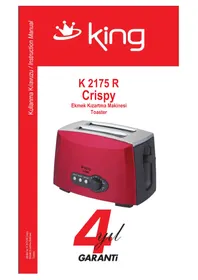
K 2175 R Crispy - Toaster KING - Free user manual and instructions
Find the device manual for free K 2175 R Crispy KING in PDF.

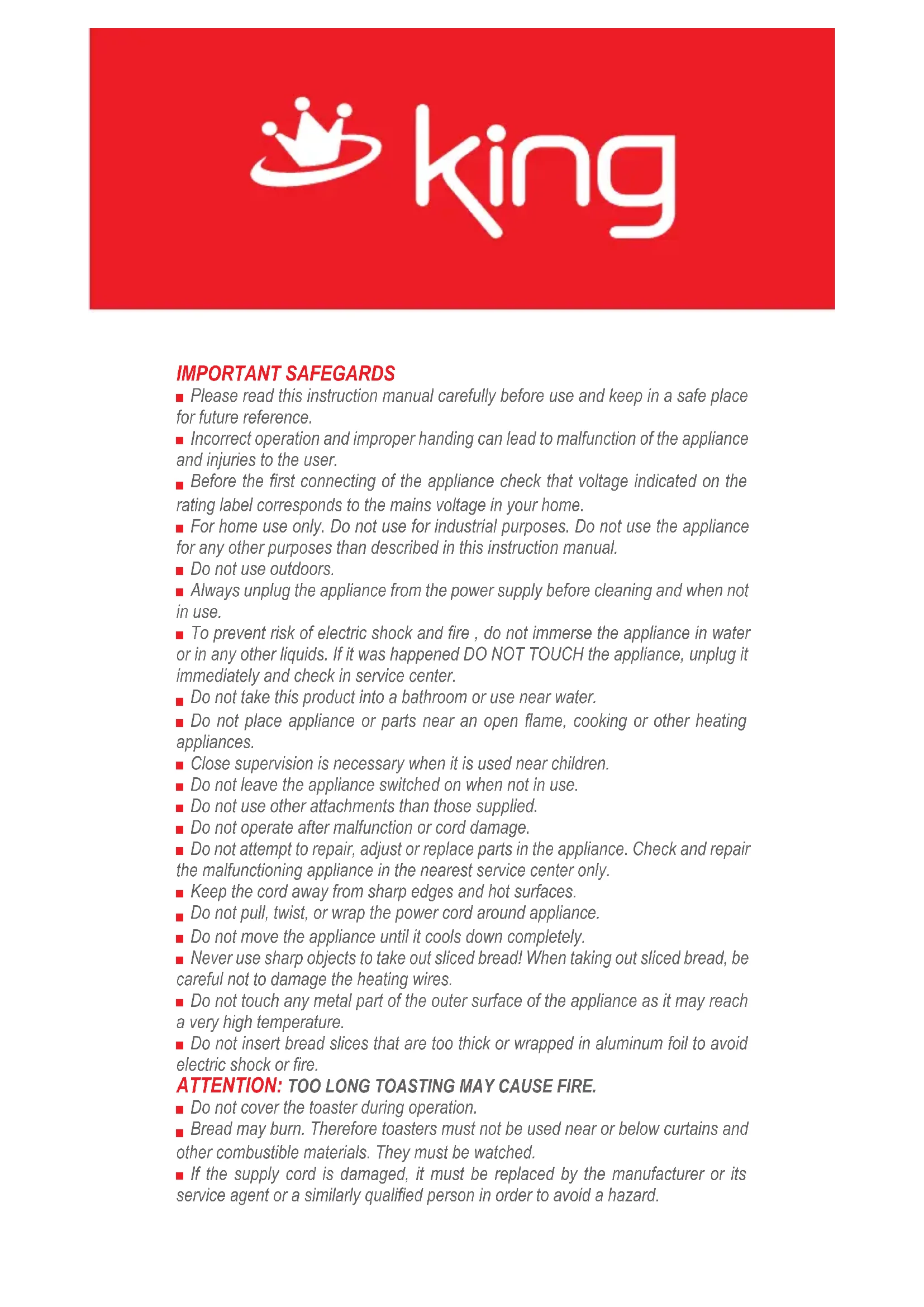


| Product Type | Toaster |
| Brand | King |
| Model | K 2175 R Crispy |
| Number of Slots | 2 |
| Browning Settings | 7 levels (1 minimum - 7 maximum) |
| Additional Functions | Defrost (D), Reheat (R), Cancel (C) |
| Mechanism | Sliding lever with auto-ejection |
| Crumb Tray | Removable, located at the base |
| Power Supply | 220-240 V ~ 50/60 Hz |
| Intended Use | Household use only |
| Care and Cleaning | Unplug and let cool before cleaning. Do not immerse. Use a damp cloth. Empty crumb tray regularly. |
| Safety | Do not use outdoors. Supervise children. Do not cover while operating. Do not insert bread that is too thick or wrapped in aluminum foil. |
| Repairability | Do not attempt to repair yourself. Contact an authorized service center. |
| Storage | In a cool, dry place, cord coiled after complete cooling. |
Frequently Asked Questions - K 2175 R Crispy KING
User questions about K 2175 R Crispy KING
0 question about this device. Answer the ones you know or ask your own.
Ask a new question about this device
Download the instructions for your Toaster in PDF format for free! Find your manual K 2175 R Crispy - KING and take your electronic device back in hand. On this page are published all the documents necessary for the use of your device. K 2175 R Crispy by KING.
USER MANUAL K 2175 R Crispy KING
natural_image
Red background with a white crown and circular swirl design (no text or symbols)king
K 2175 R
Crispy
natural_image
Red CRUPY brand toaster with black control knob and side grates (no visible text or symbols on device body)
GARANTI

natural_image
Red background with a white crown and ring design (no text or symbols)king
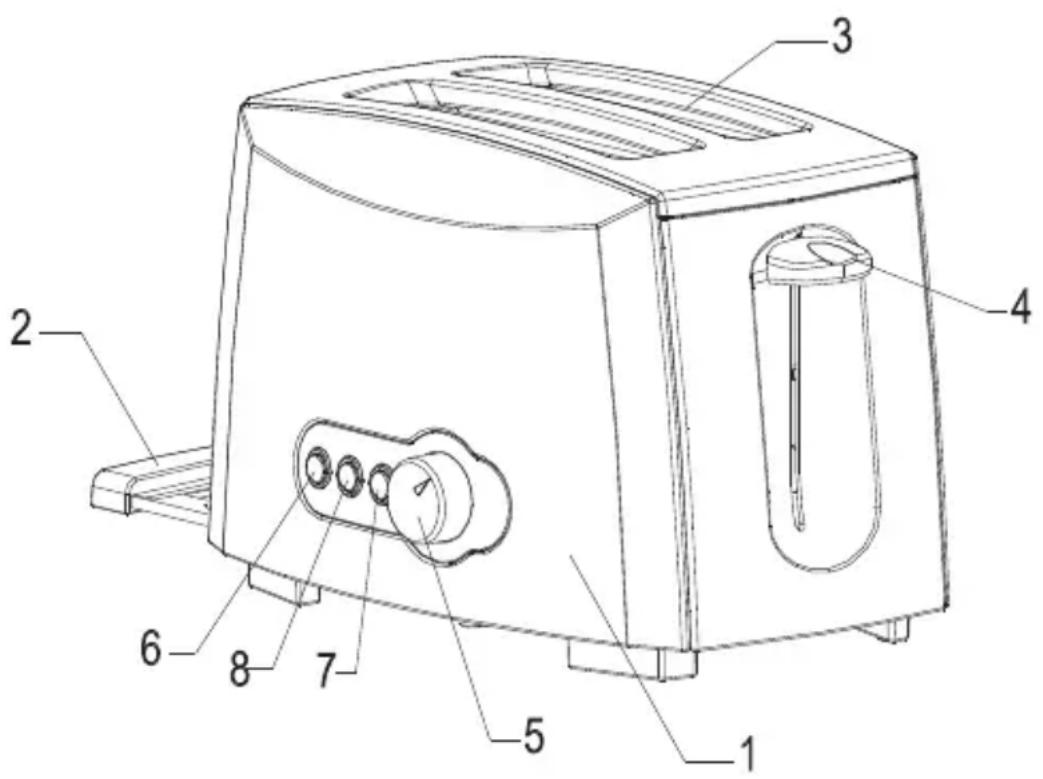
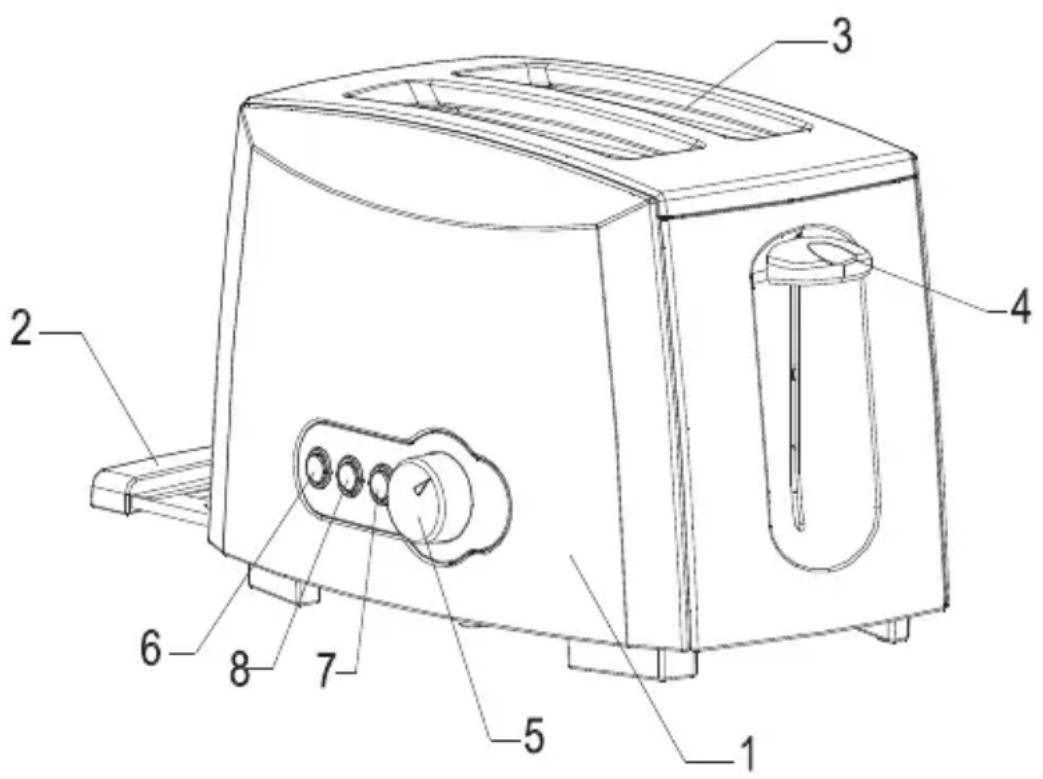
MAIN PARTS
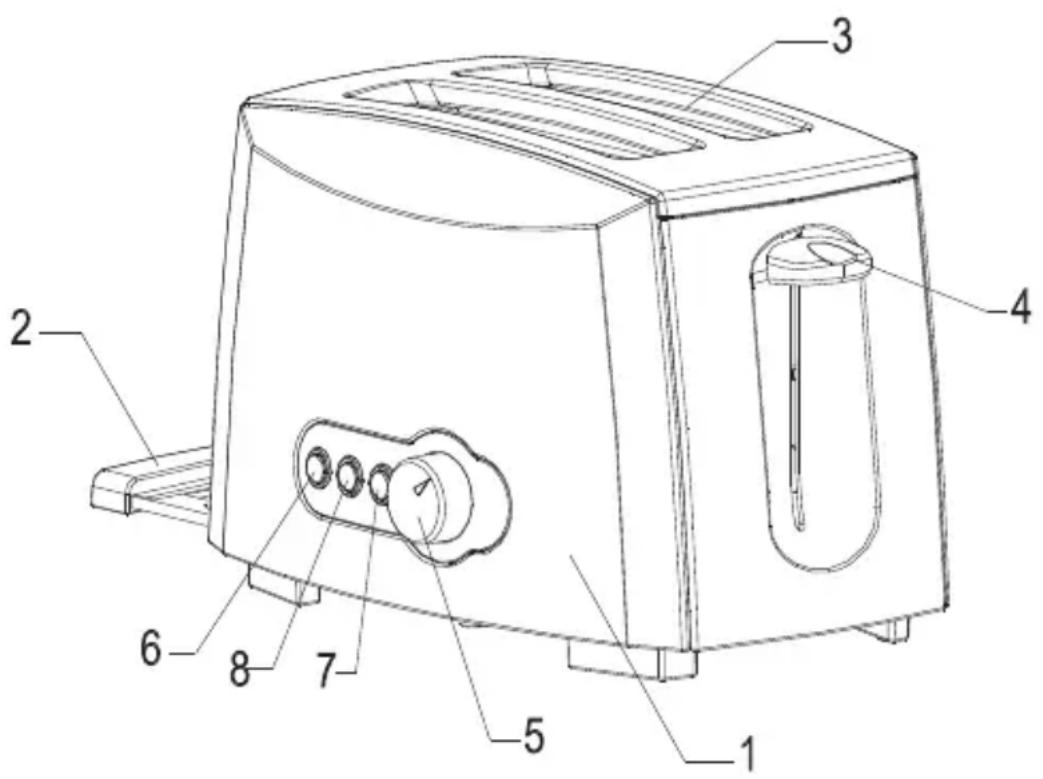
- Body
- Slide-out crumb tray
- Bread slot
- Sliding lever
- 7 settings timer
- Cancel button
- Defrost function button
- Reheat function button
king
IMPORTANT SAFEGARDS
■ Please read this instruction manual carefully before use and keep in a safe place for future reference.
■ Incorrect operation and improper handing can lead to malfunction of the appliance and injuries to the user.
■ Before the first connecting of the appliance check that voltage indicated on the rating label corresponds to the mains voltage in your home.
■ For home use only. Do not use for industrial purposes. Do not use the appliance for any other purposes than described in this instruction manual.
■ Do not use outdoors.
■ Always unplug the appliance from the power supply before cleaning and when not in use.
■ To prevent risk of electric shock and fire, do not immerse the appliance in water or in any other liquids. If it was happened DO NOT TOUCH the appliance, unplug it immediately and check in service center.
Do not take this product into a bathroom or use near water.
■ Do not place appliance or parts near an open flame, cooking or other heating appliances.
■ Close supervision is necessary when it is used near children.
■ Do not leave the appliance switched on when not in use.
■ Do not use other attachments than those supplied.
■ Do not operate after malfunction or cord damage.
■ Do not attempt to repair, adjust or replace parts in the appliance. Check and repair the malfunctioning appliance in the nearest service center only.
- Keep the cord away from sharp edges and hot surfaces.
Do not pull, twist, or wrap the power cord around appliance.
■ Do not move the appliance until it cools down completely.
■ Never use sharp objects to take out sliced bread! When taking out sliced bread, be careful not to damage the heating wires.
■ Do not touch any metal part of the outer surface of the appliance as it may reach a very high temperature.
■ Do not insert bread slices that are too thick or wrapped in aluminum foil to avoid electric shock or fire.
ATTENTION: TOO LONG TOASTING MAY CAUSE FIRE.
■ Do not cover the toaster during operation.
■ Bread may burn. Therefore toasters must not be used near or below curtains and other combustible materials. They must be watched.
If the supply cord is damaged, it must be replaced by the manufacturer or its service agent or a similarly qualified person in order to avoid a hazard.
king
■ The appliances are not intended to be operated by means of an external timer or separate remote-control system.
■ The surfaces are liable to get hot during use.
This appliance is not intended for use by persons (including children) with reduced physical, sensory or mental capabilities, or lack of experience and knowledge, unless they have been given supervision or instruction concerning use of the appliance by a person responsible for their safety.
■ Children should be supervised to ensure that they do not play with the appliance.
INSTRUCITIONS FOR USE
BEFORE THE FIRST USE
■ Before using the toaster for the first time clean your toaster (see Chapter "CARE AND CLEANING"). Operate the toaster at least two times without bread but on the highest setting. Ventilate the room during this period.
As all new electric heating elements, your toaster creates a new smell when it is first switched on. This is quite normal and not a cause for concern.
TOASTING
- Plug the toaster to the power supply and place 1 or 2 slices of bread into the bread slots of the appliance.
■ Adjust the 7 setting timer to a desired level:
-- 1-minimum level;
-- 7-maximum level.
■ Press down the sliding lever, the toaster will start running automatically and light indicator will go on.
■ Bread slices will be ejected out and the appliance will shut down automatically when toasting is finished.
REHEAT FUNCTION
■ You can use reheat facility if ready toasts got cold.
■ Insert toast into the toaster and pull down the sliding lever. Press the reheat function button REHEAT("R"). The indicator will light up.
■ The cold toast can be reheated in short time without over browning.
DEFROST FUNCTION
■ Press defrost function button DEFROST("D") to prolong toasting time of frozen bread, thus the indicator light should light up.
CANCEL BUTTON
■ Toasting can be reset anytime during toasting by pressing CANCEL("C") button, thus the indicator light will shut down.
CRUMB TRAY
■ The crumb tray is intended for collecting the crumbs, which fall on the base of the toaster while toasting.

natural_image
White crown icon on red background, no text or symbols presentking
■ Pull the crumb tray out, empty and place it back.
CARE AND CLEANING
■ Ensure that the appliance is unplugged before cleaning.
■ Let the unit completely cool down.
■ Do not use abrasive detergents, any organic solvents or aggressive chemicals.
■ Clean off crumbs of bread, buns, etc.
STORAGE
■ Switch off and unplug the appliance; let it completely cool.
■ Complete all requirements of chapter CARE AND CLEANING.
■ Reel on the power cord.
- Keep the appliance in a dry cool place.

natural_image
Red background with a white crown and ring design (no text or symbols)king
PARÇALARI
natural_image
Red background with a white crown and circular ring (no text or symbols)king
natural_image
White crown icon on red background, no text or symbols presentking
.1 هيئة
- PENZLQ LUXOGLBOKI KSRYKIBZ
.3.فتحة الخبرز
- انزلاق رافعة
.5.等多项 7%-۱۵-۶-۷
natural_image
Red background with a white crown and ring design (no text or symbols)king
ضمانات هامة
natural_image
Red background with a white crown and ring design (no text or symbols)king
natural_image
White crown icon on red background, no text or symbols presentking
natural_image
Symbol of a trash bin with crossed lines indicating no waste or discharge (no text or labels)Brand : KING
Model : K 2175 R Crispy
Category : Toaster