ES910 - Laminating machine Royal Sovereign - Free user manual and instructions
Find the device manual for free ES910 Royal Sovereign in PDF.


| Product type | Laminator |
| Brand | Royal Sovereign |
| Model | ES910 |
| Dimensions (L x W x H) | 370 x 167 x 120 mm |
| Weight | 3 kg |
| Power supply | 120 V, 60 Hz, 300 W |
| Lamination modes | Hot and cold |
| Maximum laminating width | 230 mm (9.1 in) |
| Maximum laminating thickness | 0.7 mm (27.6 mil) |
| Recommended pouch thickness | 75 to 125 microns (3-5 mil) |
| Number of rollers | 2 |
| Warm-up time | 4 to 6 minutes |
| Laminating speed | 360 mm/min (14.2 in/min) |
| Auto shut-off | After 1 hour of inactivity |
| Ready indicator | Yes (green) |
| Heating system | Hot shoe |
| Warranty | 1 year |
| Safety | Overheat protection, auto shut-off, do not immerse |
| Maintenance | Clean with a soft dry cloth |
Frequently Asked Questions - ES910 Royal Sovereign
User questions about ES910 Royal Sovereign
0 question about this device. Answer the ones you know or ask your own.
Ask a new question about this device
Download the instructions for your Laminating machine in PDF format for free! Find your manual ES910 - Royal Sovereign and take your electronic device back in hand. On this page are published all the documents necessary for the use of your device. ES910 by Royal Sovereign.
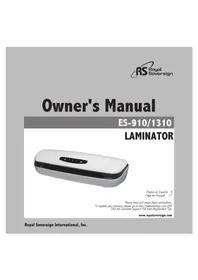
USER MANUAL ES910 Royal Sovereign
Please read and retain these instructions.
To register your product, please go to www.royalsovereign.com USA.
Click the Customer Support Tab then Registration Tab.
www.royalsovereign.com
Royal Sovereign International, Inc.
LAMINATOR
SAFETY INSTRUCTIONS
The safety recommendations outlined in this section should be read and understood before operating this machine. When using this machine follow these basic safety precautions to reduce risk of fire, electric shock or injury. Keep this information for future reference.
- To prevent the possibility of a fire or injury, do not allow foreign articles inside the machine.
- Do not attempt to laminate items that exceed total recommended material thickness.
- Do not insert pouch film with the back end first. (Front of film: sealed side, Back of film: open side.) This may cause the pouch to jam the rollers.
- To prevent the possibility of electric shock, do not immerse the laminator in water or permit liquids inside the machine.
- Because the laminator creates heat, keep out of the reach of children.
- Do not cut pouches before inserting them into the laminator. This will cause the laminator to jam.
- Do not laminate leaves, flower, clothes etc.
- If the room temperature is low (under 64^ ), the ready light may take longer to come on.
- When unplugging the power plug, grip the plug to pull it out. Pulling the cord may result in electric shock, fire, or damage to the machine.
- Do not use the machine if the cord is damaged. This may result in electric shock, fire, or other hazards.
- Do not place objects on the power cord and do not bend it excessively. This may result in electric shock, fire or other hazards.
- When not using the machine for long periods of time, unplug the power cord from the outlet.
CONTENTS
Box Contents 5
Parts 5
Controls 5
Features 5
Operation 6
Troubleshooting 7
Specifications 7
Warranty 8
Contact Information 8
Pagina en Espanol 9
Page en Francais 17
BOX CONTENTS
Laminator and pouch film
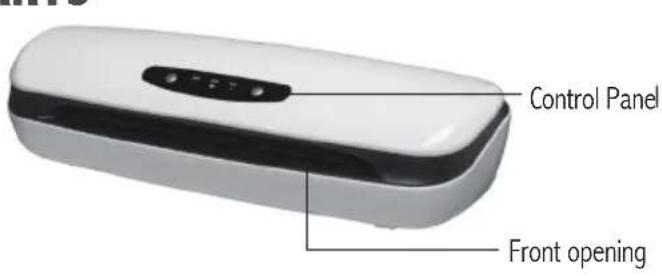
PARTS
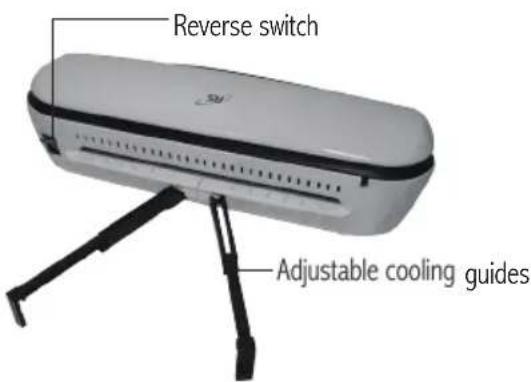
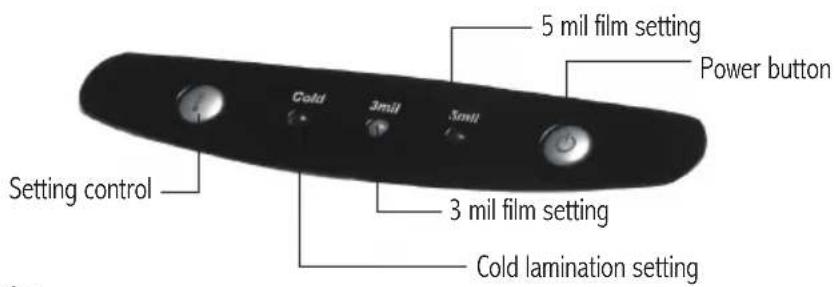
CONTROLS
FEATURES
Hot and Cold Lamination
The laminator can easily be adjusted to handle both hot and cold lamination pouch film.
Temperature Control
Individual settings for different film thicknesses from 3-5 mil.
Ready Light
A green ready light clearly indicates when the machine has reached optimal temperature and is ready to laminate.
Fast speed
Laminates up to 14.2" per minute.
Automatic Shut-Off Function
The machine will automatically shut off after one hour of non-use.
OPERATION
Hot Lamination
- Place the machine on a flat, sturdy surface and press the power button to turn on the machine.
- Pull out the cooling guides.
- The machine is preset to the 3mil setting. To change the setting press the setting control button. The machine will take approximately 5 minutes to warm-up. When the proper temperature is reached, the ready light will glow steady.
- Place the item to be laminated into the laminating pouch.
- Insert the pouch film into the front opening of the laminator. Make sure to place the sealed end of the pouch film in first.
- The document or photo will then automatically feed out the through the back of the machine.
NOTE: Laminated items exiting the machine may be too hot to touch.
- If the item is not completely laminated, repeat steps 4-5.
NOTE: Laminated items will be hot and will easily bend. To keep the item flat, place on a flat surface and allow it to cool or lay item on the cooling guides.
Before laminating important or unique documents, always test a pouch through the laminator using a similar document.
Cold Lamination
- Place the machine on a flat, sturdy surface and press the power button to turn on the machine.
- Press the setting control button until the Cold lamination setting is lit. If the machine was previously used in hot mode, allow approximately 25 minutes to cool down. When the proper temperature is reached, the ready light will glow steady.
- Place the document to be laminated on the adhesive side of the cold film with the document face down, sealed end first.
- Insert the document to be laminated into the front opening of the machine.
- Remove paper liner from the cold film slowly while the document is being inserted into the machine.
TROUBLESHOOTING
| Symptom Solution | |
| Motor does not work. | Check to make sure machine is plugged in. Check to make sure the power button is turned on. |
| Pouches are not laminating correctly. Make sure that the machine is set to the correct hot setting. | |
| The pouch is jammed. Press down the reverse switch and the pouch will exit the front of the machine. | |
If you are still having complications, please contact Royal Sovereign's Service Center at 1-800-397-1025.
SPECIFICATIONS
| Model ES-910 | ES-1310 | |
| Dimensions | 14.6x6.6x4.7 (inch)370x167x120 (mm) | 19.2x6.6x4.7 (inch)490x167x120 (mm) |
| Maximum laminating width 9.1" / 230 mm | 12.6" / 320 mm | |
| Maximum laminating thickness | 27.6 mil / 0.7 mm | |
| Film thickness | 3~5 mi / 75~125 micron | |
| Number of rollers 2 | ||
| Cold mode Yes | ||
| Heating system Hot shoe | ||
| Ready time 4-6 (min) | ||
| Motor type AC motor | ||
| Laminating speed 14.2" per min. / 360 mm per min. | ||
| Weight | 6 lbs / 3 kg | 7.4 lbs / 3.7 kg |
| Voltage/Cycle | 120V,60Hz | |
| Power consumption | 300 W | 400 W |
LIMITED ONE YEAR WARRANTY
This warranty applies to repair or replacement of product found to be defective in material or workmanship for one year from the date of the original purchase. This warranty is extended only to the original purchaser.
This warranty does not apply to damage resulting from abuse, misuse, or improper maintenance of damage that is attributable to acts of nature. Royal Sovereign International, Inc. (and its affiliated companies) is not liable for incidental or consequential damages of any nature. This limitation would not apply if you live in those areas that do not permit the exclusion or limitation of incidental or consequential damages.
Defective products for warranty repair or replacement cannot be returned without a Return Authorization number. Please go to www.royalsovereign.com USA-Customer Support Tab to make a request for an Office Product Return Authorization.
Defective products must be returned to Royal Sovereign International Consumer Return Department, freight prepaid, with proof of purchase and Return Shipping and Handling payment (check or money order). Upon repair or replacement the product will be returned to the customer.
Return defective product to the following address with a detailed description of the problem. If possible, pack in original carton. Please prepay shipping charges.
For out of warranty service or frequently asked questions please go to www.royalsovereign.com USA- Customer Support Tab.
For sales of product, parts or accessories please visit us at www.royalfullfillmentcorp.com.
For service or sales please contact your local Royal Sovereign Office:
ROYAL SOVEREIGN INTERNATIONAL, INC. RS CANADA INC.
2 Volvo Drive Rockleigh, NJ 07647 USA 1025 Westport crescent, Mississauga, Ontario, Canada L5T1E8
TEL: +1) 800-397-1025 FAX: +1) 201-750-1022 TEL: +1) 800-397-1025 FAX: +1) 201-750-1022

Espanol
www.royalsovereign.com

Français
www.royalsovereign.com
Royal Sovereign International, Inc.
PLASTIFIEUSE
CONSIGNES DE SECURITE
www.royalsovereign.com
Brand : Royal Sovereign
Model : ES910
Category : Laminating machine