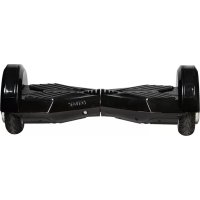
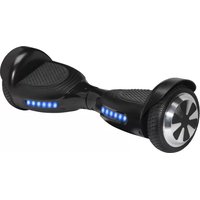
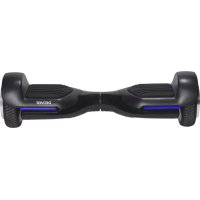
DBO8001 - Self-balancing scooter DENVER - Free user manual and instructions
Find the device manual for free DBO8001 DENVER in PDF.



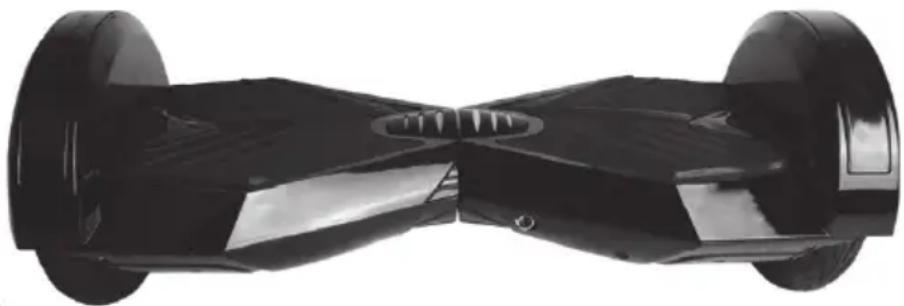
| Product type | Self-balancing scooter |
| Brand | Denver |
| Model | DBO8001 |
| Maximum user weight | 120 kg |
| Maximum speed | 15 km/h |
| Range | Varies according to weight, terrain, temperature and riding style |
| Battery type | Lithium-ion |
| Battery voltage | 42 V |
| Charging time | Approximately 4 hours |
| Included charger | Model JY-420150, 42V/1.5A |
| Stabilization system | Internal gyroscope and acceleration sensors |
| Indicator lights | Battery LED (green/red) and operation indicator |
| Pedals | 4 pedal sensors for activation |
| Operating temperature | -10°C to +45°C |
| Charging temperature | 0°C to +45°C |
| Storage temperature | 5°C to 30°C |
| Maintenance | Wipe with a soft cloth; do not use water |
| Storage | Dry place, away from sunlight and flammable materials |
| Usage | For recreational use only, not on public roads |
| Required safety equipment | Helmet, knee pads, elbow pads |
Frequently Asked Questions - DBO8001 DENVER
User questions about DBO8001 DENVER
0 question about this device. Answer the ones you know or ask your own.
Ask a new question about this device
Download the instructions for your Self-balancing scooter in PDF format for free! Find your manual DBO8001 - DENVER and take your electronic device back in hand. On this page are published all the documents necessary for the use of your device. DBO8001 by DENVER.
USER MANUAL DBO8001 DENVER
natural_image
Black electric scooter with two wheels and a sleek design, shown in studio setting (no visible text or symbols)www.facebook.com/denver-electronics
natural_image
Three sequential illustrations of human figure standing in different positions, showing vertical motion with arrows indicating left, center, and right sides (no text or symbols)2.4. Fahren lernen
natural_image
Black and white illustration of a two-holse electric motor with visible blades and mounting flanges (no text or symbols)natural_image
Abstract grayscale illustration of a symmetrical geometric shape with curved and angular features, no text or symbols present.natural_image
Black and white photo of a black three-wheeled bicycle with wheels and front side (no text or symbols visible)Warnung
natural_image
Black and white photo of a black three-wheeled electric scooter with wheels and headrest (no visible text or symbols)www.facebook.com/denver-electronics
natural_image
Three sequential illustrations of human standing figures with circular footprints, showing vertical alignment and movement directions (no text or symbols)2. 4 Lær at bruge balance scooteren
natural_image
Black and white photo of a two-holfered bicycle with visible wheels and side blades (no text or symbols)natural_image
Abstract grayscale illustration of a symmetrical, butterfly-like structure with curved and angular elements (no text or symbols)natural_image
Black and white photo of a black three-wheeled electric scooter with wheels (no visible text or symbols)Advarsel:
natural_image
Black and white photo of a black three-wheeled electric scooter with visible wheels and headrest (no text or symbols)www.facebook.com/denver-electronics
natural_image
Three sequential illustrations of human figure standing with hands on legs, showing vertical motion (no text or symbols)2.4. Aprenda a usarlo
natural_image
Black and white illustration of a two-holse electric scooter with wheels and side blades (no text or symbols)natural_image
Abstract grayscale illustration of a butterfly wing with a striped pattern and a small circular symbol at the bottom right (no text or symbols)natural_image
Black and white photo of a black three-wheeled handstand with wheels and front skings (no visible text or symbols)Advertencia:
natural_image
Black electric scooter with two wheels and a sleek design, shown in studio setting (no text or symbols visible)www.facebook.com/denver-electronics
natural_image
Three sequential illustrations of human figure standing in vertical positions with circular footprints, showing posture changes (no text or symbols)natural_image
Black and white illustration of a two-holter hover with directional arrows indicating motion (no text or symbols)natural_image
Abstract grayscale illustration of a butterfly wing with striped pattern and curved wings (no text or symbols)natural_image
Black and white photo of a black three-wheeled electric scooter with front wheels (no visible text or symbols)Avertissement
natural_image
Black and white photo of a black electric scooter with two wheels and a head strap (no visible text or symbols)www.facebook.com/denver-electronics
natural_image
Three sequential illustrations of human figure standing in different poses with circular footprints, showing vertical motion (no text or symbols)natural_image
Black and white photo of a two-holbote hover with directional arrows indicating motion (no text or symbols)natural_image
Abstract grayscale illustration of a butterfly wing with striped pattern and a small circular symbol at the bottom (no text or symbols)natural_image
Black and white photo of a black three-wheeled bicycle with wheels and front skings (no visible text or symbols)Avvertenza
natural_image
Black and white photo of a black three-wheeled electric scooter with wheels and headrest (no visible text or symbols)www.facebook.com/denver-electronics
natural_image
Three sequential illustrations of human standing figures with circular footprints, showing vertical movement and directional arrows (no text or symbols)natural_image
Black and white illustration of a two-holse electric motor with visible wheels and side blades (no text or symbols)natural_image
Abstract grayscale illustration of a butterfly wing with curved and straight stripes (no text or symbols)natural_image
Black and white photo of a black three-wheeled electric scooter with wheels and headrest (no visible text or symbols)Waarschuwing
natural_image
Black and white photo of a black three-wheeled electric scooter with wheels and headrest (no visible text or symbols)www.facebook.com/denver-electronics
natural_image
Three sequential illustrations of human figure standing in different positions, showing vertical and horizontal movement with no text or symbols.natural_image
Black and white photo of a two-holter hover with directional arrows indicating motion (no text or symbols)natural_image
Abstract grayscale illustration of a butterfly wing with curved wings and a ladder, no text or symbols present.natural_image
Black and white photo of a black three-wheeled electric scooter with front wheels (no visible text or symbols)OSTROŻNIE:
natural_image
Black and white photo of a black three-wheeled electric scooter with wheels and headrest (no visible text or symbols)www.facebook.com/denver-electronics
natural_image
Three sequential illustrations of human figure standing in different positions, showing vertical and horizontal movement with no text or symbols.2.4. Aprender a utilizar a scooter
natural_image
Black and white illustration of a two-holse electric motor with visible wheels and side blades (no text or symbols)natural_image
Abstract grayscale illustration of a butterfly wing with striped pattern and a small circular symbol at the bottom (no text or symbols)natural_image
Black four-wheeled bicycle with front wheels and headrest (no visible text or symbols)Aviso:
natural_image
Black and white photo of a black three-wheeled electric scooter with wheels and headrest (no visible text or symbols)www.facebook.com/denver-electronics
natural_image
Three sequential illustrations of human figure standing with circular footprints, showing vertical motion and movement directions (no text or symbols)natural_image
Abstract grayscale illustration of a butterfly wing with striped pattern and a small circular symbol at the bottom (no text or symbols)natural_image
Black and white photo of a black three-wheeled bicycle with wheels and front skings (no visible text or symbols)WARNING!
natural_image
Black and white photo of a black electric scooter with two wheels and a head-mounted sensor (no visible text or symbols)www.facebook.com/denver-electronics
natural_image
Three sequential illustrations of human figure standing with circular footprints, showing vertical motion (no text or symbols)natural_image
Black and white photo of a two-holter hover with directional arrows indicating motion (no text or symbols)natural_image
Abstract grayscale illustration of a butterfly wing with curved wings and a small circular object at the bottom (no text or symbols)natural_image
Black three-wheeled bicycle with front wheels and central hub (no visible text or symbols)Varoitus
natural_image
Black and white photo of a black electric scooter with two wheels and a visible 'POTTA 42' branding (no text or symbols on the vehicle body)www.facebook.com/denver-electronics
natural_image
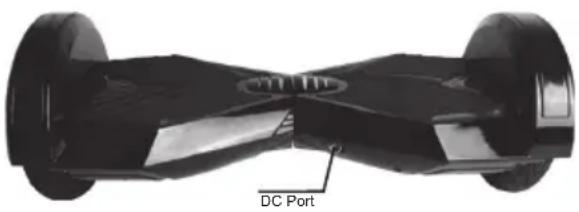
Exterior view of a black DC motor with two wheels and a labeled port (no other text or symbols)| EN NO | |
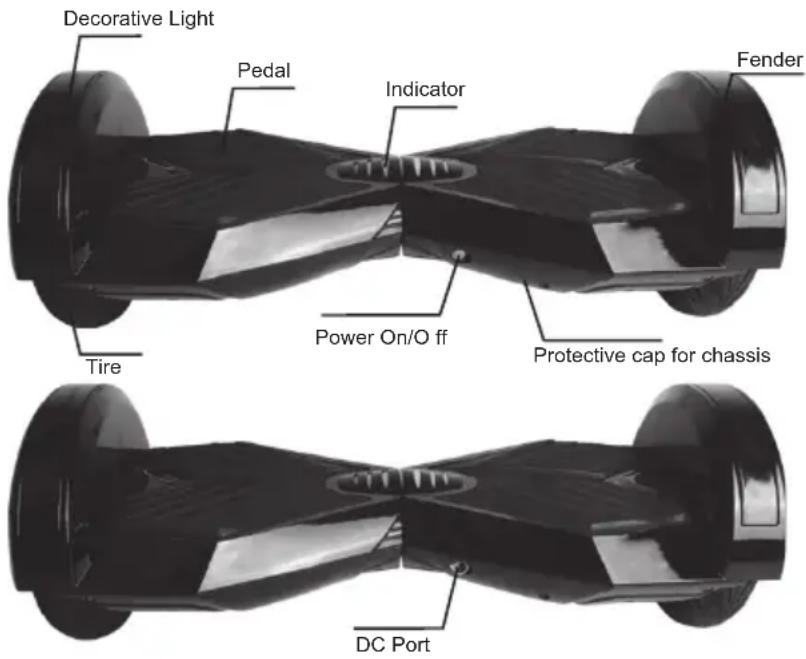
| Decorative Light Dekorative Lys | |
| Pedal Pedal | |
| Indicator Indikator | |
| Fender Skjerm | |
| Tire Dekk | |
| Power On/Off Strøm On/Off | |
| Protective cap for chassis | Beskyttelsesdeksel for chassis |
| DC Port Likestrømskontakt |
2.2 Kalibrering
natural_image
Three sequential illustrations of human figure standing with legs, showing vertical motion and movement directions (no text or symbols)natural_image
Black and white illustration of a two-wheeled electric scooter with wheels and side blades (no text or symbols)Tilt right foot forward- Turn Left
Tilt left foot forward- Turn Right
natural_image
Abstract grayscale image with curved and angular shapes, no visible text or symbolsnatural_image
Black and white photo of a black four-wheeled bicycle with two wheels (no visible text or symbols)Chapter7Vedlikeholdavstäbrette t
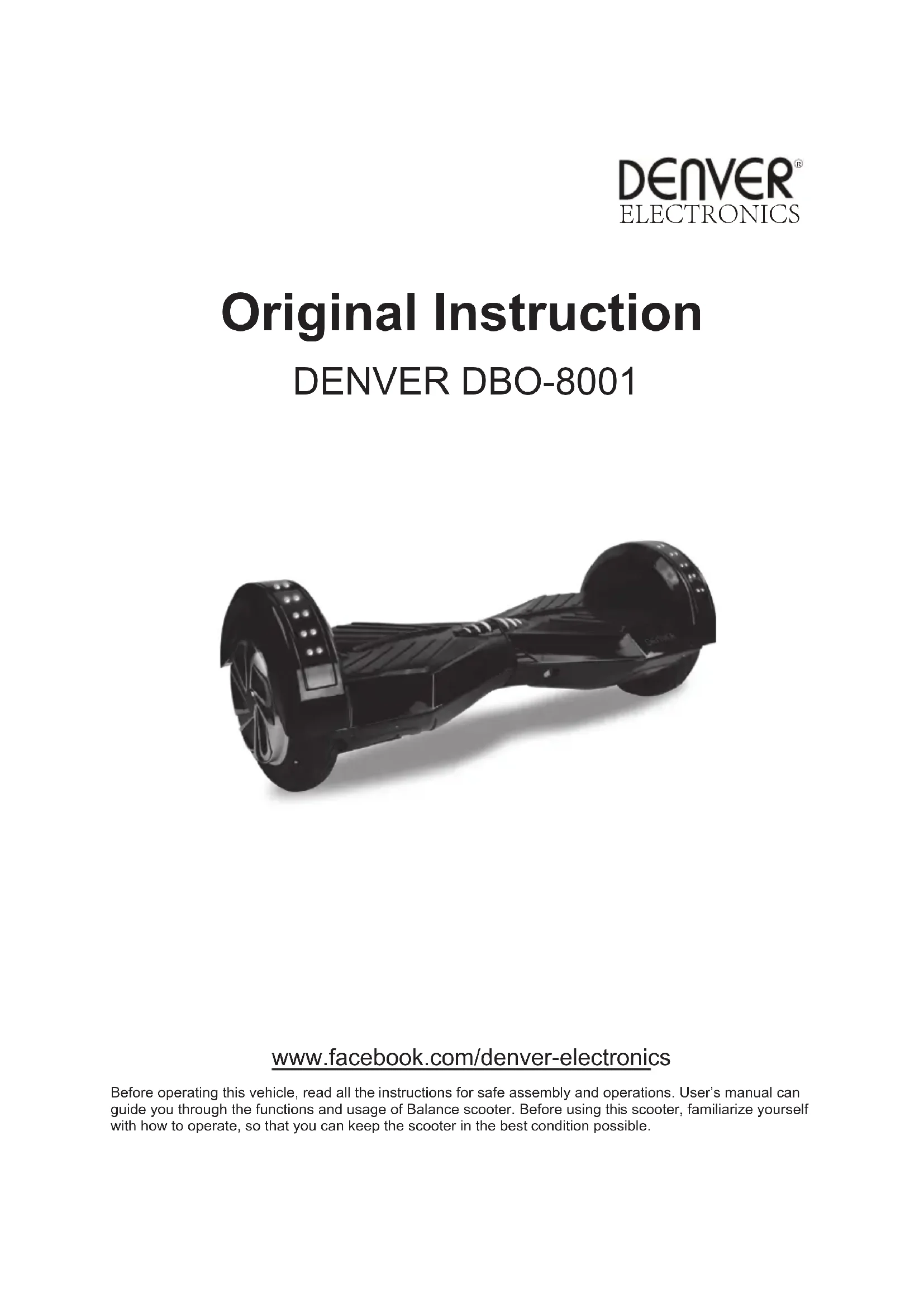
Original Instruction
DENVER DBO-8001
natural_image
Black and white photo of a black three-wheeled electric scooter with wheels and headrest (no visible text or symbols)www.facebook.com/denver-electronics
Before operating this vehicle, read all the instructions for safe assembly and operations. User's manual can guide you through the functions and usage of Balance scooter. Before using this scooter, familiarize yourself with how to operate, so that you can keep the scooter in the best condition possible.
Chapter 1 General information
1.1. The risk of driving

WARNING!
- Learn how to drive safely before you drive fast on the scooter.
- Failing, losing control, crashing, including violating the rules in the user's manual can lead to injury.
- Speed and range may differ based on rider weight, terrain, temperature, and driving style.
- Make sure to wear helmet and protective clothing before using the scooter.
- Make sure to read the manual carefully before using the scooter.
- Only for use in dry weather.
- We do not recommend the use of any balance scooters on public roads
- Please make sure to check with your national laws in your country for usage this product.
1.2. The preparation before operation
Before using, the battery should be fully charged. Please check Chapter 6.
1.3. The weight limitation of the operator
The reason of the weight limitation: 1. guarantee the safety of the operator; 2. decrease the damage of overloading.
Maximum load: 120kg.
Chapter 2 Operating the Balance scooter
2.1. Description and identification
2.2. Calibration
If your scooter seems to pull to the left or right, you may need to recalibrate its sensors. Step as below:
Step 1: Shut down/level the scooter
Step 2: Press the Power button for more than 10 seconds until you see the light flashing 5 times.
Step 3: Shutdown scooter again.
Step 4: Power on, finished calibration.

NOTE:
Built in Self-Balance function, it is easy for driving.
2.3. Operating principal
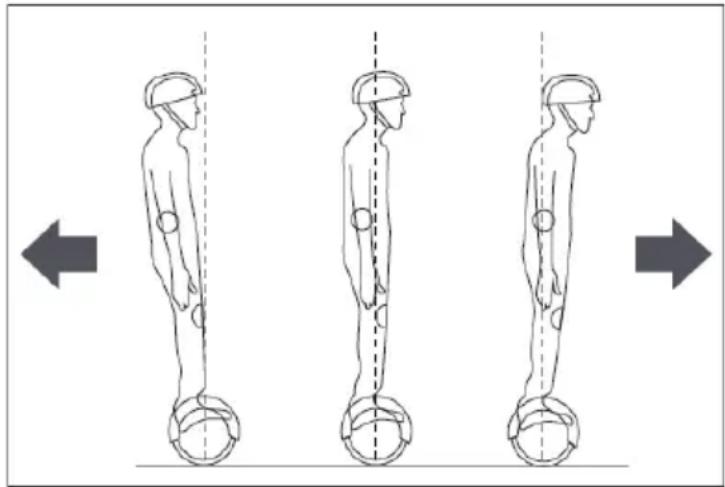
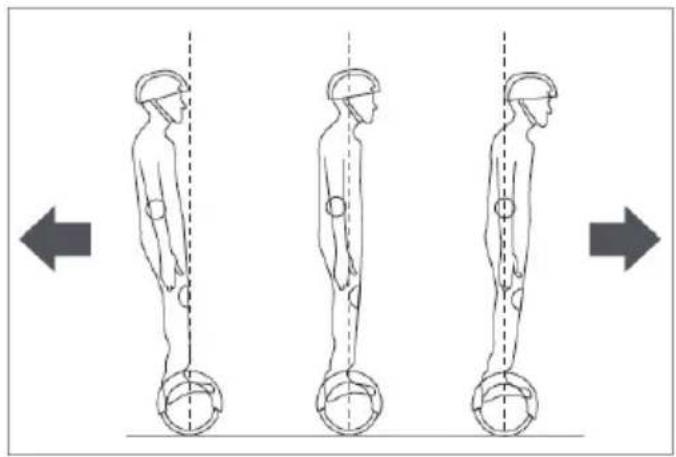
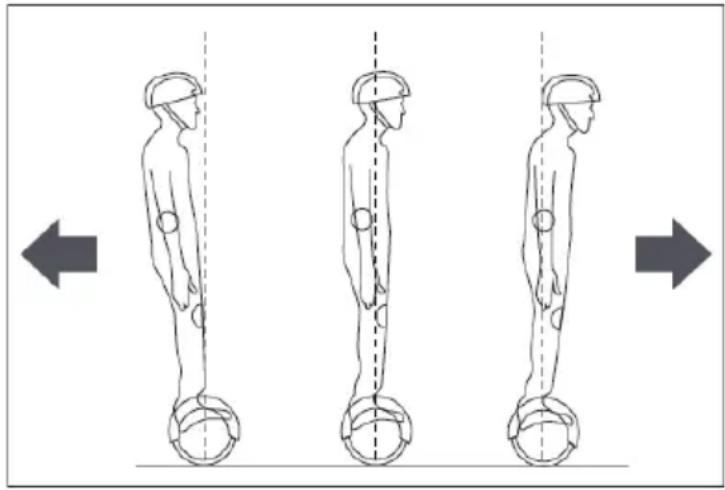
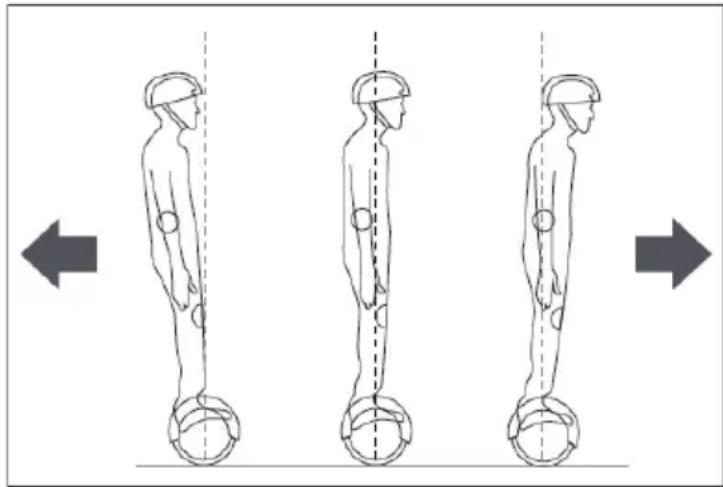
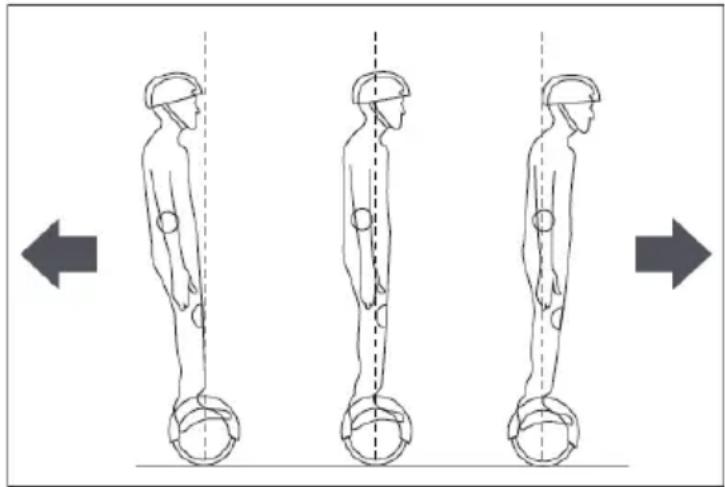
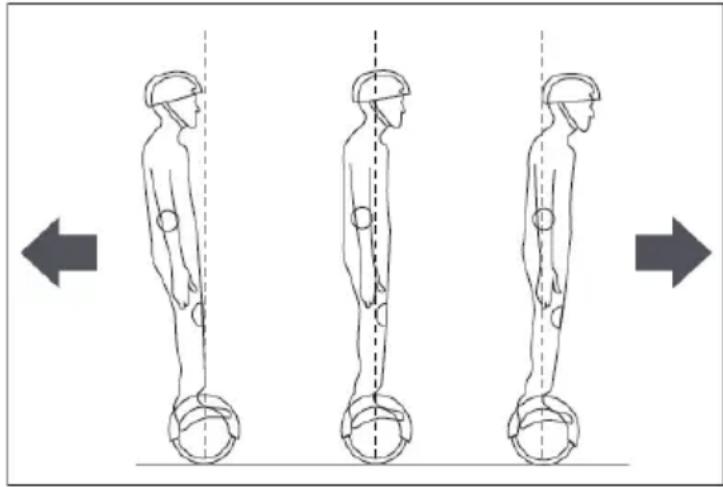
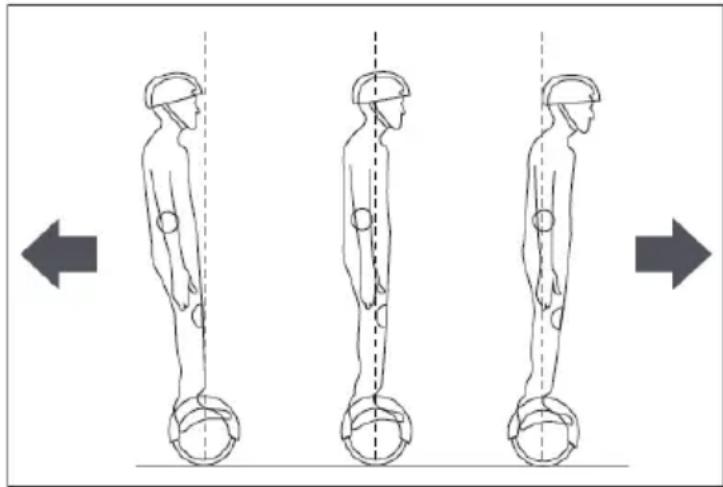
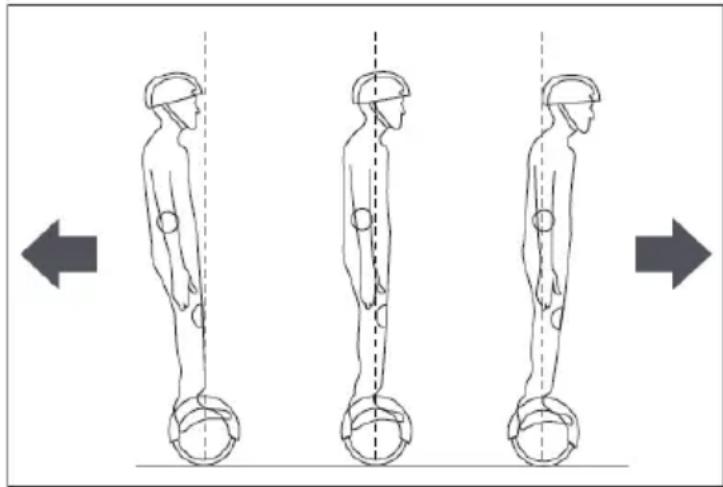
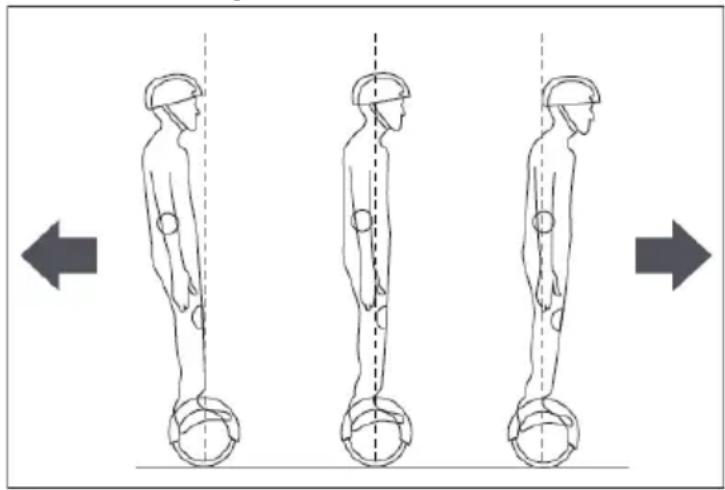
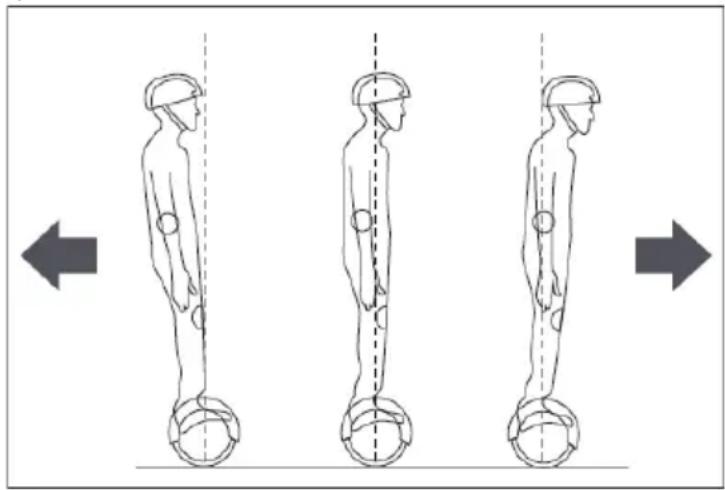
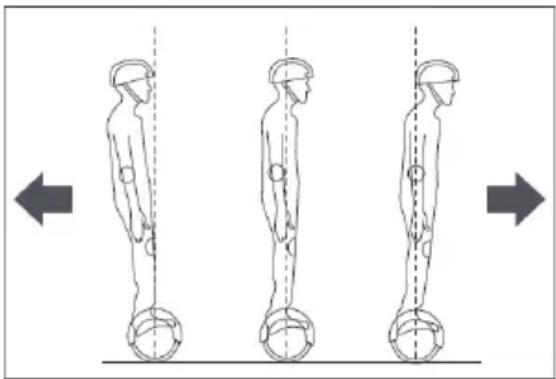
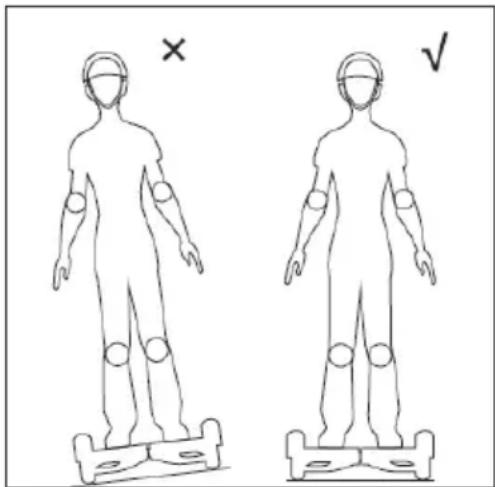
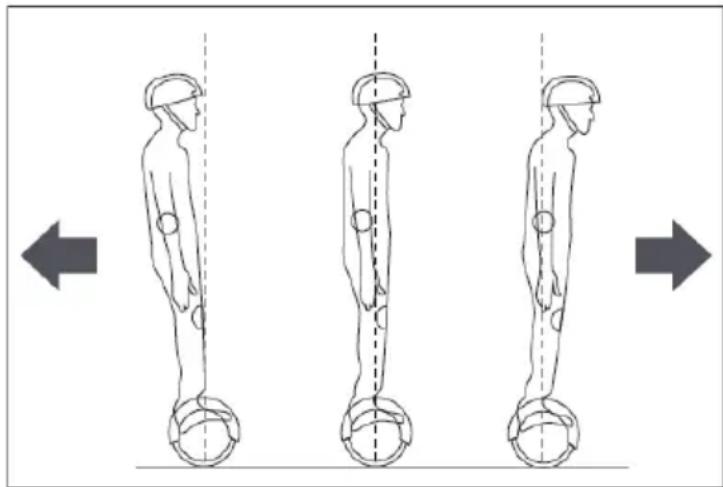
- Balancing scooter uses Dynamic equilibrium, using internal gyroscope and acceleration sensors. The status of the scooter is controlled by the center-of gravity. It is adjusted by motor, which is controlled by the servo control system. When you lean forward, it will sense your actions to accelerate. When you need to turn, slow it down and move your foot forwards or backwards then the center-of gravity of the body moves left or right therefore the scooter can sense moving left or right.
- Balance scooter has inertial dynamic stabilization system, so it can keep anterior-posterior balance but cannot guarantee the left and right. So when turning, the scooter needs to be operated slowing, otherwise, you may be injured.
natural_image
Three sequential illustrations of human figure standing in different poses with circular footprints, showing vertical motion (no text or symbols)2.4. Learn how to use it
Step 1: Press the power button to turn on the scooter.
Step 2: Put the scooter on a flat ground and make sure all safety measures are taken. Put one foot on the pad that will trigger the pedal switch to turn on the operation indicator, after the system enters the self-balancing mode, put the other foot on the pad.
Step 3: Take control of the scooters' forwards or backwards, do remember the movement of your body should not be abrupt.

If you are not in a balanced condition when you trigger the foot-switch, the buzzer will alarm, and the warning LED will light. The system is not in a self-balanced condition. Without a balanced condition, you should not operate the scooter. Then you need to calibrate the sensors, see point 2.2.
Step 4: Control the left and right direction of the scooter.
Step 5: Before you get off, make sure that the scooter is still in balanced condition and stopped, then step off one foot, then the other foot.
natural_image
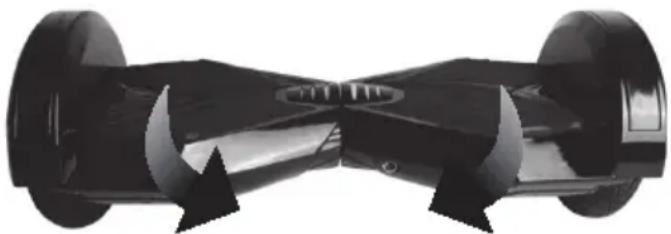
Black and white photo of a two-wheeled electric scooter with visible wheels and side stripes (no text or symbols)Tilt left foot forward- Turn Right
Tilt right foot forward- Turn Left

You should never turn violently when driving fast.
You should never ride sideways or turn on a slope. It will lead to a fall and injury.
2.5. Always react on alarms
Scooter will not operate in the following situations:
- During operation, if the system runs an error, the scooter will prompt operators in different ways such as prohibit riding, alarm indicator lights, buzzer alarm beeps intermittently the system cannot enter self-balancing mode.
- When stepping on the scooter the platform moves forwards or backwards more than 10 degrees, the unit will not operate.
• The voltage of the battery is too low. - During charging.
• During operation, the platform turns upside down will prohibit operation.
• Over speeding.
• The battery is not charged enough. - Tire stall, two seconds later the scooter enters power off mode.
- The battery voltage is lower than the protection value, 15 seconds later the electric scooter enters into power off mode.
• Continuing large current discharge (such as a long-time climbing a very steep slope)

WARNING!
When the scooter enters into the shutdown state, the system will lock down the machine automatically. It can be unlocked when you press the power button. When the battery has been depleted or the system gives out information with safety shutdown, please do not continue to drive the scooter, otherwise, the scooter cannot balance for the lack of battery. In this condition, the driver is likely to be harmed. If the battery reaches the minimum, the continued driving of the scooter will negatively affect the battery's life.
• The product should only be used in temperatures between -10^ - +45^ .
2.6. Riding practice
Before you drive the scooter, please make sure you are familiar with the skills of driving it. Always practice with someone ready to hold/catch you.
• Use casual (but not loose) clothes and flat shoes in order to retain your body's flexibility.
• Please go to open spaces to practice driving the scooter until you can easily get on and get off.
• Make sure that the surface is level.
- When you are driving on different terrain, you must slow down.
• Balance scooter is a driving tool designed for a smooth road. Reduce speed if you drive the scooter on a rough surface.
• Before driving: Read Chapter 4 on maximum speed and Chapter 5 on safe driving thoroughly
Chapter 3 Pedal Sensor and Indicator operation
3.1. Pedal sensor
Balance scooter has 4 sensors below the pedal, when the operator steps on the pedal, the scooter will adjust itself to a balancing pattern automatically. When riding it, you have to make sure that the pedal is being fully stepped on, please do not step on the parts outside the pedal. Do not put things on the pedals to make the scooter operate by itself and increase the possibility of crashing and even cause personal injury and damage to the scooter itself.
3.2. Battery & Operation Indicators
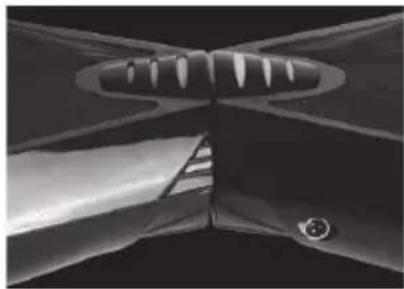
The indicator is located in the middle of the scooter. It is used for operation information.
- Battery indicator on the balance scooter will show green color as long as there is sufficient power on the battery to drive.
- Battery indicator on the balance scooter will show red color when battery power is down(15-20% left) and you will you need to stop driving and start to recharge the balance scooter.
- Battery indicator on the balance scooter will show RED and have WARNING ALARM SOUND when battery power has run out and you must stop driving immediately. The balance scooter will now shut down without further notice and the balance scooter will then loose balance. You may have risk to get injured if still try to keep driving.
- Operation indicator: When the pedal is triggered, the operation indicator will light then the system comes into operating condition; when the system runs an error, the indicator will turn red.
natural_image
Close-up of a metallic mechanical component with curved surfaces and a central blade-like structure (no visible text or symbols)Chapter 4 Range and speed
4.1. Range per charge
The range per charge is related to many factors, for example:
- Topography: On even roads the range per charge will be increased, on uneven terrain, it will be decreased.
• Weight: The weight of the operator can influence the driving distance.
• Temperature: Extreme temperature will decrease the driving distance. - Maintenance: If the scooter is charged properly and the battery is kept in good condition, this will maximize the driving distance.
- Speed and driving style: Keeping a steady speed will increase the driving distance, on the contrary, frequent start, stop, acceleration, deceleration will reduce the distance.
4.2. Max. Speed
- The maximum speed of the balance scooter is rated at 15km/h but depends on the charging condition of the battery, the condition/angle of the surface, wind direction, and the driver's weight. If the battery is fully charged, the surface is very level or even angled downward, there is a tailwind, and the driver is not very heavy, the maximum speed may exceed 15km/h.
- Approaching its maximum speed, the balance scooter emits a warning signal, and speed should be reduced.
• We recommend driving the balance scooter at speeds that are comfortable to you and not driving the balance scooter at speeds exceeding 15km/h.
• In the permissive speed, the electric scooter can balance itself well.
Chapter 5 Safe driving
This chapter will focus on safety, knowledge and warnings. Before operating this vehicle, read all the instructions for safe assembly and operation.

WARNING!
- Before starting, familiarize yourself with how to operate, so that you can keep the scooter in the best condition.
- When you are driving the scooter, make sure that all safety measures are taken. You should be wearing a helmet, knee pads, elbow pads and other protective gear.
- The driver should not wear loose or hanging clothing, shoelaces, etc. that can get caught in the wheels of the Balance scooter.
• Balance scooter is only for personal entertainment. You are not allowed to ride it on public streets.
• Balance scooter is not allowed on the motor vehicle lanes.
• Children, the elderly, pregnant women are not allowed to drive.
• Persons with reduced balancing capacity should not drive the balance scooter.
• Do not drive the balance scooter under the influence of alcohol or any other substance.
• Do not carry items when driving.
• Please be alert to things in front of you, maintaining good vision will help you drive the scooter safely. - Relax your legs while driving, knees slightly bent, it can help maintain balance when encountering uneven ground.
• In the process of driving, make sure that your feet are always steeping on the pedals.
• Balance scooter can only carry one person.
• Do not start or stop suddenly. -
Avoid driving on steep slopes.
-
Do not drive the balance scooter up against a fixed object (f.inst. a wall or other structure) and continue driving the balance scooter.
• Do not drive in dimly lit or dark places. - Driving the Balance scooter is at your own risk and the company is not responsible for any accidents or damage you may cause.
- Ensure the vehicle speed is safe to yourself and others, and be ready to stop at any time when operating.
- When you are driving the scooter, please keep a certain distance from each other to avoid collisions.
- When steering you should use your body's center of gravity, the violent shift of center of gravity may cause you to wreck or fall off the scooter.
- Do not drive backwards for long distances, drive backwards at high speeds, turn at high speeds and drive too fast.
- Do not drive when raining or expose the scooter to other wet conditions. Only to be driven in dry weather.
- Avoid driving on obstacles and avoid snow, ice, and slippery surfaces.
- Avoid driving on items made of cloth, small branches and stones.
- Avoid driving in narrow spaces or where there is an obstacle.
- Jumping on or off the scooter can and will cause damage that is not covered by warranty. Risk of personal injury. Personal damage or abuse related to “trick riding” is not covered by the company and voids any warranty.
Chapter6Chargingthescooter
This chapter mainly discusses the charging methods, how to maintain the battery, the safety issues you need to pay attention to, and battery specifications. For safety of yourself and others, and extend the battery's life and improve battery performance, please make sure to follow the following operations.
6.1.Lowbattery
When you find the battery indicator is red and flashing, it indicates low battery. It is recommended that you stop driving. When the power is low, there is not enough energy for your normal driving, then the system will automatically tilt the base of the platform to prohibit the operator's use. It is very easy to fall if you insist on driving at this time, and negatively affect battery's life.
Do not use the battery in the following cases.
• Giving out some odor or excessive heat.
• Leakage of any substance.
• It is prohibited to disassemble the battery.
• Do not touch any substance leaking out of the battery.
• Do not let children and animals touch the battery.
- Batteries contain dangerous substances inside. It is forbidden to open the battery and to stick objects into the battery.
• Use only the supplied charger.
- Don't over charge lithium batteries. The battery pack consists of lithium batteries.
NOTE:
When you find the battery indicator is red and flashing, it indicates low battery. It is recommended that you stop driving and recharge the scooter. When the battery is low, there is not enough power for normal driving. The operational system of the scooter will automatically tilt the platform forward to prohibit use. This could cause the driver to fall off the scooter and become injured.
CATION
- When charging do not ride the Balance Scooter!
- When charging ongoing then the LED light of the battery charger is red color.
- When charging is finished then LED light of the battery charger turns into green color.
- When charging finished unplug the battery charger from the mains power supply and from the balance scooter.
6.2.Chargingsteps
• Make sure that the balance scooter, the charger and the DC power socket on the balance scooter are kept dry.
• Note: ONLY use the supplied charger labelled JY-420150 with the following output voltage to charge this balance scooter: 42V - 1.5A.
• Using another charger may damage the product or create other potential risks.
- Plug the power adapter into the DC power port on the back of the scooter and a standard power outlet. Make sure the green indicator on the adaptor lights up.
- When the red indicator lights on the charger indicate charging properly, otherwise check if the line is connected properly.
- When the indicator light on the charger changes from red to green, this indicates that the battery is fully charged.
- Inthiscase, please stopcharging. Overcharging will affect the battery life.
- Charging may take up to 4 hours. Do not charge the battery for more than 4 hours. Disconnect the charger from the balance board and the power supply after 4 hours. Overcharging will reduce the lifetime of the battery.
• Theproductshouldnotbechargedoverlongerperiods.
- Neverchargetheproductwithoutsupervision.
- Theproductshouldonlybechargedintemperaturesbetween 0^-+45^ .
- If charging at lower or higher temperatures, there is a risk that the performance of the battery will be reduced and apotential risk of damage to the product and personal injury.
- Charge and store the product in an open, dry area and away from flammable materials (i.e. materials that may burst into flames).
- Donotchargeinsunlightornearopenfire.
- Donotchargetheproductimmediatelyafteruse.Lettheproductcooldown charging. foronehourbefore
- If the product is left with other persons for example during a holiday period, it should be partially charged (20-50% charged). Notfullycharged.
• Do not remove the product from the packaging, charge it fully and then put it back into the packaging.
- When shipped from the factory, the product has often been partially charged. Keep the product in a partiallycharged state, until it is going to be used.
natural_image
Black and white photo of a black three-wheeled electric scooter with two wheels (no visible text or symbols)WARNING!
- Only use the DC connector to connect with the DC cable from the charger that comes with the balance scooter!
- Do not insert any foreign objects into DC connector!
- Risk of arcing! Never bridge the DC charging socket with metal objects!
WARNING!
- Always keep the protective cap plugged onto the DC connector!
- Only take off the cap when charging the balance scooter!
• After charging finished take out the DC plug and put on the protective cap onto the DC connector again!
Chapter7Themaintenanceoftheelectricscooter
Balancescooterneedstobemaintained. This chapter mainly describes the relevant steps and important operation reminder stomaintainit. Pleasemakesure that the power and charge coil are off before you do the following operation. You should not operate when the battery is charging.
7.1.Cleaning
- Makesurethepowerandthechargecoilareoff.
- Wipetheshellofelectricscooterwithsoft cloth.
WARNING!
• Make sure that water and other liquids do not enter the internal parts of the balance scooter as this may permanently damage the electronics/batteries of the scooter. There is a risk of personal injury.
7.2. Storage
- If the storage temperature is below 0°C, please do not charge the scooter. You can place it in a warm environment (5-30°C) for charging.
• You can cover the scooter, in order to prevent dust.
• Store the scooter indoors put it in a place with a dry and suitable environment. - If used at lower or higher temperatures, there is a risk that the performance of the battery will be reduced and a potential risk of damage to the product and personal injury.
• Store the product at temperatures between 5°C - 30°C. (optimum storage temperature is 25°C) - Charge and store the product in an open, dry area and away from flammable materials (i.e. materials that may burst into flames).
• Do not store the product in sunlight or near open fire. - If the product is left with other persons for example during a holiday period, it should be partially charged (20-50% charged). Not fully charged.
• Do not remove the product from the packaging, charge it fully and then put it back into the packaging. - When shipped from the factory, the product has often been partially charged. Keep the product in a partially charged state, until it is going to be used.
- The Balance Scooter must cool down for at least 1 hour before being packed.
- Must not be left inside a warm car sitting in the sun.

WARNING!
• To protect user safety, users are forbidden to open the scooter, or you give up your warranty rights.
ALL RIGHTS RESERVED, COPYRIGHT DENVER ELECTRONICS A/S
DENVER®
www.denver-electronics.com

Electric and electronic equipment and included batteries contains materials, components and substances that can be hazardous to your health and the environment, if the waste material (discarded electric and electronic equipment and batteries) is not handled correctly.
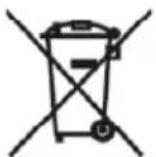
Electric and electronic equipment and batteries is marked with the crossed out trash can symbol, seen below. This symbol signifies that electric and electronic equipment and batteries should not be disposed of with other household waste, but should be disposed of separately.
As the end user it is important that you submit your used batteries to the appropriate and designated facility. In this manner you make sure that the batteries are recycled in accordance with legislature and will not harm the environment.
All cities have established collection points, where electric and electronic equipment and batteries can either be submitted free of charge at recycling stations and other collection sites, or be collected from the households. Additional information is available at the technical department of your city.
Imported by:
DENVER ELECTRONICS A/S
Omega 5A, Soeften
DK-8382 Hinnerup,
Denmark
www.facebook.com/denverelectronics


- Fahren lernen
- Warnung
- 4 Lær at bruge balance scooteren
- Advarsel:
- Aprenda a usarlo
- Advertencia:
- Avertissement
- Avvertenza
- Waarschuwing
- OSTROŻNIE:
- Aprender a utilizar a scooter
- Aviso:
- WARNING!
- Varoitus
- Kalibrering
- Chapter7Vedlikeholdavstäbrette t
- Original Instruction
- DENVER DBO-8001
- Chapter 1 General information
- The risk of driving
- The preparation before operation
- The weight limitation of the operator
- Chapter 2 Operating the Balance scooter
- Description and identification
- Calibration
- NOTE:
- Operating principal
- Learn how to use it
- Always react on alarms
- Scooter will not operate in the following situations:
- Riding practice
- Chapter 3 Pedal Sensor and Indicator operation
- Pedal sensor
- Battery & Operation Indicators
- Chapter 4 Range and speed
- Range per charge
- Max. Speed
- Chapter 5 Safe driving
- Chapter6Chargingthescooter
- 6.1.Lowbattery
- CATION
- 6.2.Chargingsteps
- Chapter7Themaintenanceoftheelectricscooter
- 7.1.Cleaning
- Storage
- DENVER®
Brand : DENVER
Model : DBO8001
Category : Self-balancing scooter