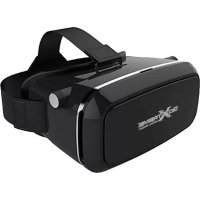
GoXtreme VRGlasses - Headphones EASYPIX - Free user manual and instructions
Find the device manual for free GoXtreme VRGlasses EASYPIX in PDF.



| Product Type | VR headset for smartphones |
| Brand | Easypix |
| Model | GoXtreme VRGlasses |
| Smartphone compatibility | 4 to 6 inches, max width 85 mm, max height 160 mm |
| Dimensions (L x W x H) | 200 x 100 x 140 mm |
| Weight | 380 g |
| Lens type | Large adjustable spherical lenses |
| Power supply | None (uses smartphone screen) |
| Main functions | Virtual reality, focus adjustment, eye-lens distance adjustment |
| Usage | Insert smartphone into cover, close and use with VR apps |
| Care and cleaning | Clean with a soft dry cloth, do not expose to moisture |
| Safety instructions | Do not use while driving or near machinery, take regular breaks, risk of epilepsy |
| Repair and disassembly | Do not disassemble, any modification voids warranty |
| Warranty | Contact retailer, general terms and conditions apply |
| Declaration of conformity | Compliant with Directive 1999/5/EC, available at easypix.info |
| Technical support | www.easypix.eu |
Frequently Asked Questions - GoXtreme VRGlasses EASYPIX
User questions about GoXtreme VRGlasses EASYPIX
0 question about this device. Answer the ones you know or ask your own.
Ask a new question about this device
Download the instructions for your Headphones in PDF format for free! Find your manual GoXtreme VRGlasses - EASYPIX and take your electronic device back in hand. On this page are published all the documents necessary for the use of your device. GoXtreme VRGlasses by EASYPIX.
USER MANUAL GoXtreme VRGlasses EASYPIX
Get in the picture and discover the amazing world of virtual reality, just like being there..!
Experience stunning 3D worlds using various sources including the Google Cardboard app or the "3D Side by Side" YouTube channel.
Alternatively, search and discover additional Virtual Reality apps dedicated to displaying content with full 360° panoramic views on Google PlayStore or AppStore.
Using YouTube's own dedicated, 360° Video’ channel you can choose from a host of videos that put you ,in’ the picture instead of just in front of it.
The gyroscope built in to your smartphone translates your head movements directly to the screen giving you the ability to look around the video in all directions.
Or to re-live your favourite moments why not create your own Virtual Reality video using the GoXtreme FullDome 360° VR camera (www.goxtreme-action-cams.com).
Thanks to their comfortable face padding and ergonomic head strap, GoXtreme VR Glasses are made to provide the user with the most comfortable interactive viewing experience.
The large lenses can be individually adjusted to suit your eye distance and vision, ensuring an optimal viewing experience while the smartphone holder allows easy access to your smartphone ports to facilitate charging and the connection of headphones to complete the experience with the addition of audio.
Technical specifications:
- Compatible with all smartphones from 4 to 6 inch screen diagonal max. width: 85mm, max. height: 160mm
Large, spherical lenses - Material: Plastic
- Dimensions: 200 × 100 × 140 mm ,Weight: 380 g
Usage notes
Gently open the top cover (figure C).
Place your smartphone in the cover, leaving the screen facing upwards.
The middle of the smartphone screen should be aligned with the center line of the eyeglasses (see figure D).
Once your smartphone has been inserted and aligned, close the cover.
If the image appears "upside down," please re-open the cover and adjust the smartphone position.
Functions
Focus Adjustment (Figure E)
Rotate the dial to bring the image into focus.
Eye distance (Figure F + G)
Rotate both dials to adjust the distance between the lenses to fit your eyes.
Safety instructions
- PLEASE NOTE: Please use your VR Glasses responsibly and do not use the product while moving, operating machinery or driving a vehicle.
- Caution: Prolonged viewing may cause dizziness.
- Epilepsy Note: In a small percentage of the population, flashing lights and patterns can trigger epileptic phenomena when watching videos, pictures, or playing video games. Even in people who have not yet responded to epileptic symptoms in response to light stimuli, the possibility of a previously undetected epileptic response occurring can not be excluded.
Be careful to avoid prolonged or excessive viewing of videos or apps etc.
- Reconstruction or alteration of the product reduces product safety and could carry the risk of injury.
This manual is intended to familiarise you with the operation of this product and should be kept in a safe place for future reference.
Any reconstruction or alteration shall void the warranty.
- The product should be handled carefully to avoid damage due to falls or any other impact. Please ensure your smartphone is securely inserted and can not fall out.
- Keep the product away from moisture, direct sunlight and extreme heat.
- Never immerse the product in water or other liquids.
- Technical changes and errors reserved.
DECLARATION OF CONFORMITY
Easypix hereby declares that the product GoXtreme VR Glasses is in conformity to all the essential requirements of Directive 1999/5/EC.
The declaration of conformity can be downloaded here:
http://www.easypix.info/download/pdf/doc_goxtreme_vr-glasses.pdf
For technical help please visit our support area on www.easypix.eu.







DECOUVREZ LE MONDE
FASCINANT DE LA REALITE VIRTUELLE!

Brand : EASYPIX
Model : GoXtreme VRGlasses
Category : Headphones